


Description
Read the documentation – installation, settings and answers, with screenshots. Need help? Contact support.
H-Shipping Multiple Shipping Addresses for WooCommerce solves the problem of customers needing to repeatedly type different shipping addresses for their orders. Whether sending gifts to family or managing deliveries to different office locations, this plugin provides a smooth, integrated experience.
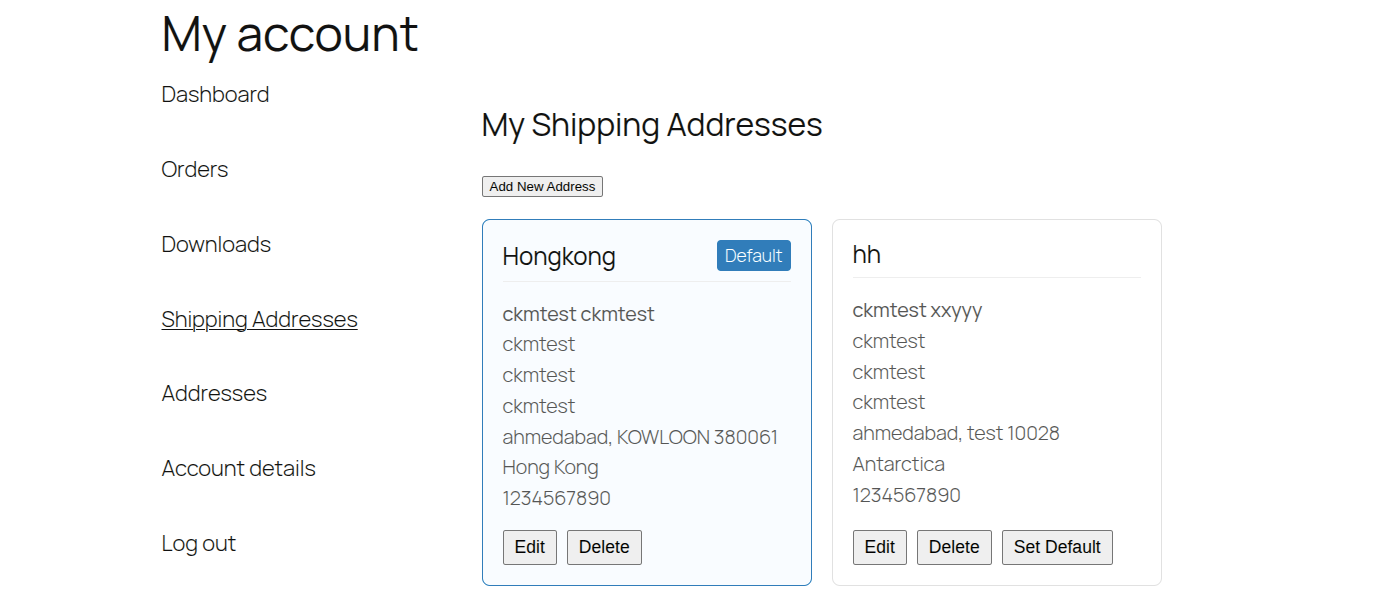
The plugin adds a dedicated “Shipping Addresses” tab to the WooCommerce “My Account” area, where users can add, edit, or delete their preferred shipping destinations. During checkout, users can simply select a saved address with a single click, automatically populating the shipping fields.
Features
- Address Book: Customers can save up to 3 unique shipping addresses.
- My Account Integration: Adds a clean, native-looking “Shipping Addresses” tab to the user account area.
- Seamless Checkout: Displays saved addresses as radio options above the shipping form at checkout.
- Classic and Block Checkout: Works with the classic checkout and with the block-based WooCommerce Checkout.
- One-Click Auto-Fill: Selecting an address instantly fills all shipping fields, including country and state.
- Ready to use: Works right after activation with sensible defaults. Change them under Multiple Shipping Addresses in the admin menu.
- Multisite Ready: Compatible with WordPress Multisite networks, with a separate address table and settings per site.
- Native UI: Designed to match your theme’s styling by using standard WooCommerce classes.
- Data Integrity: Strictly focuses on shipping fields—never overwrites billing information.
Usage
Managing Addresses (Customer)
- Log in to the store.
- Go to the My Account page.
- Click on the new “Shipping Addresses” tab.
- Click “Add New Address” to save a destination (up to 3).
- Use the “Edit” or “Delete” buttons to manage existing entries.
Using at Checkout
- Add products to the cart and proceed to checkout.
- Ensure you are logged in.
- In the Shipping section, you will see a list of your saved addresses, even before you tick “Ship to a different address”.
- Select an address to fill the form, or choose “New / Different Address” to type a new one manually.
Installation
Automatic Installation
- Log in to your WordPress Admin dashboard.
- Navigate to Plugins > Add New.
- Search for “H-Shipping Multiple Shipping Addresses for WooCommerce”.
- Click Install Now and then Activate.
Manual Installation
- Download the plugin zip file.
- Unzip the file and upload the
h-shipping-multiple-addresses-for-woocommercefolder to your/wp-content/plugins/directory. - Go to the Plugins menu in WordPress and activate the plugin.
- For Multisite: You can “Network Activate” to enable it across your entire network.
Need more detail? See the documentation.
FAQ
How can I get support?
Please contact us here for help, a new feature or a customization.
Where is the documentation?
Read the documentation for the installation steps, every setting explained and screenshots.
Does this plugin work with guest users?
No, the address book functionality requires a user account to save and retrieve addresses. Guest users will see the standard checkout form.
Can I increase the limit of 3 addresses?
The free version saves up to 3 addresses per customer. You can lower the limit under Multiple Shipping Addresses, but not raise it above 3.
I activated the plugin but see nothing.
Since version 1.1.0 the plugin is enabled with default settings when you activate it. If you saved settings earlier, check that “Enable Plugin” and “Multiple Shipping Addresses” (checkout selection) are ticked under Multiple Shipping Addresses in the admin menu.
Does it work with the block-based checkout?
Yes, since version 1.1.0. The saved-address picker appears at the top of the Shipping address step of the block checkout, as well as in the classic checkout.
What happens to my data when I delete the plugin?
The address table and the plugin settings are removed on every site of a multisite network.
Does it affect the Billing Address?
No. The plugin is strictly built for Shipping Addresses. It respects WooCommerce settings like “Force shipping to billing address” (in which case shipping options may be hidden by WooCommerce itself).
Is it compatible with custom checkout fields?
The plugin fills standard WooCommerce shipping fields (First Name, Last Name, Company, Address 1/2, City, State, Postcode, Country). Custom fields may need additional integration code.
Screenshots

Changelog
1.1.2
- Improvement: the Support links in the plugin and in this readme now open our new support site: https://support.wpallsolution.com/
1.1.1
- New: Online documentation: https://docs.wpallsolution.com/#/collection/hsm-plugin
- New: “Documentation” and “Support” links under the plugin name on the Plugins page and on the Multiple Shipping Addresses settings page. Support: https://wpallsolution.com/contact/
1.1.0
- New: Saved-address picker for the block-based WooCommerce Checkout (classic checkout is still supported).
- New: Sensible default settings on activation, so the plugin works right away. Existing settings are never overwritten.
- Fix: The classic checkout picker was hidden until “Ship to a different address” was ticked. It is now always visible.
- Fix: The “Set as default shipping address” checkbox in the address form did not save the default.
- Fix: “Set Default” could clear the current default when the chosen address was not found.
- Fix: A state is now required on the server for countries that have a state list.
- Fix: The WooCommerce check no longer fails on multisite network activation or custom plugin folders. The plugin now starts after WooCommerce has loaded and shows a notice if WooCommerce is missing.
- Fix: Multisite database upgrades now run on every site instead of only the first one.
- Fix: Uninstall now removes plugin settings, and removes the table on every site of a multisite network.
- Fix: The minified JavaScript and CSS now match the readable source files.
- Improvement: Smaller page payload. The list of states is only sent on the My Account page, and unused data was removed.
- Improvement: JavaScript texts such as “Add New Address” and “Edit Address” are now translatable.
- Tweak: Removed unused premium notice code and a duplicated address limit message.
- Update: Verified compatibility with WordPress 7.1.
1.0.3
- Update: Verified compatibility with WordPress 6.9.1.
- Update: Minor fixes and improvements.
1.0.2
- Update: Improved error handling in AJAX requests.
1.0.1
- New: Added Admin Settings page to Enable/Disable plugin.
- New: Added dedicated “Multiple Shipping Addresses” menu in WordPress dashboard.
- Security: Added strict server-side validation for Country/State codes and Max Address limit (3).
- Security: Added access control to redirect users if the plugin is disabled.
- Performance: Added minified CSS and JS assets for better loading speed.
- Update: Improved error handling in AJAX requests.
1.0.0
- Initial release on WordPress.org.
- Feature: Save up to 3 shipping addresses.
- Feature: My Account “Shipping Addresses” tab.
- Feature: Checkout address selection.
- Feature: Multisite support.