


Description
HDWebmobile Mix & Match Bundles turns any WooCommerce simple product into a “build a box” bundle picker. Instead of a plain Add to Cart button, shoppers see a grid of eligible components and choose exactly the number of items you configure before they can add the bundle to their cart.
Key Features
- Enable Mix & Match on any simple product with one checkbox
- Draw eligible components from a product category or a manual list
- Customers pick an exact quantity before Add to Cart activates
- Fixed bundle price or percentage-off-components pricing
- Component stock deducted when a bundle is ordered, and restored if the order is cancelled
- Out-of-stock items are hidden from the picker, and the cart checks there is enough stock for every bundle in it
- Bundle contents shown in cart, checkout, order admin, and order emails — including the WooCommerce Cart and Checkout blocks
- All your bundles at a glance under WooCommerce > HDWebmobile, with a warning for any bundle that can’t be built
- HPOS (custom order tables) compatible
Limitations (please read before installing)
- The bundle itself must be a simple product (its components can be any purchasable products)
- Component stock is only deducted for items that track stock quantity, and is not restocked automatically when you refund a bundle without cancelling the order
- Selection is exactly-N only; there is no min/max range picking in this version
Need more?
Everything above is free and stays free. For stores that need a pick range (“choose 4 to 8 items”), quantity discounts, variable products, gift messages or restocking on refunds, there is a separate paid add-on, Mix & Match Bundles Pro.
Enjoying this plugin?
If it helps your site, please consider leaving an honest review on WordPress.org — it helps other WordPress users find it. Found a problem or have an idea? Please open a support topic first so it can be fixed.
How to Use
1. Turn any simple product into a bundle
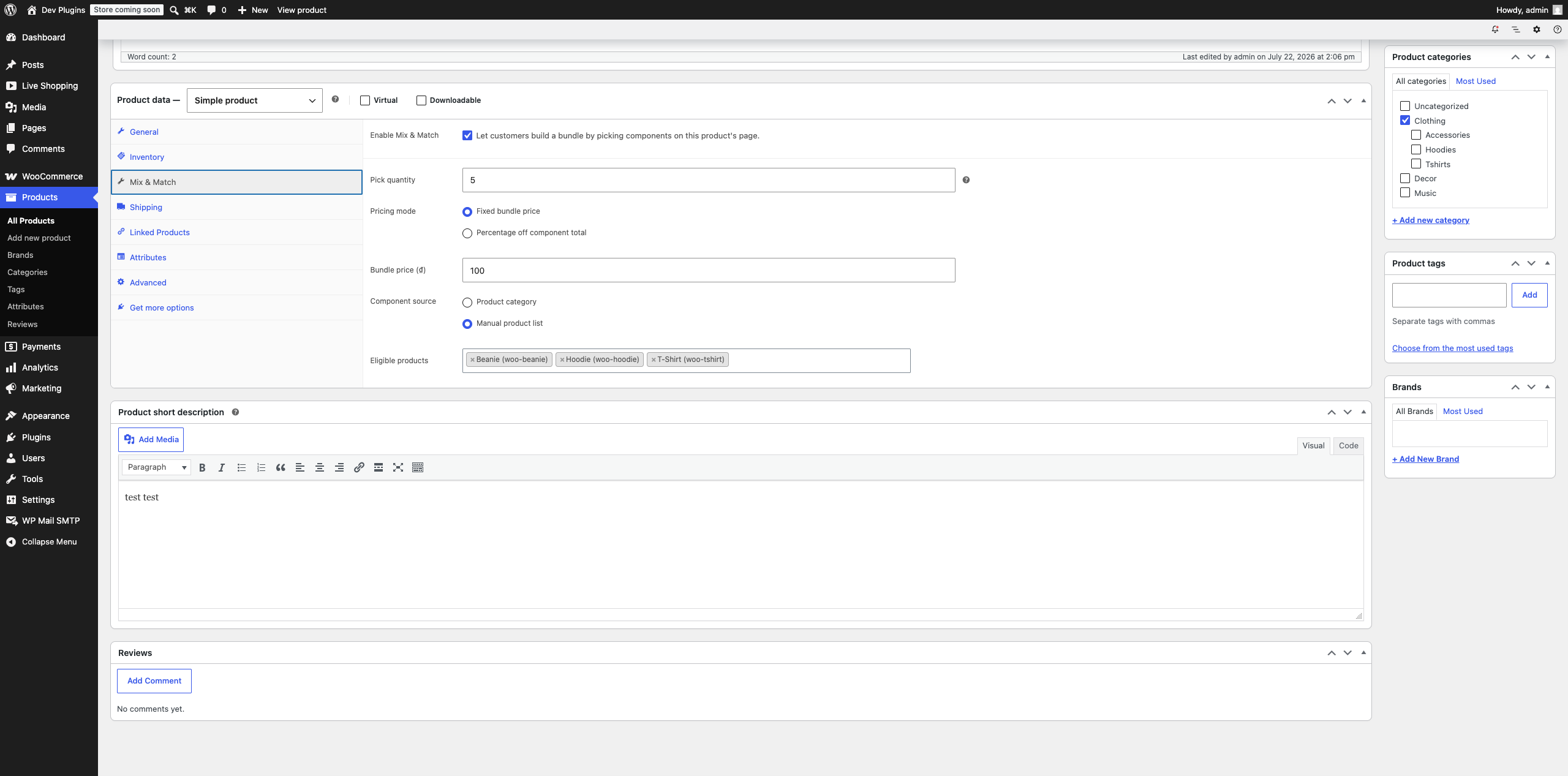
Edit a simple product, open its Mix & Match tab in the Product data box (Screenshot 1), and tick Enable Mix & Match.
2. Set how many items customers must pick
Pick quantity is the exact number of components a customer must choose before they can add the bundle to their cart — there’s no min/max range, it’s always exactly this number.
3. Choose how the bundle is priced
- Fixed bundle price — the customer always pays the same total (set in Bundle price) no matter which eligible components they pick.
- Percentage off component total — the price is calculated from the real prices of whatever components they picked, minus your discount percentage.
4. Choose where eligible components come from
Component source is either:
* Product category — any published, purchasable product in the category you pick is automatically eligible (add new products to that category later and they’re automatically includable, no bundle edit needed).
* Manual product list — hand-pick the exact eligible products yourself.
5. What customers see and do
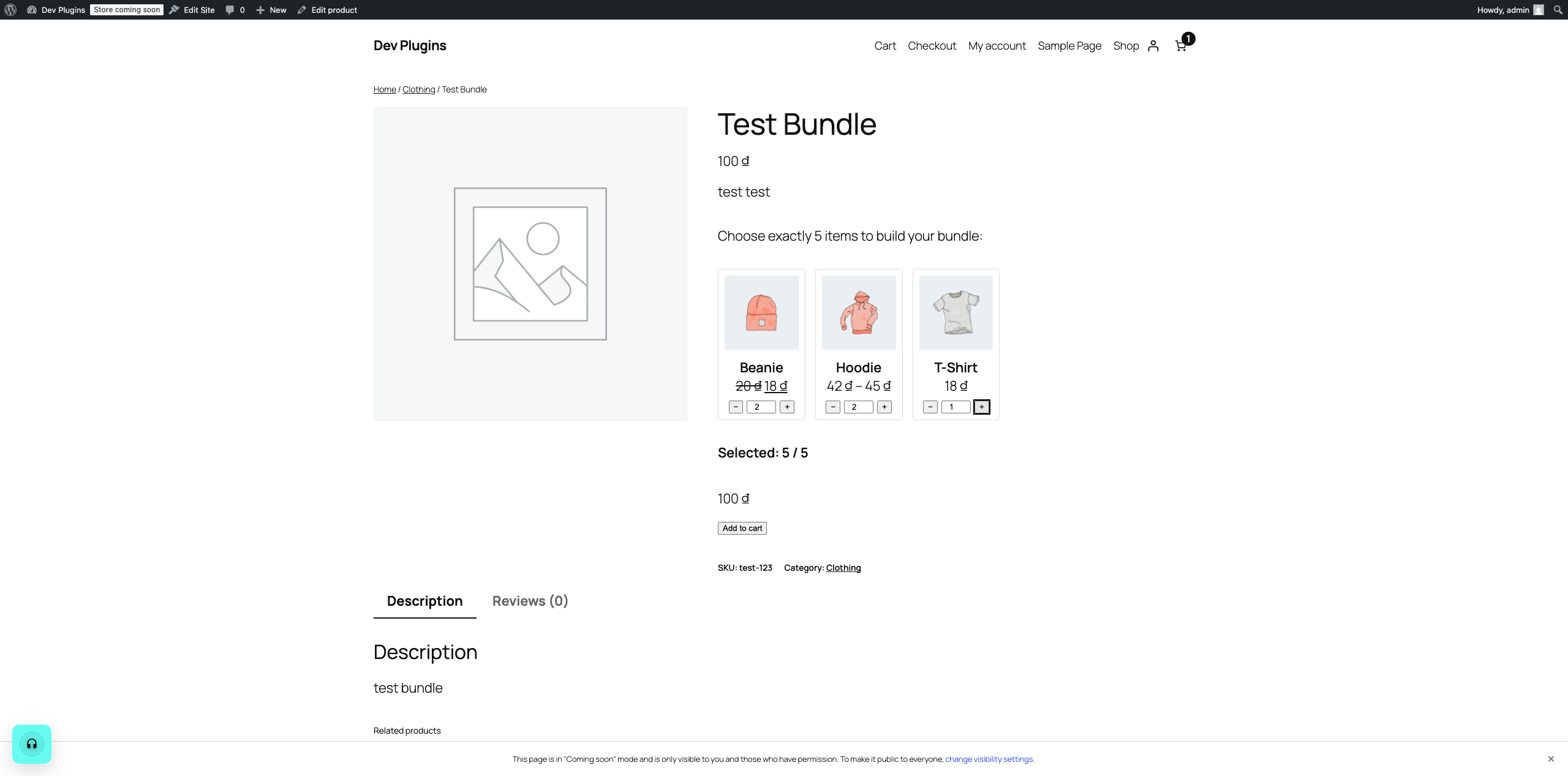
On the product page, eligible components appear as a grid of cards, each with a −/+ stepper (Screenshot 2). A running Selected: X / Y counter and the bundle’s live total update as they click, and Add to cart only enables once they’ve picked exactly the required quantity.
6. Where the bundle contents show up afterward
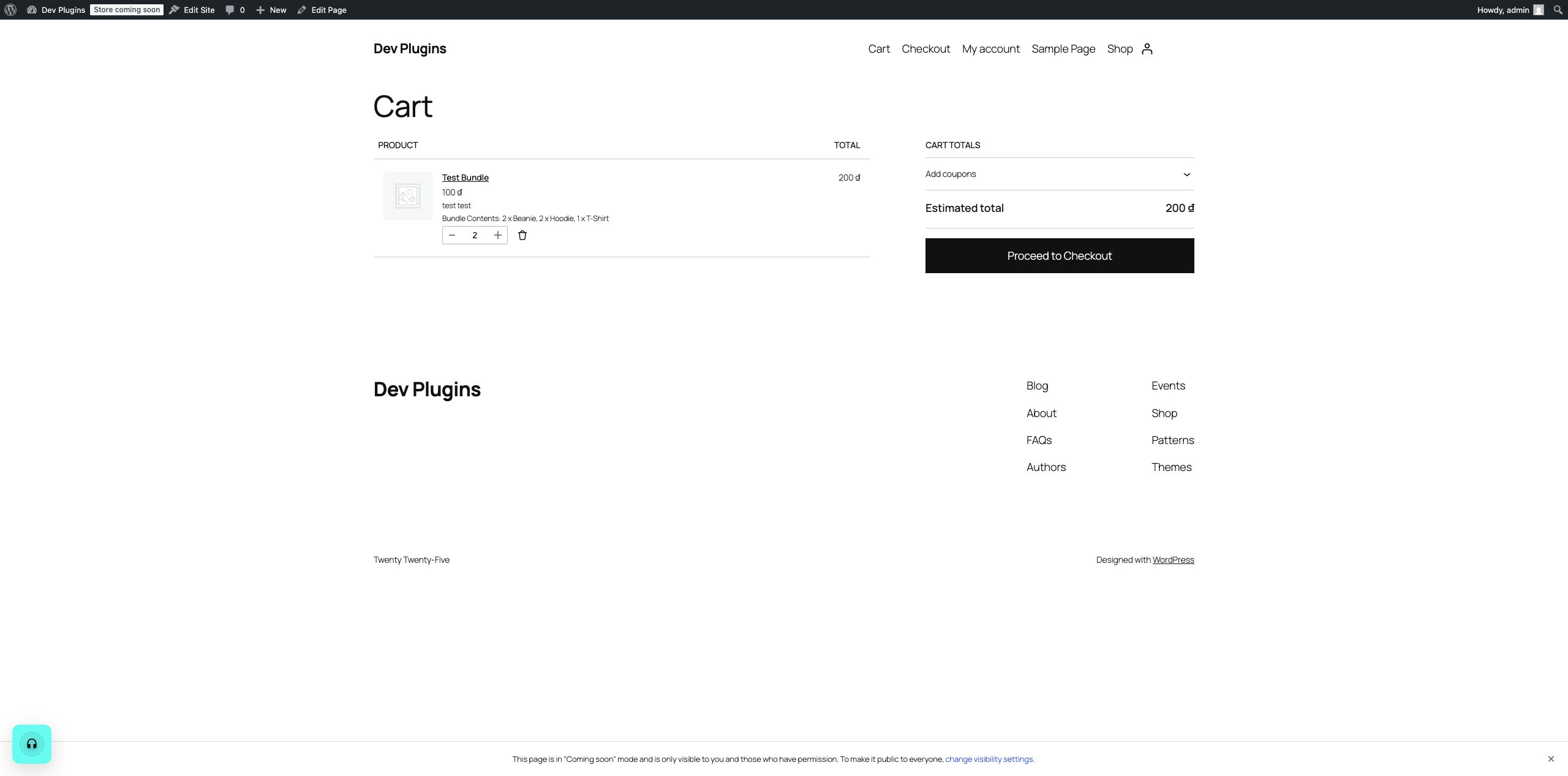
Once added, the exact picked breakdown (e.g. “2 x Beanie, 2 x Hoodie, 1 x T-Shirt”) is attached to that cart line item and follows it everywhere — the Cart page (Screenshot 3), Checkout (including the WooCommerce Checkout block, not just the classic shortcode checkout), the resulting order in WooCommerce > Orders, and the customer’s order confirmation/order-details emails. You never have to guess what a customer picked after the fact.
For developers
Filters and actions for extending the plugin:
hdmmb_eligible_component_ids(filter): the product IDs a bundle can be built from. Arguments:$ids,$bundle_id.hdmmb_pick_rules(filter): how many items must be picked, asarray( 'min' => int, 'max' => int ). By default both equal the “Pick quantity”. Arguments:$rules,$bundle_id.hdmmb_validate_selection(filter): accept or reject a selection before it is added to the cart. Arguments:$passed,$selection,$product_id.hdmmb_bundle_price(filter): the final bundle price, used in the cart and in the live price preview. Arguments:$price,$bundle_product,$selection.hdmmb_picker_after_grid(action): output extra fields inside the bundle picker form. Argument:$product.hdmmb_product_options(action): output extra settings at the end of the Mix & Match product tab. Argument:$product_id.
The picker form also fires a hdmmb:change DOM event with the current selection and total whenever it changes.
Installation
- Upload the plugin files to the
/wp-content/plugins/hdwebmobile-mix-match-bundlesdirectory, or install the plugin through the WordPress plugins screen directly. - Activate the plugin through the ‘Plugins’ screen in WordPress. WooCommerce must already be installed and active.
- Edit a simple product, open the “Mix & Match” tab, enable the bundle, and configure the pick quantity, pricing, and component source.
Screenshots
Changelog
1.2.0
- New: filters and actions for developers (see “For developers”), so the picking rules, eligible items and bundle price can be extended.
- Better: the + button stops once the required number of items is picked, so customers can’t pick more than the bundle allows.
- The bundle overview (WooCommerce > HDWebmobile > Mix & Match Bundles) mentions the separate Pro add-on.
- No change to how existing bundles work.
1.1.1
- The WooCommerce > HDWebmobile Overview page now has a short introduction to Store Guardian, a separate paid plugin that test-buys from your checkout every hour. It is hidden once Store Guardian is active. No changes to this plugin’s own features.
1.1.0
- New: “Deduct component stock” option on each bundle. When an order reduces stock, the stock of every picked item is reduced too, and restored if the order is cancelled. On by default for new bundles; existing bundles keep their current behavior until you turn it on.
- New: the Mix & Match tab under WooCommerce > HDWebmobile now lists every bundle with its pick quantity, price, available items and stock setting, and flags bundles that can’t be built.
- New: the cart now checks combined component stock, so raising a bundle’s quantity in the cart can no longer oversell an item.
- Fix: items marked “Out of stock” (without stock quantities) could still be picked; they are now hidden and rejected.
- Fix: with category sourcing, the bundle product could appear as one of its own components. Bundles, grouped and external products are no longer offered as components.
- Fix: a fixed-price bundle with an empty “Bundle price” was sold for 0; it now uses the product’s own price.
- Fix: an expired page (for example from a page cache) showed “Please select exactly N items” even when the right number was picked; it now asks the shopper to reload the page.
- Fix: the item picker no longer caps quantities at the stock level for items that allow backorders.
1.0.4
- Security hardening: the bundle picker’s add-to-cart form now carries its own nonce, verified before any submitted selection is read. Submissions without a valid nonce are treated as an empty selection.
- The “WooCommerce required” admin notice now appears only on the Plugins screen and can be dismissed.
- Updated the HDWebmobile hub Overview list with the current set of HDWebmobile plugins.
1.0.3
- Confirmed compatibility with WordPress 7.1.
- Renamed the internal hub-coordination class to a plugin-specific name for WordPress.org naming-convention compliance. No functional changes.
1.0.2
- The Mix & Match Bundles admin screen now lives under WooCommerce > HDWebmobile as a tab, alongside every other HDWebmobile plugin you have active, instead of its own separate WooCommerce submenu item. No functional changes to bundle behavior.
1.0.1
- Housekeeping release: added Donate link, expanded readme documentation, and real screenshots. No functional code changes.
1.0.0
- Initial release: bundle enable/config panel, category/manual component sourcing, exact-N picker UI, fixed/discount pricing, cart/checkout/order display (classic templates and WooCommerce Blocks), HPOS compatibility declared.