


Description
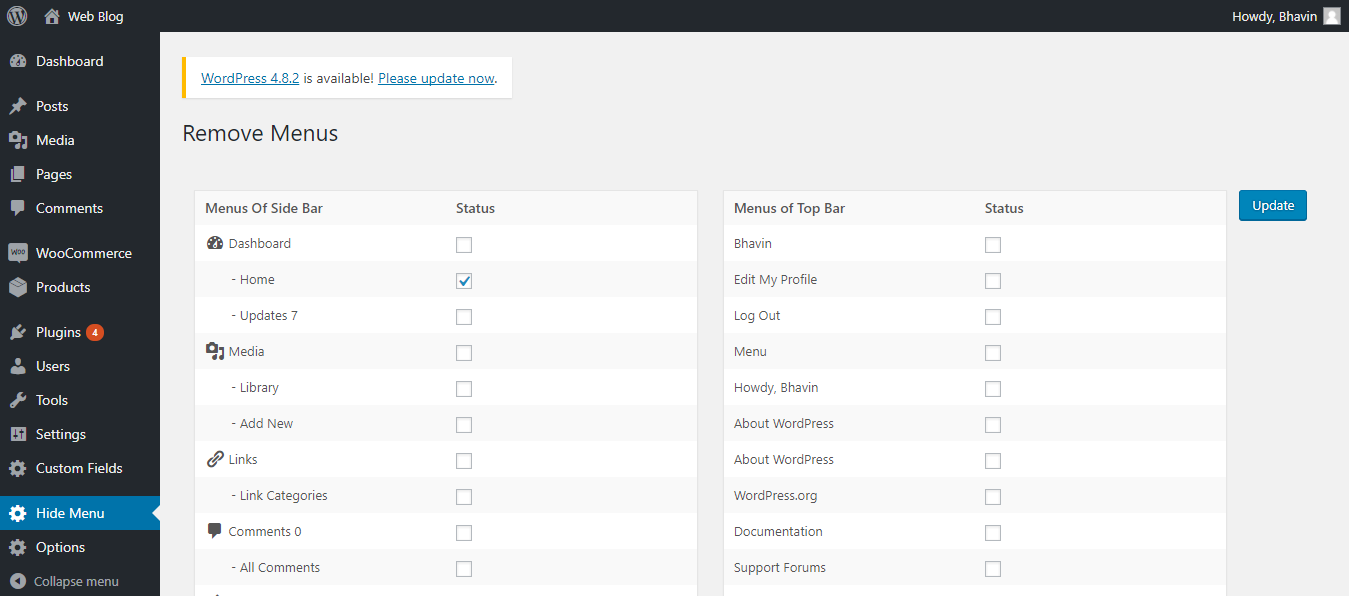
Hide Admin Menu helps you keep the WordPress dashboard focused. Tick the menu items you don’t want a user to see, save, and they disappear from the admin sidebar and top bar.
Features
- Hide sidebar menu items with a simple checkbox form
- Hide sub-menu items for finer control
- Hide top admin bar items
- Set a different list of hidden menus for each user role
- Show a hidden menu again by unchecking it
- Compatible with the latest WordPress version
- Translation ready
Perfect for
- Client websites where you want to show only what the client needs
- Shared sites with editors, authors, or shop managers
- Membership and learning sites that need a simpler dashboard
Important: This plugin hides menu links only. It does not block direct access to admin pages. To restrict access, use WordPress role capabilities together with this plugin.
Watch the video tutorial: https://www.youtube.com/watch?v=LiXcE6aEvdI
Installation
- Upload the
hide-admin-menufolder to/wp-content/plugins/, or install it from Plugins > Add New. - Activate the plugin from the Plugins screen.
- Go to Hide Menu in the admin menu.
- Select the menu items to hide for each role, then save.
FAQ
How do I show a hidden menu again?
Open Hide Menu, uncheck the menu item, and save.
I hid all the menus and can’t find the settings page. What do I do?
Open this URL in your browser, replacing the domain with your own site address:
https://your-site.com/wp-admin/admin.php?page=hide-admin-menu
Can users still open a hidden page by typing its URL?
Yes. Hiding removes only the menu link. Use role capabilities for strict access control.
Can I hide different menus for different roles?
Yes. Each role has its own list of hidden menu items.
Screenshots
Changelog
1.1.4
- Tested with WordPress 7.1.
- [Add the specific fixes you made in this version.]
1.1.3
- Updated for the latest WordPress compatibility.
- Replaced PHP sessions with WordPress globals to fix session warnings.
- Added nonce verification to all form submissions.
- Added capability checks using manage_options.
- Fixed role key references.
- Escaped output with esc_html() and esc_attr().
- Fixed redirect handling and an unset() issue on the submenu list.
1.1.2
- Tested with WordPress 6.5.4.
1.1.1
- Tested with WordPress 6.2.
- Fixed a warning shown when the form was resubmitted.
1.1.0
- Fixed hiding of customized menus.
- Removed a CSS class that conflicted with other stylesheets.
1.0.9
- Replaced $_SESSION with WordPress session handling to fix session warnings.
1.0.8
- Fixed a session-related issue from 1.0.7.
1.0.4
- Fixed a character error during activation.
- Removed a deprecated function.
1.0.0
- Fixed warnings and notices during save (WordPress 4.8).
- Fixed the site health error.