


Description
HOUETOR Connect links your WordPress site to your Houetor account. It has
two parts:
- The plugin (free, all features enabled): connects the site with a
secure token, displays your listings, products and courses fetched
from Houetor, and provides an order form that emails your site
administrator. - The Houetor agent, the external service running on houetor.com: it
reads and updates your content from your written requests, through the
plugin’s REST routes. The agent is activated with an H.Hare
subscription.
Features
- Display Houetor listings, courses and products on any page
- Built-in order form, emailed to your administrator
- Secure: unique-token authentication, HTTPS only
- REST routes that let the Houetor agent create and update content
Use cases
- E-commerce: manage your store without touching code
- NGOs and associations: publish your news quickly
- Coaches and trainers: create your educational content easily
- Marketing: automate content creation and publishing
How it works
- Install the plugin (ZIP file)
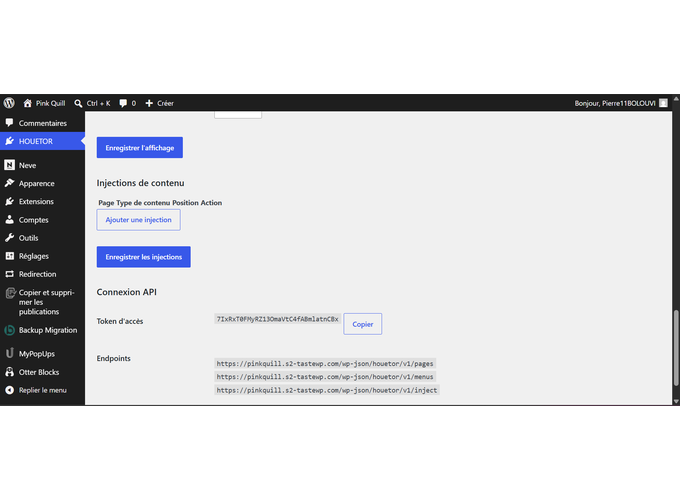
- Copy your token from HOUETOR > Settings
- Paste it into your dashboard on houetor.com
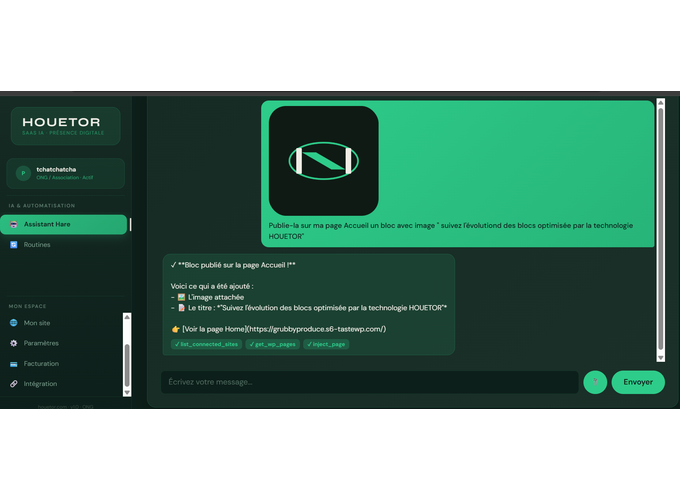
- Write your request, for example “Create a listing for the Fidjrosse apartment”
Requirements
- WordPress 5.9 or newer (native Gutenberg)
- PHP 7.4 or newer
- No other plugins required
Subscription
The plugin itself is free and complete: connection, display and the
order form all work without any subscription. The H.Hare subscription
(40,000 FCFA per year, 20-day free trial) activates the Houetor agent,
the external service running on houetor.com. It does not unlock any
plugin feature.
External services
This plugin relies on an external service: the Houetor API, hosted at
https://houetor.com. The service is required to connect your site to your
Houetor account and to let the agent fetch and update your content.
What data is sent and when:
* When you connect the plugin: your site URL, your Houetor connection code and
a unique site token are sent to https://houetor.com/api/connect-site in
order to register the connection.
* When you disconnect: your connection code and site URL are sent to the same
endpoint to remove the connection.
* While the plugin runs: requests to https://houetor.com/api/public with
your site’s public identifier, to fetch the content modules (listings,
products, courses) to display on your site.
* When the connection status is checked: a status request to the Houetor
API.
No personal data of your visitors is sent by the plugin. Orders submitted
through the plugin’s order form are emailed to your site administrator
and are not transmitted to the API.
This service is provided by Houetor: terms of use and privacy policy.
Support
Questions or bugs: write to support@houetor.com
Community forum: Facebook “HOUETOR Utilisateurs”
Documentation: https://houetor.com/aide
Plugin page: https://houetor.com/plugins
Links
Site: https://houetor.com
Plugin page: https://houetor.com/plugins
Dashboard: https://houetor.com/espace
Learn more: https://houetor.com/commencer
Installation
- Download houetor-connect.zip
- In WordPress, go to Plugins > Add New Plugin
- Click “Upload Plugin” and select the file
- Click “Install Now”, then “Activate”
- Open HOUETOR > Settings to generate your token
No further configuration is needed.
FAQ
Is my data secure?
Yes. The plugin only stores a connection token locally. All exchanges
with houetor.com use HTTPS (TLS encryption).
Can I use it on multiple sites?
One H.Hare subscription covers one WordPress site. To run the agent on a
second site, a second subscription is required.
Is it compatible with Elementor or Divi?
With native Gutenberg: full read/write (blocks, batch, move/duplicate/wrap/unwrap, CAS, dry_run).
With Elementor and Breakdance: read and content updates (get/update/batch/create/delete via their data layer) are supported; structural ops (transform/move/duplicate/wrap/unwrap) remain Gutenberg-only and return an explicit error. Other builders (Divi, Bricks, etc.) are detected and refused with an explicit builder_not_supported error — never silent.
Can I deactivate the plugin without losing my content?
Yes. Your posts, pages and content stay in the WordPress database.
Deactivating the plugin only removes its display and its REST routes;
nothing is deleted.
Is content creation paid?
The plugin is free. Creating content through the Houetor agent, the
external service running on houetor.com, requires an H.Hare subscription
(40,000 FCFA per year, same price for all profiles). A 20-day free trial
is available.
Screenshots
Changelog
1.0.6
- Elementor and Breakdance: content operations (get/update/batch/create/delete) via their native data layer, CAS and audit on the correct medium, explicit errors for unsupported structural ops.
- Other builders (Divi, Bricks, etc.): explicit builder_not_supported refusal on all block and inject routes, never silent or empty.
- REST: correct error codes for builder pages (builder_not_supported vs anchor_not_found), preserved on get_page_blocks.
1.0.5
- Connection status is checked through the canonical endpoint (https://houetor.com/api/connect-site).
- Content items (listings, products, courses) now read Houetor field names correctly (title, price, description, image).
- The order form now forwards the submitted order to houetor.com in addition to emailing your administrator, and sends the module type.
1.0.4
- Data migration: options saved by earlier versions (connection token, code, display settings, audit retention) are carried over automatically on update, so a site stays connected.
- Naming: one unique, consistent prefix across functions, classes, hooks, options and assets; the connection code format issued by Houetor is unchanged.
- Packaging: the ZIP now uses correct path separators and ships no directory assets (banners, icons, screenshots).
1.0.3
- Fixes from the wordpress.org plugin review: English and consistent descriptions, inline admin script moved to an enqueued asset, output escaping, order form and module pages no longer require a connection, documentation and assets restored.
1.0.2
- Security: the connection link from the HOUETOR space pre-fills the code; the administrator confirms the connection (CSRF protection).
1.0.1
- “after” insertion position (under a specific block) via anchor_text or anchor_index
- Invalid position -> explicit 400 error (no more silent append fallback)
- Packaging fix: class-block-editor.php included in the distributed ZIP
1.0.0
- Elementor detection (explicit refusal if a page builder is detected)
- MCP performance optimization
- Nested block support (depth 1-3)
- Admin UI improvements
2.8.0
- Full nested block support
- Atomic batch update
- Preview before confirmation
2.7.0
- Structural operations (move, duplicate, wrap, unwrap)
2.6.0
- Tier policy — suggested solutions instead of errors
2.5.0
- Transform block (paragraph <-> heading)
- Configurable audit retention
2.4.0
- Batch update_blocks with dry_run
2.3.0
- CAS (Change Awareness System)
- Rate limit 10/60s
- Full audit log
2.1.0
- Initial version: basic CRUD, Gutenberg integration