


Description
HPCMF Reader Support helps journalists, writers, content creators, news sites and blogs receive financial support from their readers. Supporters can send one-time payments, or monthly payments if you turn that option on, through the Razorpay payment platform.
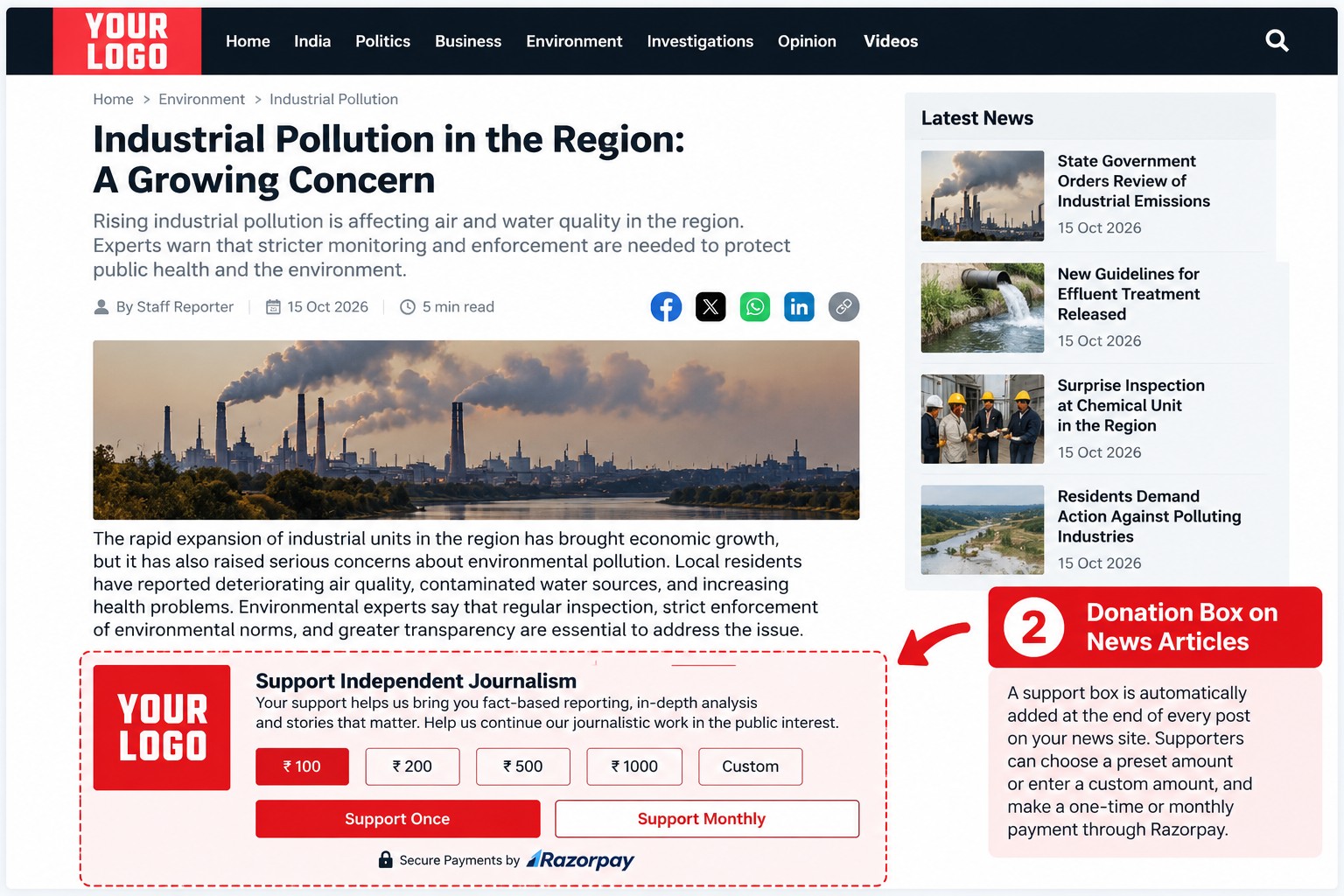
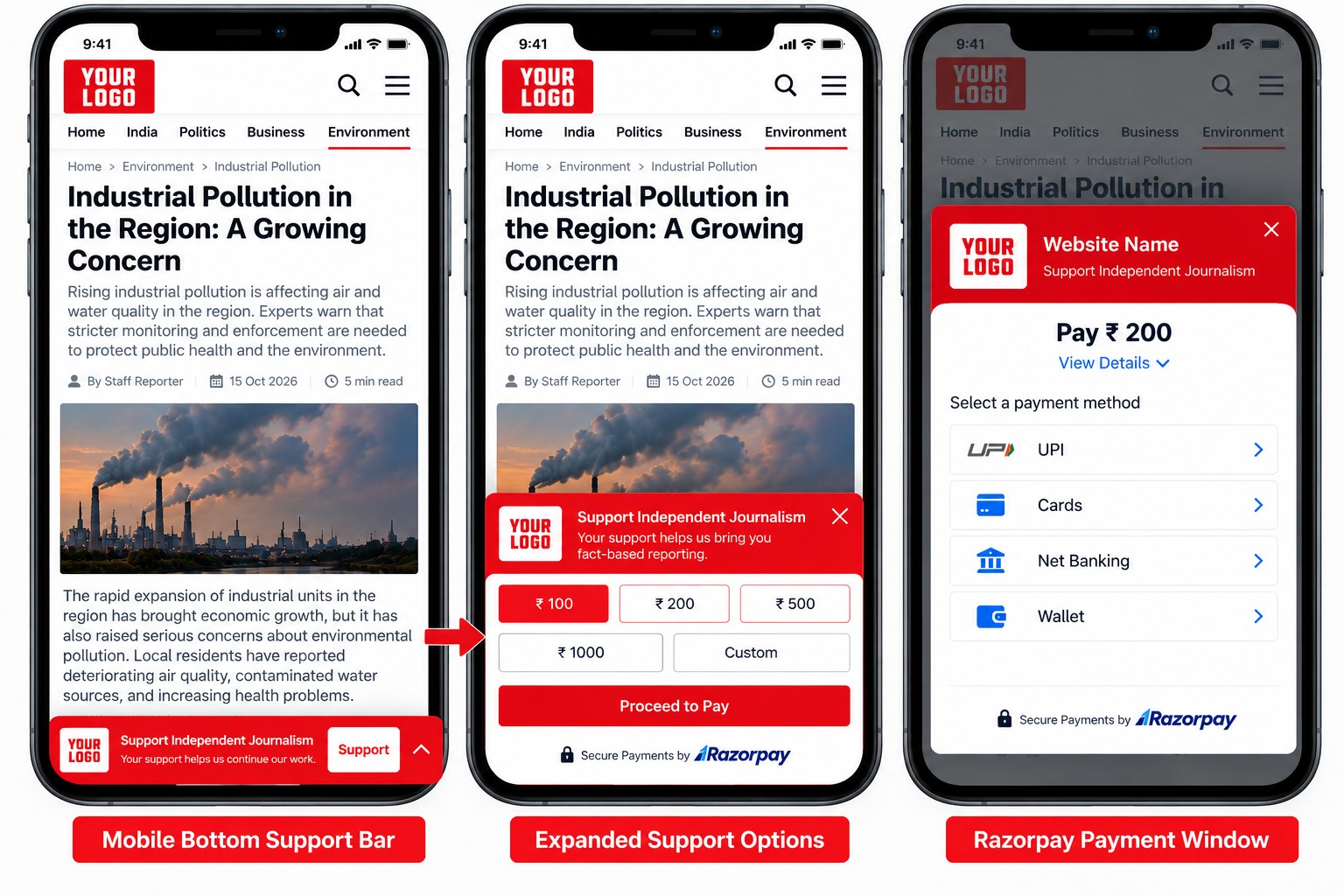
Once you enter your Razorpay API Key and API Secret, HPCMF Reader Support adds a donation box at the end of every post. On phones it also adds a slim support bar at the bottom of the screen that opens a quick payment popup. Both are designed for desktop and mobile.
Features
- One-time payments and optional monthly payments through Razorpay.
- Donation box below every post, plus a
[razorpay_donations]shortcode to place it anywhere. - Mobile support bar with a popup, plus a
[give_donations]shortcode for a link that opens it. - Preset amounts you choose, plus a custom amount field.
- Upload your logos straight from the media library.
- Custom support text for desktop and mobile.
- Your own logos for desktop and mobile.
- Payment title and description shown in the Razorpay window.
- Optional automatic popup on mobile after a delay you choose.
- Limit for how many months a monthly payment runs.
Funds go directly to your own Razorpay account, subject to Razorpay’s terms. You need a Razorpay account to use this plugin.
Free installation and setup help is available from the HPCMF team. Contact info@hpcmf.org.
External Services
This plugin connects to Razorpay to accept payments. It cannot work without it.
- Razorpay Checkout script (
https://checkout.razorpay.com/v1/checkout.js) is loaded in the visitor’s browser on posts and pages where the donation box or mobile bar is shown. It opens the payment window. When a supporter pays, the payment details they enter go to Razorpay, not to your site. - Razorpay API (
https://api.razorpay.com/v1/) is called from your server, using the API Key and Secret you enter, to create a payment order or monthly subscription when a supporter clicks pay. The data sent is the payment amount, the name of the post author and the URL of the post the supporter was reading. No personal data about the supporter is sent by this plugin.
This plugin is not affiliated with, endorsed by or sponsored by Razorpay. Razorpay is provided by Razorpay Software Private Limited. Terms of Use: https://razorpay.com/terms/ . Privacy Policy: https://razorpay.com/privacy/ .
Disclaimer
HPCMF Reader Support is provided “as is”, without warranty of any kind. Payments are processed by Razorpay under its own terms and privacy policy. Site owners are responsible for complying with Razorpay’s requirements and with the laws that apply to them. Please review Razorpay’s documentation before using the plugin.
Acknowledgements
Developed by the Harishchandra Press Club and Media Foundation (HPCMF).
Installation
- Upload the
hpcmf-reader-supportfolder to the/wp-content/plugins/directory, or install the plugin from the Plugins screen. - Activate the plugin through the Plugins menu in WordPress.
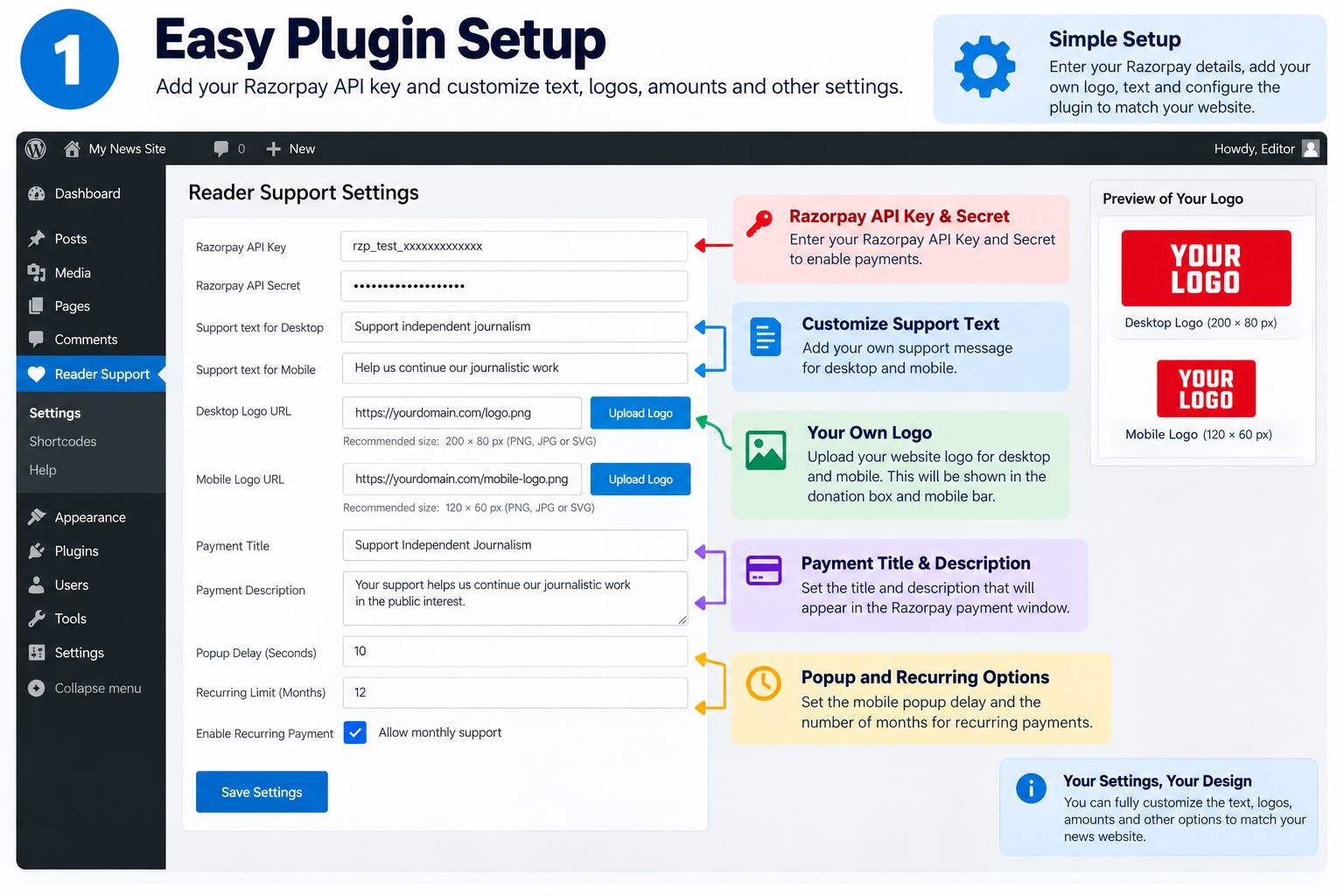
- Go to Settings > HPCMF Reader Support and enter your Razorpay API Key and API Secret.
- Adjust the support text, logos, payment title, description and other settings, then save.
FAQ
What is HPCMF Reader Support?
A free plugin that lets journalists, writers, content creators, news sites and bloggers receive financial support from their audience.
Do I need a Razorpay account?
Yes. You need a Razorpay account, API Key and API Secret. Payments go directly to your Razorpay account.
Where does the donation option appear?
At the end of every single post, and as a fixed support bar at the bottom of the screen on phones. Use the [razorpay_donations] shortcode to show the box elsewhere.
Can I accept monthly payments?
Yes. Tick “Enable recurring Payment” in Settings > HPCMF Reader Support, and choose how many months a monthly payment should run.
Can I change the amounts?
Yes. Set up to four preset amounts in Settings > HPCMF Reader Support. Supporters can pick one or type their own amount, between 1 and 500,000 rupees.
Can I hide the box on a particular post?
Developers can use the hpcmfrs_show_on_post filter, which receives true and the post ID, and return false.
Does it work with every theme?
It has been tested with popular news themes. Themes differ a lot, so please check the result with your own theme.
Screenshots

Changelog
1.0.1
- New: choose the preset amounts shown on the buttons.
- New: pick logos from the media library.
- Fix: the box no longer appears twice when the shortcode is already in the post.
- Administrators now see Razorpay’s reason when a payment cannot be started.
1.0.0
- Initial release.