


Description
Stop guessing at colours. Start choosing them.
Ever opened a WordPress colour picker and wished it did more than show a square, a slider and a HEX field?
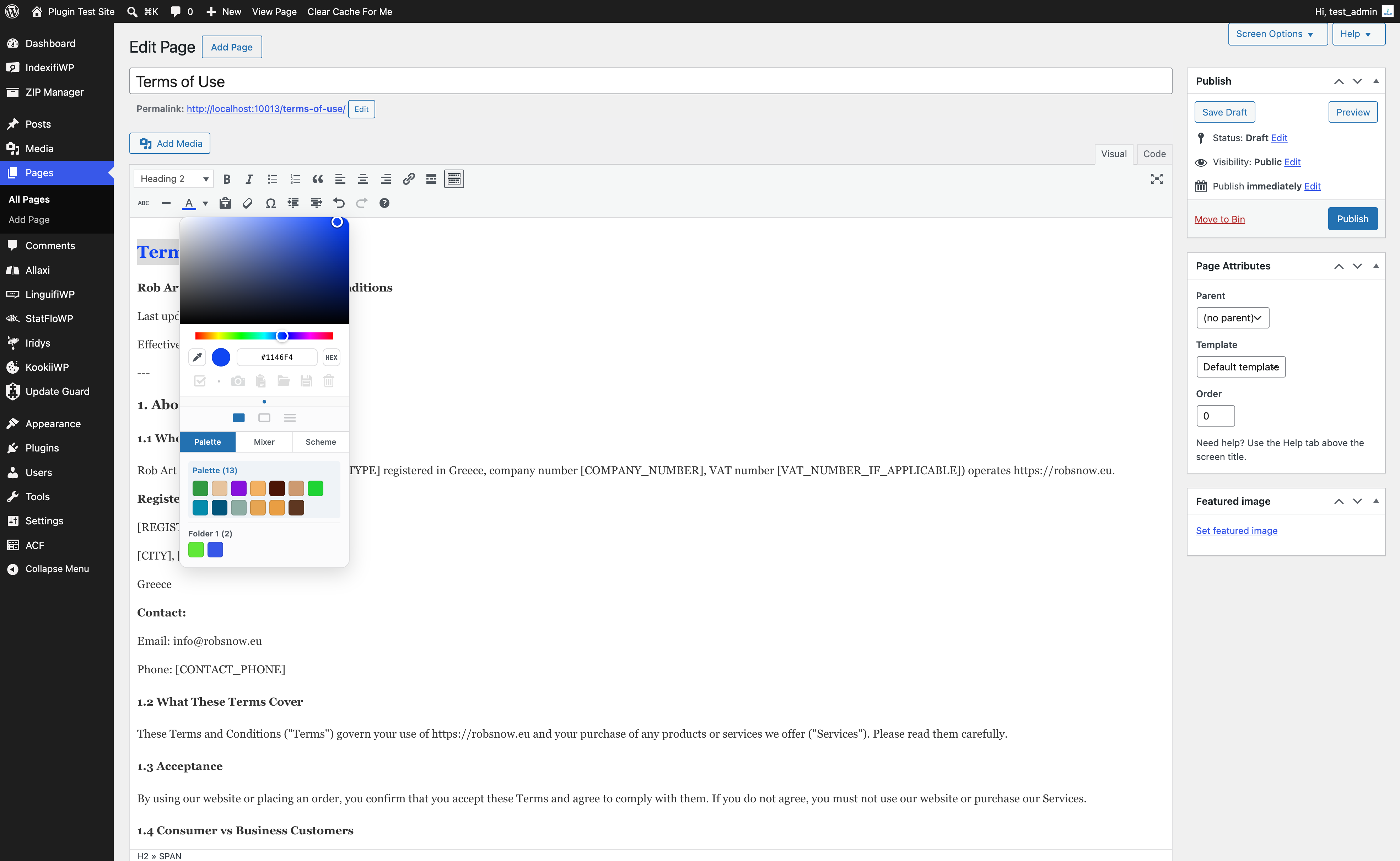
Iridys Palette Extender enhances WordPress’s familiar colour controls with a more capable, intuitive picker. Explore colour harmonies, sample shades with an eyedropper, build a working palette and discover colours hidden in your images — without leaving your WordPress dashboard.
No shortcodes or complicated setup. Activate Iridys and it enhances supported colour controls automatically, including the classic WordPress Iris picker, native colour inputs and Classic Editor text-colour controls.
Your everyday colour picker, upgraded
- Choose colours your way. Switch between Square, Hue-frame and Sliders views, with HEX, RGB and HSL formats.
- Pick colours with an eyedropper. Sample colours directly from the page, or use screen-wide sampling where your browser supports it.
- Discover colour harmonies. Create Complementary, Analogous, Triadic, Split, Square and Tetradic schemes from your current colour.
- Build a working palette. Capture up to eight swatches in the free version for quick reuse as you work.
- Know what you’re choosing. See the nearest named colour rather than relying on HEX values alone.
- Copy colours instantly. Copy the selected HEX value to use elsewhere.
Turn images into colour inspiration
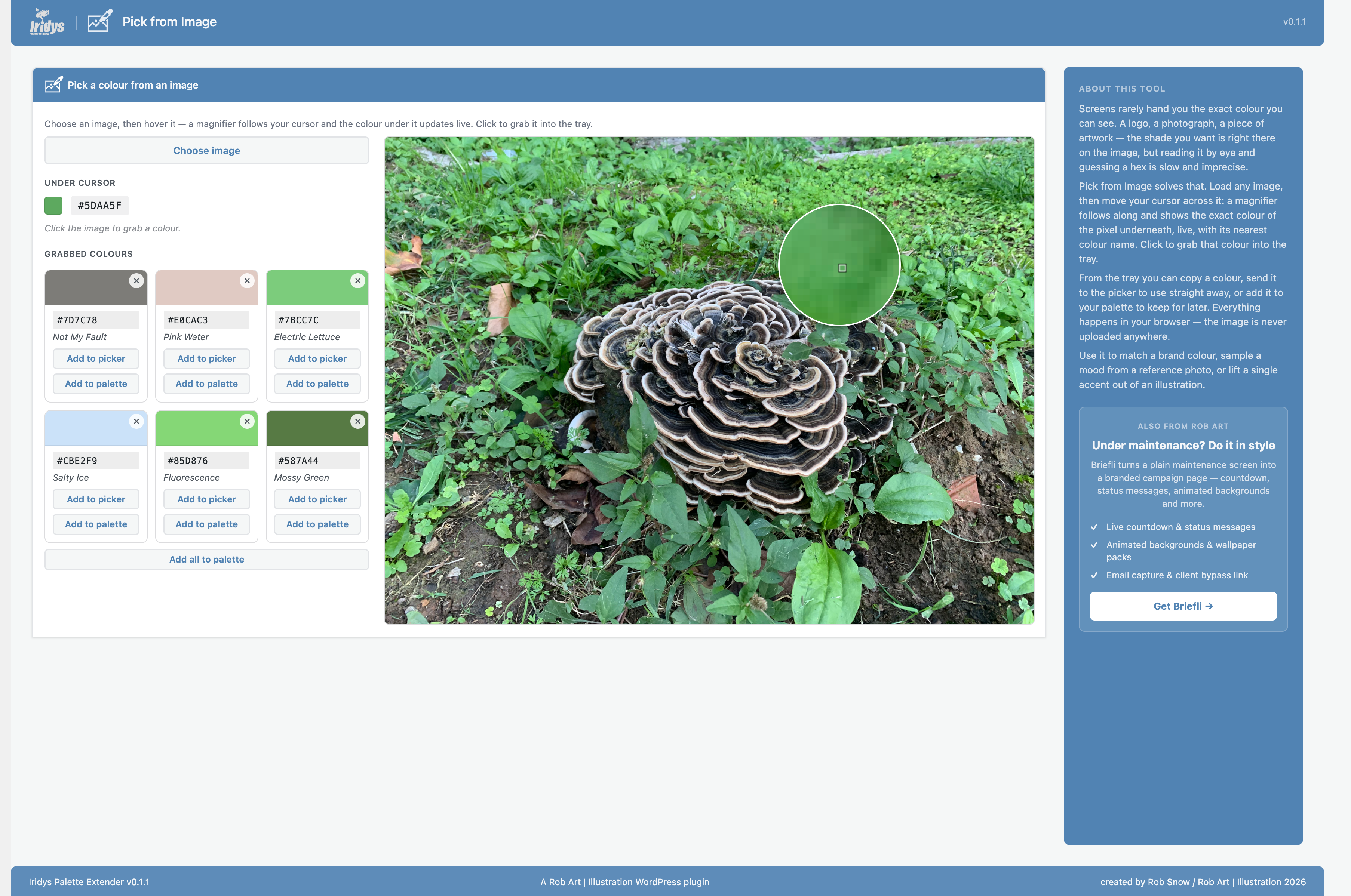
- Pick from Image: Inspect an image with a live magnifier, preview its colours and click to capture the perfect shade.
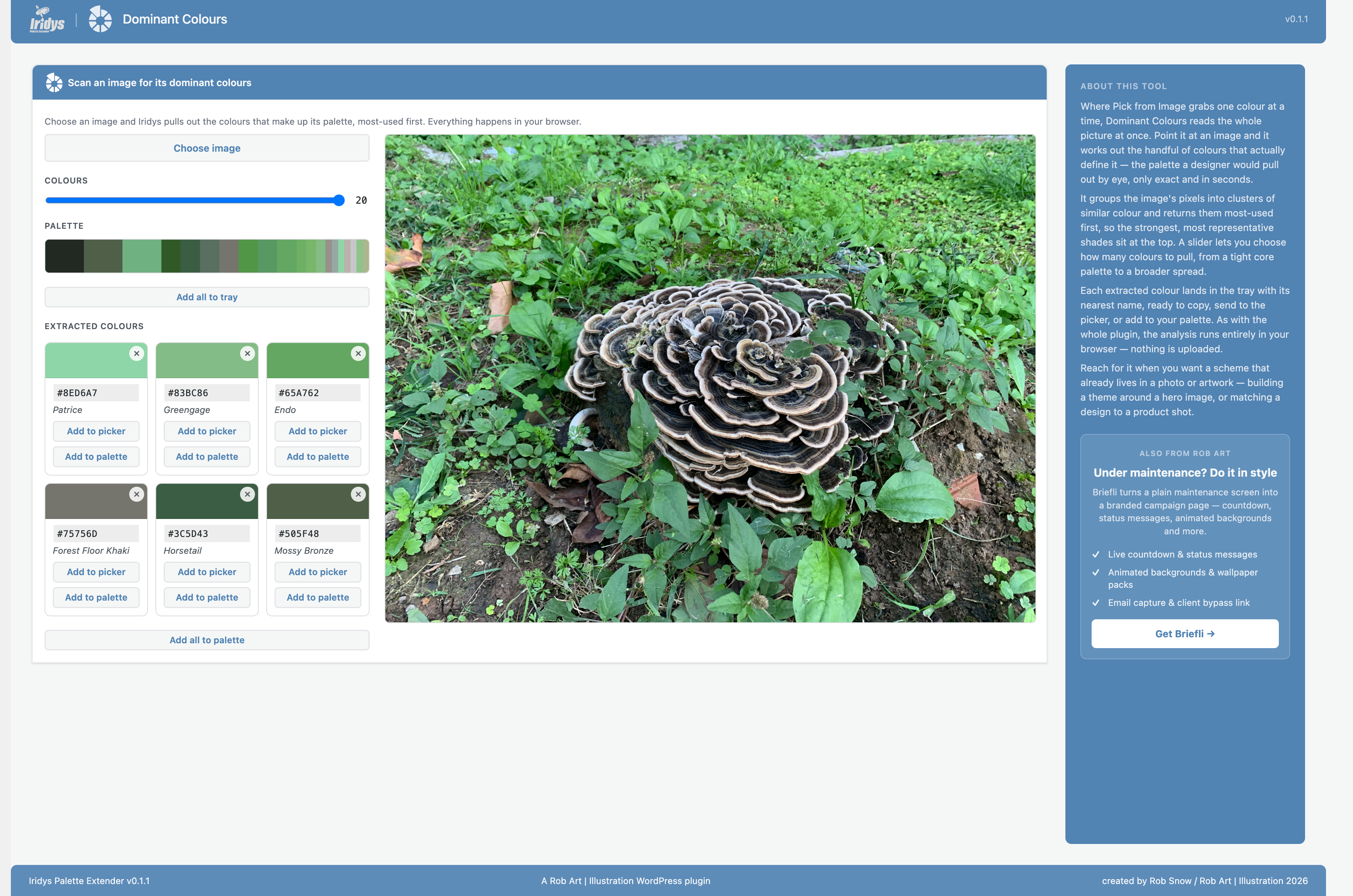
- Dominant Colours: Extract a coordinated palette from an image and adjust how many colours are returned.
- Add colours to your palette: Send picked or extracted colours into your working palette, one at a time or together.
More tools, less guesswork
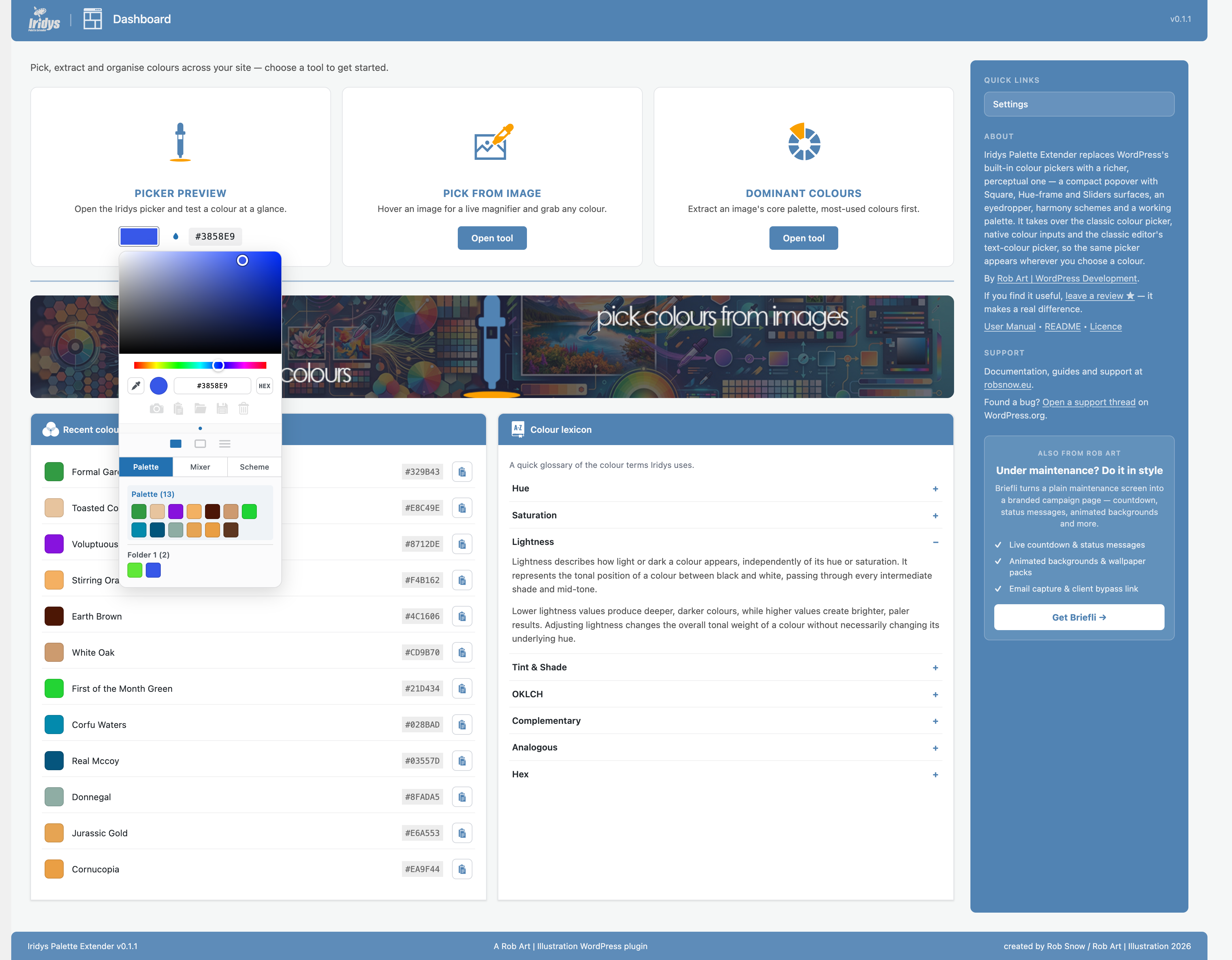
- Recent Colours: Find previously selected colours from the Iridys dashboard.
- Colour of the Day: Discover a fresh named colour on your WordPress dashboard.
- Colour Lexicon: Understand colour terminology, from hue and saturation to OKLCH, with clear, practical explanations.
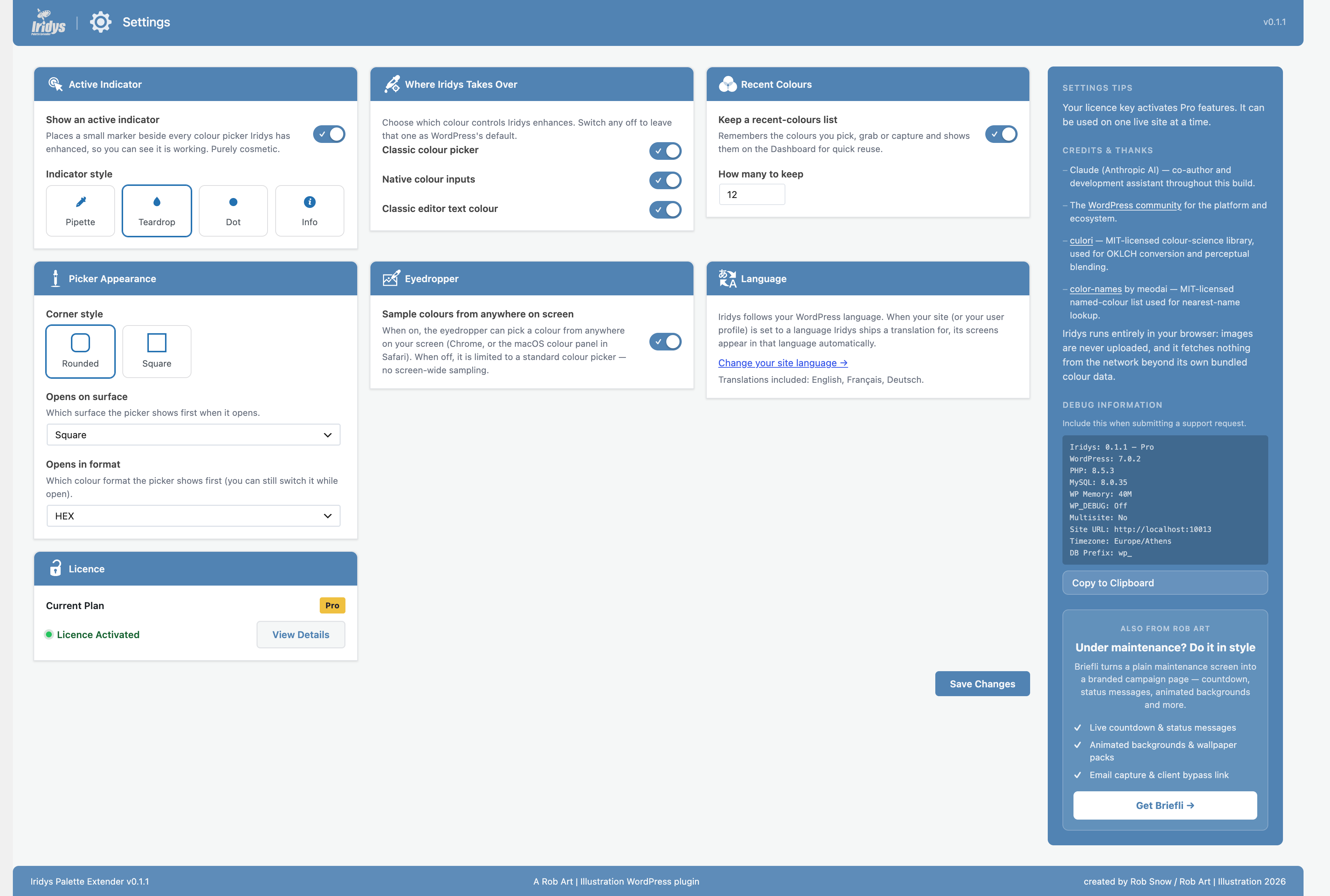
- Flexible settings: Choose your preferred picker view and colour format, configure supported takeovers, and adjust the picker appearance.
Designed for the way you work
Whether you’re styling content, matching brand colours, refining a theme or building a client website, Iridys puts more control into the WordPress colour-picking workflow.
Especially useful for: designers, WordPress developers, theme customisers, content creators and site owners who regularly work with colour.
Free vs Pro
Free includes: the enhanced picker, eyedropper, colour harmonies, image colour tools, recent colours and an eight-swatch working palette.
Pro adds: a larger 32-colour working palette, named colour folders and saved palettes that persist for reuse. You can explore the free tools before deciding whether to upgrade.
Open-source credit
Iridys includes culori, an MIT-licensed colour-science library used for OKLCH conversion and perceptual colour blending.
Uninstall
Deactivating Iridys keeps its settings. Deleting the plugin runs its uninstall routine, which removes its plugin-specific options, cached tier value and example database table. The free plugin does not store a licence key.
External services
The free plugin performs its colour selection and analysis locally in your browser and on your WordPress site. It does not need an external service for colour picking, image analysis or harmony calculations, and it does not send analytics or tracking data. An optional, separately installed Pro add-on has its own licensing functionality.
Installation
- Install Iridys Palette Extender from Plugins → Add New, or upload the plugin to
/wp-content/plugins/iridys-palette-extender/. - Activate it through Plugins in your WordPress dashboard.
- Open a supported WordPress colour control to try the enhanced picker.
- Visit the Iridys menu for Pick from Image, Dominant Colours, Recent Colours and Settings.
FAQ
Does Iridys replace the default WordPress colour picker?
Iridys enhances supported WordPress colour controls automatically, including the classic Iris picker, native colour inputs and the Classic Editor’s custom text-colour picker. You can configure which supported controls it takes over in Settings.
Will it work with my theme or page builder?
It works with supported standard WordPress colour controls. Themes and builders using entirely custom colour-picker interfaces may not be affected.
Do I need coding skills or shortcodes?
No. Activate the plugin and open a supported colour control. The additional image tools are available from the Iridys admin menu.
Can I sample a colour outside the browser page?
The eyedropper can sample from the page. Screen-wide sampling depends on browser and operating-system support, and may require permission.
Can I extract a palette from an image?
Yes. Use Pick from Image to sample individual colours, or Dominant Colours to extract multiple colours from an image.
Can I save my palettes permanently?
The free version provides an eight-colour working palette and recent-colour tools. Persistent saved palettes, a 32-colour palette and named colour folders are Pro features.
Is Iridys translated?
Iridys uses WordPress localisation and its interface is translatable. Translation availability depends on the language packs installed or available through WordPress.org.
Does it send colours or images to a third-party service?
No third-party service is required for the free plugin’s colour and image-analysis features. The separate optional Pro add-on handles its own licensing.
What happens when I uninstall Iridys?
Deactivating preserves settings; deleting runs the uninstall clean-up for plugin-specific stored data.
Screenshots
Changelog
0.1.7
- Fixed: the Iridys picker now opens above other plugins’ colour windows and pop-ups (for example Briefli’s), instead of underneath them.
- Fixed: Iridys now also takes over colour pickers that other plugins build on WordPress’s own picker. RobArt Colour Collector and Text Collector keep their own docks.
0.1.6
- Fixed: new Pro buyers can now see the licence key form and activate their key.
- Fixed: Pro stays active when the site is reached over plain http (the licence is matched to the saved site address).
- Improved: the dashboard banner now has two click zones, Dominant Colours on the left and Pick from Image on the right.
- Updated: rewritten plugin description with a clearer Free vs Pro summary.
0.1.5
- Security: internal hardening.
0.1.4
- Hardened the built-in documentation renderer: all text is HTML-escaped before formatting and links are passed through esc_url(), so the bundled help docs cannot introduce unsafe markup. Defensive hardening — the renderer only ever processes the plugin’s own documentation.
0.1.3
- Colours added from Pick from Image and Dominant Colours now stay in your working palette as you move between the plugin’s pages
- Fixed a stray colour block appearing in other plugins’ colour docks caused by the site-wide picker takeover
- Fixed the setup splash “Maybe later” button landing on a “not allowed” page
- Updated the upgrade links to the new secure checkout
- Confirmed compatible with the current version of WordPress
0.1.2
- WordPress.org compliance: the free plugin no longer contains any licence-key entry, activation or installer code — those belong to the separate Pro add-on. The Settings screen shows your current plan and a link to Pro, without a key field.
- Saving and loading palettes is now a Pro feature. In the free plugin the working palette lives in the current view only (as intended); the colour picker itself, image tools and everything else remain fully functional.
- Translations are now delivered through WordPress.org, so the plugin no longer bundles its own compiled translation files.
- The palette swatches now lay out a tidy eight per row.
0.1.1
- Prepared Iridys for the WordPress.org Plugin Directory: full readme, documented data handling and the one optional external service, and a security-hardening pass (output escaping, input sanitising and inline nonce checks) across the admin screens.
- Renamed the internal dashboard page slug for consistency; no change to how you use the plugin.
- Documentation: added a complete description, uninstall notes and FAQ.
0.1.0
- Redesigned the Iridys dashboard: three tool cards (Picker Preview, Pick from Image, Dominant Colours), an examples banner, a Recent Colours list, and a Colour Lexicon that explains the colour terms Iridys uses.
- Added a “Colour of the Day” panel to the main WordPress dashboard — a fresh named colour each day with a one-click copy.
- Recent colours: the colours you pick, grab or capture are now remembered and shown on the dashboard for quick reuse (with a Settings toggle and a count).
- Rebuilt the Settings screen as a single page with a clean card grid, and added new options: which surface and colour format the picker opens on, which colour controls Iridys takes over (classic picker, native inputs, classic-editor text colour), and the recent-colours controls.
- New upgrade experience: a polished upgrade panel with a site-count selector and pricing, plus a fuller Upgrade page describing what Pro adds.
- Each admin screen now has its own helpful sidebar — about, support, tool explanations, and full credits for the open-source libraries Iridys uses.
- Translations: Iridys now follows your WordPress language, and its screens — including the colour picker itself, tooltips and all — can be fully translated. French and German are included.
- Consistent naming and icons across the plugin.
0.0.8
- The classic-editor colour picker now has an Apply (tick) button in the picker toolbar, so you confirm your colour deliberately instead of it applying when you click away. The tick sits at the start of the toolbar, with the other tools after it when the drawer is open.
0.0.7
- The Iridys picker now takes over the classic editor’s “Text colour” and “Background colour” custom-colour picker too. Choose “Custom…” and the Iridys picker opens by the toolbar button; pick a colour and it is applied to your selected text.
- You can work the whole picker — sliders, surfaces and the palette drawer — before the colour is applied, rather than it closing on the first change.
0.0.6
- Colours you send to the palette from the Pick from Image and Dominant Colours pages now follow you to the picker on other screens, instead of only lasting on the page you added them from.
- Added “Add all to palette” on both image pages to send every collected colour to your palette in one go.
- Redesigned the Pick from Image and Dominant Colours pages into a tidy two-column layout — tools and colours on the left, the image on the right — so both pages look and behave the same.
- The chosen image now fills its preview area properly instead of sitting small in the middle.
- Fixed the magnifier so the sampled colour lines up exactly with the cursor.
- Grabbed colours now show as compact cards with their name and actions.
0.0.5
- Save your palette (Pro): the Save tool now stores your default palette and all your colour folders to your account, so they are still there next time you open the picker. Free palettes remain for the session only.
0.0.4
- Added a Copy tool to the picker toolbar — copies the current colour’s hex to the clipboard for use anywhere. Free for all.
- Colour folders (Pro): the palette can now hold named colour sets stacked below the default palette. Turn the Folder tool on and captures start a new folder; turn it off and captures return to the default palette.
- Click a folder heading to aim captures at it, double-click to rename it, and (with Delete on) click a heading to remove the whole folder.
- Harmonise is now a toggle that opens a row of harmony choices — Complementary, Analogous, Triadic, Split, Square and Tetradic — each producing that scheme from the current colour as a set of swatches.
- The Folder and Delete tools are now mutually exclusive — turning one on turns the other off.
0.0.3
- Added a context toolbar under the picker that shows the right tools for where you are — Capture, and (Pro) colour sets and save — with a Harmonise action on the Square and Sliders surfaces.
- Added Capture: send the current colour into a working palette, with a per-session limit of 8 colours (Pro raises this to 32).
- Added a Delete toggle: switch it on and click a palette colour to remove it; pressing any other tool switches it back off.
- Capture now also works from the Mixer, sending the mixed colour to the palette.
- Added a Settings option to sample colours from anywhere on screen (Chrome, or the macOS colour panel in Safari), or to keep the eyedropper on-page.
- The Mixer strips now reset to clear starting points — red to white for the blender, black to white for shades.
- Colour sets and palette saving are now Pro features, shown only with a Pro licence.
- Fixed a stray colour box that could appear inside the picker when using the eyedropper.
0.0.2
- Added the Iridys colour picker: a compact popover with switchable Square, Hue-frame and Sliders surfaces, HEX/RGB/HSL formats, eyedropper and harmony schemes.
- Iridys now takes over WordPress colour pickers site-wide — both the classic colour picker and native colour inputs — so its picker appears wherever colours are chosen.
- Added the Pick from Image page: hover an image for a live magnifier and colour read-out, click to grab.
- Added the Dominant Colours page: extract an image’s palette with a colour-count slider.
- Added a Settings page with an active-indicator toggle and style, plus a rounded/square corner option for the picker.
- Added nearest colour-name lookup, shown alongside grabbed colours.
- Added a Dashboard picker preview for quick checks.
0.0.1
- Initial scaffold.