


Description
Embed a shared Google Photos or Apple iCloud album directly from the source, without uploading copies to your WordPress media library.
Add one shortcode, choose a gallery, slider, or carousel layout, and the plugin turns your album into a responsive photo experience for desktop and mobile visitors.
It is built for photographers, bloggers, clubs, families, travel sites, event pages,
and anyone who already organizes photos in Google Photos or iCloud and wants to show them beautifully on a WordPress site.
Why Install It
- No duplicate uploads – Keep your photos in Google Photos or iCloud and show them on your WordPress site.
- Two sources, one shortcode – Google Photos and iCloud albums use the same shortcode, layouts, and options.
- Less gallery maintenance – Update the album at the source instead of rebuilding galleries by hand.
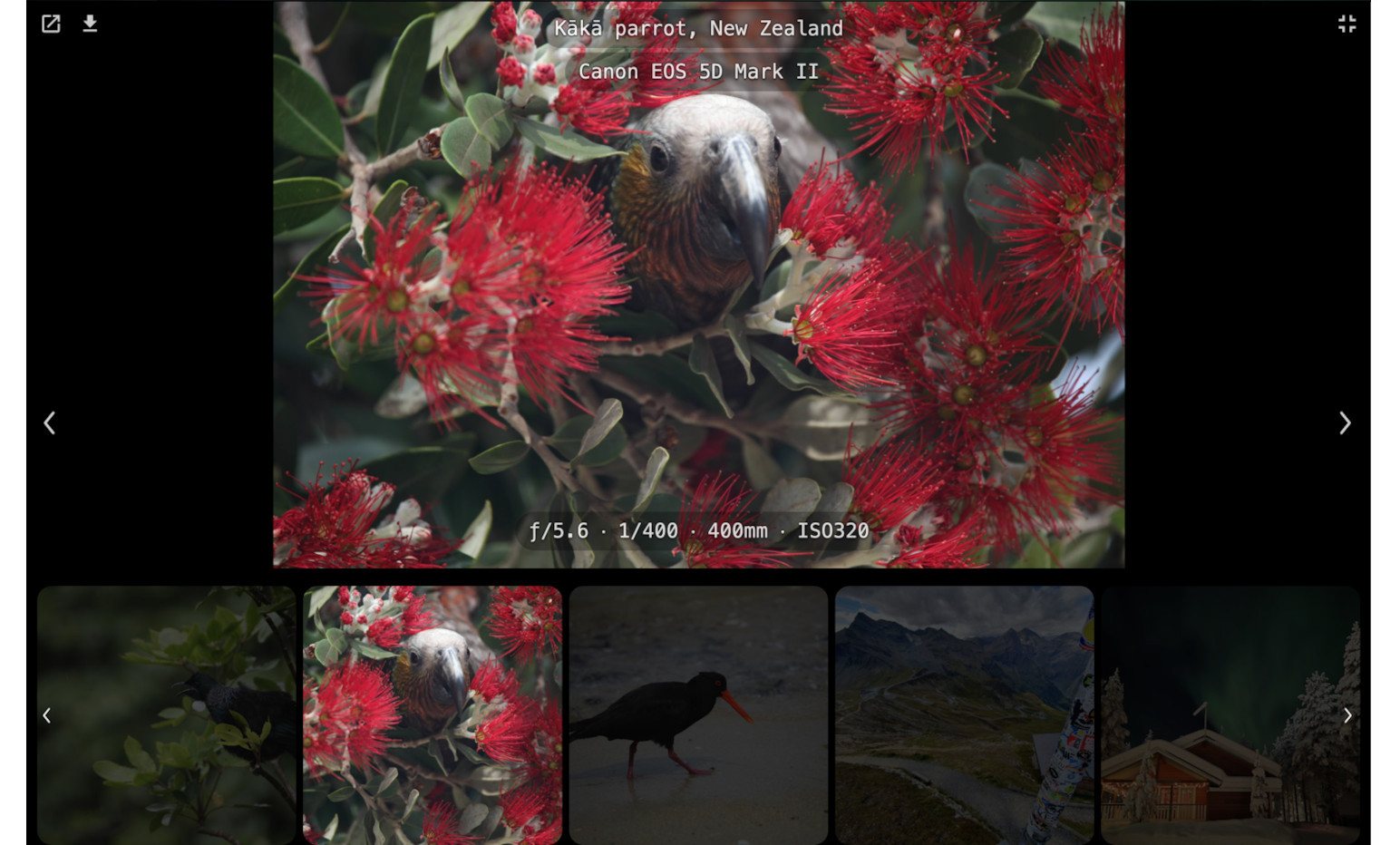
- A better visitor experience – Give people a responsive gallery, slider, carousel, fullscreen view, or lightbox.
- Photo and video support – Share mixed albums without splitting them into separate WordPress galleries.
- Mobile-friendly browsing – Let visitors swipe, tap, zoom, navigate, and enjoy slideshows naturally.
- Useful presentation options – Show descriptions, dates, counters, buttons, and camera details when they help.
- Your order – Keep the album’s order, shuffle it, or sort by date taken, oldest or newest first.
- Built for real albums – Caching, lazy loading, and progressive loading help larger albums stay practical.
Why People Use It
Google Photos and iCloud are convenient for storing and sharing albums.
WordPress is where your audience is.
This plugin connects the two.
Instead of exporting photos, uploading them to the media library, rebuilding galleries,
and repeating the work after every album change, you can share the album once and embed it where you need it.
What Happens After Installing
The plugin adds its own WordPress admin menu with a friendly Guide page,
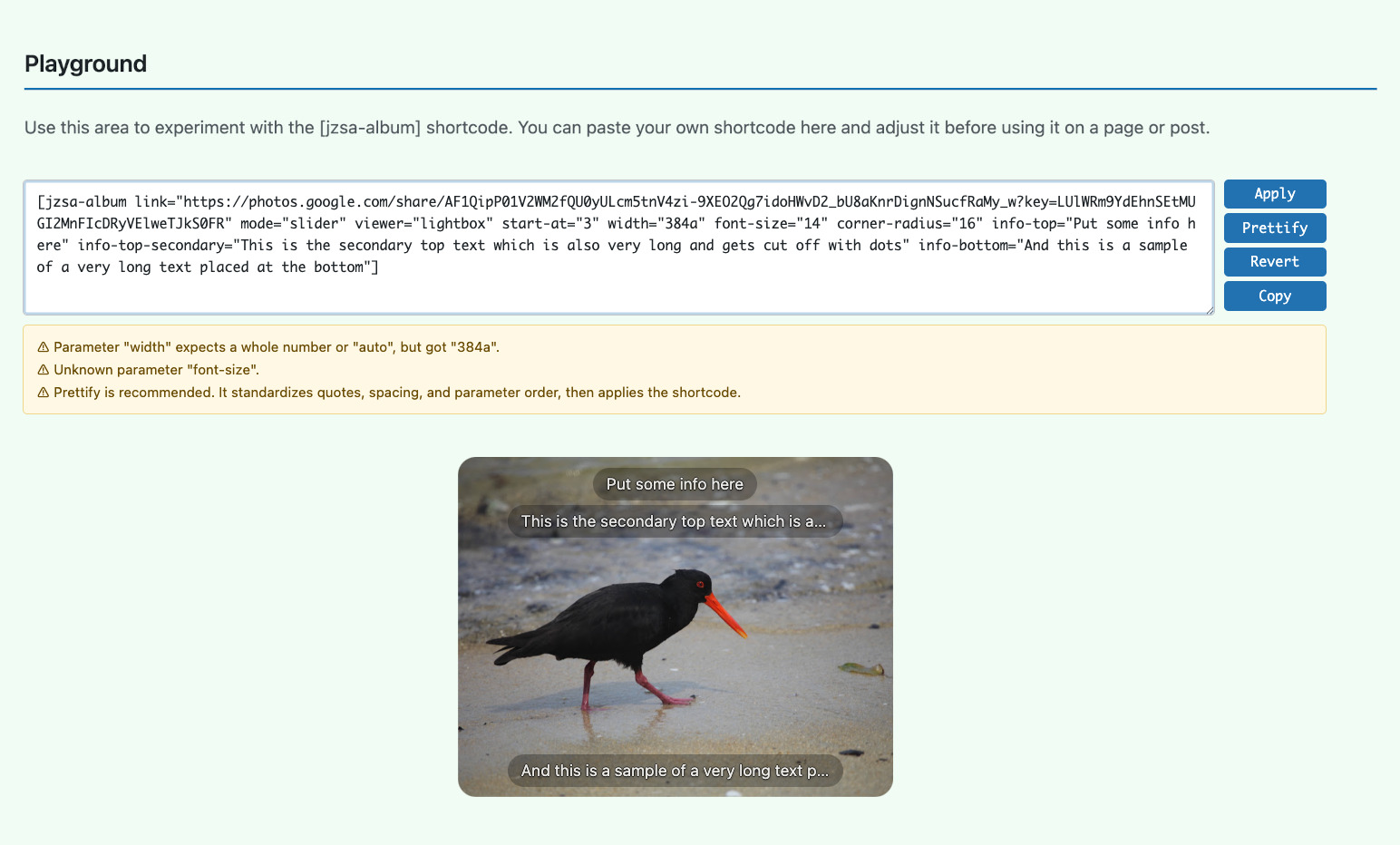
ready-to-use examples, a live shortcode playground, and the current parameter reference.
Start with a sample, paste your own Google Photos or iCloud share link,
preview the result, and place the shortcode where you want the album to appear.
Community Inspiration
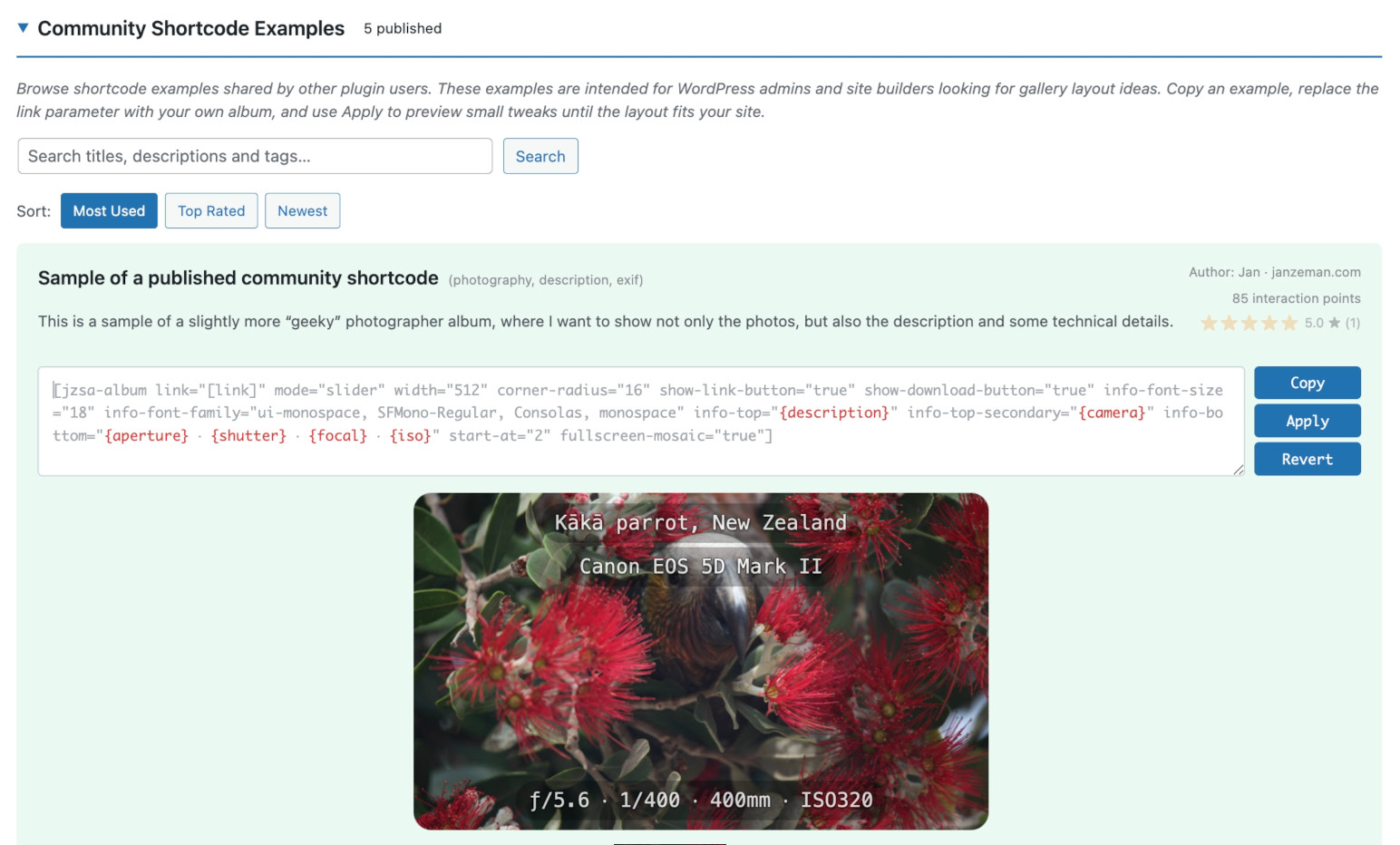
The optional Community Directory helps you discover what other users are building with the plugin.
- Browse real shortcode examples for layout ideas.
- Copy a configuration and adapt it to your own album.
- Rate useful examples and share your own.
- Add a sample page URL if you want curious visitors to find your site.
Community features are optional. You can use the gallery plugin without joining or publishing anything.
External services
This plugin connects to the following external services. No visitor data is sent to them by the plugin itself; visitors’ browsers load the photos directly from the services below.
Google Photos
Used to show publicly shared Google Photos albums. When a page with a Google Photos album is rendered, the WordPress server requests the public album page from photos.google.com, and visitors’ browsers load the images and videos from *.googleusercontent.com. Only the shared album link is sent.
Terms of Service: https://policies.google.com/terms
Privacy Policy: https://policies.google.com/privacy
Apple iCloud
Used to show publicly shared iCloud albums. When a page with an iCloud album is rendered, the WordPress server requests the public album data from icloud.com, and visitors’ browsers load the images and videos from *.icloud-content.com. Only the shared album link is sent.
Terms of Service: https://www.apple.com/legal/internet-services/icloud/
Privacy Policy: https://www.apple.com/legal/privacy/
Shared Albums Community
Optional. Used only when a WordPress administrator opens the Community page or connects to the community. Browsing sends read-only requests to sa.janzeman.com; connecting, publishing and rating send the data described in the plugin’s privacy policy text (Settings > Privacy > Policy Guide in wp-admin).
Contact: support@janzeman.com
Community Acknowledgements
This plugin has been shaped not only by code, but also by people willing to test early versions, question design decisions, and explain their real-world needs. Their ideas and thoughtful feedback continue to make it more useful and easier to use.
Special Recognition
- Naveen Bachwani (
@naveenbachwani) – An early adopter with a sharp eye and analytical mind. His feedback often improved usability while new features were still being designed, before they reached a public release. His many feature ideas, extensive testing, UX feedback, and detailed design discussions have helped shape photo information and descriptions, mobile and Fullscreen behavior, the Community Directory, and the current Lightbox and Fullscreen experience.
Personal note: It has been a genuine pleasure working with you, Naveen!
Everyone else who helped shape a feature is thanked in the Changelog, next to the version they contributed to.
Credits
Privacy Policy
This plugin does not collect or store any user data for its core gallery functionality.
Use of external Google services
- The plugin fetches public Google Photos album pages from
https://photos.google.comand image files from*.googleusercontent.comin order to render the galleries. - Only publicly shared album links are supported; the plugin has no access to private albums or any content that is not already available via a public share link.
- The plugin does not collect, store, or transmit user credentials or personal data. It only caches album HTML and image URLs in WordPress transients for performance, and this cache is stored locally in your WordPress database.
Community Directory (optional, opt-in)
The Community Directory is optional. Browsing samples loads public examples from sa.janzeman.com.
Sign-in, ratings, and publishing are used only when you choose to connect to the community.
If you publish an entry, the community service stores the information you submit,
such as title, shortcode, description, tags, optional sample page URL, and optional display name.
You can delete your community account from the plugin admin page.
The community backend does not use cookies, analytics, advertising, or newsletters.
Support
- Bug reports: Open an issue on GitHub
- Feature requests: Post on the support forum
- Privacy, account, or sensitive questions: email support@janzeman.com
- Leave a rating: Review on WordPress.org
- Buy Me a Coffee: buymeacoffee.com/janzeman
Installation
- Install and activate the plugin.
- Open the new
Shared Albumsmenu in WordPress admin. - Start with the Guide page and its live examples.
FAQ
Does this work with private albums?
No. The album must be shared by link: in Google Photos with Create link, in iCloud with Public Website turned on. The source pages in the plugin’s admin menu show the exact steps.
How many photos can I embed?
The plugin shows up to 1,000 photos and videos per album, from Google Photos and iCloud alike. Use limit to show fewer, and order=”newest”, order=”oldest” or order=”shuffle” to choose which ones are shown.
When an album has more items than are shown, a notice with a link to the whole album appears above and below it (see album-more-link).
Will this slow down my site?
It is designed to be light in normal use.
Album data is cached, images load progressively, and visitors do not download the whole album at once.
Can I customize the appearance?
Yes. The plugin includes ready-made examples and many presentation options.
You can also add your own CSS when you want full visual control.
Does it work on mobile?
Yes. The gallery is responsive and supports touch gestures, fullscreen viewing, and mobile-friendly navigation.
Is this an official Google or Apple plugin?
No. This plugin is not affiliated with or endorsed by Google LLC or Apple Inc. Google Photos™ is a trademark of Google LLC. Apple® and iCloud® are trademarks of Apple Inc.
Will it keep working forever?
There is no guarantee. Google Photos and Apple iCloud do not offer an official interface for embedding shared albums, so the plugin reads them the same way a web browser does. Either service can change the format of its shared albums at any time, which may stop the plugin from working until it is updated. The plugin is provided “as is”, without warranty of any kind, as stated in the GPL license.
Where can I find the source code?
The plugin source code and generic ZIP build tool are maintained on GitHub.
Screenshots




Changelog
3.0.9
- Google Photos albums are no longer cut off at 300 items: the plugin now loads the rest of the album the way Google Photos does when you scroll, and shows up to 1,000 photos and videos per album, for Google Photos and iCloud alike. The default limit is now 1,000 instead of 300, so after updating, albums with more than 300 items show more photos on the page (and the page gets bigger). Set limit=”300″ to keep the old behavior. Prompted by @peterpolow‘s albums with more than 300 photos.
- New, on by default: albums with more items than the plugin can show (more than 1,000, or when Google Photos could not send the whole album) now show a notice above and below the album with a link to the whole album, for example “Showing 1000 of 1450 items. View the whole album in Google Photos”. After updating, it appears on such albums without any change to your shortcodes. Turn it off with album-more-link=”false”, use your own text (for example in your language) with album-more-link=”Only the first {items} of {total-items} photos are shown here. See them all in {source}”, and show it only below the album with album-more-link-position=”bottom” (top, bottom or both). It is not shown when you set limit yourself. Requested by @peterpolow.
- gallery-layout=”justified” now uses each photo’s real shape for Google Photos albums, so portrait and landscape photos get tiles of their own width instead of every tile looking the same as in the grid layout, and rows are cropped less. Reported by @peterpolow.
- Gallery tiles now show the hand cursor when a click opens the lightbox, not only when it opens fullscreen. Requested by @peterpolow.
3.0.8
- Added gallery-video-inline=”false”: gallery videos no longer play right in the gallery. Their thumbnails show the video length in the bottom-right corner, like iCloud Photos, and open in the viewer like a photo to play there.
- Video lengths now show right away for both Google Photos and iCloud, read from the album data instead of probing every video.
- iCloud albums now notice within minutes when items were deleted, added or replaced in iCloud (for example a video converted to MP4), and load the album again instead of showing broken thumbnails until the album cache expires.
- Added viewer-video-autoplay=”true”: videos start playing by themselves in the lightbox or fullscreen, both the one it opens on and each one you browse to, in gallery, slider and carousel albums. Off by default.
- A video playing on the page (gallery, slider or carousel) now carries on in the lightbox or fullscreen from the same moment, and back on the page after closing, instead of stopping and starting over.
- The pause bars in the loading play button are now centered.
- Gallery tiles now show a soft grey area in their final size while thumbnails load, and the images fade in, instead of an empty page or a spinner. iCloud galleries show their tiles right away too, like Google Photos ones.
- iCloud video thumbnails (gallery-video-inline=”false”) and justified iCloud galleries now load their images straight from iCloud instead of through the site, which is much faster on slow hosting.
- Video buttons keep their own look when the theme or page builder restyles every button on the site (for example Elementor’s global button style), which made the round play button a rectangle.
3.0.7
- iCloud videos in older formats such as AVI, which iCloud keeps without an MP4 version, now play in browsers that support them (Safari, for example), like on iCloud web. Other browsers show them as photos.
- The administrator warning about such videos now says which browsers can play them.
3.0.6
- Added an administrator-only warning when an iCloud album contains videos that most browsers cannot play (for example AVI from older cameras). It names the videos and explains how to convert them to MP4 or MOV.
3.0.5
- Fixed: iCloud photos edited in Photos (rotated, cropped or adjusted) were shown unedited in the lightbox and fullscreen, for example upside down. The plugin now shows the edited version, as iCloud does.
3.0.4
- Added album-heading-gap and album-link-gap to set the space in pixels between the album and its heading or link.
- Fixed: on some sites (for example with Elementor), an empty area the height of the screen appeared below a gallery, and album-link below the gallery could end up in the wrong place. The hidden slideshow behind the gallery’s viewer now always stays out of the page layout.
3.0.3
- Added album-link to show a text link below the album that opens it on Google Photos or iCloud, for example album-link=”Open album in {source}”, where {source} becomes “iCloud Photos” or “Google Photos”, with album-link-text-align and album-link-indent. It opens in a new tab and shows the usual “new window” icon.
- Added album-heading-position and album-link-position (“top” or “bottom”) to show the heading and the link above or below the album. On the same side they share one row, placed left, center or right by their text-align.
- Fixed: in the Settings Playground, album-heading appeared beside the preview instead of above it.
3.0.2
- The lightbox close button is now a clear X instead of the “exit” arrows, so visitors on phones recognize it right away.
3.0.1
- Faster iCloud albums: the first photos now load straight from Apple, with one request to WordPress for the whole album instead of one per photo. This matters most on busy or slower hosts.
- Loading spinners now appear only when loading takes more than a second, and fade in gently, so fast loads show no spinner at all.
- Fixed: the lightbox could stop working with WP Rocket’s “Delay JavaScript execution”. On pages that show an album, the plugin now keeps its scripts and jQuery out of the delay, so no manual exclusions are needed. Thanks to @plauritz for reporting it.
3.0.0
- Added Apple iCloud shared albums after @plauritz requested support for Apple iCloud. The same shortcode, layouts and options work for Google Photos and iCloud albums, including videos, descriptions, camera info and downloads.
- Renamed the plugin to Shared Albums for Google Photos & Apple iCloud. The slug and existing shortcodes are unchanged.
- Changed: videos are now shown by default (show-videos=”true”). Add show-videos=”false” to keep showing photos only.
- Added gallery-caption to show a caption, such as the photo description, below each gallery tile instead of on top of the image, with gallery-caption-gap for the space above it.
- Added album-heading to show the album title as a heading above the album, in every mode, with album-heading-text-align and album-heading-indent.
- Added order=”oldest” and order=”newest” to sort photos by the date they were taken.
- Added Google Photos and Apple iCloud pages with setup steps, supported features and samples.
- Added a Primary Source setting and editable sample albums per source in Settings.
- Added a Values column to the shortcode parameter reference.
2.5.3
- Added shuffled photo order with order=”shuffle”.
- Improved Guide examples and kept sample links stable when examples are renumbered.
- Thanks to @berbux for requesting the shuffled photo order.
2.5.2
- Fixed slider controls visibility for mouse users in touch-reported browsers.
- Shortcode validation now warns when a shortcode sets options for the viewer that is not active.
2.5.1
- Moved the Shortcode Migration Tool to Settings with an integrated live preview. Improved its output.
- Fixed gallery information not appearing in scrollable galleries.
2.5.0
- Fixed the Guide page becoming slow.
- Default Viewer setting now saves instantly; no more Save button.
- Simplified the Guide page: migration tool tucked away.
2.4.6
- Better guard of shortcode typos.
- Fixed a scrollable gallery trapping the page scroll on touch devices.
2.4.5
- Bug fixes
- Confirmed compatibility with WordPress 7.1.
- Raised the minimum supported WordPress version from 5.0 to 5.5.
- Thanks to @littauer for reporting arrow keys moving several galleries at once, and to @markstravels for reporting missing captions caused by negative time zones.
2.4.4
- Minor changes
2.4.3
- Lightbox is now recommended and is the default for new installations; existing installations retain Fullscreen for shortcodes without an explicit viewer.
- The redesigned viewer syntax adds explicit selection and triggers, shared settings, isolated mode overrides, and broader feature parity between Lightbox and Fullscreen.
- The Guide adds comparison samples, semantic validation, one-click legacy conversion, and a Migration Tool that explains every change.
- Editable shortcodes now include Prettify, which standardizes quotes, spacing, and parameter order before applying the result.
- The Community Directory stores version-compatible shortcode forms, and a new Community Acknowledgements section recognizes major contributors.
- Fixed mosaic navigation arrows, viewer background stacking, Fullscreen autoplay, button routing, and whitespace inside migrated album links.
2.3.7
- Improved plugin intro
- Improve warning about “gallery-columns” in the “justified” mode
2.3.4
- Email-based login for the Community feature
- Extensive unit and end-to-end testing
2.3.1
- Tested with WordPress 7.0
- New: Lightbox – an alternative to native fullscreen
- Basic shortcode real-time validation
- Preparation of the Community feature for the release
- Thanks to @valterbruno for the original Lightbox request and continued real-world testing.
2.2.0
- New: Community Directory – browse, copy, and publish shortcode configurations and inspire others 🙂
- Privacy by design: your email is never sent; account identity uses one-way hashes, and publishing data is sent only when you choose to share
- Passwordless authentication: Connect from your WordPress admin, with no email or external account required
- Interaction points and shortcode ratings are community fun, not a competition
- Delete your account and all published entries at any time
2.1.8
- Fullscreen support of mosaic
- Warning added: Google truncates descriptions to 100 chars
- Thanks to @luisbenitez777 for requesting mosaic thumbnails in Fullscreen.
2.1.7
- Fixed info-wrap bug
2.1.6
- Fixed slider mode getting stuck on loading spinner (regression from 2.1.5)
2.1.5
- Reworked Guide page loading to reduce blocking and improve responsiveness
- Improved cache/help guidance on the settings page
2.1.4
- Screenshots added
2.1.3
- Add “How the cache works” section
- Improve Guide page loading experience
2.1.2
- Make caching description more clear and prominent
2.1.0
- Settings page moved to top-level admin menu with subpages for easier navigation and reference
- Google Photo description can be supported after all 🙂
- Introduce a halo effect to improve text readability
2.0.11
- Swiper loop navigation
2.0.10
- Lighter loading for large sliders
2.0.9
- New
fullscreen-max-widthandfullscreen-max-height - New
info-wrapand info text alignment parameters - New
gallery-buttons-on-mobilebehavior for touch devices - Responsive layout improvements
2.0.8
- File name bug fix
2.0.7
- New dynamic photo info overlays
- EXIF placeholders with background loading
- Slider, carousel, gallery and fullscreen photo info
- All Settings page samples are editable by now, not only the Playground
2.0.6
- Touch devices: Controls appear on tap and fade out on inactivity
2.0.5
- Fullscreen vs inline controls
- Video download support
- Download UX & settings improvements
- Thanks to @peterpolow for requesting separate inline and Fullscreen controls and video downloads.
2.0.4
- New: Mosaic thumbnail strip (
mosaic="true") for slider and carousel modes - Added
fullscreen-background-color(default#000) to control fullscreen background separately - Fixed gallery mode where
show-download-button="true"did not render the download button - Fixed slideshow option logic: use
disabled,manual, orautoforslideshowandfullscreen-slideshow - Fixed
fullscreen-toggle="click"for video slides in gallery mode - Improved iPhone pseudo-fullscreen behavior, including fullscreen arrow navigation
- Added restore-to-last-viewed position when closing fullscreen
- Thanks to @matiaspl for a public fork that inspired the mosaic feature.
2.0.3
- New parameter: “cache-refresh”
- Clear Cache button added
2.0.1
- Fixed album titles being truncated (dates and special characters are now preserved)
2.0.0
- Gallery mode support
- Experimental video support
- Shortcode parameters and their default values changed (Breaking. Apologies!)
- Thanks to @peterpolow for the detailed requests and testing behind Gallery mode and video support, and to @toonwolf for the digital signage requests behind show-navigation and source-width/source-height.
1.0.6
- New animated logo
1.0.3
- Improved Settings page with more intuitive onboarding and richer, example-driven documentation
- Added Shortcode Playground on the Settings page to test and preview
[jzsa-album]shortcodes without leaving admin - Thanks to @gmrobbins for an early usability review that led to clearer onboarding and helped inspire Gallery mode.
1.0.2
- Initial Settings page and onboarding content
1.0.1
- Release related improvements
1.0.0
- Initial release
- Modern Swiper 11 library integration
- Fullscreen mode with dedicated button
- Play/pause button in fullscreen with spacebar keyboard shortcut
- Download button with server-side proxy (optional, disabled by default)
- Zoom support (pinch on touch devices)
- Keyboard navigation (arrows to navigate, spacebar to play/pause in fullscreen)
- Lazy loading for optimal performance
- Progressive image loading with error recovery and placeholders
- Click-to-fullscreen option
- Random start position for galleries
- SSRF protection and proper escaping
- WordPress coding standards compliance
- 24-hour caching mechanism
- User-friendly error messages for invalid album URLs
- Responsive design with touch gestures