


Description
See what your logged-in WordPress users are doing, without digging through complicated logs.
Joe’s Recent Users Activity turns recent member and administrator activity into an easy-to-read dashboard, right inside WordPress. Whether you manage a membership website, an online community or a client portal, you can quickly see which accounts have been active, the last pages they viewed and how activity changes over time.
Instead of a sprawling activity table, the plugin organises information into friendly, focused tabs with helpful visual summaries. It works on desktops, tablets and phones, with user cards that fit smaller screens without sideways scrolling.
Features
- At-a-glance overview: live users, unique tracked accounts, users seen today, and recent logged-in page views.
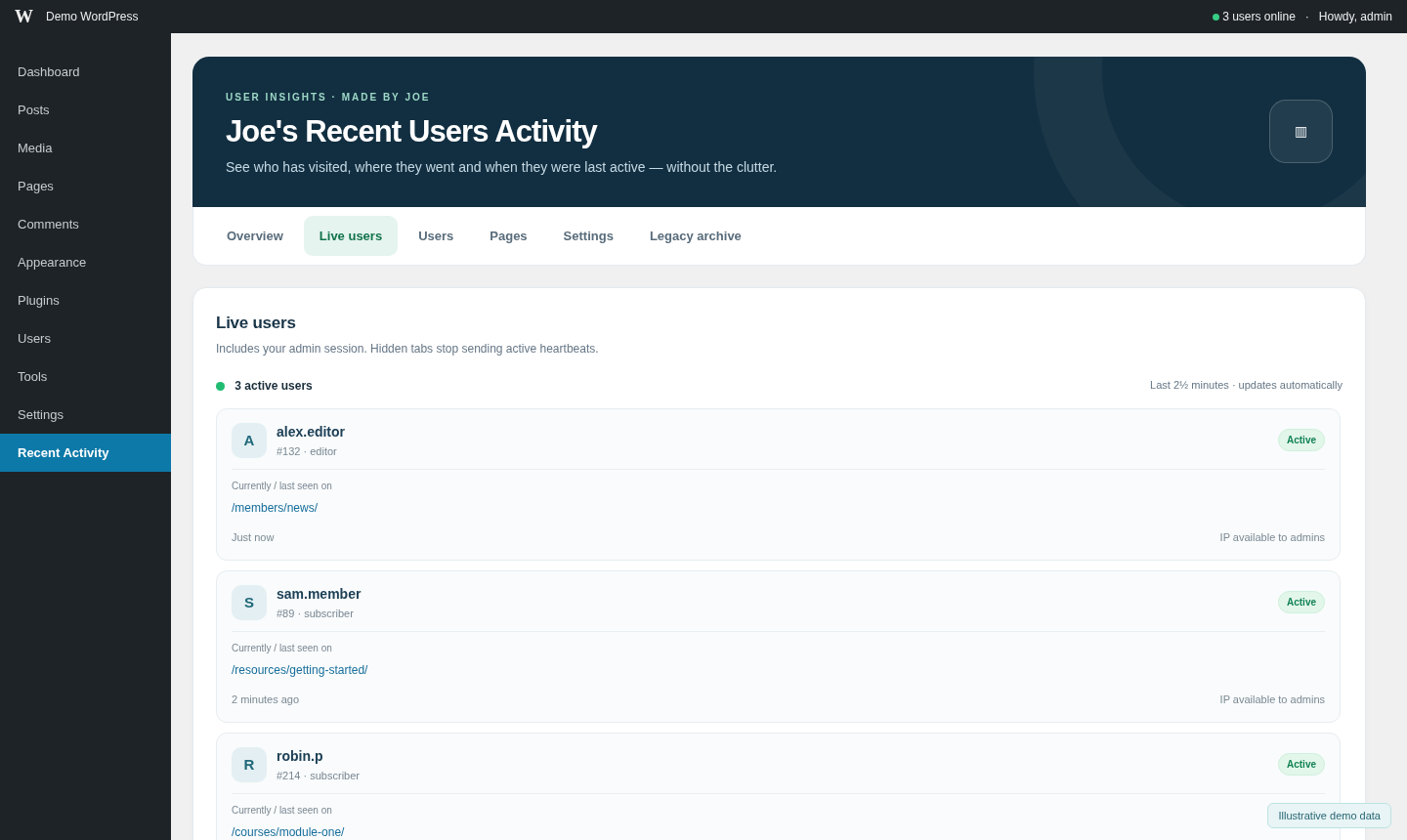
- Live users: see accounts active within the previous 150 seconds, including administrators. The live panel updates without reloading the entire page.
- Optional admin-bar counter: see the current live-user estimate from the WordPress toolbar. Switch it off at any time in Settings.
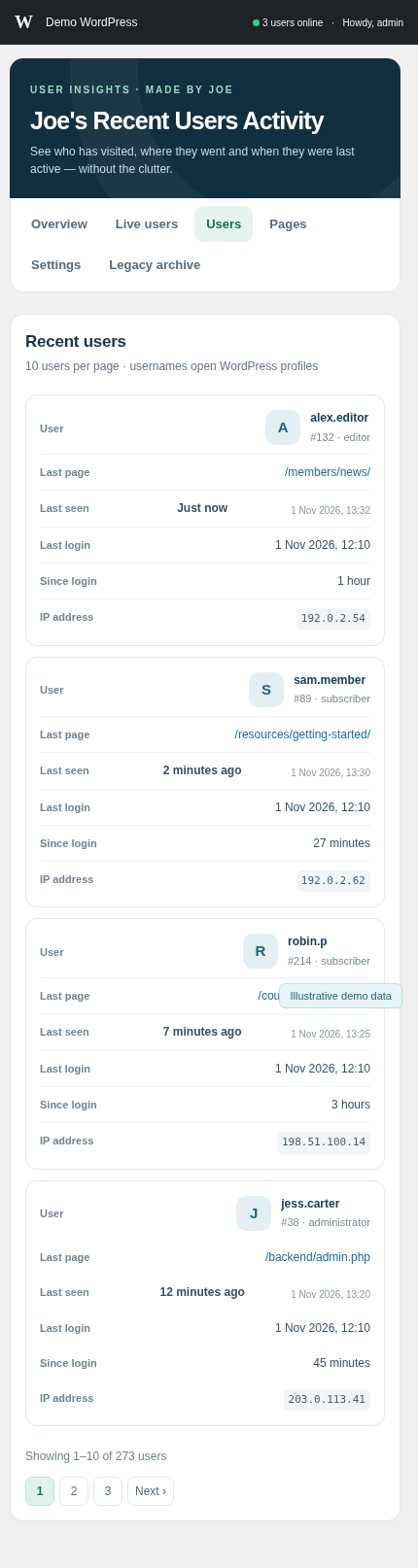
- Recent users: view usernames linked to their WordPress user-edit pages, account roles and IDs, recent pages, IP addresses, last login and elapsed time since login.
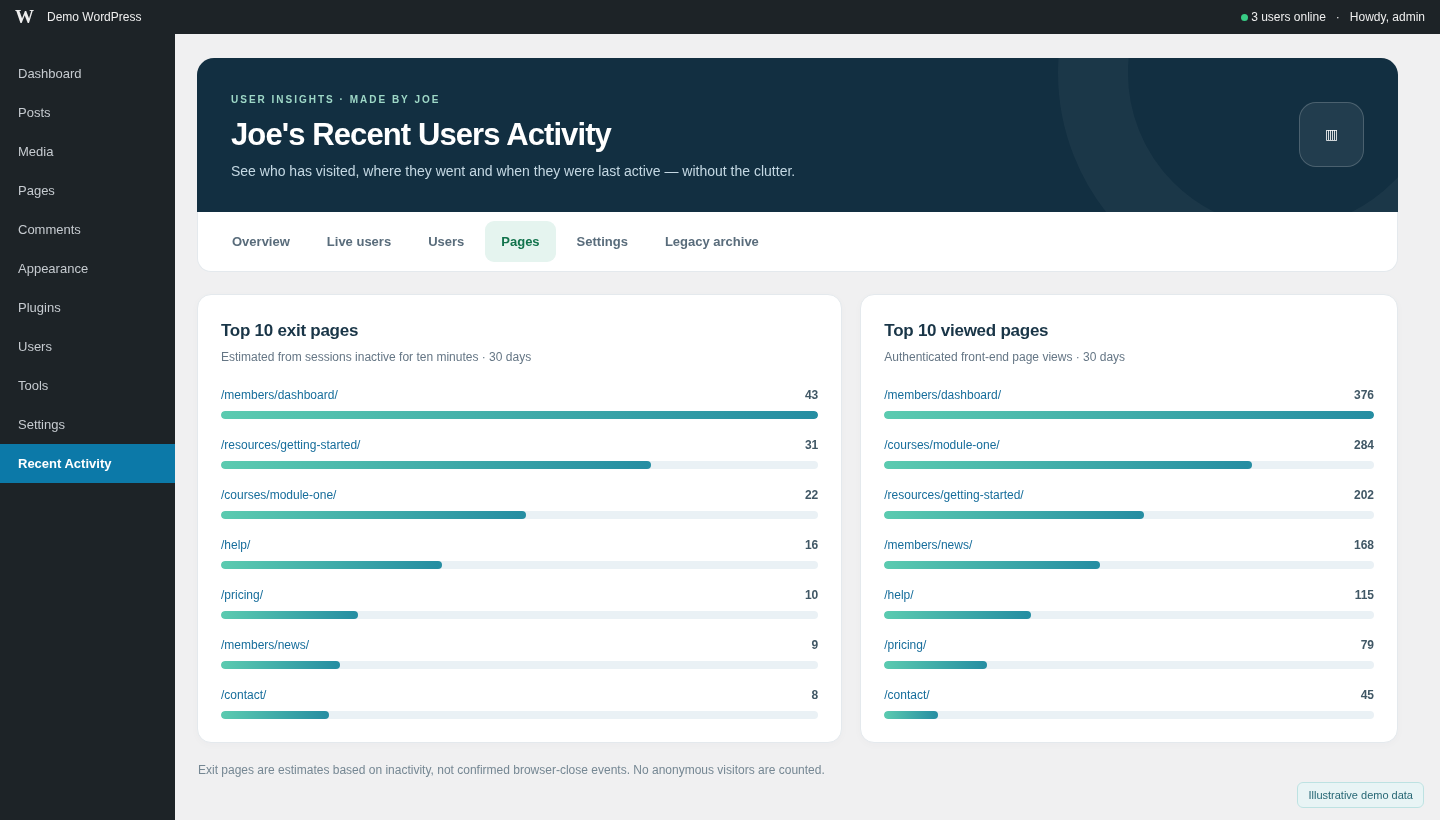
- Clear page insights: simple charts show the ten most viewed pages and ten estimated exit pages from recent logged-in sessions.
- Responsive by design: a structured desktop view becomes easy-to-scan user cards on mobile devices.
- Ten users per page: straightforward navigation keeps the Users screen tidy, even on larger websites.
- Privacy-aware tracking: records authenticated users only. URL query parameters are excluded, and configurable retention cleans up new session and event history.
- Preserved historical records: existing v2.x activity remains available in a read-only Legacy Archive when upgrading.
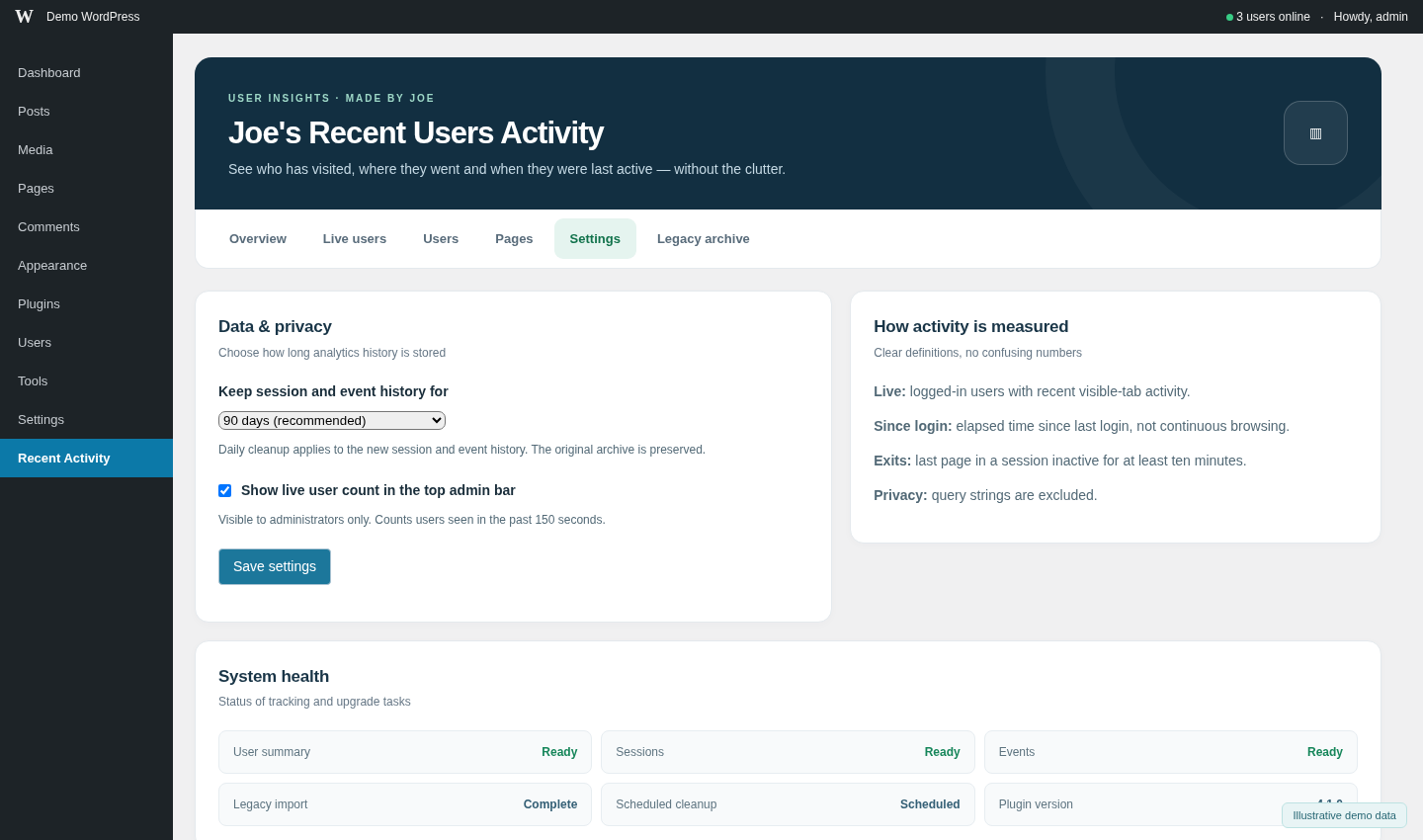
- Helpful settings and diagnostics: configure the toolbar counter, choose retention and check the status of the historical import.
How it works
The plugin observes front-end page views from logged-in users and recent presence from visible browser tabs. It does not record anonymous visitors, passwords, form content or URL query strings. The Live Users count reflects recent activity, not proof that a person is continuously watching their screen.
Since login shows the time between the last recorded login and most recent recorded activity. It does not imply continuous time on the website. Estimated exit pages identify the last observed front-end page for a session inactive for at least ten minutes; a server cannot confirm a browser was actually closed.
The original historical table is retained during upgrades. Older records are imported in small batches, so the tracked-user total may rise temporarily while existing user accounts are discovered; this is not a sudden rise in website traffic.
Translations
The dashboard includes initial translations for ten widely used languages: Spanish (Spain), French, German, Portuguese (Brazil), Italian, Dutch, Polish, Russian, Japanese and Simplified Chinese. WordPress uses your site’s chosen language for administrators, when available. You do not need to change the language from within this plugin.
The language files are editable .po files with compiled .mo files, plus a .pot source template in the plugin’s /languages folder. WordPress.org’s community translation service can also provide reviewed language packs and additional locales. Translators are welcome to help refine these first-release translations through Translate WordPress.
The Joe’s Recent Users Activity name is retained across all translations. Technical identifiers, database table names, usernames and URLs are not translated.
Who is it for?
Membership sites, educational websites, communities, private portals, subscription services and WordPress administrators who want a straightforward view of authenticated user activity.
Support and feedback
If you spot an issue or have an idea that would make the plugin more useful, please search the support forum and open a topic with the steps needed to reproduce it. You can also contact the developer.
Third Party Services
An optional PayPal Donate button is available in the plugin’s administrator dashboard to support continued development. Displaying the PayPal SDK button loads code from PayPal; a plain PayPal donation link is provided as a fallback. PayPal’s SDK documentation and privacy information explain its service.
The plugin itself does not send user activity to PayPal and does not require a third-party analytics account.
Installation
- In WordPress, go to Plugins → Add New → Upload Plugin, select the ZIP and activate it. You can also install it directly from the WordPress Plugin Directory.
- Open Recent Activity from the left-hand admin menu.
- Use the Overview, Live users, Users, Pages, Settings and Legacy archive tabs.
- Under Settings, choose how long to keep session/event history and whether to display the live count in the WordPress toolbar.
When upgrading from v2.x, your original activity table is retained. Allow the gradual historical import to complete; its status is shown in Settings.
FAQ
Does this track guests or people who aren’t logged in?
No. Joe’s Recent Users Activity monitors authenticated WordPress accounts only.
Does the live count show everyone currently logged in?
It counts distinct user accounts seen within roughly the last 150 seconds. A logged-in person with an idle or hidden browser tab may stop appearing, and an active account may have multiple tabs but is counted only once.
Are administrators included?
Yes. Administrators are included in live activity when they browse the dashboard or visit logged-in pages.
Is the plugin suitable for mobile screens?
Yes. The interface adapts to smaller devices and presents user information as readable stacked cards instead of a sideways-scrolling table.
What does “Since login” mean?
It is the elapsed time from a user’s last recorded login to their latest recorded activity, not a measurement of uninterrupted browsing time.
Are exit pages exact?
No. They are estimates based on the last front-end page seen in a session that has been inactive for at least ten minutes.
Will I lose my activity records when upgrading?
Your existing joes_recent_users_activity table is not overwritten or deleted. Historical records remain available in Legacy archive. The new database tables are used for efficient session and activity tracking.
Can I hide the WordPress admin-bar user count?
Yes. Go to Recent Activity → Settings, untick the admin-bar option and save.
How is personal data handled?
The plugin tracks logged-in users and may store IP addresses and visited page paths for administrative reporting. It omits query strings and offers retention controls for new event and session records. Website operators should document this processing in their privacy policy and select retention appropriate to their obligations. The legacy archive and per-user summary are not automatically erased by that retention setting.
Screenshots

Changelog
4.1.5 (4 November 2026)
- Delayed initial presence heartbeat on front-end pages, reducing competition with login and payment initialization.
- Reduced routine heartbeat polling from 30 to 65 seconds while preserving live-user reporting, page changes and a best-effort short-visit beacon.
- Displays lightweight Server-Timing headers on successful authenticated heartbeat requests to distinguish PHP bootstrap, handler time and selected SQL operations without extra queries or stored logs.
- Bumped asset versions to prevent stale cached presence.js from being served after an upgrade.
- Kept the existing database schema, legacy archive, translations and admin dashboard unchanged.
4.1.3
- Rebuilt the plugin-directory icons from precise vector geometry for a sharper, more balanced appearance at both standard and high-resolution sizes.
- Updated branding artwork only; tracking and database behaviour remain unchanged.
4.1.1 (1 November 2026)
- Corrected the install directory to
joes-recent-users-activity/, while retaining the originaljoes_recent_users_activity.phpmain file. - Resolved a potential fatal PHP class-name collision when a previous version was installed in another folder.
- On single-site activation, deactivates recognised older installed copies to avoid duplicate tracking; older folders can then be removed manually.
- Preserved the responsive dashboard, database history, donation button and existing settings.
4.1.0 (1 November 2026)
- Refreshed WordPress.org listing, usage guidance, FAQs, banners, icons and five screenshots.
- Preserved the original
joes_recent_users_activity.phpmain filename. - Historical import now runs only on visits to the plugin dashboard, not repeatedly during administrator AJAX heartbeats.
- Batched migration deduplicates users and will not overwrite more recent live activity with old records.
- Added historical-import progress feedback and clarified the Tracked Users metric.
- Improved overview copy, documentation and mobile status presentation.
4.0.1 (1 November 2026)
- Introduced the optional live-user counter in the administrator toolbar.
- Added live-user presence updates and settings to enable or disable the counter.
4.0.0 (1 November 2026)
- Introduced the tabbed, responsive user-activity dashboard, session insights and performance-focused data tables.
- Added a read-only archive for original activity records and configurable event/session retention.
2.8 (26th August 2026)
- Compatibility with WordPress 7.1
2.7 (25th May 2026)
- Compatibility with WordPress 7.0
2.6 (28th November 2025)
- Compatibility with WordPress 6.9
2.5 (8th April 2025)
- Compatibility with WordPress 6.8
2.4 (28th October 2024)
- Compatibility with WordPress 6.7
2.3 (5th September 2024)
- Compatibility with WordPress 6.6.1
2.2 (8th May 2024)
- Compatibility with WordPress 6.5.3
2.1 (25th March 2024)
- Compatibility with WordPress 6.5
2.0.3 (25th March 2024)
- plugin blueprint.json file added for testing the plugin easily
2.0.2 (25th March 2024)
- plugin description updated for brevity
2.0.1 (25th March 2024)
- corrected spelling errors
2.0 (25th March 2024)
- compatibility with the latest version of WordPress (6.4.3)
1.9 (9th November 2023)
- changed the default icon in the admin menu
- added title and subheader for mobile explaining sorting
1.8 (9th November 2023)
- added mobile responsiveness for the main table
1.7 (7th November 2023)
- table increased to 100 most recent users’ activity (from 10)
- paginaton introduced
- most visited page display increased to 10 (from 5)
1.6 (1st November 2023)
- sanitize function renamed to match the rest of the plugin functions
1.5 (28th October 2023)
- additional data sanitized and escaped, nonce added to clear all results button
1.4 (25th October 2023)
- additional data sanitized and escaped
1.3 (16th October 2023)
- Nonce added to the POST call to prevent unauthorised access.
- prepare() added to database clear query to protect the code from SQL injection vulnerabilities.
- detail about PayPal Donate button usage added to readme,txt
- all necessary data sanitized, escaped, and validated
- variables escaped when echo’d
1.2 (9th October 2023)
- All data being read from any of these PHP global variables $_POST / $_GET / $_REQUEST / $_COOKIE / $_SERVER / $_SESSION / $_FILES has been sanitized before storing it in another variable or doing something else with it.
In this code, the following sanitization functions have been used:
sanitize_text_field() for text fields.
absint() for integers.
esc_url_raw() for raw URLs.
These sanitization functions ensure that the input data is safe to use and minimize the risk of security vulnerabilities.
- Appropriate escaping functions (esc_html, esc_url_raw, sanitize_text_field) added to the variables that are being echoed or printed to ensure that the output is safe from XSS vulnerabilities.
1.1 (27th July 2023)
- Added top 5 most exited pages (with clickable links), Top 5 exited pages only include front-end pages and exclude admin-ajax.php, ‘nonce’, ‘wp-json’, and others not matching front-end permalinks.
- Added line space and contact details under the main title.
- Added a ‘Clear all results’ button in case the table becomes bloated
1.0 (24th July 2023)
Plugin released