


Description
Fiskalizacija web trgovine bez prepisivanja. KigoCloud for WooCommerce connects your shop to Kigo.Cloud, the Croatian invoicing and fiscalization service by Symmetria d.o.o. When a customer orders and pays, the order is sent to Kigo.Cloud, which issues the invoice, fiscalizes it (ZKI and JIR from the Tax Administration) and the plugin e-mails the PDF to the customer.
Croatian law requires every sale paid by card, cash or a similar method to be fiscalized, web shops included. With this plugin there is nothing to retype: the items, prices, VAT, shipping and the customer come from the WooCommerce order.
Bazna cijena (sidrena cijena) i cjenik za objavu. From 17 November 2026 Croatian shops show the base price (bazna cijena, also called sidrena cijena or anchor price) next to the retail price, and a shop with a website publishes its price list (cjenik) of goods and of services in a machine readable CSV or XML file, a changed price list by 11:00 on the day of the change, and keeps a replaced price list available for 15 days. Kigo.Cloud calculates the base price from the price history of your items, and this plugin shows it under the product price in WooCommerce and serves the CSV and XML price lists from your own domain, with the [kigo_cjenik] shortcode for the page your customers open.
What it does
- Fiscalized invoice for every order. Per payment method you choose the document (invoice or offer), the payment type on the invoice (card, transaction account, cash, other) and when it is created: when the order is placed or when it is completed.
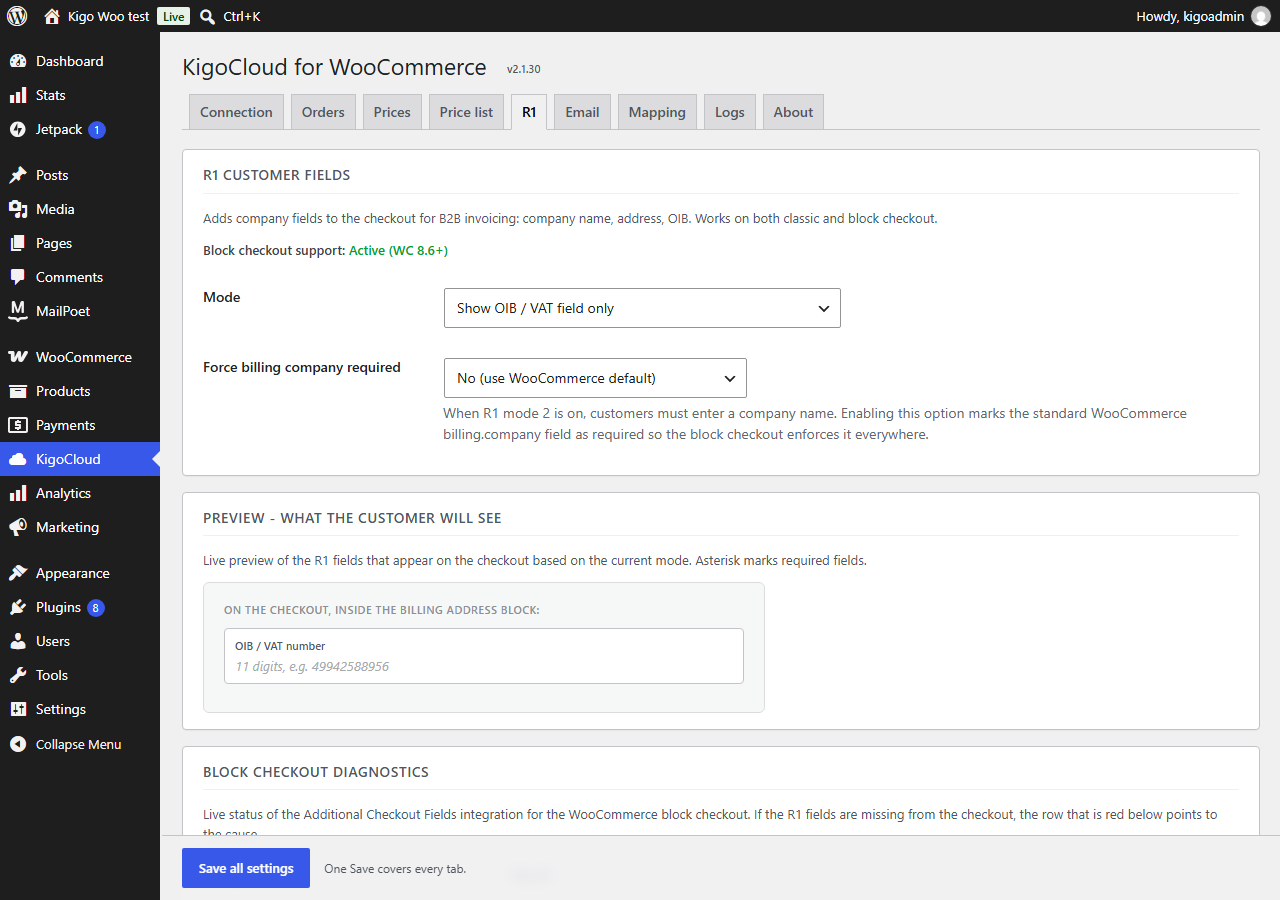
- R1 invoices for companies. OIB (VAT number) and company fields on the checkout, with the OIB checksum validated. Works with the classic checkout and the block checkout (WooCommerce 8.6+).
- Invoice PDF to the customer by e-mail, straight after the document is created.
- Invoices in the customer’s language. A customer outside Croatia can get the invoice and the e-mail in English, or in German for Germany, Austria, Switzerland and Liechtenstein.
- Stock and price sync with Kigo.Cloud (Business plan): Kigo.Cloud finds your products by SKU and keeps the quantities and prices in step.
- Base price (bazna cijena, sidrena cijena) under the product price, as “Bazna cijena (10. 9. 2026.): 12,00 €”, as the Pravilnik o isticanju bazne cijene proizvoda in force from 17 November 2026 requires, when Kigo.Cloud sends it.
- Price list (cjenik) of goods and of services in CSV and XML on your own domain. The plugin checks Kigo.Cloud every hour, downloads a changed price list as soon as Kigo.Cloud publishes it and serves the CSV and XML from your uploads folder under the prescribed file names; the
[kigo_cjenik]shortcode shows the current files and those replaced in the last 30 days. - Price list without a web shop. A WordPress site without WooCommerce (a company presentation, a craftsman’s or a service provider’s site) installs the plugin only for the price list: without WooCommerce it shows just the Connection and Price list tabs and publishes the CSV and XML price lists from Kigo.Cloud with the
[kigo_cjenik]shortcode. - Custom field mapping for shops that already collect R1 data with another plugin.
- Logs tab with the last 50 calls, and a test button that sends a test offer (never a real invoice).
- HPOS (custom order tables) compatible.
About Kigo.Cloud
Kigo.Cloud is an online program for issuing and fiscalizing invoices, eRačun (Fiscalization 2.0), stock and price lists, developed in Zagreb since 2013. Connecting a web shop and fiscalizing its orders, with the anchor price under the product price in WooCommerce, is available from the Standard plan; two-way sync of items, stock and prices from the Business plan. Registration is free and needs no card. Plans and prices: www.kigocloud.com.
Live demo
See the plugin at work in KigoCloud Demo Webshop, a WooCommerce shop in Croatian connected to the public Kigo.Cloud demo. Order a product and pay with the Stripe test card 4242 4242 4242 4242 (any future expiry date, any CVC): the order becomes an invoice in Kigo.Cloud. To see it, log in at app.kigo.cloud with username and password admin_demo. The shop also shows the anchor price (bazna cijena) under the product price and a price list page made with the [kigo_cjenik] shortcode. The demo is public, so use made-up customer details.
Try it without an account
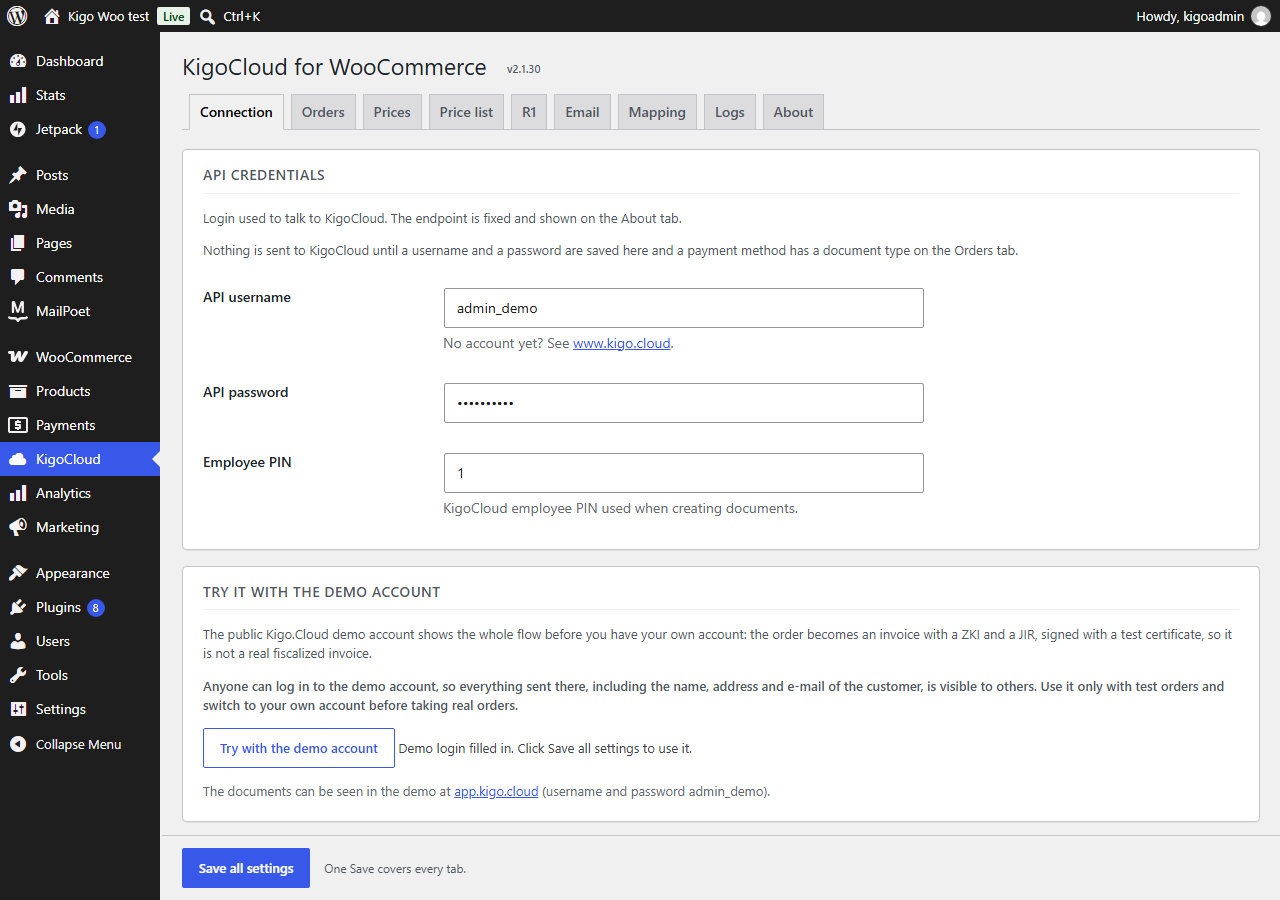
On the Connection tab, the Try with the demo account button fills in the login of the public Kigo.Cloud demo. Orders then become invoices in the demo, signed with a test certificate, so you can see the whole flow before you register. Anyone can log in to the demo, so use it only with test orders.
External services
This plugin connects your shop to Kigo.Cloud (https://app.kigo.cloud), an invoicing and fiscalization service run by Symmetria d.o.o., Zagreb, Croatia. It is needed to issue and fiscalize the invoices; without it the plugin does nothing. Nothing is sent before you save a Kigo.Cloud API key, or a username and password (or the demo login), in the plugin settings.
What is sent, and when:
- Order to invoice (
https://app.kigo.cloud/hr/api/v1/invoice/create, or/en/or/de/for a foreign customer): when an order reaches the status you chose for its payment method (placed or completed), and only for payment methods that have a document type. Sent: the order number, the items (name, SKU, quantity, price, VAT rate, discount), shipping, the payment type, the customer note, the customer’s name or company name, OIB, address, city, postcode, country, shipping country, e-mail and phone, the number and amount of any Kigo.Cloud gift voucher used, the employee PIN, and your Kigo.Cloud login for authentication (the API key, or the username and the password as an MD5 hash). - Invoice PDF (
https://app.kigo.cloud/hr/api/v1/invoice/getAsPdf/...): right after the invoice is created, only for payment methods where sending the PDF to the customer is turned on. Sent: the document id and your Kigo.Cloud login. The PDF is e-mailed to the customer from your site. - Gift voucher check (
https://app.kigo.cloud/hr/api/v1/giftVoucher/check): when a buyer types something shaped like a voucher number (XXXX-XXXX) in the cart’s coupon field and no shop coupon has that code. Sent: the voucher number and your Kigo.Cloud login. No data about the buyer is sent. The answer (what is left on the voucher) is kept for two minutes. - Order cancelled (
https://app.kigo.cloud/hr/api/v1/invoice/cancelOrder): once, when an order that already has a Kigo.Cloud document is set to cancelled or refunded. Sent: the order number, the employee PIN and your Kigo.Cloud login. Kigo.Cloud cancels the invoice, or releases the gift voucher reserved for an offer. - Connection test (R1 tab button): when you click it. Sends a test offer with made-up buyer data and your Kigo.Cloud login.
- Licence (
https://app.kigo.cloud/hr/api/v1/licence/info): once a day and when the settings are saved. Sent: your Kigo.Cloud login. The answer is the package, its expiry and the price list address. - Anchor prices (
https://app.kigo.cloud/hr/api/v1/item/list): while “Anchor price” is set to show, once a day at 8:15 and when the settings are saved. Sent: your Kigo.Cloud login. The answer is your Kigo.Cloud item list with the anchor prices; the plugin keeps the item code, barcode and anchor price. No data about your shop or customers is sent. - Price list (the addresses of the price list files in the Kigo.Cloud licence): every hour, when the settings are saved, and when a page with the
[kigo_cjenik]shortcode finds a copy not checked in the last hour. Each check is a conditional request; only the CSV and XML files of a changed price list are downloaded; no data about your shop or customers is sent. - Demo account: if you use the demo login, the same order data goes into the public Kigo.Cloud demo, which anyone can open with that login.
In the other direction, Kigo.Cloud reads products from your shop through the WooCommerce REST API (and this plugin’s SKU lookup route, /wp-json/wc/v3/kigocloud/...) only if you create WooCommerce REST API keys and enter them in Kigo.Cloud.
Kigo.Cloud terms of use: https://www.kigocloud.com/uvjeti-koristenja
Kigo.Cloud privacy policy: https://www.kigocloud.com/zastita-osobnih-podataka
Installation
- In WordPress go to Plugins > Add New, search for “KigoCloud” and install and activate KigoCloud for WooCommerce. For orders WooCommerce must be active; without it the plugin publishes the price list only.
- Open KigoCloud in the admin menu.
- On the Connection tab enter an API key and the employee PIN, or the username, password and employee PIN of your Kigo.Cloud user, or click Try with the demo account.
- On the Orders tab choose the document type for each payment method you want fiscalized (Disabled leaves that payment method alone).
- Optionally set up R1 fields on the R1 tab and the sender on the Email tab, then click Save all settings.
Nothing is sent to Kigo.Cloud until an API key, or a username and password, are saved and at least one payment method has a document type.
FAQ
My site has no web shop. Can I publish the price list with this plugin?
Yes. From 17 November 2026 every trader and service provider with a website publishes the price list in CSV or XML, also when the site only presents the business. Install the plugin without WooCommerce, enter the Kigo.Cloud API key on the Connection tab, switch on the publication in Kigo.Cloud (Sidrene cijene > Cjenik za objavu) and put the [kigo_cjenik] shortcode on a page. The price list on your own website is part of the Standard plan and above.
Do I need a Kigo.Cloud account?
Yes, for real invoices. The plugin is the connection between WooCommerce and Kigo.Cloud, which issues and fiscalizes the invoices. Fiscalizing web shop orders is available from the Standard plan. To look around first, use the demo account button.
Is the invoice really fiscalized?
Yes. Kigo.Cloud sends the invoice to the Croatian Tax Administration (Porezna uprava) and puts the ZKI and JIR on it, with the certificate you upload to Kigo.Cloud. Invoices in the demo account are signed with a test certificate.
Can a company get an R1 invoice?
Yes. Turn on the R1 fields on the R1 tab: the buyer enters the OIB (and, in full mode, the company name and address) on the checkout, and the invoice is issued to the company.
Does it work with the block checkout?
Yes, from WooCommerce 8.6, and with the classic [woocommerce_checkout] checkout.
Which payment methods are supported?
Every payment method active in WooCommerce: bank transfer, cash on delivery, card gateways (Stripe, CorvusPay, Monri, PayPal and others). Each gets its own settings on the Orders tab.
Can the invoice be in English or German?
Yes. On the Orders tab, Language for foreign customers: English for everyone outside Croatia, or by country (German for DE, AT, CH and LI).
I used the KigoKasa API for WooCommerce plugin. What happens?
KigoCloud copies its settings on activation and does not send orders while the KigoKasa plugin is active, so no order is fiscalized twice. A notice offers a button that deactivates the old plugin; from then on KigoCloud sends the orders.
Does it show the anchor price (sidrena / bazna cijena) and publish the price list?
Yes. Kigo.Cloud keeps the anchor price of every item, calculated from its price history or entered by hand, and publishes the price lists of goods and of services in CSV and XML, a changed one on the day of the change. From the Standard plan the plugin serves that price list from your own domain and shows the anchor price under the product price in the shop. More: Sidrene cijene u Kigo.Cloudu.
Which price list address do I give to the inspection or to price crawlers?
The address of the page where you put the [kigo_cjenik] shortcode. That page is the place of the price list on your site, as the Pravilnik o načinu objave cjenika proizvoda requires: it always shows the current price list of goods and, when you sell services, of services, each in CSV and XML under its prescribed name (OIB, sales point, ROBA or USLUGE, storage number, time), and the replaced ones for 30 days. A changed price list always comes to that page. The Price list tab lists the current files.
Does the plugin put a link to Kigo.Cloud on my site?
Only if you ask for it. On the Price list tab there is a box “Link to Kigo.Cloud”, unticked by default. When you tick it, a small line “Price list made with Kigo.Cloud” with a link to www.kigocloud.com appears under the [kigo_cjenik] price list. Untick it and the line is gone. Nothing else on your public pages links to Kigo.Cloud, and the plugin works the same whether the box is ticked or not.
Where do I get help?
Write to the support forum here or to the e-mail address on www.kigocloud.com.
Screenshots


Changelog
2.2.23
- Base price of a product without tax in a shop that shows prices without VAT: no “+ PDV” after it, as WooCommerce does for the product price.
2.2.22
- Classic checkout: the R1 invoice fields (company name, address, city, postcode, OIB) and their required marks show only after the customer ticks “Yes”, and hide again when it is unticked.
2.2.21
- A product without tax keeps its full base price in a shop that shows prices without VAT, as WooCommerce shows its price.
2.2.20
- Bazna cijena is shown the way the shop shows its prices: a shop that shows prices without VAT gets the base price without VAT and with the same suffix (for example “+ PDV”), so the two are no longer 25 % apart for the same price.
- The date next to Bazna cijena: for a product that was in the shop before it came into Kigo.Cloud, the date is the day it was created in the shop, or the reference day (10. 9. 2026.) when it was already in the shop then, instead of the day it was entered into Kigo.Cloud.
2.2.19
- Bazna cijena on variable products. When all variations had the same price, WooCommerce showed no variation price, so the base price appeared nowhere on the product page. The price of a variable product now carries the base prices of its variations: one amount when they are the same, otherwise the lowest and the highest, with the reference day when all are of the same day.
2.2.18
- The price list is published only under the file names the Pravilnik prescribes (OIB, sales point, ROBA or USLUGE, storage number and time). The extra copies cjenik-roba.csv, cjenik-roba.xml, cjenik-usluge.csv and cjenik-usluge.xml of 2.2.17 are removed. The page with [kigo_cjenik] is the place of the price list on your site: its buttons and the Price list tab link the current files under their prescribed names, and a changed price list always comes to that page.
2.2.17
- Price list as the Pravilnik o načinu objave cjenika proizvoda (NN 132/2026, in force 17 November 2026) wants it: a price list of goods and, when you sell services, one of services, each in CSV and XML under the new prescribed file names. The plugin checks Kigo.Cloud every hour and downloads a changed price list as soon as Kigo.Cloud publishes it, so it is on your site before 11:00 on the day of the change. A replaced price list stays available for 30 days from its replacement.
- Stable addresses of the current price list on your own domain: cjenik-roba.csv, cjenik-roba.xml, cjenik-usluge.csv and cjenik-usluge.xml in wp-content/uploads/kigo-cjenik. A changed price list comes to the same address; the [kigo_cjenik] buttons link them and the download keeps the prescribed file name.
- The line under the product price is now “Bazna cijena (10. 9. 2026.): 12,00 €” (Pravilnik o isticanju bazne cijene proizvoda); in English “Base price”, in German “Basispreis”.
2.2.16
- Price list tab: an optional line “Price list made with Kigo.Cloud” with a link to www.kigocloud.com under the [kigo_cjenik] price list. Off by default; it shows only when you tick “Link to Kigo.Cloud”.
2.2.15
- Works without WooCommerce for the price list: a WordPress site without a web shop can activate the plugin and publish the Kigo.Cloud price list (CSV, XML and the [kigo_cjenik] shortcode). Without WooCommerce the KigoCloud page shows only Connection, Price list, Logs and About, and is open to administrators. Shops with WooCommerce see no change.
2.2.14
- Plugin description only: the anchor price (sidrena / bazna cijena) and the daily price list (cjenik) in the name, tags, short description and a new FAQ answer; the anchor price obligation date is 17 November 2026. No change to the code.
2.2.13
- [kigo_cjenik] looks like the Kigo.Cloud price list page: company heading, current price list with Download CSV / XML, and the last 30 days. Each part can be hidden with CSS or with options (header, logo, current, archive, note, title, limit, style, class).
- Employee PIN is on the Orders tab (it is not part of the login).
- The “updated, review and save your settings” notice goes away once the settings are saved (it stayed after every save).
- One shipping code for all shipping methods: the code per shipping method on the Orders tab is gone. The price of the shipping line is always the order’s.
2.2.12
- R1 tab: a classic checkout is no longer shown as a fault in the block checkout diagnostics; the full R1 block works on it too.
- Connection tab: the connection check is a card of its own under the login, so it plainly covers the API key and the username and password alike. Test connection replaces the old status line with its answer, and the login is checked by itself when the page opens after an update.
2.2.11
- Croatian everywhere: the whole admin is translated, and the wordpress.org build now carries the translations (before it had none, so a Croatian shop saw English).
- The licence is read as soon as the KigoCloud page opens after an update, no Save needed. The price list address is never typed in any more; the Price list tab shows today’s files plainly.
- Price list: the plugin no longer makes a page. The Price list tab shows the [kigo_cjenik] shortcode; put it on your own page.
- The [kigo_cjenik] table keeps every cell on one line and scrolls sideways in its box, instead of being squeezed letter by letter into a narrow page.
2.2.10
- The plugin reads your Kigo.Cloud licence (package, valid until) and shows it on the About tab. What the package allows decides what the plugin does: anchor prices while the Sidrene cijene module is on, the price list on your own website from the Standard package on.
- No address to copy: the plugin takes the price list address from the licence.
- Price list tab: “Create the Cjenik page” makes a published page with the price list in one click (or finds the page that already has the [kigo_cjenik] shortcode) and shows its address, with what to do next. The CSV/XML addresses are folded away; the tab says that files older than 30 days are deleted.
2.2.9
- Connection tab: “Test connection” button, and every Save checks whether Kigo.Cloud takes the login. A refused login says what to do (for example: the Kigo.Cloud account is set to the legacy login, so it does not take API keys until it is switched to API ključ).
- The saved API key is shown by its start (kgc_7097c7d7…), as in Kigo.Cloud; the field is for a new key. Leave it empty to keep the saved one.
- A login Kigo.Cloud refused is not tried again every morning; the next Save or test checks it.
- Every Save reads the anchor prices again, also when nothing changed on the page.
- Anchor price written as Kigo.Cloud prints it on shelf labels: “Sidrena cijena (10. 9. 2026.): 12,00 €”, on the product page and on product cards alike.
2.2.8
- Anchor prices without typing anything in. With “Anchor price” set to show, the plugin reads them every morning from Kigo.Cloud (Sidrene cijene) through the API: for each item the anchor price of the newest switched-on reference day. The Prices tab says how many items have one. Works in every Kigo.Cloud package.
- The Price list tab is only for publishing the price list on your own domain; the anchor prices no longer depend on it.
2.2.7
- The anchor price is always on its own line under the price, in small grey text, whatever the theme does with the price (flex rows, coloured or large prices). On the product page it shows the reference day; on product cards the line is shorter and the reference day is in the tooltip. Where a theme puts the card price in a box that hides a second line, the anchor price is moved right under that box.
2.2.6
- The anchor price is shown from the price list as well. When Kigo.Cloud has not written the anchor price into a product, the plugin takes it from the price list it downloads every day (Price list tab), matching the product or variation SKU to the Kigo.Cloud item code, or its GTIN/EAN to the barcode. So the anchor price shows as soon as the price list address is set.
- Shipping reference per shipping method. The Orders tab lists every shipping method of every shipping zone with its own Kigo.Cloud reference field (for example dostava_25, dostava_eu). An empty field uses the general shipping reference. Each shipping method on the order is a line of its own.
2.2.5
- Connection tab: the API key and the username and password are shown as two ways to log in, separated by a line with “or”. The username and password are under “Legacy login” and are needed only without an API key. The employee PIN is set apart, as it is used with both.
2.2.4
- Saving the price list address on the Price list tab no longer ends in a fatal error (Undefined constant FS_CHMOD_FILE) on sites where WordPress had not set up its file system in that request. The daily price list refresh and the [kigo_cjenik] shortcode had the same problem.
2.2.3
- Shops that switched from the KigoKasa API for WooCommerce plugin no longer send orders to the KigoKasa server (trgovina.kigoserver.com). The KigoKasa settings copy stored that address as the endpoint; it is now ignored and removed, and orders go to Kigo.Cloud (app.kigo.cloud). If the copied KigoKasa username and password do not work in Kigo.Cloud, enter a Kigo.Cloud API key on the Connection tab.
2.2.2
- Links to the Kigo.Cloud website point to www.kigocloud.com. New plugin icon and banner.
2.2.1
- The External services section lists the gift voucher check, the cancelled order call, the API key login and the shipping country.
2.2.0
- New: Kigo.Cloud gift vouchers in the shop. The buyer types the voucher number in the coupon field, the cart takes off what is left on the voucher, and Kigo.Cloud puts the used voucher on the invoice. An order paid in full with a voucher is sent as an invoice.
- New: an order cancelled or refunded in the shop cancels its Kigo.Cloud invoice. An order that has only an offer so far releases the reserved gift voucher.
- A gift voucher bought in the shop is a product with the SKU KIGO-BON-amount (for example KIGO-BON-50); Kigo.Cloud issues it with the invoice and sends it to the buyer by e-mail.
2.1.36
- New: the order sends the shipping country to Kigo.Cloud. With the setting Distance sales in the EU (OSS) on, an order shipped to a private buyer in another EU country is issued without fiscalization, decided by where the goods are shipped, not by the billing address.
2.1.35
- The e-mail strings are now plain translatable strings in the code.
2.1.34
- API key login: an optional API key on the Connection tab replaces the username and password. Shops without a key work as before.
2.1.33
- The product lookup by SKU over the REST API needs the same permission as reading products through the WooCommerce REST API.
- Admin notices appear only on the Dashboard, the Plugins screen and the KigoCloud page.
2.1.32
- The plugin’s own translations (Croatian, German, English) are loaded directly; without one, WordPress loads the wordpress.org language pack.
- The R1 tab no longer prints an inline script.
2.1.31
- Fix: the tax rate of a product, fee and shipping is the rate set in WooCommerce, no longer one worked out from the amounts. On a low price the tax rounded to the cent gave a rate that does not exist (24 % instead of 25 %), and Kigo.Cloud could not fiscalize such a receipt. The price sent is what the buyer paid, tax included, as on the order.
2.1.30
- Ready for wordpress.org. The settings start empty and nothing is sent to Kigo.Cloud until a login is saved; the new “Try with the demo account” button fills in the public demo login for a test run.
- Security: the connection to Kigo.Cloud checks the server certificate, and debug logging no longer writes the API login to debug.log.
- Settings are sanitized when saved, and the price list files are written through the WordPress file system API.
2.1.29
- Fix: Cheque is no longer offered as a payment type, because KigoCloud does not accept it and every order with it was refused. A gateway that still has Cheque saved sends its orders as Other.
- Tested up to WordPress 7.1 and WooCommerce 11.2.
2.1.28
- German for foreign customers. The option on the Orders tab is now called Language for foreign customers and has a new choice: by country. With it a customer from Germany, Austria, Switzerland or Liechtenstein gets the invoice PDF and the e-mail in German, and every other customer outside Croatia in English. Shops that already use English keep it until they change the setting.
- The order note and the shipping line on an English or German invoice are in that language as well.
2.1.27
- Fix: with the full R1 block on the classic checkout, a buyer who does not ask for an R1 invoice keeps the address on the document. Until now the empty company fields replaced it.
2.1.26
- Fix: the connection test on the R1 tab sends a test R1 offer. Until now it issued a real invoice in KigoCloud.
- Fix: “Fill empty SKU” builds the SKU from the product, so the same product no longer becomes a new item in KigoCloud with every order.
2.1.25
- Croatian: the R1 fields and messages on the checkout are translated (OIB field, company fields, validation messages).
2.1.24
- Fix: with the trigger “Order Creation” the document is also created when the order reaches a paid status by another route (a failed payment paid on the second try, a block checkout draft, an order completed at once).
- Fix: with taxes switched off in WooCommerce no tax rate is sent, so the document uses the tax rate of the item in KigoCloud instead of 0 %.
2.1.23
- Fix: a buyer who enters an OIB is sent as a company again, as before 2.1.22, so the invoice keeps the R1 label.
2.1.22
- Fix: two status changes arriving together can no longer create two documents for one order.
- Fix: an order whose first attempt timed out is linked to the document KigoCloud already created.
- Fix: SKU lookup accepts SKUs with a dot, a space and other characters.
- Fix: an order with a product deleted in the meantime is sent instead of stopping with an error.
- Change: a buyer with an OIB but without a company name is sent as a private person.
2.1.21
- English for foreign customers. A new option on the Orders tab: when it is on, a customer whose country on the order is not Croatia gets the invoice PDF and the e-mail in English. Customers from Croatia get the same as before. Off by default.
- Translations are now part of the release, so the e-mail and the order note show the document type (for example Invoice or Račun) instead of pos_type_1.
2.1.20
- Once the KigoKasa API for WooCommerce plugin is deactivated, by the Switch to KigoCloud button or by hand, KigoCloud copies the KigoKasa document number, type and id and the R1 company details of every order into its own order fields, in the background and in batches. From then on it no longer depends on the old plugin, so the old plugin can be deleted, and a notice says when the copy is done. Versions before KigoKasa 1.7.5 delete that order data when the plugin is deleted.
2.1.19
- Switching from the KigoKasa API for WooCommerce plugin. When KigoCloud is activated, it copies the KigoKasa settings (connection, per payment method document types, R1 mode, mail, mapping) as long as KigoCloud has no username of its own yet, and keeps the KigoKasa server as the endpoint for those credentials.
- While the KigoKasa plugin is active, KigoCloud does not send orders, so no order is sent twice. A notice in wp-admin offers the Switch to KigoCloud button, which deactivates the KigoKasa plugin (its data is kept). From then on KigoCloud sends the orders.
- Orders already sent by the KigoKasa plugin are recognised and never sent again, their R1 details are used if they are sent now, and the order screen shows their KigoKasa document number.
- Author shows only Symmetria d.o.o.
Older versions: https://github.com/symmetria-doo/kigocloud-for-woocommerce/blob/main/CHANGELOG.md