

Description
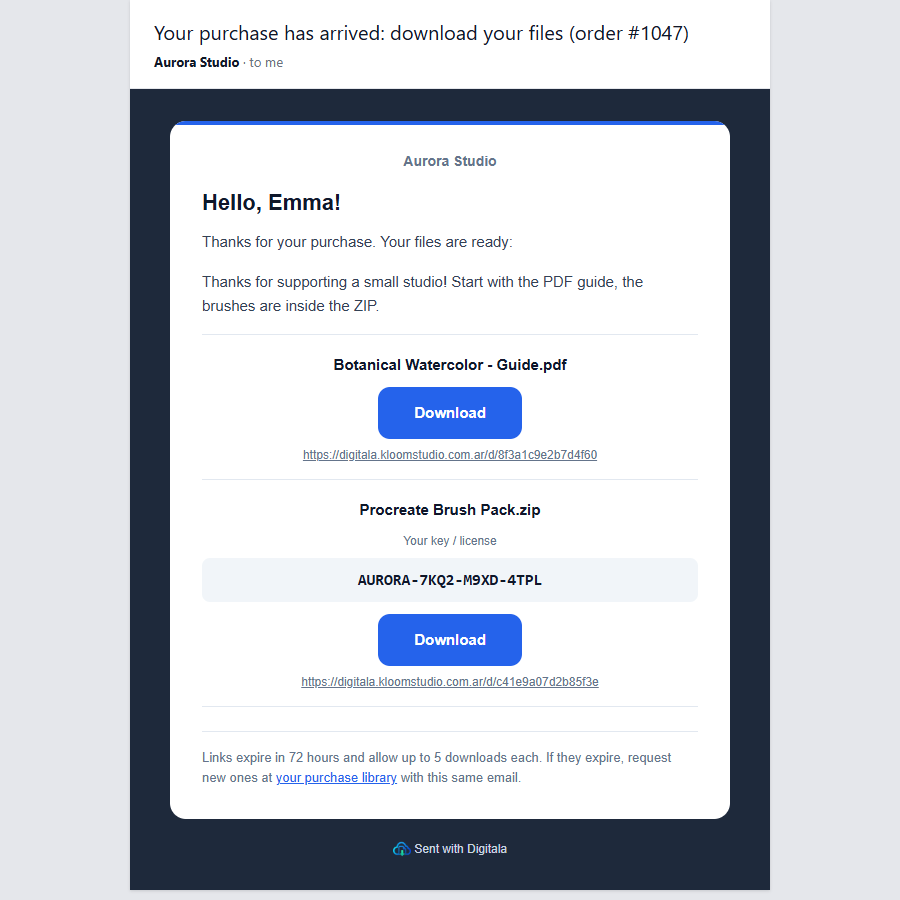
Digitala delivers your digital products and downloadable files on its own. Sell ebooks, templates, courses and license keys in WooCommerce: when an order is paid, Digitala emails the buyer the files, without you sending anything by hand.
- Instant delivery: the buyer gets the email seconds after paying.
- Secure links that expire and have a download limit, so they are not shared around.
- Files or license keys: deliver PDFs, ZIPs, videos, or one key per unit from a pool of codes.
- Signed orders: every notice is signed with your secret, and Digitala discards anything that does not come from your store.
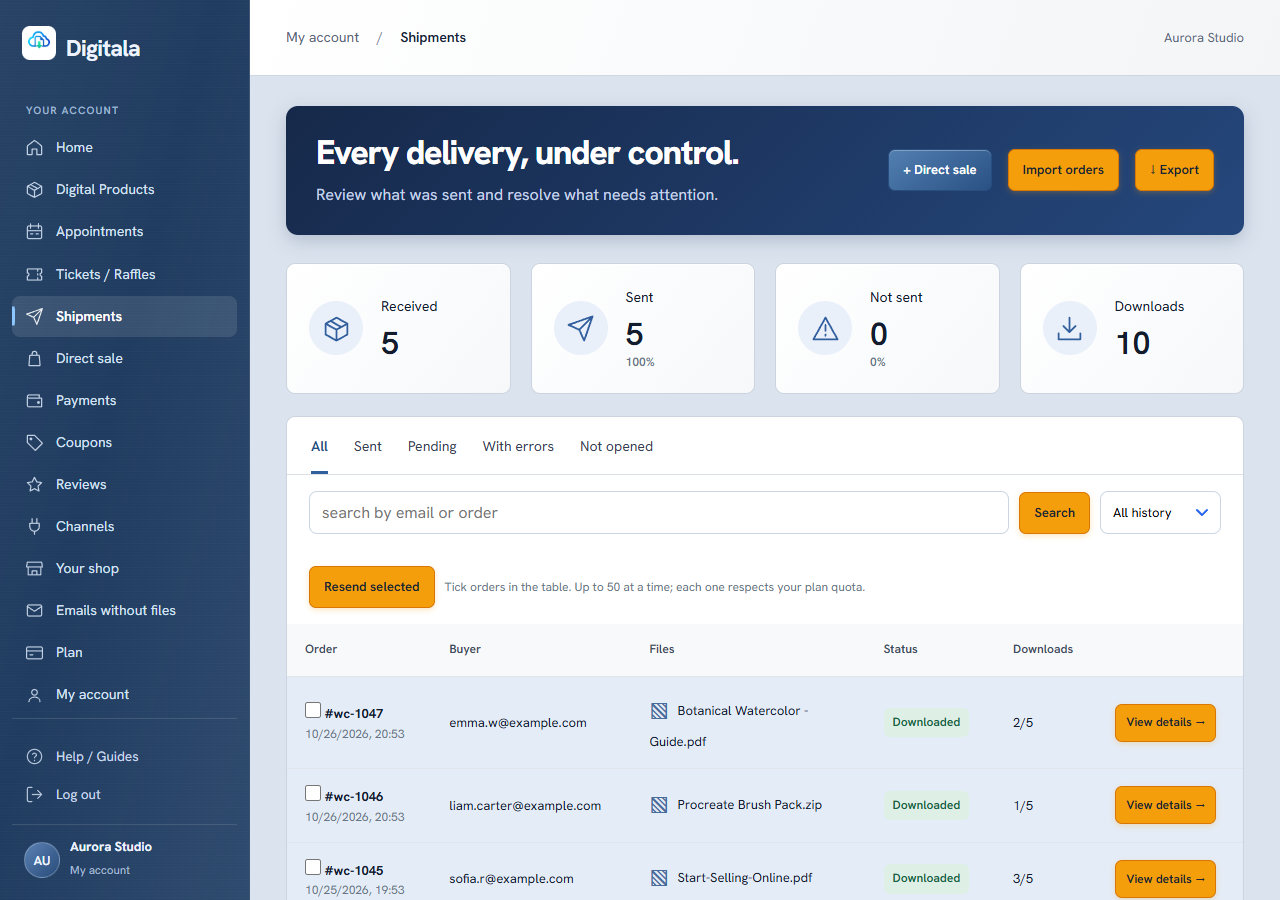
- Redelivery from the dashboard if a buyer loses the email.
- Spanish, Portuguese and English for the dashboard and the emails.
Files, products and delivery emails are set up in the Digitala dashboard; the plugin only connects your store. It creates one WooCommerce webhook and adds no tables or load to your WordPress. Digitala never changes your store.
En español
Entrega automática de productos digitales para WooCommerce. Cuando un pedido se paga, el comprador recibe el archivo por correo con enlaces seguros que vencen. El panel y los correos están en español.
Em português
Entrega automática de produtos digitais para WooCommerce. Quando o pedido é pago, o comprador recebe o arquivo por e-mail com links seguros que expiram. O painel e os e-mails estão em português.
Plans
Free plan with 15 deliveries in total to try it. No automatic charge: you decide if and when you move to a monthly plan, paid in USD from the dashboard. Prices: https://digitala.kloomstudio.com.ar/en/woocommerce
External services
This plugin connects your store to the Digitala service at https://digitala.kloomstudio.com.ar, which emails your buyers the digital products they paid for.
- What is sent: when you click “Connect store”, the plugin creates a WooCommerce webhook with the delivery address and secret you paste. From then on, every time an order is updated, WooCommerce sends that order to Digitala, signed with your secret: order number, status, payment date, items (product ID, SKU, name, quantity) and the buyer’s name and email. The plugin also sends Digitala the ID and name of your products (up to 500) when you connect, a minute after you save a product, and at most once a day when you open WooCommerce → Digitala, signed the same way, so they appear in the dashboard ready to link.
- Why: Digitala uses the order to decide what to deliver and emails the buyer the download links. The buyer’s email is used only to send that delivery.
- When: only while the webhook exists and the plugin is active. Deactivating the plugin pauses it; disconnecting or deleting the plugin removes it.
The plugin adds a suggested paragraph about this service to Settings → Privacy.
Terms of use: https://digitala.kloomstudio.com.ar/en/terminos
Privacy policy: https://digitala.kloomstudio.com.ar/en/privacidad
Installation
- Install and activate the plugin. WooCommerce must be active.
- Create your free account at https://digitala.kloomstudio.com.ar/en/login
- In the Digitala dashboard, open Channels, choose WooCommerce and copy the delivery address and the secret.
- In WordPress, go to WooCommerce → Digitala, paste both and click Connect store.
- Your products show up in the Digitala dashboard on their own: link each one to its file. Paid orders are delivered from then on.
FAQ
Which orders are delivered?
Completed orders, and Processing orders that have a payment date. A Cancelled, Refunded or Failed order cancels a delivery that has not gone out yet.
How does Digitala know which file to send?
It matches each item by product ID or SKU. If an item does not match, the order waits in the dashboard until you assign it once, and Digitala can remember the choice.
How do I stop it?
Click Disconnect in WooCommerce → Digitala, or delete the plugin: both remove the webhook, so orders stop going to Digitala. Deactivating the plugin pauses the webhook until you activate it again.
Does it work with HPOS and the block checkout?
Yes.
Where do I get help?
Write to kloomstudio@zohomail.com.
Screenshots

Changelog
1.0.5
- Your WooCommerce products now appear in the Digitala dashboard on their own, ready to link to their files.
1.0.4
- The free plan now includes 15 deliveries.
1.0.3
- Clearer plugin name and description. No change in how it works.
1.0.2
- All plugin messages now live on the plugin page. The Plugins screen link says “Connect store” until the store is connected.
1.0.1
- Asks for a WordPress.org review once the store has been connected for a week. Dismissable.
1.0.0
- First release.