


Description
Stop Paying Monthly Fees & Per-Cover Commissions. Own Your Restaurant Bookings 100%.
Are third-party booking platforms eating away at your profit margins with $1 to $3 per-cover fees and monthly subscription charges? Are no-shows and chaotic phone reservations during peak service hours causing stress for your floor staff?
Restaurant Table Bookings is the modern, powerful, 100% commission-free table reservation and floor management suite built specifically for restaurants, pubs, bistros, bars, pizzerias, and fine-dining venues.
Turn your WordPress site into a 24/7 automated host stand. Let your guests reserve their favorite tables in seconds, automatically sync bookings to their smartphone calendars, and manage your entire dining room effortlessly from the WordPress dashboard—with zero third-party subscriptions, zero vendor lock-in, and total ownership of your customer data.
🔥 Why Restaurateurs & Hospitality Owners Love Restaurant Table Bookings
- 💰 100% Commission-Free Forever: Keep every penny of revenue from your reservations. No monthly per-seat fees, no per-cover taxes, and no middleman taking a cut of your hard-earned restaurant profits.
- 🛡️ Combat Costly No-Shows: Every booking includes automatic RFC 5545 compliant
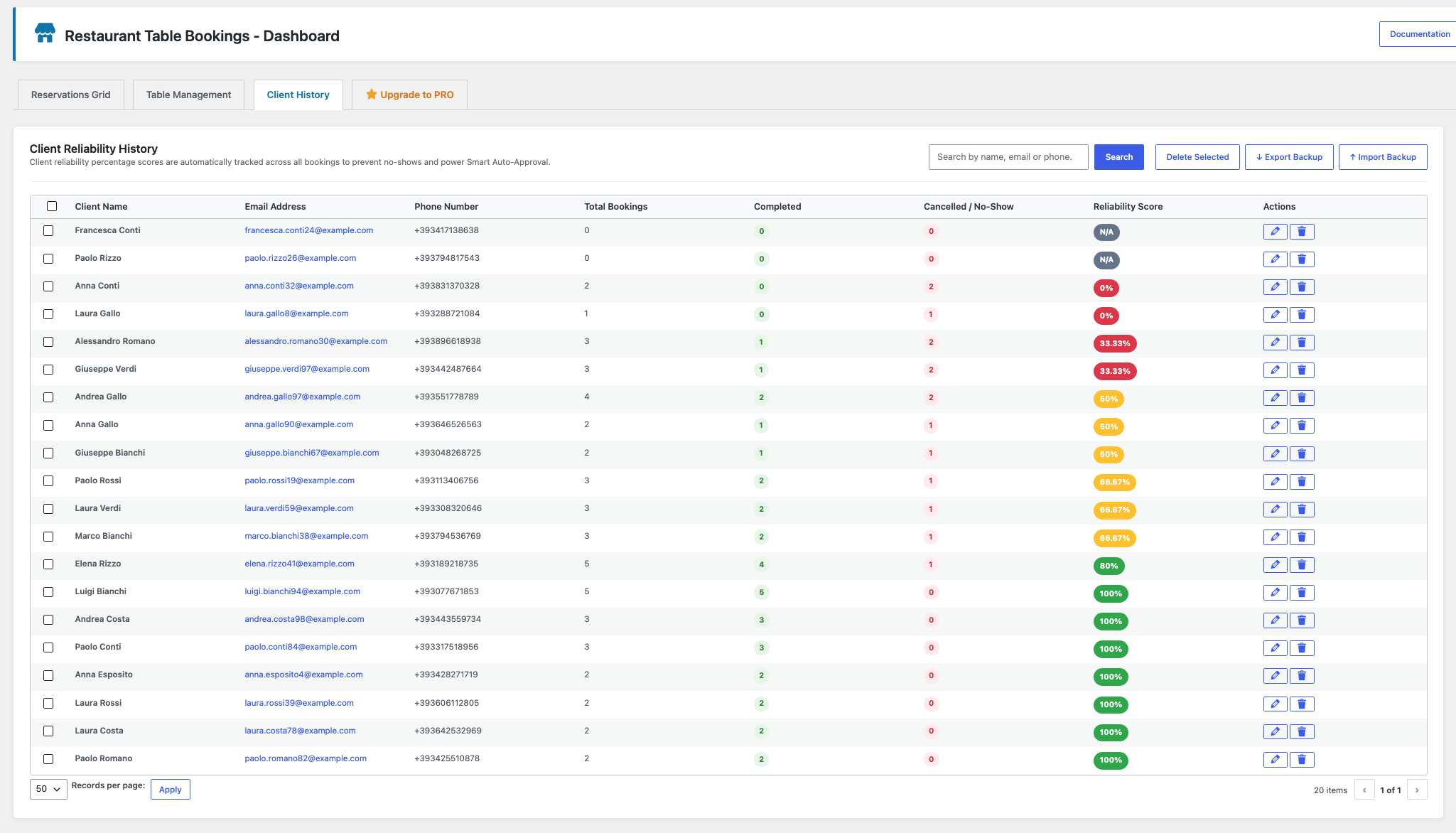
.icscalendar invitations (Apple Calendar, Google Calendar, Outlook) that sync directly to your guests’ smartphones, plus customizable Late Arrival Policy warnings holding tables for a set grace period. - 🧠 Built-In Client CRM & Reliability Scoring: Instantly know who is walking through your door! Our proprietary algorithm tracks total bookings, completed meals, cancellations, and no-shows, awarding visual color-coded reliability badges (Green VIP, Yellow Caution, Red High-Risk).
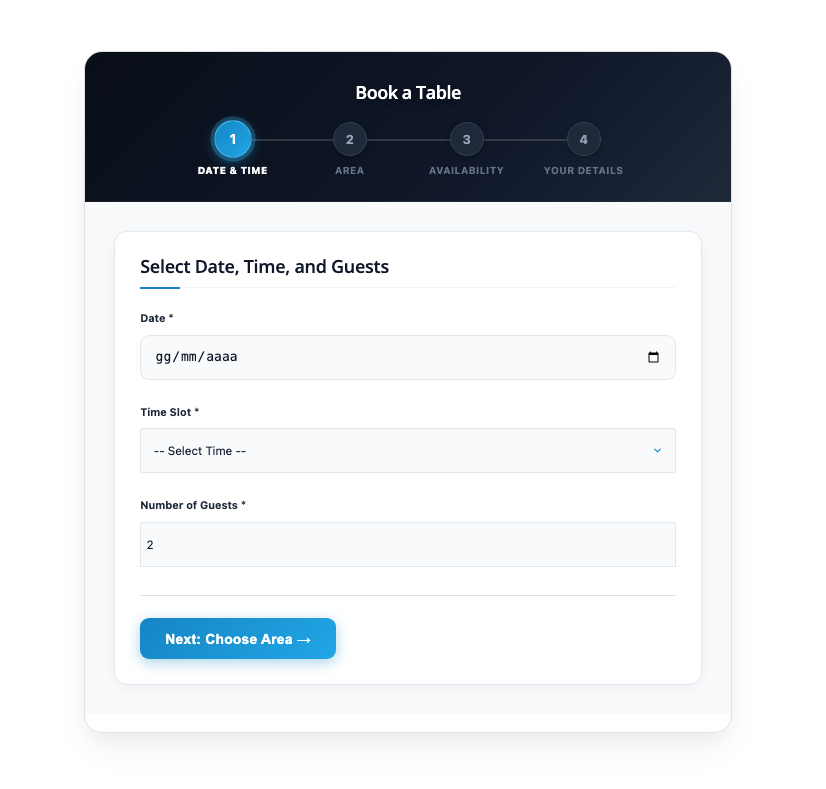
- 🎨 Two Elegant Free Booking Themes: Crisp elevated card panels with slate navy header and electric azure accents (Modern Cards) or a distinct two-column grid layout with horizontal segmented pill stepper and vibrant amber-orange & gold styling (Classic Bistro). (Additional luxury themes including Dark Mode Luxe and Sidebar Split are unlocked with PRO).
- 📱 Ultra-Fast, Mobile & Touch Optimized: Crafted with lightweight Vanilla JavaScript and zero frontend bloat. Renders instantly on smartphones and tablets with zero tap delay.
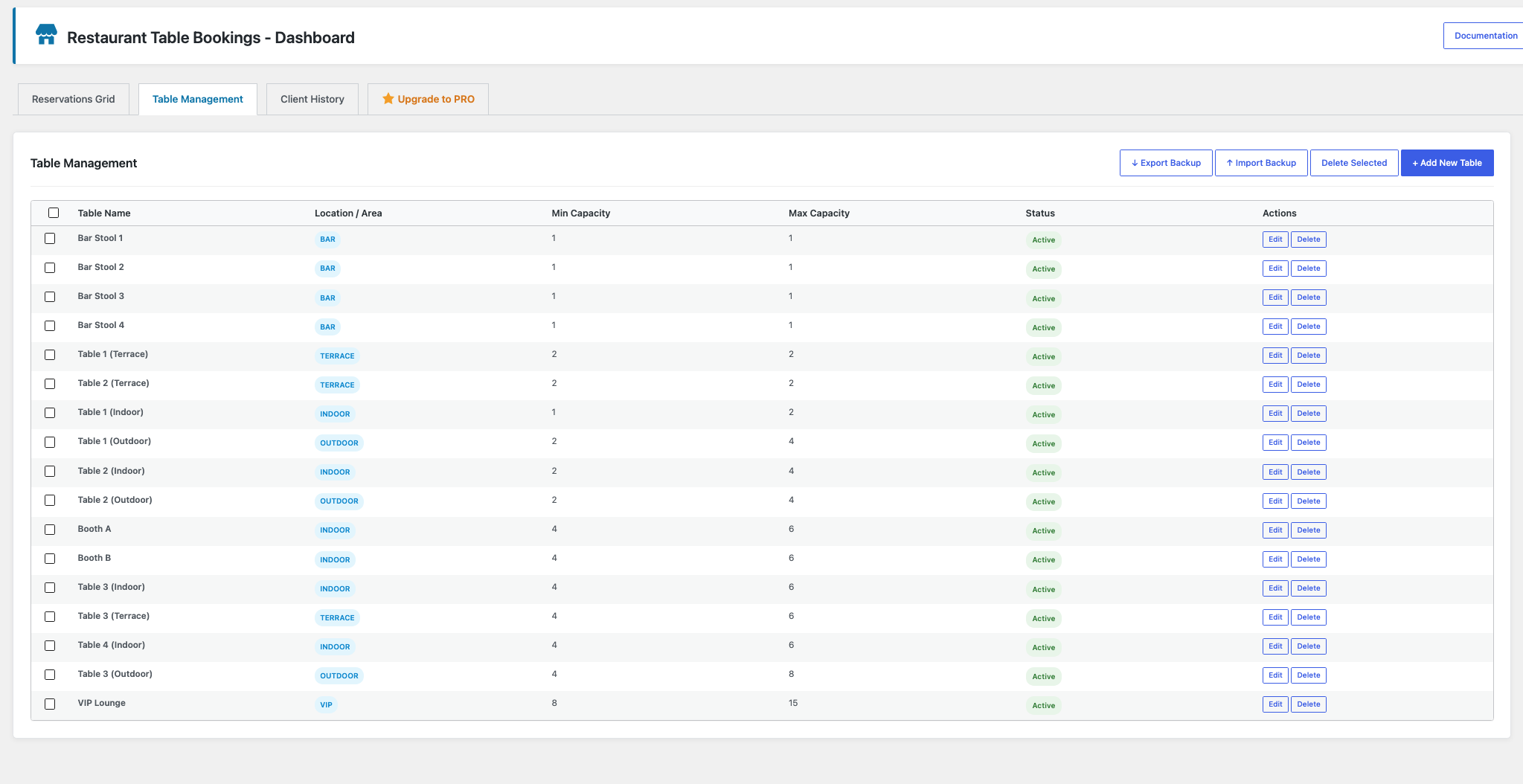
- 📐 Smart Table & Floor Allocation: Define table capacities (min/max guests), multiple dining areas (Indoor, Outdoor Patio, Garden, Rooftop, VIP Lounge), and custom shift hours for Lunch and Dinner.
- ✉️ Automated Transactional Emails with Full HTML & Self-Cancellation: Send branded confirmation, pending, cancellation, and modification notifications with dynamic placeholders (
{booking_code},{client_name},{booking_date},{booking_time},{guests_count},{table_location},{ics_download_link},{cancel_booking_link}). Fully supports custom HTML formatting (bold text, images, logos, styling, links). Guests can securely cancel their reservation directly from their confirmation email, freeing the table instantly and notifying restaurant staff! - 🏷️ Dietary & Special Request Badges: Guests can select quick dietary preferences (⚠️ Allergy, 🌾 Gluten Free, 🥕 Vegan, 👶 High Chair, 🎂 Birthday) or enter custom tags in square brackets (e.g.
[ Anniversary ],[ Window Table ]) that format into prominent badges. - 🚀 1-Click Demo Data: Test-drive the plugin in 10 seconds flat! The built-in demo installer populates realistic tables, guest CRM history, and bookings with one click.
🌟 Need Next-Level Power? Discover Restaurant Table Bookings PRO
Running a fast-paced dining room, busy host stand, or high-volume reception? Restaurant Table Bookings PRO transforms your WordPress site into a commercial restaurant management powerhouse:
- 📱 Fullscreen Staff POS Terminal: A dedicated touch-optimized web terminal for iPads, Android tablets, and front-desk monitors with 3-second phone walk-in bookings and quick-dial customer phone calling (
tel:). - 🗺️ Live Room Occupancy & Interactive Table Map: Real-time visual floor plan with color-coded table cards (Available, Seated, Reserved) and live KPI meters (Seat Occupancy %, Total Covers, Available Tables).
- 🎨 Additional Luxury Form Themes: Unlock Dark Mode Luxe (OLED black with champagne gold styling) and the two-column Sidebar Split layout for your frontend booking form.
- ⚡ Smart Auto-Approval Engine: Set your reservations on autopilot! Automatically confirms trusted, repeat guests with stellar reliability scores while holding first-time or risky guests for staff review.
- 👥 Granular Multi-Staff Security Roles: Create dedicated accounts for hostesses, floor managers, and waitstaff (
restopub_manager,restopub_staff,restopub_viewer) without granting them full WordPress administrator rights. - 💾 1-Click Complete Backup & Migration: Export and import your entire table layout, CRM client list, and reservation history via clean JSON files.
- 🔄 Zero-Loss Upgrade & Downgrade: 100% shared database schema ensures you can activate or deactivate PRO at any time without losing a single reservation or client record.
- 🔗 Official Website & PRO Details: https://levelnetwork.it/en/plugin-restaurant-table-bookings-pro.php
Free Features at a Glance
- Responsive multi-step reservation wizard (
[ln_restaurant_booking_form]) - Two Free Frontend Themes: Modern Cards & Classic Bistro responsive layouts
- International Phone Prefix selector with 40+ countries and smart auto-detection
- Real-time input verification for RFC 5322 email and ITU-T E.164 phone numbers with inline warning badges
- Customer Self-Service Cancellation with secure hash tokens and instant table release
- Immediate staff notification alerts for every new reservation and guest cancellation
- Configurable restaurant notification email with support for multiple comma-separated staff addresses
- Shortcode
[ln_restaurant_cancel_booking]for dedicated front-end cancellation pages - Classic Reservations management table with date & shift filters
- Client CRM history with calculated Reliability Score %
- Physical table management with min/max guest constraints
- Area / Location management (Indoor, Outdoor, Terrace, Bar, Garden)
- Automated email confirmations with customizable HTML templates and dynamic tags
- Reschedule & modification email notifications
- Universal .ics calendar download for Apple, Google, and Outlook
- Special request badges with square bracket syntax
[ VIP ] - Complete privacy & GDPR compliance checkbox with link to your policy
- Built-in 1-click demo data generator & factory reset tool
- Translation ready with 100% gettext internationalization
Installation
Automated Installation
- Log into your WordPress administrative dashboard and navigate to Plugins → Add New.
- Search for
Restaurant Table Bookings. - Click Install Now and then click Activate.
Manual Installation
- Download the plugin archive and extract the
levelnetwork-restaurant-table-bookingsfolder. - Upload the
levelnetwork-restaurant-table-bookingsdirectory to your/wp-content/plugins/directory via FTP, SFTP, or WordPress Admin plugin upload. - Activate the plugin through the Plugins menu in WordPress.
Getting Started & Configuration
- Once activated, navigate to Restaurant Bookings → Settings (
admin.php?page=ln-restopub-settings) in your WordPress admin sidebar. - Configure your restaurant’s lunch and dinner opening hours, time slot intervals (
15,30, or60minutes), average table turn duration (booking_duration), and weekly closed days. - Define your available dining areas (e.g.,
Indoor, Outdoor, Terrace, VIP Lounge). - Go to Restaurant Bookings → Dashboard → Tables & Layout to create your physical tables and assign seat capacities.
- Place the shortcode
[ln_restaurant_booking_form]on any WordPress page or post to display the customer reservation form. - Manage incoming reservations from Restaurant Bookings → Reservations in your WordPress Admin.
FAQ
What shortcodes are available in the Free version?
The Free version provides:
* [ln_restaurant_booking_form] (aliases: [ln_restaurant_booking], [restopub_booking_form], [restopub_booking]): Renders the interactive, multi-step customer reservation form.
* [ln_restaurant_cancel_booking] (alias: [restopub_cancel_booking]): Renders the self-service reservation cancellation portal for guests.
(Note: The [restopub_staff_terminal] touch POS shortcode is unlocked with Restaurant Table Bookings PRO).
Can customers cancel their own reservations?
Yes! Customer self-service cancellation is 100% automated and managed securely via email. Every confirmation and modification email automatically embeds a tamper-proof cancellation link ({cancel_booking_link}) signed with a unique cryptographic HMAC security token. When the customer clicks the link, they land directly on an authenticated review screen displaying their reservation details (code, date, time, party size, table). Upon confirming the cancellation, the table is instantly released back into available inventory, the customer’s CRM reliability score is updated, and an immediate notification email is delivered to the restaurant staff.
Do I need to manually create a cancellation page with [restopub_cancel_booking]?
No. You do not need to create a cancellation page manually. The self-service cancellation flow is dynamic and secured with cryptographic tokens passed directly through the email link. If a visitor opens a standalone page containing [restopub_cancel_booking] directly without clicking a valid email link, the system displays an “Invalid Cancellation Link” security notice. This is a deliberate protection mechanism designed to prevent unauthorized third parties from guessing booking codes and cancelling someone else’s table.
How do I hide exact remaining table or seat capacity numbers from the public?
Under Restaurant Bookings → Settings → Operating Hours & Capacity Rules, configure the Public Availability Display setting. By default, it is set to Discreet / Simplified (displaying clean notices such as “Tables available for booking” and “Table available for your party” without exposing exact numbers or restaurant capacity). If preferred, you can select Hide Seat Capacities (shows only table counts) or Detailed (shows both table counts and remaining seat capacities). An interactive Live Customer Preview box updates instantly as you switch options.
Can I customize the transactional confirmation and alert emails?
Yes! In Restaurant Bookings → Settings → Email Notifications & Templates, you can customize both the subject and body copy for Confirmation, Pending Request, Modification, Cancellation, and Staff Alert emails. All templates support dynamic placeholders (e.g. {booking_code}, {client_name}, {booking_date}, {booking_time}, {table_location}, {ics_download_link}, {cancel_booking_link}). You can also load professionally designed HTML email templates with 1 click, preview them in an interactive modal, or revert at any time using the instant Undo / Restore button.
What is the Pending approval status and how does it work?
When a customer submits a reservation under manual approval mode (or when flagged for review), their request is saved in Pending status. The customer receives a dedicated Pending Notice Email clarifying that their booking is under review (without a premature .ics calendar invitation). Staff receive an urgent alert tagged [ACTION REQUIRED - Pending Approval] with a 1-click link to review the request in the admin dashboard. As soon as staff changes the status to Confirmed, the official confirmation email with .ics calendar invitation is dispatched automatically to the customer.
Can I change the visual layout of the booking form?
The Free version includes two professionally crafted themes: Modern Cards (crisp elevated cards with slate navy header & electric azure styling) and Classic Bistro (two-column grid layout, segmented pill tabs, and vibrant amber-orange & gold styling). Upgrading to Restaurant Table Bookings PRO unlocks additional luxury layouts, including Dark Mode Luxe (ultra-premium OLED obsidian black & 24K liquid gold) and the two-column Sidebar Split layout.
How do staff manage reservations in the Free version?
Staff and administrators manage all reservations directly in the WordPress backend under Restaurant Bookings → Reservations (admin.php?page=ln-restopub-dashboard&tab=reservations). The Classic Reservations Grid provides date filters, shift filters, real-time search, quick status change dropdowns, manual booking modal, and .ics calendar exports.
Will I lose any data if I upgrade to PRO or deactivate PRO?
No. All database tables (wp_pub_reservations, wp_pub_clients, wp_pub_tables) and plugin settings are 100% shared. When you activate Restaurant Table Bookings PRO, your existing reservations, tables, and client profiles are instantly accessible. If PRO is deactivated at any time, all data remains intact in the Free version.
What user roles are supported in the Free version?
The Free version integrates with standard WordPress roles. Site Administrators have complete control over settings, tables, and reservations. Users with the Editor role can manage reservations and tables. Granular front-of-house roles (restopub_manager, restopub_staff, restopub_viewer) are available in the PRO edition.
How does client reliability scoring work?
Every time a reservation is updated, the customer’s reliability score is recalculated inside the client CRM:
Reliability Score (%) = (Completed Bookings / Total Bookings) * 100
Guests receive visual color-coded badges: Green (80-100% – Reliable), Yellow (50-79% – Moderate/Caution), and Red (< 50% – Low Reliability/High Risk).
How do the .ics calendar invitations work?
Upon booking, customers receive a unique booking code and an instant download link (Download Calendar Invitation .ics). The link dynamically generates an RFC 5545 compliant iCalendar stream compatible with Apple Calendar (iOS/macOS), Google Calendar, and Microsoft Outlook.
Where can I find the complete plugin documentation?
A responsive HTML manual (docs/documentation.html) is included directly inside the plugin. You can access it anytime by clicking the Documentation button in the dashboard header or on the WordPress Plugins screen.
How do I disable a specific shift (e.g. closed for lunch)?
Simply leave the Opening and Closing time fields blank in the Settings panel (e.g. clear the “Lunch Opening” and “Lunch Closing” fields). The booking form will automatically remove all time slots for that shift.
Can I completely remove all plugin data when uninstalling?
Yes. By default, the plugin preserves your database so records are not lost during updates. To completely wipe all tables and settings when deleting the plugin, enable Clear All Data on Uninstall (clear_on_uninstall) in Settings before deletion.
Screenshots



Changelog
1.2.4
- Feature: Cascading 3-Tier Smart Fallback UX in Reservations Grid: automatically loads “Today Only”, seamlessly cascades to “Upcoming & Active” if today is empty, or defaults to “All History” to guarantee zero empty-table dead states.
- Feature: Unified quick filter pill navigation (“Today Only” | “Upcoming & Active” | “All History”) with auto-adapting compact labels on mobile screens (“Today” | “Upcoming” | “All”).
- Feature: Added customizable “Special Notes Preview Limit” setting in admin settings to configure character threshold before truncating long guest notes.
- Feature: Interactive non-intrusive floating popover for truncated guest notes with 1-click preview button (
[Read]) and instant tag highlights. - Enhancement: Complete mobile UI/UX optimization for smartphones in portrait orientation: reorganized pending alert box, promo spotlight card, and stacked full-width filter controls.
- Fix: Solved text overflow and wrapping in Special Notes table column preventing text clipping or overlay across action buttons.
- Tweak: Updated onboarding demo dataset with realistic badge tags and detailed notes.
1.1.8
- Fix: Expanded database allowed statuses to support ‘checked_in’ and ‘seated’ table states and normalized ‘noshow’.
- Fix: Updated live table availability queries to correctly account for checked-in and seated guests.
- Tweak: Added status filter support to the reservations AJAX query endpoint.
1.1.7
- Fix: Hardened demo data seeder and installer for full SQLite and WebAssembly compatibility in WordPress Playground preview sessions.
- Tweak: Enabled automatic demo database seeding on WordPress Playground startup, instantly populating sample tables, customers, and active reservations.
- Fix: Changed transaction start syntax from MySQL-specific to universal BEGIN to prevent syntax errors on SQLite database drivers.
1.1.6
- Tweak: Reordered admin sidebar to position the “Support Free Development” card at the top for Free installs (auto-hidden when PRO is active).
- Tweak: Added intelligent contextual “Help & Guidance” sidebar card that adapts to active Free or PRO features.
- Tweak: Replaced header donate button with “Upgrade to PRO” quick link on Free installations.
1.1.5
- Tweak: Optimized plugin title and SEO keywords for WordPress.org search discoverability (Online Reservations & Table Management).
1.1.4
- Fix: Corrected method call in demo data installer for client reliability scoring.
- Tweak: Added automatic demo data seeding for WordPress Playground preview sessions.
- Tweak: Streamlined demo content WXR removing deprecated cancellation placeholder page.
1.1.3
- Added safe HTML tag support (wp_kses_post) across all transactional email template bodies (Confirmation, Pending, Modification, Cancellation, and Staff Alert) allowing custom branding, images, logos, links, and text styling with automatic tag balancing.
- Enabled automated staff notification alerts and client confirmation dispatch for manual reservations created from the WordPress admin dashboard.
- Added dedicated Customer Pending Email notification (
send_pending_email) sent upon booking submission when status is pending, clarifying the review process without premature confirmation or .ics download. - Automated customer confirmation email & .ics calendar invitation dispatch immediately upon staff approving/confirming a pending reservation in the admin panel.
- Added customizable Pending Email Subject and Body templates in Settings with complete placeholder support (
{booking_code},{client_name},{booking_date},{booking_time},{table_location},{cancel_booking_link}). - Enhanced Restaurant Staff Notification Email with urgent subject tag
[ACTION REQUIRED - Pending Approval]and direct 1-click dashboard link when requests await staff review. - Added live pending count bubble badge to the WordPress admin sidebar menu item
Restaurant Bookings(<span class="update-plugins count-X"><span class="plugin-count">X</span></span>). - Added prominent pending attention banner in Classic Reservations Table with instant 1-click filter for pending requests.
- Added Status Filter selector (
All Statuses,Confirmed,Pending,Completed,Cancelled,No-Show) in Classic Reservations Table. - Implemented instant Auto-Save on Status select changes in Reservations Grid, accompanied by an explicit manual Save checkmark icon button.
- Added modern floating Toast notification system (
.ln-admin-toast) and visual “Saved” badge for real-time status change feedback. - Hardened admin AJAX security capabilities with
manage_optionsfallback to ensure administrators are never blocked. - Restyled and visually hardened
layout-modern-cardsandlayout-dark-luxefrontend form themes.
1.1.2
- Added new Free form layout theme: “Classic Bistro”, featuring a distinct two-column responsive grid structure, horizontal segmented pill stepper, warm ivory canvas, and radiant amber-orange (#ea580c) and gold (#f59e0b) accents.
- Added Administrator Setup Guidance Card when no tables are configured, with direct 1-click links to Table Management and courtesy visitor notice.
- Added past time slot filtering on today’s date, preventing clients from selecting or booking time slots that have already passed.
- Fixed .ics calendar invitation download handling by hooking template_redirect and authenticating via dual cryptographic HMAC tokens and nonces with buffer sanitization.
- Added customizable Staff Alert Email Subject and Body templates in the backend settings for incoming online reservations.
- Added International Phone Prefix selector with 40+ countries/flags and smart auto-detection via timezone, browser language, and IP lookup.
- Added Real-Time Input Verification with inline warning banners for RFC 5322 email syntax and ITU-T E.164 phone numbers.
- Added Customer Self-Service Reservation Cancellation via secure cryptographic HMAC token links in emails.
- Added dedicated front-end cancellation portal (
[ln_restaurant_cancel_booking]) with instant table inventory release. - Added automatic staff / pub email notification alerts for every new reservation and guest cancellation.
- Added configurable Restaurant Notification Email setting supporting multiple comma-separated staff addresses.
- Fixed literal
<strong>tag output on Step 5 reservation confirmed screen. - Fixed zero-availability edge cases to prevent advancing to the next step when no tables are available.
- Enforced PRO exclusivity on luxury themes (Dark Mode Luxe, Sidebar Split) and Smart Auto-Approval threshold settings.
- Hardened database reservation joins from INNER JOIN to LEFT JOIN to guarantee reliable email dispatch.
1.1.1
- Modularized into Free Core and PRO Add-on architecture with zero data loss migration.
- Added Classic Reservations Table in WordPress Admin with date/shift filters and search.
- Enforced strict promotion capability checks for staff role assignments.
- Enhanced input sanitization across demo data imports and CRM profile updates.
- Updated documentation and shortcode aliases.
1.1.0
- Added transactional Modification Email and Cancellation Email notifications.
- Integrated Late Arrival Warning notice (
{late_arrival_notice}) into email templates. - Added HTML placeholders and fallback preservation across communication fields.
- Enforced strict server-side table max-capacity validation.
1.0.0
- Initial public release.