


Description
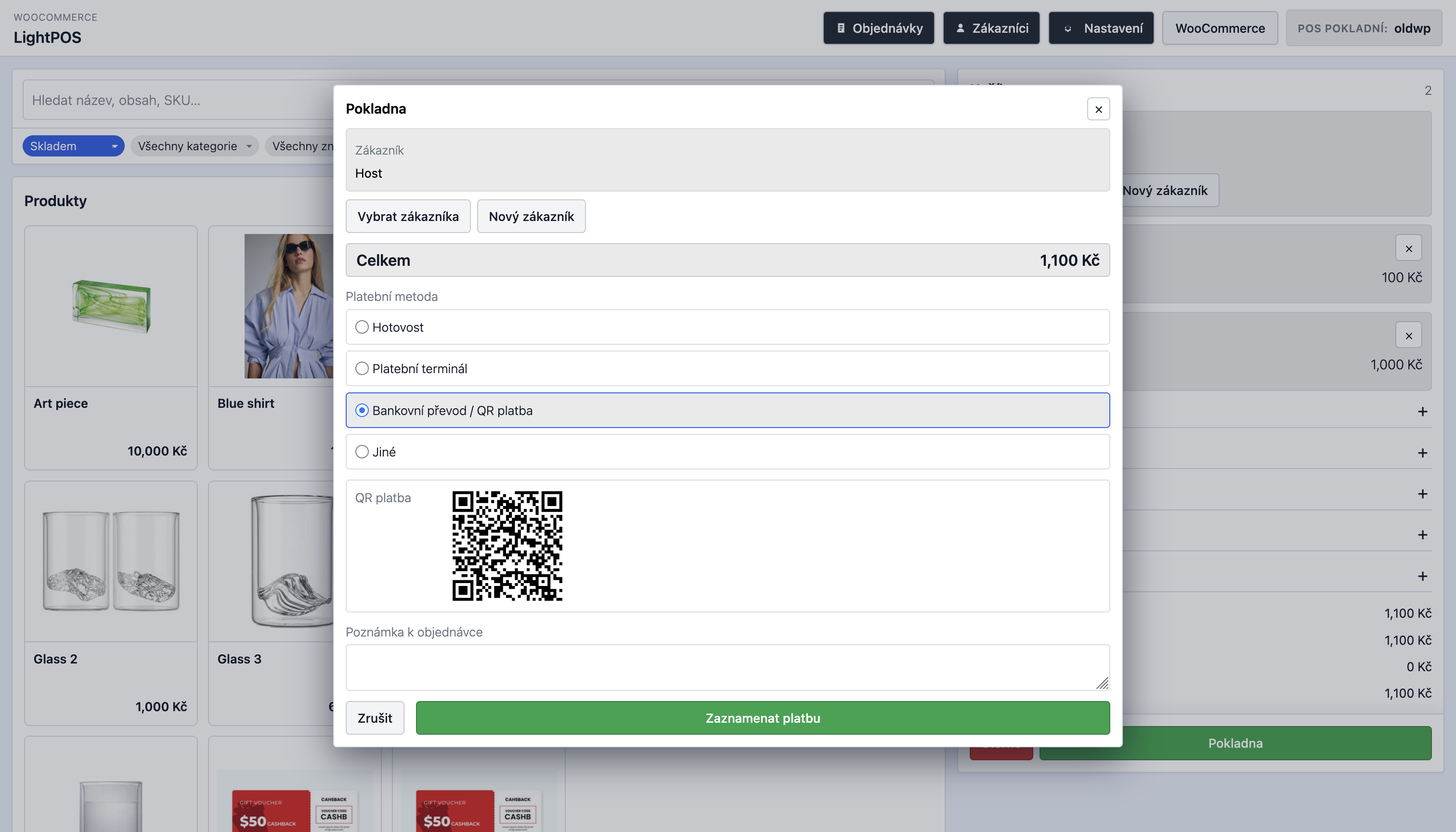
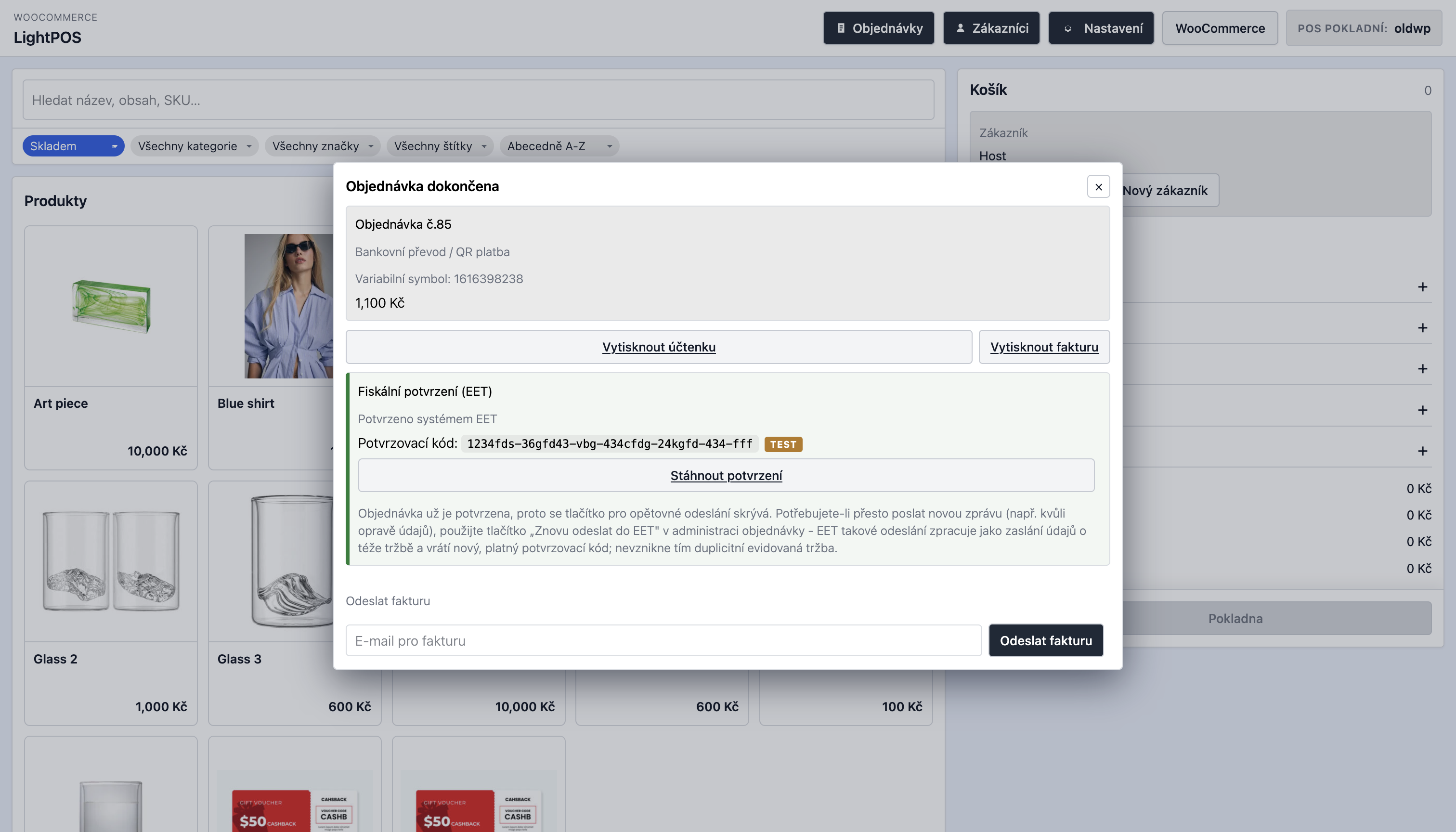
LightPOS je pokladní systém pro rychlý prodej: podporuje QR platby v CZK a EUR, multiccreuncy, správu zákazníků a práci s existujícími objednávkami přímo v POS. Obsahuje integraci s pluginem PDF Invoices & Packing Slips for WooCommerce pro tisk a odesílání faktur a s pluginem EET 2.0 pro WooCommerce pro elektronickou evidenci tržeb. LightPOS může po dokončení prodeje odeslat tržbu do EET 2.0, zobrazit stav evidence přímo v POS a zpřístupnit fiskální potvrzení.
V LightPOS můžete také přímo definovat vlastní zákaznická meta pole (např. IČ, DIČ), která lze programově využít ve vlastních pracovních postupech, například ve fakturách, e-mailových šablonách nebo jiných integracích na míru.
Hlavní funkce
- Samostatná responzivní pokladna s nastavitelnou URL adresou, zobrazením produktů a přehlednými ovládacími prvky pro obsluhu.
- Rychlé vyhledávání produktů a nastavitelné filtrování podle skladu, kategorií, značek, štítků, jazyka a klíčových slov.
- Volba filtrů produktů, které uvidí obsluha pokladny.
- Podpora variantních produktů, detailu produktu v dialogu a přidávání do košíku s kontrolou skladu.
- Přidávání vlastních položek s vlastním názvem, SKU, DPH a cenou.
- Sbalitelné nástroje košíku pro kupóny, ruční poplatky, slevy a dopravu.
- Platba v hotovosti se zadanou přijatou částkou a automatickým výpočtem vrácené hotovosti.
- QR platby pro CZK (SPAYD) a EUR (EPC) s ověřením bankovních údajů bez služby třetí strany.
- Storno aktuálního prodeje z košíku.
- Vyhledávání, vytváření, úprava a přiřazení zákazníků během platby.
- Nastavitelná vlastní zákaznická pole s popisky připravenými pro Polylang a WPML.
- Možnost programově znovu použít vlastní zákaznická pole ve fakturách, e-mailech a dalších integracích na míru.
- Nastavitelné platební metody POS s mapováním stavů objednávek.
- Nastavitelný jazyk rozhraní POS s češtinou a angličtinou.
- Kompatibilita s WooCommerce HPOS a práce s objednávkami přes WooCommerce CRUD API.
- Multicurrency integrace s CURCY a FOX Currency Switcher.
Objednávky, stavy a e-maily
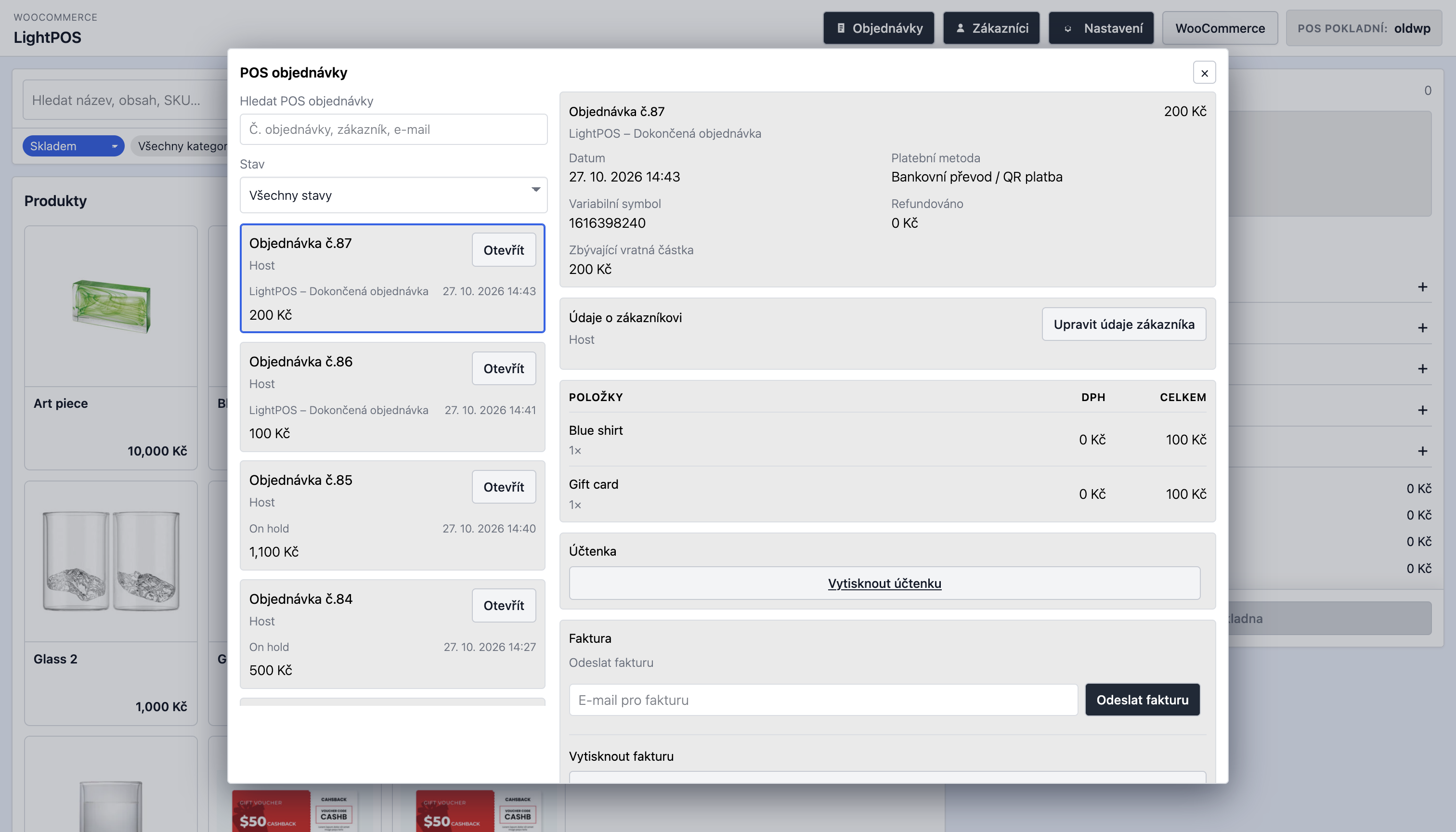
- Plugin označuje objednávky vytvořené v POS, aby je bylo možné spravovat odděleně od běžných objednávek e-shopu.
- Přidává vlastní stav WooCommerce pro dokončené POS objednávky.
- Registruje vlastní e-mailovou šablonu účtenky pro POS objednávky.
- Volitelně přikládá účtenku LightPOS jako HTML soubor k e-mailu s účtenkou.
- Umožňuje přepsat šablonu účtenky v child šabloně pro potřeby konkrétního obchodu nebo legislativy.
- Integruje se s pluginem WooCommerce PDF Invoices & Packing Slips od WP Overnight pro tisk a odeslání PDF faktur.
- Pozdější ruční odeslání faktury nebo účtenky z detailu objednávky.
- Akce pro zobrazení detailu a úpravu údajů zákazníka, zrušení objednávky a vytvoření vratky s volitelným naskladněním.
Installation
- Nahrajte plugin do
/wp-content/plugins/nebo jej nainstalujte do lokálního projektu. - Aktivujte WooCommerce.
- Aktivujte LightPOS – Pokladní systém (POS) pro WooCommerce.
- Otevřete
LightPOS > Nastavenía nastavte odkaz POS, filtry, měny, platební metody a zákaznická pole. - Otevřete pokladnu přes
LightPOS > Otevřít POS.
FAQ
Podporuje HPOS?
Ano. Plugin podporuje kompatibilitu s HPOS a pro práci s objednávkami i zákazníky používá WooCommerce CRUD API.
Mohu upravit účtenku v child šabloně?
Ano. Zkopírujte šablonu účtenky do child šablony a upravte ji tam. LightPOS podporuje přepsání v lightpos/ i starší cestu minimal-pos/ pro zpětnou kompatibilitu.
Synchronizuje LightPOS zákazníky přes WP Remote Users Sync?
Ve výchozím stavu ne. Plugin WP Remote Users Sync při každém vytvoření nebo úpravě uživatele čeká na odpověď vzdálených webů (až 1 s + 5 s při opakování), takže ukládání zákazníka v pokladně trvalo kolem 6 sekund. LightPOS proto při vytvoření a úpravě zákazníka v pokladně jeho synchronizaci vypíná. Ostatní synchronizace (registrace na webu, úpravy v administraci, přihlášení) fungují dál beze změny.
Pokud chcete POS zákazníky synchronizovat, vložte do functions.php šablony nebo do vlastního pluginu:
add_filter( 'minimal_pos_skip_remote_user_sync', '__return_false' );
Screenshots

Changelog
0.1.54
- Product images: the POS loads WooCommerce’s product image size (
woocommerce_single, original proportions, never cropped) instead of the “medium” size; if it was not generated, the smallest uncropped copy at least 300px wide, then the original. On sites whose theme disables “medium” (sets it to 0x0), WordPress returned the full original upload (often 2500px / 0.5 MB+) for every tile. - POS orders list: shows all orders – when you scroll to the end of the list the next page loads automatically (with a “Načítání…” indicator; a “Load more orders” button is the fallback). Previously only the first 20 orders were shown.
- Product tiles: stock locations are shown on their own line under the available quantity, without the “Sklad podle umístění” label and the “•” separator.
- Product tiles (grid view): title and availability line up across each row – when one title wraps to two lines, every tile in that row reserves the same title height (CSS subgrid), so the details below stay aligned.
- Customer and order search now run automatically shortly after typing stops, like the product search (no Enter needed). A slower, older response can no longer replace the results of a newer search.
0.1.53
- Customer form: no longer closes when clicking outside it; close it with × or Escape.
- Checkout: “Přijatá hotovost” and the change line are cleared after a successful sale.
0.1.52
- WooCommerce order admin: POS sales show their payment method as “POS – Hotovost” / “POS – Cash” (in the admin’s language) in the order header and order preview, and the POS methods can be chosen in the order’s payment method dropdown. They are never offered at the storefront checkout or listed in the Payments settings. E-mails and documents rendered in another language (e.g. an English order via Polylang) show the method name in that language. Stored order data is unchanged.
- EET card: after a confirmed submission the long “already confirmed / resend” note is no longer shown (checkout-complete screen and order detail), the “Stáhnout potvrzení” button is a download icon in the card’s top-right corner (labelled for screen readers and with a tooltip), and the XML button is compact.
- Customer form: field labels no longer repeat their section (“Fakturační jméno” -> “Jméno”, “Doručovací PSČ” -> “PSČ”, …); the account e-mail is labelled “E-mail účtu” to tell it apart from the billing “E-mail”. Czech translations added.
- Customer form: the “Customer” heading and close button stay visible while the form scrolls, and first/last name, phone/email and city/postcode sit side by side from 992px up (full width below).
0.1.51
- VAT guard: a POS sale is refused before anything is recorded (order, EET, invoice, stock, emails) if a taxable line would have no VAT. Checked are products and custom items, manual delivery and fees (must carry VAT when a non-zero rate exists) and discounts (must reduce VAT when the sale carries VAT); lines marked as not taxable are skipped, and nothing is checked when WooCommerce taxes are disabled. Can be turned off with the
lightpos_tax_guard_enabledfilter. The guard first retries in the same request (clears the tax-rate cache and a stray VAT exemption, recalculates); if VAT is still missing, the payment dialog shows the cashier what to do with a “Recalculate VAT and record payment” button, the refusal is logged under WooCommerce > Status > Logs (sourcelightpos-tax-guard) and emailed to the addresses from thelightpos_tax_guard_alert_recipientsfilter (default: site admin email), at most once per cause every 10 minutes. - VAT on POS sales is always calculated at the store’s base address (WooCommerce > Settings > General), not from the cashier’s WooCommerce customer session, which is shared with the storefront and could carry another country. Developers can override the location with the
lightpos_tax_locationfilter. - Faster checkout: the checkout request no longer spawns WP-Cron (a loopback request that took ~1 s locally); it runs on the next request. Background jobs queued by a sale (EET, notifications) are started by a new
POST /minimal-pos/v1/background/dispatchcall the POS makes right after showing the order-complete screen. Add-ons can detect this via theminimal_pos_dispatches_background_jobsfilter. - EET: while a queued EET submission is in progress, the order-complete screen and the order detail show “Čeká se na odeslání do EET…” with a spinner and update themselves when the confirmation arrives (about 2 minutes of polling, then a “continuing in the background” note). Polling stops when the dialog is closed; the submission continues on the server. Requires EET 2.0 for WooCommerce 1.0.52 (background start after checkout: 1.0.53).
- Customer form: billing and shipping country are dropdowns of WooCommerce’s selling/shipping countries and store the ISO code (e.g. CZ), with the store’s base country preselected for new customers. Country names typed into the old text field (e.g. “Česká republika”) are converted to their code on save; unrecognised values are kept.
- Customer form: the region (state) field follows the selected country like WooCommerce’s checkout – a dropdown where WooCommerce has a region list, hidden where the country has none (e.g. CZ, SK), a text field otherwise. Region names are saved as WooCommerce codes.
0.1.50
- Faster customer saves: creating or editing a customer selects them for the sale in the same request, the WooCommerce customer save is skipped when no core field changed, and the customer list loads user data in bulk.
- POS customer saves no longer trigger WP Remote Users Sync, which waited up to 6 s for remote sites. Re-enable with
add_filter( 'minimal_pos_skip_remote_user_sync', '__return_false' );. - The Save customer button is disabled while a save is running, preventing duplicate submissions.
- The “Invoice email” field is prefilled with the order’s billing email, falling back to the customer’s account email.
- The product search placeholder lists the fields configured in “Searchable meta keys” in lowercase (ACF field labels where available; acronyms such as EAN stay uppercase). New filter:
minimal_pos_search_placeholder. - Product variations in the product detail are sorted naturally by their label (e.g. 3/80, 5/80, 11/80, 50/80).
- POS orders dialog: the order list and the order detail scroll independently, so the list is no longer cut off next to a long order detail.
0.1.49
- POS order detail lists products at their price before discount codes, so the lines and the separate discount code lines add up to the order total.
0.1.48
- The POS order detail now lists the discount codes applied to the order (with their discount and VAT), below the order items.
0.1.47
- The coupon form in the cart now closes after a discount code is added.
- The order line created for a discount code on custom products is now translated (“Slevový kód: CODE”) instead of showing English text.
0.1.46
- Fixed checkout failing with “No stock location can fulfill …” for custom products: custom order lines are now marked as having no stock to allocate.
0.1.45
- Custom products are now included in the cart subtotal rows and show their VAT in the cart line.
- Discount codes and POS percentage/fixed discounts now also apply to custom products when the cart mixes them with regular products; the VAT of such discounts is split across both.
0.1.44
- Removed the temporary cart totals and VAT rate debug logging (PHP error log and browser console).
0.1.43
- Product detail no longer shows the “Stock by location” label before the location stock list.
0.1.42
- Discount codes (percentage and fixed cart) now reduce the total when the sale contains only custom products.
0.1.41
- Fixed a fatal error when adding a custom product (private WC_Cart::reset_totals() call).
0.1.40
- Custom product VAT rate list no longer repeats the same rate once per country.
0.1.39
- The custom product VAT rate list is populated as soon as the configuration loads, and is fetched on demand if the dialog is opened before it has loaded.
0.1.38
- Fixed fees, discounts, coupons and delivery not being included in the cart and checkout totals (and the created order) when the sale contains only custom products: WooCommerce skips fee calculation for an empty native cart, so totals are now calculated directly in that case.
0.1.37
- Fixed a single customer search result stretching to fill the whole customers dialog; rows now keep their natural height.
- The sticky “Save customer” button is now exactly as wide as the form inputs.
- Product tiles in the first server-rendered page now show the available stock and stock by location, exactly like tiles rendered after a filter change.
0.1.34
- Faster customer save: selecting a customer now applies the cart returned by the select request (which includes the selected customer) instead of fetching the cart a second time, removing one request and one cart totals calculation.
- The customer form’s save button is now sticky at the bottom of the dialog so it is always visible.
0.1.33
- Fixed custom customer fields (including the default IČ, DIČ and IČ DPH fields) not being saved when adding or editing a customer in the POS. The save wrote the legacy
billing[ic]/billing[dic]values, which the form never sends, over the submitted custom field values. Fields missing from a request are no longer cleared. - Added a “Customer saved.” confirmation after saving a customer, and failed saves now show their error message instead of failing silently.
0.1.32
- Fixed a fatal error when opening product detail for a single (simple) product with WC Multi Stock enabled: WordPress unwraps a one-element array passed to
do_action(), so the stock prefetch now accepts a single product. - Fixed WooCommerce 9.2+ “meta_query is not supported in the current order data store” notices on sites using legacy post order storage. POS orders are now selected with
meta_key/meta_valueon legacy storage andmeta_queryon HPOS.
0.1.31
- Performance (no change to cashier-facing features): product paging now resumes after the previous page’s last product (opaque keyset cursor with a unique-ID tiebreaker) instead of re-scanning the catalogue from the start; numeric
pagestill works as a fallback. - Performance: request-local memoization of WC Multi Stock availability, variable-product variations, stock payloads and price checks during product list/detail reads. Cart and checkout are never memoized, so reservation-aware validation stays strict and live.
- Performance: optional bulk WC Multi Stock availability hook (
minimal_pos_wcms_bulk_availability); without a provider the existing per-location reads are used and results are identical. - Performance: POS orders are selected with the
_minimal_pos_ordermarker insidewc_get_orders()(legacy storage and HPOS) and status options use single-row existence queries, so storefront orders are no longer loaded and scanned. - Performance:
/configno longer rebuilds the filter vocabularies already embedded in the POS page (opt in with?include_filters=1); cart totals are calculated once per mutation; infinite scroll appends new product cards instead of re-rendering the whole grid;no_found_rowson product ID queries. - Added a development-only profiler (
define( 'MINIMAL_POS_PROFILE', true );) and standalone regression tests intests/.
0.1.30
- Fixed CURCY multi-currency POS cart requests sending duplicate currency cookies during cart serialization. The selected currency is now applied at most once per request, preventing oversized response headers and production 502 errors.
0.1.29
- Updated POS Cashier role to access WooCommerce Products.
0.1.28
- Hid WooCommerce dashboard widgets for POS Cashiers because WooCommerce requires broad store-management and reports permissions to load them.
0.1.27
- Fixed POS Cashier access to WooCommerce order screens in wp-admin without granting broad post-editing or WooCommerce-management permissions.
- Fixed the WordPress admin-menu access check for creating WooCommerce orders as a POS Cashier.
0.1.26
- Made the POS ready for interaction immediately: customer selection, product actions and filters no longer wait for the startup REST requests.
- Hydrated the initial server-rendered cart and product list in the browser, preventing the customer panel from appearing late and eliminating the initial product-grid flash.
0.1.25
- Fixed CURCY currency switching in LightPOS by persisting the selected POS currency in the WooCommerce session and restoring it for every POS REST request.
- Prevented non-base-currency sales when CURCY has no explicit fixed price for the product or variation; affected products are unavailable instead of displaying a converted base price with a different currency symbol.
- Added clear currency-switch failure handling in the POS API.
0.1.24
- Added configurable QR bank payments for CZK and EUR, including Czech account, IBAN and SWIFT/BIC validation.
- Added locally generated SPAYD and EPC QR codes, with a unique server-generated payment reference. Czech QR payments use this value as the variable symbol; completed bank-transfer orders retain it in WooCommerce order metadata and display it in LightPOS and WooCommerce order details.
- Fixed REST cart-session restoration and immediate session persistence for all POS cart changes, preventing products and cart adjustments from disappearing between requests.
- Added organized Czech LightPOS settings tabs, QR-payment settings, PDF invoice guidance, and English translations for new POS labels.
- Refined checkout, product imagery, dialogs, receipt customization guidance, and POS toolbar controls.
- Hardened the POS inline configuration and QR payload handling.
0.1.23
- Added content-based asset cache busting and early no-cache handling for the POS route.
- Added compatibility with current and legacy CURCY / Woo Multi Currency releases.
- Ensured WooCommerce administrator cancellation notices are sent when eligible LightPOS orders are cancelled.
0.1.22
- Refined the order-items table header styling.
0.1.21
- Removed padding from the order-items table header.
0.1.20
- Restored the order-items header to a normal background with black text and removed temporary cart calculation error logging.
0.1.19
- Simplified the order-items card and styled its column header as a black table header.
0.1.18
- Made the manual-discount amount field span the full form width.
0.1.17
- Added a “Print invoice” section heading above the invoice print action in the POS order detail.
0.1.16
- Simplified invoice-send wording and use “Send invoice” instead of “Resend invoice” in the order detail.
0.1.15
- Combined invoice sending and printing into one invoice card in the POS order detail, with email sending shown before printing.
0.1.14
- Simplified refund wording in Czech and English, and hide the “Create refund” opener after the itemised refund form is opened.
0.1.13
- Removed the manual-discount title field. Discounts use the localized default name automatically.
0.1.12
- Fixed zero-decimal currency rounding for VAT-inclusive manual delivery. The stored delivery amount now matches the whole-currency amount shown in the POS and no longer creates a one-koruna total difference.
0.1.11
- Improved diagnostic logging for POS cart-calculation discrepancies.
0.1.10
- Fixed manual VAT-inclusive discounts combined with a coupon: their VAT allocation now follows WooCommerce’s post-coupon calculation order.
- Product prices in the POS are rounded to the active currency’s configured precision before VAT calculation, so visible and charged amounts agree.
- An unnamed manual discount now defaults to “Discount” (“Sleva” in Czech), and fee, discount, and shipping panels close after their line is added.
0.1.9
- Fixed VAT allocation for VAT-inclusive POS discounts after coupon discounts, preventing whole-koruna total discrepancies.
- Manual delivery rows now display the calculated gross amount used by the WooCommerce cart total.
0.1.8
- Improved the POS order refund workflow with itemised product, fee, and shipping refunds, VAT-inclusive refund amounts, and clearer refund controls.
- Cancelling an invoiced POS order now creates a full WooCommerce refund so compatible invoice plugins can generate a credit note.
- Improved the checkout, order-detail, and refund UI, including VAT and total displays.
0.1.7
- Updated the WC Multi-Stock integration for WCMS 1.0.7: stock is allocated before checkout completes; shortages leave the cart intact and do not create an invoice.
- Cashier-selected locations remain fixed. Stock display and validation subtract online reservations, and location inventory cannot be oversold using a confirmation override.
- Refunds use explicit WooCommerce item lines with per-item quantities and refund amounts. Returned quantities are validated against prior refunds, and restocking can be selected separately.
- Deploy both LightPOS 0.1.7 and WCMS 1.0.7 together when using the location stock integration.
0.1.6
- Replaced legacy POS header controls with a settings modal for currency and interface language selection.
- Added a return link to WordPress admin in both the POS header and the settings modal.
- Improved admin settings UX with clearer language-setting descriptions.
0.1.5
- Fixed CSS/JS inlining, escaping and few other minor issues.
- Added translation updates for the new admin copy and bumped the plugin version for the settings/documentation refresh.
0.1.4
- Added plugin packaging fixes for WordPress.org submission, including license metadata and review-driven compatibility cleanups.
- Improved Plugin Check compliance for template loading, escaping, and packaging expectations.