


Description
Find out when your WooCommerce store stops taking orders, before your customers tell you.
Every 15 minutes the plugin checks the things that quietly break checkout, and emails you when one turns red:
- no payment method enabled, or one left in test or sandbox mode
- cart or checkout page unpublished or unset
- maintenance mode left on
- a burst of failed payments, or one payment method failing while the others take money
- orders stopped coming in on a store that normally has a steady flow
- SSL certificate close to expiry, slow DNS, a stalled Action Scheduler, WooCommerce fatal errors
- orders that never sent their “New order” email
- card-skimmer scripts injected into pages or settings, PHP files hidden among the uploads, an administrator called “admin”
- Redis or Memcached object cache that stopped answering
- JavaScript errors real shoppers hit on the cart and checkout, and payment scripts that fail to load
- a wave of failed logins, with the usernames bots try and the networks they come from
- wp-config.php, index.php, .htaccess or your theme’s checkout templates changed outside an update
Free, no account, and nothing leaves your server. One email per problem, and another when it is fixed.
It comes in two parts. The first one is free and needs no account.
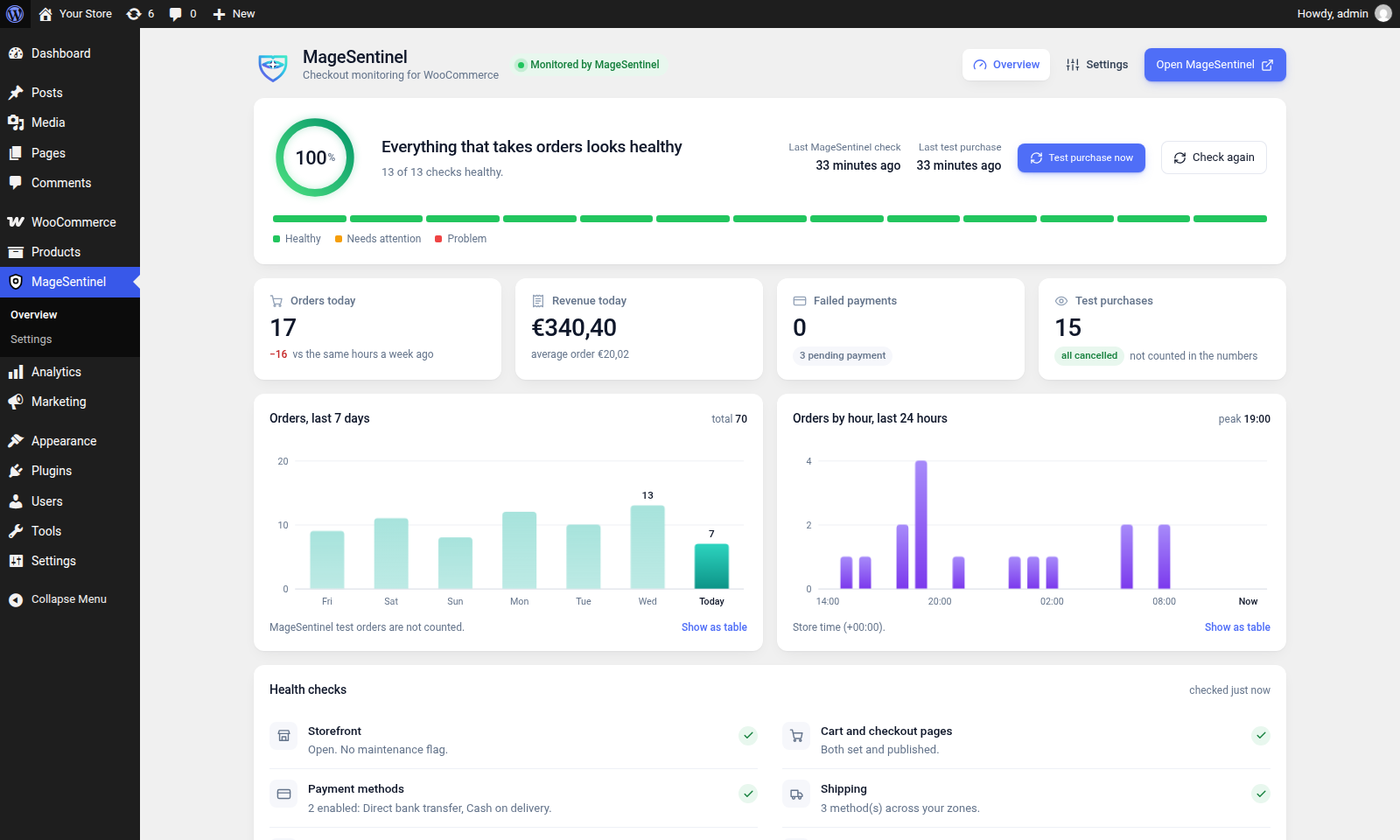
A health page in your admin. Under the MageSentinel menu you get a plain reading of the things that quietly stop a WooCommerce store from taking money: whether the cart and checkout pages are still set and published, whether any payment method is enabled at all, whether a shipping zone exists, how many fatal errors WooCommerce logged in the last day, whether Action Scheduler is running on time, whether this server’s DNS answers quickly (a slow nameserver makes every payment and courier call wait), and whether a WooCommerce database update is waiting. Each row links straight to the screen that fixes it.
Email alerts, every 15 minutes. The same checks run on your site every 15 minutes. When one turns red — no payment method, the checkout page unpublished, maintenance mode left on, a pile of failed payments, or orders that stopped coming in when your store normally has a steady flow — you get an email naming the problem and the screen that fixes it, and another when it is fixed. One email per problem, not one per hour. The email goes out through your site’s own mail; nothing else leaves your server. Send it to any address, or switch it off.
A weekly summary email (optional, off until you switch it on): every Monday, last week’s orders, revenue, average order and failed payments against the week before, with the health checks as they stand. Built from your own orders and sent through your site’s own mail.
These checks read your settings and counts from the inside. They cannot tell whether a shopper can actually pay — a broken payment script, a theme update that hides the button. That is what MageSentinel checkout monitoring is for.
A connector for MageSentinel checkout monitoring (optional, paid, 14 days free). MageSentinel walks your storefront the way a customer does — finds a product, adds it to the cart, fills the checkout — and tells you when that stops working. This plugin is the part that runs inside WordPress, so the check can confirm what actually happened in your database instead of guessing from the page.
The connector is off by default. Nothing is exposed until you switch it on and paste a token from your MageSentinel dashboard. Once on, it lets MageSentinel:
- read store health — WordPress, WooCommerce and PHP versions, active plugins, enabled payment and shipping methods, order counts, scheduler state. Never order contents, never customer data;
- confirm the test order a check just placed;
- cancel that test order — only if “Test orders” is switched on, and only for an order from a
magesentinel+address, under an hour old and unpaid.
CAPTCHA on your checkout? MageSentinel never solves or gets around a CAPTCHA. If your checkout asks for one, you can switch on Let MageSentinel’s checks past your CAPTCHA: requests that carry this store’s own connector token are then served without the CAPTCHA, through the CAPTCHA plugin’s own allow-list. Every other visitor still gets it. Off by default. Supported: CAPTCHA 4WP (Advanced noCaptcha & invisible Captcha), reCAPTCHA for WooCommerce, hCaptcha for WP and Simple CAPTCHA Alternative with Cloudflare Turnstile.
Test orders never reach anyone’s inbox: the plugin silences WooCommerce’s new, cancelled, failed, on-hold and customer emails for its own orders.
Once MageSentinel is connected and checking in, it sends your alerts (email or Slack), so the plugin’s own emails pause to spare you duplicates. If MageSentinel stops checking in for three hours, they resume on their own.
External services
The health page, the email alerts and the weekly summary run entirely on your site. Their emails go out through your site’s own wp_mail; the plugin sends nothing to MageSentinel or anyone else for them, and the emails load nothing from outside when they are opened. To check HTTPS, the certificate and the security headers, the self-check requests your own site’s home page; it contacts no other address. The sign-up and pricing links are plain links you choose to follow.
The plugin connects to MageSentinel (https://magesentinel.com), a third-party checkout-monitoring service, only after you switch the connector on under Settings and paste a connector token from your MageSentinel account. While the connector is off, or holds no token, none of the following happens.
- MageSentinel reads this site’s diagnostics. MageSentinel calls the plugin’s REST endpoint (
/wp-json/magesentinel/v1/) with your token in theX-MageSentinel-Tokenheader. It receives: the checks shown on the health page; the site address, locale, timezone and currency; WordPress, WooCommerce and PHP versions; the active theme and plugin names and versions; enabled payment and shipping method names; order counts per hour, day and payment method (no amounts); counts of products, stock states and fatal errors (only the plugin or theme folder named, never the error text); free disk space; cache and Action Scheduler state; plugins switched on or off and updates applied in the last week. For the test orders MageSentinel itself placed (amagesentinel+billing address and the order key are required), it reads their number, status, total, payment method and items, and may cancel them. It never receives customer names, addresses, emails or payment details. Requests without a valid token are refused. - Requests to start a test purchase. The plugin sends a request to https://magesentinel.com/api/connector/checks, with a hash of your token and your site address, in two cases: when you press Test cart & checkout (it then asks for the progress until the purchase finishes), and two minutes after WooCommerce, the active theme or a payment or shipping plugin is updated, at most once every 15 minutes. Nothing else is sent.
- The plan check. While the connector is on, the plugin asks https://magesentinel.com/api/connector/status, with a hash of your token and your site address, which MageSentinel plan the store is on, at most once an hour, so it can say when the connector is inactive on the Free plan. Nothing else is sent.
- The free monthly test purchase. Only when you press Free test purchase on a store that is not connected, the plugin sends your site address, the alerts email address, your admin language and a one-off random code to https://magesentinel.com/api/audits/plugin, then asks https://magesentinel.com/api/audits/ for the progress. To confirm the request comes from your site, MageSentinel reads that code back from the route
/wp-json/magesentinel/v1/proof, which shows it for two minutes at most and nothing else. MageSentinel then walks your checkout like a shopper, without placing an order, and emails the result to that address. Once a month per site.
Using the connector requires a MageSentinel account on a paid plan (14 days free). On MageSentinel’s Free plan the checkout is still checked once a day, without test orders or diagnostics, and the plugin can stay installed.
- Terms of service: https://magesentinel.com/terms
- Privacy policy: https://magesentinel.com/privacy
- Data processing addendum: https://magesentinel.com/dpa
Privacy
The checkout figure on the overview counts shoppers who reach checkout with something in the cart, once a day each. It stores only a daily count: the “already counted” mark is a salted hash of the WooCommerce session, kept for the current day and then dropped. No IP address, name or cookie of its own is stored, and the count is never sent anywhere.
JavaScript errors on cart and checkout (on by default, switch it off under Settings): a few lines of script on those two pages report uncaught errors to this site’s own REST route. Stored on your site for 14 days: the error message (emails and long numbers masked), the script address without its query, the line, the page and the browser family. No cookies, no IP address, no visitor id, and nothing is sent anywhere else.
Login activity: failed and successful logins are counted per hour for 7 days, with the usernames tried and the address masked to its network (the last part of an IPv4 address dropped). The last ten administrator logins are kept with the same masked address.
File integrity: the plugin keeps SHA-256 fingerprints of a few files (wp-config.php, index.php, .htaccess, the WordPress loader files, the theme’s cart and checkout templates), never their contents.
Deleting the plugin removes all its settings and stored data.
Installation
- Install and activate the plugin. WooCommerce must be active.
- Open MageSentinel in the admin menu. The health page works immediately — no account, no token, nothing to configure. Email alerts go to the site admin address from the first self-check; change the address or switch them off under MageSentinel → Settings.
- To connect monitoring, go to MageSentinel → Settings, switch the connector on and paste the token from your store’s page in the MageSentinel dashboard. The token is stored hashed; it is never shown again.
- Optionally switch on Test orders so MageSentinel may cancel the orders it places itself. Leave it off and those orders are only ever read.
To disconnect, switch the connector off. The endpoints stop answering at once.
FAQ
Do I need a MageSentinel account?
Not for the health page or the email alerts — they read your own store and report to you. The connector needs an account, because it is one half of a link to the service.
Why did I get an email saying orders stopped?
Only stores with at least 14 orders in the last week get this check. It compares the quiet spell with the same hours of the week over the last four weeks, and fires when your store would normally have taken five or more orders in that time, never before six hours of quiet. A Sunday night with no orders is normal; a Monday noon is not. If nothing is wrong, it clears itself with the next order.
The alert emails never arrive
They are sent by WP-Cron, which runs when your site gets visits, and through your site’s own mail. If other WordPress emails do not arrive either, set up an SMTP plugin. The overview shows when the last self-check ran.
What can the token do?
Read the diagnostics listed in the description, read one order by id, and cancel one order — and the cancel path refuses anything that is not a MageSentinel test order: the billing address must match magesentinel+…, the order must be under an hour old and unpaid, and you must have switched “Test orders” on. A real customer order cannot be touched.
Will test orders email my customers, or me?
No. The plugin filters WooCommerce’s order emails for its own orders before they are addressed.
Will test orders pollute my reports?
They are real WooCommerce orders while they exist, so they are visible — which is why the overview lists the last 15 of them, and why cancelling them is offered. They are placed with a synthetic magesentinel+ billing address, which makes them easy to filter anywhere you report.
Why did my WooCommerce orders suddenly stop?
Usually because something between the cart and the payment broke: a payment method switched off, the checkout page unpublished, maintenance mode left on, or a plugin update that broke the checkout. The health page checks each of these, and the “orders stopped” alert fires when a store with a steady flow goes quiet for much longer than usual. The full list of causes and fixes: WooCommerce checkout not working.
A payment method disappeared from my checkout
WooCommerce hides an enabled payment method when its own conditions fail: wrong currency, a minimum amount, a missing API key, a shipping method it does not allow. The health page shows which methods are enabled, and connected stores see the one WooCommerce refuses to offer. More: why payment methods disappear.
Orders are stuck in Pending payment
The shopper reached the payment provider but the store never heard back, usually a blocked webhook or callback. The failed payments check counts pending and failed orders, and names a payment method that fails while the others take money. More: orders stuck in Pending payment.
WooCommerce order emails are not sending
The plugin’s own alerts go through the same wp_mail as WooCommerce’s order emails, so if neither arrives the problem is the site’s mail, not WooCommerce. An SMTP plugin usually fixes both. More: WooCommerce order emails not sending.
Many failed orders from the same card in minutes
That pattern is card testing: bots trying stolen card numbers through your checkout. Three failed payments in an hour trigger the failed payments alert at once, so you hear about it while it is happening. How to stop it: WooCommerce card testing attacks.
Does it slow the store down?
No front-end scripts or styles are loaded at all. The self-check runs in WP-Cron, off the shopper’s request path.
Is HPOS supported?
Yes. The plugin uses WooCommerce’s order CRUD, not direct post queries.
Screenshots


Changelog
4.2
- The overview is split into tabs: Overview, Health checks, Errors & logins, Store. Each tab shows how many problems it holds, and the page remembers the last one you opened.
4.1
- New check: JavaScript errors from real shoppers on the cart and checkout, including payment or tracking scripts that fail to load, with a list of each error, where it happens, the browsers and how often. On by default, stored only on your site.
- New check: login attempts. Failed and successful logins over 24 hours and 7 days, the usernames bots try and the networks they come from (masked), and recent administrator logins.
- New check: key files unchanged. wp-config.php, index.php, .htaccess, the WordPress loader files and your theme’s cart and checkout templates are compared with their fingerprints; WordPress and theme updates move the baseline on their own, other changes wait for you to accept them.
- Snooze: a check that needs attention can be snoozed. It stops counting against the score and sends no alerts, but keeps being checked and wakes up when it is fixed, when it gets worse, or after 30 days.
- The injected-script check names the patterns it looks for in words.
3.10
- The check MageSentinel runs after you update a plugin, theme or WordPress itself now says why it ran: the run shows “Update on the store” in your dashboard, so a failure right after an update is easy to tie to it.
3.9
- New, off by default: test orders through a hidden payment method, for stores that take only cards or PayPal. Only MageSentinel’s checks, carrying this store’s token, see it; it takes no payment, its orders get no emails, never show in the order list and are cancelled (never deleted) with stock restored within 30 minutes.
3.8
- The lock that keeps two runs of the checks from overlapping now carries an owner token: a run releases only its own lock, never one a later run took over.
3.7
- MageSentinel’s own test orders are left out by order id instead of by billing email, so the order queries no longer read the email of every order. The list is built once from the emails and kept up to date as test orders come in.
- The week’s sales figures keep the six older days for an hour and read only the last 24 hours on each run. A refund on an older day shows within the hour.
- Stores that keep orders in the posts table read the order total only where revenue is shown.
3.6
- Lighter again: the per-payment-method figures (which could load up to 5,000 orders as objects per run) and the failed/pending counts are now single count queries. A full run of the checks stays at about 35 queries and under 2 MB of memory whatever the order volume.
- On stores that still keep orders in the posts table, date ranges now use the existing index.
- The last-order lookup reads one hour instead of the whole history, and the hour-of-week baseline is kept for six hours.
3.5
- Lighter checks: the sales figures and the “order emails sent” check now ask the database for counts in one query instead of loading every order of the week. The cost of a run no longer grows with the number of orders.
- “Orders stopped” compares the quiet spell with the same hours of the week over the last four weeks, so a quiet night or weekend no longer raises it, and a quiet weekday afternoon raises it sooner.
- Fix: MageSentinel’s own test orders no longer count as the store’s last order, which could hide a real stop.
- Alert emails separate settings to fix from changes in how the store behaves.
- A run of the checks can no longer start while another is still going.
3.4
- New checks: orders that got no “New order” email; obfuscated card-skimmer scripts in published content and settings (named by place, never printed); PHP files in wp-content/uploads; an administrator called “admin”; a Redis or Memcached object cache that stopped answering. The file scans run twice a day.
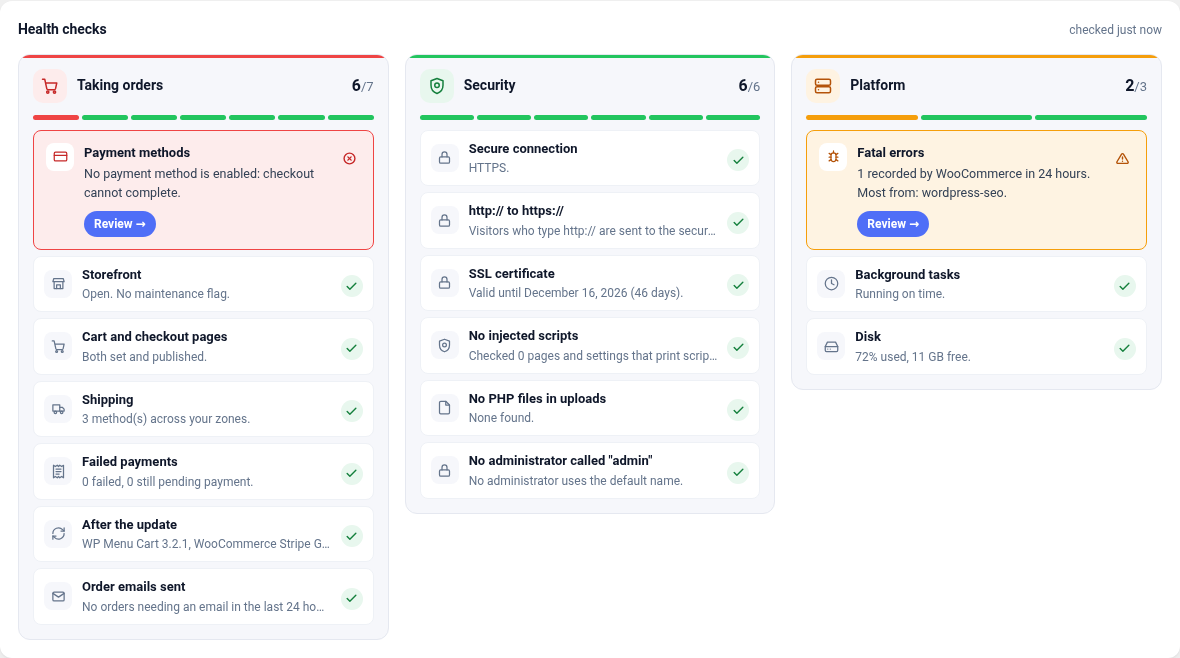
- Health checks are grouped in three cards (taking orders, security, platform), problems first.
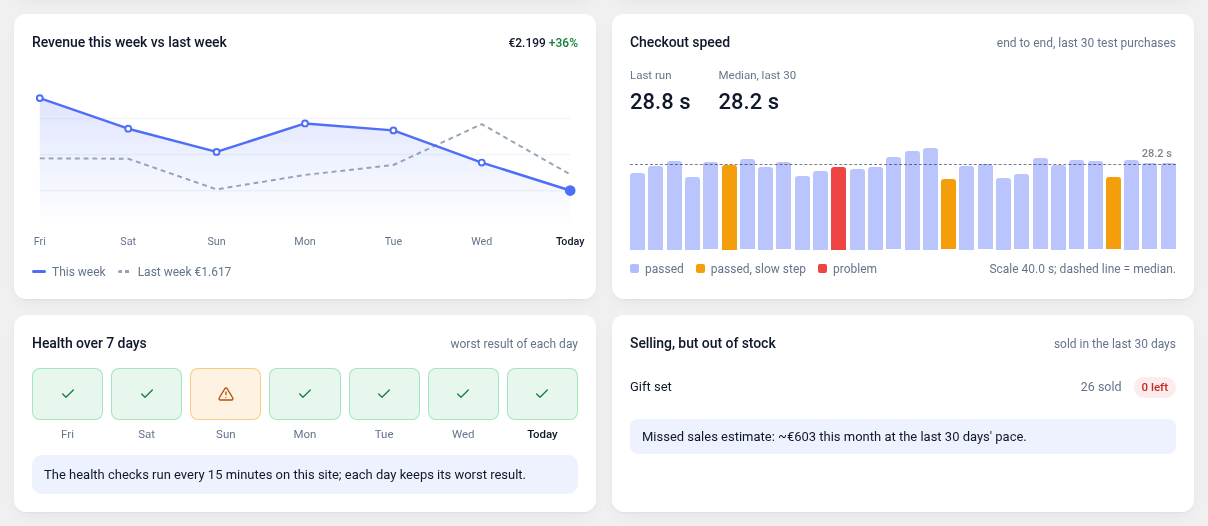
- Health over 7 days shows every hour of the week as a square, the share of checks without a problem, and which checks failed.
- Checkout speed draws the slow line at 1.3 times the median and marks the test purchases above it.
3.3
- Tested with WooCommerce 11.2.
- Fix: the payment methods health check string now uses ordered placeholders, so translations can reorder the count and the names.
- Readme: a short list of what the plugin checks, and answers for common checkout problems.
3.2
- New: on MageSentinel’s Free plan the connection card says the connector is inactive and that the checkout is still checked once a day, instead of asking whether the monitor is paused.
- Readme: documents the hourly plan check.
3.1
- New: when the free monthly test purchase does not pass, the result offers to email you the next time it happens.
- Changed: links to magesentinel.com from the plugin carry a plain campaign tag (utm_source=wporg), so MageSentinel can tell that a signup came from the plugin. No data about your site is added to them.
- Readme: the health page list now mentions the DNS check added in 2.9.
2.10
- Changed: the button that runs MageSentinel’s test purchase is now called “Test cart & checkout”, so it is not mistaken for “Check again”, which re-runs the health checks on this site.
2.9
- New: “DNS on this server” health check. It times a lookup at each nameserver in /etc/resolv.conf and warns when the first one does not answer, which makes every outgoing call from the site (payments, couriers, updates) wait seconds first.
2.8
- Improved: during a test purchase, “Where the time went” now moves while a step is running. The current step counts up live from the moment MageSentinel started it, instead of the bar waiting for the step to finish.
2.7
- New: dark colours. The plugin screens follow your system’s light or dark setting, and a small switch in the header lets each user pin Light or Dark instead. The dashboard widget stays light.
2.6
- New: after two weeks, and only while every check is healthy, the overview asks once for a review on WordPress.org. “Later” hides it for 30 days, “No, thanks” for good.
2.5
- New: Revenue this week vs last week, day by day.
- New: Selling, but out of stock: products that sold in the last 30 days and have none (or almost none) left, with an estimate of the sales missed this month.
- New: Health over 7 days: the worst result of each day’s health checks.
- New: Checkout speed: how long a test purchase takes from start to the last click before paying. Your free monthly tests without an account, the last 30 checks with MageSentinel connected.
2.4
- New: a free test purchase once a month, without an account. MageSentinel goes through your checkout from outside like a shopper, up to the last click before paying, and shows each step as it happens.
- New: “Test purchase now” in the dashboard widget for connected stores.
2.3
- Translations now use WordPress’s standard system, so the plugin can be translated on translate.wordpress.org. Greek is bundled.
2.2
- The weekly summary email is now opt-in, and loads nothing from outside when opened.
- All markup the admin screens build is escaped before it is printed.
- The readme describes the external service in one place, including the test purchase requested after an update.
- Deleting the plugin removes its settings and stored data.
2.1
- Tools → Site Health shows a “WooCommerce checkout health” test: critical when something stops orders, recommended when something is worth a look.
wp magesentinel statusprints every check from the command line, and exits 1 when one is red.
1.10
- The HTTPS self-check now verifies the certificate.
- The readme lists the external services the plugin talks to.
- Plugin Check clean: inputs are unslashed and sanitized, the error-log reader uses SplFileObject, and the name now reads “Checkout Monitoring for WooCommerce”.
1.9
- Connected stores: MageSentinel now receives the updates applied in the last week (name and version), to mark them on the store’s charts next to the checks.
1.8
- The plugin is now listed as “MageSentinel — WooCommerce Checkout Monitoring”. Same slug, settings and features.
1.7
- New: checks that http:// sends shoppers on to https:// and shows which security headers the storefront sends (HSTS, nosniff, frame protection, referrer policy).
1.6
- Connected stores: when WooCommerce, the theme or a payment or shipping plugin is updated, MageSentinel runs a test purchase two minutes later instead of waiting for the next scheduled check. At most one every 15 minutes.
- The update email links to the overview with every check.
1.5
- MageSentinel now sees whether WooCommerce would actually offer each enabled payment method, and whether checkout and cart are built with the WooCommerce blocks or the classic shortcode. When a check finds no payment method at checkout, the alert names the one WooCommerce itself refuses to offer.
1.4
- The self-check runs every 15 minutes instead of every hour, so a broken checkout, a payment method switched off or a site left in maintenance is emailed within a quarter of an hour. The expensive parts keep their 12-hour cache, so the extra runs cost the site little.
1.3
- Settings: “Settings saved” shows only after saving, not on every visit.
1.2
- New check: the SSL certificate, with a warning two weeks before it expires.
- New check: products in stock without a price, which nobody can add to the cart.
- Payments by method over 7 days: paid, failed, unpaid and success rate.
- Checkout over 7 days: shoppers who reached checkout and how many paid. Counts only.
- Stores not connected see the steps MageSentinel’s hourly test purchase goes through.
1.1
- The weekly summary is a designed email: tiles with the change against the week before, a chart of orders per day, the health checks and the updates.
- Versions now run 1.1 to 1.10, then 2.1.
0.13
- Failed payments: three in an hour trigger the check at once, and a payment method that only fails while the others take money is named.
- New check: a payment method left in test or sandbox mode on the live store.
- Updates of WooCommerce, the theme and the plugins behind checkout, payment and shipping are recorded; you get one email asking for a test order.
- Weekly summary email every Monday: orders, revenue, average order and failed payments against the week before, plus what needs a look.
0.12
- Test purchase: the progress shows each checkout step by name, with a tick, a cross or a skip and how long it took, the same flow as the MageSentinel app.
0.11
- Test purchase: the button stays readable while it runs, and the progress bar is labelled.
0.10
- Connected stores: “Test purchase now” asks MageSentinel to run a real test purchase and shows it step by step, with the verdict and a link to the run.
0.9
- The Save button is always shown; it saves the alert address and the token.
0.8
- Fix: settings switches failed to save (“Could not save”).
0.7
- Settings: switches save as soon as you flip them; the Save button appears only when you edit the alert address or paste a token.
0.6
- Alerts on the overview are a single on/off switch with a link to their settings.
- Background tasks: WooCommerce’s own housekeeping (such as fetching block patterns) no longer counts as a failure; a real failed task is named.
- Recent setting changes name the plugin that was switched on or off.
0.5
- “Check again” now runs the checks on the spot (and sends the alert email if something turned red), instead of only reloading the page.
0.4
- Free email alerts: the health checks run every hour and email you when one turns red, and again when it is fixed. Any address, or off.
- New check: orders stopped coming in, for stores with a steady flow.
- Connected to MageSentinel, the plugin shows “Monitored by MageSentinel” and pauses its own emails; they resume if MageSentinel stops checking in.
- Links to try MageSentinel or see its plans, shown only while not connected.
0.3.0
- Optional CAPTCHA exemption for MageSentinel’s own checks, off by default: requests carrying this store’s connector token skip CAPTCHA 4WP, reCAPTCHA for WooCommerce, hCaptcha for WP and Simple Cloudflare Turnstile. Pages served that way are never cached.
0.2.0
- Admin overview: cart and checkout pages, payment methods, shipping zones, fatal errors, Action Scheduler and pending WooCommerce database updates, each linking to the screen that fixes it.
- Table view of every figure on the overview, so nothing lives in the chart alone.
- Activity panel: MageSentinel’s last contact and its recent test orders.
- Diagnostics now report catalog size, pending updates, cache state and configuration changes.
- Greek admin strings.
0.1.0
- First release: diagnostics, order confirmation and test-order cancellation over
/wp-json/magesentinel/v1/, guarded by a hashed token.