

Description
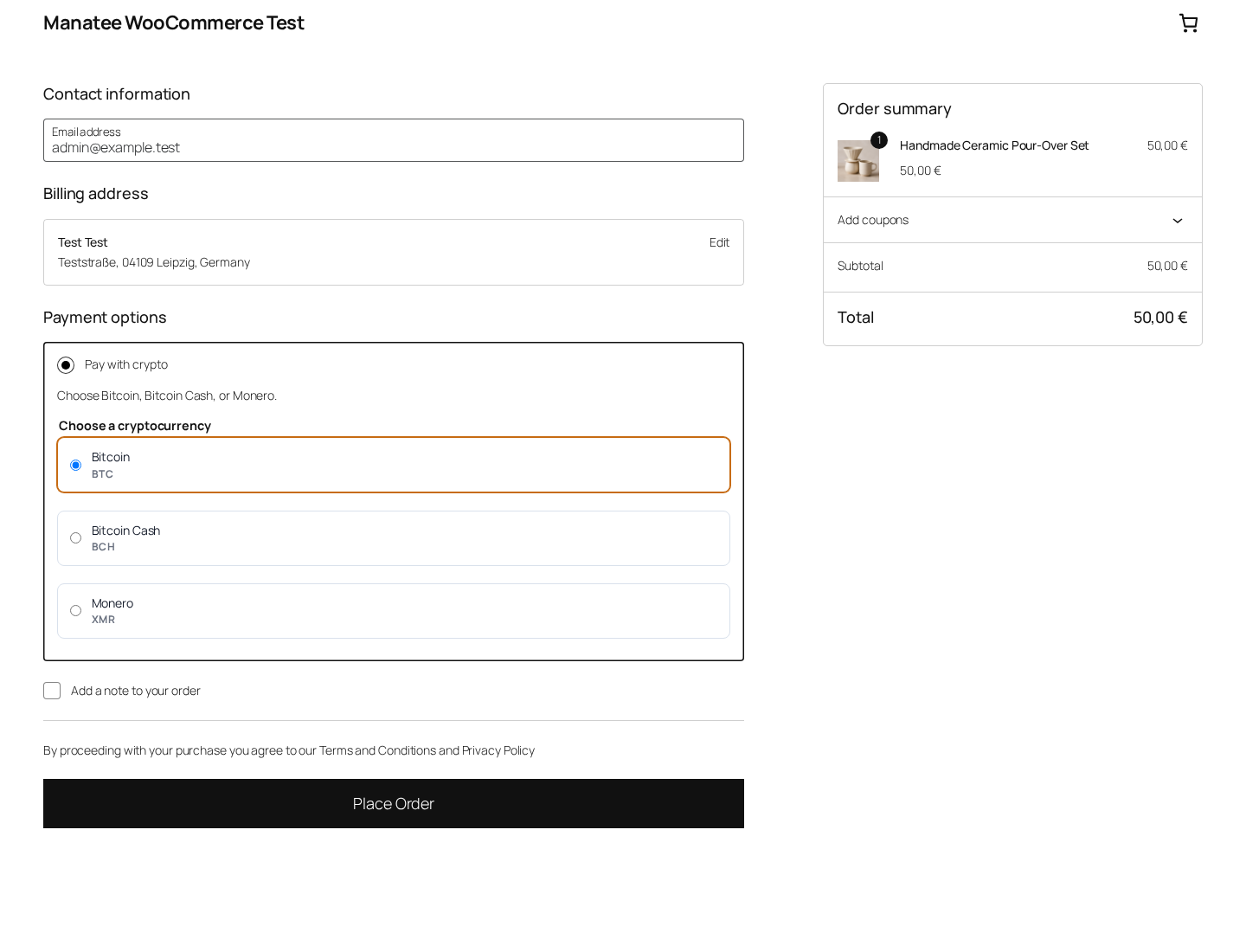
Manatee adds a non-custodial crypto payment gateway to WooCommerce. Customers choose Bitcoin (BTC), Bitcoin Cash (BCH), or Monero (XMR) within one “Pay with crypto” checkout method. The plugin creates an asset-scoped payment, shows the returned address, exact amount, wallet URI, and local QR code, then updates the order from signed webhook events. Test mode combines BTC/BCH Testnet4 with XMR Stagenet, and XMR is offered only after the selected environment reports a ready view-only receive wallet.
Manatee is non-custodial. The plugin does not hold customer funds, request wallet seeds or spending keys, or run blockchain node logic inside WordPress. BTC, BCH, and XMR are available on their test networks and mainnet. The plugin receives only XMR readiness state, never an address or view key, before displaying it to customers.
The plugin is built for merchants and developers who want to accept supported on-chain crypto payments while keeping checkout, order metadata, and webhook handling inside WordPress.
Features
- One WooCommerce crypto payment method with a clear BTC/BCH/XMR selector.
- Non-custodial flow: no wallet seed, private key, or hosted wallet custody is required by the plugin.
- Test mode with BTC/BCH Testnet4 and XMR Stagenet, plus Live mode for all three Mainnet assets.
- One environment-scoped API key and webhook secret shared by BTC, BCH, and XMR.
- Cached plan allowance and active webhook monitor overview at the top of settings.
- Read-only API connection and usage refresh from the gateway settings screen.
- Asset-specific customer payment screen with address, satoshi or exact piconero amount, wallet URI, local QR code, expiry, and automatic status polling.
- XMR is hidden until the selected environment has a configured, synchronized view-only receive wallet.
- Classic checkout and WooCommerce Checkout Blocks support.
- Signed webhook verification with timestamp and event ID handling.
- Automatic WooCommerce order updates after Manatee payment events.
- Pending Manatee payments are cancelled when the WooCommerce order is cancelled.
- Order metadata for asset, network, payment ID, address, satoshi amount, pricing data, environment, transaction ID, confirmations, status, and expiry.
- WooCommerce logging with secret redaction.
- WooCommerce HPOS compatibility.
How it works
- A customer selects “Pay with crypto” and chooses BTC, BCH, or a ready XMR option.
- The plugin sends the WooCommerce order total to Manatee as
fiat_amountandfiat_currency. - The plugin calls the matching
/v1/btc/payments,/v1/bch/payments, or/v1/xmr/paymentsroute. - The customer sees asset-specific payment instructions on the order received page.
- Manatee monitors the payment lifecycle and sends signed webhook events to the shop.
- The plugin verifies signature, timestamp, event ID, payment ID, asset, network, and order mapping before mutation.
- WooCommerce order status and Manatee payment metadata are updated automatically.
- If a pending WooCommerce order is cancelled, the plugin asks Manatee to cancel the pending payment. Payments already detected on-chain are left for manual review.
- The order received page polls the shop for verified status updates using the WooCommerce order key.
Setup
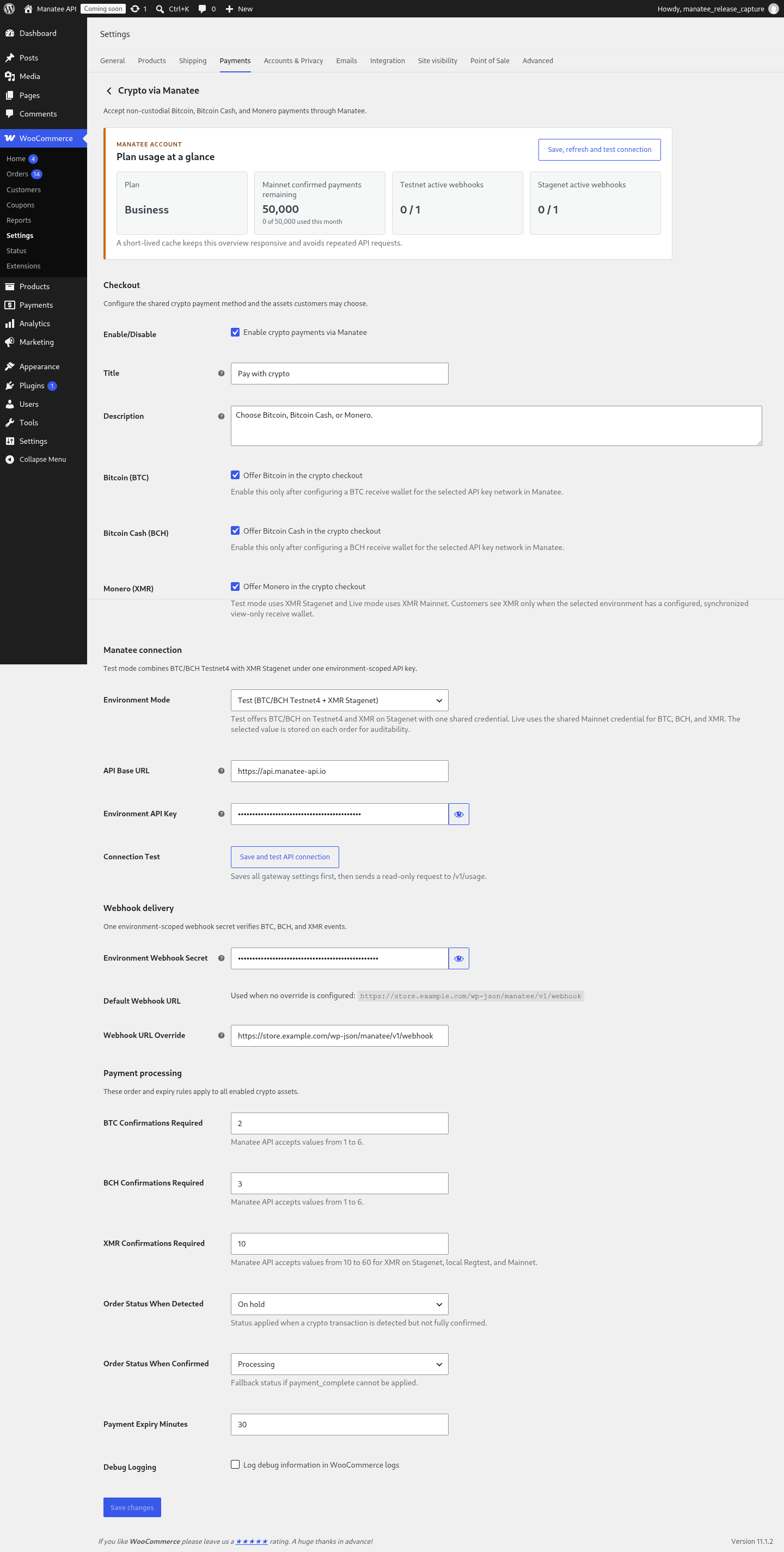
Before accepting payments, configure the gateway in WooCommerce > Settings > Payments > Crypto via Manatee:
- Environment Mode: choose Test for BTC/BCH Testnet4 plus XMR Stagenet, or Live for BTC/BCH/XMR Mainnet.
- API Base URL: use
https://api.manatee-api.iounless Manatee support tells you otherwise. - Environment API Key: enter one Test or Mainnet key for every enabled asset. The Test key maps XMR to Stagenet and BTC/BCH to Testnet4.
- Bitcoin / Bitcoin Cash: choose which configured assets customers may use.
- Monero: enable it after the selected Test or Live view-only receive wallet is configured and synchronized. The plugin checks network-specific readiness before offering XMR at checkout.
- Environment Webhook Secret: enter the single secret used for BTC, BCH, and XMR events in the selected environment.
- Webhook URL Override: leave empty unless Manatee cannot reach the automatically generated WordPress REST endpoint.
- BTC / BCH / XMR Confirmations Required: configure the confirmation target for each asset. XMR accepts 10–60 confirmations.
- Payment Expiry Minutes: define how long new payment requests remain payable.
- Order Status When Detected: choose the status used when a transaction is seen but not fully confirmed.
- Order Status When Confirmed: choose the fallback status used after confirmation if WooCommerce cannot complete the payment automatically.
The settings header shows remaining monthly confirmed mainnet payments and active webhook monitors by network. “Save, refresh and test connection” persists changed settings before sending a read-only GET /v1/usage request.
The API key and webhook secret fields include reveal controls so an authorized WooCommerce administrator can verify the entered values before saving.
Test mode
Use Test mode with one Test Manatee API key and webhook secret. That credential selects BTC/BCH Testnet4 and XMR Stagenet. Enable each asset only after configuring its receive wallet and wait until the XMR readiness check succeeds. A locally database-re-scoped Regtest credential can likewise be shared by all three assets.
When switching to Live mode, use a mainnet Manatee API key, review the webhook secret, confirm that the webhook URL is reachable from the public internet, and test a low-value payment before opening the payment method to customers.
Privacy / Data Sent to Manatee API
When a customer selects BTC, BCH, or XMR, the plugin sends the WooCommerce fiat amount, currency, webhook URL, required confirmation count, expiry window, underpayment tolerance, and order reference to the corresponding Manatee API route. For XMR, the plugin first reads a minimal API-key-scoped readiness result; it does not receive a view key or wallet address from that check.
The WooCommerce order stores asset, network, Manatee payment ID, payment address, pricing metadata, environment mode, status, transaction ID, confirmations, and expiry. BTC/BCH amounts are stored in satoshis; XMR amounts are stored exactly in piconero.
Webhook events are verified with the X-Manatee-Signature, X-Manatee-Timestamp, and X-Manatee-Event-Id headers before order mutation.
External services
This plugin connects to the Manatee Payment API to create and verify non-custodial BTC, BCH, and XMR payments for WooCommerce orders.
When a customer chooses an asset, the plugin sends the order amount, currency, webhook URL, required confirmations, expiry, tolerance, and reference to the asset-specific API route. The API returns asset, network, payment ID, address, exact atomic amount, exchange-rate metadata, expiry, and status. BTC/BCH use satoshis; XMR uses piconero.
The settings screen sends a briefly cached read-only usage request, and the merchant can refresh it with the connection-test action. When a pending order is cancelled, the plugin may send an asset-scoped cancellation request. Manatee sends signed webhook events back to update the order after detection or confirmation.
This service is provided by Manatee.
Privacy Policy: https://manatee-api.io/privacy-policy
Installation
- Upload the
manatee-bitcoin-paymentsfolder to/wp-content/plugins/. - Activate the plugin in WordPress.
- Make sure WooCommerce is installed and active.
- Go to WooCommerce > Settings > Payments.
- Enable “Crypto via Manatee”.
FAQ
Does Manatee hold customer funds?
No. The plugin is built for non-custodial BTC, BCH, and XMR payment flows. It does not hold funds or ask for wallet seeds or private keys.
Do I need to share my wallet seed or private key?
No. Never enter a wallet seed or private key into this plugin.
Can I test payments before going live?
Yes. Configure Test mode with one Test key for BTC/BCH Testnet4 and XMR Stagenet. In local Regtest, all three reuse one database-re-scoped key.
Why does checkout say that crypto payments are temporarily at capacity?
Each payment with a webhook occupies one concurrent-payment slot while it is pending or detected. BTC, BCH, and XMR in the same API-key environment share this capacity. A slot is released when the payment is confirmed, expired, or cancelled. Failed webhook delivery attempts do not consume additional slots.
How many confirmations are required?
You can configure separate BTC, BCH, and XMR confirmation counts. XMR accepts 10–60 confirmations; BTC/BCH retain their existing 1–6 range. The plugin sends the selected asset’s value when creating a payment.
What happens when a transaction is first detected?
Manatee sends a signed event when a transaction is detected. The plugin verifies the event and applies the configured “Order Status When Detected” status.
What happens when a payment is confirmed?
Manatee sends a signed confirmation event. The plugin verifies the event, stores transaction metadata, and completes or updates the WooCommerce order.
What happens if a payment expires or fails?
The plugin handles signed terminal events and can move the order to the configured unpaid or failed state without completing the payment.
What happens if I cancel a WooCommerce order?
If the payment is still pending, the plugin calls the matching asset cancellation endpoint. Detected or confirmed on-chain payments are not automatically cancelled and require manual review.
Does this support Lightning payments?
No. The plugin focuses on supported on-chain BTC, BCH, and XMR payments.
Does this plugin support WooCommerce HPOS?
Yes. The plugin declares WooCommerce custom order tables compatibility and uses WooCommerce CRUD methods for order metadata.
Does this plugin support Checkout Blocks?
Yes. The shared crypto method and BTC/BCH/XMR selector work in classic checkout and WooCommerce Checkout Blocks. XMR appears only when the selected Test, Live, or local Regtest readiness check succeeds.
Screenshots


Changelog
0.4.1
- Updated the plugin website URL to the WooCommerce crypto payment gateway landing page for BTC, BCH, and XMR.
0.4.0
- Added production XMR Mainnet checkout when the selected Live API key reports a ready view-only receive wallet.
- Enforced environment-specific XMR readiness so Stagenet wallets cannot appear in Live checkout.
- Updated merchant setup and production guidance for BTC, BCH, and XMR.
0.3.0
- Added XMR Stagenet checkout, payment creation,
monero:QR wallet links, exact piconero formatting, cancellation, polling, and signed webhook handling. - Added XMR wallet readiness checks so XMR is hidden until the selected Test or local Regtest API key has a configured, synchronized receive wallet.
- Unified BTC/BCH Testnet4 and XMR Stagenet under one Test credential and webhook secret.
- Added XMR-specific confirmation controls and documentation.
0.2.0
- Added Bitcoin Cash payment creation, instructions, cancellation, and webhook handling.
- Grouped BTC and BCH under one customer-facing crypto payment method.
- Added BTC/BCH selection to classic checkout and Checkout Blocks.
- Added asset and network isolation for stored orders and signed webhook events.
- Added a cached settings overview for monthly plan usage and active webhook monitors.
- Added separate BTC and BCH confirmation settings.
0.1.2
- Added customer-facing guidance when a detected or confirmed Bitcoin payment belongs to a cancelled order.
- Fixed the cancellation warning being visible before an order was cancelled.
0.1.1
- Added structured handling for concurrent payment limit responses.
- Added a clear customer-facing message when Bitcoin checkout capacity is reached.
- Added detailed payment capacity information to WooCommerce order notes.
- Added unit tests for API limit responses and checkout handling.
0.1.0
- Initial WordPress.org submission candidate.
- Added classic WooCommerce checkout support.
- Added WooCommerce Checkout Blocks support.
- Added Manatee API payment creation.
- Added pending payment cancellation when WooCommerce orders are cancelled.
- Added customer Bitcoin payment instructions with wallet URI, local QR code, and automatic status polling.
- Added signed timestamped webhook verification.
- Added WooCommerce order metadata and status updates.
- Added API connection test and setup feedback.
- Added WooCommerce HPOS compatibility.