


Description
Get every new Gravity Forms entry as a message in Bale messenger, the moment it is submitted.
- Works with your own Bale bot – no third-party relay server.
- Messages go only to the chat IDs you add — not to every user who starts the bot.
- Send to a private chat, a group or a channel; several chats per feed.
- One or more feeds per form, each with its own message and chats.
- Full merge tag support, including {all_fields}.
- Gravity Forms conditional logic decides when a feed runs.
- Messages are sent in the background, so visitors never wait.
- Long messages are split automatically to fit Bale’s limits.
- A success or error note is added to every entry.
- “Send test message” and “Find chat IDs” tools: browse recent chats, click Add on the ones you want, then save.
- Translation-ready. Language packs are provided through translate.wordpress.org.
Gravity Forms is a separate commercial plugin and must be installed and active. This plugin is not affiliated with or endorsed by Rocketgenius or Bale.
External services
This plugin connects to the Bale Bot API (https://tapi.bale.ai) to deliver form submissions to Bale messenger. Nothing is sent until you save a bot token and create a feed.
- When a form with an active feed is submitted, the message text you configured (which normally contains the submitted form data) and the target chat ID are sent to Bale.
- When you open the add-on settings page, the bot token is checked with Bale (at most once per hour).
- When you click “Send test message” or “Find chat IDs”, a test message is sent or the bot’s recent updates are requested.
The service is provided by Bale. See Bale’s terms of service and privacy policy.
Installation
- Install and activate Gravity Forms.
- Upload this plugin to
/wp-content/plugins/or install it from the Plugins screen, then activate it. - In Bale, message @BotFather, create a bot and copy its token.
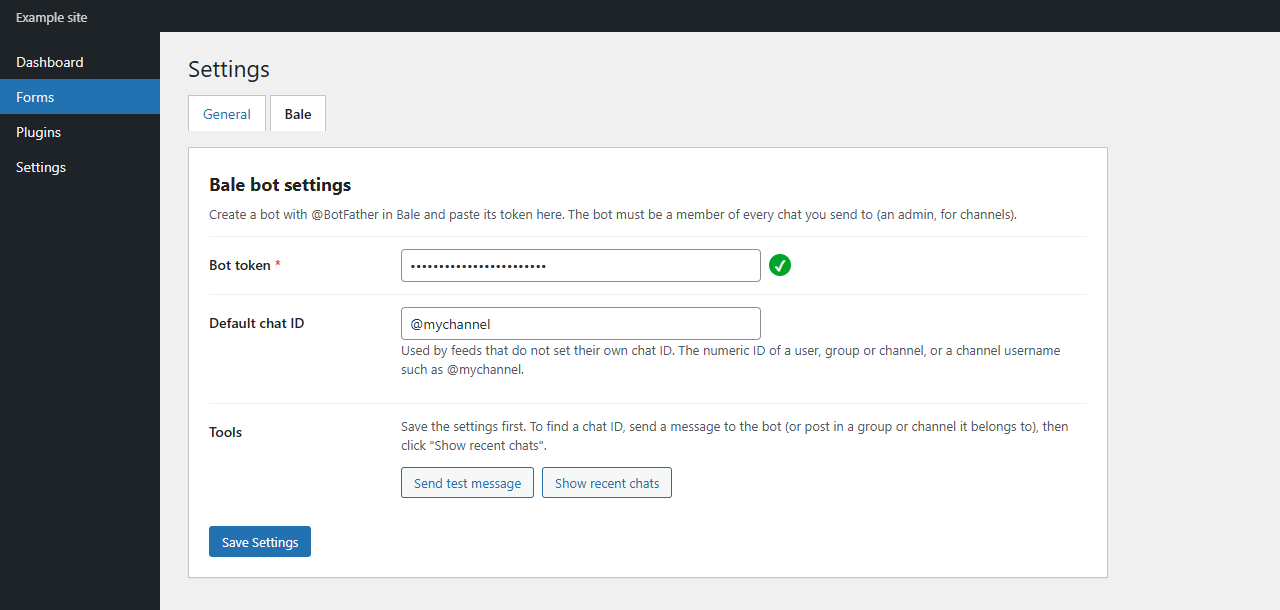
- Go to Forms → Settings → Bale, paste the token.
- Every manager who should receive messages must open the bot and send /start. For a group or channel, add the bot (as an admin in channels) and post a message.
- Click Find chat IDs, press Add on each chat you want, save, then send a test message.
- Open a form, go to Settings → Bale and add a feed (you can pick chat IDs there the same way).
FAQ
Where do I find the chat ID?
Send any message to the bot, or post in the group or channel it belongs to, then click Find chat IDs on the settings page and press Add. For public channels you can also type the channel username, for example @mychannel.
Why did every bot user get the form message?
They should not. Only chat IDs that appear in Default chat ID or in the feed’s Chat IDs field receive messages. Finding chats does not select anyone until you click Add and save.
Messages are not arriving. What should I check?
Open the entry in Gravity Forms: an error note explains what Bale replied. Common causes are a wrong token, a bot that is not a member of the group, or a bot that is not an admin of the channel. Enabling Gravity Forms logging (Forms → Settings → Logging) gives more detail.
The settings page says Bale does not recognise the bot token.
Bale and Telegram bots are separate. Create the bot with @BotFather inside the Bale app, copy the whole token (digits, colon and letters) and save the settings again. A check mark appears next to the token when Bale accepts it.
Can I send to several chats?
Yes. Add several chat IDs (comma-separated) in the feed or the default field, or create several feeds.
Is the submitted data stored anywhere else?
No. The plugin only sends the configured message to Bale; it does not store or send data anywhere else.
Screenshots

Changelog
1.1.0
- Find chat IDs lists recent chats with an Add button; only added IDs receive messages.
- Test message uses the values on the settings form, even before saving, and shows a last-send summary.
- The same finder and test tools are available on each form feed.
- Clarified that starting the bot does not subscribe a user to form notifications.
1.0.1
- Renamed the plugin so Gravity Forms and Bale are referenced after “for”, under the Melalweb name.
- Removed the bundled translation files. Translations are loaded from WordPress.org.
1.0.0
- First release.