


Description
Two products with the same SKU throw off stock levels, integrations and every export file your store
produces. Two products with the same GTIN tell a shopping service they are the same item, so one of
them quietly disappears from search. A product with no identifier at all usually drops out of the
feed altogether.
None of this breaks your store, which is why it goes unnoticed for years. Nothing in the WooCommerce
admin points at any of it.
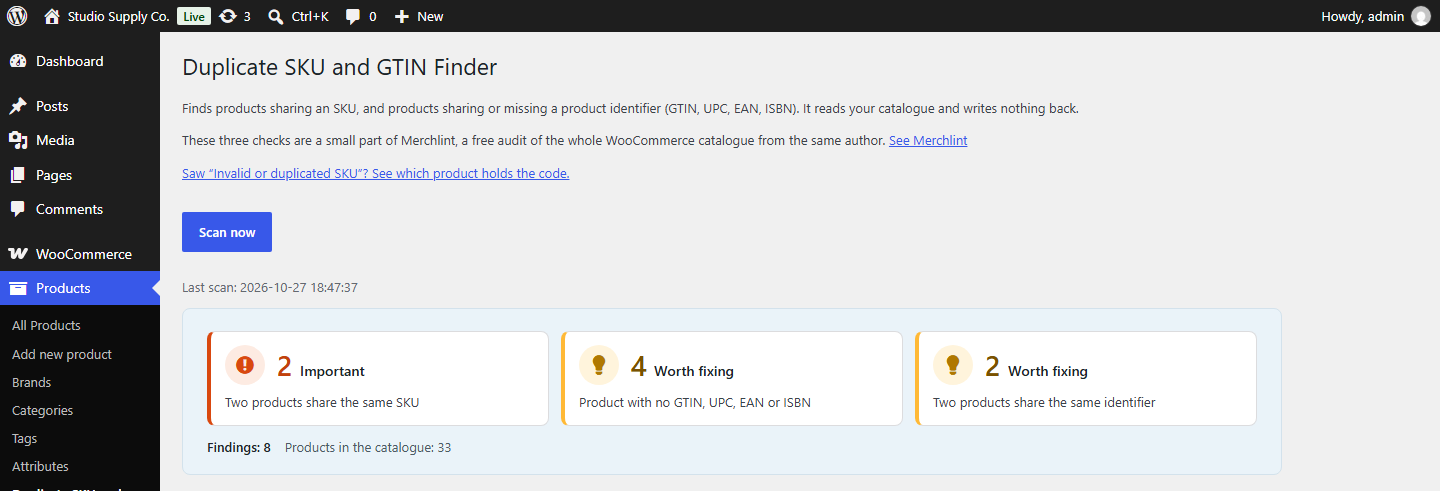
This plugin checks three things and nothing else:
- Two products share the same SKU. Translations of one product are not counted as a duplicate —
a multilingual store gives every translation the same code on purpose, and reporting that pair
would be a false alarm. We read the translation groups of Polylang and WPML. - Product with no GTIN, UPC, EAN or ISBN. Stays quiet in shops that do not use identifiers at
all: if not one product has the field filled, you get a single sentence saying so instead of a
list of your entire catalogue. Handmade goods, services and your own production carry no
manufacturer’s barcode and need none. - Two products share the same identifier.
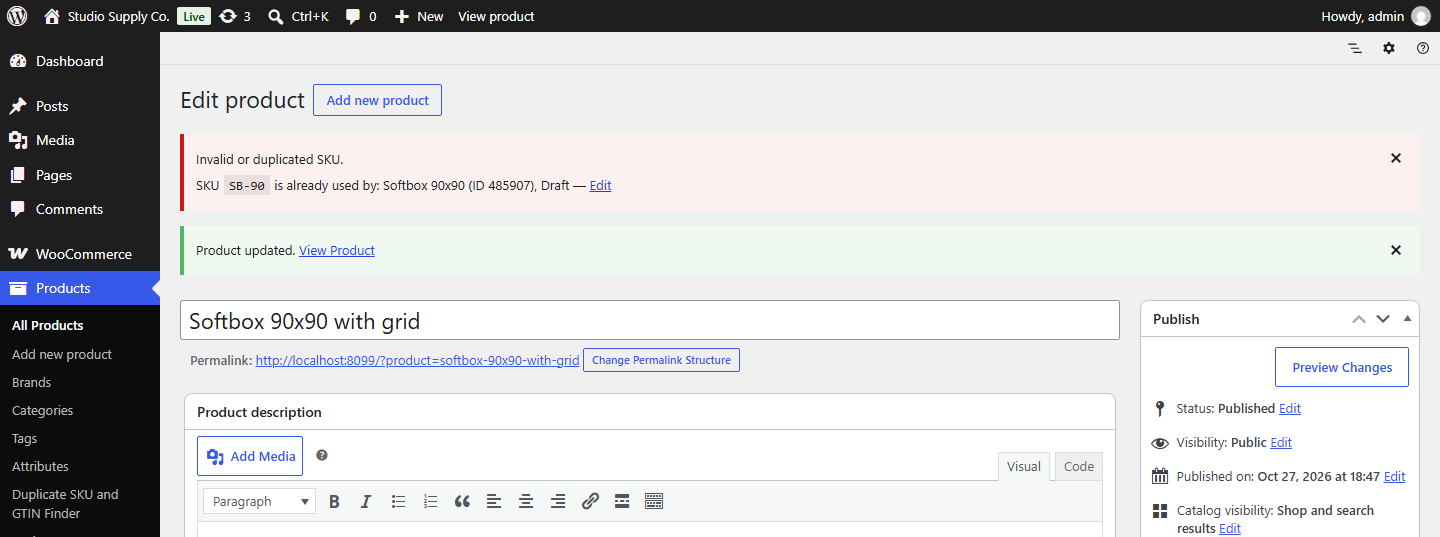
When WooCommerce says “Invalid or duplicated SKU”
WooCommerce refuses an SKU or GTIN that another product or variation already has, but its message
does not say which one. This plugin adds one line under the message with the product that holds
the code and a link to edit it. Codes from elsewhere, for example from the product import log, can
be pasted on the plugin screen under Who has this code?.
It also finds the holders that the product search does not show: a variation whose product no
longer exists, a placeholder left by an import that did not finish, and an out-of-date row in the
WooCommerce product lookup table.
What it does not do
It never writes to your catalogue. There is no “Fix it” button, and there will not be one: a
bulk change to product data is not something a report should do on your behalf. Every finding shows
the value that was read, so you can check the claim before you act on it.
It reads no order data, which makes the scan far cheaper than a full audit. The scan still runs
in a single request, so on a very large catalogue it can run into your host’s time limit — the
screen says so when that becomes likely, and the WP-CLI command has no such limit.
Evidence, not adjectives
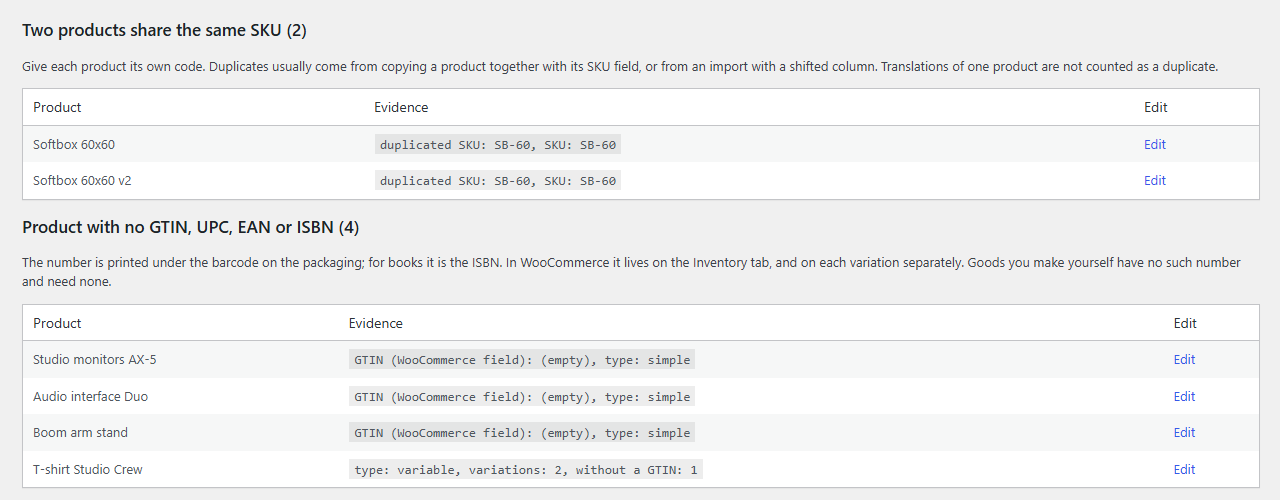
Every finding shows the field that was read and the value found, with a link straight to the product
in your admin. A rule that could not run says so by name — on WooCommerce older than 9.2 the
identifier field does not exist at all, and the report says that rather than reporting every product
as faulty.
A small part of Merchlint
These three checks come from Merchlint, a free audit of
the whole WooCommerce catalogue from the same author. Besides SKUs and identifiers it finds products
that sold in the past year and can no longer be bought, products with no price or no photo, sale
prices that should have ended and images with no alt text, each with the money at stake. This
plugin carries its own copy of the scanning engine with its own class names, so both can run side
by side.
Installation
- Install and activate.
- Open Products → Duplicate SKU and GTIN Finder, or click Find duplicates next to the
plugin on the Plugins screen. - Press Scan now.
For large catalogues there is a WP-CLI command: wp merchlint-duplicate-sku-finder scan.
FAQ
How do I find duplicate SKUs in WooCommerce?
Install this plugin, open Products → Duplicate SKU and GTIN Finder and press Scan now. Every
product that shares its SKU with another one is listed with the SKU that was read and an Edit link,
and Download CSV gives you the same list as a file. It compares published products and their
variations; translations of one product are not counted as duplicates.
WooCommerce itself refuses a repeated SKU when you save a product, but it has no screen that lists
the pairs already in your catalogue. Those got in another way – for example through a tool that
writes to the database directly.
What does “Invalid or duplicated SKU” mean?
WooCommerce shows this message when you save a product with an SKU that another product or
variation already has. A draft or a private product holds its SKU too; only a product in the Trash
does not. In the classic product editor your other changes are saved, and the SKU keeps its
previous value.
This plugin adds one line under that message with the product that holds the code and an Edit link.
For codes from elsewhere, for example the product import log, open
Products → Duplicate SKU and GTIN Finder and paste them under Who has this code?. It also finds
what the product search does not show: a variation whose product no longer exists, a placeholder
left by an import that did not finish, and an out-of-date row in the WooCommerce product lookup
table. The line does not appear in quick edit, where WooCommerce drops a taken SKU without any
message, or in the block product editor.
The identifier field has its own version of the message, “Invalid or duplicated GTIN, UPC, EAN or
ISBN.” (WooCommerce 9.2 and later), and it works the same way.
Since WooCommerce 11.2 the product CSV importer, with Update existing products ticked, also
finds products by their GTIN. A row whose GTIN two products share fails with this message, and
neither product changes; the importer does not say which product holds the other copy.
Who has this code? shows both.
How do I find WooCommerce products without a GTIN?
Since WooCommerce 9.2 every product has a field for a GTIN, UPC, EAN or ISBN. Since 10.4 the list
under Products → All Products also has a column for it, hidden by default: turn it on in
Screen Options and sort by it, and products with no number come first. Variations are not in
that list: for a variable product the column shows the product’s own number, not the numbers of its
variations. This plugin lists the products with no number, variations included: each with an
Edit link, and a variable product once, with the number of its variations that have no code.
How do I check if a GTIN or EAN is valid?
This plugin does not check the number itself. It finds products with no GTIN and GTINs used by more
than one product. To check the check digit, the length and the format of a whole list of codes, use
the free GTIN validator on our website: paste a column of
codes or pick a product export file (CSV, TXT or XLSX). It runs in your browser, and the file is not
sent anywhere.
A well-formed number is not yet proof that it belongs to the product. Only the GS1 registry shows
whether the manufacturer registered it.
Does it change anything in my shop?
No. It reads the catalogue and writes nothing back. It keeps a few things of its own: the last
result, so that reloading the page does not require another scan, and notes in your user profile,
so that the notice on the Plugins screen, the review request and the note about Merchlint under
the results do not come back once you have dealt with them. Deleting the plugin removes all of
them. The line about a refused SKU goes into the WooCommerce message itself, which WooCommerce
keeps only until the next page shows it.
My shop is multilingual. Will translations be reported as duplicates?
No. Translations of one product share an SKU on purpose, and the check treats one translation group
as one product. Polylang and WPML are both read.
I do not use GTINs at all. Will I get a list of every product?
No. If not one product in the catalogue has the field filled, the check stays quiet and tells you
why, in one sentence.
Can an AI assistant read the results?
Only if you connect one yourself. On WordPress 6.9 or later the plugin registers two read-only
abilities through the WordPress Abilities API: the summary of the last scan and the list of its
findings. An AI assistant you connect to your store, for example through an MCP plugin, can call
them as a logged-in user with the manage_woocommerce permission, and gets the same results as
the plugin screen. The plugin itself sends nothing anywhere and changes nothing in your shop.
Screenshots

Changelog
0.1.4
- When WooCommerce refuses an SKU or GTIN while you save a product or a variation, a line under its
message now says which product or variation already has the code, with an Edit link. When
WooCommerce refuses both at once, its message mentions only the SKU; the line covers both. - Who has this code? on the plugin screen: paste one or more SKUs or GTINs, for example from
the product import log, and see every product that has them – published products, drafts,
private products, variations, a variation whose product no longer exists, a placeholder left by
an import that did not finish, and products in the Trash, which do not hold the code. When the
WooCommerce product lookup table is out of date, the list says so and points to the tool that
fixes it. - Codes are compared the way WooCommerce compares them, in the database, so a code that differs
only in letter case counts as the same code, as it does for WooCommerce. - The screen has moved from Tools to Products → Duplicate SKU and GTIN Finder. The old address
under Tools still opens it. - The plugin row on the Plugins screen has a Find duplicates link. After activation, one
notice on that screen says where the plugin is; it goes away for good once you dismiss it or open
the screen. - A link to the support forum at the bottom of the screen.
0.1.3
- A line under the title now says where these three checks come from: Merchlint, a free audit of
the whole catalogue from the same author. Below the results, a short note lists what else it
checks, with a button that opens the standard WordPress plugin details window – nothing is
installed until you press Install Now there. “Don’t show again” hides the note for your user only;
deleting the plugin removes that setting too. When Merchlint is already active, the note does not
appear and the line links to its screen. The links carry no tracking parameters.
Older releases: changelog.txt in the plugin folder.