


Description
WooCommerce’s default add-to-cart feedback is easy to miss. Cart Motion adds a small, polished flying-icon animation from the Add to Cart button to your cart icon, alongside an accessible confirmation message – on shop/archive grids, WooCommerce Blocks, and the single product page itself.
It doesn’t replace or change any WooCommerce cart or checkout behaviour – purely visual/accessible feedback layered on top.
Features (free)
- A flying-icon animation (plus symbol) from the Add to Cart button to your header cart icon
- Automatic cart-icon detection across common themes and page builders
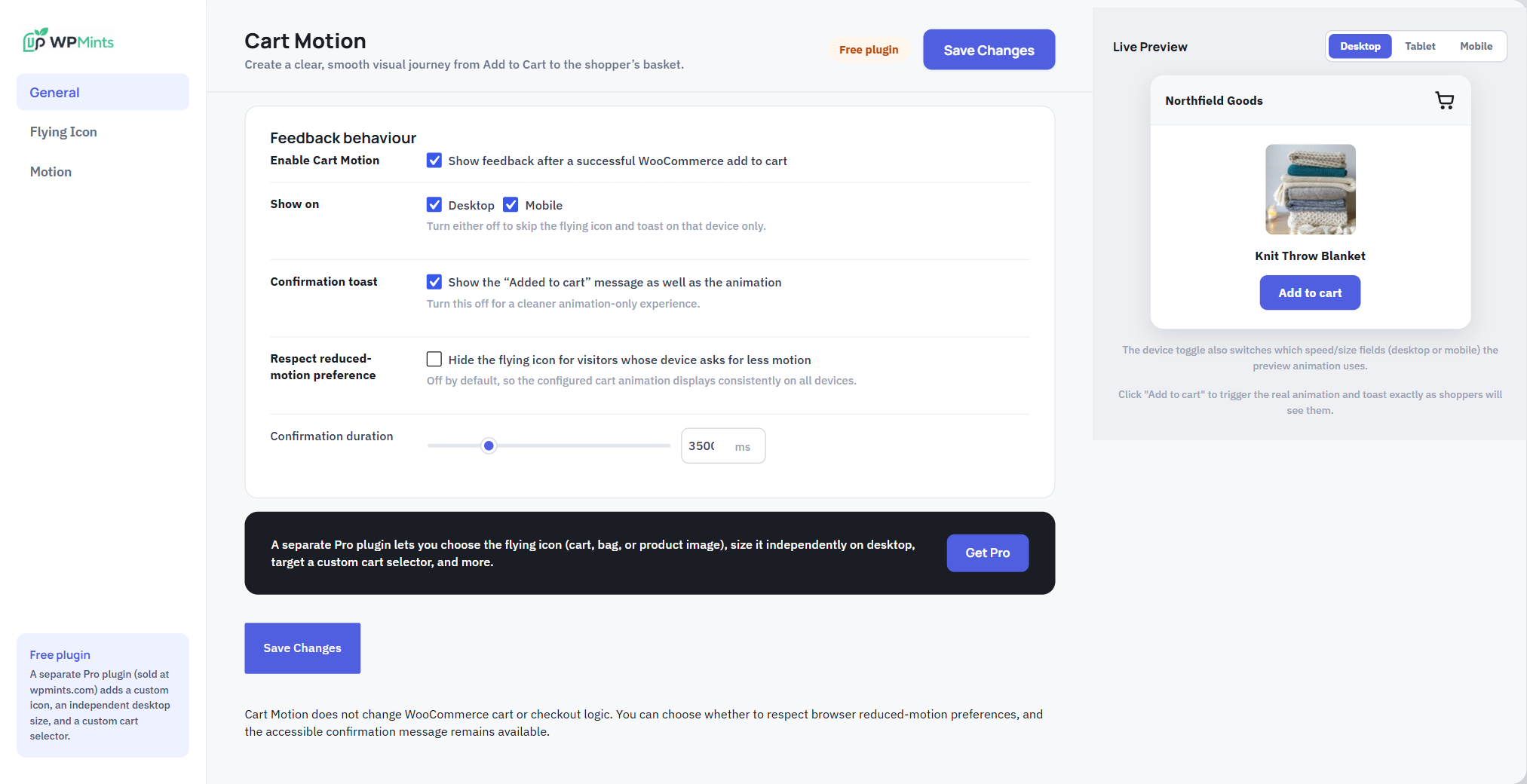
- An accessible “Added to cart” confirmation message, with an adjustable duration
- Turn it on or off separately for desktop and mobile
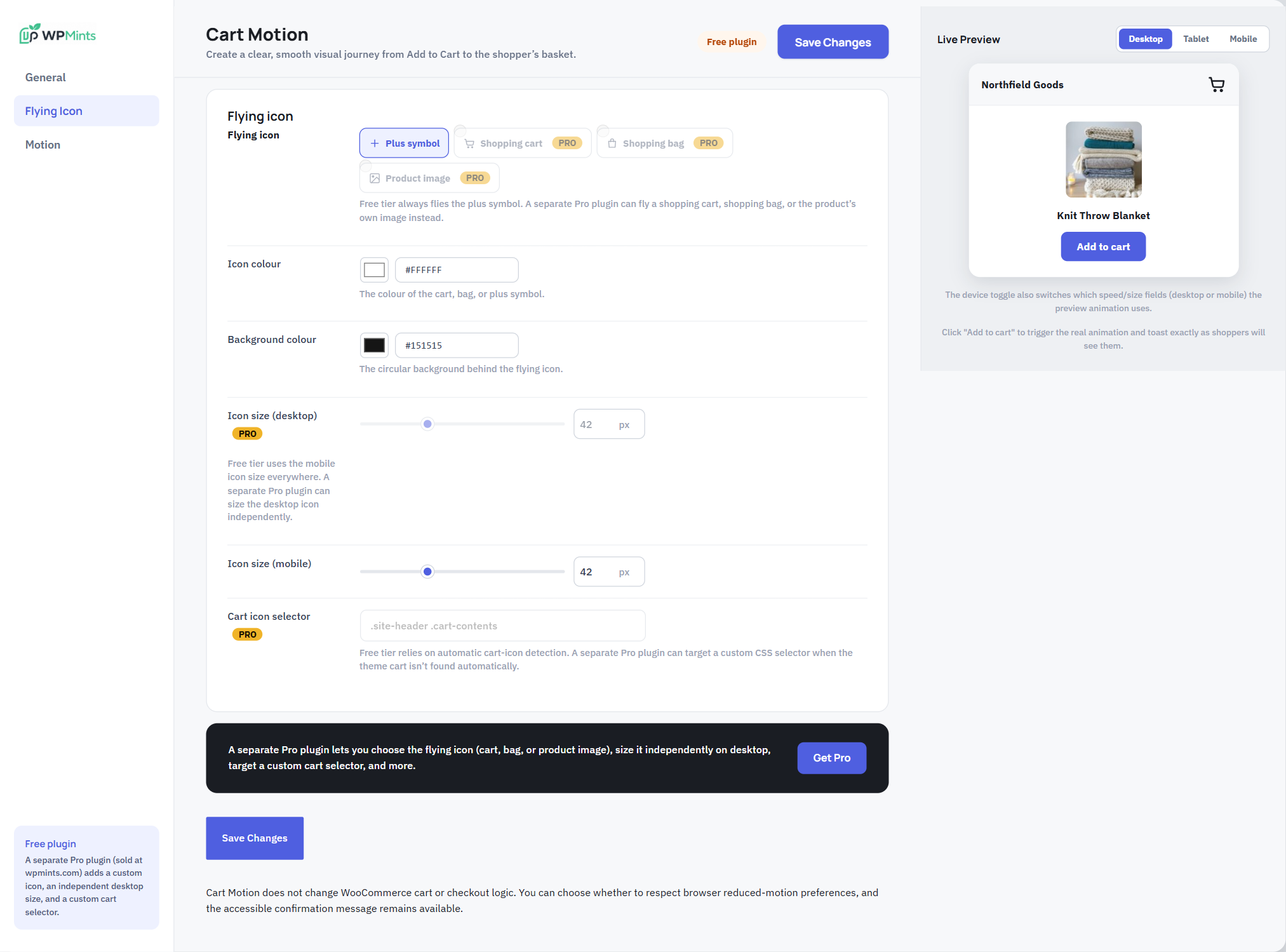
- Icon and background colour controls
- Independent mobile icon size
- Three motion feels (gentle, smooth, snappy) and three flight paths
- Respects the browser’s reduced-motion preference, optionally
- A live preview right in the settings page
Free vs Pro
This is the full, free plugin – it is not a limited trial. A separate Pro plugin is sold at wpmints.com, as its own additional install (not unlocked with a key inside this plugin), and adds:
- Choice of flying icon – shopping cart, shopping bag, or the product’s own photo (free always uses a plus symbol)
- An independent desktop icon size (free uses one size for both desktop and mobile)
- A custom cart-icon CSS selector, for themes the automatic detection doesn’t find
The Pro-only fields are visible in this plugin’s own settings page (with a “PRO” label) so you can see what they do, but nothing behind them runs in this free version – no license check, no remote calls of any kind.
Source code
All JavaScript and CSS in the plugin’s assets/ folder is the original, human-readable source. There is no build step, bundler, transpiler or minifier involved, and no third-party libraries are bundled – the files are edited and shipped exactly as they appear in the plugin.
Installation
- Upload the plugin files to
/wp-content/plugins/mints-cart-motion-for-woocommerce, or install it directly through the Plugins screen. - Activate the plugin.
- Go to WooCommerce → Cart Motion to configure it.
FAQ
Does this need WooCommerce?
Yes – it only reacts to a real WooCommerce add-to-cart event, and won’t load at all if WooCommerce isn’t active.
Does it change what happens when someone adds to cart?
No. It’s purely visual/accessible feedback layered on top – the add-to-cart request itself, the cart contents, and checkout are completely unaffected.
Will the flying icon find my theme’s cart icon automatically?
In almost all cases, yes – it checks a wide list of common theme and page-builder cart-icon patterns. If your theme is unusual and it can’t be found automatically, that’s a Pro-only custom-selector field in this version; the free plugin falls back gracefully with no animation, but the confirmation message still shows.
Does this plugin phone home or track anything?
No. This free plugin makes no external requests of any kind.
Screenshots

Changelog
1.0.5
- Reformatted the front-end and admin JavaScript/CSS into fully readable, one-statement-per-line source (whitespace-only change; no behaviour changes).
- Documented in this readme that the assets are the original source with no build step.
1.0.4
- Removed the “Tested up to” line from the main plugin file header; it now lives only in readme.txt, per WordPress.org review.
1.0.3
- Fixed a fatal error on activation: the main plugin file required the settings class under an old file name.
- Text domain now matches the plugin slug (
mints-cart-motion-for-woocommerce). - The single-product Add to Cart script is now enqueued with wp_add_inline_script() instead of printed as a raw script tag.
- Removed leftover code for Pro-only options (other flying icons, product-image flights, a separate desktop size, a custom cart selector) – none of it could run in this build, and it no longer ships at all.
- Escaped the icon previews, PRO badges, and preview product image on output.
- uninstall.php now removes this plugin’s real options (it was still deleting pre-rename option names).
1.0.2
- Fixed the same “too short/generic” prefix issue WordPress.org flagged on a sibling plugin: the front-end enqueue handle (
cart-motion), the shared admin-page handle (wpm-admin), and their localized JS objects (cartMotion,cartMotionPreviewFly,cartMotionPreviewShow) are all now under the fullwpmintscmprefix.
1.0.1
- Renamed to be more distinctive, per WordPress.org review feedback on a sibling plugin.
- Internal option names are now uniquely prefixed (wpmintscm_) to avoid any collision with other plugins.
1.0.0
- Initial release.