


Description
✨ Live Preview | 🎬 Video Tour | Official Website | Free Support Forum | WordPress 7.1 Ready
Stop losing 15% to 25% of your accommodation revenue to third-party travel agent commissions and high booking fees.
Modern Hotel Booking is an ultra-fast, self-hosted hotel booking plugin, direct booking engine, availability calendar and property management system (PMS) built for independent bed and breakfasts, vacation rentals, boutique hotels, guesthouses, inns, cottages and serviced apartments.
- ⚡ ~70% Smaller HTML Payload — 100% Zero-jQuery Vanilla JS & React engine for instant page loading.
- 📱 Mobile-First Accessibility — WCAG 2.2 AA touch targets (44×44px) so guests book effortlessly on any phone.
- 🎨 Theme-Native Styling — Signature Midnight Navy & Champagne Gold palette or automatic block theme matching.
- 🔒 100% Self-Hosted & Commission-Free — Full data sovereignty with zero transaction fees and no third-party lock-in.
★★★★★ “The plug-in does everything needed for my B&B.” — @georger1970 (Verified WordPress.org Review)
✨ Test Drive the Live Preview (No Setup Required)
Experience the direct booking engine, room availability calendar, and guest checkout in real time before installing:
➜ Launch the WordPress.org Live Preview — Instant interactive browser demo running on WordPress Playground with pre-seeded luxury rooms and live date selection.
🎬 Official Plugin Tour & 0% Commission Walkthrough (3 Mins)
Watch a complete tour of Modern Hotel Booking in action — from direct guest reservations and availability calendars to front-desk PMS management:
Prefer a hands-on test? You can also test drive the live demo in your browser with zero setup using the Live Preview link above.
Why Speed Equals More Direct Bookings
Over 65% of travelers search and book accommodation on mobile devices. Legacy hotel booking plugins dump thousands of calendar elements into page HTML, stalling mobile browsers and hurting Google PageSpeed scores.
Modern Hotel Booking uses Front-Heavy Progressive Hydration:
- Renders an immediate 4-month availability window in lightweight HTML for instant First Contentful Paint.
- Preloads future dates up to 2 years out in the background during idle browser moments (
requestIdleCallback). - With 0 KB of jQuery, the calendar responds instantly to taps, cutting checkout bounce rates and boosting direct reservations.
🛎️ Universal Shortcodes & Blocks Reference
- 📅 Accommodation Search —
[mhbo_booking_form](Block:Booking Form) — Full search for main reservations pages and homepages. - 🗓️ Direct Room Availability —
[mhbo_room_calendar room_id="1"](Block:Room Calendar) — Live availability on individual room or villa pages. - 🛏️ Room Showcase Grid —
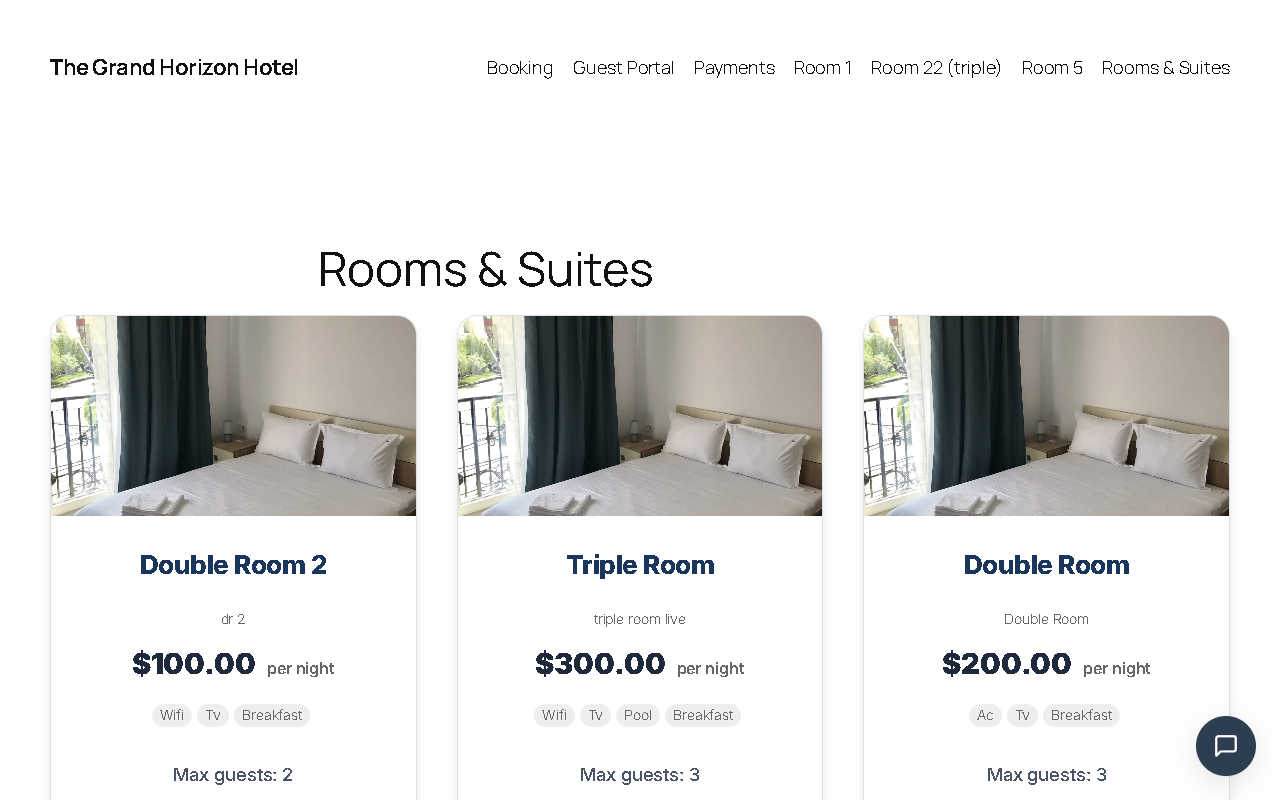
[mhbo_rooms]— Responsive catalog grid of rooms, suites, and vacation rentals. - 🔑 Guest Self-Service Portal —
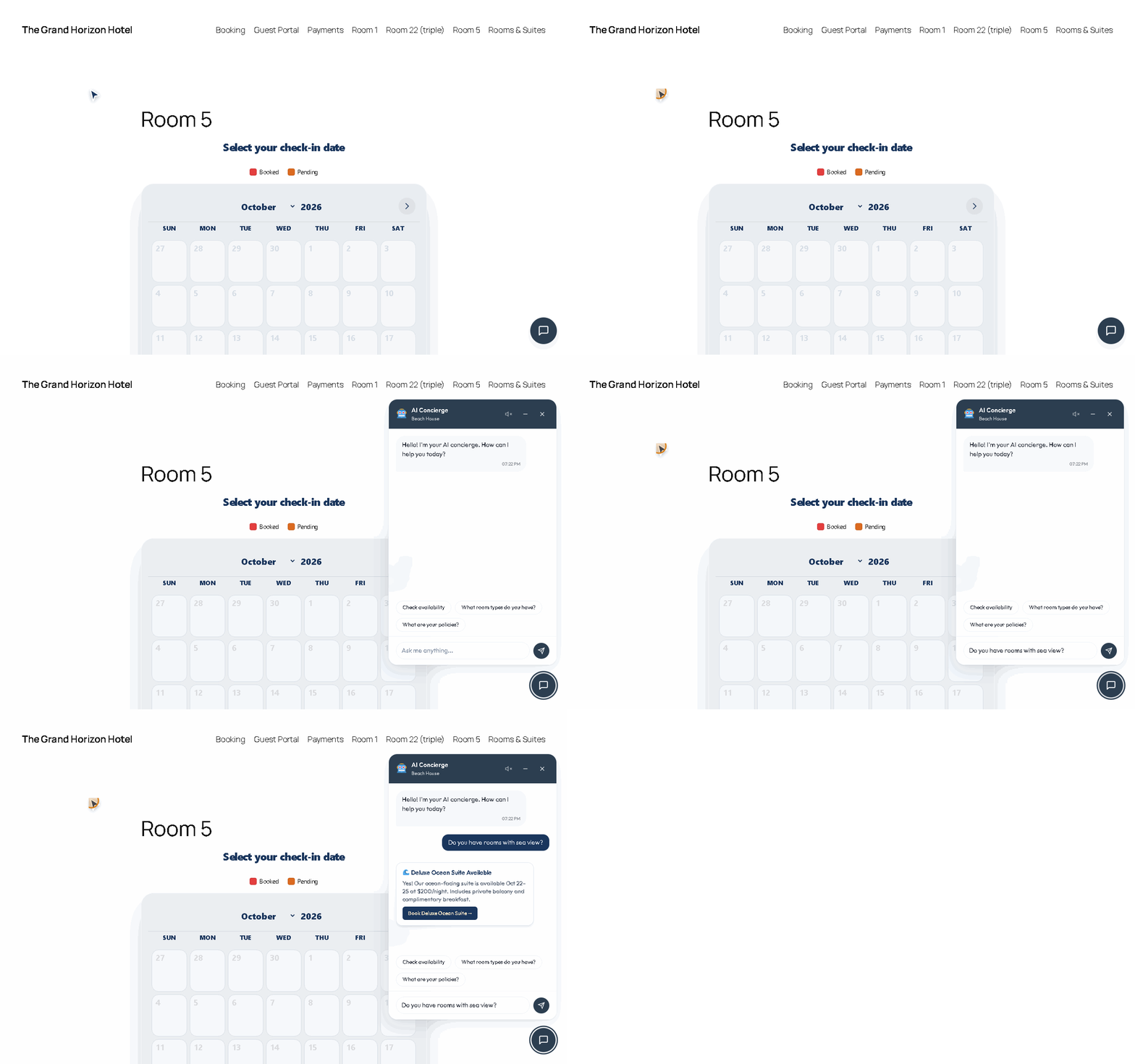
[mhbo_guest_portal]— Hub for guests to view, print, or modify reservations. - 🤖 Virtual AI Concierge —
[mhbo_ai_concierge](Block:AI Chat Widget) — Sitewide drawer or contact page chat assistant. - 💬 WhatsApp Inquiries —
[mhbo_whatsapp](Block:WhatsApp Button) — Quick click-to-chat inquiry button. - 🏦 Bank Wire Details —
[mhbo_banking_details](Block:Banking Details) — Bank wire instructions for confirmation pages. - 💳 Revolut Pay QR & Link —
[mhbo_revolut_details](Block:Revolut Details) — Direct payment link and QR code. - 🏢 Company Profile —
[mhbo_company_info](Block:Company Info) — Embed property address, phone, and contact details. - 🪪 Hotel Business Card —
[mhbo_business_card](Block:Business Card) — Summary card for sidebars and about pages. - 🏷️ Payment Methods —
[mhbo_payment_methods]— Display accepted offline payment options.
Feature Comparison: Free vs. Commercial Editions
Every core feature needed to accept direct bookings and run your property is 100% free on WordPress.org — with zero booking caps, no expiration timers, and no forced account signups.
Included in the Free Edition (WordPress.org):
- ✔ Direct Bookings — 100% commission-free direct booking engine with unlimited room types and physical units.
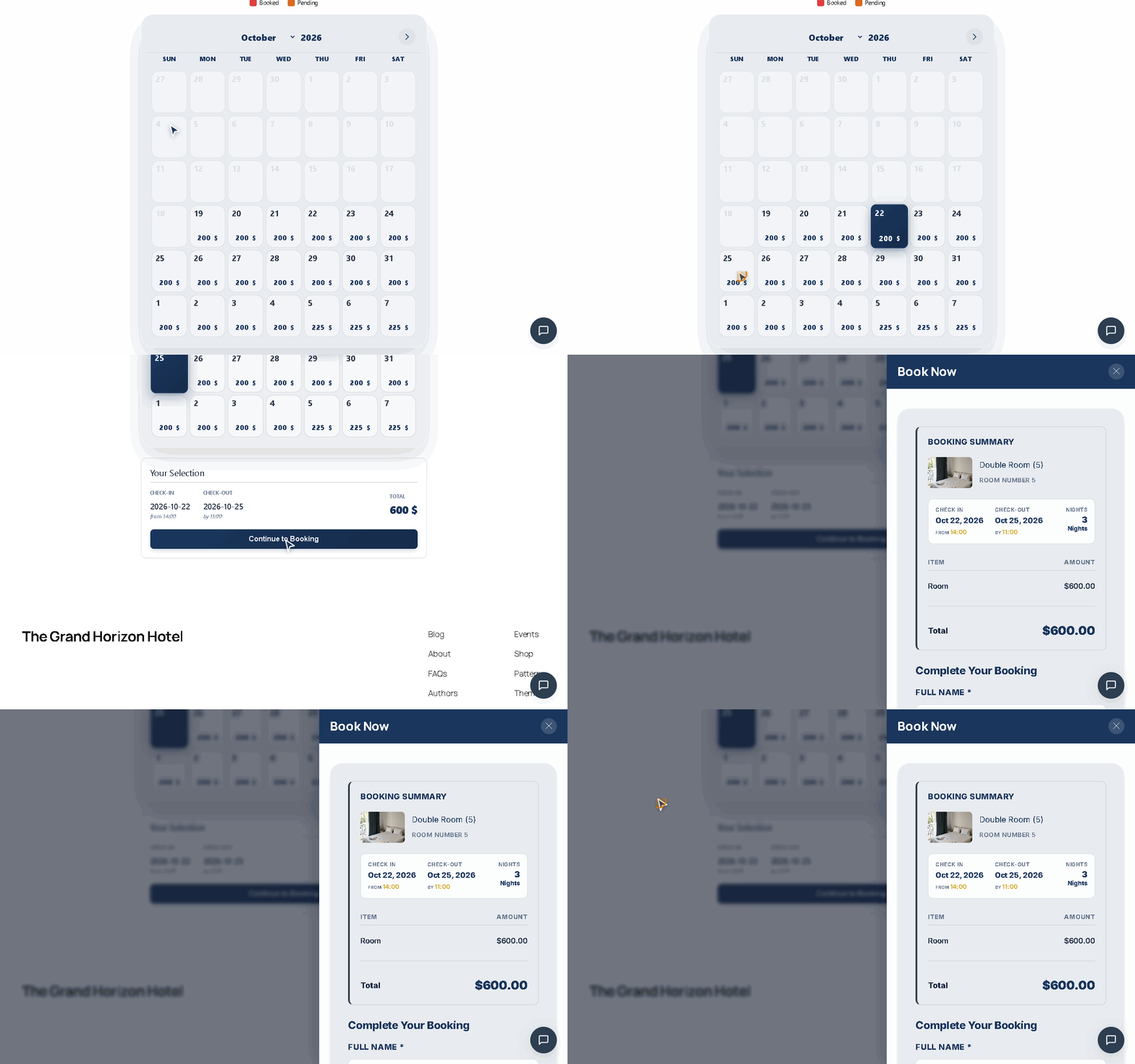
- ✔ Progressive Calendar — 0 KB jQuery availability calendar with smooth slide-out checkout drawer.
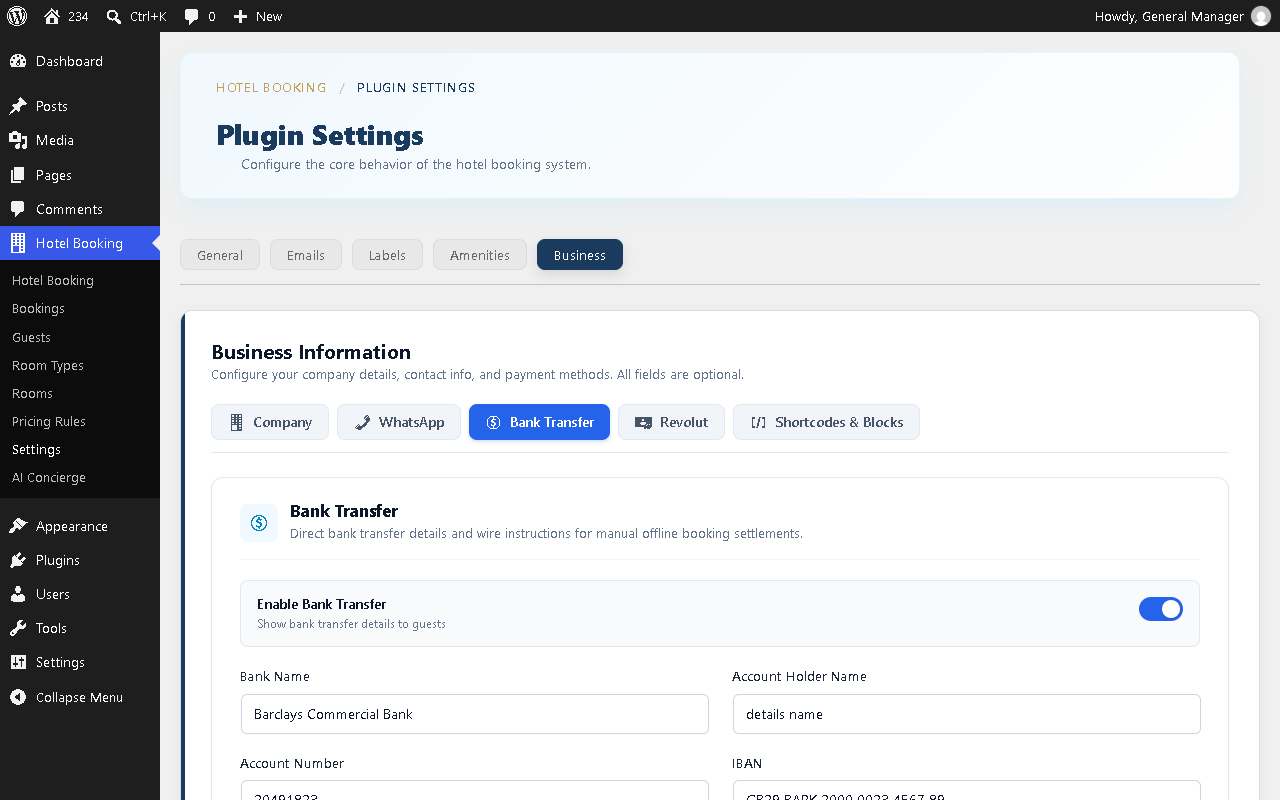
- ✔ Offline Payments — Pay on Arrival, Bank Wire Transfer (IBAN/BIC), Revolut Pay, and WhatsApp reservations.
- ✔ Guest Self-Service Portal — Passwordless lookup, stay countdown, USALI billing ledger, and printable travel vouchers.
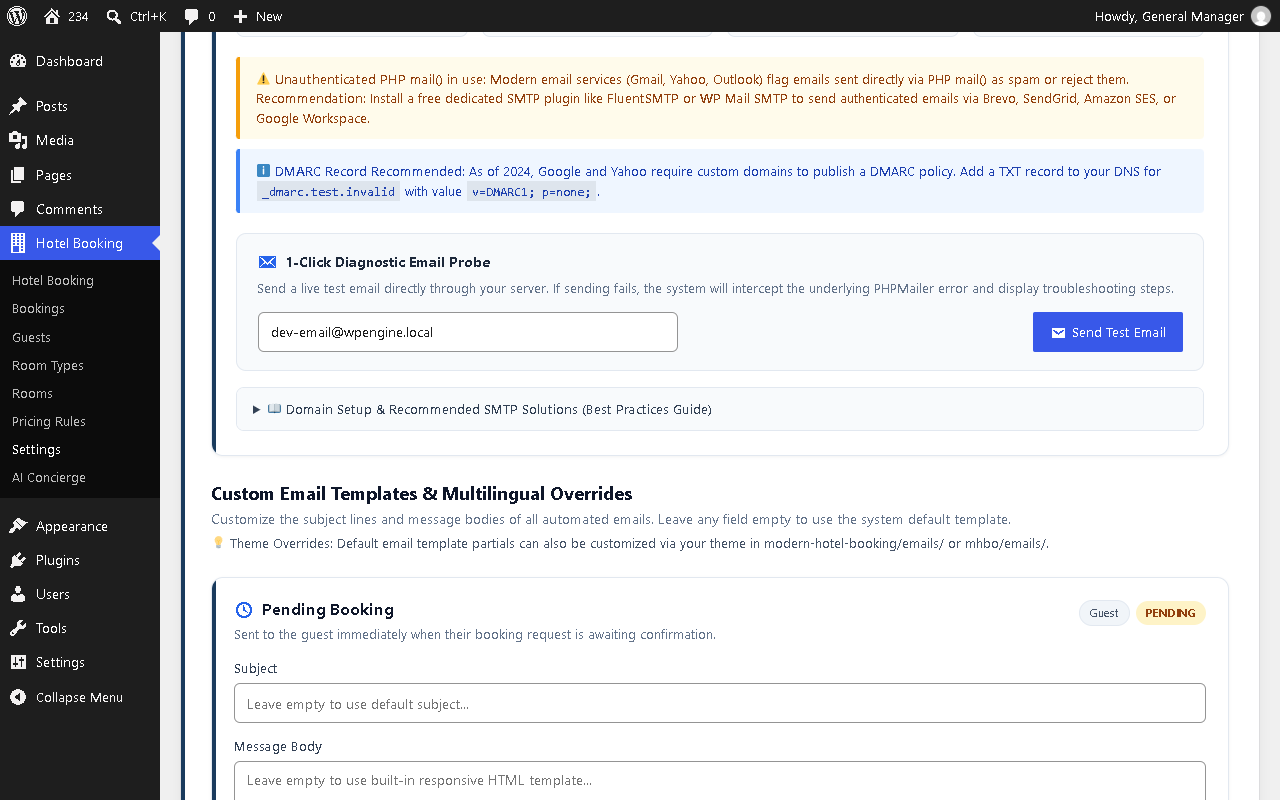
- ✔ Email Health Inspector — Live 4-tile diagnostic grid checking SMTP mailer, sender domain, SPF, and DMARC records.
- ✔ Front-Desk Manual PMS — 2-column reservation workstation with repeat guest CRM auto-fill and quick cashiering.
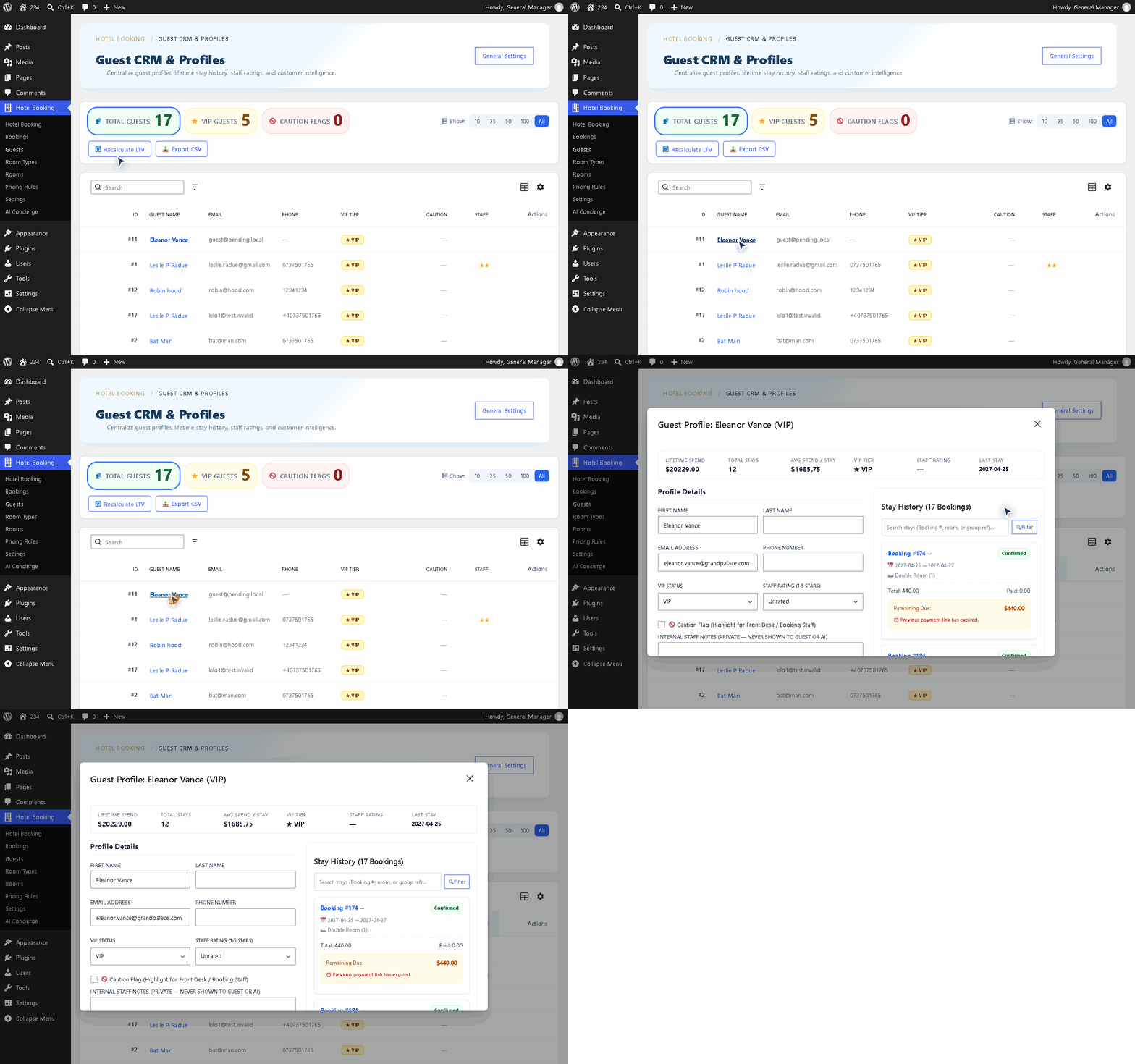
- ✔ Guest CRM Directory — React DataViews guest profiles with slide-out dossier drawers and stay histories.
- ✔ AI Concierge Core — 10 WordPress 7.1 abilities, Model Context Protocol (MCP) server, and 30 req/hr capacity.
- ✔ Content Integration — 8 native Gutenberg blocks, 11 shortcodes, 3 Elementor widgets, and 15 native translations.
Added in Modern Hotel Booking Starter:
- ➜ Online Payment Gateways — Stripe Elements (Cards, Apple Pay, Google Pay, 3DS2), PayPal Smart Buttons, and Braintree Drop-in.
- ➜ Dynamic Invoicing & Taxes — PDF/HTML guest tax invoices, VAT inclusive vs Sales Tax exclusive, and split lodging/extras rates.
- ➜ Child Pricing & Buffers — Age-tiered pricing (ages 1 to 17) and same-day turnover buffers.
- ➜ Expanded AI Concierge — Doubled capacity (60 req/hr) and voice features.
Added in Modern Hotel Booking Pro:
- 🚀 Automated 2-Way iCal Sync — Two-way availability sync with external travel channels and personal calendars.
- 🚀 Deposits & Balance Links — Upfront deposit collection and automated scheduled balance payment links.
- 🚀 Front-Desk Tablet Kiosk — Fullscreen operational workstation with live interactive Gantt tape chart.
- 🚀 Group Stays & Housekeeping — Multi-room group bookings with split folios and daily housekeeping turnover manifests.
- 🚀 Dynamic Yield Pricing — Seasonal pricing schedules, interactive visual calendar override editor, and weekend multipliers.
- 🚀 Marketing & Analytics — Automated post-stay review requests, email marketing, and STR revenue analytics (ADR, RevPAR).
- 🚀 AI Concierge Pro — 17 hospitality abilities, Google Hotel Center XML feeds, and ElevenLabs neural voice.
🏨 Everything Included in the Free Edition
1. 📅 Progressive Availability Calendar & Direct Booking Engine
- Unlimited Room Types & Units — Manage vacation rentals, bed and breakfast (B&B) rooms, guesthouse suites, and boutique hotel accommodations with an intuitive property management system (PMS) featuring automatic physical unit allocation and natural room-number sorting.
- Double-Booking Prevention — Database-level locking (
GET_LOCK) prevents race conditions when visitors book the same dates simultaneously. - Slide-Out Booking Drawer — Guests pick dates on the calendar, review instant stay summaries, and complete reservations inside a smooth slide-out drawer without leaving the page.
- Showcase Grid (
[mhbo_rooms]) — Responsive room cards with amenity badges, guest capacity tags, photo galleries, and nightly rates. - Flexible Pricing & Stay Rules — Configure custom per-room nightly rates, extra adult charges, global min/max stay lengths, advance booking horizons, and room maintenance status blocks.
- Theme Styling & Dark Mode — Midnight Navy and Champagne Gold palette, automatic block theme color inheritance, and WCAG AAA high-contrast dark mode.
2. 💳 Direct & Offline Payment Gateways
- Pay on Arrival — Guests reserve online and settle their balance at your front desk with cash or card terminal.
- Direct Bank Wire Transfer (IBAN / BIC / SWIFT) — Clear instructions with 1-click copy buttons for IBAN and BIC/SWIFT at checkout and in emails.
- Revolut Pay (Direct Link & QR Code) — Accept instant payments via your
revolut.melink or merchant QR code at checkout. - WhatsApp Click-to-Chat Reservations — Guests submit room reservation requests directly to your property WhatsApp with pre-filled details.
3. 🔑 Passwordless Guest Self-Service Portal ([mhbo_guest_portal])
- 1-Click Magic Links & Verified Lookup — Guests open their portal via an authenticated email link or by entering Booking ID and email.
- Itemized Billing Ledger — USALI accounting breakdown showing nightly rates, taxes, payments received, and remaining balance due.
- Self-Service Cancellations & Changes — Guests can cancel unpaid bookings instantly or submit modification requests for confirmed stays.
- 1-Tap Printable Travel Voucher — Ink-friendly confirmation voucher with property address, directions, and check-in times.
- Digital Compendium — Display Wi-Fi credentials, keybox codes, and house rules directly on the guest portal.
4. 🛎️ Front-Desk Command Center & Manual Booking PMS
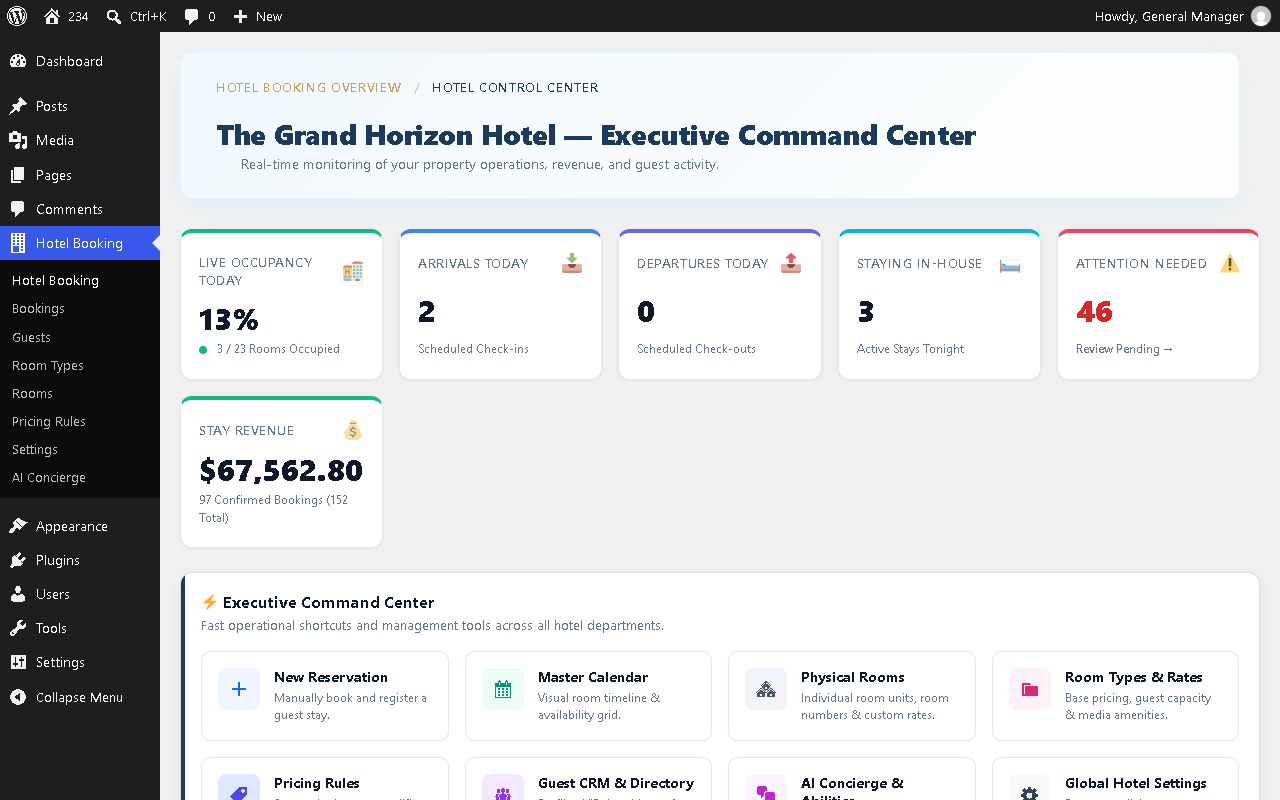
- Executive Hotel Command Center — High-level dashboard with Live Occupancy Pulse gauge, arrivals/departures counters, today’s tasks, and quick actions.
- Operational Bookings Calendar — Visual month grid powered by FullCalendar with multi-room booking bars, occupancy indicators, and event hover popovers linking to Guest CRM profiles.
- 2-Column Manual Reservation Workstation — A front-desk hotel reservation system to take phone and walk-in bookings easily: CRM Quick-Fill repeat guest auto-fill, inline Flatpickr calendar, live price recalculations, and one-tap payment shortcuts.
- Verified Payment Ledger — Log partial or full payments (Cash, Card Terminal, Bank Wire, Check) with strict transaction tracking.
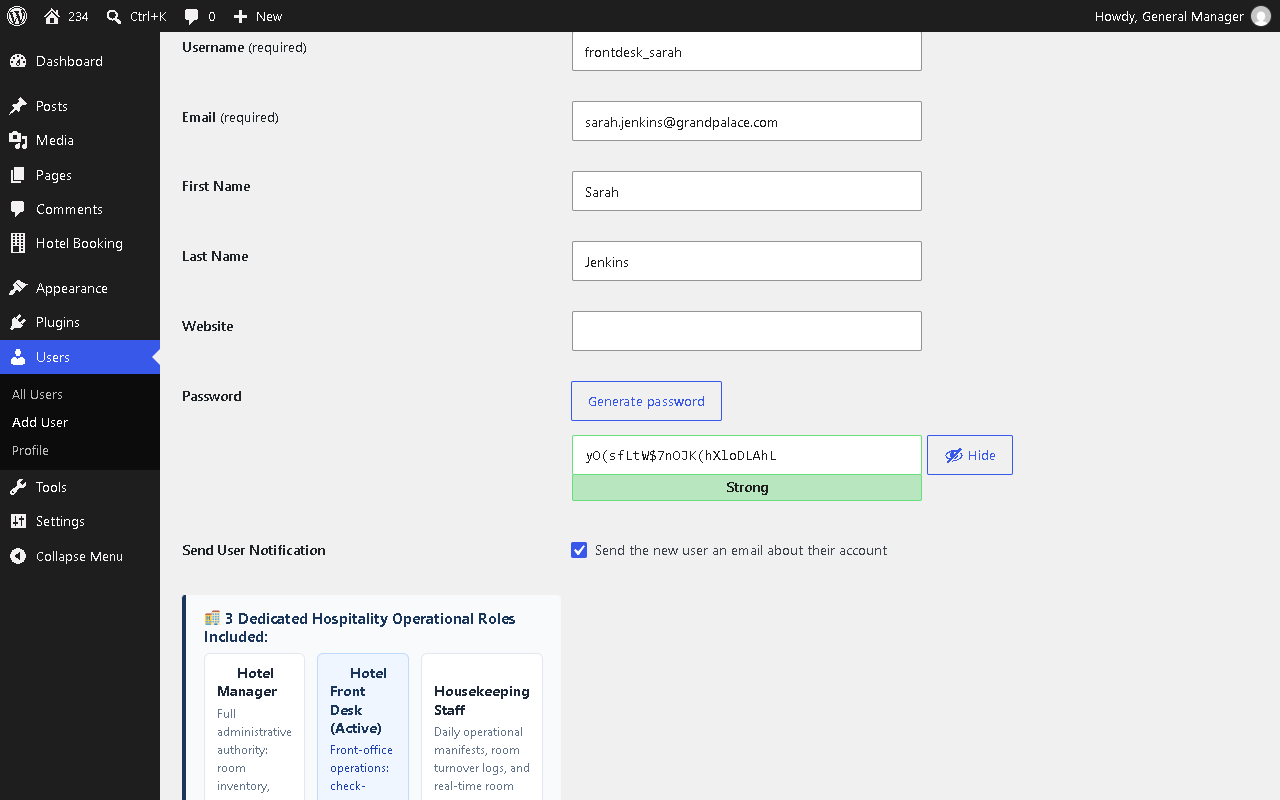
- Hospitality Staff Roles — Dedicated Hotel Manager, Front Desk Staff, and Housekeeping Staff roles enforce clear operational access boundaries.
5. 👥 Guest CRM Directory & Dossiers
- React DataViews Guest Directory — Search, filter, and sort guest profiles using native WordPress DataViews.
- Slide-Out Guest Dossier — Slide-out drawer showing Lifetime Spend, completed stays history, staff ratings, private management notes, and caution alerts.
- Zero Overhead Switch — Enable the Guest CRM or toggle it off anytime with a single click.
6. ✉️ Email Delivery Health Inspector & 14 Notification Templates
- Live Email & DNS Diagnostic Grid — Checks active mailer transport (SMTP vs default PHP mail), sender domain alignment, and live SPF / DMARC DNS records to prevent spam folder delivery.
- 1-Click Test Email Probe — Send a live test email directly from settings to verify inbox delivery before launching.
- 14 Transactional Email Templates — Automated lifecycle notifications with dynamic merge tags, theme override support, admin BCC financial archiving, and multi-language support.
7. 🤖 Optional 24/7 AI Guest Concierge & WordPress 7.1 Abilities
- Virtual Front-Desk Assistant — Chat assistant answering guest questions about live room availability, nightly rates, check-in policies, amenities, and recommendations.
- Connect Your Own AI Key — Use your own API key from Google Gemini (including free-tier keys), OpenAI, Anthropic, OpenRouter, or the native WordPress 7.0+ AI Connector.
- 10 WordPress 7.1 Hospitality Abilities — Registers 10 schema-validated abilities (availability, rooms, pricing), exposes an MCP server, generates
llms.txtmanifests, and supports voice dictation.
8. 🧩 Native Blocks, Shortcodes & Page Builders
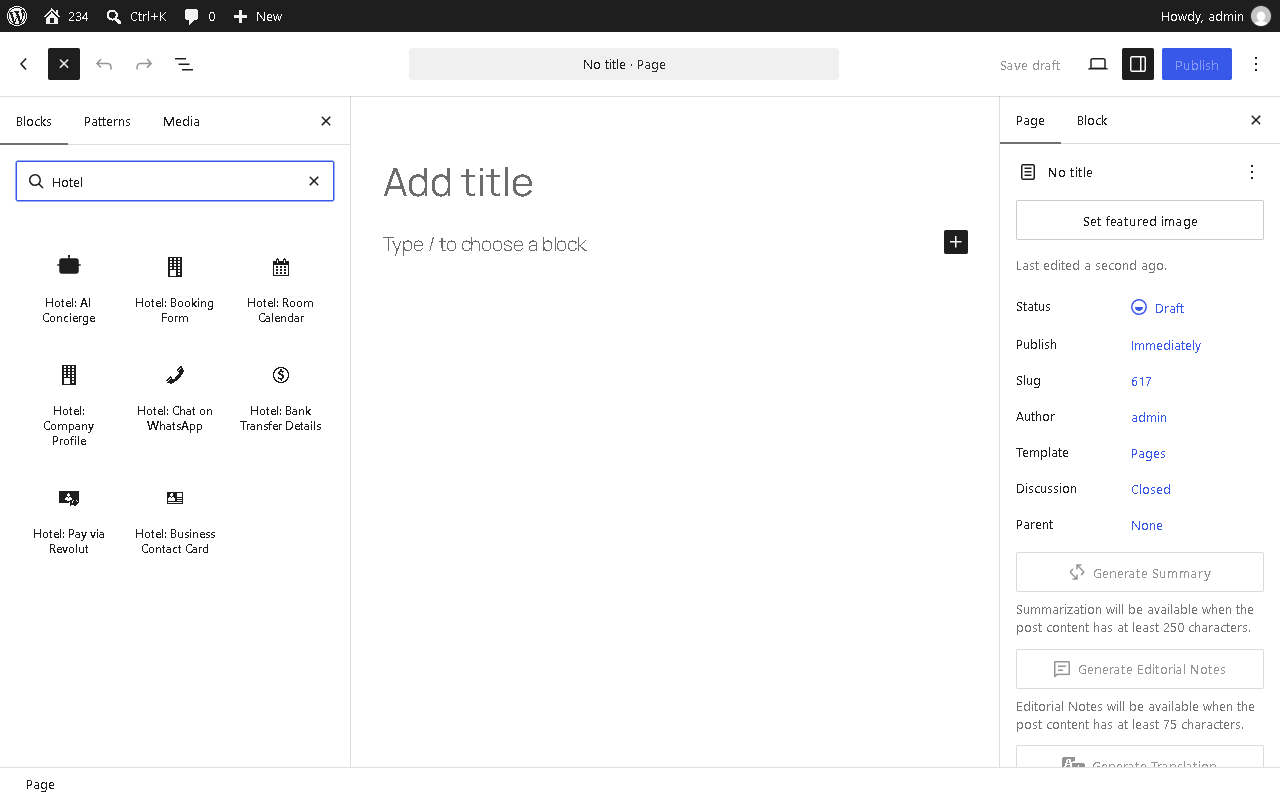
- 8 Native Gutenberg Blocks — Search “Hotel” in the Block Inserter: Booking Form, Room Availability Calendar, Company Info, WhatsApp Button, Banking Details, Revolut Pay Details, Business Card, and AI Chat Widget.
- 11 Universal Shortcodes — Complete shortcode library covering all booking and property display requirements.
- Elementor & Classic Support — 3 native Elementor widgets and a classic sidebar search widget.
Built for Global Hospitality (15 Native Translations)
Modern Hotel Booking includes 100% native translations across 15 languages with compiled .mo, .l10n.php, and script .json catalogs:
Includes full native translations for Czech, Danish, German, Greek, Spanish, French, Hungarian, Italian, Norwegian, Dutch, Polish, Portuguese (Brazil), Romanian, Russian, Swedish, and English.
Seamlessly integrates with Polylang, WPML, qTranslate-XT, and Bogo, plus an in-plugin translation editor under Settings > Labels to customize any button, notice, or email string.
Data Sovereignty, Privacy & GDPR Ready
- All reservations, customer profiles, and financial transactions stay 100% on your self-hosted WordPress server.
- Zero external telemetry scripts or third-party tracking cookies.
- Full compatibility with WordPress Core Export Personal Data and Erase Personal Data tools.
- Native bridges for Complianz and the WP Consent API ensure browser storage is accessed only with visitor consent.
🎯 Who Is Modern Hotel Booking Built For?
- 🏡 Bed and Breakfasts & Inns — Manage room availability, offline checkout, and automated guest emails with 0% commissions.
- 🌲 Vacation Rentals & Cabins — Rent entire properties or private suites with custom rates, min-stay rules, and self-service guest vouchers.
- 🏨 Boutique Hotels & Guesthouses — Front-desk operations with physical room allocation, walk-in reservations, staff roles, and guest CRM.
- 🏢 Serviced Apartments — Manage extended stays up to 2 years in advance with min/max stay limits and itemized billing ledgers.
- 💻 WordPress Agencies — Fast, theme-native, GPL direct booking engine that adapts to any theme with clean shortcodes and blocks.
Optional Commercial Upgrades (Starter & Pro)
Modern Hotel Booking Free is complete and never expires. For advanced operations, commercial editions add online credit cards (Stripe/PayPal), PDF invoices, child rates (Starter), and 2-way iCal OTA sync, front-desk tablet mode, and AI voice (Pro). Explore details at Modern Hotel Booking.
External Services & Privacy Notice
Modern Hotel Booking is self-hosted. By default, no guest booking data is sent to external servers unless you enable one of these optional integrations:
- Google Fonts (
fonts.googleapis.com/fonts.gstatic.com— Free, Starter, Pro): Loads Inter and Outfit typefaces via standard browser requests (no cookies or form data transmitted). Google Fonts FAQ | Google Privacy. - WhatsApp Click-to-Chat (Optional — Free, Starter, Pro): Opens a pre-filled summary in WhatsApp (
wa.me) only when clicked by the guest. WhatsApp Privacy. - Revolut Pay (Optional — Free, Starter, Pro): Redirects guests to your configured Revolut payment link or QR code at checkout. Revolut Privacy.
- AI Concierge (Optional — Free, Starter, Pro; Disabled by Default): Transmits guest inquiries only when configured by the admin (Google Gemini, OpenAI, Anthropic, OpenRouter, or ElevenLabs in Pro). Gemini Privacy | OpenAI Privacy.
- Online Payments (Optional — Starter & Pro Only): Processes card payments via Stripe, PayPal, or Braintree directly tokenized by gateway libraries. Stripe Privacy | PayPal Privacy.
- External iCal Feeds (Optional — Pro Only): Fetches external
.icscalendar feeds configured by the admin to sync room availability. - License Verification (Starter & Pro Only): Validates licenses and checks updates via modernhotelwp.com in commercial releases only. Privacy Policy.
Third-Party Software Credits
The following open-source JavaScript libraries are bundled locally in the plugin:
- Flatpickr v4.6.13 — MIT License — Flatpickr Documentation
- FullCalendar v7.1.5 — MIT License — FullCalendar Documentation
- Chart.js v4.6.1 — MIT License — Chart.js Documentation
Installation
Quick Installation
- Log into your WordPress admin dashboard and go to Plugins > Add New.
- Search for Modern Hotel Booking.
- Click Install Now, then click Activate.
🎥 10-Minute Video Setup Tutorial
Follow our step-by-step video guide to set up room categories, configure physical units, and take your first live booking in 10 minutes:
Looking for a quick feature overview instead? Check out the 3-minute Official Video Tour on the Description tab.
Complete Setup Guide (From Activation to First Booking)
After activation, open the new Hotel Booking menu in your WordPress admin sidebar.
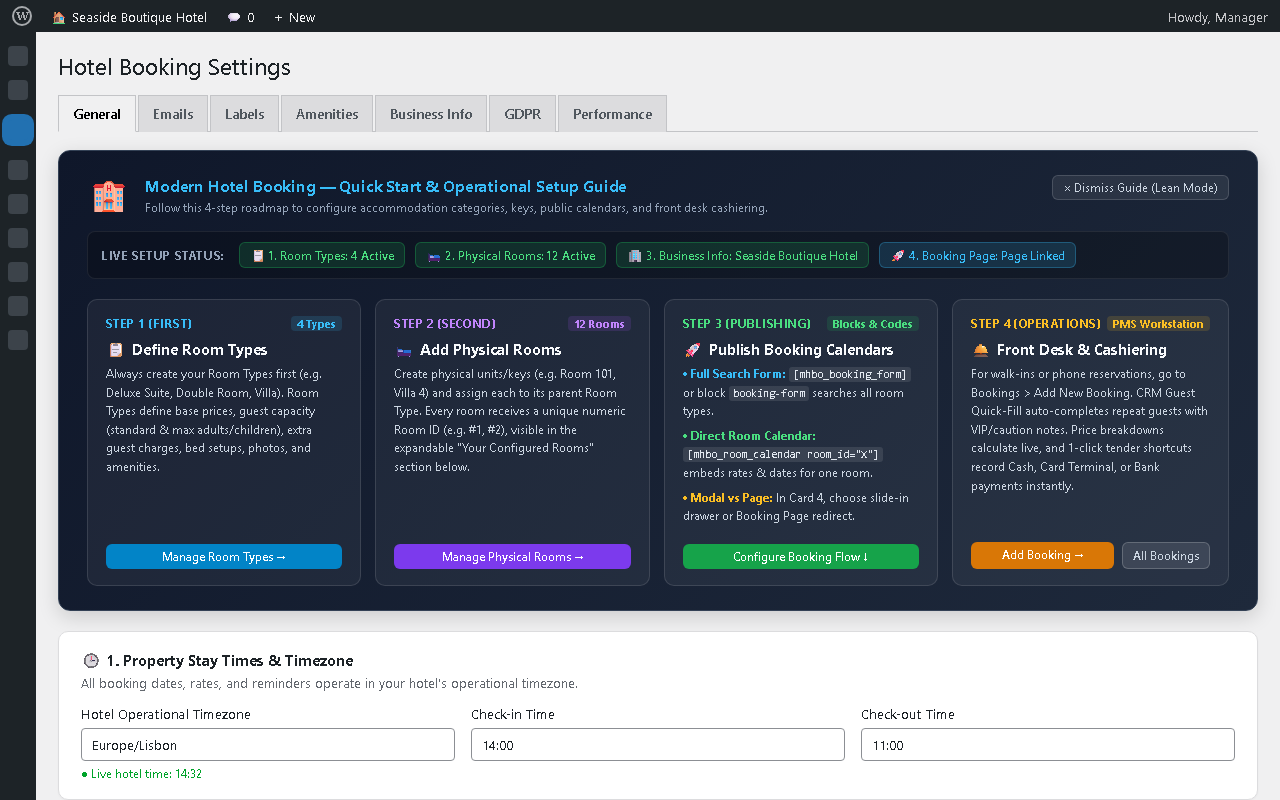
A built-in Quick Start & Setup Guide banner sits at the top of Hotel Booking > Settings > General (see Screenshot 14). Its Live Setup Status meter turns each item green once it is configured:
- 📋 Room Types — Shows how many room types are active.
- 🛏️ Physical Rooms — Shows how many bookable rooms or units exist.
- 🏢 Business Info — Shows your property name once saved.
- 🚀 Booking Page — Confirms your public booking page is linked.
Follow these 7 steps to take your first booking:
Step 1: Create Your Room Types
- Go to Hotel Booking > Room Types and click Add New.
- Create your accommodation categories (e.g., Deluxe Suite, Standard Double, Ocean Villa).
- Set base nightly price, standard and maximum adults, extra guest charges, beds, photos, and amenities.
- Always create Room Types first — physical rooms belong to them.
Step 2: Add Your Physical Rooms
- Go to Hotel Booking > Rooms and click Add Physical Room.
- Add each unit or key (e.g., Room 101, Villa 4) and link it to its Room Type.
- Each room receives a unique numeric Room ID (
#1,#2, etc.). - Tip: Expand Your Configured Rooms in Settings > General for 1-click copy buttons for every room’s calendar shortcode and block.
Step 3: Set Stay Times & Timezone
- Open Hotel Booking > Settings > General (Card 1).
- Select your Hotel Operational Timezone — all dates, rates, and reminders use it.
- Enter your Check-in Time (e.g., 14:00) and Check-out Time (e.g., 11:00).
- Optionally set property-wide minimum and maximum stay rules.
Step 4: Add Business Details & Payment Options
- Open Hotel Booking > Settings > Business Info.
- Enter your property name, address, email, phone, and optional Google Maps Place ID.
- Enable the payment methods you want to offer:
- Pay on Arrival — Cash or card terminal at your front desk.
- Bank Wire Transfer — Account holder, IBAN, and BIC/SWIFT with 1-click copy buttons at checkout and in emails.
- Revolut Pay — Your payment link or QR code.
- WhatsApp Reservations — Instant click-to-chat booking requests.
Step 5: Choose Your Booking Flow & Publish Pages
- Open Hotel Booking > Settings > General (Card 4) and pick a booking flow:
- Slide-Out Drawer (Recommended) — Guests book on the current page without navigating away.
- Booking Page Redirect — Guests go to your reservations page with dates pre-filled.
- Blocks: In the block editor, search “Hotel” and insert Booking Form or Room Availability Calendar.
- Shortcodes: Add
[mhbo_booking_form]to your main booking page, or[mhbo_room_calendar room_id="1"]to a single room page. - Guest Portal: Create a “Manage Reservation” page with
[mhbo_guest_portal]and select it in Settings > General (Card 9).
Step 6: Test Email Delivery
- Go to Hotel Booking > Settings > Emails.
- Check the 4-tile Email Delivery Health Inspector (mail transport, sender domain, SPF, and DMARC).
- Click Send Test Email to confirm confirmation emails reach your inbox before launch.
Step 7: Take a Test Booking
- Go to Bookings > Add New Booking to try the front-desk workstation with live price breakdowns and 1-click tender buttons (Pay in Full, Deposit Only, Pay on Arrival).
- Monitor occupancy, arrivals, and departures in Hotel Booking > Command Center.
- Lean Mode: Dismiss the setup banner once you are done. Reopen it anytime with the ✨ Property Setup & Shortcode Guide button at the top of Settings.
FAQ
Can I accept real hotel bookings and payments in the Free version without Stripe?
Yes. The Free edition on WordPress.org is a complete, working reservation system with no booking caps. Out of the box, you can accept reservations using Pay on Arrival (cash or card terminal at your front desk), Direct Bank Wire Transfer (IBAN / BIC / SWIFT), Revolut Pay (payment link and QR code), and WhatsApp Click-to-Chat requests. You can also record front-desk payments manually in the verified folio ledger. Online card gateways (Stripe, PayPal, and Braintree) are only needed if you want automated online card processing in the Starter or Pro editions.
What is the difference between the Free, Starter, and Pro editions?
Free Edition (WordPress.org):
- Direct booking engine with unlimited room types and physical units
- Progressive availability calendar (0 KB jQuery) with slide-out checkout drawer
- Offline payments: Pay on Arrival, Bank Wire (IBAN/BIC), Revolut Pay, and WhatsApp
- Passwordless Guest Self-Service Portal (
[mhbo_guest_portal]) and printable vouchers - Guest CRM Directory with React DataViews and slide-out profile dossiers
- 2-column front-desk manual reservation workstation with repeat guest auto-fill
- Live Email Delivery Health Inspector (SMTP, SPF, DMARC) with 14 notification templates
- 8 native Gutenberg blocks, 11 universal shortcodes, and 3 Elementor widgets
- AI Concierge Core with 10 WordPress 7.1 abilities and MCP server
Starter Edition (Commercial Entry):
- All Free features plus online card processing: Stripe Elements, PayPal Smart Buttons, and Braintree Drop-in
- Dynamic PDF & HTML guest tax invoices with custom property headers
- Multi-mode tax engine (VAT inclusive vs Sales Tax exclusive, split accommodation/extras rates)
- Child occupancy pricing by age tiers (ages 1 to 17) and same-day turnover buffers
- Doubled AI Concierge capacity (60 req/hr) and voice features
Pro Edition (Complete Enterprise Hospitality Suite):
- All Starter features plus Automated 2-Way iCal Calendar Sync (RFC 5545 channel synchronization)
- Upfront deposit collection and automated scheduled balance payment links
- Fullscreen Front-Desk Tablet Kiosk workstation with live interactive Gantt tape chart
- Multi-room group reservations with sibling room linking and split folios
- Daily housekeeping turnover manifests with 1-tap room status toggles
- Dynamic yield pricing: seasonal rate schedules, visual calendar override editor, weekend multipliers
- Automated post-stay guest review requests and marketing emailer
- Hospitality revenue analytics: ADR, RevPAR, TRevPAR, and ALOS reporting
- AI Concierge Pro: 17 abilities, Google Hotel Center XML feeds, and neural voice synthesis
Can I sync my availability calendar with external booking channels and calendar apps?
Automated two-way iCal synchronization (importing and exporting .ics calendar feeds every 30 minutes with RFC 5545 conflict detection and automatic orphan cleanup) is available in Modern Hotel Booking Pro. In the Free and Starter editions, availability is managed directly on your WordPress site and through the front-desk manual reservation workstation.
Will an interactive availability calendar slow down my WordPress website?
No. Modern Hotel Booking is engineered with 0 KB of jQuery and uses Front-Heavy Progressive Calendar Hydration. Rather than outputting thousands of calendar elements into your page HTML, the server renders an immediate 4-month window for quick initial page loads (reducing initial HTML size by ~70%), then quietly hydrates the remaining 2-year booking horizon in the background during idle browser moments.
How do guests view, print, or cancel their reservation online?
Add the [mhbo_guest_portal] shortcode to any page and set it as your portal page in Hotel Booking > Settings > General. Guests access their reservation using a secure 1-click magic link in their confirmation email or by entering their Booking ID and email. They can view their personalized greeting, stay countdown, itemized USALI billing ledger, Wi-Fi details, print an ink-friendly travel voucher, cancel an unpaid stay in one click, or submit a date modification request.
Why aren’t hotel booking confirmation emails landing in the guest’s inbox?
Shared WordPress hosting often uses default PHP mail() configurations that fail modern email authentication checks. Modern Hotel Booking includes a built-in Email Delivery Health Inspector under Hotel Booking > Settings > Emails. Its live diagnostic grid inspects your mail transport (SMTP vs standard mail), sender domain alignment, and live SPF and DMARC DNS records, paired with a 1-Click Test Email Probe so you can confirm inbox delivery before your first guest arrives.
How does the AI Concierge work, and do I have to pay for it?
The AI Concierge is completely optional and can be turned on or off anytime. In the Free version, it connects directly using your own API key from Google Gemini (which offers a generous free API tier through Google AI Studio), OpenAI, Anthropic, OpenRouter, or the native WordPress 7.0+ AI Connector. It answers guest questions about availability, pricing, amenities, and house rules with interactive cards, with zero monthly middleware fees.
Does this plugin work with block themes, Elementor, and multilingual plugins?
Yes. Search “Hotel” in the WordPress Block Inserter to use any of the 8 native Gutenberg blocks, or use the 3 native Elementor widgets and 11 universal shortcodes across block themes, classic themes, Bricks, Divi, and Beaver Builder. For multilingual properties, the plugin includes native compatibility with Polylang, WPML, qTranslate-XT, and Bogo, along with a built-in translation table for room names and email notifications.
How does the plugin handle GDPR and guest data privacy?
All booking and guest data is stored locally in your WordPress database. The plugin integrates natively with WordPress Core’s Export Personal Data and Erase Personal Data tools, provides explicit GDPR checkout consent checkboxes, and bridges with the WP Consent API and Complianz to ensure local storage is only used after appropriate consent.
Screenshots



Changelog
3.0.3
- Security: Hardened SSRF URL and IP validation on external HTTP requests and webhook endpoints.
- Privacy: Bundled self-hosted GDPR-compliant typography assets locally with zero external font requests.
- Performance: Added minified CSS (
cssnano) and JavaScript (terser) asset delivery with dynamic.minresolution. - Updated: Upgraded bundled FullCalendar scheduling engine to v7.1.5.
- Compatibility: Restored WordPress core
jqueryscript registration while maintaining 100% Zero-jQuery architecture in Modern Hotel Booking.
3.0.2
- Improved: WordPress.org catalog documentation and parser compliance optimizations.
- Improved: Embedded tutorial and getting started video walkthrough references.
3.0.1
- Fix: Admin notification email settings in Free & Starter editions.
- Improved: Upgraded FullCalendar engine to v7.1.4 with scoped
mhbo-asset handles.