

Description
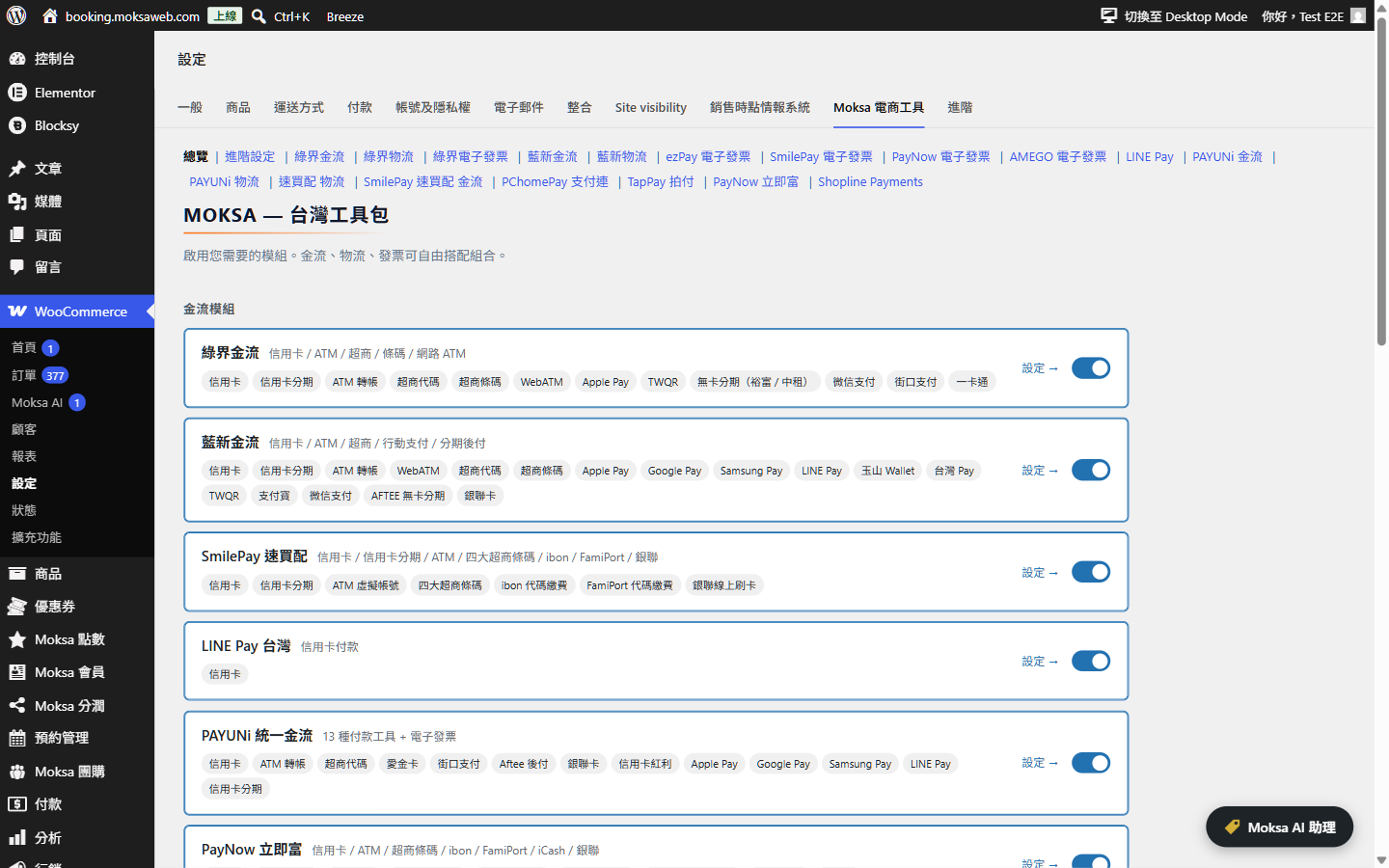
A Taiwan-focused WooCommerce extension. Toggleable modules cover ECPay (綠界), NewebPay (藍新), SmilePay (速買配), LINE Pay, PAYUNi (統一金流), PayNow (立吉富), PChomePay (支付連), TapPay and Shopline Payments for payments; ECPay, NewebPay, SmilePay, PAYUNi and PayNow for convenience-store + home-delivery shipping; ezPay, ECPay, SmilePay, PayNow and AMEGO for Taiwan e-invoicing.
Enable only the providers you need from a single settings page — payment, shipping and invoice modules are fully independent and can be mixed in any combination.
HPOS-native, Block Checkout-native, PHP 8.2+ strict-typed, GPLv3, no premium gating.
Moksa AI assistant
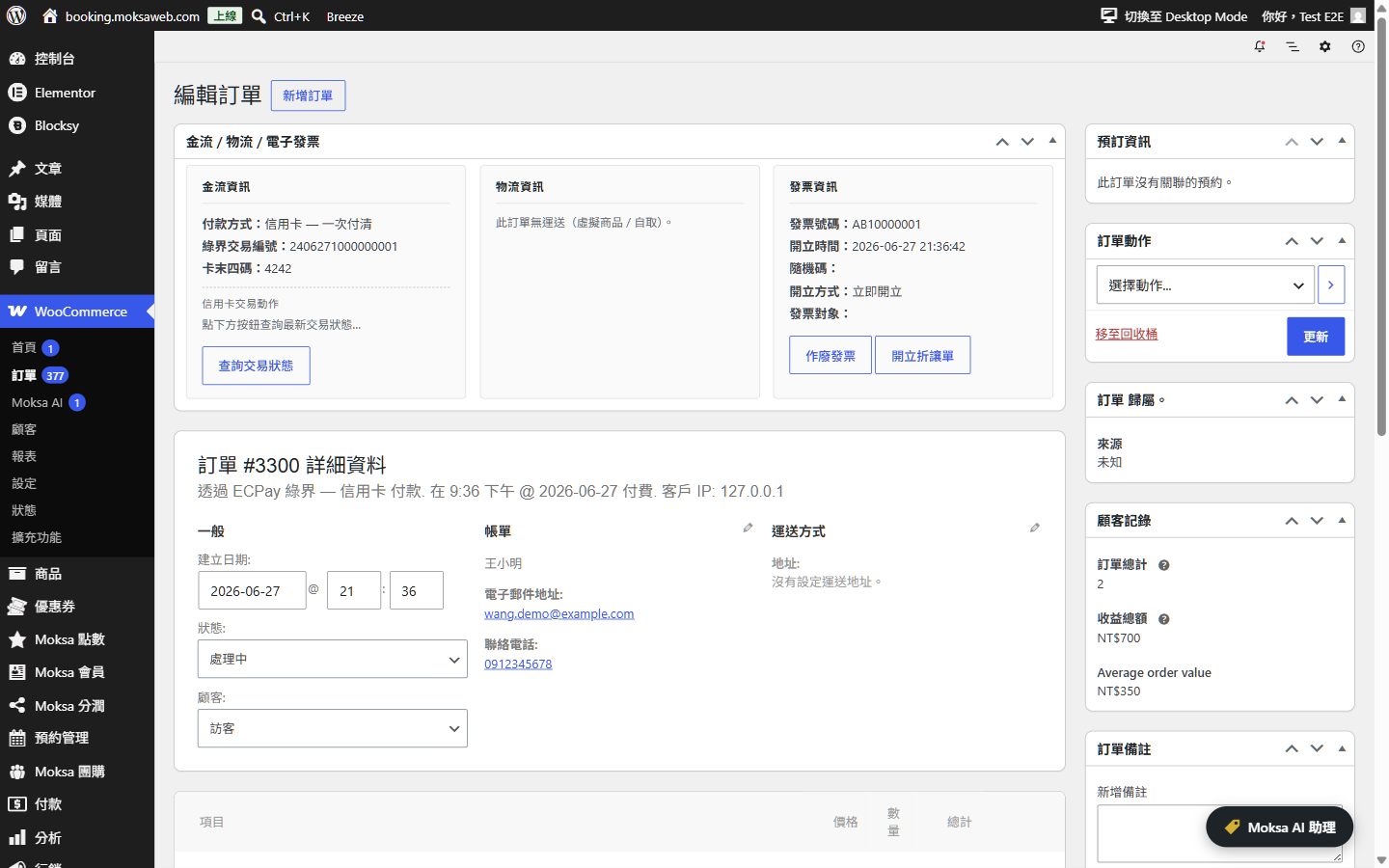
Built on the WordPress 7.0 AI Client, Moksa AI is an optional in-admin chat assistant that lets you run common store tasks in natural language: find orders by invoice / shipping / payment number, look up order details and counts, change order status (single or batch), add order notes, issue / void / allowance e-invoices, create and print shipping labels, and enable or disable modules, individual payment methods and invoice issuing methods. For shipping methods it finds the right one and gives you the link to switch it on or off. Every action that changes data first shows a summary and waits for your explicit confirmation before it runs. The assistant uses whichever AI provider you connect under Settings → Connectors — the plugin never handles your AI keys, refunds, or credentials.
WooCommerce Subscriptions
With WooCommerce Subscriptions installed, six payment methods can charge renewals automatically. Renewals need no extra setup once the method below is ready; what each one needs first:
- TapPay credit card — No extra setting. With 3D Secure on, free trials are not offered and customers cannot change their card themselves.
- PAYUNi credit card — Ask PAYUNi to enable the card token and background authorization services and register your server IP. Then tick Automatic renewals under Subscriptions in the PAYUNi settings (Payment section).
- LINE Pay — Ask LINE Pay to approve automatic payments for your store. Then tick Automatic renewals under Subscriptions in the LINE Pay settings.
- Shopline Payments — Enable Shopline Payments credit card (on-page). Shopline has to turn on payment notifications for your store; the address to send them is shown in the Shopline Payments settings.
- ECPay saved card — ECPay has to enable card binding (on-site payment 2.0) for your store. Turn on daily automatic capture in the ECPay dashboard, otherwise renewal payments are never captured. In the ECPay settings, tick ECPay credit card (saved for subscriptions) under Enabled payment methods, then enable it under WooCommerce → Settings → Payments. The card check amount for free trials is under Subscriptions in the ECPay settings.
- NewebPay recurring payments — Ask NewebPay to enable credit card recurring payments (定期定額) for your store. In the NewebPay settings, tick NewebPay recurring credit card under Enabled payment methods, then enable it under WooCommerce → Settings → Payments. NewebPay charges on its own schedule and notifies your store after each charge, so there is no notification address to set. One subscription schedule per order, with the same amount every period; mixing one-time products or different schedules in the cart hides this method. Under Subscriptions in the NewebPay settings, tick Mandate status changes only if NewebPay has enabled mandate changes for your store; it adds pausing and resuming. Cancelling always works.
Customers need an account to subscribe. Payment results reach your store at /wc-api/ addresses, so make sure a firewall or security plugin does not block them.
WPSubscription
With WPSubscription installed, PAYUNi credit card and NewebPay recurring payments can charge its renewals too, using the same settings as above. NewebPay recurring payments work for one subscription per order with no free trial, sign-up fee or shipping fee. A paid renewal reactivates the subscription straight away, so you can keep the order in Processing until it ships.
Source
Source code and issue tracker: github.com/Moksa1123/moksa-for-woocommerce.
External Services
This plugin is a toolkit of optional integrations. Each integration only loads and only transmits data when you, the site administrator, explicitly enable that module and a customer chooses the corresponding payment / shipping / invoice option. No data is sent to any third party unless the relevant module is enabled and used. The plugin never sends data to Moksa or any analytics/telemetry service.
For every integration below, requests are made server-to-server over HTTPS using your own merchant credentials, and typically include the order number, order amount, buyer name, e-mail, phone, shipping/billing address, item descriptions, and (for e-invoices) the buyer tax ID or carrier number that the customer enters at checkout.
When a module is set to test/sandbox mode, requests go to the provider’s corresponding staging hostname instead of the production one listed below (for example payment-stage.ecpay.com.tw, logistics-stage.ecpay.com.tw, einvoice-stage.ecpay.com.tw, ecpg-stage.ecpay.com.tw, ccore.newebpay.com, sandbox-api.payuni.com.tw, sandbox-api.pchomepay.com.tw, sandbox-api-pay.line.me, sandbox.tappaysdk.com, api-sandbox.shoplinepayments.com, cinv.ezpay.com.tw, test.paynow.com.tw, testinvoice.paynow.com.tw, ssl.smse.com.tw/api_test).
Payment gateways
These run when a customer selects the gateway at checkout (to create the payment) and when you query, capture, refund or void the payment from the order screen.
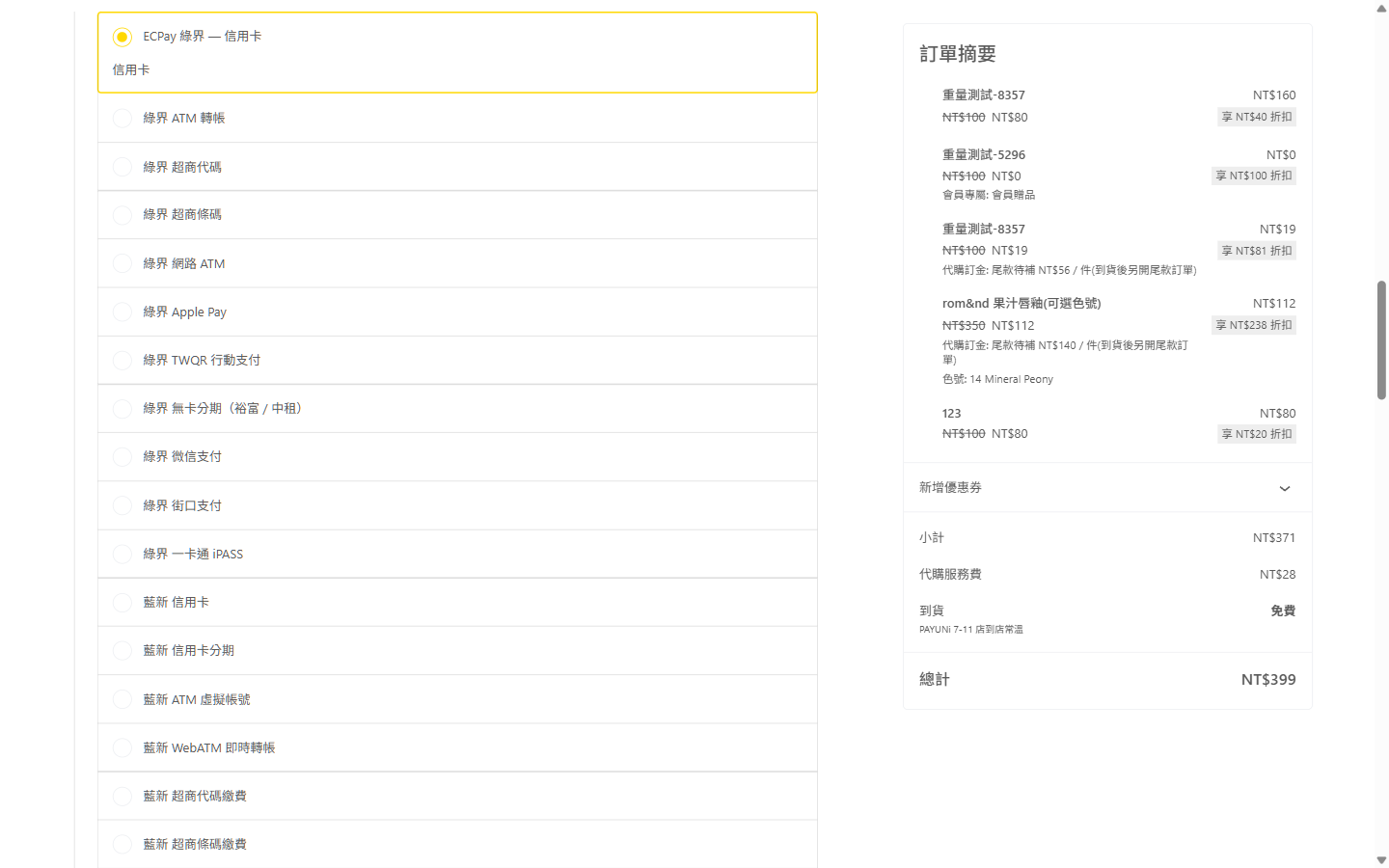
- ECPay (綠界科技) — credit card, ATM, CVS, barcode, installments, wallets. Endpoints: payment.ecpay.com.tw, ecpayment.ecpay.com.tw, ecpg.ecpay.com.tw (test mode: payment-stage.ecpay.com.tw, ecpayment-stage.ecpay.com.tw, ecpg-stage.ecpay.com.tw). The saved-card gateway for subscriptions loads ECPay’s card form script from ecpg.ecpay.com.tw in the browser; card data goes straight to ECPay. Terms: https://support.ecpay.com.tw/10075/ — Privacy: https://www.ecpay.com.tw/CreditCard/Privacy
- NewebPay (藍新金流) — credit card, ATM, CVS, barcode, wallets. Endpoints: core.newebpay.com (test mode: ccore.newebpay.com). Terms: https://www.newebpay.com/website/Page/content/new_service_policy — Privacy: https://www.newebpay.com/website/Page/content/privacy
- PAYUNi (統一金流) — credit card, ATM, CVS, wallets. Endpoints: api.payuni.com.tw (test mode: sandbox-api.payuni.com.tw). Terms: https://www.payuni.com.tw/terms — Privacy: https://www.payuni.com.tw/privacy
- SmilePay (速買配) — credit card, ATM, CVS, barcode. Endpoints: ssl.smse.com.tw (SmilePay’s own API hostname — smse.com.tw and smilepay.net are both operated by the same company, 訊航科技 Shinhang Technology; its policies are published on the smilepay.net brand site; test mode uses the /api_test path on the same hostname). Terms: https://www.smilepay.net/em/servicepolicy.asp — Privacy: https://www.smilepay.net/em/servicepolicy.asp (SmilePay publishes a single combined service & personal-data-protection document, so both links point at that document)
- PayNow (立吉富) — credit card, ATM, CVS, installments. Endpoints: www.paynow.com.tw (test mode: test.paynow.com.tw). Terms: https://www.paynow.com.tw/PayNowUserAgreement.aspx — Privacy: https://www.paynow.com.tw/safepolicy.aspx
- PChomePay (支付連) — credit card, ATM, CVS, barcode. Endpoints: api.pchomepay.com.tw (test mode: sandbox-api.pchomepay.com.tw). Terms: https://www.pchomepay.com.tw/other/service_treaty — Privacy: https://web.pchomepay.com.tw/introduction/privacy
- LINE Pay — LINE Pay wallet. Endpoints: api-pay.line.me (test mode: sandbox-api-pay.line.me). Terms: https://terms2.line.me/linepay_TW_TermsofUse?lang=zh-Hant — Privacy: https://terms2.line.me/linepay_TW_PP
- TapPay — credit card via the TapPay Fields SDK loaded in the browser (js.tappaysdk.com). Card data is tokenised client-side; only the token reaches your server. Endpoints: prod.tappaysdk.com, js.tappaysdk.com (test mode: sandbox.tappaysdk.com). Terms: https://www.tappaysdk.com/taiwan-en/privacy-term — Privacy: https://www.tappaysdk.com/taiwan-en/privacy-term (TapPay publishes a single combined terms & privacy document, so both links point at that document)
- Shopline Payments — credit card, wallets. Endpoints: api.shoplinepayments.com (test mode: api-sandbox.shoplinepayments.com). The on-page card gateway loads Shopline’s card form script from cdn.shoplinepayments.com in the browser; card data goes straight to Shopline Payments. Terms: https://book.shoplineapp.com/pages/shopline-payments-terms-and-conditions — Privacy: https://www.shopline.com/shopline-payments-privacy
Shipping / logistics
These run when a customer opens the convenience-store map at checkout (the store-selection map is hosted by the provider), when a shipment is created after an order is placed, and when you print a label or query shipment status.
- ECPay Logistics (綠界物流) — 7-11 / FamilyMart / Hi-Life / OK / home delivery. Endpoints: logistics.ecpay.com.tw (test mode: logistics-stage.ecpay.com.tw). Terms: https://support.ecpay.com.tw/10075/ — Privacy: https://www.ecpay.com.tw/CreditCard/Privacy
- NewebPay Logistics (藍新物流) — CVS / home delivery. Endpoints: core.newebpay.com (test mode: ccore.newebpay.com). Terms: https://www.newebpay.com/website/Page/content/new_service_policy — Privacy: https://www.newebpay.com/website/Page/content/privacy
- PAYUNi Logistics (統一物流) — 7-11 / home delivery (incl. cold chain). Endpoints: api.payuni.com.tw (test mode: sandbox-api.payuni.com.tw). Terms: https://www.payuni.com.tw/terms — Privacy: https://www.payuni.com.tw/privacy
- SmilePay Logistics (速買配物流) — 7-11 / FamilyMart / home delivery. Endpoints: ssl.smse.com.tw (SmilePay’s own API hostname; see the SmilePay entry above — same operator as smilepay.net; test mode uses the /api_test path on the same hostname). Terms: https://www.smilepay.net/em/servicepolicy.asp — Privacy: https://www.smilepay.net/em/servicepolicy.asp (single combined service & personal-data-protection document)
E-invoice (Taiwan electronic invoicing)
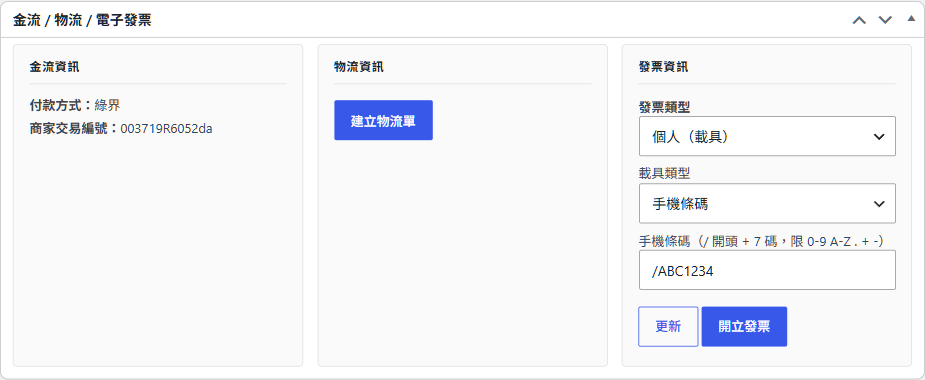
These run when an invoice is issued for an order (immediately on payment, on completion, or manually, per your setting) and when you void / issue an allowance / query an invoice. Data includes the order amount, item descriptions and the buyer’s carrier number, donation code or company tax ID entered at checkout.
- ECPay e-Invoice (綠界電子發票) — Endpoints: einvoice.ecpay.com.tw (test mode: einvoice-stage.ecpay.com.tw). Terms: https://support.ecpay.com.tw/10075/ — Privacy: https://www.ecpay.com.tw/CreditCard/Privacy
- ezPay e-Invoice (ezPay 電子發票) — Endpoints: inv.ezpay.com.tw (test mode: cinv.ezpay.com.tw). Terms: https://www.ezpay.com.tw/info/Site_description/service_page/member — Privacy: https://www.ezpay.com.tw/info/Site_description/service_page/member (ezPay publishes a single combined membership & data-protection terms page, so both links point at that page)
- SmilePay e-Invoice (速買配電子發票) — Endpoints: ssl.smse.com.tw (SmilePay’s own API hostname; see the SmilePay entry above — same operator as smilepay.net; test mode uses the /api_test path on the same hostname). Terms: https://www.smilepay.net/em/servicepolicy.asp — Privacy: https://www.smilepay.net/em/servicepolicy.asp (single combined service & personal-data-protection document)
- PayNow e-Invoice (立吉富電子發票) — Endpoints: invoice.paynow.com.tw (test mode: testinvoice.paynow.com.tw). Terms: https://www.paynow.com.tw/PayNowUserAgreement.aspx — Privacy: https://www.paynow.com.tw/safepolicy.aspx
- AMEGO e-Invoice (光貿電子發票) — Endpoints: invoice-api.amego.tw. Terms: https://invoice.amego.tw/term — Privacy: https://invoice.amego.tw/privacy
Carrier tracking links (hyperlinks only — the plugin itself never contacts these hosts)
When a shipment has a tracking number, the order screen renders a plain hyperlink to the carrier’s own public parcel-tracking page. The plugin makes no HTTP request to any of these hosts and transmits no data to them; the shipment number only leaves your site if a person clicks the link, at which point the carrier’s own terms and privacy policy apply in their browser:
- T-Cat 黑貓宅配 (t-cat.com.tw, incl. the tracking link shown for PAYUNi home-delivery shipments) — Privacy: https://www.t-cat.com.tw/member/privacy.aspx
- 7-ELEVEN (eservice.7-11.com.tw) — Privacy: https://www.7-11.com.tw/privacy.asp
- 7-ELEVEN pickup status via PAYUNi logistics (tracking.shopmore.com.tw, operated by the Uni-President group for PAYUNi shipments) — service info: https://help.shopmore.com.tw/ ; the PAYUNi logistics policies above apply to the shipment itself
- FamilyMart 全家 (fmec.famiport.com.tw), Hi-Life 萊爾富 (www.hilife.com.tw), OK Mart (ecservice.okmart.com.tw) — public tracking pages of each chain; their site policies are linked from those pages
- Chunghwa Post 中華郵政 (postserv.post.gov.tw) — Privacy: https://www.post.gov.tw/post/internet/Group/index.jsp?ID=156739569921
Moksa AI assistant (optional, admin-only)
When an administrator actively uses the in-admin Moksa AI assistant, the typed question and the store/order data needed to answer it (for example an order number, status, totals or invoice/shipping numbers) are sent to the AI provider you have connected in WordPress under Settings → Connectors — Anthropic, Google or OpenAI — through the WordPress 7.0 AI Client. This never happens automatically and only for the administrator using the assistant. The plugin does not store these conversations on any Moksa server, sends nothing to Moksa, and never transmits your AI provider keys (WordPress manages the connector credentials). The transmitted data is governed by the terms and privacy policy of the provider you choose: Anthropic — Terms: https://www.anthropic.com/legal/commercial-terms — Privacy: https://www.anthropic.com/legal/privacy ; Google — Terms: https://ai.google.dev/gemini-api/terms — Privacy: https://policies.google.com/privacy ; OpenAI — Terms: https://openai.com/policies/terms-of-use/ — Privacy: https://openai.com/policies/privacy-policy/
MCP server (optional, off by default)
This plugin can optionally expose a standards-compliant, stateless MCP (Model Context Protocol) endpoint on your own site at /wp-json/moksa-for-woocommerce/v1/mcp, so a standard MCP client you control (for example mcp-remote or Claude) can look up orders and reports through the WordPress REST API. This is not a Moksa service and is not a phone-home: nothing is sent to Moksa, the endpoint only runs on your server and only exposes the plugin’s own WordPress Abilities. It is off by default and must be turned on under WooCommerce → Moksa AI → Settings. Access requires authentication with a WordPress Application Password for a user that has the “edit orders” capability (use a dedicated, limited account). By default only read-only tools are exposed. Turning on the separate “Allow external AI to make changes (MCP)” option also lists order-changing tools, but over MCP they only preview the change and never apply it; changes are made only in the WordPress admin, through Moksa AI, after you confirm. Every request is permission-checked on your server.
Installation
Minimum Requirements
- PHP 8.2+
- WordPress 7.0+
- WooCommerce 9.9+
Setup
- Install and activate the plugin.
- Go to WooCommerce → Settings → Moksa for WooCommerce to enable the modules you need.
- Configure the credentials for each enabled provider on its dedicated tab.
FAQ
Does it work with the Block-based Checkout?
Yes. All payment methods, the convenience-store picker and the e-invoice fields work in the Checkout block as well as in the classic checkout.
Is it HPOS-compatible?
Yes. It works with both High-Performance Order Storage (HPOS) and the older posts-based order storage, and reads and writes order data only through the WooCommerce order API.
Does it work with WooCommerce Subscriptions?
Yes. TapPay, PAYUNi credit card, LINE Pay, Shopline Payments (card), ECPay (saved card) and NewebPay (recurring payments) can charge renewals automatically. See “WooCommerce Subscriptions” in the description for what each one needs.
Does it work with WPSubscription?
Yes, with PAYUNi credit card and NewebPay recurring payments. See “WPSubscription” in the description.
Can I mix providers?
Yes. Payment, shipping and invoice modules are fully independent — any combination works.
What is the Moksa AI assistant and what does it need?
It is an optional in-admin chat assistant for managing orders, e-invoices, shipping labels and module settings in natural language. It requires WordPress 7.0 (for the built-in AI Client) and an AI provider connected under Settings → Connectors; enable it under the plugin’s Advanced settings. Every action that changes data first asks for your confirmation, and the assistant can never read or change your provider credentials, switch sandbox/live mode, or issue refunds.
Can external AI tools connect to my store over MCP?
Yes, optional and off by default. Turn it on under WooCommerce → Moksa AI → Settings → “Enable the MCP server”. The plugin then serves a standards-compliant, stateless MCP (Model Context Protocol) endpoint at /wp-json/moksa-for-woocommerce/v1/mcp that any standard MCP client (for example mcp-remote or Claude) can connect to directly — no bridge required.
Authentication uses a WordPress Application Password for a user that has the “edit orders” capability; use a dedicated, limited account rather than an administrator. Connect your client to the endpoint with an Authorization: Basic <base64 of username:application-password> header. By default only read-only tools (look up orders, reports, settings overview) are exposed. With “Allow external AI to make changes (MCP)” turned on, order-changing tools are listed too, but over MCP they only preview the change; to apply it, ask Moksa AI in the WordPress admin and confirm there. Every request is permission-checked on the server.
What happens to my data when I delete the plugin?
Deleting the plugin removes its settings, the customer-service messages and the order-number search index. The payment transaction IDs, e-invoice numbers, tracking numbers and pickup stores saved on your orders are kept, because they are part of your trading records. Saved card credentials that could charge a customer again (used for subscriptions) are removed from the orders.
I am upgrading from 1.21 or earlier. Do I need to do anything?
No. After the update, customer-service messages and the order-number search index move to the new storage in the background (you can follow it under WooCommerce > Status > Scheduled Actions). Until that finishes everything keeps working from the old tables, and the old tables are kept for now so you can go back to an earlier version.
Screenshots
Changelog
1.23.5 – 2026-11-17
- New: PAYUNi “Pay on pickup at 7-ELEVEN” can be offered as its own payment button when PAYUNi shipping is created on the payment page.
- New: When a pay-on-pickup parcel comes back to the seller, the order is cancelled and the stock restored; paid orders get a note to refund or re-ship.
- Fixed: ECPay “payment pending confirmation” and NewebPay buy-now-pay-later results that are not yet paid are no longer treated as failed or paid.
- Fixed: ECPay OK Mart store-to-store (ended by ECPay) is no longer offered; ECPay shipment status 4444 now leaves a note; shipment lookups use the current API version.
- Fixed: PAYUNi refunds report a connection error instead of failing silently, and LINE Pay refund numbers display correctly.
1.23.4 – 2026-11-17
- Fixed: A district saved on a customer account that is no longer in the district list no longer blocks the block checkout. It is cleared so the customer can pick it again.
1.23.3 – 2026-11-17
- Fixed: In the block checkout, a logged-in customer who ticks “Use same address for billing” after a first failed attempt can place the order again. A leftover billing error used to stop the order with no message.
1.23.2 – 2026-11-17
- Fixed: When PAYUNi shipping creates the shipment on the PAYUNi payment page, choosing 7-ELEVEN pickup now hides the address fields at checkout (classic and block checkout), the same as the other mode.
1.23.1 – 2026-11-16
- Fixed: On phones, the shipping options in the classic checkout order summary now use the full width instead of being squeezed into the right half.
1.23.0 – 2026-11-16
- New: PAYUNi shipping can create the shipment on the PAYUNi payment page, together with the payment. PAYUNi has removed its separate shipping API, so this is now the default for new stores; stores already using PAYUNi shipping keep their current setting.
- New: Customers can choose pay on pickup on the PAYUNi payment page (optional).
- Changed: Cash on delivery and pay-at-pickup orders now get their e-invoice when the order is completed, not when it is placed.
- Fixed: Guest checkout details (name, phone, email, address) are no longer lost after choosing a convenience store on the map.
1.22.0 – 2026-11-15
- New: Customer-service messages and the order-number search index now use WordPress data types instead of the plugin’s own tables. Existing data moves over in the background.
- Changed: Deleting the plugin removes its settings and saved card credentials, but keeps the payment, invoice and shipping numbers saved on your orders.
- Changed: The AI assistant now finds a shipping method and gives you the link to switch it on or off, instead of changing it itself.
- Fixed: ECPay payment and shipping notices that contain quotes are no longer rejected as having a bad signature.
- Fixed: “Look up payment status” now works for PChomePay and TapPay orders.
- Fixed: Block checkout payment scripts now use the React JSX runtime that ships with WordPress, so they keep working when WordPress moves to React 19.
1.21.3 – 2026-11-14
- Fixed: A payment notice for a cancelled order now puts the order on hold for you to check, instead of marking it as paid.
1.21.2 – 2026-11-13
- Fixed: Stricter verification of payment and shipping notifications, so forged or unconfirmed notices can no longer change orders.
1.21.1 – 2026-11-10
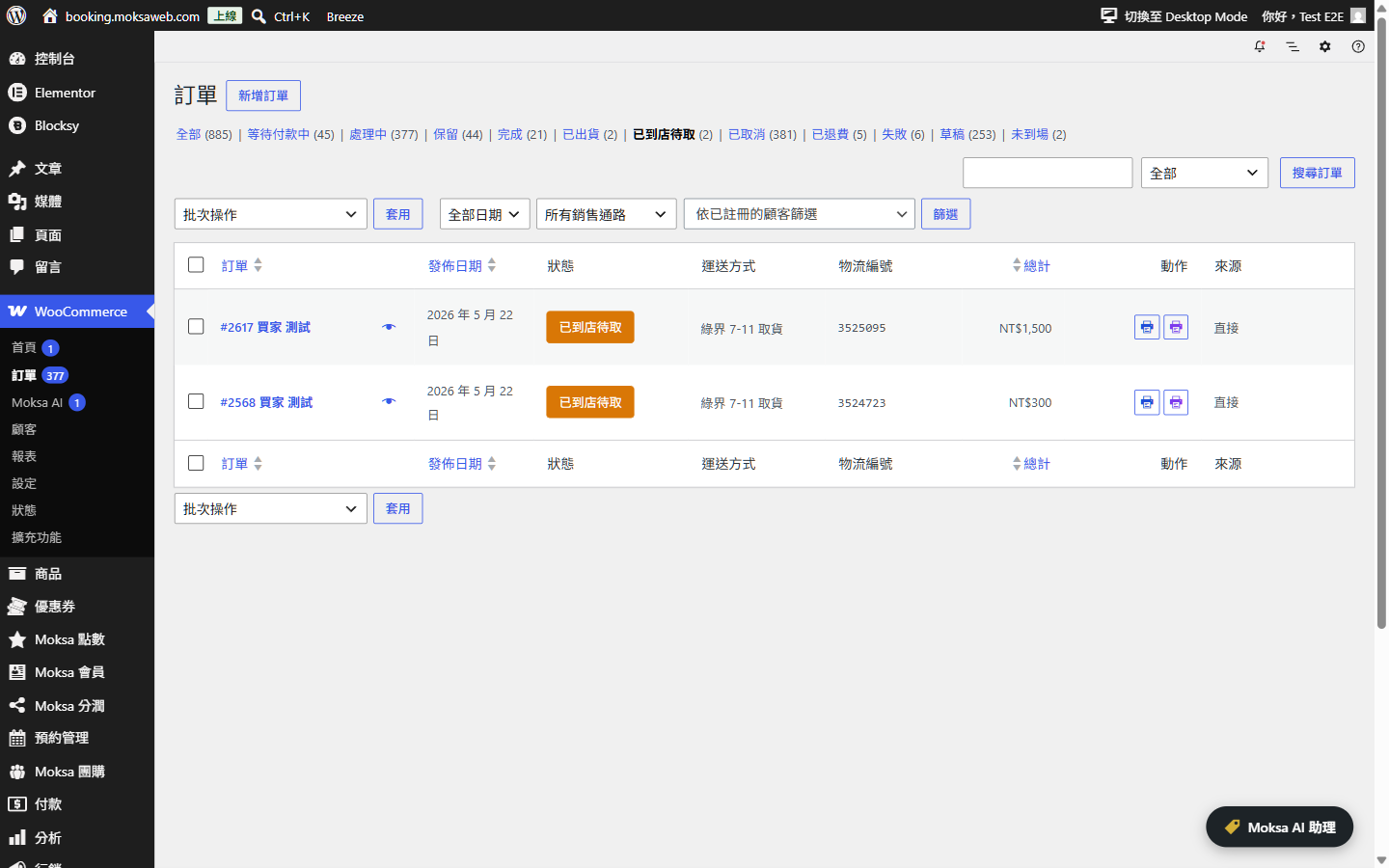
- Fixed: PAYUNi 7-ELEVEN orders that are waiting for a shipping code now show a “Print label” button in the orders list instead of a blank.
1.21.0 – 2026-11-07
- New: For orders from RY Tools or the official ECPay plugin, you can void the old ECPay invoice from the order screen, see the pickup store in the shipping address, and switch RY order statuses to Moksa statuses in bulk.
1.20.1 – 2026-11-07
- Fixed: Orders invoiced or shipped by RY Tools or the official ECPay plugin are no longer invoiced or shipped again, keep their RY order statuses, and show the old invoice and tracking numbers. Voiding those old invoices still has to be done in the original service.
1.20.0 – 2026-11-06
- New: The orders list now has “Issue invoice” and “Create shipment” buttons for orders that still need them, and shows why the last attempt failed.
1.19.5 – 2026-11-06
- Fixed: Amego e-invoices are no longer rejected when a discounted line total does not divide evenly by its quantity.
1.19.4 – 2026-11-05
- Fixed: The ECPay shipment print buttons on the order screen now read “Print A4” and “Print A6”, so they are easy to find.
1.19.3 – 2026-11-05
- Fixed: The LINE Pay payment card on the order screen now shows the payment method, like the other payment providers.
1.19.2 – 2026-10-27
- Fixed: Invoices are no longer queued for automatic voiding when a failed or cancelled order has no invoice yet. LINE Pay order notes now show why a payment was declined.
1.19.1 – 2026-10-26
- Fixed: Security hardening for payment and shipping notifications, the storefront order lookup (which now also asks for the billing email) and Moksa AI confirmations. SmilePay card payments are now put on hold until you confirm them in the SmilePay back office.
- Fixed: Customers can now see staff replies in storefront support.
1.19.0 – 2026-10-26
- New: WPSubscription renewals with PAYUNi credit card and NewebPay recurring payments.
- Fixed: When NewebPay sends the same duplicate mandate twice, it is now cancelled and reported only once.
1.18.3 – 2026-10-26
- Fixed: A PAYUNi 7-ELEVEN or T-Cat shipment number that missed its print notice is now picked up by the hourly status check and the Query button.
1.18.2 – 2026-10-25
- Fixed: ECPay saved card and NewebPay recurring credit card can now be turned on from their settings pages, and their subscription options moved there too.
1.18.1 – 2026-10-25
- Fixed: The subscriptions switch for LINE Pay and PAYUNi moved to their own settings pages, where it is easier to find.
1.18.0 – 2026-10-24
- New: WooCommerce Subscriptions renewals with TapPay, PAYUNi, LINE Pay, Shopline Payments, ECPay (saved cards) and NewebPay (recurring payments).
- Fixed: PAYUNi shipping updates now send the shipped and arrived-at-store emails.
1.17.0 – 2026-10-24
- New: TapPay wallets can use their own Merchant ID, T-Cat package size for ECPay, and AFTEE capture for NewebPay.
- Fixed: NewebPay shipping statuses and labels, PayNow invoices, Shopline Payments amount checks, voiding ECPay and Amego invoices that have allowances, and other payment, shipping and invoice fixes from an API spec review.
1.16.2 – 2026-10-22
- Fixed: SmilePay T-Cat home delivery shipments can be created again; the expected delivery date is now sent.
1.16.1 – 2026-10-21
- Fixed: TapPay payments follow the official transaction statuses, and 3-D Secure or wallet payments still awaiting confirmation are checked again automatically instead of staying pending.
1.16.0 – 2026-10-15
- New: scannable store barcodes, e-invoice details for customers, PAYUNi payment codes on the order page and in email, and PayNow / SmilePay payment cards.
- Fixed: payment deadlines in Taiwan time, ECPay refunds before capture, shipping statuses no longer go backwards, and clearer order notes and settings.
1.15.0 – 2026-10-15
- Stricter PayNow, TapPay and SmilePay checks, safer order lookup, NewebPay and ECPay payment codes saved and emailed, late failure notices no longer reopen paid orders, and invoice and refund fixes.
1.14.0 – 2026-10-15
- PAYUNi uncaptured card payments can be cancelled from the refund screen; refunds work for disabled payment methods; split shipments, PAYUNi printing, cash on delivery limits, checkout phone and invoice checks, SmilePay test mode and email fixes.