


Description
TranslateEase helps WordPress site owners create and manage English translations without turning the whole site into a complex multilingual system.
It is designed for small sites that want to translate a limited number of Japanese pages or posts into English, review the translation, and publish only when ready.
Main features
- Create paired English translations for pages and posts.
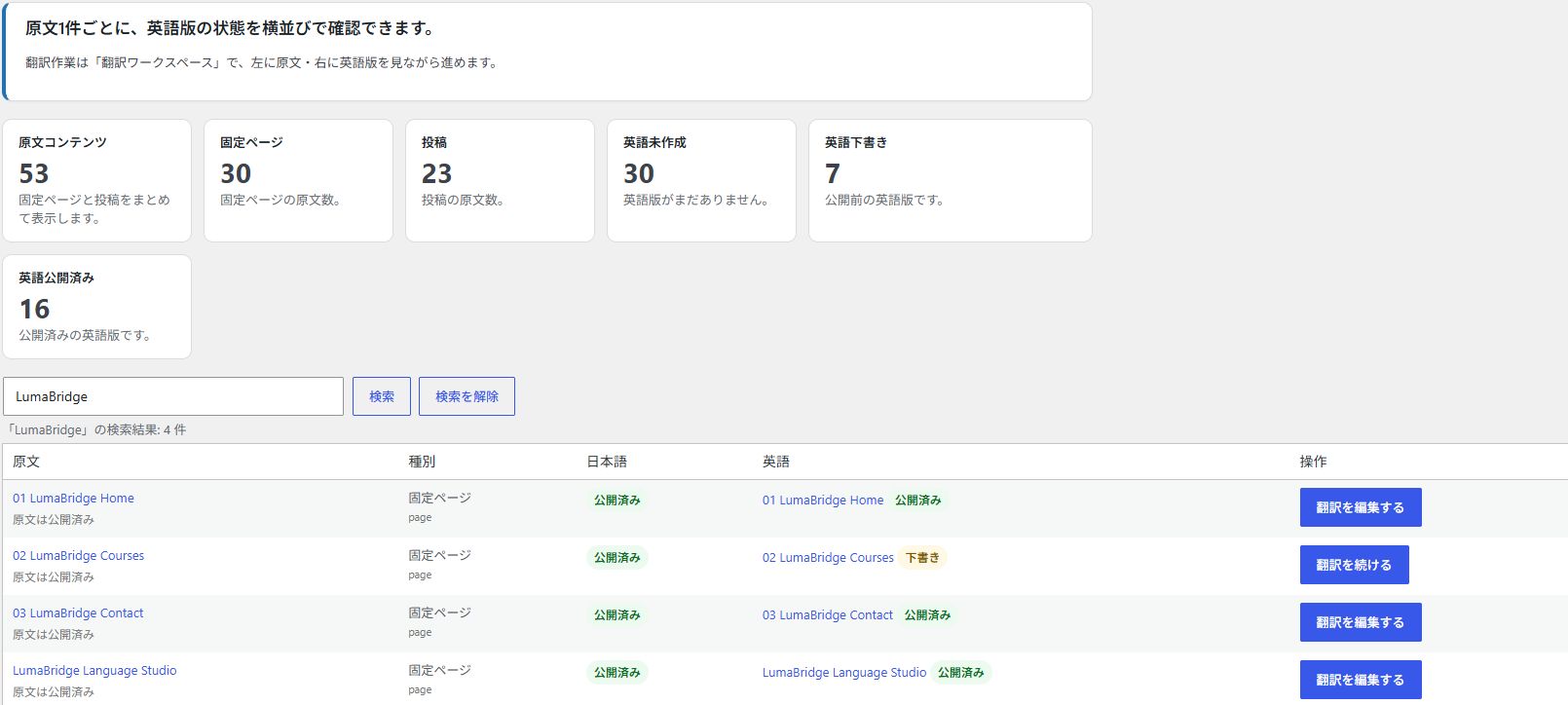
- Manage original and English content from a dedicated Content Translations screen.
- Search original and English content by title or slug, and start translating from post and page lists.
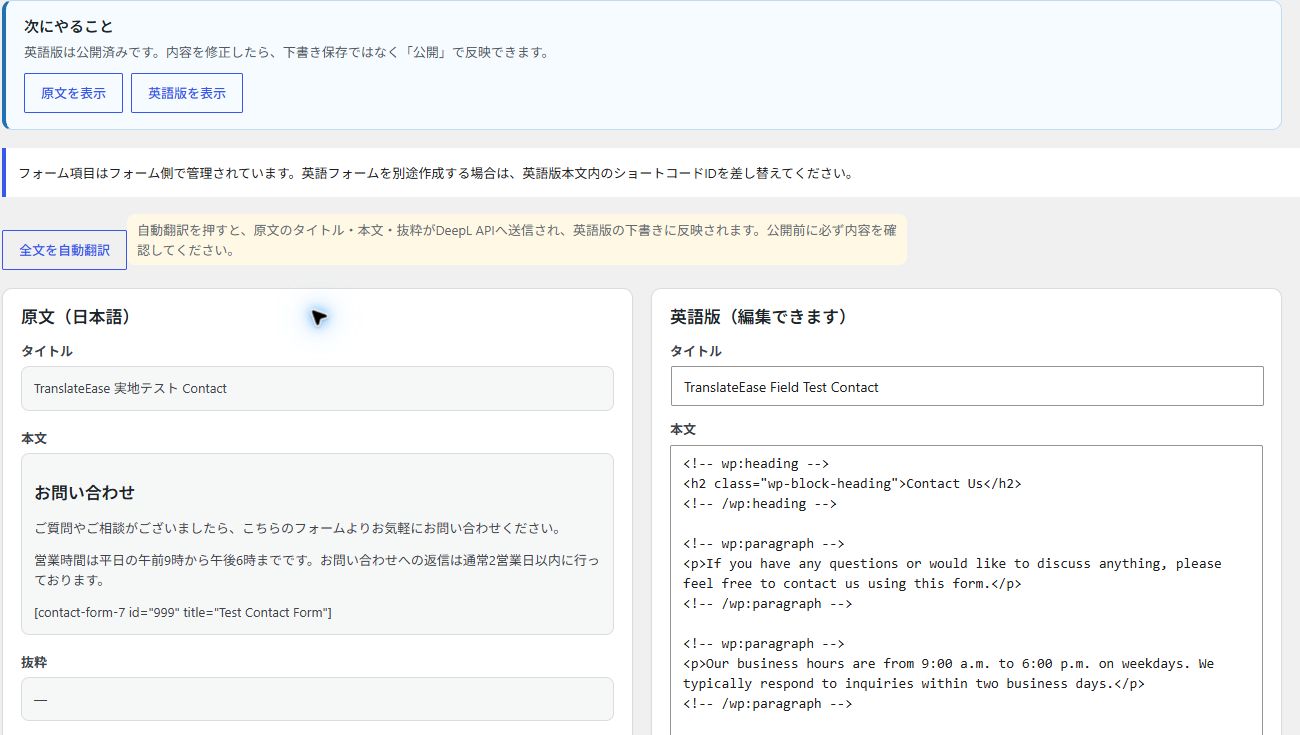
- Edit translations in a side-by-side Translation Workspace.
- Use manual translation without any external API key.
- Optionally create English draft translations with DeepL API.
- Keep automatic translation output as draft until reviewed.
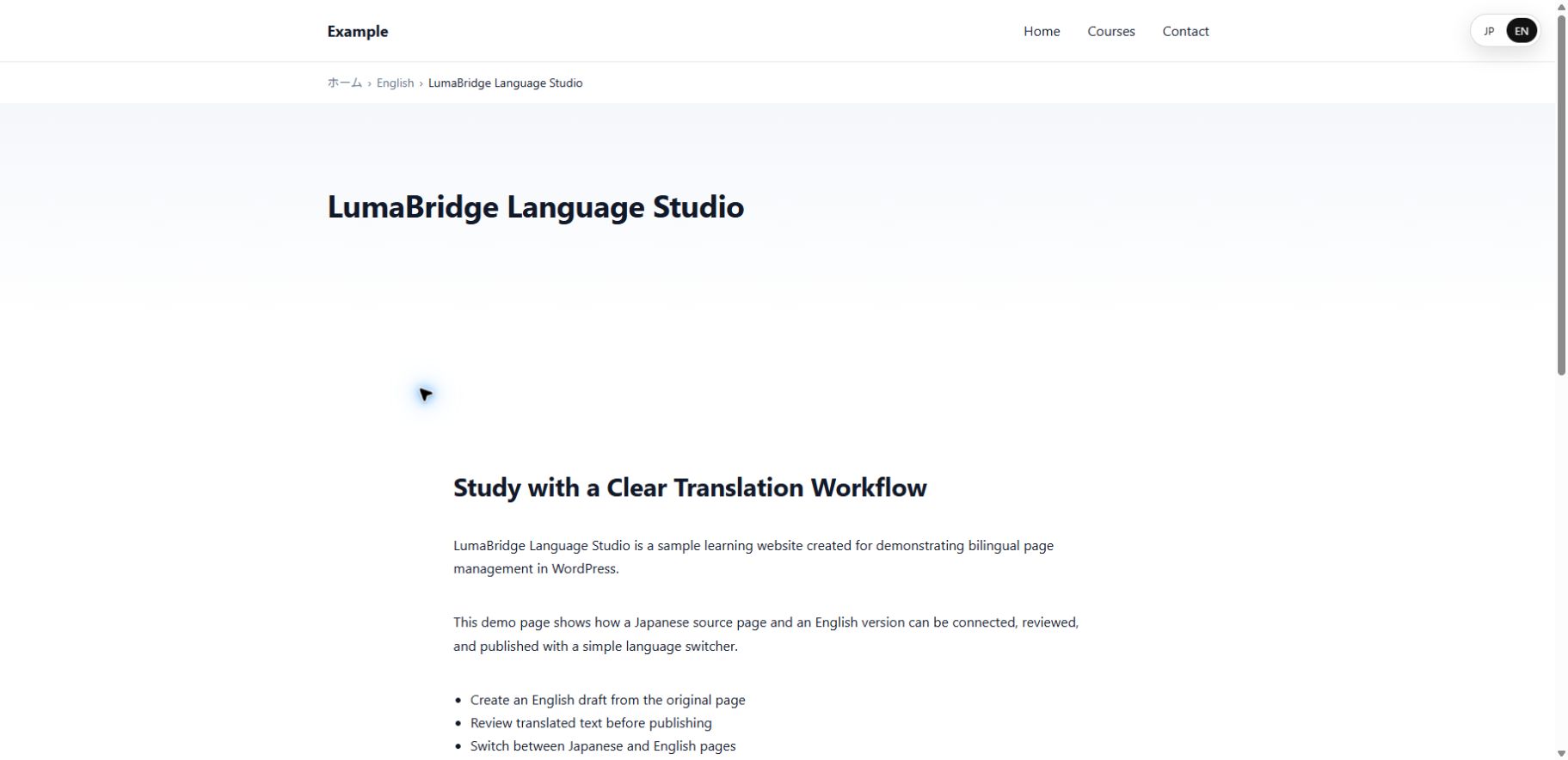
- Show a JP / EN language switcher on paired published content.
- Output hreflang alternates for paired published content.
- Preserve Gutenberg block structure during automatic translation.
- Preserve list structure and shortcode-only blocks such as form embeds.
DeepL API and external service use
TranslateEase can be used without DeepL by manually editing English translations.
If you choose DeepL as the translation provider and enter a DeepL API key, TranslateEase sends the selected source title, content, and excerpt to the DeepL API only when an authorized administrator clicks an automatic translation action in the WordPress admin area.
TranslateEase does not send visitor data to DeepL. Automatic translation is not triggered by front-end visitors.
DeepL API service information:
- Service: DeepL API
- API endpoint used for Free keys: https://api-free.deepl.com/v2/translate
- API endpoint used for Pro keys: https://api.deepl.com/v2/translate
- DeepL Privacy Policy: https://www.deepl.com/privacy
- DeepL Terms: https://www.deepl.com/pro-license
You are responsible for your own DeepL account, API key, and usage limits.
Installation
- Upload the
neutrope-translate-easefolder to the/wp-content/plugins/directory, or install the plugin ZIP from the WordPress admin screen. - Activate TranslateEase from the Plugins screen.
If the older TranslateEase plugin is active, deactivate it first. Existing translations and settings are reused. Do not delete the old plugin while its data deletion option is enabled. - Go to TranslateEase > Settings.
- Enable TranslateEase.
- Use TranslateEase > Content Translations to create English translations.
- Optional: choose DeepL and enter a DeepL API key to enable automatic draft translation.
FAQ
Do I need a DeepL API key?
No. You can create and edit English translations manually. A DeepL API key is only required for automatic draft translation.
Is content automatically published after translation?
No. Workspace automatic translation keeps the English version as a draft so you can review it before publishing.
Does TranslateEase translate the entire site automatically?
No. TranslateEase is designed for reviewed page-by-page and post-by-post translation.
Translation covers page and post titles, content and excerpts. Text embedded in theme templates, custom data arrays or JSON, JavaScript-rendered views and custom URLs without a post are outside this scope. Preview the English version before publishing: a template may ignore the translated post content. Theme and custom data changes must be handled separately.
Can I use browser language redirection with a CDN or page cache?
TranslateEase sends cache prevention headers for language-dependent responses. A cache that serves a response before WordPress runs cannot be controlled by the plugin. Exclude affected URLs from caching or verify that the cache respects these headers. In a test environment, check Japanese and English visitors, saved language preferences and search bots, and ensure that one visitor’s page or redirect is not served to another. TranslateEase does not change your cache configuration.
Does TranslateEase send visitor data to DeepL?
No. DeepL requests are only made from the WordPress admin area when an authorized administrator explicitly runs automatic translation.
Which languages are supported in the free version?
The free version is focused on Japanese source content and English translations.
Does TranslateEase support Contact Form 7 shortcodes?
TranslateEase preserves shortcode-only Gutenberg blocks during automatic translation so form shortcodes are not translated or modified.
Screenshots


Changelog
0.8.7
- Explain translation scope and the need to preview theme and custom data output before publishing.
- Add CDN and page cache guidance beside browser language redirection settings.
- Explicitly prevent storage of language-dependent responses on older supported WordPress versions as well.
0.8.6
- Explain that disabling or deleting the plugin leaves published translations public, with a read-only review list.
- Show the /en/ parent status and editing and publication guidance without changing existing content.
- Correct Rank Math OG locale for managed English translations while preserving existing English regional locales.
0.8.5
- Respect the frontend OFF setting for language cookies and redirects.
- Default browser language redirection to OFF for new installations; preserve existing saved settings.
- Exclude known crawlers from automatic redirects and prevent caching of language-dependent responses.
- Set English HTML language attributes for managed translations.
- Output reciprocal hreflang links for published page and post pairs.
0.8.4
- Explain that a saved DeepL API key requires selecting the DeepL translation provider and saving settings.
- Show a warning when a key is saved but the provider is none, and a save reminder after selecting DeepL.
0.8.3
- Prevent duplicate constants, classes, and hooks when the legacy TranslateEase package is also active, including network activation.
- Show an administrator notice explaining how to switch from the legacy plugin without deleting translation data.
0.8.2
- Renamed the public plugin listing to Neutrope Translate Ease for WordPress.org review.
- Updated the plugin slug, text domain, and package root to neutrope-translate-ease.
- Replaced inline script output with WordPress enqueue and inline script APIs.
- Re-audited nonce and permission checks for admin actions.
0.8.1
- Updated WordPress.org submission metadata.
- Updated Tested up to value.
- Adjusted the public plugin title to align the intended translate-ease slug and text domain.
0.8.0
- Add title and slug search to the Content Translations screen.
- Show the post type name and slug for each item on the Content Translations screen.
- Add Create, Continue, and Edit English version row actions to post and page lists for original content.
- Add a workspace note reminding editors that form field shortcodes are managed by the form plugin.
0.7.1
- Prepare WordPress.org packaging and address Plugin Check findings.
- Update request handling in the Translation Workspace.
- Prefix uninstall variables.
- Update Tested up to header.
0.7.0
- Preserve shortcode-only Gutenberg blocks during DeepL translation to protect form embeds and similar shortcodes.
0.6.1
- Preserve list wrapper tags during DeepL translation so list items remain inside ul and ol elements.
0.6.0
- Protect Gutenberg block comments during DeepL translation so block structure is preserved.
- Translate content text segments while keeping wp:block markers unchanged.
0.5.1
- Decode DeepL HTML entities before saving translated title, content, and excerpt so the workspace stays readable.
0.5.0
- Add a safer workspace automatic translation handler with draft-only output.
- Return DeepL API errors to the workspace as admin notices instead of stopping on an error page.
- Add workspace guidance explaining that original title, content, and excerpt are sent to DeepL when auto-translation is used.
0.4.2
- Add contextual guidance, front-end links, and input placeholders to the Translation Workspace.
0.4.1
- Avoid front-end slug conflicts while English post translations are still drafts.
0.4.0
- Add a side-by-side Translation Workspace for posts and pages.
- Route Content Translations actions to the workspace.
- Support manual English draft editing, draft save, publish, and DeepL full auto-translate from the workspace.
0.3.8
- Add no-cost/manual setup guidance and switcher style previews.
0.3.7
- Add provider setup links to the automatic translation wizard.
0.3.6
- Add a beginner-friendly automatic translation setup wizard for DeepL.
0.3.5
- Add one-click create-and-translate actions to the Content Translations dashboard.
0.3.4
- Localize split metabox labels for Japanese admin users.
0.3.3
- Localize Content Translations and post editor metabox labels for Japanese admin users.
0.3.2
- Localize Settings body text and field labels for Japanese admin users.
0.3.1
- Localize remaining Settings section headings for Japanese admin users.
0.3.0
- Add live DeepL translation for titles, content, and excerpts.
- Apply the selected translation publishing mode after automatic translation.
- Keep Google provider reserved for a later version.
0.2.4
- Add a Content Translations dashboard for pages and posts.
- Show original content and English status side by side.
- Replace the old page-only translation menu label with a content-focused view.
0.2.3
- Hide translation entries from normal post and page lists by default.
- Add show and hide translation list links.
- Replace unavailable automatic translation actions with guidance when no provider is configured.
0.2.2
- Add translation publishing mode setting.
0.2.1
- Copy source content into English drafts.
0.2.0
- Add standard post support.
0.1.0
- Initial MVP skeleton.