


Description
This plugin connects your store to NFE.io, a Brazilian service that issues electronic service invoices (NFS-e) with city halls across Brazil.
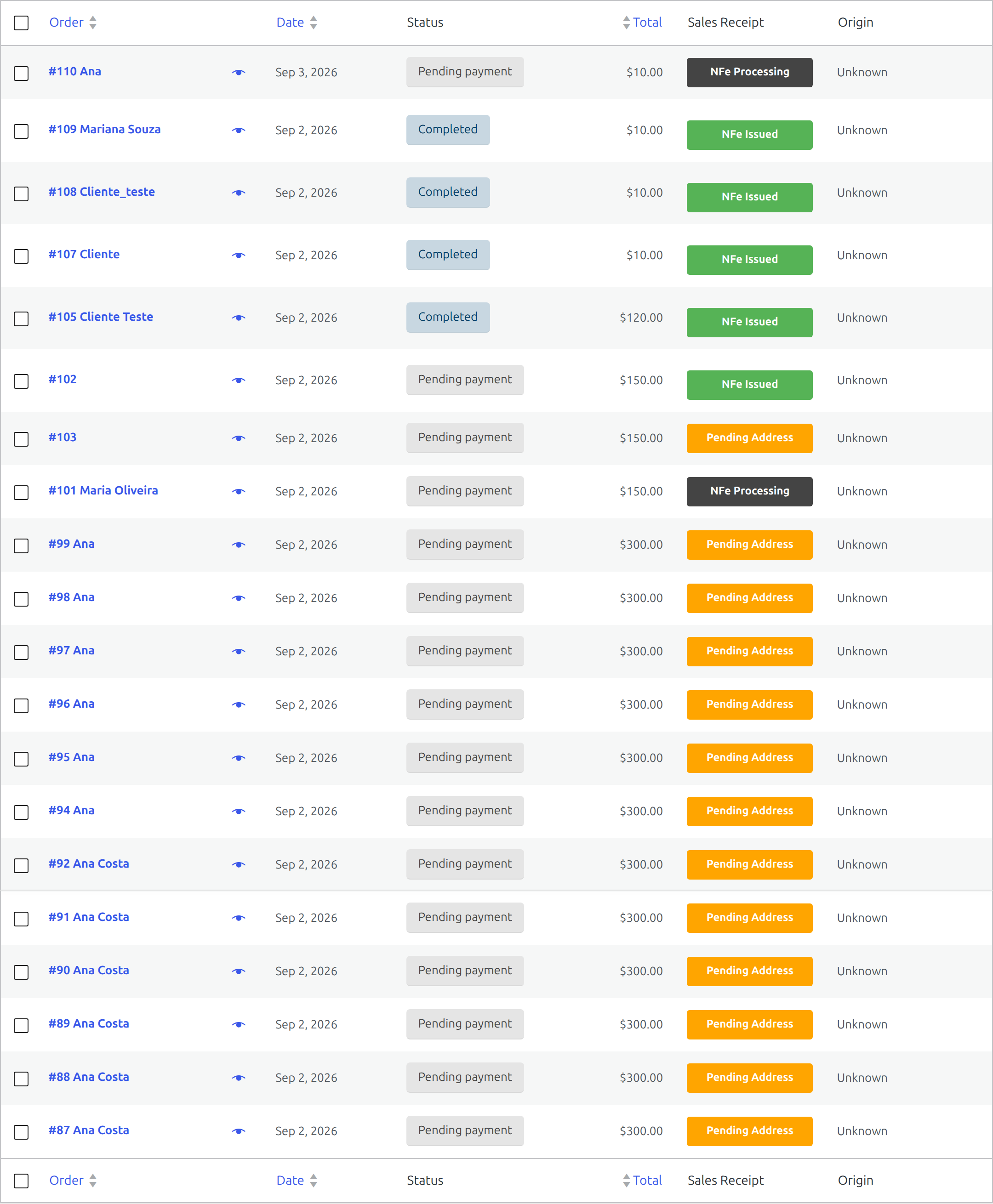
You configure which company issues the invoices and when they should be issued. From then on, an invoice can be requested automatically when an order reaches a given status, by you from the order screen, or by the customer from their account page. NFE.io issues the document with the city hall and reports back; the plugin records the result on the order and lets the customer download the PDF.
What it does
- Requests NFS-e for orders, automatically on an order status or manually
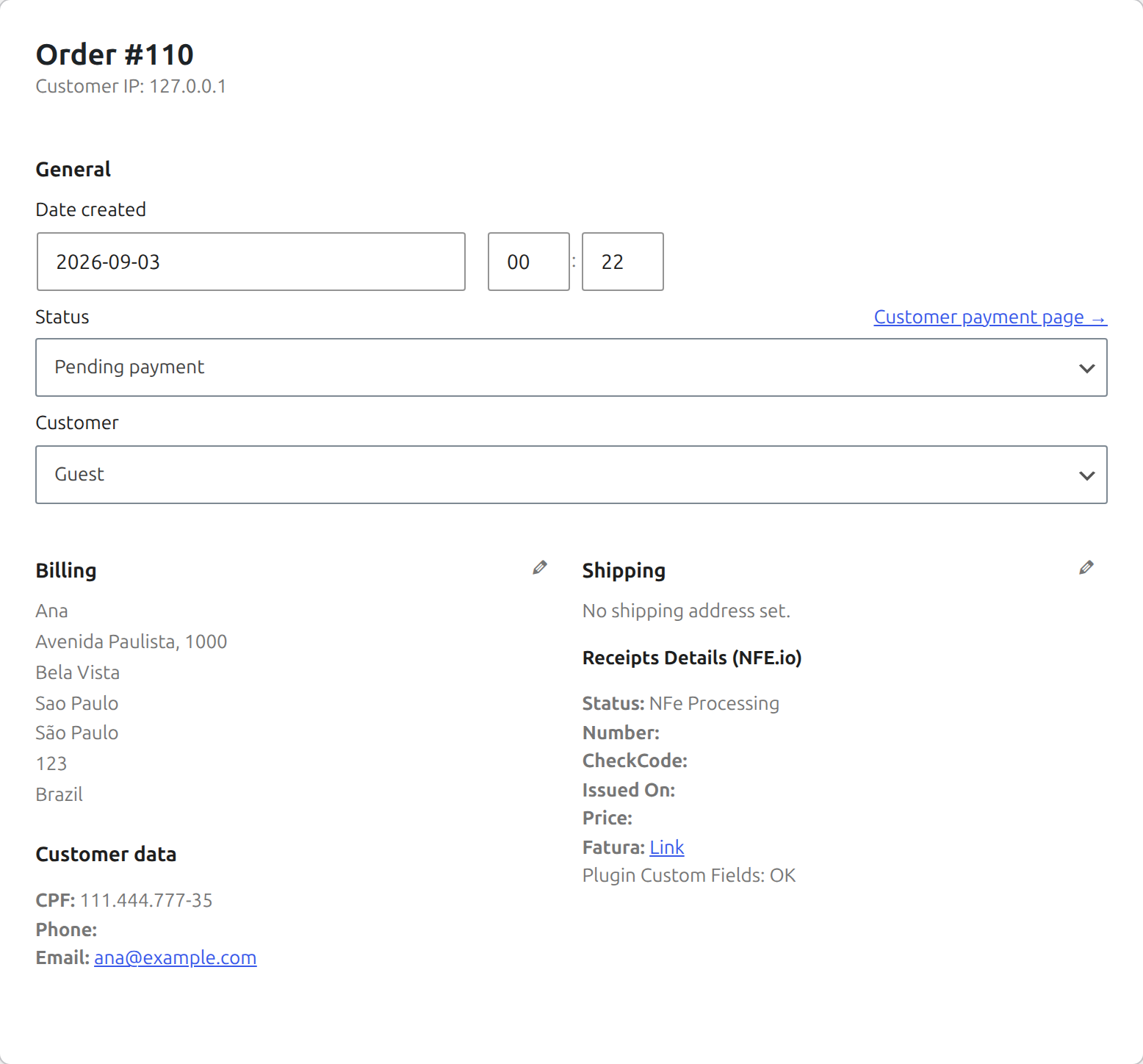
- Records the invoice number, verification code and issue date on the order
- Sends the customer an e-mail when the invoice is confirmed, with a link to download it
- Lets the customer download the invoice PDF from their account
- Supports the tax reform (RTC) fields:
nbsCode,ibsCbs.operationIndicatorandibsCbs.classCode, resolved per variation, per product, or from the global settings - Works with both WooCommerce order storages, including High-Performance Order Storage (HPOS)
What you need
- An account at NFE.io, with a company registered and a digital certificate uploaded
- The Brazilian Market on WooCommerce plugin, which collects the buyer’s CPF/CNPJ and address fields at checkout. Without it those fields are not captured, and an NFS-e cannot be issued for a buyer the invoice cannot identify.
External services
This plugin sends data to NFE.io, a third-party service, because that is what issuing an invoice requires: the document is produced by NFE.io and filed with the city hall. Nothing is sent unless an invoice is requested for an order.
api.nfe.io — issuing and managing invoices.
- What is sent: the buyer’s full name, e-mail address, tax identification number (CPF for individuals, CNPJ for companies) and complete address (street, number, complement, district, city, state, postal code); the order amount; and the service description and tax codes you configured.
- When: every time an invoice is requested for an order — automatically when the order reaches the status you configured, or when you or the customer ask for one.
- Also sent here: the invoice identifier alone, when downloading a PDF or cancelling an invoice; and, once, the address of your site when the plugin registers its notification endpoint.
open.nfe.io — postal code lookup.
- What is sent: the buyer’s postal code, and nothing else.
- When: while assembling an invoice, to resolve the city code that the invoice requires.
Notifications back to your site. After an invoice is requested, NFE.io reports the outcome to your site over HTTPS. These deliveries are authenticated with a shared secret the plugin generates; anything unsigned is rejected. No personal data leaves your site in this exchange — your site only receives.
Your use of the NFE.io service is governed by its terms of service and privacy policy. This plugin is published by NFE.io, the owner of the NFE.io service and trademark, to connect that service to WooCommerce.
Third-Party Licenses
This plugin is distributed under the GNU General Public License version 2 or later (GPLv2 or later), the same license declared in composer.json (GPL-2.0-or-later).
The plugin bundles the official NFE.io PHP SDK (nfe/nfe, version 3.5), which is distributed under the MIT License. The full license text ships with the plugin in vendor/nfe/nfe/LICENSE.
The MIT License is a permissive license and is compatible with the GPL: MIT-licensed code may be combined with and redistributed as part of a GPL-licensed work. The bundled library keeps its own MIT terms, while the plugin as a whole is distributed under GPLv2 or later.
WooCommerce and its associated designs are trademarks of Automattic Inc. This plugin is an independent integration and is not affiliated with, endorsed by, or sponsored by Automattic Inc.
Installation
- Install and activate WooCommerce and Brazilian Market on WooCommerce.
- Install this plugin through Plugins > Add New, or upload its folder to
wp-content/plugins. - Activate it through the Plugins menu.
- Go to WooCommerce > Settings > Integration > Receipts (NFE.io).
- Enter your NFE.io API key and choose the company that issues the invoices.
- Choose when invoices should be issued, and set the service codes your city hall requires.
The plugin registers its notification endpoint with NFE.io on its own as soon as an API key is saved. If anything goes wrong there, the settings screen tells you and offers to try again.
FAQ
Where do I configure the integration?
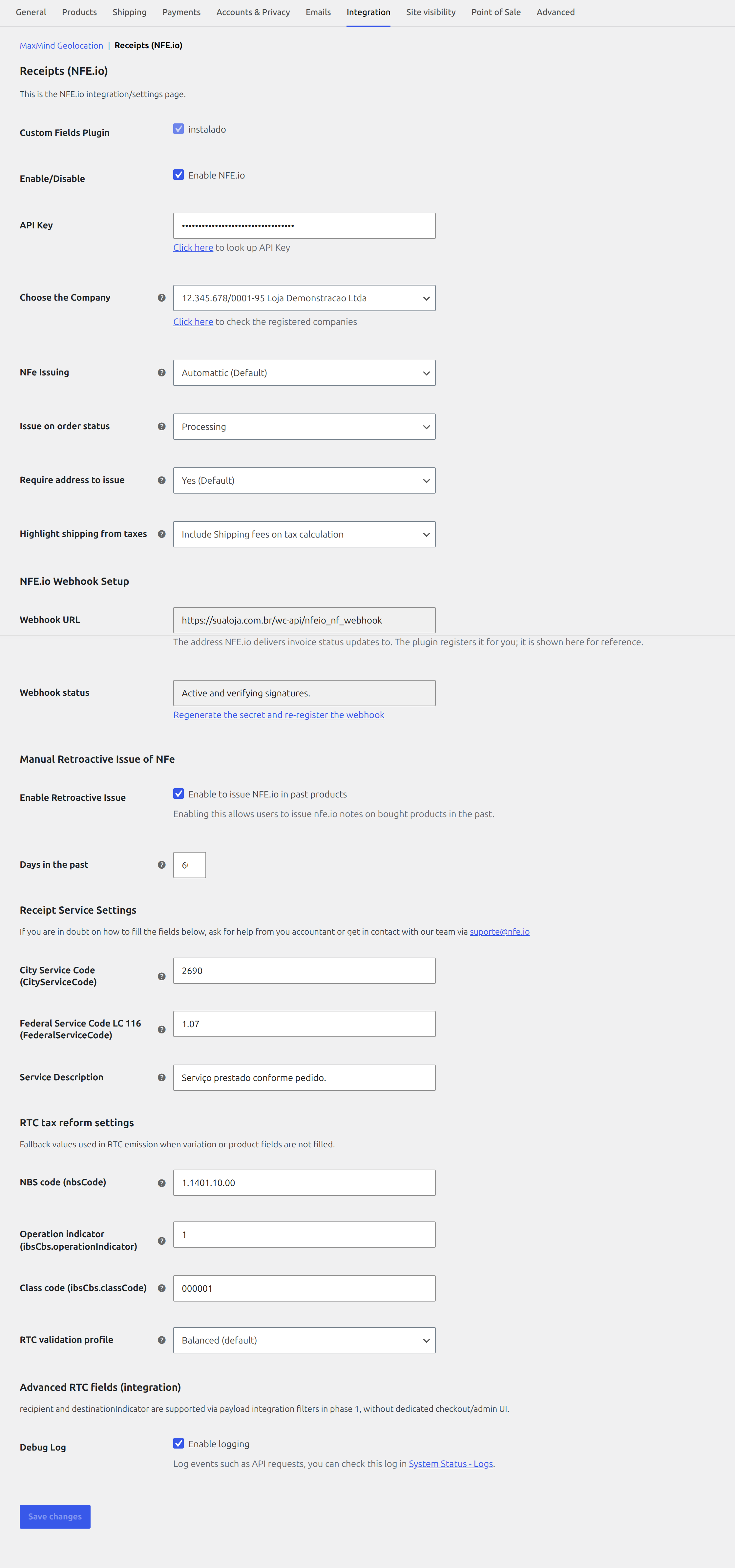
Open WooCommerce > Settings > Integration > Receipts (NFE.io). This is where you configure the API key, issuing company, invoice issuance mode and fiscal defaults.
Do I need to configure a webhook?
No — the plugin registers it for you. It generates a secret, registers the webhook with NFE.io and starts verifying signatures as soon as an API key is saved. The settings screen shows whether it is active, and offers a link to register it again if you ever need to.
The webhook is what keeps your store in sync with invoice status changes, including issuance and cancellation. Every delivery is authenticated with an HMAC signature: anything unsigned, or signed with the wrong secret, is rejected without touching your orders.
Does the plugin support the tax reform (RTC) fields?
Yes. It supports nbsCode, ibsCbs.operationIndicator and ibsCbs.classCode, with fallback priority across variation, simple product, and global integration settings.
How do I test without issuing real invoices?
The plugin always talks to the production API, and that is deliberate: NFE.io has no separate sandbox host, so an “environment” switch in these settings would promise an isolation that does not exist — and a fiscal document issued by mistake is not something you can take back.
Isolation comes from the account instead. Use an API key from a development account and select a company configured outside the production environment. Invoices issued that way carry no fiscal validity, and the plugin refuses to record an invoice whose environment does not match the company you selected.
I am upgrading from the older plugin. What changes?
This plugin was renamed, so WordPress treats it as a new plugin rather than an update. Install this one and deactivate the older “NFe for Woocommerce”. Your settings and the invoices already recorded on your orders are kept — both read the same data.
Do not leave both active. Two copies would each request invoices for the same order, and a duplicate NFS-e has to be cancelled by hand. If the older plugin is still active, this one refuses to start and tells you so.
Will I miss invoice updates while upgrading?
The new, signed webhook is registered before the old one is retired, so there is no gap where nothing is listening. During the short window in between, deliveries from the old unsigned webhook are refused — NFE.io retries them, and the new webhook picks them up.
If the API key is not configured when you upgrade, registration waits until you save one. Until that happens the plugin tells you, in the admin area, that invoice status updates are not being applied.
Screenshots

Changelog
1.5.3
- Updated the bundled NFE.io SDK to 3.5.1, which fixes a generated file that was not valid PHP. Nothing in the plugin used it, but it travelled inside the package.
1.5.2
- Fixed: no invoice could be issued for any order that had a postal code. Resolving the postal code to the city code the invoice requires was calling an endpoint that needs a separate data credential, and answered HTTP 403 to the API key stores actually have. The lookup now uses the public endpoint, which takes no credential at all.
- The note left on the order when the city code cannot be determined no longer blames your postal code. It points at the NFe log, where the real reason is recorded.
- Only the postal code is now sent for that lookup — the previous call also carried your API key, which the external-services disclosure in this readme never promised.
1.5.1
- Fixed: two status notifications for the same event arriving at the same moment could both be applied, recording the invoice twice on the order and sending the customer two e-mails. An event is now claimed atomically before anything is applied to the order.
- Fixed: the plugin could end up unreachable by NFE.io without saying so. It now records the address its webhook was registered at, warns in the admin area whenever that address no longer matches the store, and keeps retrying the registration until it succeeds. This also repairs stores whose site address changed after the webhook was created.
- Everything the plugin registers or stores — options, scheduled events, admin actions, order actions, the notification endpoint — now uses a single
nfeio_nfprefix, so it cannot collide with another plugin. Values written by earlier builds are moved across automatically on update. - The address NFE.io posts status updates to changed as part of that. The plugin re-registers it on update; if you allow-list the endpoint in a firewall or WAF, update the rule to the address shown in the plugin settings.
1.5.0
- Renamed: the plugin is now “NFE.io Nota Fiscal for WooCommerce”. Deactivate the previous “NFe for Woocommerce” — your settings and recorded invoices are kept.
- Requires PHP 8.2. On older versions the plugin stays inactive and says so, instead of breaking the site.
- Replaced the bundled API client with the official NFE.io SDK.
- Fixed: downloading the invoice PDF never worked — a leftover debug line in the old client short-circuited the call and exposed the API URL in the response.
- Fixed: the “receipt issued” e-mail was sent when issuing started, announcing a document that did not exist yet and might never. It is now sent when NFE.io confirms the invoice, and carries the invoice number and a link.
- Fixed: re-issuing an order after cancelling its invoice was rejected by the API, leaving the order permanently unable to produce a new invoice.
- Fixed: the invoice download link never appeared for issued invoices on the customer’s account page.
- Fixed: an order could not be invoiced twice, but the guard that was supposed to prevent it never actually ran.
- Fixed: orders with a total of zero are no longer sent for invoicing.
- Security: status notifications from NFE.io are now authenticated with a signature; unsigned deliveries are rejected. The endpoint is registered automatically.
- Security: invoice PDFs are no longer cached in a publicly readable folder under uploads. Files left by earlier versions are removed on update.
- Removed the local PDF cache; invoices are streamed straight from the API.
- Fixed: automatic issuing never fired on a fresh install. The default order status was stored with a prefix the setting itself never uses, so it matched nothing — and the dropdown fell back to “Pending payment”, which would have invoiced orders before they were paid.
- Fixed: the customer’s account page emitted a WooCommerce deprecation notice, from a filter retired in WooCommerce 2.6.
1.4.0-beta
- Added support for RTC fiscal fields in NFS-e emission flows.
- Added RTC validation profiles for progressive rollout.
- Improved operational documentation for setup, webhook usage, and development workflow.
1.0.0
- Initial release
1.0.1
- Fix issue #6
1.0.2
- Added trigger to issue invoices on specific status
- Fixed when issue invoices federal tax number must be only numbers
1.0.3
- Added support to issue invoices without all address fields filled
1.0.4
- Fix support to issue invoices without all address fields filled
- Fix trigger to issue invoices on specific status
1.2.5
- Added option to require an address when issuing an invoice.
- Fixed a bug where zero orders could be issued.
- Added notice in the order list when a order is zeroed.
- Added php require header on the readme.txt
- Fixed a bug that gave fatal error when on before PHP 5.5 versions.
- Fix – load_textdomain first from WP_LANG_DIR before load_plugin_textdomain
- Tweak – Tweak load_plugin_textdomain to be relative – this falls back to WP_LANG_DIR automatically. Can prevent “open_basedir restriction in effect”.
1.2.6
- Fixing client-php folder conflict.
1.2.7
- Fixing how we verify the type of customer to output its information on the NFe receipt.
1.2.8
- Improved code documentation, PHPDoc.
- Started to use
[]instead ofarray(). - Started to use the new logger implementation,
wc_get_logger(). - Updated WordPress tested header to 3.5.1.
- Removed Extra Checkout plugin dependency.
- Removed Composer support for the client-php.
- Removed checks when on automatic issuing, as it was avoiding important log information to be saved.
- Added better labeling for the NFE.io
flowStatus.
1.2.9
- Refactoring classes
1.3.0
Testing support to newer wordpress versions
1.3.1
Adjusting trademarking issues