

Description
A central health dashboard for WordPress site owners. Instant diagnostic overview of core files, PHP, backups, and your top priority step.
The product page is https://nuem8.com/wordpress/nuem8-safety-pass.
What’s new in 1.2.0
Must-use plugins and drop-ins
The PHP file check now includes must-use plugins and the drop-in files WordPress loads from wp-content, such as db.php, object-cache.php, and advanced-cache.php. They use the same record as plugin and theme PHP. A file that changes outside a WordPress update is marked Look. The files that are present are listed even when they match. Uploads are not part of this check.
Webhook
An optional Webhook URL field sits under Email. Safety Pass posts a JSON message to that address when a check needs a look, and when a new administrator is waiting for approval. The site sends it. It is not sent to NueM8. The field stays empty, and nothing is posted, until you save an address. A test button is on the same page.
WP-CLI
Three commands read the same checks as the page. They are not loaded in wp-admin.
wp safetypass statusprints the one thing to do first.wp safetypass checkprints every check that is turned on, including file names that differ.wp safetypass approve 12approves that administrator. Add--user=1when the shell user must be a specific administrator.
The exit status is 0 when every check is OK, 1 when a check says Look, and 2 when a check says Stop.
Sign-in history
The Administrators tab keeps the last 50 administrator sign-ins on this site. Each row has the time, the login, the IP address, and the user agent. Older rows are dropped. Download CSV saves that list. The list is not loaded on public pages, and it is removed when the plugin is deleted.
What’s new in 1.1.1
Plugin and theme PHP
nuem8-safety-pass records the PHP files in plugins and themes on this site. A later check marks Look when one of those files changes outside an update WordPress installs.
- Installing, updating, or deleting a plugin or theme through WordPress refreshes the record.
- The first record includes the files already on the server.
- Uploads are not part of this check. A difference is something to look at. It is not a malware verdict.
- The result is saved for 12 hours. The record stays on this site.
What’s new in 1.1.0
New administrator approval
Any account created or promoted to administrator after activation is disabled until an existing signed-in administrator clicks Approve.
- The new account cannot sign in, so it cannot approve itself.
- A daily check catches an administrator added outside the dashboard, including one added in the database.
- The account you are signed in with is not disabled. The last remaining administrator is not disabled.
Pick one administrator to receive mail. Mail stays off until you choose.
- The message goes out when a check needs a look, and when a new administrator is waiting for approval.
- A test button sends one message from this site. The message is not sent to NueM8.
- The daily check sends the message even if nobody has opened the page.
It reads these facts:
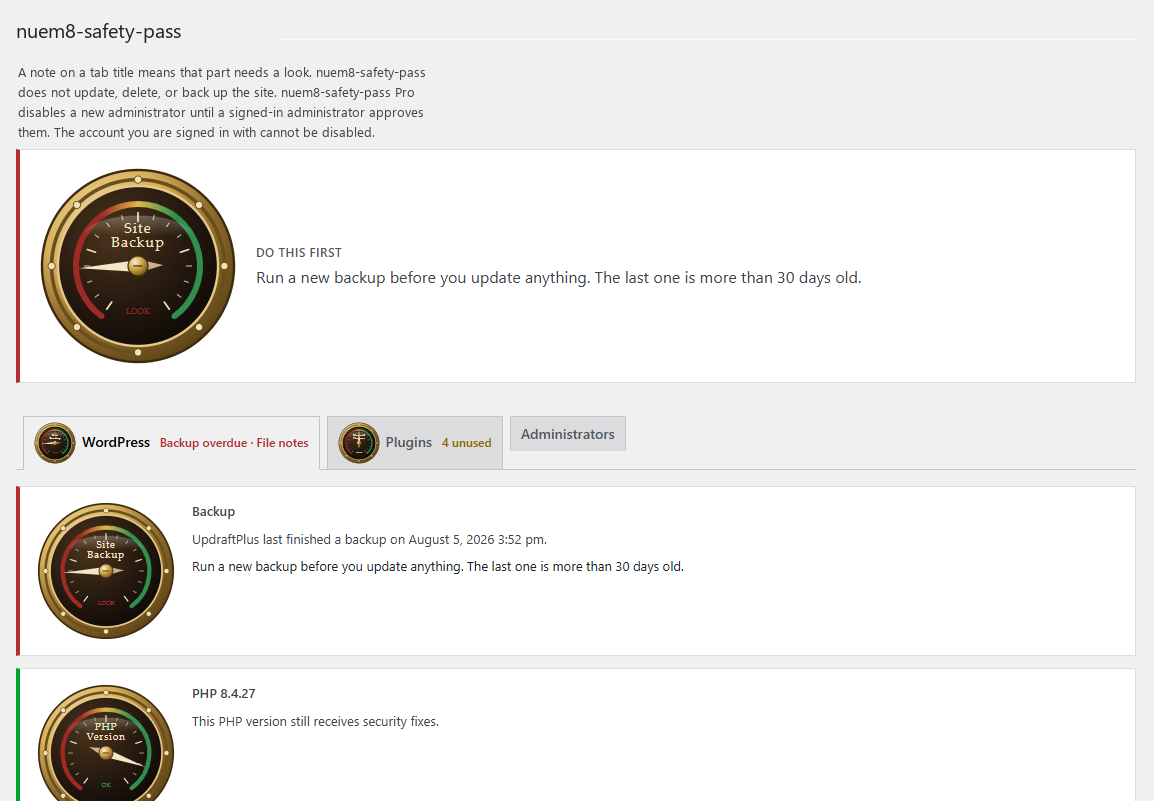
- PHP version, and whether that version still receives security fixes.
- WordPress version, and whether an update is waiting.
- WordPress core files, compared with the official copy from WordPress.org. The result is saved for 12 hours. Plugins, themes, and uploads are not part of the core comparison.
- Plugin, theme, must-use, and drop-in PHP files, compared with a record kept on this site. A WordPress install, update, or delete refreshes that record. A PHP file that changes any other way is something to look at. Must-use plugins and drop-ins are listed when they are present. Uploads are not part of this check. The result is saved for 12 hours.
- Plugins that are turned on and have an update waiting, and plugins that are installed and turned off. Each list has its own next step. A turned-off plugin is not listed as an update. Update installs a plugin update that is already waiting.
- Every administrator, shown as active or disabled, any administrator added after the day nuem8-safety-pass was activated, and the last sign-in nuem8-safety-pass has recorded. The Administrators tab also keeps the last 50 administrator sign-ins, with the time, login, IP address, and user agent. Download CSV saves that list. A new administrator is disabled until a signed-in administrator approves them.
- File notes: must-use plugins that stay on, whether the theme and plugin editor is on, and whether .htaccess tells PHP to load another file first.
- Whether UpdraftPlus, BackWPup, or WPvivid has finished a backup in the last week.
The page also lists passwords and keys to change if you think someone broke in, and it recommends a new WordPress install. nuem8-safety-pass does not change those passwords and does not delete the old site.
The page tells you the one thing to do first. It does not update WordPress, delete plugins, or run a backup. Update installs a plugin update that is already waiting. Approve marks a new administrator as expected and lets that account sign in. Disable and Enable change an account that is already expected.
nuem8-safety-pass does not scan for malware, does not search the database, does not read server logs, and does not send your site to NueM8. A core file that does not match is something to look at, not a malware verdict.
Copyright
Copyright (C) 2026 NueM8 LLC
Installation
- Upload the
nuem8-safety-passfolder to/wp-content/plugins/. - Activate NueM8 Safety Pass from the Plugins screen.
- Open NueM8 Safety Pass in the admin menu.
Only an administrator can open the page. Other roles do not see the menu item, and a direct link does not show the report.
Activating the plugin saves the current administrator accounts. An account created or promoted to administrator after that is disabled until a signed-in administrator clicks Approve. The new account cannot sign in, so it cannot approve itself. The account you are signed in with is not disabled.
The first time you activate NueM8 Safety Pass, a question asks whether to email one administrator. Enable email turns mail on for the administrator you choose. Not now leaves mail off. You can choose an administrator later on the same page.
FAQ
Does nuem8-safety-pass change my site?
The plugin disables a new administrator until a signed-in administrator clicks Approve. The new account cannot sign in, so it cannot approve itself. Approve marks the account expected and lets it sign in. Disable and Enable change an account that is already expected. Disable signs that account out. The account you are signed in with cannot be disabled. The sign-in time is saved when an administrator signs in. Update installs a plugin update that is already waiting. WordPress updates, deletions, and backups stay in your hands.
Which backup plugins can it read?
UpdraftPlus, BackWPup, and WPvivid. If another backup plugin is turned on, nuem8-safety-pass says so and asks you to confirm the last copy in that plugin.
Who can see the report?
Only an administrator. Editors, authors, and subscribers do not see the nuem8-safety-pass data.
Does it need an account or a subscription?
No.
What license is it under?
GNU General Public License, version 2 or later. The gauge script included with nuem8-safety-pass is under that same license.
Does it send data anywhere?
No account data, site content, or visitor information is sent to NueM8. The core file check downloads the public WordPress.org file list for this site’s WordPress version and language. The result is saved for 12 hours. That request happens on its own. When you choose an administrator, WordPress sends the report to that person’s address on this site. When you save a webhook URL, the site posts the same kind of notice to that address. Both stay off until you choose them. Neither is sent to NueM8. WordPress.org privacy: https://wordpress.org/about/privacy/ WordPress.org terms: https://wordpress.org/about/terms/
Does it scan for malware?
No. nuem8-safety-pass compares WordPress core files with the official copy from WordPress.org, records plugin, theme, must-use, and drop-in PHP files on this site, and shows three file notes. A file that does not match is something to look at, not a malware verdict. It does not search the database, read server logs, or delete files.
Will it email me?
Yes, after you choose one administrator on the NueM8 Safety Pass page. The message goes out when a check needs a look, and when a new administrator is waiting for approval. WordPress sends it. Mail stays off until you make that choice. A test button is on the same page. The check also runs once a day. A webhook URL on that page can receive the same kind of notice. It stays off until you save an address. The site posts it. It is not sent to NueM8.
When does the sign-in time start?
nuem8-safety-pass records each administrator sign-in after it is active. The Administrators tab keeps the last 50 of those sign-ins. An administrator who is already signed in keeps that session time. Sign-ins from before this plugin was active are not on the site.
Screenshots
Changelog
1.2.0
- The PHP file check includes must-use plugins and drop-ins such as db.php, object-cache.php, and advanced-cache.php. They use the same hash record as plugin and theme PHP. A change outside a WordPress update is marked Look. Files that are present are listed even when they match. Uploads are not part of this check.
- Adds an optional Webhook URL. Safety Pass posts a JSON message to that address when a check needs a look, and when a new administrator is waiting for approval. The site sends it. It is not sent to NueM8. Nothing is posted until an address is saved.
- Adds
wp safetypass status,wp safetypass check, andwp safetypass approve <user_id>. The commands use the same checks as the page and are not loaded in wp-admin. status and check exit 0 when every check is OK, 1 for Look, and 2 for Stop. - The Administrators tab keeps the last 50 administrator sign-ins on this site: time, login, IP address, and user agent. Older rows are dropped. Download CSV saves that list. The list is not loaded on public pages. It is removed when the plugin is deleted.
1.1.1
- Records the PHP files in plugins and themes on this site. Look means a PHP file changed outside an update WordPress installs. Installing, updating, or deleting a plugin or theme through WordPress refreshes the record. The first record includes the files already on the server. Uploads are not part of this check. This is not a malware verdict. The result is saved for 12 hours.
- Each tab has a checkbox for every check on it. Uncheck one to leave it out of the page, the next step, and the email. A new administrator is still disabled until a signed-in administrator approves them.
1.1.0
- Any account created or promoted to administrator after activation is disabled until an existing signed-in administrator clicks Approve. The new account cannot sign in, so it cannot approve itself. A daily check catches an administrator added outside the dashboard, including one added in the database. The account you are signed in with is not disabled. The last remaining administrator is not disabled.
- Pick one administrator to receive mail. Mail stays off until you choose. The first activation asks whether to turn that email on. The message goes out when a check needs a look, and when a new administrator is waiting for approval. A test button sends one message from this site. The message is not sent to NueM8. The daily check sends the message even if nobody has opened the page.
1.0.2
- The Plugins tab lists turned-on plugins that have an update waiting, and plugins that are installed and turned off. Each list is a table with its own next step. A turned-off plugin stays on the unused list even when an update exists.
- Update installs a plugin update that is already waiting, using the same update WordPress uses on the Plugins screen. The button says Updating while it runs, then the Plugins tab reloads. A finished update leaves the list.
- The first update in a visit reminds you that a backup is best practice. Later updates in that visit do not ask again.
- nuem8-safety-pass still does not update WordPress, delete plugins, or run a backup.
1.0.1
- The Plugins screen, the admin menu, and the settings page show NueM8 Safety Pass.
1.0.0
- First release. One page for PHP, WordPress, core files, unused plugins, new administrators, last sign-in, active or disabled administrators, file notes, and backup status. A new administrator is reported here. The page includes a short note on what to change if you think someone broke in.