

Description
English
Nyaclean – Automatic Cleanup is a friendly cat-themed cleanup scheduler for WordPress. Set it once and let the little cat make regular visits, using your site’s timezone.
What’s cleaned automatically by default?
- Only expired, ordinary database-backed WordPress transients.
- At most 50 transient candidates per scheduled visit, with each expiration verified immediately before deletion.
- When an external object cache is active, transient cleanup is skipped. Other enabled tasks can still run.
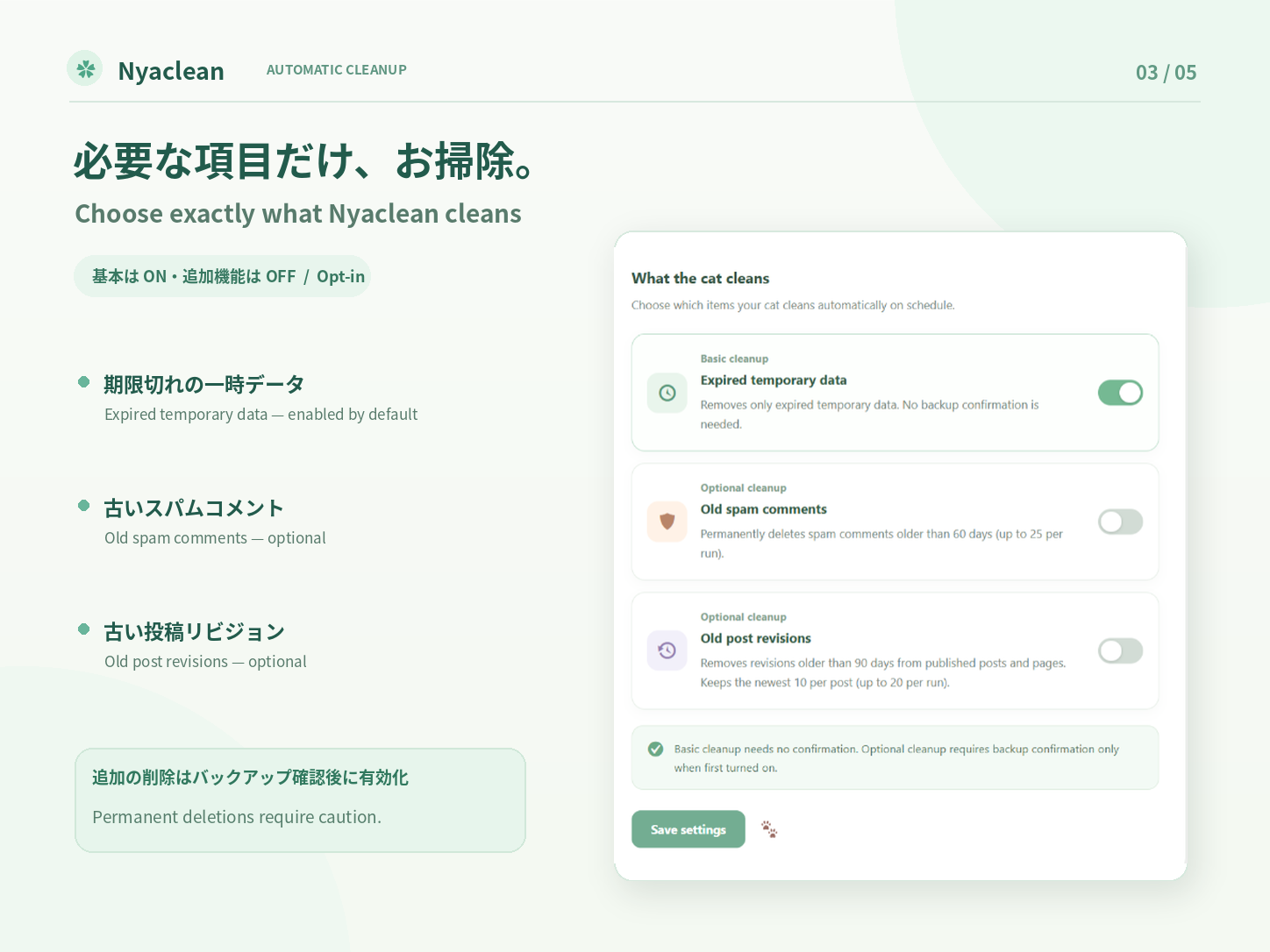
Optional cleanup (OFF by default; enable only after a backup)
- Old spam comments: permanently remove only comments that are still marked as spam and are more than 60 days old, up to 25 per run.
- Old post revisions: remove revisions older than 90 days from published standard posts/pages only. Preserve the 10 most recent revisions of each parent post, leave autosaves alone, and remove at most 20 revisions per run. A bounded rotating scan avoids scanning everything in one request.
- These optional deletions are permanent. Nyaclean does not offer a restore feature. A backup acknowledgment is shown only when newly enabling one of these optional tasks, not for everyday automatic cleanup.
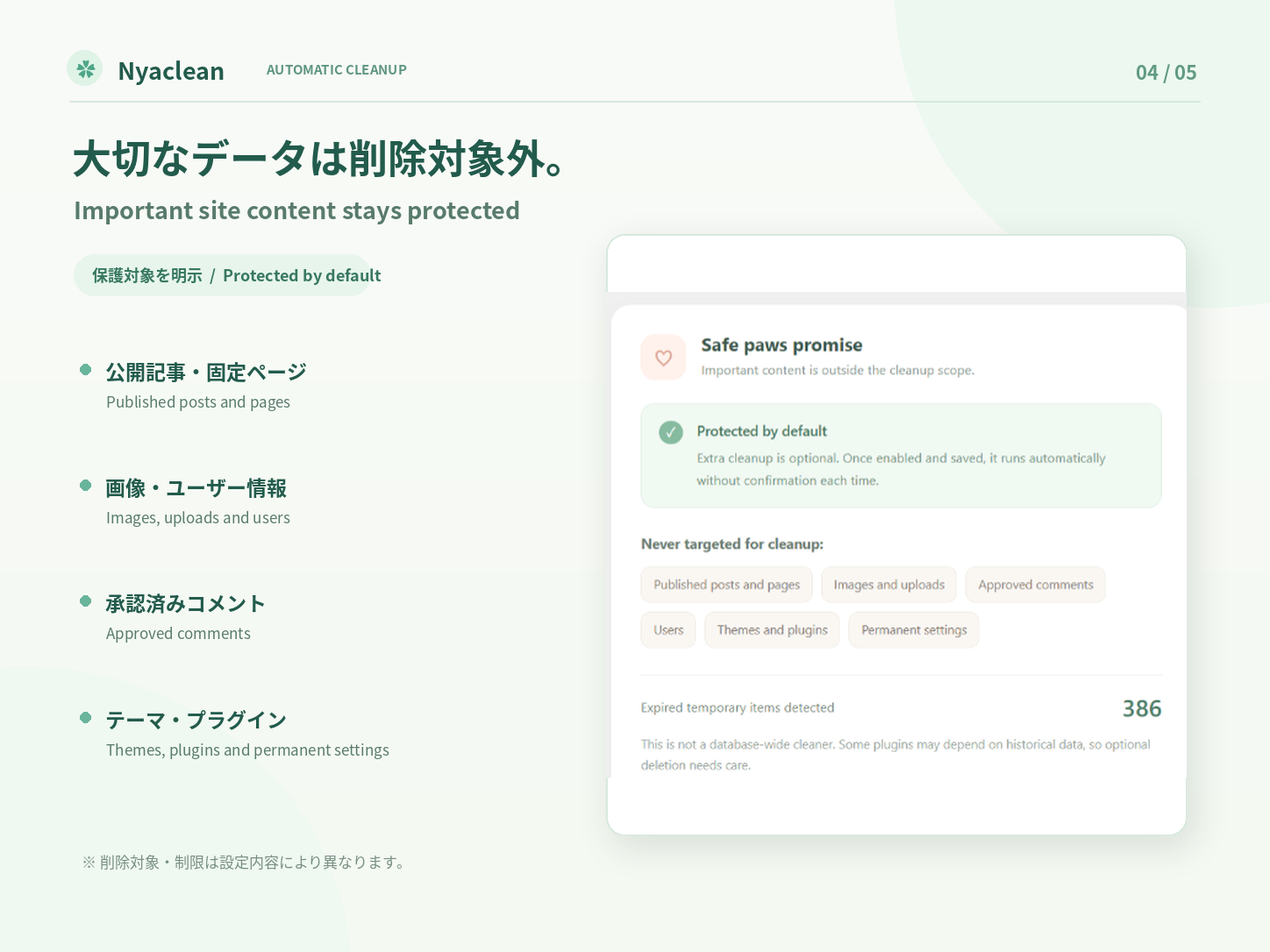
Always outside the cleanup scope
- Published posts/pages themselves, drafts, autosaves, media/files and user accounts.
- Approved comments and comments not in spam status.
- Themes, plugins and their permanent settings; network transients.
On-demand cleanup (new in 0.1.2)
- Preview the next bounded batch without deleting content or recording a cleanup run. This is not a full-site count; revisions are scanned in small groups.
- Clean now uses saved cleanup settings, including the existing opt-in for spam and revisions. Save changed settings first.
- The initial cleanup and preview use standard form submissions and work without JavaScript. Without JavaScript, each click processes one bounded batch; click again if more remain. With JavaScript, keep the page open to process batches sequentially, with a short pause between requests. Stop after the current batch, then continue when ready.
- Each batch retains the existing limits: 50 temporary items, 25 spam comments, 20 revisions and a scan of at most 150 revision candidates. Each batch is logged separately.
- A session pauses after 100 batches; click Clean now to continue. Closing the page stops further manual requests; an in-flight batch may finish. Scheduled cleanup still runs one bounded batch per scheduled visit.
- The cat changes between waiting, cleaning and completion. Counts show removed items, not reclaimed disk space.
Dashboard
- Automatic ON/OFF, daily / Monday / first-of-month scheduling and site-timezone preferred time.
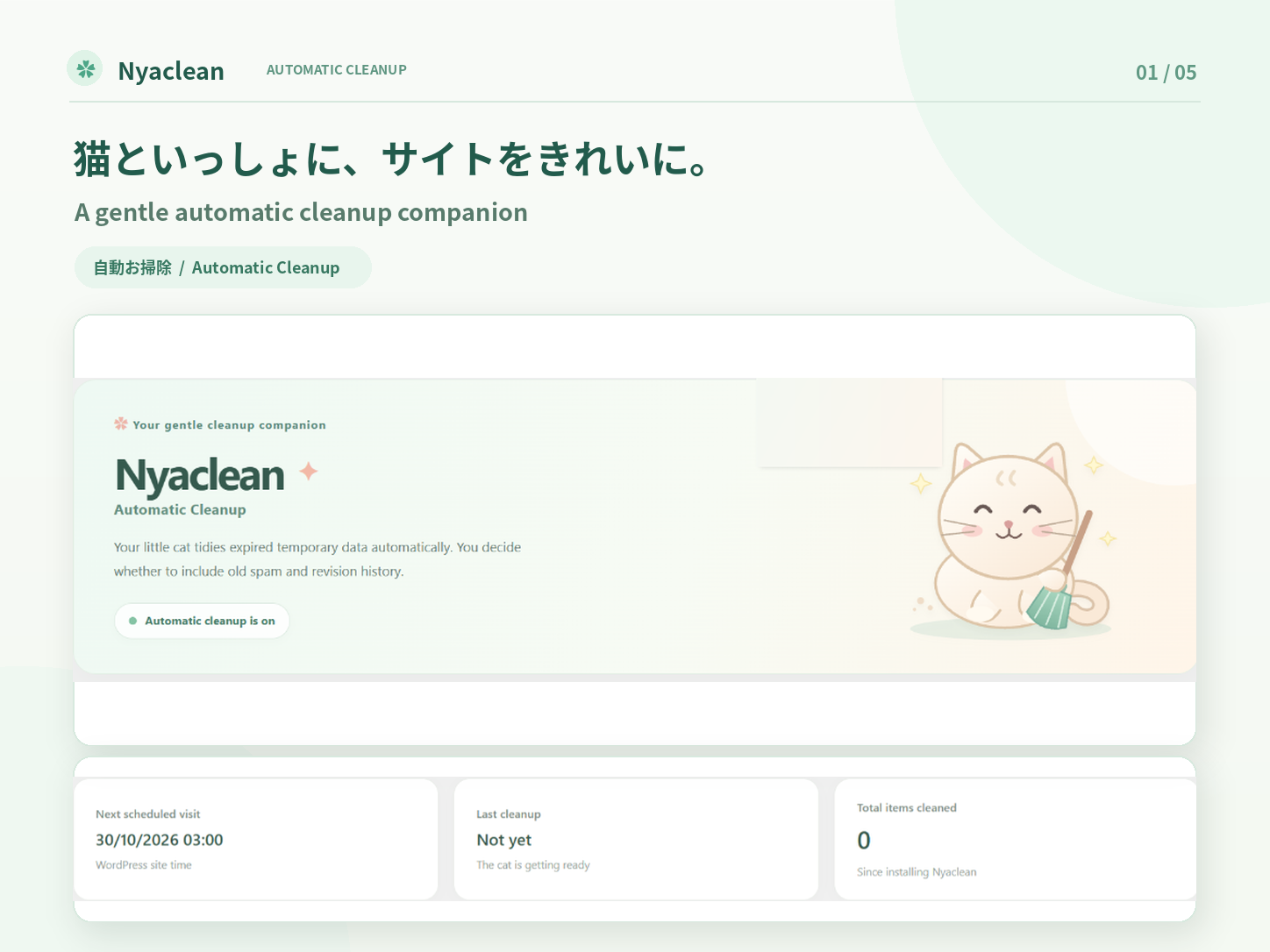
- Illustrated cat dashboard with a Cleanup results panel showing counts for temporary data, spam and revisions.
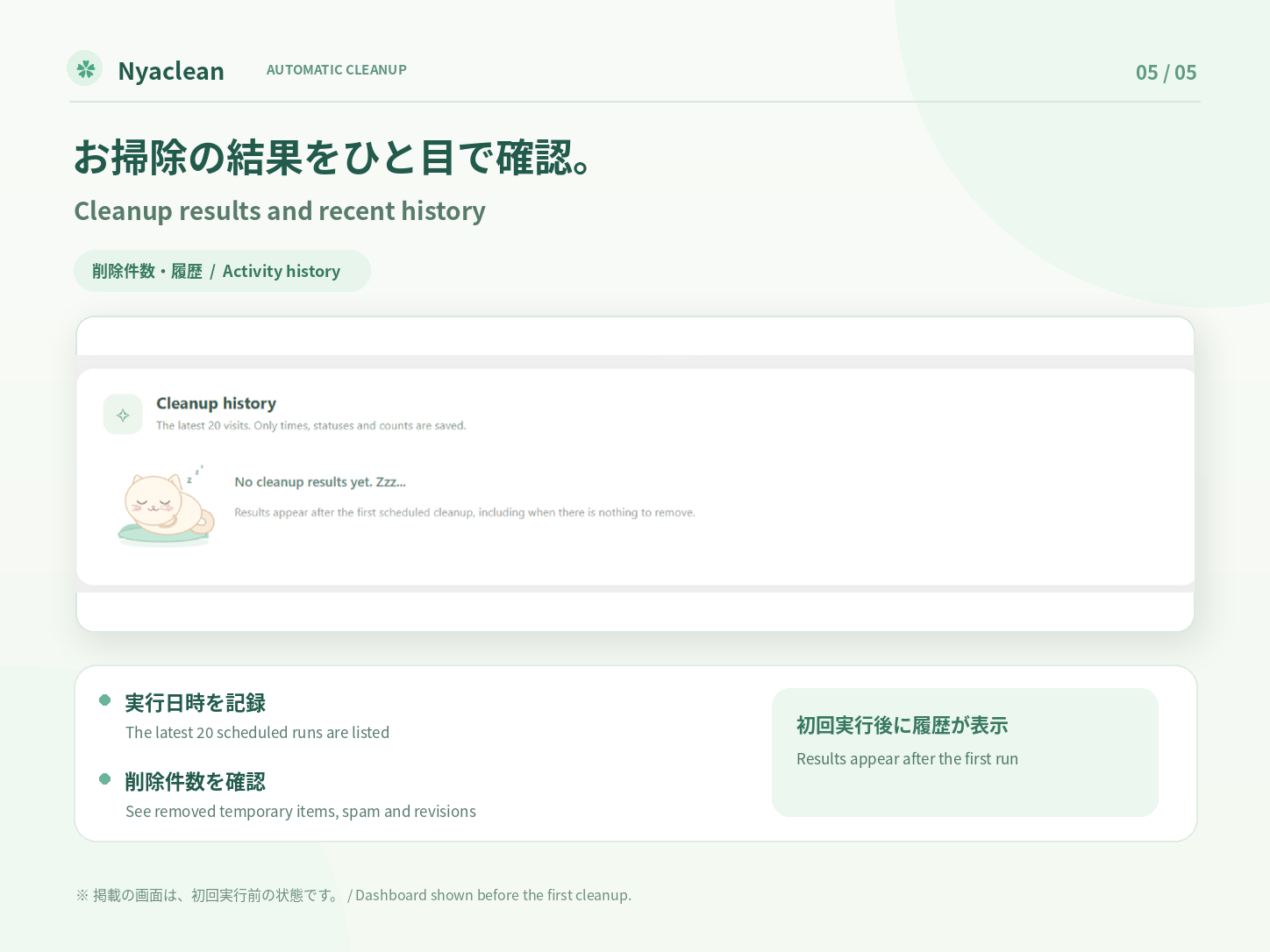
- Latest 20 runs in a history table with date, status and a count for each cleanup type. No comment content, post content or identities are stored in the log.
- Cumulative cleaned-item count (not a measure of freed disk space).
- Dashboard language defaults to WordPress site language, and can be overridden for Nyaclean alone: English, Japanese, Spanish, French, German, Brazilian Portuguese, Simplified/Traditional Chinese, Korean, Italian, Indonesian and Russian.
- Translations for all listed languages are bundled. Choose a dashboard language and save settings; no extra WordPress language or Nyaclean language pack is required.
- Local code and artwork only; no external API, account or tracking.
WordPress already handles some background cleanup. Results depend on whether expired data is actually present. Nyaclean does not guarantee improved performance or that all third-party plugins will work with deleted history.
Important timing note: WordPress WP-Cron normally runs when triggered by traffic, so visits may occur later than the selected time. For exact scheduling, configure a server cron to run WordPress cron. If DISABLE_WP_CRON is enabled, server cron is necessary.
日本語
Nyaclean(ニャクリーン)は、猫ちゃんがWordPressの不要データを定期的にお掃除してくれるプラグインです。初期設定では毎日午前3時(WordPressサイトのタイムゾーン)に予約されます。
最初からONになっているお掃除
- 期限切れの通常のデータベースTransientだけをお掃除します。1回最大50候補を確認し、削除前に有効期限を再チェックします。
- 外部オブジェクトキャッシュを利用している場合、この一時データ掃除はスキップします。
任意のお掃除(最初はOFF。必ずバックアップしてから選択)
- 古いスパムコメント: 60日以上前で、現在もスパム扱いのコメントだけを完全削除します。1回最大25件。
- 古い投稿リビジョン: 90日以上前の公開済みの通常投稿・固定ページに紐づくリビジョンを対象に、各記事の最新10件を保持して、1回最大20件を削除します。自動保存データは対象外です。
- これらは完全削除で、Nyaclean自体に復元機能はありません。これらのお掃除を新しくONにするときだけ、バックアップ確認が表示されます。毎回の自動お掃除では確認する必要はありません。
削除対象外
- 公開記事・固定ページの本文、下書き、自動保存、画像・添付ファイル、ユーザー情報。
- 承認済みコメントなど、スパム以外のコメント。
- テーマ、プラグイン、その永続設定、ネットワークTransient。
今すぐお掃除(0.1.2で追加)
- 「お掃除前にチェック」で次の1回の対象を確認できます。削除や清掃履歴への記録は行いません。サイト全体の総数ではなく、リビジョンも少量ずつ確認します。
- 「今すぐお掃除」は保存済みの設定を使います。対象の変更は先に設定を保存してください。
- 最初の清掃と事前チェックは通常のフォーム送信で実行します。JavaScriptが動かない環境でも1回分を処理し、画面に結果を表示します。対象が残っていれば再度ボタンを押してください。JavaScriptが動く場合は、画面を開いたままにすると少量ずつ連続処理し、途中停止もできます。
- 1回の上限(一時データ50候補、スパム25件、リビジョン20件・確認150候補)を維持し、各回を履歴に記録します。
- 100回の分割処理で一時停止します。続ける場合は再度ボタンを押してください。画面を閉じると次の処理は開始しませんが、送信済みの処理は完了する場合があります。予約清掃は従来どおり1回の処理です。
- 猫ちゃんの待機・清掃中・完了表示と、今回の削除件数を確認できます。
画面・機能
- 自動お掃除ON/OFF、毎日・毎週月曜日・毎月1日のスケジュール、時刻設定。
- 猫ちゃんの管理画面に「お掃除結果」を追加。一時データ・スパム・リビジョン別の削除件数がわかります。
- 直近20回分の掃除履歴、実行時刻、状態、種類別の削除件数を保存。記事本文・コメント本文などはログに残しません。
- WordPressのサイト言語が初期設定。Nyacleanだけ個別に、日本語・英語・スペイン語・フランス語・ドイツ語・ポルトガル語(ブラジル)・簡体字中国語・繁体字中国語・韓国語・イタリア語・インドネシア語・ロシア語を切り替えられます。
- 選択できる全言語の翻訳を同梱しています。表示言語を選んで設定を保存するだけで切り替わり、WordPressの追加言語やNyacleanの言語パックのインストールは不要です。
- 外部APIや追跡機能は利用しません。
実行時刻について: WP-Cronはアクセスなどをきっかけに実行されるため、予定した時間より遅れる場合があります。厳密な時刻実行にはサーバーのcron設定が必要です。
Multisite
Settings and cleanup are scoped to each site. With network activation, each site’s schedule is initialized when that site next loads WordPress. Network deactivation clears scheduled visits across the current network. Uninstall removes only Nyaclean’s settings, counters, locks and schedules across sites.
Credits and license
The bundled cat illustrations and other plugin assets are distributed under GPLv2 or later, together with the plugin code. No external fonts, scripts or image services are loaded.
Installation
- Upload the ZIP in Plugins > Add New > Upload Plugin or install it from the WordPress Plugin Directory.
- Activate Nyaclean. Expired transient cleanup is ON; old spam and revisions are OFF by default.
- Open Nyaclean in the WordPress admin sidebar, choose your schedule and preferred language.
- To enable old spam or revision cleanup for the first time, back up your site, select the optional task, and confirm the deletion notice. The confirmation only appears when you newly turn on an optional task.
- Review Cleanup results and Cleanup history after scheduled runs.
FAQ
Can deleted spam comments and revisions be restored?
Not by Nyaclean. They are permanently deleted if you explicitly enable those optional cleanup jobs. Always keep backups.
Does Nyaclean delete my posts, media or users?
No. Those records and files are not targets. Revisions, which are separate historical records, can be deleted only if explicitly enabled and only within the documented limits.
Will it run at exactly the selected time?
Not necessarily. WP-Cron is traffic-triggered unless a server cron is configured.
What if the cleaning result is zero?
This is normal when nothing is eligible for cleanup or when another system has already removed expired items.
What if an external object cache is enabled?
Only transient cleanup is skipped. Optional spam/revision cleanup can still run if enabled.
Does changing language change WordPress language?
No. The setting only changes Nyaclean’s displayed labels. When set to Follow WordPress site language, Nyaclean detects the site’s current locale.
Screenshots

Changelog
0.1.3
- Added a Free Upgrade link to the plugin list and a Nyaclean Premium button to the dashboard.
0.1.2
-
Redesign the quick-start guide with a forest-green illustrated sidebar and three usage rows. Print its scoped styles with the panel to avoid stale or missing external guide styles.
-
Style the quick-start guide with pastel icon cards, cat artwork and expandable numbered steps.
-
Add a translated quick-start guide above the manual cleanup panel, with an expandable usage walkthrough.
-
Make Clean now and Preview native POST forms: the first bounded request no longer depends on JavaScript. Return per-user results after redirect, with optional JavaScript continuation.
-
Initialize manual controls both before and after DOM readiness; embed configuration directly on the cleanup panel and ensure the script is queued.
- Refresh changed CSS/JS assets even when reinstalling the same version.
-
Improve wordmark tracking and spacing above the subtitle.
-
Add a read-only next-batch preview and administrator-only Clean now action using saved settings.
- Add sequential bounded manual cleanup with progress counts, stop/resume and a 100-batch session limit.
- Retain nonce and capability checks, cleanup locking, age thresholds, protected revisions and optional-cleanup consent.
- Add waiting, working and completed cat states with reduced-motion support.
- Include all new labels in the 11 bundled non-English translations.
- 事前チェック・手動連続清掃・途中停止と再開・猫ちゃんの状態表示を追加。既存の削除条件を維持し、全対応言語に翻訳を追加。
0.1.1
- Bundle complete dashboard translations for all 11 non-English language choices.
- Fix language selection without installed WordPress language packs, including site-language fallback.
- Move the language setting to the top of the form and translate the dashboard subtitle.
- Keep cleanup behavior, schedules and saved settings unchanged.
- 日本語を含む11言語の翻訳を同梱し、言語変更が反映されない問題を修正。言語設定をフォームの先頭へ移動。
0.1.0
- Initial release with a cat-themed dashboard and daily, weekly or monthly scheduled cleanup.
- Clean expired transients, with optional old spam and revision cleanup and backup acknowledgment.
- Preserve recent revisions and autosaves, enforce per-run limits, and prevent overlapping cleanup jobs.
- Include cleanup history, a dashboard language selector and per-site settings.
- Use WordPress.org language packs for translations, including the plugin-list description.
- Report failed optional deletions and database lookup errors as partial runs.
- Keep dashboard language overrides scoped to Nyaclean; missing translations appear in English.