


Description
Omea Consent is a free cookie consent banner for WordPress with Google Consent Mode v2 always on. Scripts wait for consent in their category, every choice is logged as proof of consent, and a cloud scan checks from the outside that nothing slips through – with no pageview or visitor limits and the banner in 12 languages. The plugin gives you the tools; whether your site complies depends on how you set it up.
Try it in Live Preview: https://wordpress.org/plugins/omea-consent/?preview=1 – a demo shop with the banner, two sample scripts that wait for consent and a map behind a placeholder.
Free, and fully functional:
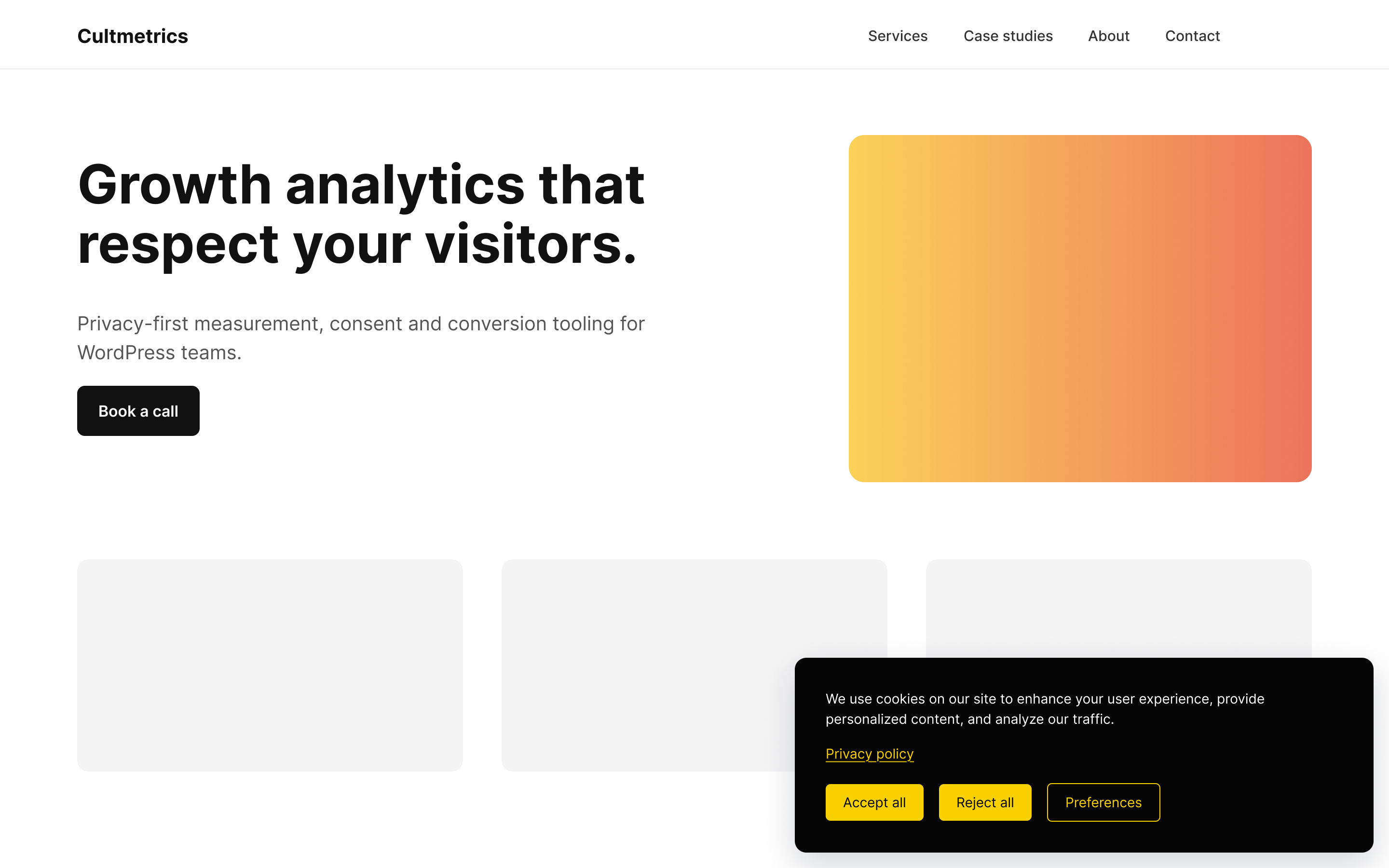
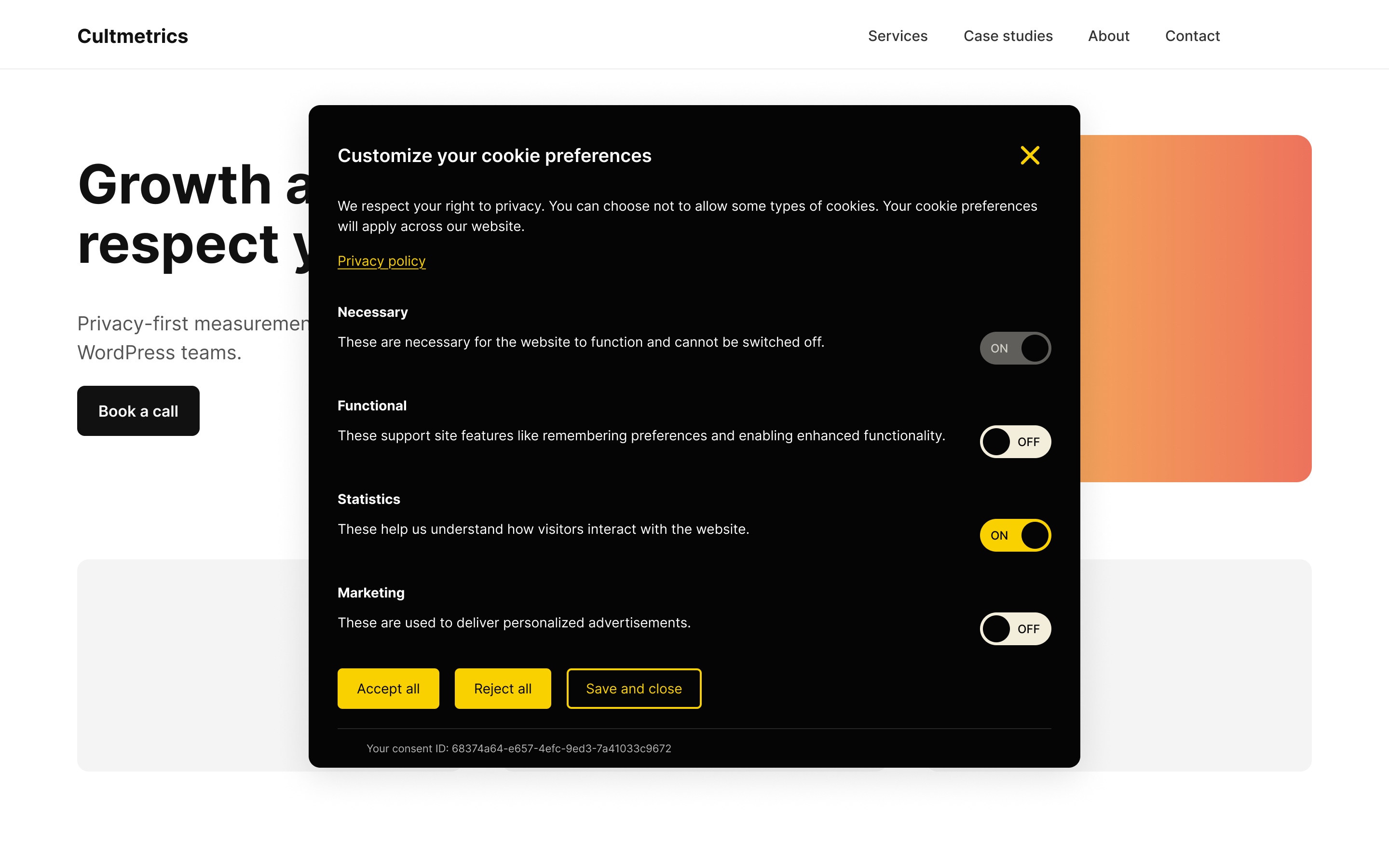
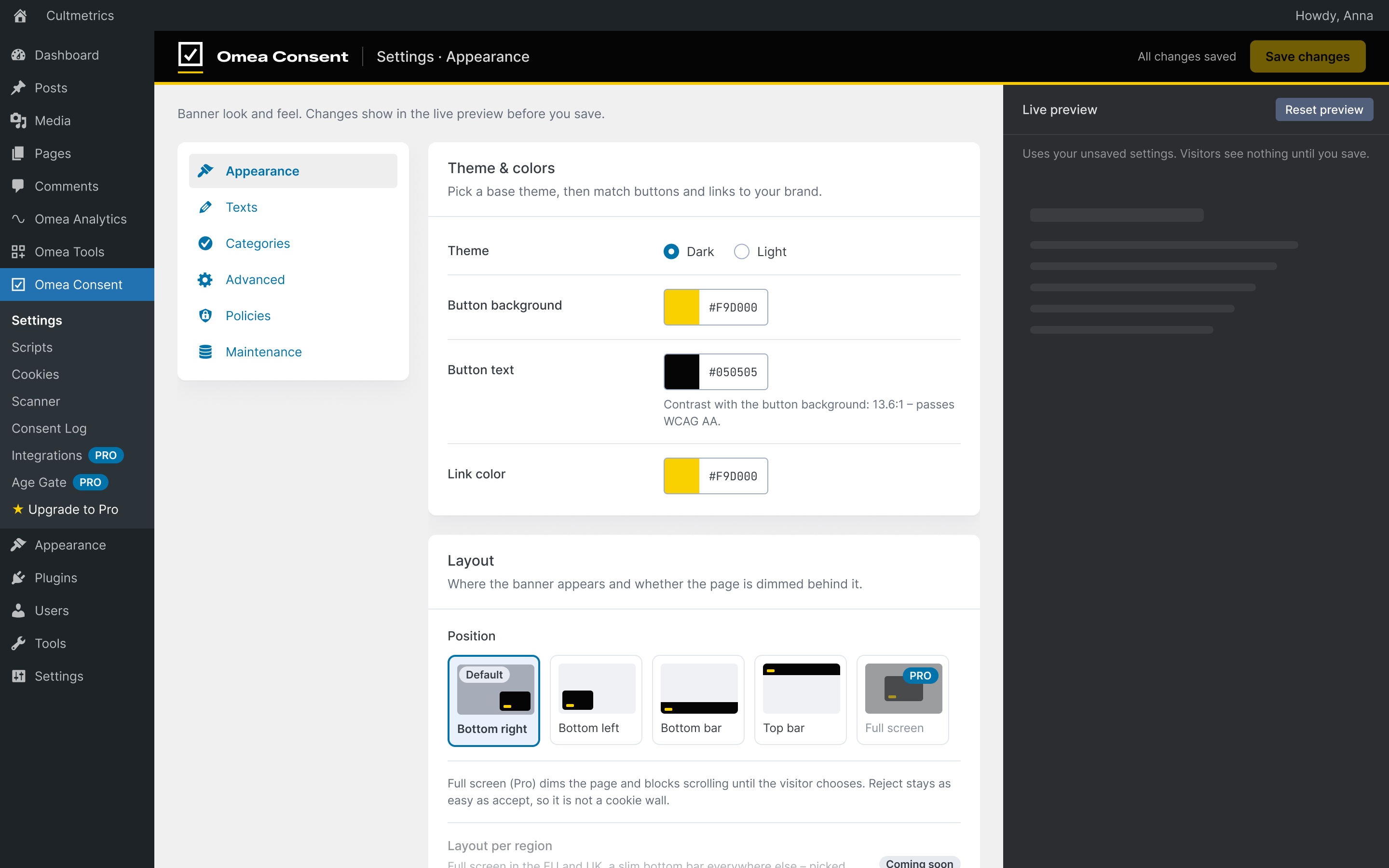
- Cookie banner and preferences window – four layouts (bottom right or left box, top or bottom bar), dark or light theme, your own colors and texts in every language (Polylang, WPML). Reject is as easy as accept.
- Your visitors’ language – the banner, preferences and cookie policy page are built in for 12 languages: English, Finnish, Swedish, Danish, Norwegian, Estonian, German, Dutch, French, Spanish, Italian and Polish. Polylang and WPML sites get each page’s language.
- Accessible banner – built and tested for WCAG 2.2 Level AA (automated axe-core checks plus keyboard and screen reader tests): keyboard and screen reader friendly, readable contrast in both themes, “Reject all” exactly as prominent as “Accept all”, and a warning in the settings if your own colors are hard to read.
- Google Consent Mode v2 – always on. Every consent type is denied before any Google tag loads and updated the moment the visitor chooses. You choose, in plain words in the setup checklist: Advanced (Google’s recommendation – cookieless pings to Google before consent and after a rejection) or Basic (nothing sent to Google before consent). Optional
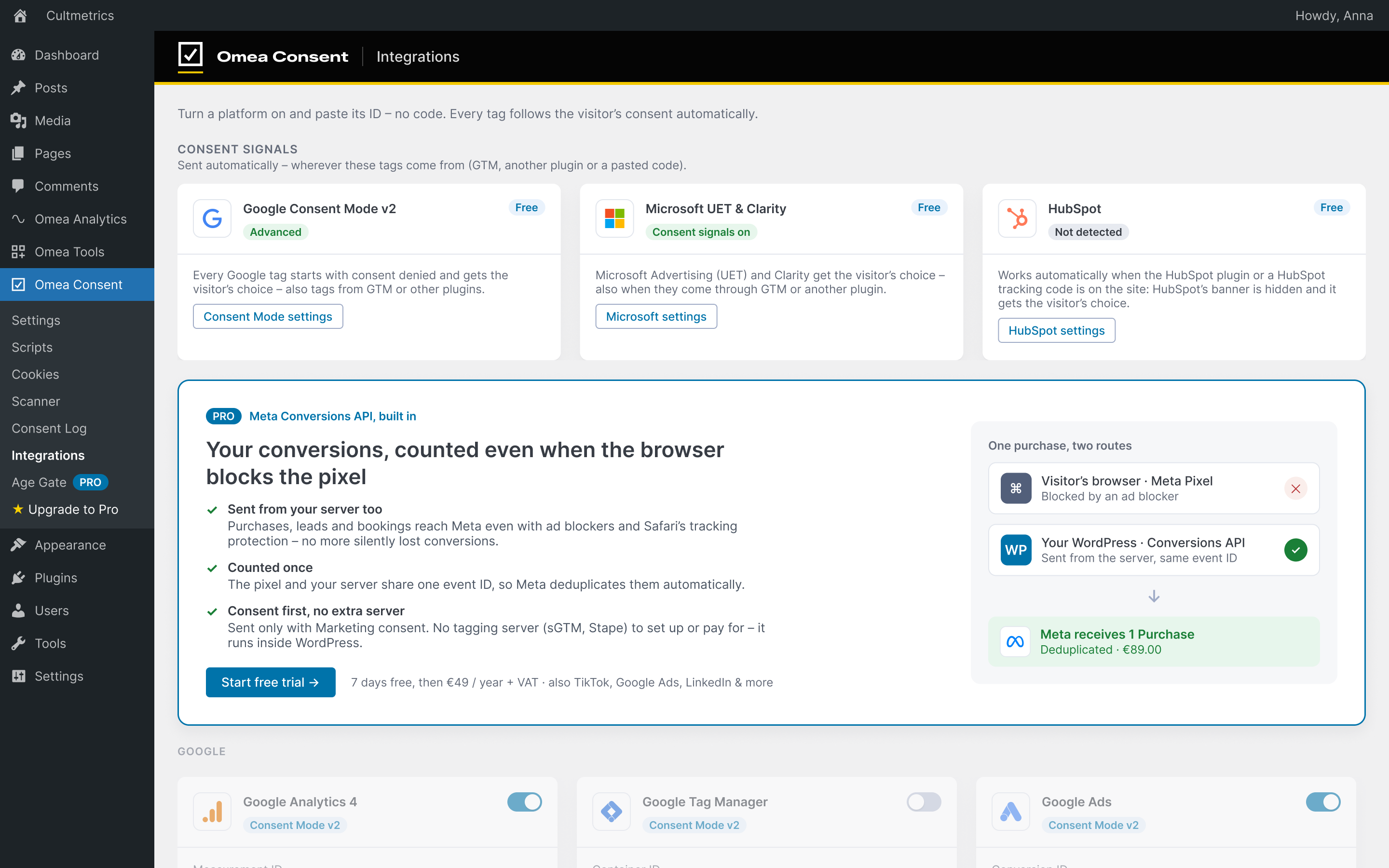
url_passthrough. - Consent signals for Microsoft and HubSpot – Microsoft Advertising (UET) and Clarity, and the official HubSpot plugin, get the visitor’s choice automatically – also when their tags come through Google Tag Manager or another plugin. Optional stricter rule: HubSpot’s tracking code loads only after Statistics consent.
- Script blocking – paste tracking snippets by consent category, or turn on auto-blocking to also hold known tracking scripts that themes and other plugins add, until consent. A pasted Google tag (gtag.js) can follow your Consent Mode setting instead: it loads at once with consent denied in Advanced mode and waits for consent in Basic mode.
- Embed placeholders – YouTube and Vimeo videos, Google Maps and Facebook embeds wait behind a placeholder that names the provider, with “Load once” and “Allow” buttons – no blank gap and no cookies before consent. Works with or without auto-blocking.
- US state laws (CCPA/CPRA) and Global Privacy Control – switch to the opt-out model: categories run until the visitor opts out, and a notice with “Do Not Sell or Share My Personal Information” replaces the consent banner. A footer link (shortcode) opts out in one click. A browser’s Global Privacy Control (GPC) signal is honored automatically in opt-out regions and the notice says so; in opt-in regions the banner says Marketing stays off. Opt-outs don’t expire, and every opt-out lands in the consent log.
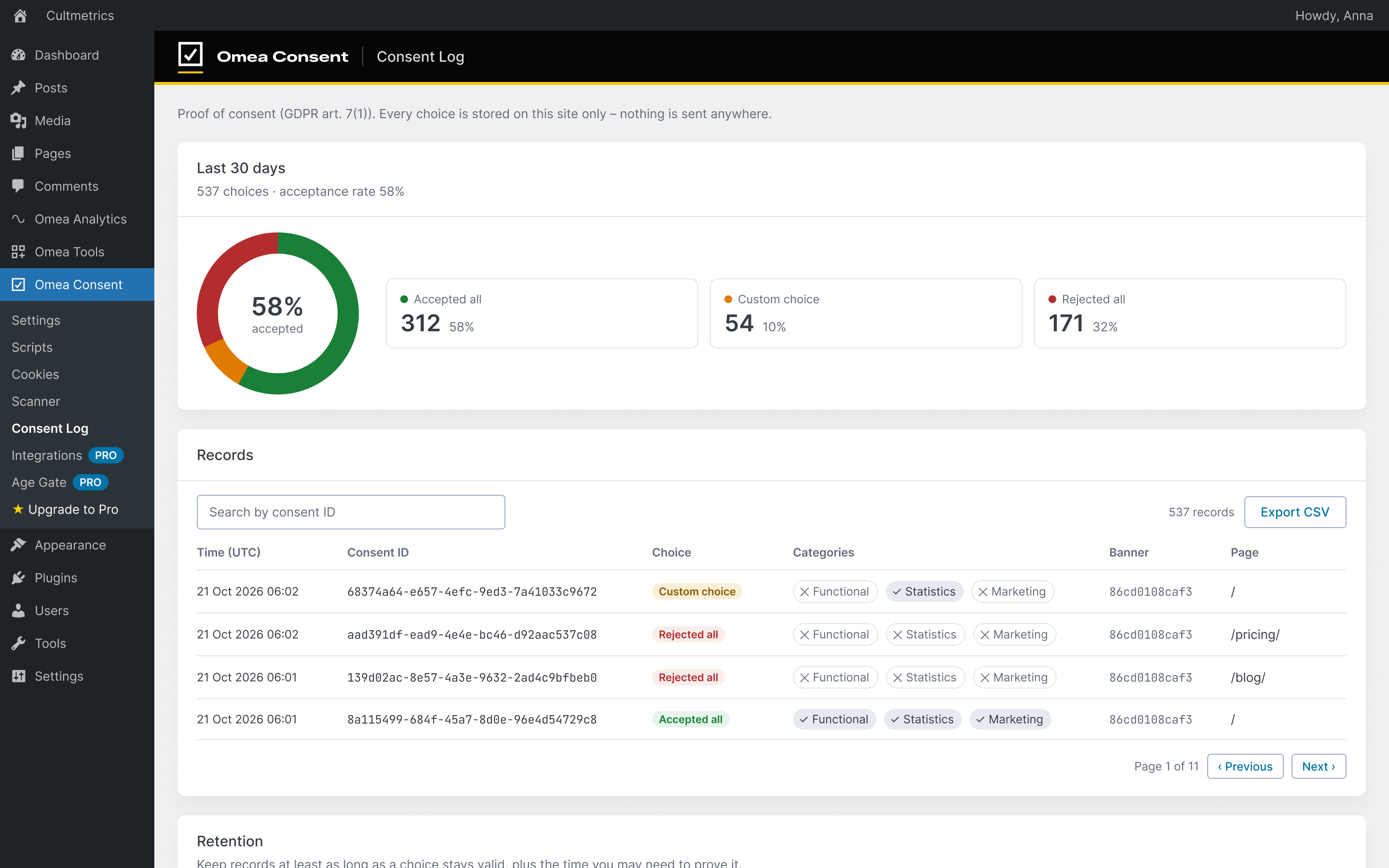
- Consent log (proof of consent, GDPR art. 7(1)) – every banner and preferences choice, and every embed loaded once, stored on your own site with a consent ID, time, categories and banner version. CSV export and a retention setting.
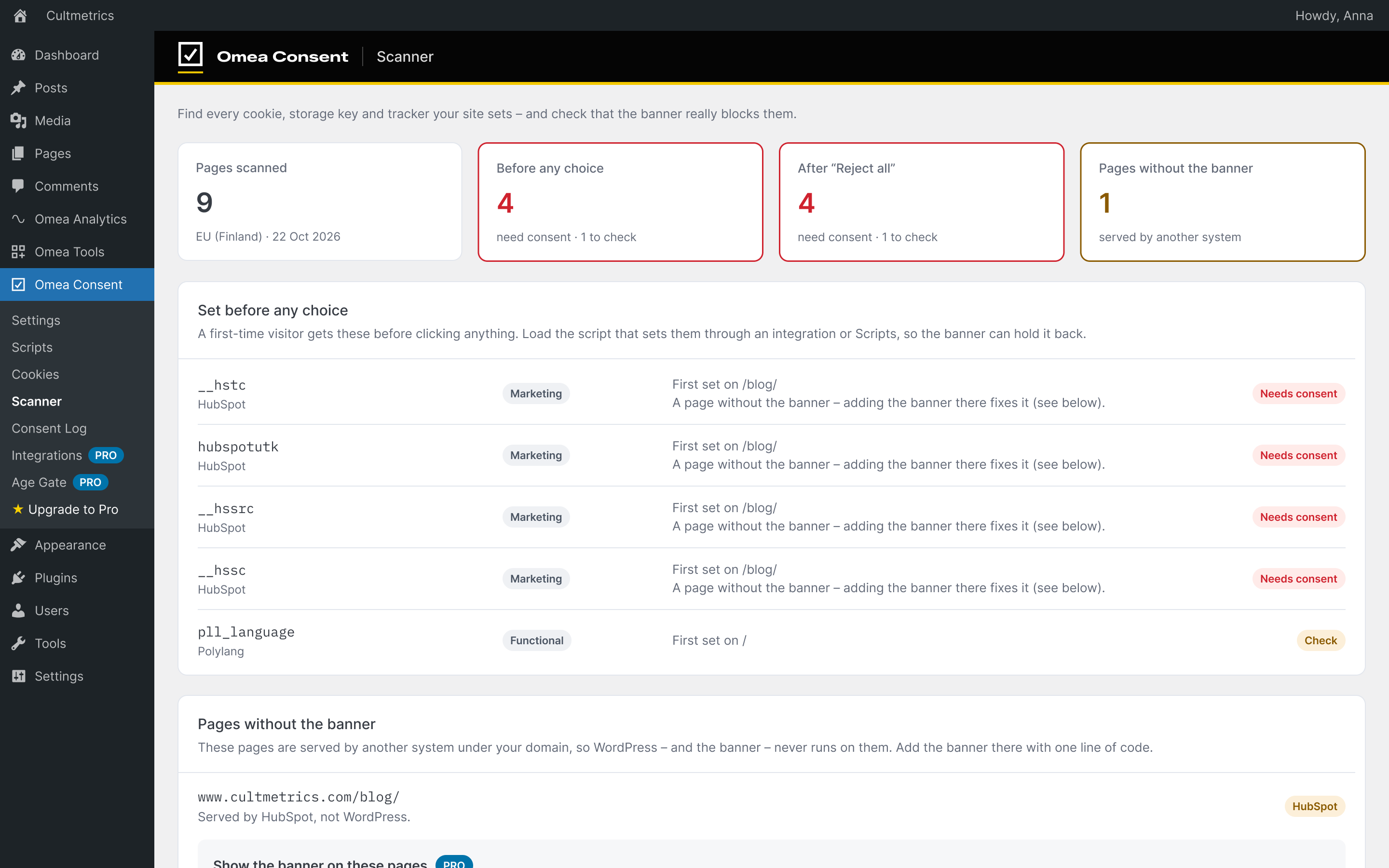
- Cookie scanner and cookie policy – a local scan, plus one free cloud scan: our scanner visits your site like a first-time visitor in the EU and checks what is set before any choice, after “Reject all” and after “Accept all” – and finds pages where the banner doesn’t run. Results fill the cookie table and an auto-updating cookie policy page (a Cookie table block, or the shortcode).
- Setup wizard – five short steps after activation (look, your visitors, Google tags, scripts, policies), each choice explained in plain words.
- Setup checklist and “Found on your site” – the plugin spots tags already on your site, other cookie banner plugins and WooCommerce, and tells you what to do next.
- WordPress Consent API – other plugins can read the visitor’s choice.
Omea Consent Pro (paid add-on, 7-day free trial) turns consent into measurement you can trust:
- One-click pixels and tags – Google Analytics 4 (GA4), Google Tag Manager (GTM), Google Ads, Meta Pixel (Facebook Pixel), TikTok Pixel, Microsoft Advertising (UET), LinkedIn Insight Tag and Snap Pixel. Paste an ID – no code. Google tags use Consent Mode v2, the others wait for Marketing consent (or, if you choose, load with the platform’s own consent mode).
- Conversion tracking – define a conversion once (a thank-you page, a button click, a form,
omea.trackEvent('lead')ordata-omea-event) and send it to every platform. WooCommerce purchases, checkouts and add-to-carts and booked HubSpot meetings are set up for you; server-side WordPress events (sign-ups, logins) work without JavaScript. - Server-side tracking with Conversions APIs – each conversion is also sent from your WordPress server, so it arrives despite ad blockers and browser limits: Meta Conversions API (CAPI), TikTok Events API, LinkedIn Conversions API and Snap Conversions API, with the same event ID as the pixel or tag so each platform counts it once. Server-side conversions (WooCommerce purchases, sign-ups) also reach GA4 through the Measurement Protocol, and Google Ads enhanced conversions add the customer’s hashed email through the Google tag in the browser, after Marketing consent. Email, phone and address details are SHA-256 hashed (the IP address and browser details are sent unhashed, as the platforms ask), and everything is sent only with the visitor’s consent – no tagging server (sGTM, Stape) to set up or pay for.
- Unlimited cloud scans – a scan every month and an email when a new cookie shows up before consent or after “Reject all”.
- The banner beyond WordPress – one line shows the same banner on pages a HubSpot blog or landing page tool serves under your domain; one choice covers both.
- Rules per region – opt-in in the EU, UK and Switzerland, the US opt-out notice in the US, and your choice (or no banner) everywhere else, each region with its own layout. The country is looked up on your own server once per session, so page caching keeps working.
- Age gate, full-screen banner and custom CSS.
More about Pro: https://www.cultmetrics.com/products/omea-consent-pro/
Privacy
Omea Consent stores the visitor’s consent choices in a first-party consent cookie and matching browser storage key so choices can persist across page loads. With the opt-in model nothing is stored before the visitor chooses; with the opt-out model (US state laws) the default settings are stored right away so tags and other plugins can follow them. Site administrators control any tracking snippets added through the plugin settings.
As proof of consent, each choice is also recorded in a database table on your own site (Omea Consent → Consent Log): a random consent ID (kept in the visitor’s first-party omea_consent_id cookie), the time, the choice per category, a hash identifying the banner text shown, the page path and a salted hash of the shortened IP address (pseudonymised – the records are still personal data, linked to the consent ID). Records are deleted automatically after the retention period you set (default 365 days). Nothing is sent to Cultmetrics or any third party. A suggested privacy-policy paragraph is added to Settings → Privacy.
External services
Omea Consent ships with a local Open Cookie Database catalog for cookie matching. By default, the scanner uses this bundled local catalog and does not contact a remote cookie database service.
Site administrators can enable optional CookieDatabase.org lookups in the plugin settings. When enabled, Omea Consent may send detected cookie or browser storage names to CookieDatabase.org during an admin-initiated scan so the plugin can retrieve cookie classification metadata such as category, purpose, provider, and retention. This service is provided by Complianz B.V. Terms: https://cookiedatabase.org/terms-of-use-api/. Privacy: https://cookiedatabase.org/plugin-use-of-cookiedatabase-org-privacy-terms/.
The scanner includes local pattern matching for common script providers such as Google Tag Manager, Google Analytics, Meta Pixel, and HubSpot. These patterns are used only to detect scripts already present on the scanned site. Omea Consent does not send data to those providers as part of the scan.
The optional “Upgrade to Pro” admin page contains “Start free trial” buttons for the paid Omea Consent Pro add-on and the Omea Pro bundle (Consent Pro with Omea Analytics Pro). Clicking it opens a window (or, as a fallback, a new tab) with the checkout page at account.cultmetrics.com (operated by Cultmetrics Oy), where payment is handled by Stripe. The page receives the site’s domain, the admin address it was opened from and the plugin version, so it can show the new license key in that window. Nothing is loaded or sent until an administrator clicks the button; card details are entered only in Stripe’s fields, never inside WordPress. More about Pro: https://www.cultmetrics.com/products/omea-consent-pro/. Cultmetrics terms of sale: https://www.cultmetrics.com/terms/. Cultmetrics privacy policy: https://www.cultmetrics.com/privacy-policy/. Stripe terms: https://stripe.com/legal. Stripe privacy: https://stripe.com/privacy.
The Scanner page and the setup checklist offer an optional cloud scan by Cultmetrics (one free scan per site; unlimited with Omea Consent Pro). Nothing is sent until an administrator clicks “Run free cloud scan” or “Cloud scan” – or, with Omea Consent Pro, when its monthly scan runs (it can be turned off on the Scanner page). Then the plugin sends the site’s home URL, the plugin version and a one-time token (or, with Pro, the license key) to account.cultmetrics.com (operated by Cultmetrics Oy). Cultmetrics’ scanner in the EU loads up to 10 public pages of the site like a first-time visitor – before any choice, after “Reject all” and after “Accept all” – and returns the cookie names and settings, browser storage keys, script addresses and third-party hosts it saw (never cookie values). To confirm the request came from the site, the scanner first fetches the token from the public REST route /wp-json/omea-consent/v1/cloud-scan/verify, which only answers for a scan the administrator just started. The site address and the result are kept for 90 days. Cultmetrics privacy policy: https://www.cultmetrics.com/privacy-policy/. Terms: https://www.cultmetrics.com/terms/.
Credits
The cookie icon is “Cookie” from Phosphor Icons (https://phosphoricons.com), MIT License.
Installation
- In WordPress go to Plugins › Add New, search for “Omea Consent”, then Install and Activate.
- The setup wizard opens: five short steps (look, your visitors, Google tags, scripts, policies).
- Add your tracking snippets under Omea Consent › Scripts, or turn on auto-blocking (Omea Consent › Settings › Advanced) for tags your theme and other plugins add.
- Optional: run the free cloud scan under Omea Consent › Scanner to see what is set before any choice and after “Reject all”.
FAQ
Is Omea Consent free?
Yes. The banner and preferences window, Google Consent Mode v2, script blocking and auto-blocking, embed placeholders, the consent log, the cookie scanner, the cookie policy page, the US opt-out model with Global Privacy Control and one cloud scan per site are free, with no pageview or visitor limits. Omea Consent Pro is an optional paid add-on for one-click pixels and tags, conversion tracking and server-side Conversions APIs.
Does it support Google Consent Mode v2?
Yes, always on. Every consent type is denied before any Google tag loads and updated the moment the visitor chooses. You choose Advanced (cookieless pings before consent, Google’s recommendation) or Basic (nothing sent to Google before consent) in the setup checklist. It works with gtag.js and Google Tag Manager.
Does it block cookies before consent?
Scripts you add under Omea Consent › Scripts wait for consent in their category. Turn on auto-blocking (Omea Consent › Settings › Advanced) to also hold known tracking scripts that your theme or other plugins add, and YouTube, Vimeo, Google Maps and Facebook embeds wait behind a placeholder. The free cloud scan checks from the outside what is set before any choice and after “Reject all”.
Is “Reject all” as easy as “Accept all”?
Yes. Both buttons are on the first layer and look the same, and the banner is built and tested for WCAG 2.2 Level AA.
Can I prove consent?
Every choice is stored on your own site with a consent ID, time, categories and banner version (Omea Consent › Consent Log), with CSV export and a retention setting. Nothing is sent to Cultmetrics.
Which languages does the banner speak?
English, Finnish, Swedish, Danish, Norwegian, Estonian, German, Dutch, French, Spanish, Italian and Polish are built in. With Polylang or WPML each page gets its own language.
Does it work with Microsoft Clarity, Microsoft Advertising and HubSpot?
Yes. They get the visitor’s choice automatically, also when their tags come through Google Tag Manager or another plugin.
Does it work for US visitors (CCPA/CPRA)?
Switch to the opt-out model under Omea Consent › Settings › Policies: a “Do Not Sell or Share My Personal Information” notice replaces the banner, and the Global Privacy Control signal is honored automatically.
I already use another cookie plugin. Can I switch?
Yes. The setup checklist spots other cookie banner plugins and tags already on your site and tells you what to do. Run one consent plugin at a time.
Do other plugins see the visitor’s choice?
Yes, through the WordPress Consent API.
Screenshots
Changelog
1.0.10
- Works better with Omea Analytics and other plugins that read the WP Consent API: a visitor’s choice now reaches them for as long as it is valid (before, they stopped seeing it after 30 days), on every subdomain that shares the choice, and not after it has expired.
- Google Consent Mode settings: the Advanced option is labelled “Better modelling”, which is what Google’s documentation says about it.
- For developers: settings export and import as a public API (used by Omea Consent Pro’s settings profiles).
1.0.9
- Scripts: new category “Google tag – follows Consent Mode”. Paste Google’s gtag.js snippet once: in Advanced Consent Mode it loads for every visitor with consent denied by default, in Basic mode it waits for consent (Statistics for Google Analytics, Marketing for Google Ads). The Scripts list suggests it when a gtag.js snippet sits in another category.
- Google Consent Mode: Omea Consent now tells Google which consent platform set the signals (Google’s developer ID for Omea).
- Sites with a domain per language (Polylang, WPML) or a mapped domain: the shared consent cookie is now set on the domain the page is served on, so server-side features (Conversions APIs, Omea Analytics) see the visitor’s choice there too.
- Upgrade screen: Omea Consent Pro is also available for 5 and 25 sites.
1.0.8
- Auto-blocking now also holds TikTok’s pixel and LinkedIn’s Insight tag until consent, whether they are in the theme or come from another plugin.
- Phones: the banner’s Preferences button is as wide as Accept all and Reject all.
1.0.7
- New setup wizard: five short steps after activation (look, your visitors, Google tags, scripts, policies), each choice explained in plain words.
- The banner speaks the site’s language: visitor texts built in for 12 languages (English, Finnish, Swedish, Danish, Norwegian, Estonian, German, Dutch, French, Spanish, Italian, Polish) until a language pack is installed.
- Clearer default texts: the banner names partners and advertising and says how to change the choice; the cookie policy follows your consent model and Google Consent Mode type, and says what Google’s cookieless pings contain.
- US opt-out: a stored opt-out never expires; the Global Privacy Control status is shown in every model; the opt-out notice buttons look the same; the shortcode link works without JavaScript.
- Consent log: “Load once” on a video or map is logged as evidence.
- Optional close button (×) on the banner – closing keeps only necessary cookies (Italian guidance).
- Asks again only when categories or purposes change (button labels don’t count); a warning when choices are remembered for less than 180 days.
- WooCommerce’s “recently viewed” cookie waits for Functional consent.
- Settings texts corrected after a legal accuracy review (no compliance promises, US link placement, GPC, consent-log wording).
1.0.6
- Accessibility (WCAG 2.2 AA): the light theme is now readable (dark button text and links), the Link color setting applies to banner links, corner and bar banners no longer trap the Tab key, the banner is announced to screen readers, and closing the preferences window without a choice brings the banner back. Settings › Appearance warns when your colors are hard to read.
- Google Consent Mode: new “Pass ad clicks through links (url_passthrough)” option.
- HubSpot: optional stricter rule – load HubSpot’s tracking code only after Statistics consent.
- Auto-blocking: saving the settings no longer turns “Hold embeds until consent” off.
- Rules per region (Pro): a failed country lookup is remembered for the session.
- Consent log: the GPC badge shows only where the signal had an effect.
1.0.5
- US state laws: a new opt-out model (Settings › Policies › Privacy law) with a “Do Not Sell or Share My Personal Information” notice, an opt-out link shortcode and the texts under Settings › Texts.
- Global Privacy Control is honored: Marketing stays off in opt-out regions, the notice confirms it, and the consent log records it.
- Embed placeholders: YouTube, Vimeo, Google Maps and Facebook embeds wait behind a placeholder with “Load once” and “Allow”. New setting to hold embeds without auto-blocking.
- Google Consent Mode defaults follow the model (and, with Pro’s rules per region, each region).
- The consent log stores the model and the GPC signal with each choice.
- The banner on pages outside WordPress picks up changes within 5 minutes, also behind Cloudflare’s browser cache.
- Fix: with auto-blocking on, the cookie and storage guard now runs (a script error stopped it, so cookies written before consent weren’t blocked).
1.0.4
- The banner on pages outside WordPress (embed line, with Omea Consent Pro) now also runs your Scripts, the Pro integrations and conversion tracking, each after the same consent as on WordPress pages. A new setting turns this off when the other platform already loads those tags.
- Clearer about auto-blocking: it works on pages WordPress serves; tags another platform adds itself must be removed there or set to wait for consent.
1.0.3
- Translatable everywhere, and every visitor text follows the page language with Polylang or WPML: banner, preferences window, privacy policy link, cookie policy and cookie table. The embed line speaks the host page’s language.
- Consent log records the language of each choice (also in the CSV export).
- Setup checklist warns when tracking tags from the theme or another plugin may run before consent, with one click to turn on auto-blocking.
- Hidden-banner roles keep sending consent signals (Google, Microsoft, HubSpot).
- Embed line: no more CORS error on other hosts; the preferences window title is an H2.
- Knows Omea Analytics’ consent-only
omea_vidcookie. - Upgrade to Pro also offers the Omea Pro bundle (Consent Pro and Omea Analytics Pro with one key).
1.0.2
- Security: the scanner’s scan mode can only be started by an administrator, and turning on auto-blocking no longer holds the Google Consent Mode default.
- Fixed (1.0.1): with “One choice across subdomains” on, the banner disappeared after the first page view.
- New scripts must be given a category (they defaulted to Necessary); “Found on your site” flags tracking tags while auto-blocking is off.
- Withdrawing consent reloads the page and deletes that category’s cookies; expired or outdated choices are ignored from the first page on.
- Nothing is stored in the browser before the visitor chooses.
- Auto-blocked embeds (YouTube, Maps…) load after consent; fewer false matches for inline scripts.
- Accessibility: the preferences window is a labelled dialog, buttons and toggles have names, focus returns on close.
- Consent log rate limit works behind proxies and CDNs.
- Clearer, accurate texts in the readme, settings and cookie policy draft.
1.0.1
- New (with Omea Consent Pro): one choice across subdomains – visitors who choose on example.com aren’t asked again on shop.example.com, and the other way round.
- Integrations (Pro): a clear “Test mode” warning while a Meta or TikTok test event code is set.
- Fixed: the “Start free trial” button overflowed its card on the Upgrade page.
- Fixed: the Microsoft consent signals setting is now sanitised on save.
1.0.0
- First stable release.
- New: Google Consent Mode v2 built in and always on – advanced (default) or basic. Returning visitors’ choices apply before any Google tag runs.
- New: Consent log (proof of consent) – consent ID, time, categories and banner version stored on your own site, with search, CSV export and a retention setting.
- New: one free cloud scan – our scanner visits your site like a first-time visitor in the EU, before any choice, after “Reject all” and after “Accept all”, and finds pages where the banner doesn’t run.
- New: Microsoft UET & Clarity and HubSpot consent signals follow the visitor’s choice.
- New: Cookie table block and a ready-to-publish cookie policy page generated from your scan; a link to #omea-consent-preferences opens the cookie settings.
- New: setup checklist and “Found on your site” suggestions (tags, WooCommerce, competing cookie banners).
- New: banner layouts – bottom right, bottom left, bottom bar or top bar – and consent validity with “ask again when texts change”.
- New: export, import and reset settings.
- Redesigned admin screens with a live preview panel; lighter banner typography and a round cookie icon.
- Omea Consent Pro (separate add-on): integrations, conversions and Conversions APIs, the banner on pages outside WordPress, full screen layout and age gate.
- Fixed: a JavaScript error when an inline snippet was HTML without a script tag (for example a GTM noscript iframe).
0.1.3
- Added an optional “Upgrade to Pro” page describing the paid Omea Consent Pro add-on (7-day free trial, then yearly subscription). Its link opens Stripe Checkout in a new tab; no payment details are entered inside the WordPress admin. The free plugin remains fully functional without it.
0.1.2
- Added the
omea_consent_managed_scriptsfilter so companion add-ons can register consent-gated scripts programmatically (rendered inert and activated by the same consent gating as stored scripts).
0.1.1
- Fixed managed scripts not running after consent: inline snippets (including full Google Tag Manager Header/Body code with comments, can no longer truncate them.
- Scripts in custom categories are no longer silently dropped.
- The consolidated consent state is now written and a consent event is dispatched so scripts activate immediately after a choice, without a reload.
0.1.0
- Prepared Omea Consent metadata and documentation for plugin packaging.
- Added consent manager, script injection, scanner, autoblocking, cookie table, and Google Consent Mode support.