


Description
Speed up the purchase process. Increase your sales!
Formerly known as “OneClick WhatsApp Order”, OneClick Chat to Order will make it easier for your customers to order your products directly through WhatsApp with a single click. Connect your WooCommerce-powered online store with WhatsApp and make it super quick and easy for your customers to complete their order via WhatsApp.
—
Watch the Complete Overview and Tutorial
It’s really easy to get started. Here’s the complete overview and tutorial:
Want to see it live? Try it yourself!.
—
Premium Add-ons
- OneClick WCFM Connector: Seamlessly combine the power of WordPress & WooCommerce, OneClick Chat to Order, WCFM Marketplace Multivendor, WCFM Frontend Manager and WhatsApp.
- OneClick Dokan Connector: Extend the functionality of Dokan Multivendor Marketplace by combining it with OneClick Chat to Order. Let vendors show the WhatsApp button(s) on their own products.
- OneClick WCVendors Connector: Integrate OneClick Chat to Order with WC Vendors Multivendor Marketplace plugin to allow vendors to receive orders and purchases directly through WhatsApp.
- OneClick Variations Grabber: Let your customers send the selected product variations, quantities, and other important details from WooCommerce product pages directly to you via WhatsApp. Watch Video.
- More powerful add-ons coming soon!
Revolutionary Features in the Latest Version:
All the features you will love:
Major New Features:
- Force wa.me URL Option – Override mobile/desktop base URL settings to use wa.me for all WhatsApp links, ensuring consistent behavior across all devices and browsers.
- JavaScript onClick Event Option – Choose between standard link tags or inline onClick events for better Ajax compatibility and modern theme support.
- Enhanced Button Styling – Completely refactored CSS with natural styling that seamlessly adapts to your theme without conflicts.
- Comprehensive Uninstall System – Complete data cleanup with user control over what gets deleted during plugin removal.
- WPML Integration – Full multilingual support with comprehensive translation configuration for international stores.
- Conditional CSS Classes – Smart CSS class application based on button position for perfect theme integration.
Core Features:
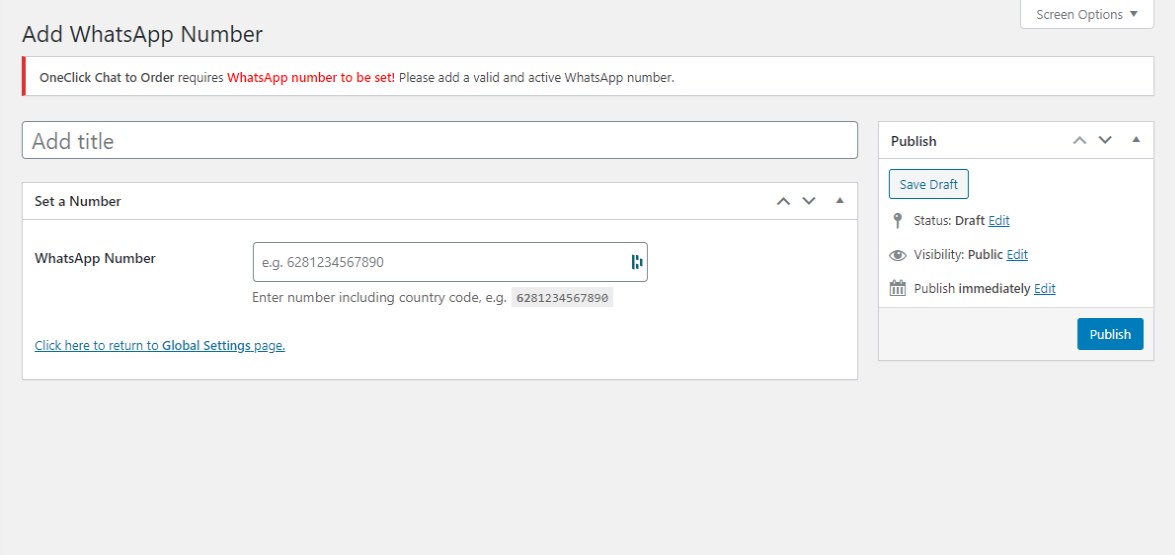
- Multiple WhatsApp Numbers – Create unlimited WhatsApp numbers and assign them to different pages, products, or departments. Learn more or watch tutorial.
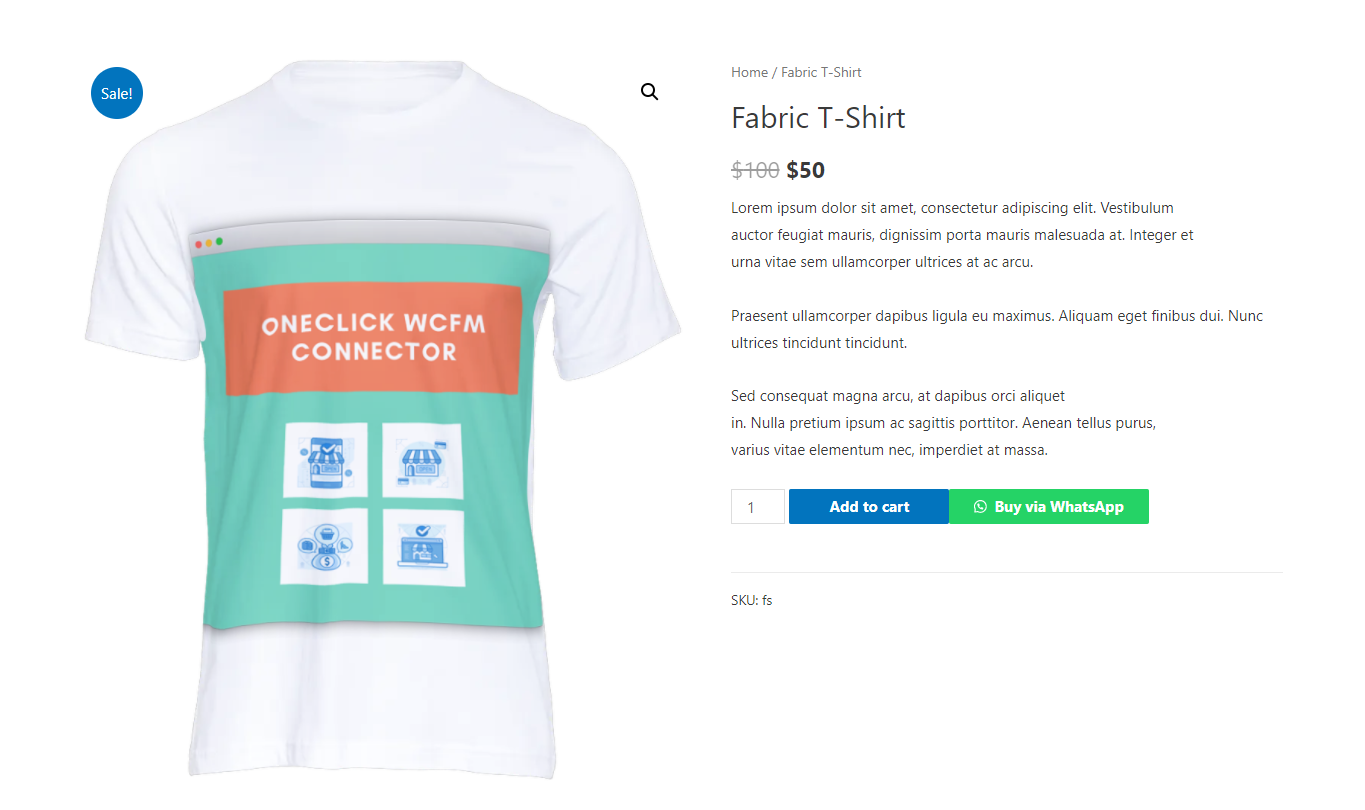
- Flexible Button Positioning – Five selectable WhatsApp button positions on single product pages for optimal placement.
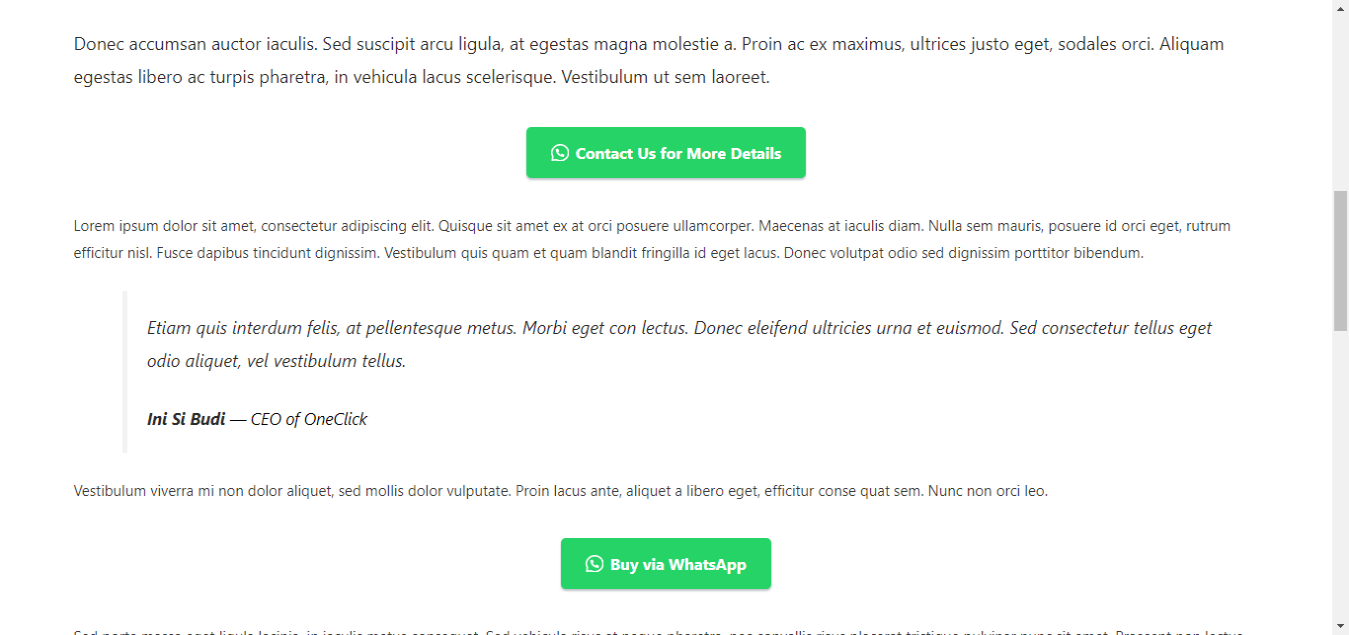
- Single Product Shortcode Generator – Display shortcodes on current product pages or set specific products by ID with automatic product details.
- Advanced Display Control – Hide WhatsApp and floating buttons on specific posts, pages, product categories, and tags.
- Professional Customization – Button color customization, margin/padding controls, and box shadow effects.
Page-Specific Features:
- Single Product Integration – Product-specific button text, custom messages, and individual show/hide options.
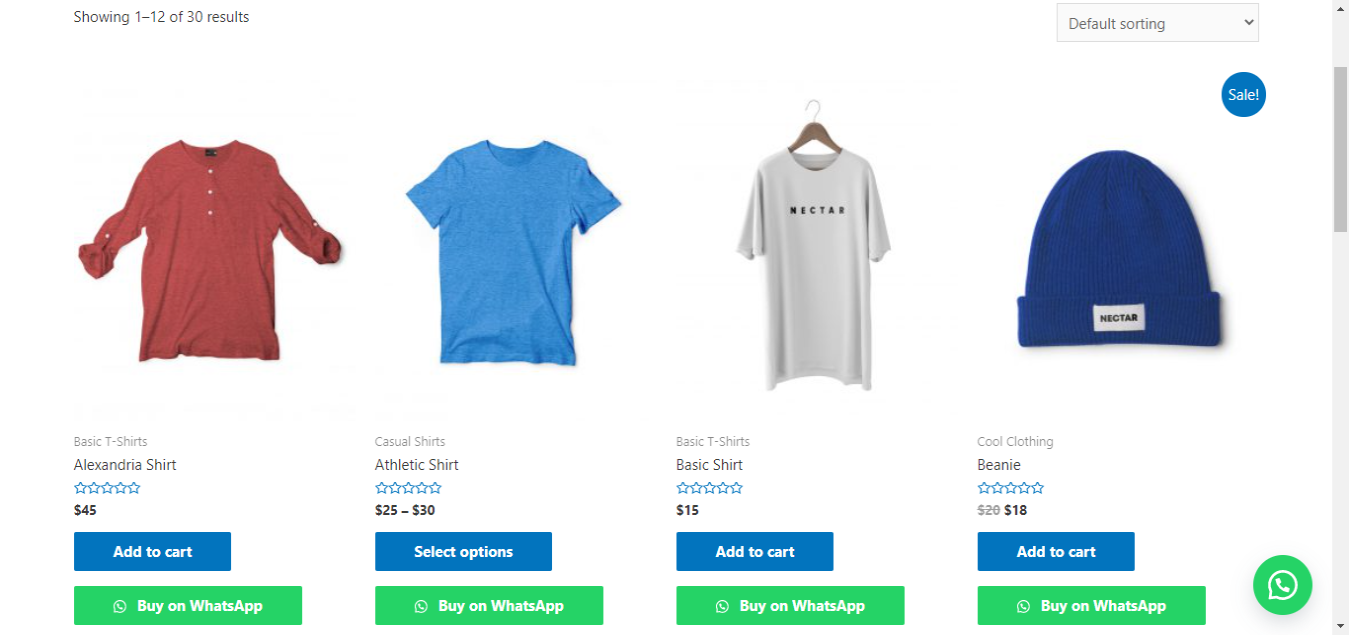
- Shop Page Support – WhatsApp buttons directly on shop page product loops for quick inquiries.
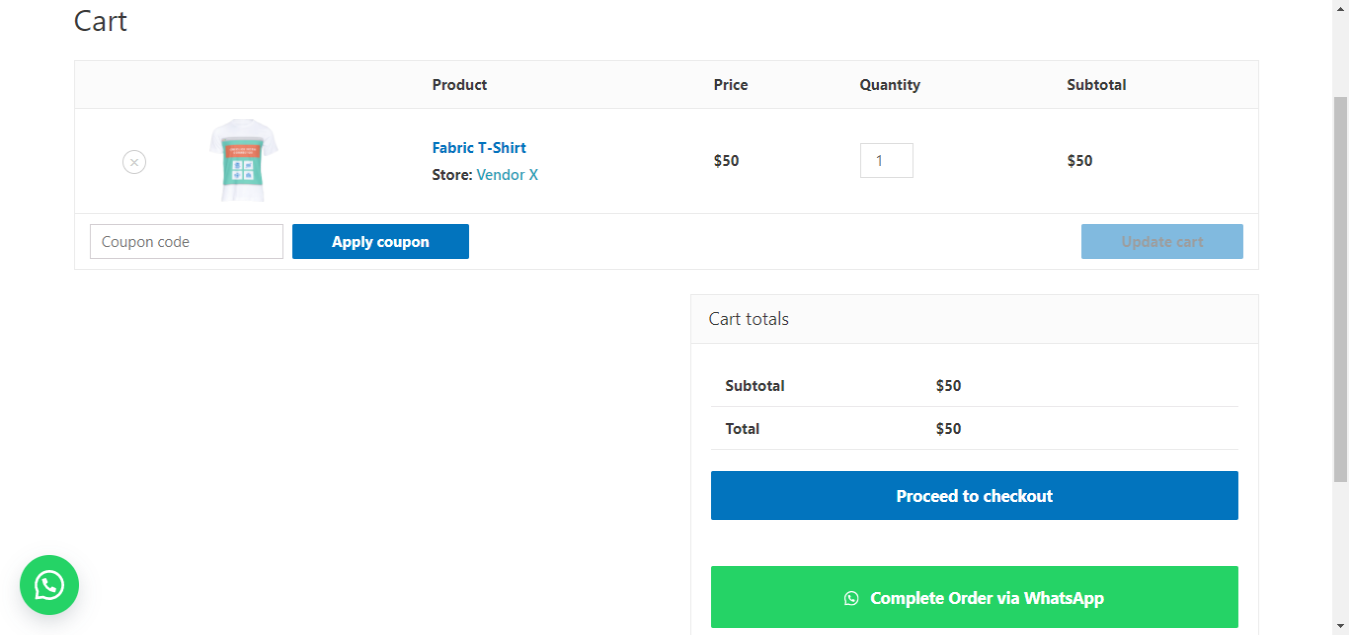
- Cart Page Integration – Complete orders via WhatsApp for faster checkout with full cart details.
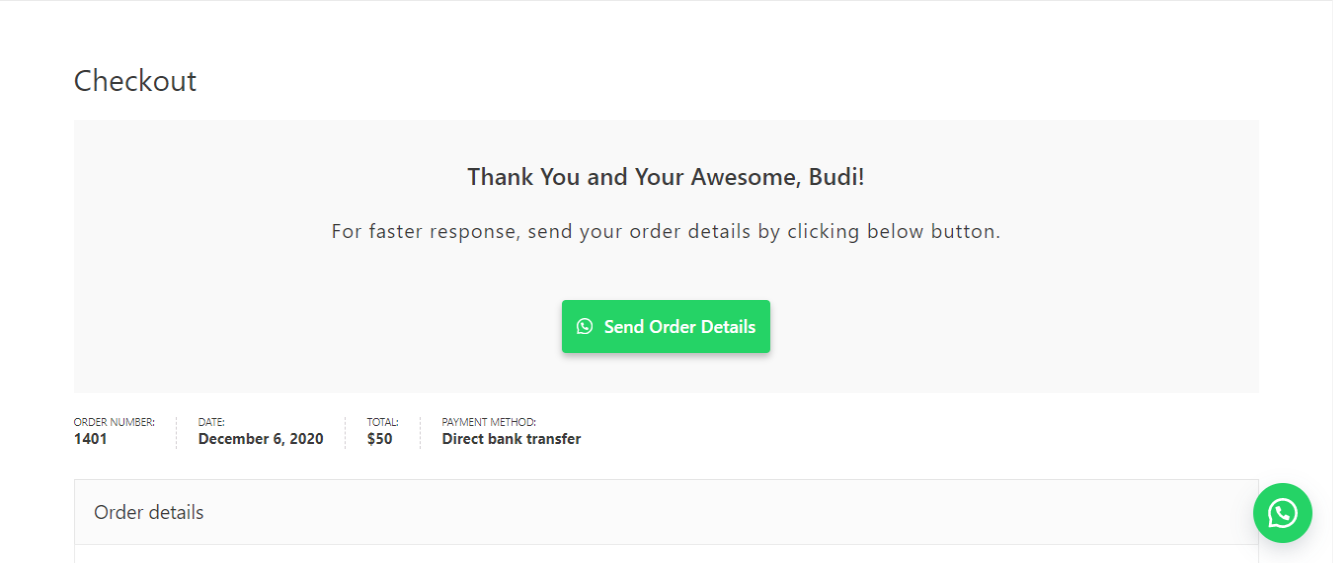
- Thank You Page Override – Custom thank you page with WhatsApp button to send complete order details.
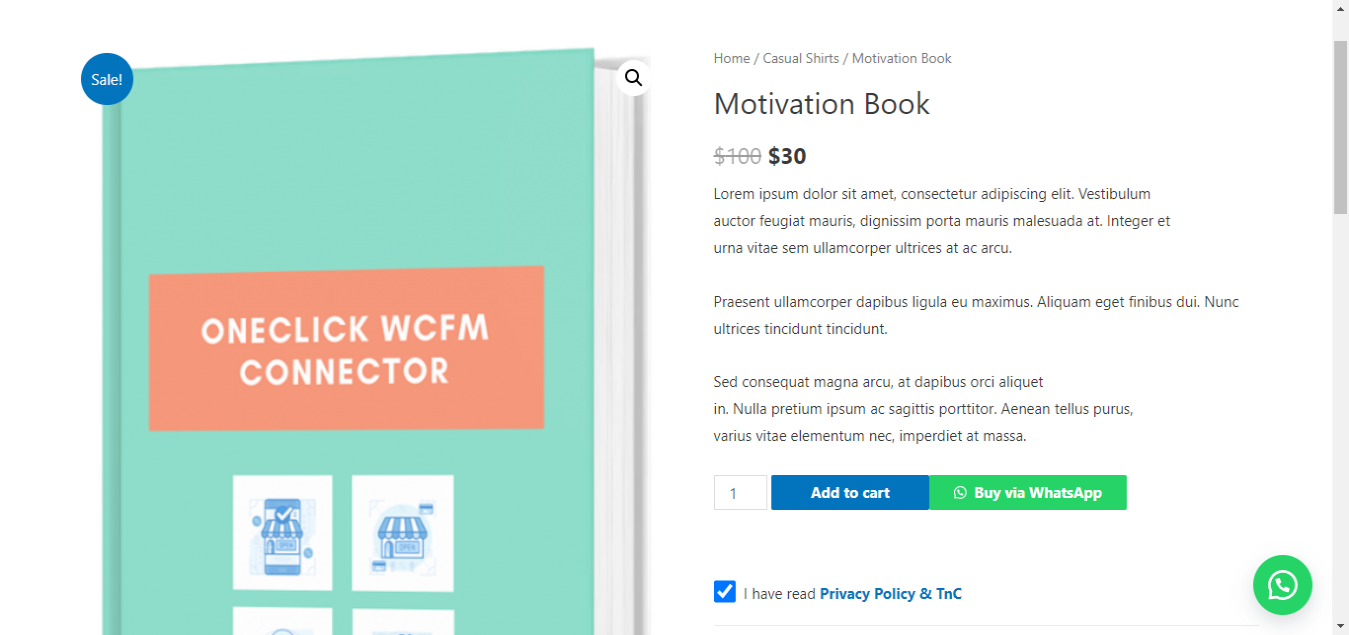
- Floating Button – Customizable floating WhatsApp button with tooltip support and conditional display.
Advanced Functionality:
- Device-Specific Controls – Hide buttons on desktop or mobile independently.
- Message Customization – Change labels for product details in sent messages.
- Admin Integration – Convert customer phone numbers to clickable WhatsApp links in order details.
- Source URL Tracking – Include page URL in floating button messages for better context.
- Product Variations – Include product variations and coupon codes in cart messages.
- Shortcode System – Generate custom shortcodes for any page or post with full customization.
Security & Compliance:
- GDPR-Ready – Built-in GDPR notice with checkbox requirement and privacy policy integration.
- Enhanced Security – Comprehensive input sanitization, output escaping, and XSS protection.
- Performance Optimized – Intelligent caching, efficient database queries, and conditional loading.
- Accessibility Compliant – Proper contrast, keyboard navigation, and screen reader support.
More features are coming soon!
For more info, please refer to this page for Indonesian users or on this page and Online Store Kit for international users.
Documentations
Further Questions and Feature Requests?
Premium-quality support without having to spend a dime. Just send your inquiry or feature request on Walter Pinem Projects or Online Store Kit Support and I’ll gladly help you out.
Installation
- Make sure your site has WooCommerce installed and activated.
- Install and activate this plugin via dashboard or file manager.
- Begin configurating this plugin through OneClick Chat to Order admin menu.
- Complete the configuration and you’re all set!
FAQ
Is OneClick Chat to Order free to use?
Yes! OneClick Chat to Order is completely free to use for unlimited sites. All features are included at no cost.
How do I install and configure OneClick Chat to Order?
- Prerequisites: Ensure WooCommerce is installed and activated on your WordPress site
- Installation: Install the plugin via WordPress Admin > Plugins > Add New > Upload Plugin
- Initial Setup: Navigate to Chat to Order > Numbers and add your first WhatsApp number
- Configuration: Configure settings in Chat to Order > Basic tab
- Testing: Test the WhatsApp button on a product page
Can I use multiple WhatsApp numbers?
Absolutely! You can create unlimited WhatsApp numbers and assign them to:
– Different product pages
– Various store sections (shop, cart, checkout)
– Specific product categories or tags
– Different departments (sales, support, orders)
Learn more about Multiple Numbers or watch the tutorial.
What’s new in the Force wa.me URL option?
The Force wa.me URL option ensures consistent WhatsApp link behavior across all devices by:
– Overriding mobile/desktop base URL settings
– Using https://wa.me/ format for all links
– Providing uniform user experience
– Simplifying troubleshooting and support
How does the JavaScript onClick Event option work?
This feature provides better compatibility with modern themes by:
– Offering an alternative to standard HTML links
– Preventing conflicts with Ajax Add to Cart functionality
– Improving reliability with JavaScript-heavy themes
– Maintaining proper event handling
Is the plugin GDPR compliant?
Yes! OneClick Chat to Order includes comprehensive GDPR features:
– Built-in GDPR notice with checkbox requirement
– Privacy policy integration
– User consent management
– Data processing transparency
– Compliance with privacy regulations
Can I customize where WhatsApp buttons appear?
Absolutely! You have complete control over button placement:
– Single Product Pages: 5 different position options
– Shop Pages: Product loop integration
– Cart Page: Checkout alternative
– Thank You Page: Order completion support
– Floating Button: Persistent site-wide button
– Custom Placement: Shortcode generator for any location
Does it work on mobile devices?
Yes! The plugin is fully optimized for mobile devices with:
– Responsive design for all screen sizes
– Touch-friendly button sizing
– Mobile-specific URL handling
– Device-specific show/hide options
– Optimized WhatsApp app integration
Is it compatible with my theme?
OneClick Chat to Order v1.0.8 features enhanced theme compatibility:
– Natural styling that adapts to any theme
– Automatic color and spacing adaptation
– Minimal CSS conflicts
– Comprehensive theme override support
– Works with popular page builders
Can I translate the plugin to my language?
Yes! The plugin supports full internationalization:
– WPML integration for multilingual stores
– All strings are translation-ready
– Admin interface translation support
– Custom message translation
– RTL language support
How do I troubleshoot common issues?
For troubleshooting help:
1. Check the comprehensive user documentation included with the plugin
2. Verify WhatsApp number format includes country code without + sign (1234567890)
3. Test with different button positions and link types
4. Enable “Force wa.me” option for consistency
5. Check browser console for JavaScript errors
Where can I get support?
For additional support:
– Review the detailed user documentation
– Visit the Online Store Kit Support
– Check the plugin’s support forums
– Watch tutorial videos for visual guidance
The WhatsApp button doesn’t show on products without a price. Why?
WooCommerce hides the Add to Cart form on products without a price, and the default button positions sit inside that form. Since 1.2.0 the button is shown below the product summary on these products. Turn it off with “Show on Products Without a Price?” on the Basic tab. Out-of-stock products have their own option, “Show on Out-of-Stock Products?”.
Phones open WhatsApp Web, or iPhone users have to search for a contact. How do I fix it?
- Save numbers with the country code and digits only, for example 6281234567890. Since 1.2.0, spaces, dashes and “+” are removed automatically.
- Turn on “Force wa.me” on the Basic tab. Without it, the plugin picks the WhatsApp address per device when the page is generated, and a page cache can then serve a desktop link to phones. New installs use wa.me by default since 1.2.0.
- Clear your page cache after changing these settings.
Customers can only add one of each product to the cart. Why?
Before 1.2.0, “Hide Product Quantity Option?” on the Display tab marked every product as sold individually, which locked cart quantities to 1. Since 1.2.0 it only hides the quantity field on single product pages.
Can I send a quote request without prices?
Yes. Product and shop messages have an “Exclude Price?” option. Since 1.2.0 the Cart tab also has “Exclude Prices and Totals?”, which sends products and quantities only.
Can I move the single product button to another hook or priority?
Yes, since 1.2.0 with two filters: wa_order_single_button_hook and wa_order_single_button_priority. The per-product hide option and the category and tag exclusions keep working wherever the button goes.
Is it compatible with WooCommerce HPOS?
Yes! OneClick Chat to Order fully supports WooCommerce High Performance Order Storage (HPOS) and the Cart and Checkout blocks. It requires:
– WordPress 6.0+
– WooCommerce 8.2+
– PHP 7.4+
– Modern hosting environments
Screenshots

Changelog
1.2.0 – November 02, 2026
A maintenance release that fixes the reports collected on the support forum and by email, and catches up with WordPress 7.1 and WooCommerce 11.2. Option names, filters, CSS classes and button markup are unchanged, so existing customizations and add-ons keep working.
Fixes
- Updating no longer switches buttons back on. 1.1.2 re-ran the 1.1.1 checkbox repair on every site, which could turn on the floating, shop, cart, checkout or GDPR features. The repair is gone: a one-time notice asks 1.1.1 and 1.1.2 users to check their tabs, and tells sites updating from 1.1.0 or older which features are switched off but still have their text filled in.
- “Hide Product Quantity Option?” no longer locks cart quantities to 1 (it marked every product as sold individually). With the option off, WooCommerce’s own “Sold individually” setting is respected again in the cart, AJAX add to cart and the Cart block.
- The button now shows on products without a price (on by default) and, optionally, on out-of-stock products.
- Phone numbers are saved and sent as digits only, so numbers entered with “+”, spaces or dashes work.
- The “Inline onClick Event” link type opened WhatsApp without the message unless “Force wa.me” was on.
- The
[oneclick]shortcode sent HTML tags and codes like&in messages, crashed on pages without a product, and changed the product shown on the rest of the page. - The Block Cart message now updates when quantities, coupons or shipping change, and the button stays visible when the cart re-renders (including on mobile).
- Cart and thank you messages use the discount WooCommerce actually applied for each coupon, follow the store’s tax display setting, and no longer contain HTML.
- Thank you message: the shipping address is included on stores using HPOS, the subtotal has its own label, the total uses your “Total” label, dates are translated, and the page keeps WooCommerce’s text when no number is set instead of showing a broken button.
- The thank you page script no longer needs jQuery and only runs on the order received page.
- Thank you page: when WooCommerce doesn’t show the order to the visitor (a logged-out customer, or a guest who still has to confirm their email), the button no longer carries the customer’s name, address, email or phone. Failed, cancelled and refunded orders keep WooCommerce’s own text, which also fixes a critical error on the Order Confirmation block for refunded orders.
- Settings are read when each button renders instead of being cached while plugins load, so Polylang and WPML always see the current language.
- The per-product “Custom Message” field now applies to the single product button, not only to the shortcode.
- Prices in messages follow the store’s “Display prices” tax setting, and variable products send their price range.
- “Force show Add to Cart” works when the WhatsApp button is on; “Hide Add to Cart” also hides it on variable products and no longer hides the GDPR WhatsApp button.
- “Hide Price in Product Page” only hides the price of the product being viewed, not related products.
- The shop button appears on block-based shop and category pages (Product Collection block), uses the product’s own number when one is assigned, and category or tag exclusions apply right away without slow site-wide queries.
- The floating button has an accessible name (fixes WAVE “empty link”), builds the source URL correctly on sites in a subfolder, and uses the same mobile breakpoint as other buttons.
- Shortcode tab “Open in New Tab?” now saves, and
[waorder target="yes"]outputs a valid link target. [wa-order]and[waorder]messages keep their line breaks (link escaping removed them).- Buttons with no number set no longer open WhatsApp’s share screen. Cart, shop, checkout and shortcode buttons fall back to the Basic tab number. The floating button still needs its own number.
- Phone numbers changed in the settings take effect immediately (the one-hour cache was removed).
- GDPR consent boxes work independently when several are on one page, and the link around a disabled button can no longer skip consent.
- The admin order screen’s WhatsApp link works on both the HPOS and legacy order screens.
- The admin notice about WhatsApp numbers only appears on the plugin’s screens.
Improvements
- New Cart options: “Exclude Prices and Totals?” for quote requests and “Include Extra Item Details?” for add-on, booking and custom field data.
- New Display option: “Hide WhatsApp Icon?”.
- New filters:
wa_order_single_button_hook,wa_order_single_button_priority,wa_order_filter_show_on_unpurchasable,wa_order_filter_whatsapp_url,wa_order_filter_cart_exclude_price,wa_order_filter_cart_include_item_data,wa_order_filter_floating_phone_number,wa_order_filter_floating_message,wa_order_filter_floating_button_url. - New installs use wa.me links by default. Sites with a page cache see a suggestion to turn on “Force wa.me”.
- Number dropdowns have an empty choice, so saving a tab no longer stores the first number by accident.
- Declared compatibility with the WooCommerce Cart and Checkout blocks.
- Tested with WordPress 7.1 and WooCommerce 11.2.
Under the Hood
- Text domain changed to
oneclick-whatsapp-orderso translations from translate.wordpress.org load. The bundled Indonesian translation was moved to the new name. - Renamed the global
sanitize_checkbox()function towa_order_sanitize_checkbox()to prevent fatal errors with themes or plugins using the same name. - Removed the
[donate]shortcode from the front end, directwp-load.phpincludes, core function fallbacks in the GDPR tab, and an unused deactivation routine that would have deleted all settings. - Links to the author’s site no longer include PHP version, WordPress version or locale.
- The WhatsApp Numbers post type is no longer public.
- Uninstall cleans up every site on a multisite network (when that site chose to delete data).
- Fixed unclosed admin markup, a duplicated tab include, and Select2 being applied to every dropdown on the settings screens.
1.1.2 – May 27, 2026
Bug Fixes
- Fixed “Open in New Tab?” checkbox not saving on the Basic, Shop, Checkout, and Floating tabs. The four affected options (
wa_order_option_target,wa_order_option_shop_loop_open_new_tab,wa_order_option_custom_thank_you_open_new_tab,wa_order_floating_target) were incorrectly registered withsanitize_checkbox, which only accepts'yes'and silently discards'_blank'. Changed all four tosanitize_text_fieldto match the Cart tab, which was already working correctly.
1.1.1 – March 27, 2026
New Features
- Automated Checkbox Migration Routine – Background database migration (
wa_order_run_migrations) runs automatically on update, inspecting database state and repairing corrupted settings options back to their intended'yes'/'no'values. - Migration Admin Notice – One-time dismissible notice for administrators confirming when the database repair is complete, with a link to review settings.
- WooCommerce Block Cart Support – Full support for the Gutenberg-based Block Cart via dual-mode hook approach. Uses
MutationObserverJavaScript injection to wait for React hydration before inserting the WhatsApp checkout button. - Block Cart “Hide Checkout” Support – Scoped dynamic CSS injected via
wp_headto hide the Block Cart’s native checkout button, sinceremove_action('woocommerce_proceed_to_checkout')is ignored by Block Cart.
Bug Fixes
- Fixed a major glitch causing all checkbox-based plugin settings (e.g. enabling/disabling cart buttons, altering visibility, GDPR toggles) to fail to save across the entire plugin.
- Restored missing
sanitize_checkboxcallbacks across 35+register_settingrules, correctly translating checkbox states to binary'yes'/'no'options. - Fixed the WhatsApp Cart Button not rendering on sites using modern block themes (e.g. Twenty Twenty-Five) due to WooCommerce transitioning from legacy shortcodes to React-based Block Cart.
- Fixed the “Hide Proceed to Checkout button?” option being silently ignored on Block Cart structures.
1.1.0 – December 11, 2025
Security Advisory: This update addresses a Missing Authorization vulnerability (CVE-2025-14270) that allowed authenticated users with Editor role or higher to modify plugin settings without proper authorization.
Credits: Thank you to the Wordfence security team for responsible disclosure.
Security Update
- Authorization Fix – Added proper capability checks to restrict WhatsApp number management to administrators only
- Custom Post Type Restriction – WhatsApp Numbers CPT now requires
manage_optionscapability for all operations - Nonce Verification – Enhanced CSRF protection for all save operations
Technical Details
- Minimal Implementation – Security fix with no impact on existing functionality
- Backward Compatible – All existing features work exactly as before
- WordPress Standards – Uses WordPress core capability system
Important Notes
- Security Update – Addresses unauthorized settings modification issue
- No Breaking Changes – Only administrators could previously access these settings in the UI
- Immediate Update Recommended – Update to ensure proper authorization controls
1.0.9 – November 07, 2025
Security Advisory: This update addresses a potential IDOR (Insecure Direct Object Reference) vulnerability that could allow unauthorized access to order details.
Credits: Thank you very much to Md Shofiur R. from Pentest Testing Corp for responsible disclosure.
Security Update
- Order Access Validation – Added validation to prevent unauthorized access to order details on thank you pages
- IDOR Vulnerability Fix – Implemented proper authorization checks to ensure users can only view their own orders or orders they have permission to access
Security Improvements
- User Permission Checks – Verify user ownership before displaying order information
- Admin Access Control – Maintain proper admin access to all orders for management purposes
- Guest Order Protection – Validate order keys for guest purchases following WooCommerce standards
Technical Details
- Minimal Implementation – Added single security function with no performance impact
- Backward Compatible – No changes to existing functionality or user experience
- WordPress Standards – Uses only WordPress and WooCommerce core functions
Important Notes
- Security Update – Addresses potential unauthorized order access issue
- No Breaking Changes – All existing features work exactly as before
- Immediate Update Recommended – Update to ensure order privacy protection
1.0.8 – August 06, 2025
Major New Features
- Force wa.me URL Option – Override mobile/desktop base URL settings to use wa.me for all WhatsApp links, ensuring consistent behavior across all devices
- JavaScript onClick Events – Choose between standard link tags or inline onClick events for better Ajax compatibility and modern theme support
- Comprehensive Uninstall System – Complete data cleanup with user control over what gets deleted during plugin removal
- WPML Integration – Full multilingual support with comprehensive translation configuration for international stores
- Enhanced CSS Styling – Completely refactored CSS with natural styling that seamlessly adapts to any theme
- Conditional CSS Classes – Smart CSS class application (single_add_to_cart_button) only when positioned after Add to Cart button
Technical Enhancements
- Performance Optimization – Intelligent caching system, efficient database queries, and conditional script loading
- Security Hardening – Comprehensive input sanitization, output escaping, and XSS protection throughout the codebase
- JavaScript Improvements – Enhanced event handling to prevent WooCommerce conflicts with onClick buttons
- Accessibility Features – Support for high contrast mode, reduced motion preferences, and better keyboard navigation
- Mobile Optimization – Improved touch targets, spacing, and responsive design across all button types
Critical Bug Fixes
- onClick Button Redirects – Fixed onClick buttons redirecting to /undefined by preventing WooCommerce event conflicts
- Floating Button Icons – Resolved icon positioning issues with proper CSS structure and SVG implementation
- JavaScript Console Errors – Fixed errors with defensive programming and conditional loading
- Button Styling Consistency – Corrected styling inconsistencies across different themes and positions
- File Loading Issues – Added proper file existence checks before enqueueing JavaScript files
Security Improvements
- XSS Vulnerability Fixes – Fixed multiple Cross-Site Scripting vulnerabilities with proper sanitization
- Enhanced HTML Filtering – Comprehensive wp_kses configuration for safe HTML output
- Nonce Verification – Enhanced CSRF protection across all admin forms and metaboxes
- Input Validation – Improved validation and sanitization for all user inputs including POST data
- Capability Checks – Added proper permission checks for admin functions and post meta operations
Compatibility Updates
- WordPress 6.8.2 – Full compatibility with latest WordPress version
- WooCommerce 10.0.4 – Updated compatibility with latest WooCommerce version
- HPOS Support – Enhanced High Performance Order Storage compatibility declarations
- Theme Compatibility – Natural styling that adapts to any theme without conflicts
- Variable Products – Added support for complex product configurations and variations
Performance Enhancements
- CSS Optimization – Better organization, reduced redundancy, and improved loading speed
- Database Efficiency – Optimized queries with proper caching and transient management
- Asset Loading – Conditional enqueueing based on page context to reduce unnecessary loading
- Memory Usage – Improved memory efficiency and reduced resource consumption
Internationalization
- Translation Ready – All strings properly prepared for translation
- WPML Configuration – Complete translation configuration for multilingual stores
- Admin Interface – Proper translation support for all admin notices and error messages
- User Experience – Consistent multilingual experience across all plugin features
1.0.7 – September 30, 2024
- [New] Added a Single Product Page shortcode that pulls in product details and can be placed anywhere.
- [New] Introduced options for controlling the WhatsApp base URL for both mobile and desktop devices.
- [Improvement] Enhanced text configurability for better label customization in WhatsApp messages.
- [Improvement] Added an option to include both regular and sale prices in messages sent from single product pages.
- [Improvement] Introduced two new button positions on single product pages: “After Single Product Summary” and “Around Product Share Area”.
- [Improvement] Added an option to make the WhatsApp button full width on single product pages.
- [Improvement] Introduced an option to include tax information in messages sent from the Cart page.
- [Improvement] Enhanced WhatsApp messages sent from the Cart page to include coupons, price calculations, tax, shipping details, and more.
- [Improvement] Added an option to display the “Total Products” label in WhatsApp messages sent from the Thank You page.
- [Improvement] Introduced options to include or exclude coupon/discount information in WhatsApp messages sent from the Thank You page.
- [Improvement] Added options to include or exclude the Order Summary Link in WhatsApp messages sent from the Thank You page.
- [Improvement] Added an option to include or exclude the Payment Link in WhatsApp messages sent from the Thank You page.
- [Improvement] Added an option to include or exclude the “View Order” link in WhatsApp messages sent from the Thank You page.
- [Improvement] Introduced an option to include or exclude the Order Number in WhatsApp messages sent from the Thank You page.
- [Improvement] Added an option to include or exclude tax information in WhatsApp messages sent from the Thank You page.
- [Improvement] Fixed an issue where key details were missing from messages sent from the Thank You page.
- [Improvement] Refactored the message structure for the Thank You page to conditionally display shipping address details if they differ from the billing address.
- [Improvement] Fixed an issue where the WhatsApp button did not display on the Cart page.
- [Improvement] Added transients for improved database performance.
- [Improvement] Optimized, sanitized, and made all strings translation-ready.
- [Improvement] Refactored the codebase for single product pages for better performance.
- [Improvement] Refactored the codebase for the shop loop and product archive pages.
- [Improvement] Added padding and margin options for the floating button.
- [Improvement] Added padding and margin options for the floating button icon.
- [Improvement] Enhanced the rendering of the Floating Button.
- [Improvement] Fixed an issue where the WhatsApp button wasn’t visible when the “Hide Add to Cart” option was enabled.
- [Improvement] Introduced the ability to customize output via
apply_filters()for various configurable variables. - [Improvement] Added filters to make key elements configurable across various sections, such as product names, prices, and URLs for WhatsApp messages.
- [Improvement] Refactored and optimized the floating button CSS, making margin and padding values dynamically configurable via settings.
- [Improvement] Added validation checks and improved security for input handling across shortcode attributes, ensuring safer usage and improved performance.
1.0.6 – December 15, 2023
- Fixed Stored Cross-Site Scripting for the ‘waorder’ shortcode
- Fixed the WhatsApp button not showing on Thank You / Order Received page.
- Fixed the WhatsApp button not showing on a single product page where the Hide Add to Cart button? is checked.
- Optimized the way the saved options fetched from database.
- Code cleaned up
1.0.5 – November 16, 2023
- Fixed Stored Cross-Site Scripting (XSS) vulnerability
- Fixed various unescaped input fields for better security
- Fixed the output of messages on Cart and Checkout pages
- Fixed the output of stylings on the front-end from Display Options settings page
- Compatibility with the latest WordPress version and the WooCommerce High-Performance Order Storage (HPOS)
- Simplified major code logics for better security, best practice, and performance
- Removed the option to select WhatsApp base subdomain URL (previously there are options to select either api* or web*)
- Updated wp-color-picker-alpha to the latest version
- Code cleaned up
1.0.4.2 – December 27, 2022
- Fixed Stored Cross-Site Scripting vulnerability in an unescaped data
- Code cleaned up
1.0.4.1 – December 07, 2020
- Fixed a minor issue on Floating settings tab
- Code cleaned up
1.0.4 – December 06, 2020
- New: Three new selectable WhatsApp button positions on single product page to fix issue for users using theme with ajax feature.
- New: Hide WhatsApp and floating buttons on all posts and pages, specific posts, pages, product categories and tags.
- New: Button color & box shadpw customization options for WhatsApp and floating buttons.
- New: Button margin & padding customization options for WhatsApp button on single product page.
- New: Hide Add to Cart button only on a specific product via product editor page.
- New: The force show the Add to Cart button option on product editor page to keep displaying Add to Cart button regardless the configuration you set on the global settings page.
- [Improvement] New selectable WhatsApp base URL to improve clickable link on mobile devices.
- [Improvement] Replaced the mobile detection to fix the issue on iOS devices.
- [Improvement] Translations updated for Bahasa Indonesia.
- WooCommerce Latest Version Compatibility v4.7.1.
- Code cleaned up.
1.0.3 – November 06, 2020
- Fixed message sent from Thank You page didn’t include customer details
- Fixed the structure of message sent from Cart page
- WooCommerce Latest Version Compatibility v4.6.2
- Code cleaned up.
1.0.2 – November 04, 2020
- Fixed floating button with no number issue.
- Fixed and cleaned code on every file for displaying button.
- Code cleaned up.
1.0.1 – November 02, 2020
- New: Shipping name and its cost in the message sent from Order Received & Cart page. If exists, it will show shipping address and details instead of customer’s billing info.
- New: Option to set Customer Details Label in the message sent from Order Received page.
- New: Option to include product SKU in the message sent from Order Received page.
- New: Automatically include all selected product attributes / variations in the message sent from Order Received page.
- New: Option to hide floating button only on desktop.
- [Improvement] Include all selected product attributes / variations in the message sent from Cart page instead of just one.
- [Improvement] Price amount format for discounts.
- [Improvement] Added discount deduction formula.
- [Improvement] Added subtotal & total price before and after discount.
- [Improvement] Added a shortcode generator to generate a dynamic shortcode instead of just using one shortcode for all.
- [Improvement] Fixed possible SEO issues for number custom post type. Set publicly_queryable to false to prevent possible SEO issues everytime a WhatsApp number is set and published, and removed the number redirection.
- Fixed undefined post ID notice on the front end when no WhatsApp number is published.
- Fixed and added default custom button and floating button tooltip texts when they are still empty.
- Code cleaned up.
1.0.0 – October 20, 2020
- New: Multiple Numbers feature. Now every user can add more than one WhatsApp numbers and assign them to specific page.
- New: Option to assign a WhatsApp number from a list of created numbers only for a single product.
- New: An option to hide or show the Order Date from WA message sent from Thank You page.
- New: An option to include Order Number from WA message sent from Thank You page.
- Fixed WhatsApp base URL to make it compatible on both mobile and desktop
- Fixed pricing format and currency issues
- Fixed order date time format
- Fixed other minor issues
- Code cleaned up
0.1.9.1 – May 11, 2020
- Fixed a minor issue
- Code cleaned up
0.1.9 – May 11, 2020
- New: Option to exclude price in the message sent from Shop loop page
- New: Option to open shortcode button link in new tab
- Fixed discount amount sent from checkout page
0.1.8 – May 10, 2020
- Fixed missing file issue
0.1.7 – May 10, 2020
- New: Options to set button text and custom message for individual product, including option to individually hide / show WhatsApp button on single product page
- New: Options to individually hide button on shop loop, cart, and thank you page on mobile and desktop
- New: Option to include source page URL in the message when the floating button is clicked
- New: Option to include product variation on Cart page (only one variation from each product)
- New: Option to include coupon code in the Checkout put (that will include coupon code details in the message)
- WooCommerce Latest Version Compatibility v4.1.0
- Various bug fixes
- Code cleaned up
0.1.6 – May 06, 2020
- Fixed incorrect number of the total amount (thanks @atempel for pointing this out)
- Code cleaned up
0.1.5 – May 02, 2020
- New: Full options to individually hide or show WhatsApp button on every page
- New: Individual options to exclude some labels in the message and managing button click target
- Misc: Replaced icon depedency to make it faster in terms of loading speed
- Fixed major issues such as incorrect number format and some non-functional plugin options
- Fixed CSS issues
- Code cleaned up
0.1.4 – April 15, 2020
- Fixed issues on some themes
- Fixed CSS issues
- Code cleaned up
0.1.3 – April 12, 2020
- New: Option to Override Thank You Page Title and add a WhatsApp button to send complete order details
- New: Option to show WhatsApp button on Cart page
- New: Option to show WhatsApp button on Shop page product loop
- New: Options to change labels for product details in sent message
- New: Converted customer’s number into clickable WhatsApp link on Order Details page (admin Dashboard)
- New: Options to hide button both on Desktop and Mobile respectively
- Fixed button icon not showing
- Fixed other CSS issues
- Code cleaned up
0.1.2 – November 23, 2019
- Complying to Copyright and Trademark Guidelines
- Rebranded “OneClick WA Order” to “OneClick Chat to Order”
- Code cleaned up
0.1.1 – November 22, 2019
- Complying to Copyright and Trademark Guidelines
- Rebranded “OneClick WhatsApp Order” to “OneClick WA Order”
- Code cleaned up
0.1.0 – February 17, 2019
- [NEW] Option to exclude price in WA message output
- [NEW] Option to hide product quantity in a single product page (if sold individually)
- [Improvement] More translation-ready
- Code cleaned up
0.0.5 – February 12, 2019
- [Fix] CSS issue on WA button
- [Improvement] Compatibility with various themes
- Code cleaned up
0.0.4 – February 10, 2019
- [Fix] WA button is redirected to the same page when displaying GDPR checkbox
- [Improvement] Changed icons library into Font Awesome
- [Improvement] Tooltip on floating button is much more smooth than before
- [Improvement] Strings corrected and translations added
- Code cleaned up
0.0.3 – February 9, 2019
- [Improvement] Move WA button position: right beside the Add to Cart button, sit side-by-side
- [Improvement] Repositioned floating button icon
- Code cleaned up
0.0.2 – February 6, 2019
- [Improvement] Plugin setting page
- Code cleaned up
0.0.1 – February 3, 2019
- Initial Release