


Description
OpenPorte is a free and open-source WordPress plugin that protects forms, comments, logins, registrations, and WooCommerce from spam and bots using lightweight Proof-of-Work challenges instead of CAPTCHAs.
The goal is simple: make spam attempts computationally costly for bots while keeping the experience unobtrusive for legitimate visitors and respecting their privacy.
Key benefits
- CAPTCHA-free spam protection: No image-recognition puzzles or intrusive challenges.
- Open source (GPL): Free software, developed openly and welcoming community contributions.
- Self-hosted by default: Challenges are generated and verified directly by your WordPress site, without requiring an account or external service.
- Privacy-first: No tracking, fingerprinting, or cookies introduced by OpenPorte, helping simplify GDPR compliance.
- Accessible by design: Built around the open-source ALTCHA widget, with an emphasis on accessibility and minimal user interaction.
- Easy configuration: Enable the integrations you need and configure the widget to suit your site.
- Flexible deployment: Choose between WordPress REST API and Ajax for self-hosted challenge delivery, or use a compatible external challenge provider through Custom API Mode.
- ALTCHA v1 migration: Supported settings from ALTCHA Spam Protection v1 (≤ 1.26.3) can be imported automatically, with deprecated compatibility aliases for existing integrations.
OpenPorte is built around the open-source ALTCHA widget. It is a community-driven project committed to openness, transparency, privacy, and long-term stewardship.
For the list of contributors, see the GitHub contributors page.
AI-assisted development
OpenPorte is an AI-assisted project. I remain responsible for its architecture, security decisions, and final review. AI tools (Claude, Mistral, local LLMs and others) assist with drafting code, tests, translations, and documentation.
Without these tools, maintaining and developing a project of this scope as a single contributor would be difficult. AI assistance helps me keep the project moving forward, while responsibility for its quality and security remains mine.
Compatibility & Migration
OpenPorte can import supported settings from ALTCHA Spam Protection v1
(≤ 1.26.3) and retains deprecated aliases for several legacy interfaces.
Some features have changed or been removed; review your settings and test
protected forms after migration.
Migrating from the original ALTCHA Spam Protection v1 plugin
Deactivate the original ALTCHA plugin, then install and activate OpenPorte.
On activation, supported v1 settings are copied where corresponding OpenPorte
settings do not already exist. The original ALTCHA settings are left untouched.
Do not run both plugins at the same time.
Migrating from ALTCHA for WordPress v2/v3 plugin
If you previously upgraded or were automatically upgraded to ALTCHA v2/v3,
OpenPorte can still import your original v1 settings if they remain in the
database. Settings introduced in v2/v3 are not imported. The original ALTCHA
v1/v2/v3 settings are left untouched.
Deactivate ALTCHA, then install and activate OpenPorte. Do not run both plugins
at the same time.
Backward compatibility
The following legacy interfaces remain available as deprecated aliases:
- The
[altcha]shortcode continues to work alongside[openporte]. - The
altcha_*filters and actions continue to fire alongside theiropenporte_*equivalents. - The
altcha/v1REST API namespace remains available alongsideopenporte/v1.
These aliases are deprecated and may be removed in a future release. See the Deprecations section for compatibility aliases, deprecated integrations, and recommended replacements.
Custom API compatibility
OpenPorte supports Custom API Mode, allowing challenges to be obtained from an ALTCHA-compatible backend.
This mode has been verified against GateCHA, an open-source server implementing the ALTCHA challenge protocol.
Challenge verification is performed locally by OpenPorte using the configured shared secret, even when challenges are issued by an external backend. Backend-side verification features are therefore not used.
OpenPorte does not support the former ALTCHA SaaS API Mode. Users who rely on ALTCHA Sentinel’s advanced features should consider the official ALTCHA Spam Protection v2/v3 WordPress plugin instead.
Downgrading OpenPorte
Downgrading to an earlier version of OpenPorte is not officially supported.
- Major or minor version downgrade (e.g. 1.30.1 → 1.29.0): You must remove the existing plugin settings before installing the older version. To do so, disable Keep settings when the plugin is deleted under Settings → OpenPorte → Data, save your changes, then deactivate and delete the plugin through WordPress’s Plugins screen and install the older version.
- Patch version downgrade (e.g. 1.30.1 → 1.30.0): This may work without removing your settings, but compatibility is not guaranteed.
Important: Deactivating OpenPorte does not remove its settings. Deleting it through WordPress’s Plugins screen removes them only if Keep settings when the plugin is deleted is disabled. This option is available since version 1.30.0.
Clearing OpenPorte settings leaves the original ALTCHA settings intact. Activating a version with the legacy migration routine can import supported ALTCHA v1 settings again, so this does not necessarily produce a default configuration.
Multisite: The current uninstall handler cleans only the current site’s options table; it does not reset settings across the network. Before a major or minor downgrade, have your network administrator ensure that OpenPorte settings are removed on each affected site.
Before downgrading, back up your site and database. After installing the older version, clear your WordPress, hosting, and CDN caches to prevent cached pages from referencing features unavailable in that release. You may also need to reconfigure OpenPorte.
Need help?
If you’re considering a downgrade or encounter difficulties, you’re welcome to ask for advice in the OpenPorte support forum on WordPress.org.
Support is provided on a voluntary, best-effort basis by the maintainer and community. Questions and contributions from other users are welcome and appreciated. Please understand that responses and resolution times cannot be guaranteed, as availability may vary.
Deprecations
The following compatibility aliases and integrations are deprecated and
scheduled for removal in a future release:
- The
[altcha]shortcode — use[openporte]. - The
altcha/v1REST namespace — useopenporte/v1. - The
altcha_*filters and actions — now firing through WordPress’ deprecated
hook mechanism; use theopenporte_*equivalents. - The
AltchaPluginclass and theALTCHA_VERSION/ALTCHA_WIDGET_VERSION
constants — useOpenPortePluginand theOPENPORTE_*constants. - Integrations targeting paid-only third-party plugins; affected users should
migrate to the official ALTCHA v2/v3 plugin. - The “Custom HTML” integration (auto-configuration of hand-written
tags) — place the[openporte]shortcode instead. You can
re-enable it for now under Settings → OpenPorte → Integrations.
Privacy
No cookies, no tracking
OpenPorte prioritizes user privacy by avoiding the use of cookies and fingerprinting techniques.
No mandatory external service
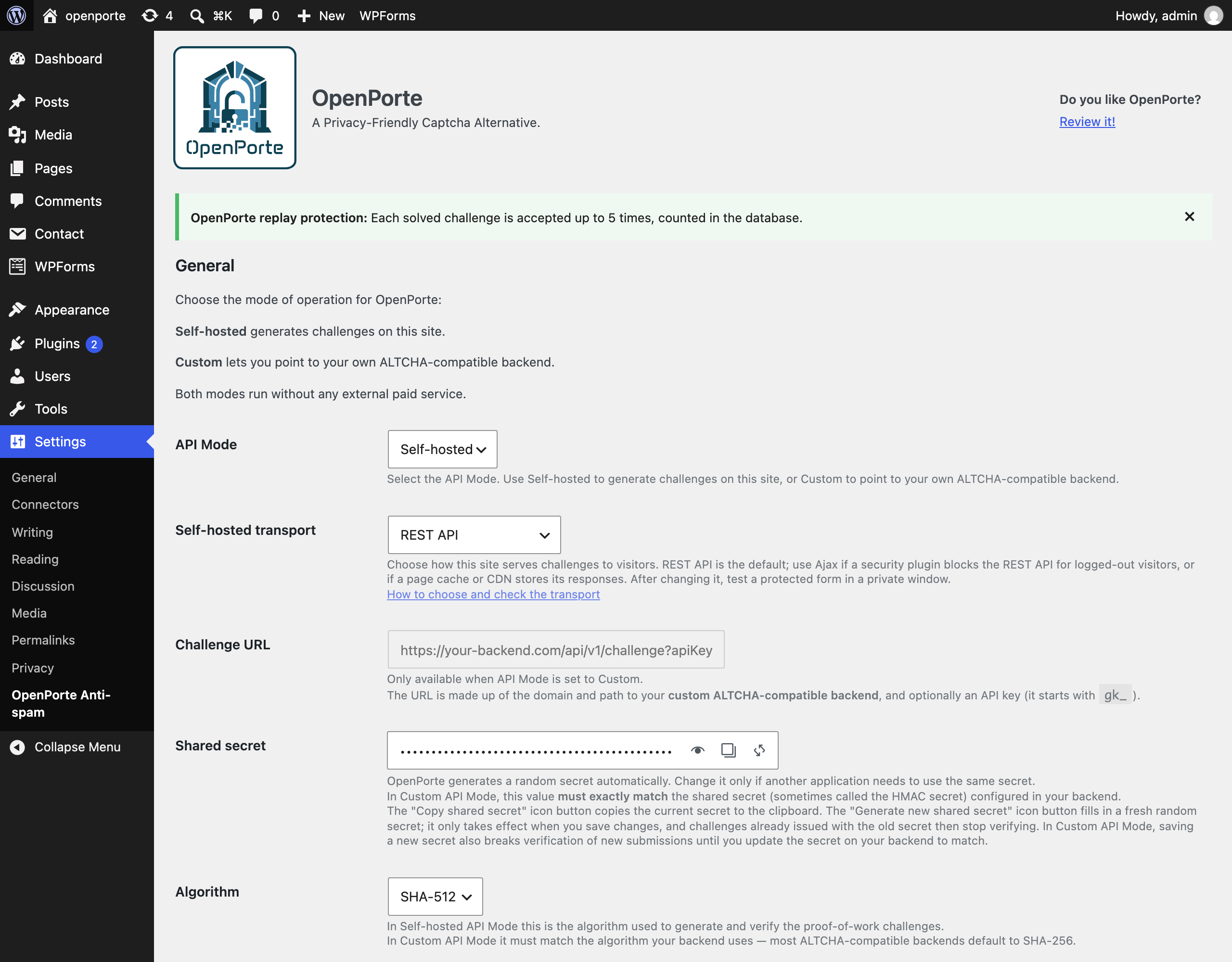
In its default self-hosted mode, OpenPorte generates and verifies Proof-of-Work challenges entirely within your WordPress installation, without requiring an external service or account.
Alternatively, Custom API Mode allows challenges to be obtained from an ALTCHA-compatible backend, including a service hosted separately from your WordPress site. Verification still takes place locally.
Modes of Operation
OpenPorte verifies submissions in one of two modes, selected in the settings
(API Mode):
- Self-hosted (default) — a proof-of-work challenge is issued and verified by
your own WordPress site, served through the REST API (default) or
admin-ajax.php (see Self-hosted transport). Fully self-contained, with no
external service and no additional setup beyond enabling the integrations you
need. - Custom — point the Challenge URL at your own ALTCHA-compatible backend (for
example GateCHA).
Submissions are verified with your site’s shared secret.
The paid altcha.org regional SaaS classifier offered by earlier versions has
been removed. Neither mode requires a paid service; a Custom backend may have
its own costs and terms.
Self-hosted transport
In Self-hosted mode the widget fetches each challenge from your own site. The
Self-hosted transport setting (Settings → OpenPorte, below API Mode) chooses
which endpoint serves it:
- REST API (default):
/wp-json/openporte/v1/challenge, or
/?rest_route=/openporte/v1/challenge with plain permalinks. - Ajax:
/wp-admin/admin-ajax.php?action=openporte_challenge.
Both serve the same challenge, are verified the same way, and stay available
whichever one is selected. The deprecated /wp-json/altcha/v1/challenge alias
is still served too. In Custom API mode all of them refuse with HTTP 403
instead: your backend issues the challenges there.
Keep REST API unless a security plugin blocks the REST API for logged-out
visitors; then either allow /openporte/v1/challenge in that plugin, or switch
to Ajax. If admin-ajax.php is blocked for visitors instead, stay on REST API.
The same applies when a page cache or CDN stores the REST API’s responses
(opening the challenge URL twice, logged out, shows the same challenge): exclude
/openporte/v1/challenge from it, or switch to Ajax. Since 1.30.1 the challenge
endpoints already opt out of LiteSpeed Cache and of caching plugins that honour
DONOTCACHEPAGE.
OpenPorte does not test this automatically: a check from the server cannot see
firewall, CDN or browser-side rules. See the FAQ for how to check by hand.
On multisite, each site has its own transport setting; a site where it was
never saved uses the REST API.
Supported Integrations
- CoBlocks
- Contact Form 7
- Elementor Pro Forms (deprecated — paid plugin, see Deprecations)
- Formidable Forms
- Forminator
- GravityForms
- HTML Forms
- wpDiscuz
- WPForms
- WordPress Login, Register, Password reset
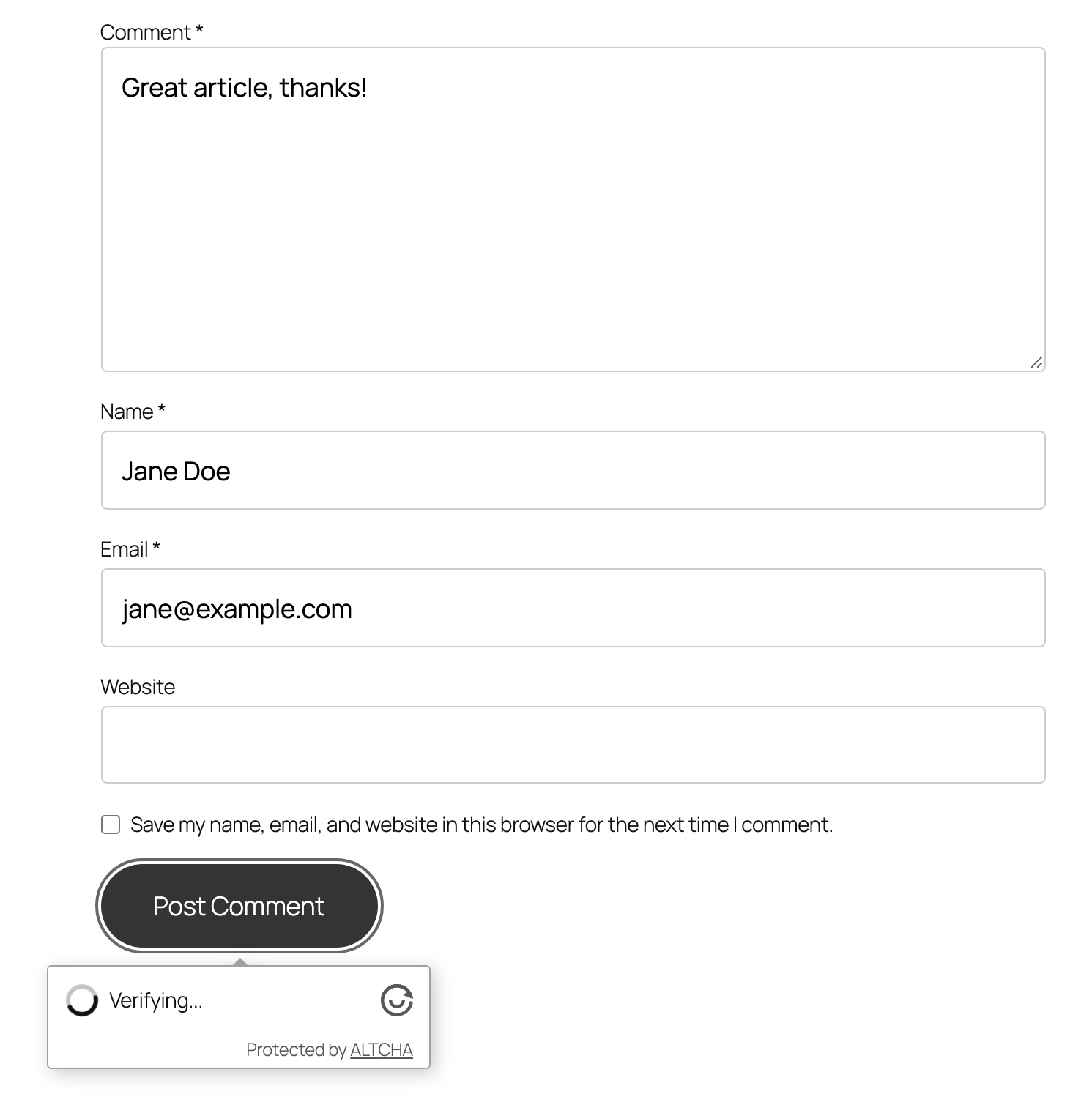
- WordPress Comments
- WooCommerce
- Many other plugins and your own content (via the
[openporte]shortcode, or the deprecated[altcha]alias)
Source Code
All source code for the plugin, and the ALTCHA widget is available on GitHub. In the repository, you’ll also find versions of non-minified JavaScript and CSS assets:
- Plugin: https://github.com/openporte/openporte
- ALTCHA Widget: https://github.com/altcha-org/altcha
Installation
Download, install and activate OpenPorte Spam Protection.
Alternatively, install the plugin manually:
- Download the
.zipfrom the Releases. - Upload
openportefolder to the/wp-content/plugins/directory - Activate the plugin through the ‘Plugins’ menu in WordPress
- Review the settings and enable your integrations
FAQ
Is placing the `[openporte]` shortcode enough to protect a form?
Not on its own. The shortcode displays the widget; the verification that
rejects unsolved submissions is performed by the integration for that form
plugin. For a supported plugin, enable its toggle under Settings → OpenPorte →
Integrations as well. Two integrations go further: with Contact Form 7 and
HTML Forms, a widget you placed in the form yourself (the shortcode or a
hand-written tag) is verified even while the toggle is off.
In a form plugin OpenPorte has no integration for, the shortcode still shows
the widget and visitors still have to tick it, but nothing checks the result on
the server — a bot posting directly to the form’s endpoint is not stopped. See
Supported Integrations for the list.
Shortcodes in my Contact Form 7 or HTML Forms form stopped working. Why?
Since 1.30.3, OpenPorte renders only its own [openporte] and [altcha] tags
inside Contact Form 7 and HTML Forms forms. Until then it ran every shortcode
in the displayed form, including text that visitors typed into its fields or
put in the page’s URL, so any visitor could run any shortcode on your site
(security advisory GHSA-hvr5-q69x-jp62). Other plugins’ shortcodes in these
forms only ever worked because of that; neither form plugin renders them
itself.
The fix is to take those shortcodes out of the form: put the content they
produce directly in the form, or next to it on the page.
There is deliberately no setting or code snippet to bring the old behaviour
back: it would let any visitor run any shortcode again. If a form depended on
another plugin’s shortcode and you can’t see how to replace it, ask in the
OpenPorte support forum on WordPress.org
and we’ll help you find a safe way.
Does login protection also cover XML-RPC and the REST API?
No. The WordPress and WooCommerce login protection covers the login forms:
wp-login.php, WooCommerce’s My Account login and any form that signs in
through WordPress’s own login function. Logins through XML-RPC (xmlrpc.php)
and REST API authentication with application passwords are deliberately left
alone, because the apps and services that use them cannot solve a challenge.
An attacker can try passwords there without meeting the widget.
If your site does not need them:
- Disable XML-RPC authentication, with a security plugin or with
add_filter( ‘xmlrpc_enabled’, ‘__return_false’ );. - Disable application passwords, with
add_filter( ‘wp_is_application_passwords_available’, ‘__return_false’ );.
OpenPorte does not limit login attempts or add two-factor authentication. Use a
dedicated plugin for those; it also protects XML-RPC and the REST API where you
keep them.
The widget cannot load a challenge for visitors. What should I check?
Usually a security or optimization plugin blocks the REST API for logged-out
visitors; the browser console then shows an error such as Server responded or
with 401Unexpected token '<'. Check by hand:
- Open a private browser window, so you are logged out.
- Open
/wp-json/openporte/v1/challengeon your site (with plain permalinks:
/?rest_route=/openporte/v1/challenge). A working endpoint shows a short
JSON text withalgorithm,challenge,maxnumber,saltand
signature. An error, a login page, a redirect or an HTML page means it is
blocked for visitors. - If it is blocked, open
/wp-admin/admin-ajax.php?action=openporte_challenge
the same way. If that one works, set Self-hosted transport to Ajax under
Settings → OpenPorte and save. You can also allow/openporte/v1/challenge
in the blocking plugin and keep REST API. - Still logged out, open a page with a protected form, solve the widget and
submit it. If your forms are also used by logged-in visitors, test once
more as a subscriber or customer.
Ajax is not a universal fix either. Plugins that keep visitors out of wp-admin
(“hide” or “lock down” wp-admin, membership plugins) can also block
admin-ajax.php, sometimes only for logged-in subscribers and customers. If
Ajax fails too, stay on REST API and allow /openporte/v1/challenge in the
plugin that blocks it.
After switching, purge any page or CDN cache: cached pages still contain the
old challenge URL. Switching does not help a form plugin that submits through
the REST API itself (Contact Form 7, for example): it still needs the REST API
for its own submissions.
Logins or forms fail on a site using LiteSpeed Cache. What can I do?
LiteSpeed Cache caches REST API responses by default and ignores the
“do not cache” headers OpenPorte sends, so with OpenPorte 1.30.0 or older every
visitor gets the same challenge: logins and protected forms fail after five
uses (the Replay limit) and for everyone once that challenge expires.
Since 1.30.1, OpenPorte tells LiteSpeed Cache not to cache its challenges.
Update, then run LiteSpeed Cache → Purge All once: a challenge cached before
the update stays cached until it is purged. If you cannot update yet, use
either workaround, then purge:
- Set Self-hosted transport to Ajax under Settings → OpenPorte, or
- in LiteSpeed Cache → Cache → Excludes → Do Not Cache URIs, add
/wp-json/openporte/.
If you are already locked out, purge the cache from your hosting panel or with
WP-CLI (wp litespeed-purge all) and log in.
Will deleting the plugin remove my settings?
By default, yes: deleting OpenPorte from the Plugins page permanently removes
all of its settings, including the shared secret. Deactivating it removes
nothing. To keep your configuration for a later reinstall, switch on Keep
settings when the plugin is deleted under Settings → OpenPorte → Data and
save before deleting the plugin. Temporary data such as replay counters is
removed either way, and the settings of the original ALTCHA Spam Protection
plugin are never touched. On multisite, this cleanup covers only the current
site’s options table, not every site in the network. See Downgrading OpenPorte
for the reset limitations, including re-import of legacy ALTCHA settings.
Screenshots



Changelog
1.30.3
- Security: any visitor could run any shortcode registered on the site through a Contact Form 7 or HTML Forms form (GHSA-hvr5-q69x-jp62). To show the widget in those forms, OpenPorte expanded every shortcode in the displayed form, including text visitors had typed into its fields or put in the page’s URL. Depending on the plugins installed, this could expose private content or open the way to flaws in other plugins’ shortcodes. Neither the integration toggles nor the CAPTCHA prevented it. OpenPorte now renders only its own
[openporte]/[altcha]tags, and only from the form as you wrote it. Present since ALTCHA Spam Protection 1.6.0 (Contact Form 7) and 1.7.0 (HTML Forms). Thanks to Erik Debye for the report. - Behaviour change: other plugins’ shortcodes placed in a Contact Form 7 or HTML Forms form are no longer rendered. Neither form plugin renders them itself; it only worked as a side effect of OpenPorte. If you relied on it, see the FAQ entry “Shortcodes in my Contact Form 7 or HTML Forms form stopped working”.
- Contact Form 7:
[openporte]and[altcha]are now Contact Form 7 form-tags. Write the widget language as[openporte language:de_DE]; the old[openporte language="de_DE"]keeps working.
1.30.2
- Fix: on WooCommerce sites with registration protection on, creating an account at checkout (classic or block), on the order confirmation page, through the REST API or from code was refused with “Could not verify you are not a robot.” Only the My Account registration form is now checked; accounts created at checkout are not challenged yet. Thanks to studio10h10 for the report.
1.30.1
- Security: in Gravity Forms, an OpenPorte field placed before the last page of a multi-page form was not checked when the form was submitted. Such a form now refuses submissions until the field is moved to the last page; the form editor shows a notice on the field. Present since ALTCHA Spam Protection 0.3.2.
- Security hardening: a server-signed verification payload from a custom backend is now accepted only when it is marked verified and carries an expiry no more than a day ahead; a backend that omits either field has its payloads refused. The bundled widget does not use these payloads.
- Security hardening: a submitted verification token longer than 4 KiB is now refused before it is decoded. Genuine tokens are well under 1 KiB.
- Fixed logins and protected forms failing on sites using LiteSpeed Cache, which caches REST API responses by default: every visitor got the same challenge, refused after five uses by the replay limit and for everyone once it expired. Challenge responses now tell page-caching plugins not to store them. After updating, purge the page cache once. Present since ALTCHA Spam Protection 0.3.2. Thanks to Nico (@gooloode) for the report.
- The Self-hosted transport setting’s help now names page caches and CDNs that store REST API responses as a reason to switch to Ajax.
- Docs: new screenshots of the current widget, settings page, login protection, WooCommerce and Floating UI, and a clearer plugin description.
- Docs: a new FAQ entry explains that login protection does not cover XML-RPC or REST API authentication, and how to turn those off when a site does not need them.
- Translations: 14 fully translated languages updated for the new and changed strings.
1.30.0
- Security: solved challenges are now always refused once expired; until now, a submitted challenge could be altered so that its expiry was ignored. Present since ALTCHA Spam Protection 0.3.2.
- Security: login protection now checks the challenge before the password, so password guessing can no longer skip it, and the error no longer reveals whether a guessed password was right. Present since ALTCHA Spam Protection 0.3.2.
- Security: on sites running WooCommerce, WordPress login and password-reset protection can no longer be skipped with a forged WooCommerce form field. Present since ALTCHA Spam Protection 1.13.1.
- Security: with the CoBlocks integration switched off, OpenPorte no longer overrides the CoBlocks form’s own reCAPTCHA check. Present since ALTCHA Spam Protection 1.23.0.
- Security: in Custom API mode, the site’s own challenge endpoints no longer issue challenges, which let bots bypass the backend’s rules; they now answer with an error. Present since ALTCHA Spam Protection 1.21.0. After switching a site to Custom mode, purge page caches.
- Security: in Custom API mode, a solved challenge from a backend whose salts do not end with “&” can no longer be reused after it expires; the settings-page backend check now warns about such a backend, so it can be updated. Present since ALTCHA Spam Protection 1.21.0.
- Added a Self-hosted transport setting to serve challenges through the REST API (default) or admin-ajax.php, for sites whose security plugin blocks the REST API for visitors. Thanks to @factor11 for the report and workaround.
- Added a “Keep settings when the plugin is deleted” option (Settings → OpenPorte → Data), so OpenPorte can be removed and reinstalled without losing its configuration. It is off by default: deleting the plugin still removes all of its settings unless you switch it on.
- Shared secret actions now use inline WordPress SVG icons inside the field, with accessible labels, copy feedback, and visible keyboard focus.
- Fixed the “Settings saved.” message appearing twice on the OpenPorte settings page.
- Fixed the Elementor integration ending the whole request when Elementor Pro’s form fields are missing. Present since ALTCHA Spam Protection 1.4.0.
- Fixed Expiration and Replay limit being saved as 0 when “Custom” was submitted without a value; the stored value is now kept. Present since OpenPorte 1.28.0.
- For developers: the
openporte_replay_limitfilter keeps its existing hook/context as the second argument and adds the form surface as the third (wordpress_login,woocommerce_login,wordpress_comments,contact_form_7, …), so a site can set a stricter limit on one form than another. The actual running hook is the fourth argument; existing login filters still receiveauthenticateat the earlier login gate.verify()accepts the surface as an optional third argument. - Translations: 14 fully translated languages updated for the new and changed settings strings.
1.29.1
- Front-end links now use
rel="noopener noreferrer"ontarget="_blank"(settings page links and the “Protected by ALTCHA” footer text). Two equivalent links inside the bundled third-partyaltcha.min.jsremain as shipped upstream; see #118 for details.
1.29.0
- Added server-side replay protection in both API modes, with a configurable limit (default: 5), fail-open handling and status reporting.
- Improved expiration guidance and disabled Expiration and Complexity controls in Custom API Mode, where the backend sets them.
- Contact Form 7 now verifies manually placed widgets even when its integration toggle is off.
- Malformed token payloads are now rejected without causing PHP errors.
- Added Copy and Regenerate controls to the Shared secret field.
- Uninstalling now removes OpenPorte transients.
- For developers: deprecated direct calls to
verify_solution()andverify_server_signature()in favour ofverify(), and added theopenporte_replay_limitfilter andopenporte_replay_store_unavailableaction.
1.28.1
- New GitHub location and updated description of the project.
- No other changes.
1.28.0
- ALTCHA Widget 2.3.0. Note: the bundled widget file still reports “2.2.4” — upstream 2.3.0 only repackaged optional plugins OpenPorte does not use and did not rebuild its distributed file, which is byte-identical to 2.2.4. Nothing is missing.
- Removed the remaining spam-filter plumbing from the paid-SaaS classifier; verification relies on the proof-of-work challenge alone.
- WordPress and plugin integration settings are now simple on/off toggles rather than dropdowns. The removal of the spam filter reduced the dropdown choices to two values which justified their replacement with toggles. Existing settings automatically convert on upgrades; any legacy mode that displayed or verified the captcha is now “on”. The two “shortcode” modes preserve their behaviour: HTML Forms’ shortcode-placed widget verification remains unaffected, while Contact Form 7’s verification is enforced even though the integration skips auto-injection for any form already displaying a widget.
- New Algorithm setting (SHA-256/384/512). New installs are seeded with SHA-512; upgraded sites keep SHA-256, so existing custom ALTCHA-compatible backends continue to verify.
- Expiration is now a preset list (5/30/60 minutes) plus a Custom input accepting 0-14400 seconds; new installs default to 5 minutes.
- Retuned the Low/Medium/High proof-of-work complexity for modern hardware; developers can adjust the ranges via the new
openporte_complexity_matrixfilter. - The settings page now health-checks a custom Challenge URL and warns about misconfiguration (unreachable backend, algorithm or secret mismatch) before visitors are impacted.
- Settings screen refresh: per-field hints throughout, a Show/Hide toggle on the secret field (now called “Shared secret”), and clearer API-mode wording. The “Floating UI” checkbox is now a “Display Mode” dropdown menu for Inline or Floating; the setting itself is unchanged, so sites keep their current behaviour.
- “Hide logo” and “Hide footer” are now grouped as “Acknowledgement”, each a Show/Hide toggle. Both remain independent settings, still off by default, so nothing changes for existing sites — the hints simply explain that the ALTCHA logo and “Protected by ALTCHA” text credit the open-source project OpenPorte is built on, and that hiding them affects nothing else.
- “Delay” is now “Verification Delay”, and the pause it adds drops from 1.5 seconds to 0.5. This setting only ever changed how the check is perceived — it never made spam-blocking stronger, and the hint now says so and points at Complexity, which does.
- Deprecated: the “Custom HTML” integration (auto-configuring hand-written
<altcha-widget>tags by loading the widget scripts on every front-end page) is deprecated and will be removed in the next major release — use the[openporte]shortcode instead. The setting is switched off on upgrade and no longer enabled on new installs; if your site relies on hand-written widget tags, re-enable the toggle under Integrations while you migrate. See Upgrade Notice. - For developers and third-party integrators: the spam-filter API is removed — the
OpenPortePlugin::$spamfilter_resultproperty, theget_blockspam()method, the$option_blockspamoption and theblockspam/spamfilterwidget attributes are gone, andverify_server_signature()no longer parses classification data. The integration-listing methodsget_integrations()andhas_active_integrations()are deprecated with no replacement (they lost their only caller in 1.21.0) and will be removed in the next major release. - Fix: Contact Form 7 showed the widget twice when a form contained an
[openporte]/[altcha]shortcode and the CF7 integration was also enabled — two checkboxes to tick, two challenge requests per page. The integration no longer auto-injects a widget into a form that already renders one. This affected 1.27.x and earlier too; verification is unchanged. - Fix: a form submitted while the widget was still verifying lost the click silently; the submission is now held and replayed once the challenge is solved.
- Fix: WooCommerce login and registration silently failed with auto-verification “On form submit” or Display Mode set to Floating (the widget’s replayed submission dropped the submit button’s name, which WooCommerce requires).
- Fix: wpDiscuz comments could be posted before the challenge was solved; the submission is now held until verification completes.
- Fix: the “OpenPorte cannot be activated” conflict screen now links to the Plugins page instead of a browser Back link, which failed with “the page has expired” when activating right from the plugin uploader.
- Tested on WordPress 7.0.2. The browser E2E suite (tests/e2e, not shipped) covers WordPress comments, Contact Form 7, wpDiscuz, WPForms and WooCommerce login/registration across every auto-verification and display-mode combination, with negative controls (missing, forged and expired tokens).
- 4 new translations. OpenPorte has been localised in 4 new languages: Czech, Polish, Romanian and Turkish.
1.27.3
This is a small bug-fix release.
* Branding: add a logo refresh and new banners
* Fix a conflict with ALTCHA v2+ by extending the plugin’s guard at activation
* Doc: define support workflow and add it to the readmes
* Support up to WordPress 7.0.1
1.27.2
This is a security-hardening release. None of these are exploitable vulnerabilities; they are defence-in-depth improvements with no change to normal behaviour.
* Hardening: submitted verification tokens are now strictly validated before use, so malformed or junk submissions fail closed without emitting PHP warnings.
* Hardening: signed server (spam-filter) responses are now only accepted while unexpired and explicitly verified, mirroring the proof-of-work path. Minimal custom backends that omit those fields keep working.
* Hardening: new installs now generate a 256-bit HMAC signing key. Existing keys — and the challenges already signed with them — are left untouched.
* Hardening: the inline widget-configuration script now hex-escapes its JSON so attribute values cannot break out of the <script> context.
* Hardening: tightened the Formidable Forms autoloader class-name guard.
* Fixed a typo in the settings field markup (autcomplete="none" became autocomplete="off").
* Removed dead code left over from the paid-SaaS removal.
1.27.1
- Renamed the Elementor form-field integration class to use the
OpenPorte_prefix, as requested by the wordpress.org plugin review (avoids the reservedElementorprefix). No behaviour change. - Removed the wordpress.org directory icon files from the plugin package; they are deployed separately as directory assets.
- Removed the
load_plugin_textdomain()call: since WordPress 4.6 (we require 5.6+) translations are loaded automatically by core. No behaviour change.
1.27.0
- Forked ALTCHA Spam Protection v1 as OpenPorte, a community-maintained, fully open-source (GPLv2 or later) continuation.
- Rebranded the plugin to OpenPorte: new
[openporte]shortcode andopenporte/v1REST namespace, with the[altcha]shortcode,altcha/v1endpoint,altcha_*hooks and theALTCHA_*/AltchaPluginsymbols kept as deprecated aliases (see Deprecations). - Existing ALTCHA v1 settings are copied into the OpenPorte namespace on activation; the original
altcha_*options are left in place so you can roll back. - Removed the paid altcha.org regional SaaS classifier; self-hosted proof-of-work and custom self-hostable backends are unchanged.
- Security: HMAC signatures are now compared with
hash_equals()(timing-safe). - Wrapped the “This form requires JavaScript!” message so it can be translated.
- Corrected the documented minimum requirements to match the plugin’s existing PHP 8.0 / WordPress 5.6 floor.
Contributors (GitHub) for this release: jcberthon, ded-furby.
Co-contributors: Mistral (AI), Claude (AI), GPT-OSS (AI).
1.26.3
- Fixed possible replay attacks via salt splicing.
1.26.2
- Updated readme for the new version 2.
1.26.1
- Fix Elementor Pro Forms widget rendering
1.26.0
- Added Formidable Forms integration
- Fixed PHP warning in the verify function
- ALTCHA Widget 2.2.2
1.25.0
- Added hooks for improved customization and integration flexibility. [#45]
1.24.0
- Fix issue with duplicate widget rendering in Elementor popups and WPDiscuz replies
1.23.0
- Support for CoBlocks
1.22.1
- Fix Gravity Forms validation with custom server
1.22.0
- Fix Forminator multi-page forms
- Fix Gravity Forms with Sentinel and fields classification
1.21.0
- ALTCHA Widget 2.0.2
- Widget scripts are now injected only on pages, which include the widget
- Support for custom Challenge URL and ALTCHA Sentinel
1.20.0
- Enfold Theme (contact and newsletter forms) integration
1.19.0
- Fix submit issues with Contact Form 7 + Conditional fields
1.18.0
- Fix language with Contact Form 7
1.17.0
- Update widget to 1.2.0
- Widget removes support for Expires header fixing potential auto-revalidation issues
- Widget script provided as a UMD module allowing for JS minification
1.16.0
- Fix reply to comments from the admin page [#36]
1.15.0
- Translations with gettext and automatic language detection [#33]
1.14.1
- Fix the “Settings” link [#32]
1.14.0
- Automatic language detection [#31]
- Change placement of the “Settings” link in the plugin list [#32]
1.13.1
- Ignore WooCommerce form submissions in WordPress integration [#30]
1.13.0
- WooCommerce integration [#26]
- Improved validation message [#27]
- Password lost error message [#28]
1.12.0
- HTML Forms – skip verification if the shortcode is not in the form markup [#23]
1.11.1
- Fix Forminator compatibility issue
1.11.0
- Added support for WP-Members
1.10.0
- Added support for WPDiscuz
1.9.3
- Fix REST API Cache-Control header
1.9.2
- Enable Custom HTML (shortcode) integration by default when activated
1.9.1
- PHP 7 support (replace str_contains by strpos) [#19]
1.9.0
- Widget updated to version 1.0.0
- CF7 – fix widget placement
- Fix page caching
1.8.0
- Shortcode (custom integration) – fix mode (SpamFilter)
1.7.0
- HTML Forms – add Shortcode option
1.6.1
- Fix WordPress login integration
1.6.0
- Fix Elementor Pro Forms widget rendering
- Fix Contact Form 7 widget position and shortcode support
1.5.0
- Fix REST base URL (+ REST prefix removed from settings) [#13]
1.4.0
- Support for Elementor Pro Forms
- Widget updated to 0.6.7
1.3.1
- Fix site_url parsing issue [#11]
1.3.0
- Added support for custom REST API prefixes
1.2.0
- Forminator – fix widget rendering with file input
- Widget updated to 0.6.4
1.1.0
- Shortcode – support for
languageattribute
1.0.0
- Widget updated to 0.6.3
0.3.0
- Added nonce sanitization
- Removed server-side spam filter (required for Plugin Directory)
0.2.1
- Fixes requested by Plugin Directory review
- Fixed various Spam Filter issues
0.2.0
- Widget updated to 0.6.0
- Added support for Floating UI
0.1.7
- Fix Forminator multi-step forms
0.1.6
- Widget updated to 0.5.1
0.1.5
- Fixes requested by Plugin Directory review
0.1.4
- GravityForms – added label and description options
- Altcha widget updated to 0.4.3
0.1.3
- Fixed “lost password” verification bug
- Altcha widget updated to 0.4.1
0.1.2
- Fixed widgets footer link and log warnings
0.1.1
- Widget v0.4.0
- Challenge expiration
0.1.0
- First version
wp-rankings verification string: https://wp-rankings.com/plugins/openporte