

Description
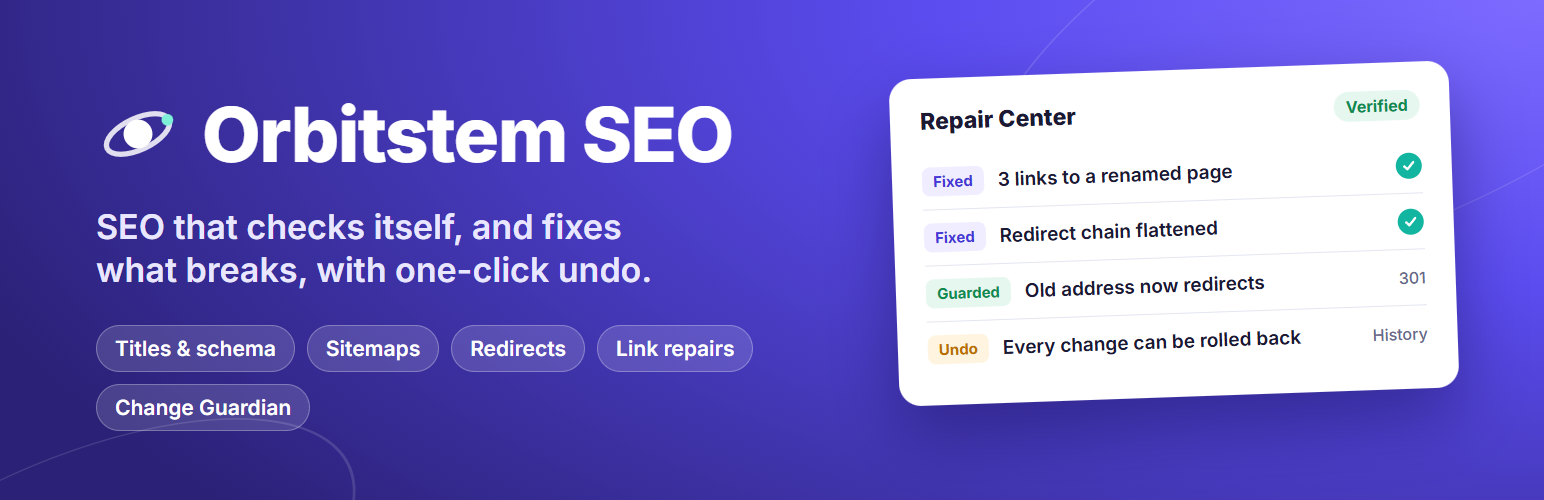
Most SEO plugins help you write a title, give you a green light, and stop there. Orbitstem SEO keeps watching your site after you hit Publish. It finds broken links, redirect chains and pages that dropped out of search, warns you when an update breaks your SEO, and fixes what can be fixed safely. Every change it makes can be undone.
Three promises
- No Premium version, ever. Every feature is in this free plugin: no add-ons, no account, no upsell banners.
- No tracking. No data leaves your site unless you switch on a feature that needs it (see External services).
- Every change can be undone. Repairs, redirects, imports and risky edits are recorded with a one-click undo.
Free here, often a paid upgrade elsewhere
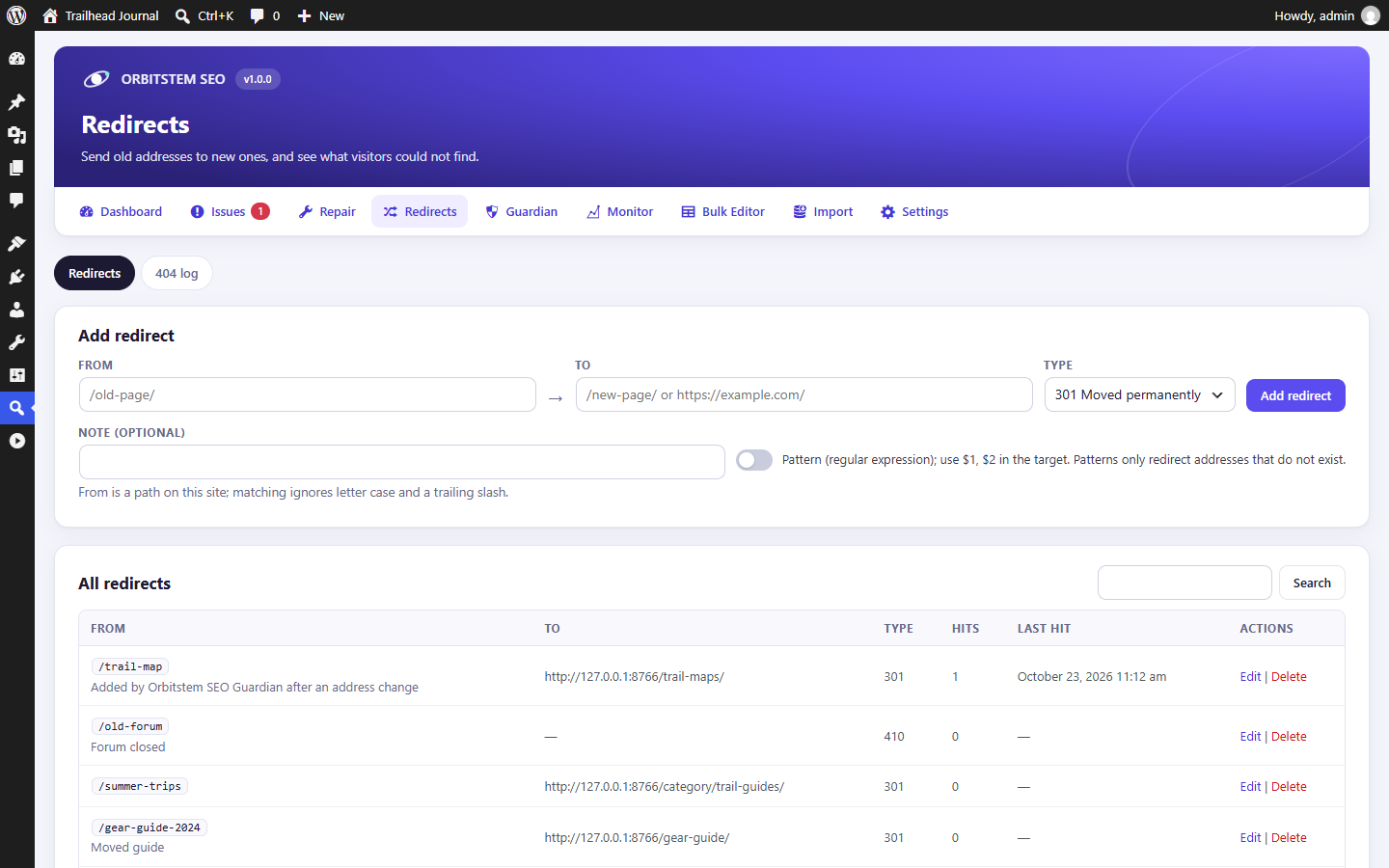
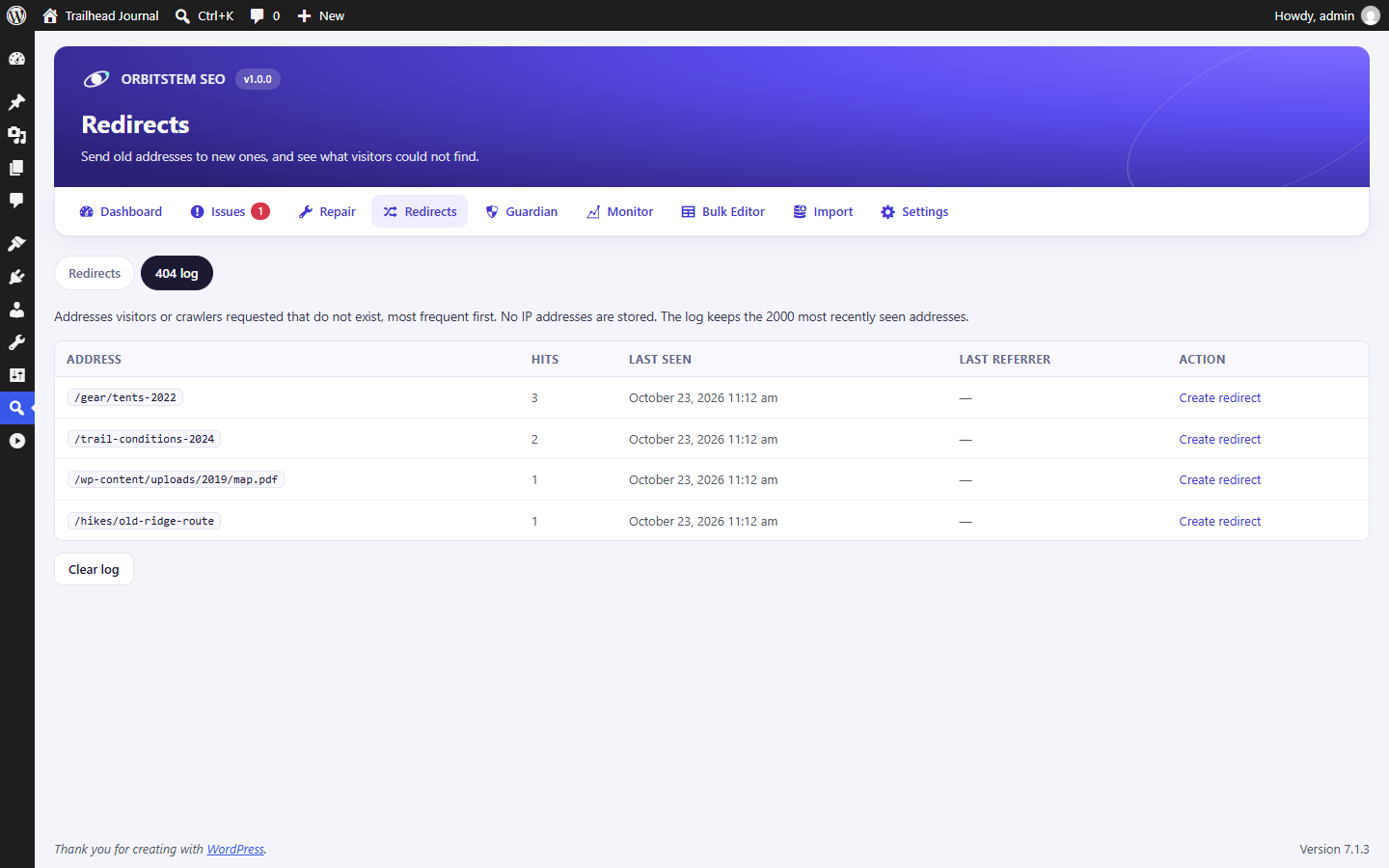
- Redirect manager with 404 log
- Automatic 301 redirect when you change a URL
- Up to 5 keyphrases, content score and search intent
- Internal link suggestions while you write
- 9 rich-result types, schema templates and custom JSON-LD
- Google Search Console data inside WordPress
- Crawl and indexability check with a URL inspector
- Local SEO and WooCommerce Product schema
- Image, video and news sitemaps
- Broken link checker and AI crawler blocking
Writing: a sidebar that says exactly what to change
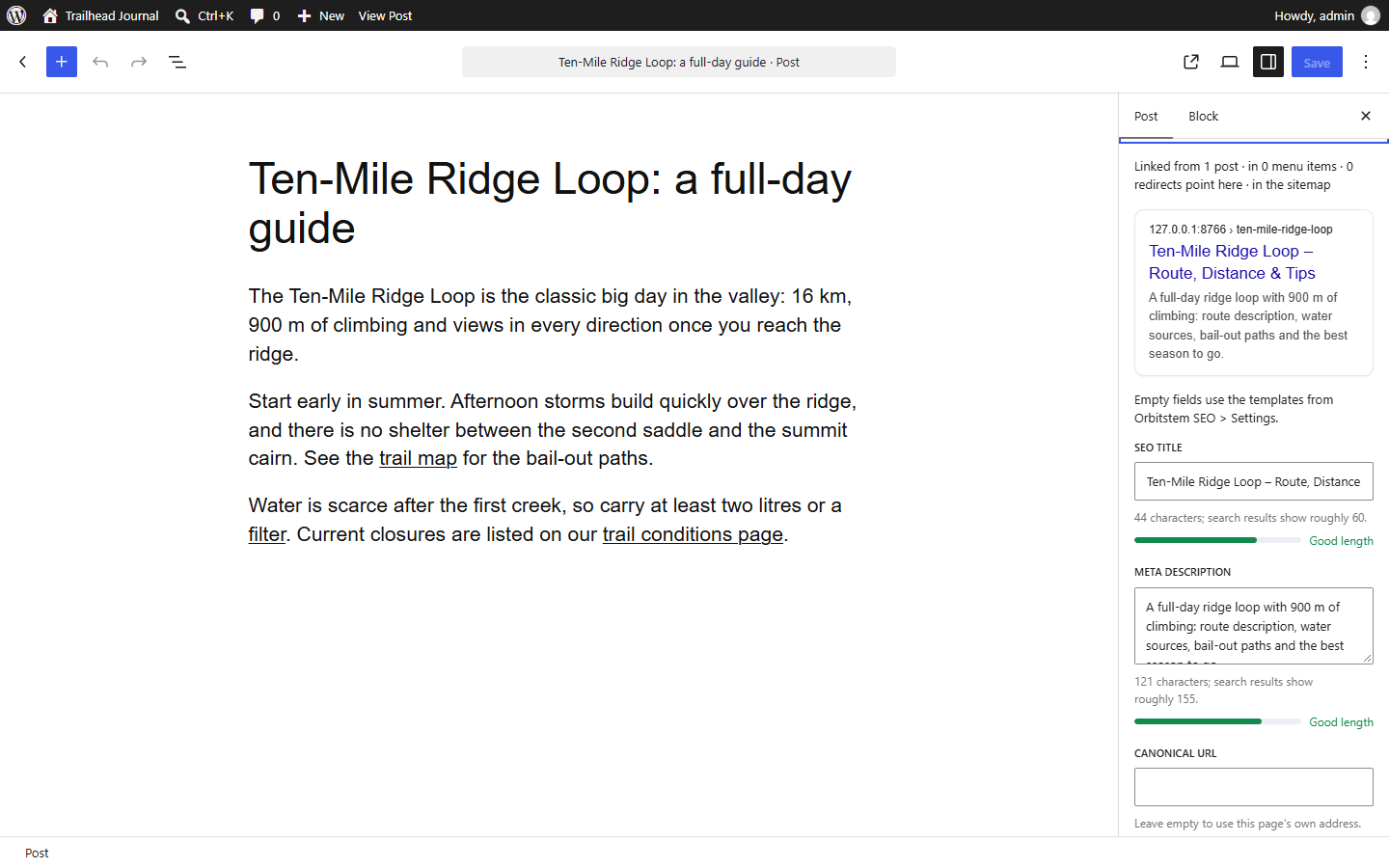
- Previews: Google (desktop and mobile) with length guidance, plus Facebook and X with their own title, description and image.
- Up to five keyphrases with synonyms. Word forms count (“boot” finds “boots”). Checks title, description, URL, first paragraph, subheadings, alt text, density and spread, and warns when another page already targets the same phrase.
- Headings, images and readability: stray H1s, skipped levels, long sections without a subheading, missing or file-name alt text, long sentences and paragraphs, and (in English) passive voice, transition words and a reading-ease grade.
- Search intent: recognizes informational, commercial, transactional or navigational keyphrases and checks the page fits, for example a price and a call to action for “buy …”.
- A 0–100 content score sums up the checklist; every item says what to do. The analysis runs in your browser and your text is never sent anywhere.
- Links panel: links to and from this post, broken links, and suggested internal links with an “Add link” button.
- Pre-publish check: real problems only (noindex, no description, a duplicate title, missing alt text), with one-click fixes.
SEO Issues: a scan that shows the evidence
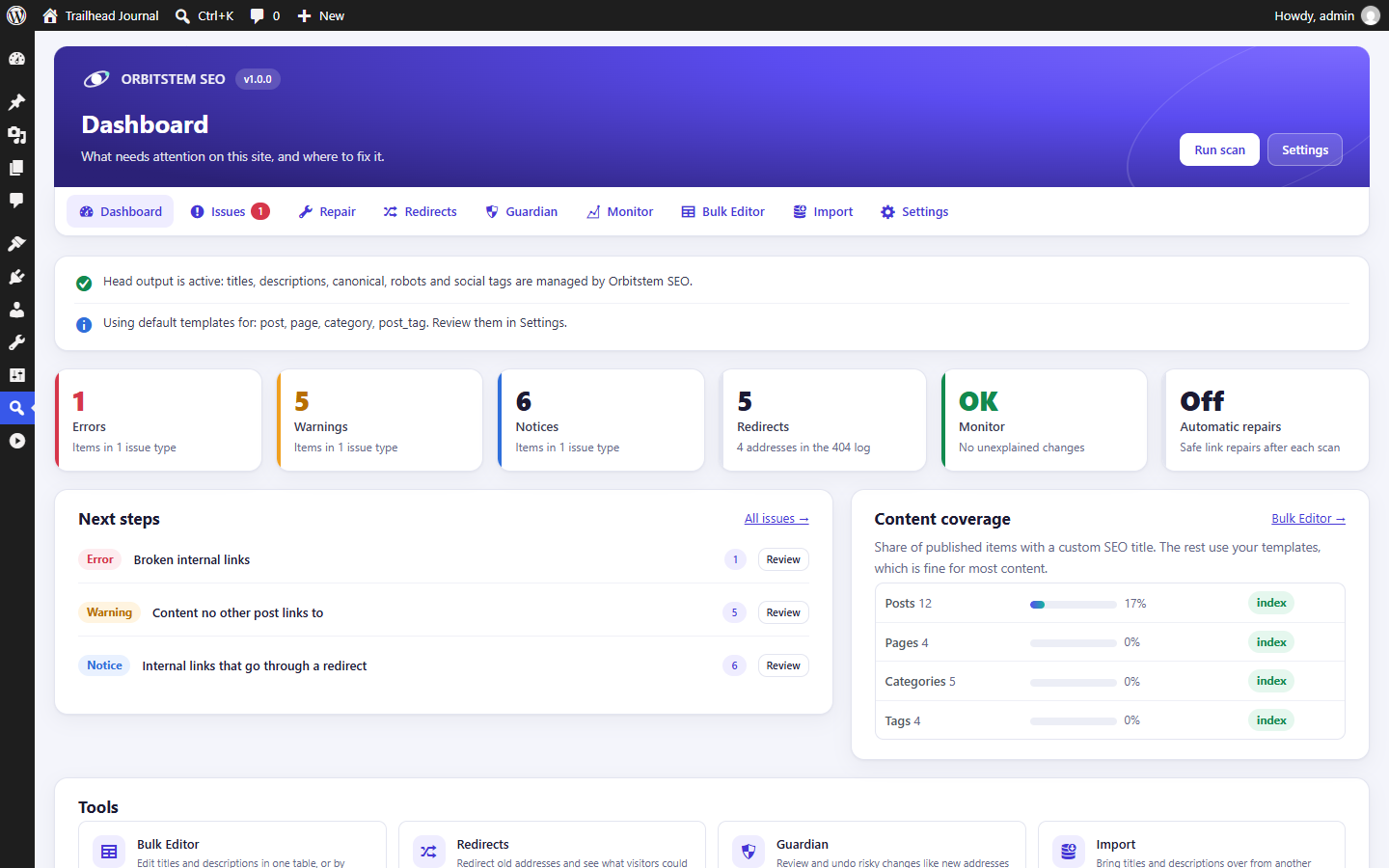
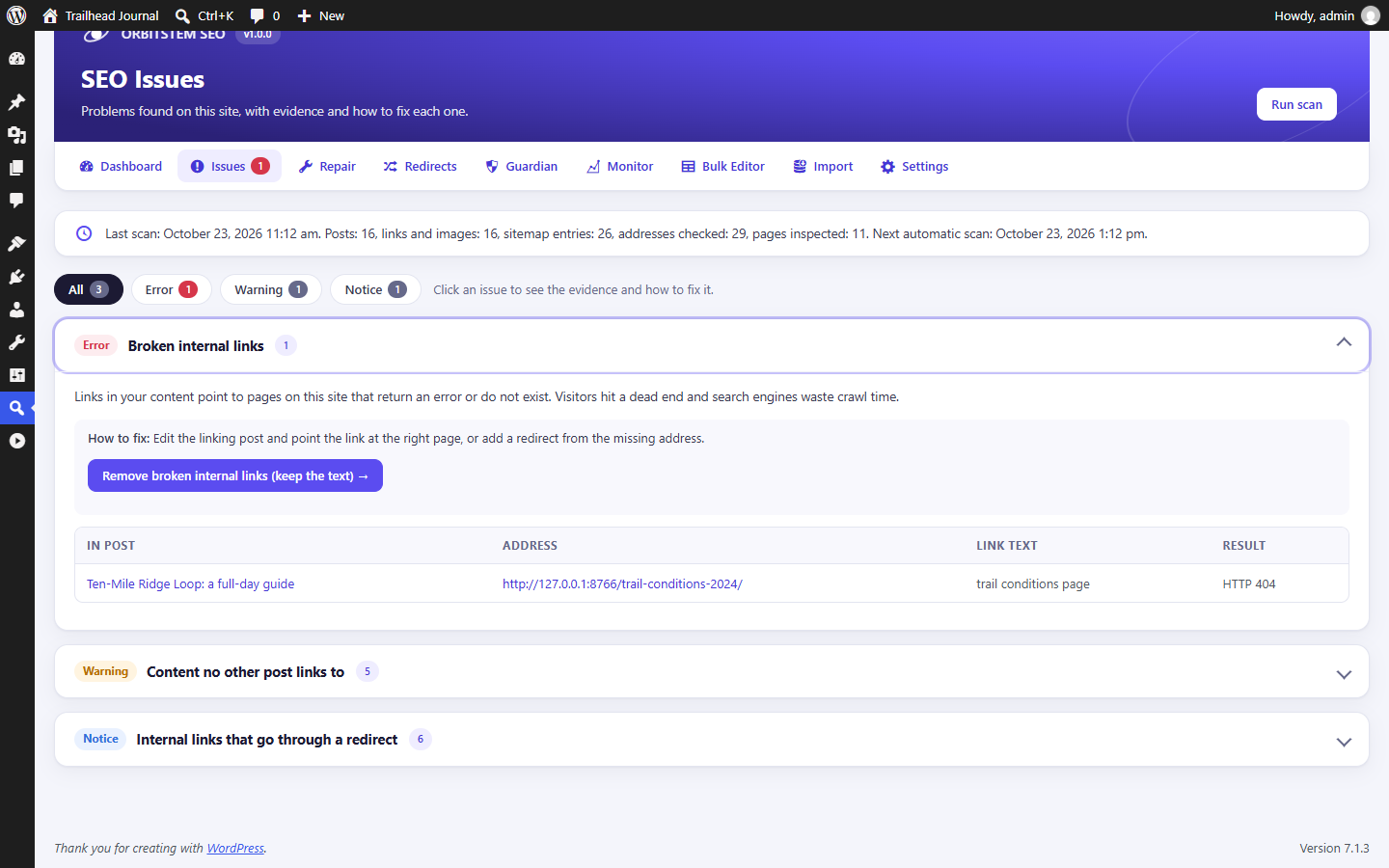
A background scan lists what needs attention, with the exact posts, links and addresses involved and how to fix each one:
- broken links and images, links through redirects, redirect chains and loops;
- content no other post links to, and pages competing for the same search;
- sitemap entries that fail or should not be there, and pages missing from the sitemap;
- duplicate or conflicting SEO tags from the theme or another plugin;
- crawl and indexability problems: pages robots.txt blocks (with the exact rule, read the way Google reads it), noindex pages robots.txt hides, canonicals that lead to broken, redirecting or noindex pages, contradicting robots tags, login walls and soft 404s.
The URL inspector checks any address the way a search engine does: redirect steps, robots.txt, meta robots and X-Robots-Tag, where the canonical leads, and whether the page is in the sitemap. “Explain like I’m new” adds one plain sentence per issue.
Repair Center and automatic 301 redirects
- Change a published page’s address and the old one redirects at once, child pages included, without chains.
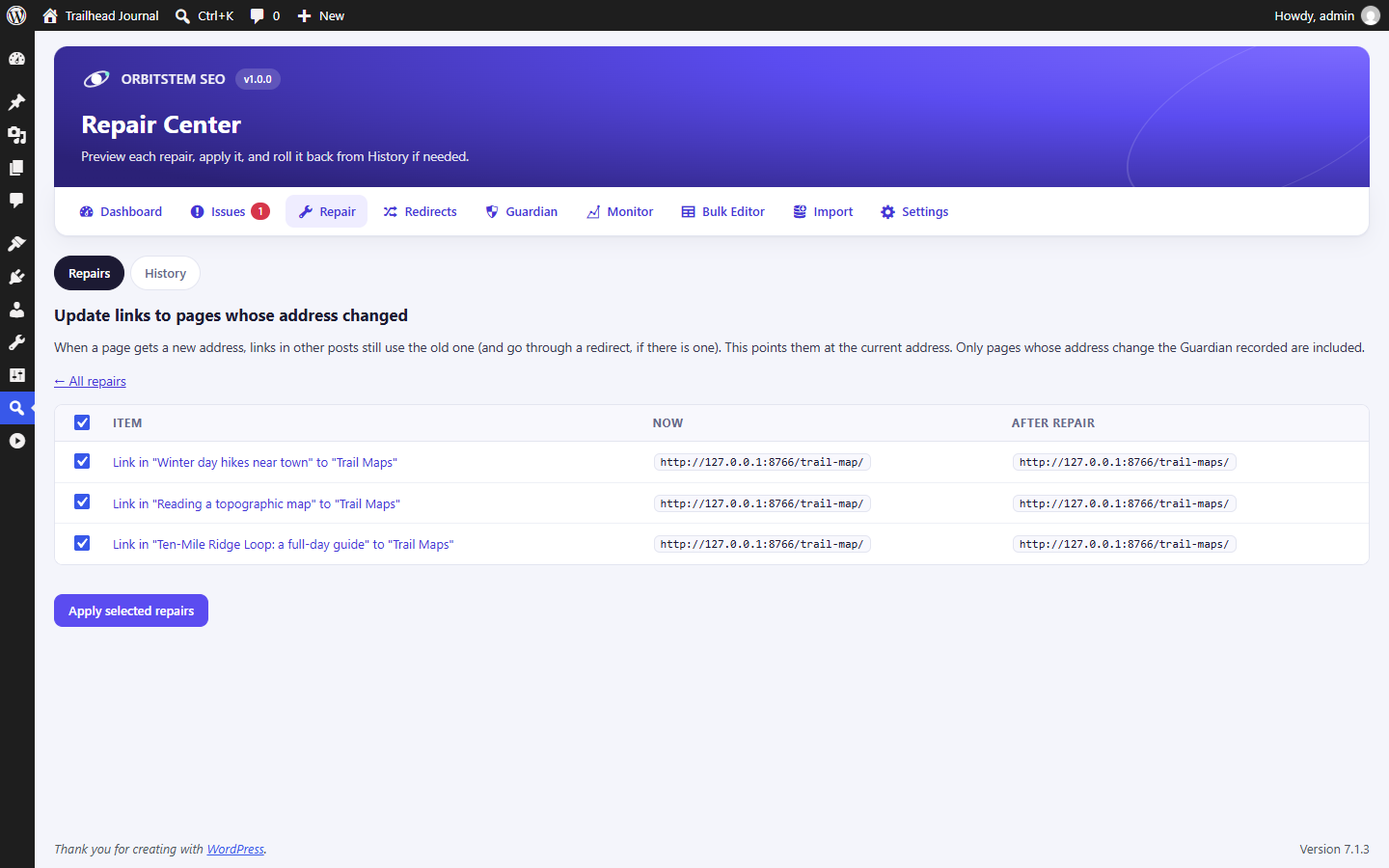
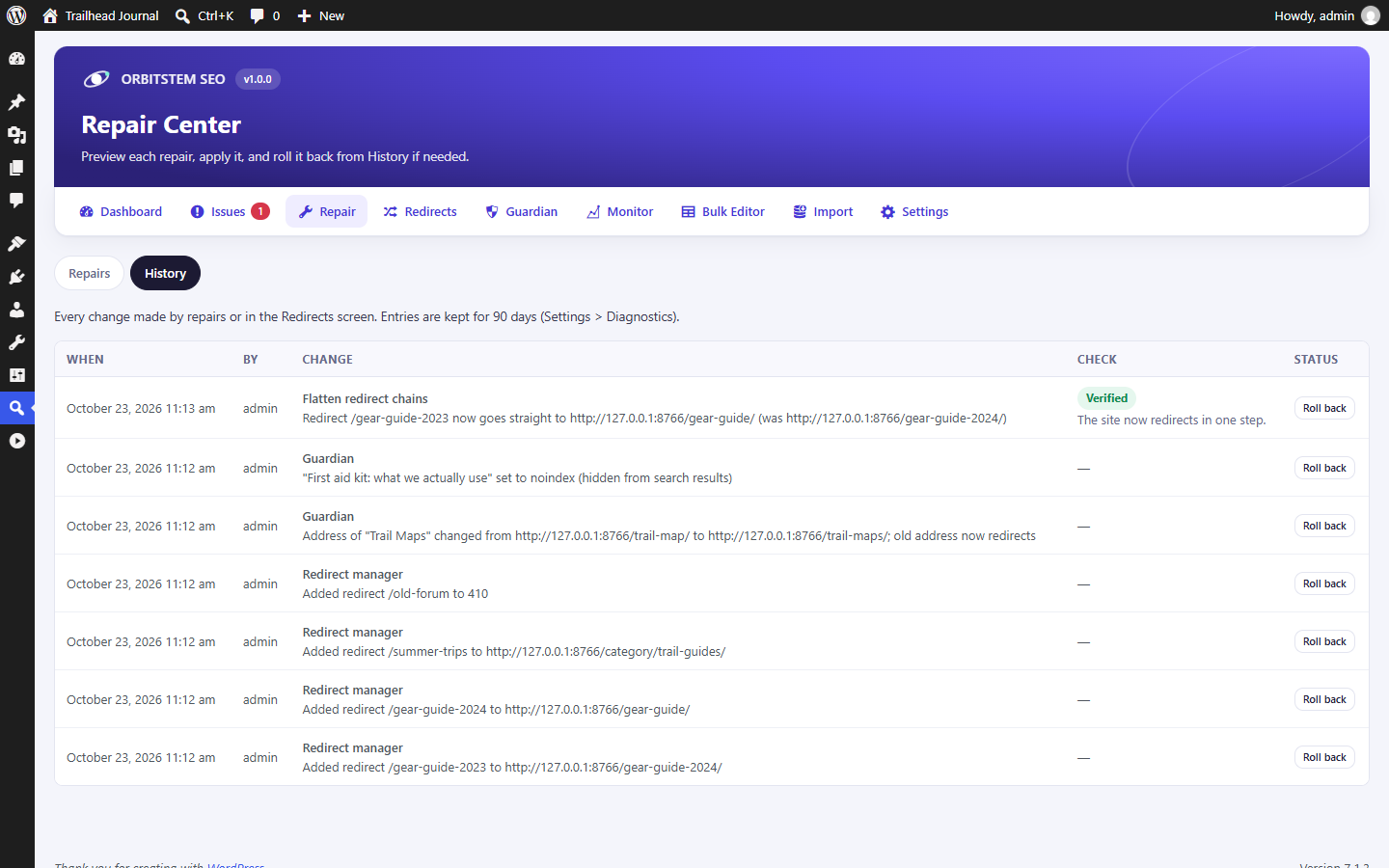
- Update links that go through a redirect or point at a renamed page, and flatten redirect chains.
- Orphan rescue: add links to pages nothing links to, from posts that already mention them.
- Remove broken internal links while keeping their text (always asks first).
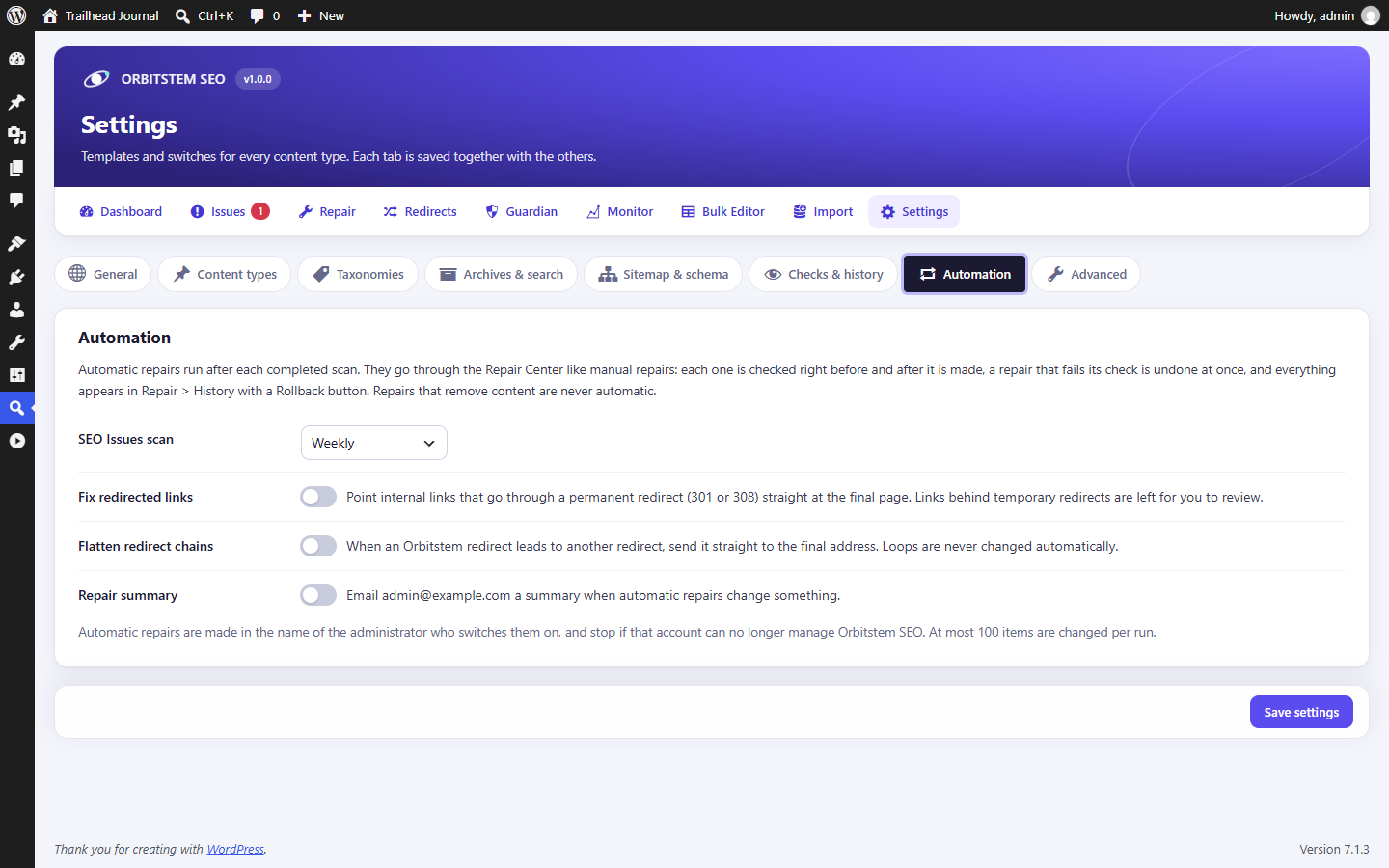
Each repair is previewed, checked afterwards and can be rolled back. Safe repairs can run automatically after each scan.
Watching your site for you
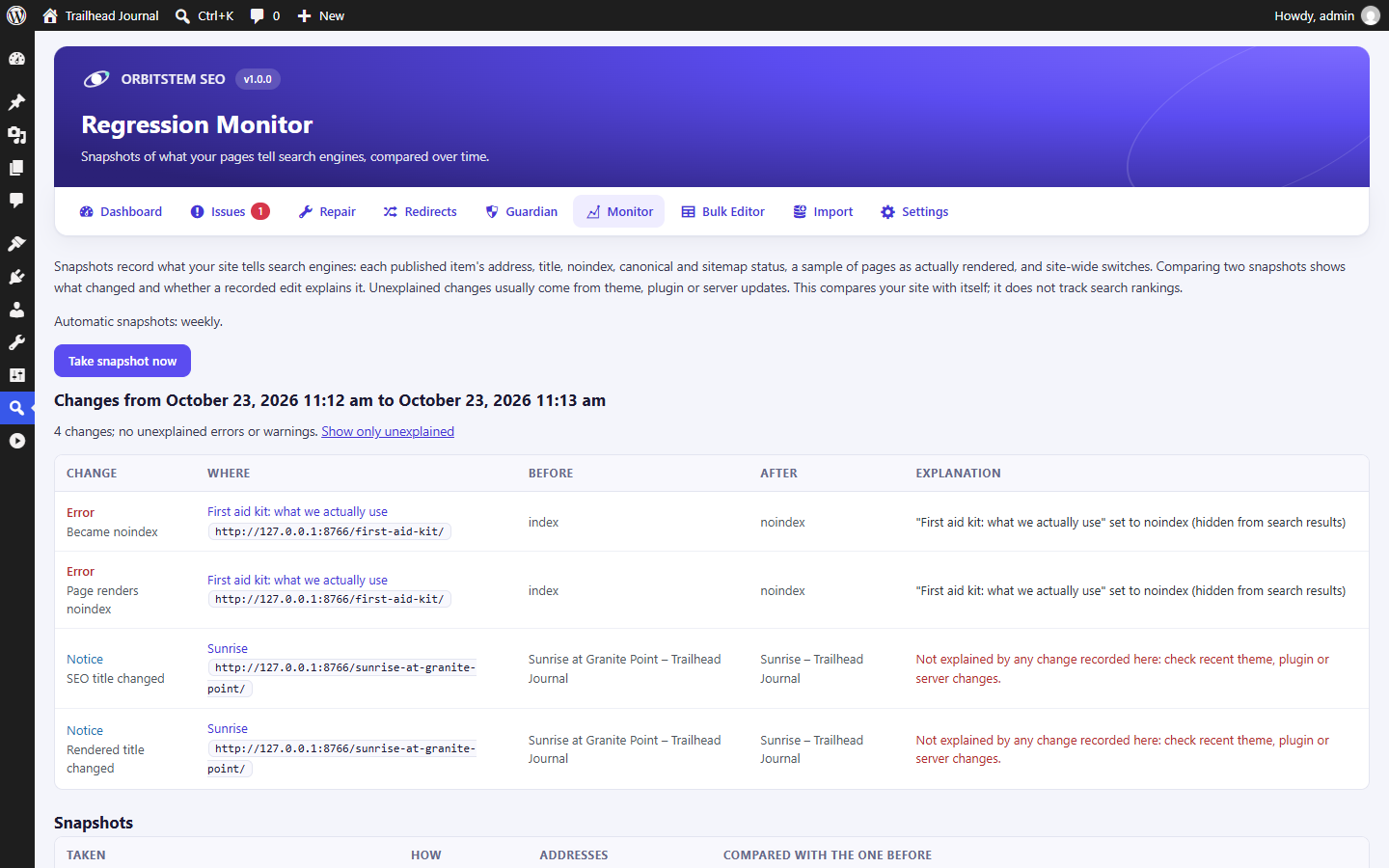
- Update guard: after any theme, plugin or WordPress update, ten key pages are checked for a lost title, broken canonical, new noindex, second H1 or missing schema.
- Change history: every SEO change, who made it and when, grouped by day, including site updates. Orbitstem’s own changes have an Undo button.
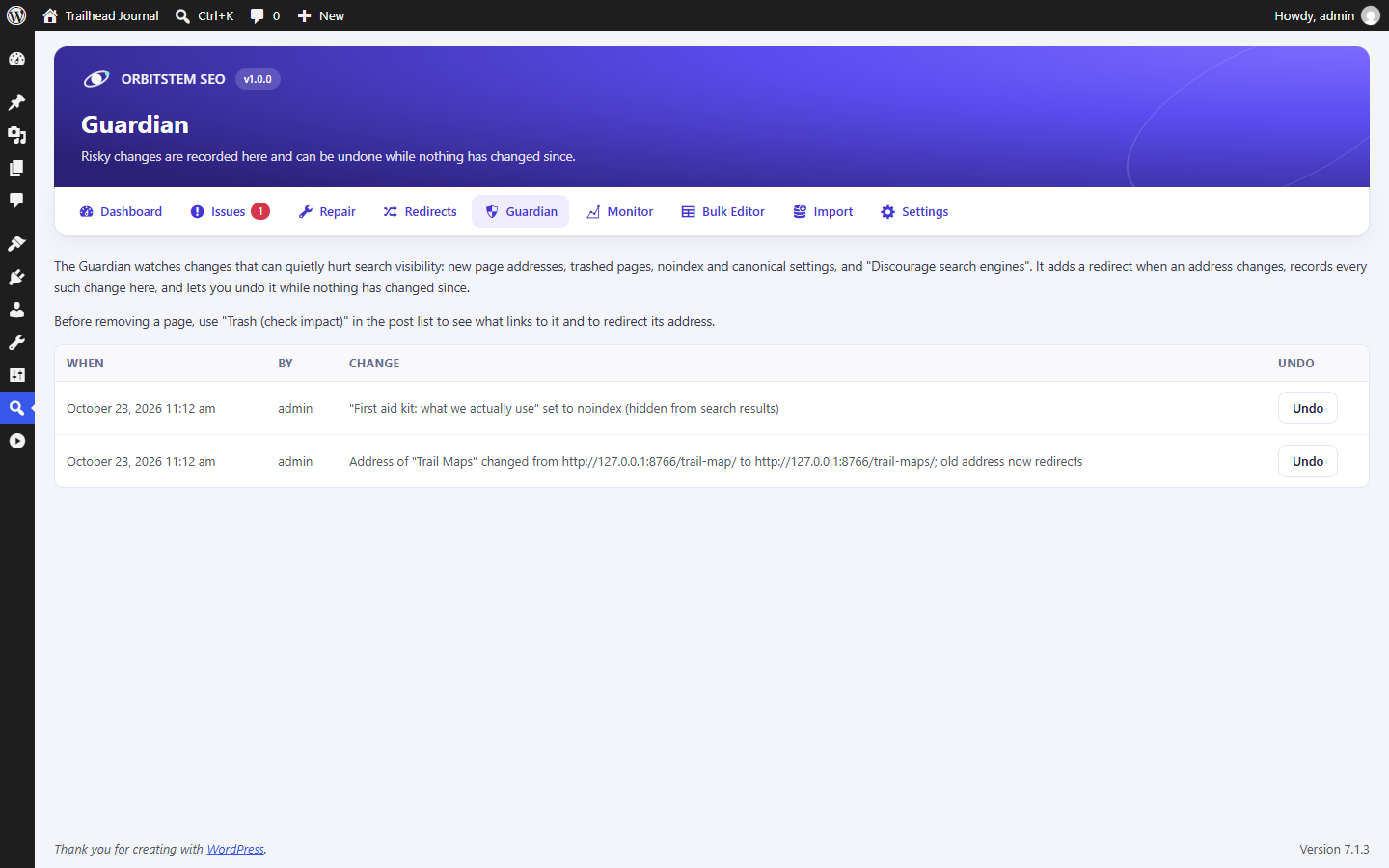
- Change Guardian: see what depends on a page before you change its address, noindex it or trash it.
- Regression Monitor: weekly snapshots of what every page tells search engines, with unexplained changes flagged.
- SEO health email (optional), weekly or monthly, sent from your own site.
Schema (structured data)
One connected JSON-LD graph per page (WebSite, Organization or Person, WebPage, Article, BreadcrumbList), plus:
- Rich results from the sidebar: FAQ, HowTo, Product, Recipe, Event, Course, JobPosting, Review and Video, with plain-language checks. Incomplete data is never printed.
- Schema templates: add rich results or your own JSON-LD to every page matching your conditions (content type, category, template, address, author), with variables such as
%title%or%meta:price%, a preview, and undo. - Custom JSON-LD per post, checked as you type (line and column for syntax errors, Google’s required fields per type).
- Automatic: video schema for YouTube embeds, full WooCommerce Product schema (price, stock, reviews), and LocalBusiness schema from your Local SEO details, with the
[orbitstem_business]shortcode.
Google Search Console, inside WordPress (optional)
Connect with your own free Google Cloud key (a guide is built in; no Orbitstem server in between) to see clicks, impressions, click-through rate and position against the previous 28 days, top pages and searches, pages losing clicks, and Google’s indexing check with affected pages explained. Each post gets a Search Console panel in the editor. Access is read-only.
Sitemaps, redirects and crawlers
- XML sitemaps built on WordPress’s own, plus image, video and Google News sitemaps, and “why isn’t this page in my sitemap?” in plain words.
- 301, 302, 307, 308 and 410 redirects, exact or pattern-based, that can never lock you out of the admin. A 404 log without IP addresses, grouped by folder.
- Redirect CSV import and export, import from Redirection, Yoast SEO Premium, Rank Math and AIOSEO Pro, and Apache or nginx export.
- robots.txt editor with undo, one-click AI crawler blocking, optional llms.txt, and staging protection for copies WordPress knows are not live.
- Optional IndexNow notifications for Bing and other participating search engines.
Bulk editing and switching plugins
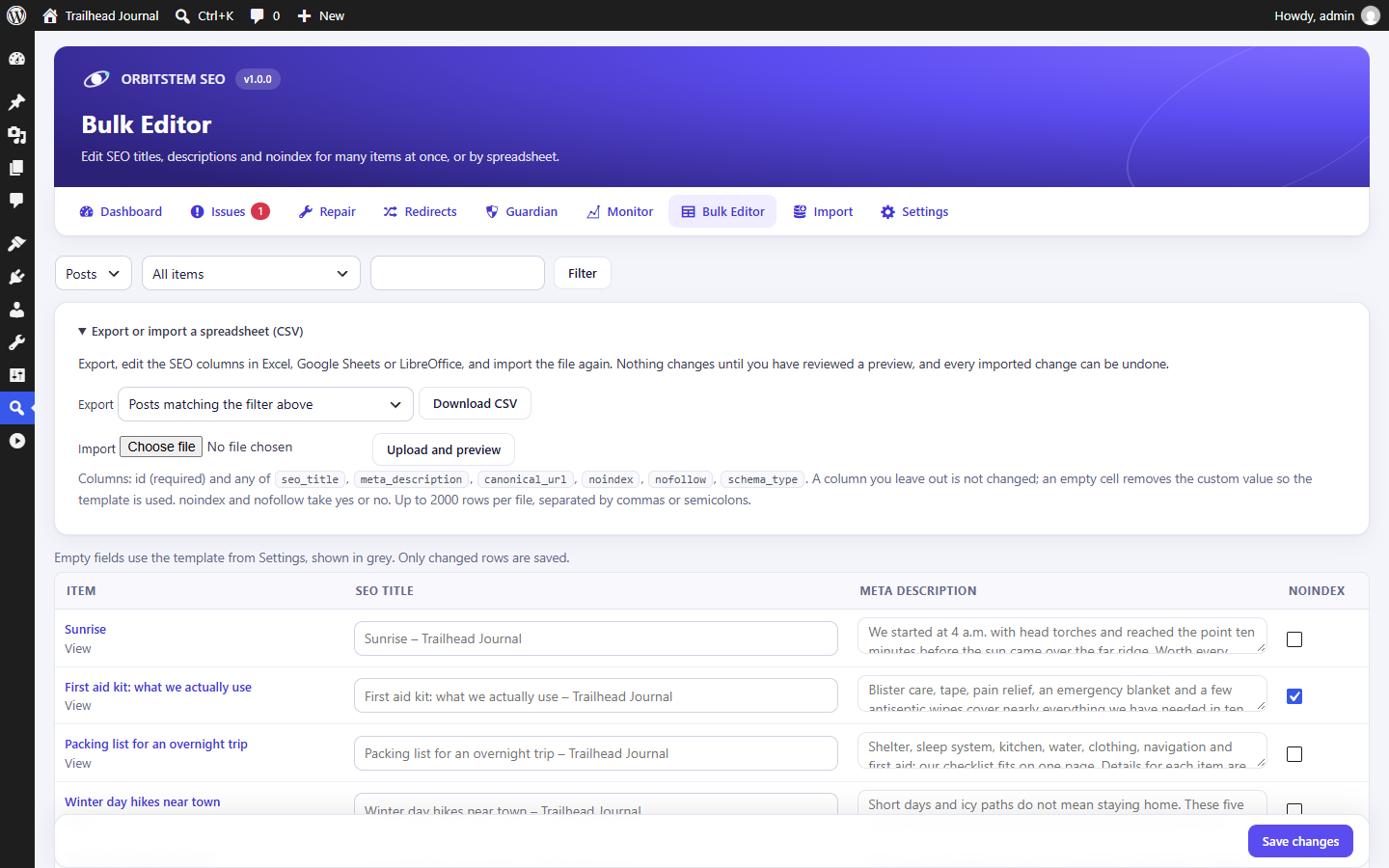
- Edit titles, descriptions and noindex in one table, or as CSV in any spreadsheet, including page addresses (each change gets its redirect). Every import is previewed and can be undone.
- Import from Yoast SEO, Rank Math, All in One SEO, SEOPress and The SEO Framework: titles, descriptions, canonicals, robots, keyphrases, social data and site settings. Only empty fields are filled, and the import can be rolled back.
- Compare before you switch, then Check the import: every field is compared with the source plugin (same, converted, missing or not supported), and duplicate tags printed by two plugins are found and named.
- While another SEO plugin is active, Orbitstem SEO prints nothing (safe mode), so you never get duplicate titles.
A three-minute setup wizard does the first import and scan. Developers get wp orbitstem-seo commands and filters such as orbitstem_seo_head_tags and orbitstem_seo_schema.
Also from the developer
Media Rename – OrbitStem renames media files safely, with every link updated and every rename undoable. Free, and independent of this plugin.
External services
Orbitstem SEO works on your own server. It contacts other services only for the optional features below, which are off until you switch them on.
IndexNow (Settings > Automation > Instant indexing). When you publish, update, move or remove a post, the plugin sends the following to https://api.indexnow.org/indexnow:
* the changed addresses of your site;
* your site’s host name;
* a verification key it created.
IndexNow shares them with the participating search engines. Nothing about visitors or users is sent. Submissions are logged in Settings. IndexNow terms.
Google Search Console (Orbitstem SEO > Search Console), a service by Google LLC. It is off until a site administrator saves their own Google OAuth client ID and secret and clicks “Connect Google Search Console”. What is sent, and when:
* On connect: the administrator signs in at accounts.google.com; the site then sends the client ID, client secret and authorization code to oauth2.googleapis.com to get access, and later the stored refresh token to renew it.
* Reports (when the Search Console screen is opened or refreshed, at most every 12 hours, and when a post’s Search Console panel is opened in the editor): the property name, date ranges and, for one page, its address, to www.googleapis.com (Search Console API).
* Indexing checks (only when an administrator or editor asks for them): the page address and property, to searchconsole.googleapis.com (URL Inspection API).
* On disconnect or uninstall: the refresh token, to oauth2.googleapis.com, to revoke access.
No visitor data is sent, and nothing is sent to Orbitstem. Google Terms of Service, Google Privacy Policy, Google APIs Terms of Service.
Check external links (Settings > Checks & history). During scans, the plugin sends one request to each website your content links to, at most once a week per address, to see whether the link still works. Nothing beyond the request itself is sent.
Links only, nothing loaded. The editor’s “Test in Google’s Rich Results Test” link and the “Get directions” link of the [orbitstem_business] shortcode are plain links. Nothing is sent unless someone clicks them. Video schema and the video sitemap point at YouTube’s thumbnail and player addresses for videos in your content, without fetching anything from YouTube.
Installation
- In your WordPress admin, go to Plugins > Add New, search for “Orbitstem SEO”, then install and activate it.
- Click “Start setup” on the Orbitstem SEO dashboard. The wizard takes about three minutes.
- Edit any post or page: the “Orbitstem SEO” panel in the block editor sidebar has the previews, checklist, links and schema.
Coming from another SEO plugin? The setup wizard and Orbitstem SEO > Import bring your data over before you deactivate it.
FAQ
Is Orbitstem SEO really free?
Yes. Every feature described here is in this plugin. There is no Premium version, no add-ons, no account and no license key.
Does it create a redirect when I change a page’s URL?
Yes, automatically. The old address redirects to the new one (301) as soon as you save, child pages are redirected too, and older redirects are pointed straight at the new address. You can undo the change from the Guardian screen, and update links in your other posts from the Repair Center.
Can I switch from Yoast SEO, Rank Math or another SEO plugin?
Yes. Use the setup wizard or Orbitstem SEO > Import, and first use “Compare pages” to see what will change. Titles, descriptions, canonical URLs, noindex settings and focus keyphrases are copied. Redirects from Redirection, Yoast SEO Premium and Rank Math can be imported under Redirects > Import & export. The other plugin’s data is left untouched. Deactivate it when you’re happy with the result.
Is there an SEO score?
Yes, a 0–100 content score in the editor, but only as a summary of the checklist below it. Every suggestion says exactly what to change, and a keyphrase repeated too often lowers the score instead of raising it.
Does the Search Console connection send my data to you?
No. Orbitstem SEO talks to Google directly from your site, using an OAuth client you create in your own Google Cloud project (the Search Console screen walks you through it). Access is read-only, and Disconnect revokes it at Google. Google requires your site to use HTTPS for the connection.
Does it fix problems automatically?
Only if you switch it on, and only for safe repairs: links that go through a permanent redirect, and redirect chains. Each change is checked right away and undone if the check fails, and every change can be rolled back. Removing broken links and adding new links always need your confirmation.
Can I undo a change Orbitstem SEO made?
Yes. Every repair, redirect change, import, address change and robots.txt change is recorded in Repair > History, or on the Guardian screen, with a Roll back or Undo button. A rollback is refused only when the item was edited again since, so newer work is never overwritten.
What does the update guard do?
After a theme, plugin or WordPress update, it checks ten key pages and compares them with the day before. If the update removed a title, changed a canonical, added noindex or a second H1, or dropped your structured data, you see a warning on your dashboard right away. If Monitor alerts are on, you also get an email.
Does it work with WooCommerce?
Yes. Products get full Product schema automatically, and WooCommerce’s own simpler markup is turned off, so search engines see one Product. Products and product categories get their own templates, sitemap entries and per-item fields.
Does it support local businesses?
Yes. Under Settings > Local SEO, enter your business type, address, phone, opening hours and coordinates. They become LocalBusiness schema on your homepage, and the [orbitstem_business] shortcode shows them to visitors.
Should I block AI crawlers?
That’s your choice. Settings > Crawlers lists the main AI crawlers with a plain note on each. Some only collect pages to train AI models; others power AI search answers that can send you visitors. Blocking is a request in robots.txt; well-behaved crawlers follow it.
Does IndexNow work with Google?
No. Google does not use IndexNow. Microsoft Bing and other participating search engines do. Google finds your changes through your sitemap, which Orbitstem SEO keeps up to date.
My site is a staging copy. Will it appear in Google?
Not with staging protection on (the default), as long as WordPress knows it is a copy: add define( 'WP_ENVIRONMENT_TYPE', 'staging' ); to the copy’s wp-config.php (many hosts do this for you). Then every page asks search engines not to index it, and every admin screen says so. Apart from localhost, .test, .local and other addresses that cannot be reached from the internet, the web address is not used to decide, so a live site is never hidden by mistake. On your live site this does nothing, and the dashboard warns you if “Discourage search engines” is still on after going live.
Does the scan slow down my site?
No. It runs in the background in small steps (each a few seconds at most), using WordPress’s scheduled tasks. On a test site with 10,000 posts and 50,000 links, a first full scan took about two and a half minutes of background work and under 60 MB of memory.
A few checks load your own pages the way a visitor would. If your server cannot answer requests from itself (some hosts allow only one or two PHP processes, and local test sites often do), those checks are skipped for a while instead of slowing your site down, and SEO Issues tells you how many were skipped. You can run the full scan from the command line with wp orbitstem-seo scan.
Do redirects slow down page loads?
A site with no redirects pays nothing. With redirects, each request costs one indexed database lookup. With 10,000 redirects and 200 pattern rules, that measured about 0.3 ms per request. Very large sites can export the rules for Apache or nginx.
Does it work with my theme?
Yes. Block themes (such as Twenty Twenty-Five) and classic themes that support the title-tag feature show one correct title. The dashboard warns you if a classic theme does not support it.
Does it work on multisite?
Yes. Each site in the network has its own settings, redirects, scan results and history.
How do I edit SEO titles or URLs in a spreadsheet?
Open Orbitstem SEO > Bulk Editor, expand “Export or import a spreadsheet (CSV)” and download the file. Change the columns you want, keep the id column, and upload it. You see exactly what will change before you confirm. A changed slug on a published page gets its 301 redirect automatically, and the whole import can be undone in one click.
Does deactivating the plugin delete my SEO data?
No. Deactivating keeps everything. Deleting the plugin removes your settings and per-item SEO fields only if you first tick “Delete all Orbitstem SEO settings and per-item SEO fields” under Settings > Advanced.
Is it translation ready?
Yes. All text uses the orbitstem-seo text domain and can be translated on translate.wordpress.org.
Screenshots
Changelog
1.2.2
A bug-fix release: no new features.
- Fixed (serious): a redirect to the same address with a query string (such as
/saleto/sale?ref=1), loops through pattern rules, and patterns that keep growing the address are refused when saved, imported or exported. Loops saved by older versions, including two-step and pattern loops, are no longer followed by visitors and are listed in SEO Issues. “Flatten redirect chains” never turns a loop into a redirect to itself. - Fixed (serious): restoring a page from the WordPress Trash removes the redirects added for its child pages, so they cannot loop.
- Changed: a Recipe without an image, and a job posting past its closing date, are no longer printed as schema, because Google rejects them. Add an image to your recipes to keep their rich results.
- Fixed: staging and local copies. SEO Issues no longer reports robots.txt errors caused by staging protection; one notice says search engines are blocked on purpose. The Monitor and update guard no longer report “Page renders noindex” on every page; they note once that staging protection was switched on. llms.txt is not served while staging protection is on.
- Fixed: loading your own pages. One slow page no longer pauses link checks, the update guard and the Monitor. The URL inspector, duplicate-tag check, “Compare before you switch” and redirect-chain check say “Couldn’t check from this server” instead of reporting a page as not indexable.
- Fixed: Search Console. The setup guide says to publish your Google app (access granted in “Testing” ends after 7 days), and a lost connection asks you to reconnect. Authors and editors can no longer use up the site’s daily indexing checks.
- Fixed: schema.
- Only one article schema per page.
- Custom JSON-LD with wrong value types (such as
"name": 5or a date given as an object), unknown@idreferences, one of the page’s own@ids or a second publisher is no longer printed, and the editor’s check now matches the page exactly. - Custom JSON-LD over 50,000 characters is refused instead of cut off.
- TechArticle, Report and the other article types follow the one-article rule too.
- Custom JSON-LD refuses an image that is not an address or an ImageObject with an address, and null values such as
"name": null. - The editor’s schema check uses a rich result’s unsaved values.
- Job descriptions no longer contain block markup or
[b]tags, and expired jobs get a warning. - HowTo steps no longer show
&, and recipes without an image get a warning. - Schema templates with an address condition work on category and tag pages.
- Security:
%meta:…%in per-post JSON-LD can no longer read hidden custom fields. A post’s custom JSON-LD is only readable in the REST API by its editors. The competing-pages list and link suggestions no longer reveal keyphrases of posts you cannot edit. The writers’ daily Search Console limit cannot be beaten with simultaneous requests, also at midnight. Profile addresses containing HTML are refused, and the error message shows them as plain text. - Fixed: content analysis.
- Keyphrases only match real word forms (“plan” no longer matches “planet” or “planner”, “plant” no longer matches “planter”, and “analysis” matches “analyses”).
- Japanese, Chinese and Thai text is measured in characters.
- Passive voice, transition-word and density checks are more accurate.
- Singular forms such as “1 word” are correct.
- Fixed: redirects and repairs.
- Activating a plugin no longer waits about 30 seconds for the update guard, also when a caching or security plugin filters HTTP requests. Zip uploads and theme switches are checked.
- Previewing a large redirect import is fast again, also with a catch-all pattern rule (20,000 rows in about 3 seconds).
- The Apache/nginx export leaves out rules that lead into a loop saved by an older version, and lists them with the reason.
- Trashing a page counts and redirects all its child pages. A restored page is never redirected.
- Orphan rescue never adds links inside shortcodes, and finds phrases written with curly apostrophes or non-breaking spaces. Undo works after WordPress tidies characters.
- Links through temporary (302/307) redirects are left alone.
- Catch-all patterns no longer catch /login, /admin or missing files.
- The 404 log drops referrer query strings.
- The CSV import reports repeated rows and refuses non-addresses.
- Fixed: front end and sitemaps.
- Cart, checkout and account pages get no canonical and are not sent to IndexNow.
- The comment-page canonical no longer ends in
#comments. - Auto descriptions drop builder shortcodes.
- llms.txt and IndexNow skip sitemap-excluded and canonical-elsewhere posts.
- Image and video sitemaps include WooCommerce products and custom post types.
- The Shop page’s SEO fields are used on /shop/.
- Two fewer database queries per page.
- Fixed: diagnostics.
- X-Robots-Tag lines for other crawlers no longer count as noindex, while a plain noindex sent alongside them still does.
- robots.txt 429 answers and rules without a colon are read like Google reads them.
- No false “More than one sitemap” or duplicate User-agent warnings.
- The competing-pages finder keeps numbers (“iPhone 14” vs “15”).
- The Monitor treats a lost title as an error and tracks lost schema.
- When a page cannot be loaded, the index checker says whether the connection was refused, the domain was not found, the SSL certificate failed or the page timed out.
- Fixed: admin.
- Local SEO country codes (Germany is DE).
- The setup wizard saves per site kind, keeps Local SEO, and can be re-run.
- “Roll back imported data” also restores imported settings. After a partial rollback, a second rollback lists only the settings you changed and History can undo them. The Import screen says so if the per-page rollback cannot start.
- Deleting the plugin with the Uninstall setting off keeps your Google client ID and secret; only the Google sign-in is revoked, so after reinstalling you just click Connect.
- Link suggestions find titles with “&”.
- The editor warns about empty HowTo steps.
- Readable setting names instead of internal ones.
- Accessibility fixes.
- The import check lists Rank Math rich results it does not copy.
wp option patch … falseswitches a setting off.
1.2.1
- Fixed: On servers that cannot request their own pages (one or two PHP processes, common on budget hosting and local test sites), a running scan could make every admin and front-end page wait 20 seconds or more. Checks that load your own pages now pause for a while when the server does not answer itself, instead of hanging page after page.
- Fixed: Those unanswered requests were reported as broken links, a missing robots.txt or “page no longer answers” alerts. They now count as skipped, and SEO Issues explains why.
- Improved: Tag, category, author and post type archive addresses and the homepage are checked from the database, without loading the page.
1.2.0
- New: Google Search Console (optional). Clicks, impressions, click-through rate and position, top pages and searches, pages losing clicks, and indexing checks with affected pages, in WordPress and in the editor. Uses your own Google key; no Orbitstem server.
- New: schema templates. Rich results or your own JSON-LD on every page that matches your conditions, with variables, a preview of the pages and output, and undo in History.
- New: custom JSON-LD per post, with plain-language checks. Invalid or incomplete data is never printed.
- New: deeper content analysis.
- Headings and images checks.
- Keyphrase use with word forms, density, spread, subheadings, alt text and other pages already using it.
- Reading ease, transition words and repeated sentence openings (English sites).
- Search intent with checks that the page fits.
- A 0–100 content score.
- New: crawl and indexability diagnostics in SEO Issues, a robots.txt checker that follows Google’s rules, and a URL inspector.
- New: “Check the import” compares every imported field with the source plugin, and “Duplicate tags after switching” finds tags printed twice and names the plugin.
- Improved: importing.
- Share titles, descriptions and images, the article type and extra keyphrases are now imported.
- Title templates, separator, site name, logo and social profiles now come from Rank Math and All in One SEO too.
- All in One SEO Pro redirects can be imported.
- Improved: “missing from sitemap” now says when a post was switched off in its own settings. WooCommerce cart, checkout and account pages are no longer reported as missing.
1.1.0
- New: setup wizard. Your site type, name and logo, moving over from another SEO plugin, and the first scan.
- New in the editor:
- Facebook and X previews, with a social title, description and image (shared by Facebook, X and LinkedIn) that can differ from the SEO title and description.
- Desktop and mobile Google previews.
- Up to five keyphrases with synonyms, and readability tips.
- A links panel with suggested internal links and an “Add link” button.
- A pre-publish check with one-click fixes.
- New: rich results. FAQ, HowTo, Product, Recipe, Event, Course, JobPosting, Review and Video schema, with plain-language checks.
- New: automatic schema. Video schema for YouTube videos, full WooCommerce Product schema, and Local SEO with LocalBusiness schema and the
[orbitstem_business]shortcode. - New: sitemaps. Image, video and Google News sitemaps, a per-post “leave out of the sitemap” switch, and “why is this page not in my sitemap?” explanations.
- New: crawlers. A robots.txt editor with undo, AI crawler blocking, llms.txt, staging protection (only on sites WordPress knows are not live: WP_ENVIRONMENT_TYPE set to staging, development or local, or a localhost or .test address), and noindex for empty archives.
- New: IndexNow (optional). Notifies Bing and other participating search engines when content changes, with a log of every submission.
- New: update guard. Checks key pages right after theme, plugin and WordPress updates.
- New: change history by day (Repair > History), including site updates, and an optional SEO health email.
- New: links.
- Orphan rescue adds links to pages nothing links to.
- A finder for pages competing for the same search.
- “Explain like I’m new” mode in SEO Issues.
- New: redirects.
- CSV import and export.
- Import from Redirection, Yoast SEO Premium and Rank Math.
- 404s grouped by folder, fixed with one redirect.
- Apache and nginx export of simple one-address redirects (pattern rules stay in WordPress, where admin and login are protected).
- New: importing. “Compare before you switch” when moving from another SEO plugin. Focus keyphrases are imported from Yoast SEO, Rank Math and SEOPress.
- New: CSV. Slugs (page addresses) in the CSV, with automatic redirects.
- New: WP-CLI. The
wp orbitstem-seocommands. - Fixed: the Bulk Editor, classic editor, term and settings forms could change text containing “&” or “<” when saved without edits.
- Fixed: SEO fields lost backslashes when saved.
- Fixed: the Repair Center lost a link to a renamed page after a scan or after saving the linking post.
- Fixed: redirect chains were left behind for child pages after a parent page was renamed twice.
- Fixed: redirect sources with “/./”, “/../” or “//” did not match.
- Fixed: the Import preview’s “Now” column showed the default instead of the saved setting.
1.0.0
- First public release.