

Description
OrderCourier adds “Send order via chat” buttons to your WooCommerce store. When a customer clicks one, the plugin builds a message with the cart details and opens a WhatsApp chat (through a wa.me link) with your store’s phone number, so the customer can send it to you.
By default the plugin creates a normal WooCommerce order before the chat opens, so you can manage it like any other order. You can switch to direct mode if you only want the message and no order.
Features
- Order-first mode: creates a WooCommerce order (with the status you choose) and puts the order number and totals in the message.
- Direct mode: sends the cart details as a message without creating an order.
- Message templates with placeholders such as {order_number}, {items}, {total}, {customer_name}, {shipping_method}, {coupons}, {fees}, {tax}, {checkout_fields} and {pay_link}.
- Cart details include variations, product add-on meta, coupons, fees, shipping and tax.
- Custom checkout fields support: include additional checkout fields (e.g., from field editor plugins) in order messages via {checkout_fields} placeholder.
- Quote requests: products without a price are sent as a quote request that you can price later. Mark products as quote-only in the product data panel.
- Per-product settings: hide chat button or mark products as quote-only directly in the product edit screen.
- Multiple numbers: set a different phone number per product or per product category, with one default number for everything else.
- Buttons on product pages, shop pages, the cart, checkout, and thank-you page, plus a “chat” payment method at checkout.
- Theme-friendly buttons: adjust button width (full or auto), use theme button classes, custom colors, and custom CSS classes.
- Cart and Checkout block support.
- Optional floating chat button.
- Optional admin email notification when chat orders are created.
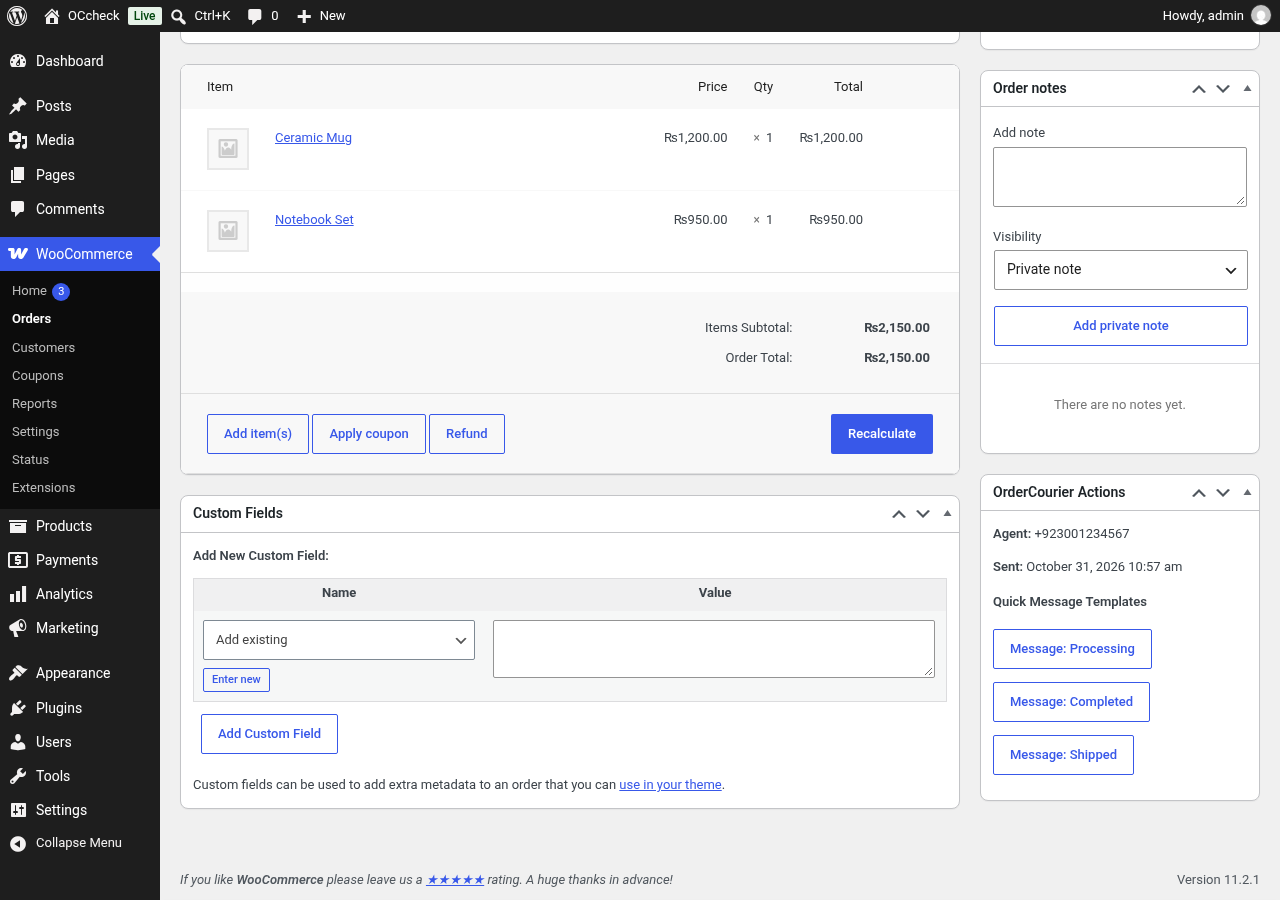
- An order box in the order screen showing the number the order was routed to.
- Supports High-Performance Order Storage (HPOS).
- Rate limiting for the order endpoints.
- Personal data export and erasure through the WordPress privacy tools, and a data retention setting.
- Developer hooks, documented in docs/hooks.md inside the plugin.
How it works
- The customer adds products to the cart.
- The customer clicks the OrderCourier button on the product, cart or checkout page.
- In order-first mode, OrderCourier creates the WooCommerce order.
- A WhatsApp chat opens with the message filled in, addressed to your number.
- The customer sends the message, and you handle the order in WooCommerce as usual.
The customer always sends the message themselves from their own WhatsApp. OrderCourier does not send messages on your behalf and does not connect to any WhatsApp API.
OrderCourier Pro (optional)
A separate paid add-on, OrderCourier Pro, is available from the plugin author for stores that need agent routing rules, office hours, chat reports and a mini-cart button. It is not required: everything listed above works in this free plugin on its own, with no limits or time restrictions.
External services
This plugin links to WhatsApp, a service provided by WhatsApp LLC (Meta Platforms, Inc.). It is needed to open the chat with your store’s phone number.
- What is sent: only when a customer clicks an OrderCourier button or the floating chat button, their browser opens a https://wa.me/ link. The link contains your store’s phone number and the message text, which can include the items, prices, totals, the order number, a payment or order link, and the customer details used in your message template (such as name, phone, email and address).
- When: only after that click. The plugin makes no server-side requests to WhatsApp and loads no WhatsApp scripts, fonts or images.
- WhatsApp Terms of Service: https://www.whatsapp.com/legal/terms-of-service
- WhatsApp Privacy Policy: https://www.whatsapp.com/legal/privacy-policy
OrderCourier is not affiliated with, endorsed by or sponsored by WhatsApp or Meta. WhatsApp is a trademark of its respective owner.
The plugin also adds a suggested paragraph to your site’s privacy policy guide (Settings > Privacy) that describes this.
Installation
- Make sure WooCommerce 9.0 or later is installed and active.
- In WordPress, go to Plugins > Add New, search for “OrderCourier”, then install and activate it. Or upload the
ordercourierfolder to/wp-content/plugins/and activate it on the Plugins screen. - Go to WooCommerce > Settings > OrderCourier.
- Enter your default phone number in international format, for example +923001234567.
- Choose the mode (create the order first, or message only), then adjust the buttons, templates and widget to suit your store.
- Optional: set a different number on a product (Product data > General) or on a product category.
FAQ
Do I need a WhatsApp Business account?
No. Any WhatsApp number that can receive messages works. The plugin only opens a chat link; it does not use the WhatsApp Business API.
What phone number format should I use?
Use the international format with the country code, for example +923001234567. Local formats such as 0300 123 4567 are converted using your store’s base country, but the international format is the safest.
Does it create real WooCommerce orders?
Yes, in the default “Create order first” mode. The order uses the status you choose in the settings (Pending payment by default). In direct mode no order is created.
Does it work with variable products and product add-ons?
Yes. Variation attributes and the item meta that add-on plugins store on cart items are included in the message.
Does it work with the Cart and Checkout blocks?
Yes. It works with both the classic shortcode pages and the Cart and Checkout blocks.
Can customers request a quote?
Yes. Products with no price are sent as a quote request. In order-first mode an order is created that you can price and then send a payment link for.
Does the plugin send data to external servers?
No server-side requests are made. The only external link is the wa.me chat link that opens when a customer clicks a button. See “External services” above.
How do I include custom checkout fields in order messages?
Go to WooCommerce > Settings > OrderCourier > Advanced, and add your custom field keys and labels in the “Custom Checkout Fields” setting. Format: meta_key|Label (one per line). For example:
_delivery_notes|Delivery Notes
_gift_message|Gift Message
Then add the {checkout_fields} placeholder to your message template. Only fields you explicitly list will be included.
How are chat orders recorded for payment?
By default, chat orders are recorded with the Cash on Delivery payment method (if COD is enabled in your store). This ensures proper payment tracking in WooCommerce. You can customize the payment method label in OrderCourier settings under General > Payment Method Label. If you prefer to use a custom OrderCourier payment gateway instead of COD, disable the “Record as Cash on Delivery” setting.
Chat orders are not marked as paid while they are Pending, On hold or Processing. They count as paid when you mark them Completed, the same way WooCommerce handles its own Cash on Delivery orders. This applies to new orders; orders created before 1.0.1 are not changed.
How do I record a chat order that was paid online?
Open the order and use the “Payment received as” box. Choose Online payment and add the provider (for example JazzCash, Easypaisa or bank transfer), the transaction reference and an optional note, then save or change the order status. The order is marked as paid, the reference is saved as the transaction ID, and customers see “Paid online” as the payment method. The provider, reference and note are only shown in the admin. Cash on Delivery stays the default, so riders know to collect cash.
Do I need OrderCourier Pro?
No. The free plugin works on its own. Pro is an optional add-on for agent routing rules, office hours, reports and a mini-cart button.
Where can I get support?
Please use the support forum for this plugin on WordPress.org.
Screenshots



Changelog
1.0.1 – 2026-11-20
- Added: Payment method label setting to customize payment method title for chat orders.
- Added: Record as Cash on Delivery setting to use WooCommerce COD gateway instead of OrderCourier gateway.
- Fixed: Chat orders are no longer marked as paid while Pending, On hold or Processing; they count as paid when Completed.
- Fixed: Admin order screen no longer shows an incorrect “Paid” line for unpaid chat orders.
- Improved: Payment method on customer emails now shows the configured label (default: Cash on Delivery).
- Added: “Payment received as” box on the order screen for chat orders: Cash on Delivery (default) or Online payment, with provider, transaction reference and note for your records.
- Fixed: Customers no longer see “Chat Order” or “Confirm via Chat” as the payment method in emails, on the thank-you page or in My Account, including for orders placed with the chat checkout option.
1.0.0 – 2026-10-31
- Initial release.
- Order-first mode creates WooCommerce orders before opening chat.
- Direct mode for message-only flow without creating orders.
- Quote request support for products without prices.
- Per-product settings: mark as quote-only or hide chat button.
- Message templates with extensive placeholders including {checkout_fields}.
- Custom checkout fields support via allowlist configuration.
- Theme-friendly buttons with width, color, and CSS class options.
- Buttons on product, shop, cart, checkout, and thank-you pages.
- Optional floating chat widget.
- Multiple phone numbers per product or category.
- Optional admin email notifications for chat orders.
- HPOS (High-Performance Order Storage) support.
- Cart and Checkout block compatibility.
- Rate limiting and privacy tools integration.
- Developer hooks documented in docs/hooks.md.