

Description
Oscar AI writes and publishes SEO content for you. This plugin is the bridge between Oscar AI and your WordPress site.
Oscar AI (https://oscar-seo.ai) is a content platform that grows your traffic from Google, ChatGPT and other search engines, without effort. It analyses your site and your competitors, builds a keyword strategy tailored to your niche, researches the best-ranking articles for each keyword, writes optimised articles with internal and external links and generated visuals, scores them for SEO and GEO in real time, and publishes them to your site on a schedule.
What the plugin does
- One-click connection. Install, click “Connect to Oscar”, sign in to Oscar AI, pick your company. Done. No Application Password, no token to copy.
- Automatic publishing. Oscar AI creates or updates posts with title, content converted to blocks, excerpt, slug, categories, tags and a featured image, as drafts or published posts according to the publish mode you choose in Oscar AI.
- Article classification. Choose in Oscar AI the categories, tags or custom taxonomies each article is filed under. Only existing terms are used; the plugin never creates new ones for this.
- Author and layout. Choose in Oscar AI which account articles are attributed to and which post template of your theme they use. Without a choice, new posts go to the account named like the author set in Oscar AI when there is one, otherwise to the site’s first administrator, with the theme’s default template; updated posts keep their current author and template.
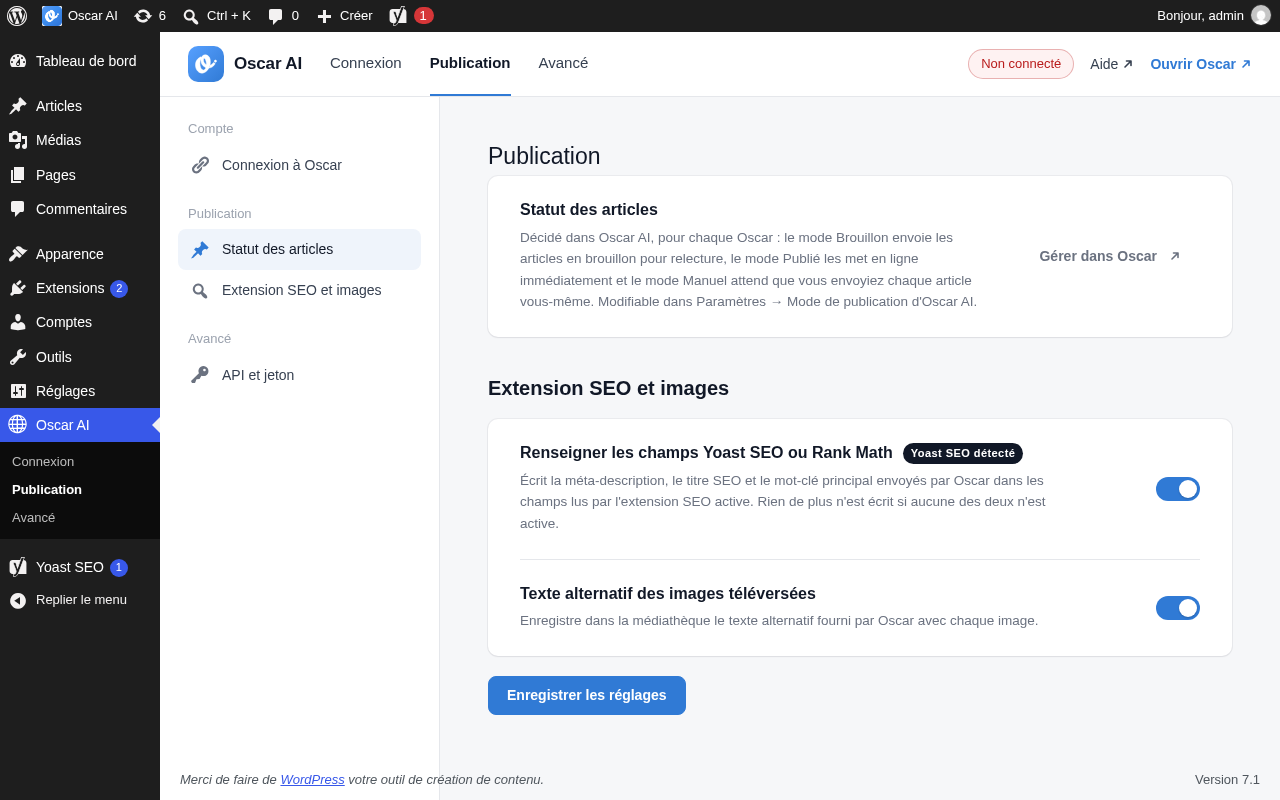
- SEO plugin integration. Meta description, SEO title and focus keyword are written into Yoast SEO or Rank Math when one of them is active, so your existing SEO setup keeps working.
- Brand styling. The stylesheet Oscar AI sends with each article (heading and link colours, table borders) is applied to those posts only.
- Structured data. Article JSON-LD sent by Oscar AI is always injected into the page head, unless Yoast SEO or Rank Math already manages the schema.
- Media library. Images arrive in your Media Library with their alternative text.
- Full control. A clear settings screen shows the linked Oscar AI company, recent publications, two publishing switches, and a Disconnect button that revokes access instantly.
How Oscar AI works
- Complete analysis of your site. Oscar AI studies your pages, your niche and your competitors.
- Content strategy. It builds a personalised keyword list and an editorial calendar.
- Writing and integration. Articles are written, optimised, illustrated and published to WordPress through this plugin.
Security first
- The connection uses a dedicated token generated with a cryptographically secure random source. Only its hash is stored in your database.
- Every request from Oscar AI is authenticated with a
Bearertoken compared in constant time. No valid token, no access. - Every REST route has an explicit permission check and requires the connection token or a single-use pairing code, except
oscar/v1/connect-entry, which returns no site data and only tells Oscar AI that the home page accepts connection requests. The plugin also answers two unauthenticated addresses: the IndexNow key file (/<key>.txt), which returns the key Oscar AI set and nothing else, and the connection link on the home page (/?oscar_connect=1), which only sends an administrator to the connection screen and asks anyone else to log in. - All admin actions are nonce-protected and require the
manage_optionscapability. - The plugin can only publish posts, add images (JPEG, PNG, GIF, WebP, AVIF, over HTTPS), list or assign the existing terms of public or admin-visible post taxonomies exposed to the REST API, list the accounts that can write posts (ID and display name only) and the post templates of the active theme, and it only reads, updates or trashes posts it created itself; shortcodes in incoming content are removed. It cannot change your users, settings, plugins or themes, and has no access to your other content.
Oscar AI is a paid service with a free trial. An Oscar AI account is required to use this plugin.
External services
This plugin connects your WordPress site to Oscar AI (https://oscar-seo.ai), a third-party content platform that you must have an account with. The connection is initiated by you: you install this plugin and click “Connect to Oscar”, or paste a connection token into your Oscar AI account.
What data is exchanged and when:
- Oscar AI calls this site’s REST API (the
oscar/v1endpoints) using the connection token, to verify the connection and to create or update posts (title, content, excerpt, slug, status, categories, tags, meta description, SEO title, focus keyword, structured data, date of the next planned publication, terms the post is filed under). Oscar AI also reads the list of public or admin-visible post taxonomies exposed to the REST API and their terms (ID, slug and name), so you can choose in Oscar AI how articles are classified. Since 1.4.0, Oscar AI also reads the accounts that can write posts (ID and display name) and the post templates of the active theme (slug and name), and sends with each article the author and template you chose, or the author name set in Oscar AI, so you can choose in Oscar AI who articles are attributed to and which layout they use. - IndexNow (https://www.indexnow.org), a protocol shared by Microsoft Bing and other participating search engines, lets Oscar AI notify them when it publishes an article, so the page is crawled sooner. Oscar AI sends a random IndexNow key to this site’s
oscar/v1/indexnow-keyendpoint (added in 1.3.0); the plugin stores it and serves it in plain text, without authentication, athttps://<your-site>/<key>.txt, so search engines can verify that Oscar AI may submit URLs for this site. Oscar AI then sends the URLs of the articles it publishes, with that key, to IndexNow. The plugin itself never contacts IndexNow. IndexNow terms: https://www.indexnow.org/terms. Microsoft privacy statement: https://privacy.microsoft.com/privacystatement. - When a post includes images, the plugin downloads those images from the URLs Oscar AI provides and adds them to your Media Library.
- When you click “Connect to Oscar” (added in 1.2.0), your browser is redirected to the Oscar AI app (https://beta.oscar-seo.ai) with your site URL, your site’s REST base URL and a single-use pairing code valid for 10 minutes. Oscar AI’s server then calls this site’s
oscar/v1/pairendpoint with that code, along with the name of your Oscar AI company, the email of your Oscar AI account and a link to that company’s page in Oscar AI (shown on the settings screen only), and receives a freshly generated connection token, your site URL, REST base URL, site name and plugin version. The plugin itself sends nothing: the only transfer is the response to that one request, and only while a pairing you started is pending. - When you use the “Authorize Oscar” button (added in 1.1.0, shown when you arrive from Oscar AI), the plugin sends a freshly generated connection token, your site URL and your site’s REST base URL to the Oscar AI callback address that started the authorization. This outbound request happens only when you click “Authorize Oscar”; it is never sent automatically or in the background.
- Apart from those two connection flows and the image downloads above, the plugin does not send your site’s data to Oscar AI, does not track your site or its visitors, and makes no scheduled or background requests. The connection can be revoked at any time with the “Disconnect” button or by regenerating the token.
By connecting, you agree to Oscar AI’s Terms of Service (https://oscar-seo.ai/cgv) and Privacy Policy (https://oscar-seo.ai/confidentialite).
Installation
- Upload the
oscar-seo-connectorfolder to/wp-content/plugins/, or install the plugin through Plugins → Add New by searching for “Oscar AI”. - Activate the plugin through the Plugins screen.
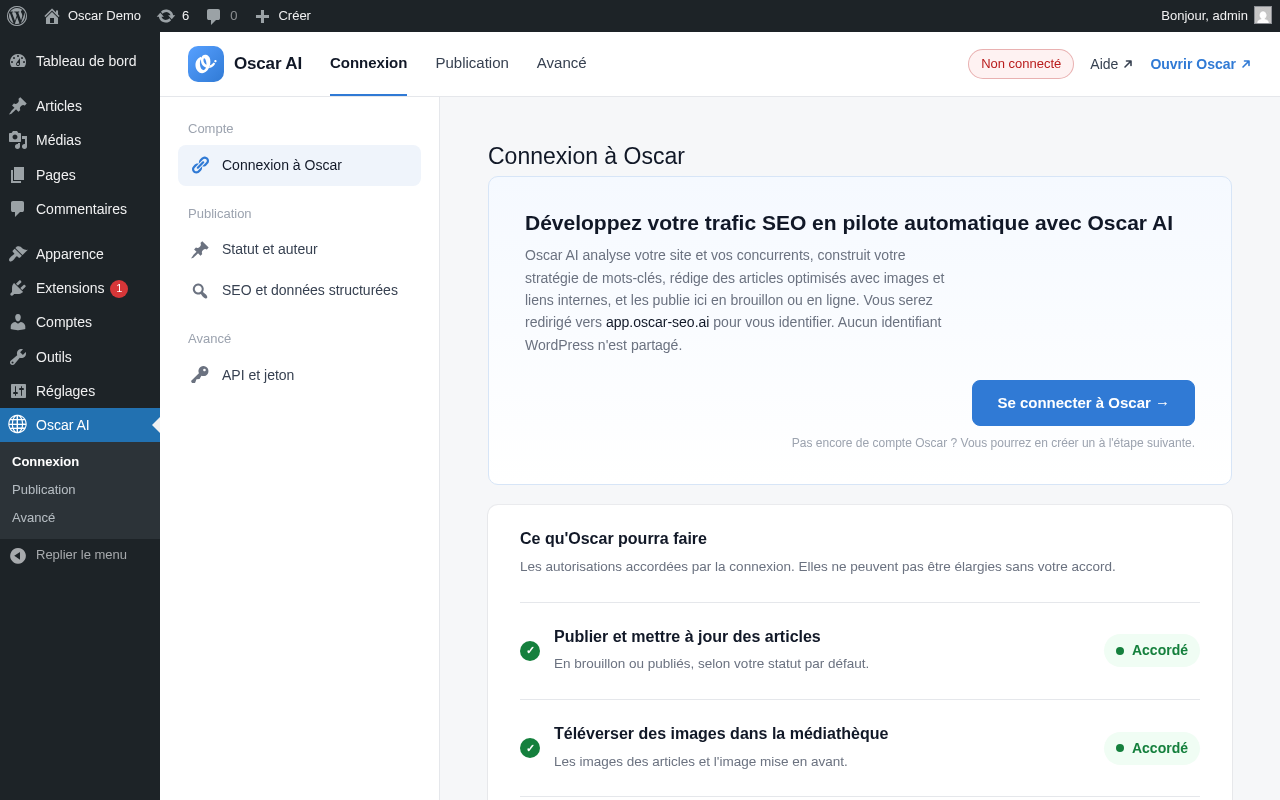
- Go to Oscar AI in the admin menu and click Connect to Oscar.
- Sign in to Oscar AI (or create an account), pick the company this site belongs to, and you are done: the status switches to “Connected”.
Manual alternative, for custom integrations: open Oscar AI → Advanced, copy the REST base URL and the connection token (the token is only shown once, right after it is generated), and paste both values into Oscar AI’s WordPress connection settings.
FAQ
Do I need an Oscar AI account?
Yes. Oscar AI is a paid service with a free trial. Create your account at https://oscar-seo.ai, then connect this site from the plugin’s screen.
Where is my connection token stored?
Only a SHA-256 hash of the token is stored in the WordPress options table. The plaintext token is never persisted; it is shown once, immediately after it is generated or regenerated, and cannot be retrieved afterwards. If you lose it, use Regenerate.
What happens if I regenerate the token or click Disconnect?
A brand-new token is generated and its hash replaces the old one, or the token is removed entirely. Any system still using the previous token immediately gets 401 Unauthorized responses. Oscar AI shows the site as disconnected and lets you reconnect in one click.
Does this work with Yoast SEO or Rank Math?
Yes. If either plugin is active, the meta description, SEO title and focus keyword sent by Oscar AI are also written to that plugin’s own fields. You can turn this off on the Publishing tab. If neither is active, nothing extra happens.
Does this plugin send any data anywhere on its own?
It does not phone home, track the site or its visitors, or schedule any background requests. It makes an outbound request in only two cases, both under your direct control:
- When you click “Authorize Oscar” after arriving from Oscar AI, it sends a freshly generated connection token, your site URL and REST base URL to the Oscar AI callback that started the authorization, to establish the connection.
- When an authenticated publish or media request references an image URL (
featured_image_urlon publish, orsource_urlon the media endpoint), it downloads that image into the Media Library — the standard WordPress media sideload.
The “Connect to Oscar” button makes no outbound request at all: it redirects your browser to Oscar AI with your site URL, its REST base URL and a single-use pairing code, and Oscar AI’s server then calls this site once to exchange that code for a token. Outside of these cases, the plugin only responds to authenticated requests initiated by Oscar AI (or by anyone holding a valid token) and sends no data on its own. The public exceptions are the IndexNow key file at /<key>.txt, which only returns the key Oscar AI stored so that search engines can verify the URLs Oscar AI submits for this site, and the oscar/v1/connect-entry endpoint, which returns no site data and only tells Oscar AI that the home page accepts connection requests.
What is a pairing code?
A random, single-use secret created when you click “Connect to Oscar”. Only its hash is stored, for at most 10 minutes. Oscar AI exchanges it once for the real connection token; a reused, expired or wrong code is refused. Your site must be served over HTTPS to use this flow.
Can I still use Application Passwords alongside this plugin?
Yes, they are independent. This plugin adds its own narrow, token-based API rather than replacing WordPress’s core REST authentication.
Screenshots


Changelog
1.5.0
- Added: connection started from Oscar AI on sites whose administration or login page is not at the default address (WordPress in a subfolder, renamed admin, hidden login page). Oscar AI opens the connection on the home page (
/?oscar_connect=1) and the plugin sends you to the authorization screen, or to the login page first when it is the standard one. A login page hidden by a security plugin is never revealed: you are asked to log in, then to start the connection again from Oscar AI. - Added: public
GET /oscar/v1/connect-entryendpoint, without any site data, telling Oscar AI that the home page accepts connection requests. - Changed: “Connect to Oscar” also sends your site’s REST base URL to Oscar AI, so the connection works when a security plugin renames the REST prefix and blocks
?rest_route=.
1.4.0
- Added: author and layout choice. Oscar AI can list the accounts allowed to write posts (
GET /oscar/v1/authors, ID and display name only) and the post templates of the active theme, classic PHP templates and site editor templates (GET /oscar/v1/post-templates), and send the chosen account and template with each article through the newauthor_idandtemplatepublish parameters. Without a chosen account, the post goes to the account allowed to write posts whose display name or slug matches theauthor_namesent by Oscar AI, when there is one. - An author who no longer exists or can no longer write posts, or a template the theme no longer offers, is ignored: the article is still published, a new post going to the site’s first administrator or using the default template and an updated post keeping its current author or template, and the publish response lists it under
ignored_choices.
1.3.0
- Added: article classification. Oscar AI can list the site’s public or admin-visible post taxonomies and their existing terms (
GET /oscar/v1/taxonomies,GET /oscar/v1/taxonomies/{taxonomy}/terms) and file each article under the terms you chose, through the newtaxonomy_termspublish parameter. - Added: IndexNow support, so Oscar AI can notify Bing and other IndexNow search engines when it publishes an article. New
POST /oscar/v1/indexnow-keyendpoint storing the key sent by Oscar AI, served in plain text at/<key>.txt. The plugin never contacts IndexNow itself.
1.2.2
- Fixed: “Connect” started from Oscar AI now completes. The new token is active while Oscar AI verifies it, and the previous one is restored if the connection fails.
1.2.1
- Fixed: “Connect to Oscar” and “Open Oscar” now point to the Oscar AI app at https://beta.oscar-seo.ai. The previous default address did not resolve, so the connection could not be started from WordPress.
1.2.0
- Renamed to Oscar AI, with a new admin interface: a full-width screen with Connection, Publishing and Advanced tabs.
- Connect from WordPress: a single “Connect to Oscar” button starts a pairing handshake, no token to copy. New
POST /oscar/v1/pairendpoint, single-use code, 10-minute expiry, HTTPS required. - Connected view shows the linked Oscar AI company, the number of articles published, drafts awaiting review, the date of the next publication Oscar has planned and the recent publications, with a direct link to the company in Oscar AI.
- “Disconnect” button revokes the token and forgets the linked account.
- Posts are attributed to the site’s first administrator; the default author setting is removed.
- The post status now always follows the publish mode chosen in Oscar AI (Draft, Published or Manual); the plugin-side default status setting is removed.
- Articles arrive as native blocks (group, paragraphs, headings, lists, images, table) instead of a single HTML block, so they can be edited normally in the block editor. Plain HTML from custom integrations is still converted.
- Images are downloaded once: the media endpoint accepts an optional Oscar media identifier and returns the existing attachment when the same image is sent again, so republishing no longer duplicates files in the Media Library.
- Article styling now survives publishing: the stylesheet Oscar AI sends is stored per post and printed in the head instead of being stripped from the content.
- Publishing switches for filling Yoast SEO / Rank Math fields and saving image alt text.
- Token and REST base URL moved to the Advanced tab; the manual connection flow is unchanged.
1.1.0
- One-click connection: authorize Oscar directly from the WordPress admin — no more token copy/paste.
- New REST endpoints: read a post (
GET /post/{id}) and change a post status (POST /post/{id}/status). - The publish endpoint accepts a featured media ID, an SEO title, a focus keyword and JSON-LD structured data.
- The media endpoint accepts an alt text for uploaded images.
- French (fr_FR) translation bundled; all admin strings are translatable.
1.0.0
- Initial release: connection token management,
oscar/v1REST API (ping, publish, media, delete), settings screen, Yoast/Rank Math meta description support.