


Description
Parcelflare connects your WooCommerce store to Royal Mail Click & Drop using the official Click & Drop API. New orders are sent to your Click & Drop account automatically, so you can print Royal Mail shipping labels without copying customer addresses by hand.
Who it is for
UK WooCommerce store owners who ship with Royal Mail and already use (or want to use) Click & Drop for labels, rather than typing every order into Click & Drop or relying on the built-in sales-channel import alone.
Features
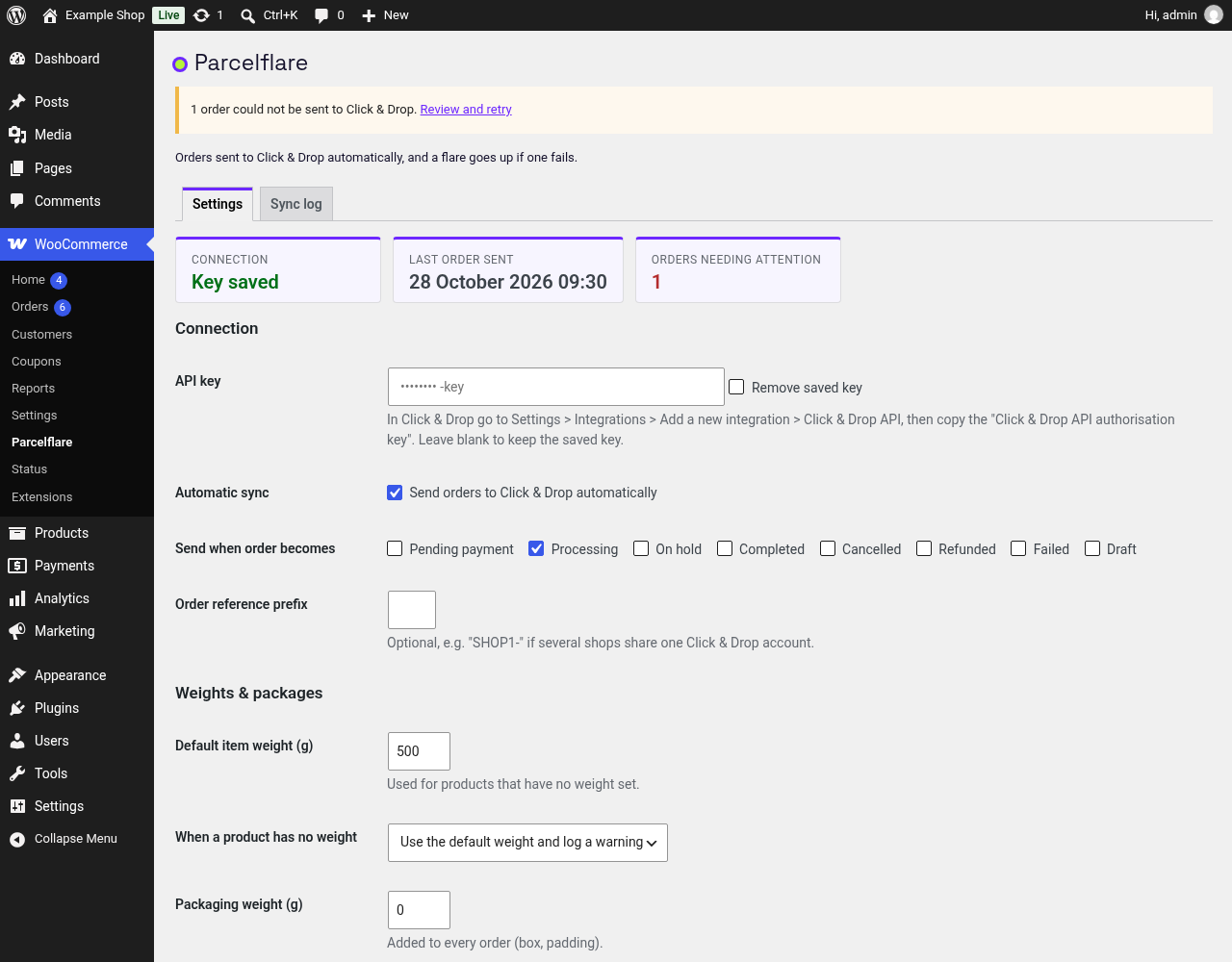
- Automatic sync when an order reaches the statuses you choose (default: Processing).
- Background queue (Action Scheduler) with automatic retries and exponential back-off, honouring API rate limits. You choose how many attempts to make.
- Duplicate protection: after a timeout or lost response, the order is looked up by reference before it is created again. If that lookup fails, the order is held for a manual check instead of being created twice.
- Email digest and admin notice when an order fails to sync, with a one-click retry.
- Sync log page with filtering, search and CSV export. You choose how long to keep it, or keep it forever.
- Health check every 6 hours: warns you if the API key stops working and sends any recent order that was missed.
- Default parcel weight for products with no weight, and a 30 kg per-parcel safety check.
- International orders: customs line items, HS codes, country of origin and IOSS for EU destinations.
- Map WooCommerce shipping methods to Click & Drop service codes.
- Manual “Send to Click & Drop” order action and bulk action.
- Works with High-Performance Order Storage (HPOS) and legacy order storage.
All of the above is free, with no limits; you only need your own Click & Drop API key.
Parcelflare Pro
Parcelflare Pro is a separate, paid add-on from the same author. It is not needed for any of the features above. Pro writes Royal Mail tracking numbers back onto your WooCommerce orders, and can send the customer a tracking-link note. It can also optionally mark the order Completed, and optionally warn you about a likely size or weight surcharge before the order is sent. Details and current prices: https://parcelflare.pages.dev
Royal Mail and Click & Drop are trademarks of Royal Mail Group Ltd. Parcelflare is an independent product and is not affiliated with, endorsed by or sponsored by Royal Mail Group Ltd.
External services
This plugin connects to the Royal Mail Click & Drop API (https://api.parcel.royalmail.com/api/v1) to create orders in your Click & Drop account and to check your API key (when you press “Test connection”, and every 6 hours while the health check is on).
- What is sent: the order number, date, customer name, shipping (and billing) address, email address and phone number if present, order items (name, SKU, quantity, value, weight, customs data) and order totals.
- When: whenever an order reaches one of the trigger statuses you configure, or when you send it manually.
- The health check uses your API key to confirm it still works, and sends any recent order that should have been sent but was missed (the same order data as above). It can be turned off on the settings page.
- Data is only sent once you have entered your own Click & Drop API key and enabled sync.
Royal Mail Click & Drop terms: https://www.royalmail.com/terms-and-conditions
Royal Mail privacy notice: https://www.royalmail.com/privacy-notice
Installation
- Install and activate WooCommerce.
- Install and activate this plugin.
- In Click & Drop, go to Settings > Integrations, add a “Click & Drop API” integration and copy the API key.
- In WordPress go to WooCommerce > Parcelflare, paste the key, press “Test connection”, then tick “Enable sync”.
FAQ
Do I need a Click & Drop account?
Yes. Click & Drop is free to use with a Royal Mail business account; you pay Royal Mail for postage as usual. Parcelflare uses the Click & Drop API key from Settings > Integrations inside Click & Drop.
Is this the same as Royal Mail’s built-in WooCommerce sales channel?
No. Royal Mail’s own channel pulls orders into Click & Drop over the WooCommerce REST API. Parcelflare works the other way: your store pushes each order to Click & Drop with your API key. Many stores use Parcelflare when the built-in channel disconnects, stops importing, or is not available for their account.
Does this calculate Royal Mail shipping rates at checkout?
No. Parcelflare syncs paid (or ready-to-ship) orders into Click & Drop for label printing. For live Royal Mail rates at cart and checkout, use a separate shipping-rates plugin alongside it.
What happens if Click & Drop is down?
The order stays in the queue and is retried automatically with increasing delays. If it still fails you get an email and an admin notice with a retry button.
Will an order ever be sent twice?
The plugin stores the Click & Drop order identifier on the WooCommerce order and, after any uncertain failure such as a timeout, checks Click & Drop for the order reference before creating it again. If that check fails, the order is not created.
How many times is a failed order retried?
10 times by default, with the wait between attempts growing from about 2 minutes to at most 6 hours. Change “Retry attempts” under WooCommerce > Parcelflare to any number you like. Problems that retrying cannot fix, such as a rejected address, are flagged straight away instead.
How long is the sync log kept?
90 days by default. Change “Keep log for (days)” to any number, or 0 to keep it forever. Use “Export log (CSV)” on the Sync log tab to download it.
What about products without a weight?
Set a default item weight on the settings page. Orders over 30 kg are flagged rather than sent.
Does it work with HPOS?
Yes. It is tested with WooCommerce High-Performance Order Storage and with classic order posts.
Screenshots


Changelog
0.1.4
- Added a short Parcelflare Pro section to the readme, with a link to the product page.
- Optional dismissible note about Pro on the Parcelflare settings page, a Get Pro link on the Plugins screen, and an optional tip on orders that have been sent.
- Thanks to PeepSo for flagging the failed-lookup bug that was fixed in 0.1.3. After an uncertain send, if the reference lookup fails, the order is held as outcome unknown and needs a manual check, instead of being created again.
0.1.3
- After an uncertain send, a failed reference lookup no longer creates the order again. The order is held as outcome unknown and needs a manual check. Automatic retries stop. Send to Click & Drop looks the order up again and creates it only when Click & Drop says it is not there.
0.1.2
- Readme and plugin name clarified for Royal Mail Click & Drop / WooCommerce shipping-label search.
- Optional dismissible review prompt after 10 successful syncs and 7 days (Parcelflare and WooCommerce order screens only).
- Install timestamp recorded for the review milestone; cleaned up on uninstall.
0.1.1
- Retry attempts and log retention are now settings with no upper limit (log can be kept forever).
- Added CSV export of the sync log.
- Added a health check that detects a rejected API key and sends recent orders that were missed.
- The setup reminder now appears only on the Dashboard, Plugins and WooCommerce screens and can be dismissed.
- Corrected menu name in messages (WooCommerce > Parcelflare).
- Deleting or trashing an order now clears its failure alert.
0.1.0
- First release.