


Description
Payexa (pexn.ir) is an Iranian card-to-card payment gateway with automatic confirmation. This plugin adds Payexa to the WooCommerce checkout. The customer pays with an ordinary card-to-card transfer in their own banking app. Payexa confirms the transfer automatically, and the order is marked as paid. Nobody has to check receipts or bank messages by hand.
How a card-to-card payment is confirmed:
- At checkout the customer goes to the Payexa payment page, which shows the card number and the exact amount to transfer.
- Each payment gets a unique amount, so every deposit can be matched with the right order.
- The bank’s deposit SMS for the receiving card reaches Payexa through the Payexa Uploader Android app.
- Payexa matches the deposit with the pending payment and sends the customer back to the store. The plugin verifies the payment with Payexa before the order is marked as paid.
- Each payment stays open for 30 minutes.
Payexa offers two gateway types:
- Personal card-to-card: the money goes directly to the merchant’s own card.
- Admin card-to-card: the money is paid to Payexa’s cards and settled to the merchant’s account after 12 working hours.
No eNamad or tax code is needed to start. The merchant account is activated after identity verification and a review by the Payexa support team. The sandbox shows the whole payment flow without real money.
Useful links:
- Payexa website: https://pexn.ir
- WooCommerce setup guide (Persian): https://pexn.ir/tutorials/woocommerce-card-to-card-gateway-setup
- How automatic card-to-card confirmation works (Persian): https://pexn.ir/blog/how-card-to-card-auto-confirm-works
- API documentation: https://pexn.ir/doc
Plugin features:
- Sends payment requests to Payexa and redirects the customer to the hosted payment page.
- Verifies the transaction before marking the WooCommerce order as paid.
- Supports an explicit production or sandbox payment environment.
- Stores transaction details in WooCommerce order meta for support and reconciliation.
- Adds frontend checkout assets only on checkout and order received pages.
- Supports the classic WooCommerce checkout and the WooCommerce blocks checkout.
- Provides a Persian RTL interface for checkout and plugin settings.
- Automatically detects the WooCommerce store currency and converts Toman amounts to Rial before sending to the gateway. The currency setting can also be set manually.
How it works:
- The plugin creates a payment request through the Payexa API.
- The customer is redirected to Payexa to complete payment.
- Payexa returns the customer to WooCommerce through the callback endpoint.
- The plugin verifies the transaction with Payexa and updates the order status.
Requirements:
- WordPress 6.4 or newer
- WooCommerce 8.0 or newer
- A Payexa merchant account and API key for live payments
فارسی
پیاکسا درگاه پرداخت کارت به کارت با تأیید خودکار است. با این افزونه، خریدار فروشگاه ووکامرسی شما با برنامهٔ بانک خودش کارت به کارت میکند. پیاکسا واریز را از روی پیامک بانک شناسایی میکند و پرداخت را خودکار تأیید میکند. سفارش پس از تأیید پرداخت «پرداختشده» میشود و دیگر لازم نیست رسیدی را بررسی کنید.
- هر پرداخت مبلغ یکتا دارد تا واریز با سفارش درست تطبیق داده شود.
- مهلت هر پرداخت ۳۰ دقیقه است.
- دو نوع درگاه دارد: کارت به کارت شخصی که وجه مستقیم به کارت خود فروشنده واریز میشود، و کارت به کارت ادمین که وجه به کارتهای پیاکسا واریز و پس از ۱۲ ساعت کاری تسویه میشود.
- برای شروع، اینماد و کد مالیاتی لازم نیست. حساب پس از احراز هویت و بررسی تیم پشتیبانی فعال میشود.
- سندباکس دارد و کل مسیر پرداخت را بدون پول واقعی نشان میدهد.
- با صفحهٔ پرداخت معمولی و بلوکی ووکامرس کار میکند و مبلغ تومان را خودکار به ریال تبدیل میکند.
آموزش نصب و راهاندازی: https://pexn.ir/tutorials/woocommerce-card-to-card-gateway-setup
سایت پیاکسا: https://pexn.ir
Third-Party Services
This plugin connects to the external Payexa payment service to create and verify payment transactions.
What the service is used for:
- Creating payment requests for WooCommerce orders
- Redirecting the customer to the Payexa hosted payment page
- Verifying completed transactions before the order is marked as paid
What data is sent when a customer starts payment:
- Order amount
- Callback URL
- A unique merchant-side order reference
What data is sent when the plugin verifies a payment:
- Payexa request order ID returned by the payment request API
- The unique verification token returned by Payexa as amount_unique
When data is sent:
- A payment request is sent when the customer places an order and chooses this gateway.
- A verification request is sent after Payexa returns the customer to the WooCommerce callback URL.
Service endpoints used by the plugin:
- https://pay.pexn.ir/v1/payment/request
- https://pay.pexn.ir/v1/payment/verify
- https://sandbox.pexn.ir/v1/payment/request
- https://sandbox.pexn.ir/v1/payment/verify
Merchant API keys are stored in WordPress and sent server-to-server in the X-API-KEY header.
Provider policies:
- Terms of service: https://pexn.ir/terms
- Privacy policy: https://pexn.ir/privacy
Installation
- Upload the
payexa-gatewayfolder to the/wp-content/plugins/directory. - Activate the plugin from the WordPress admin area.
- Make sure WooCommerce is installed and active.
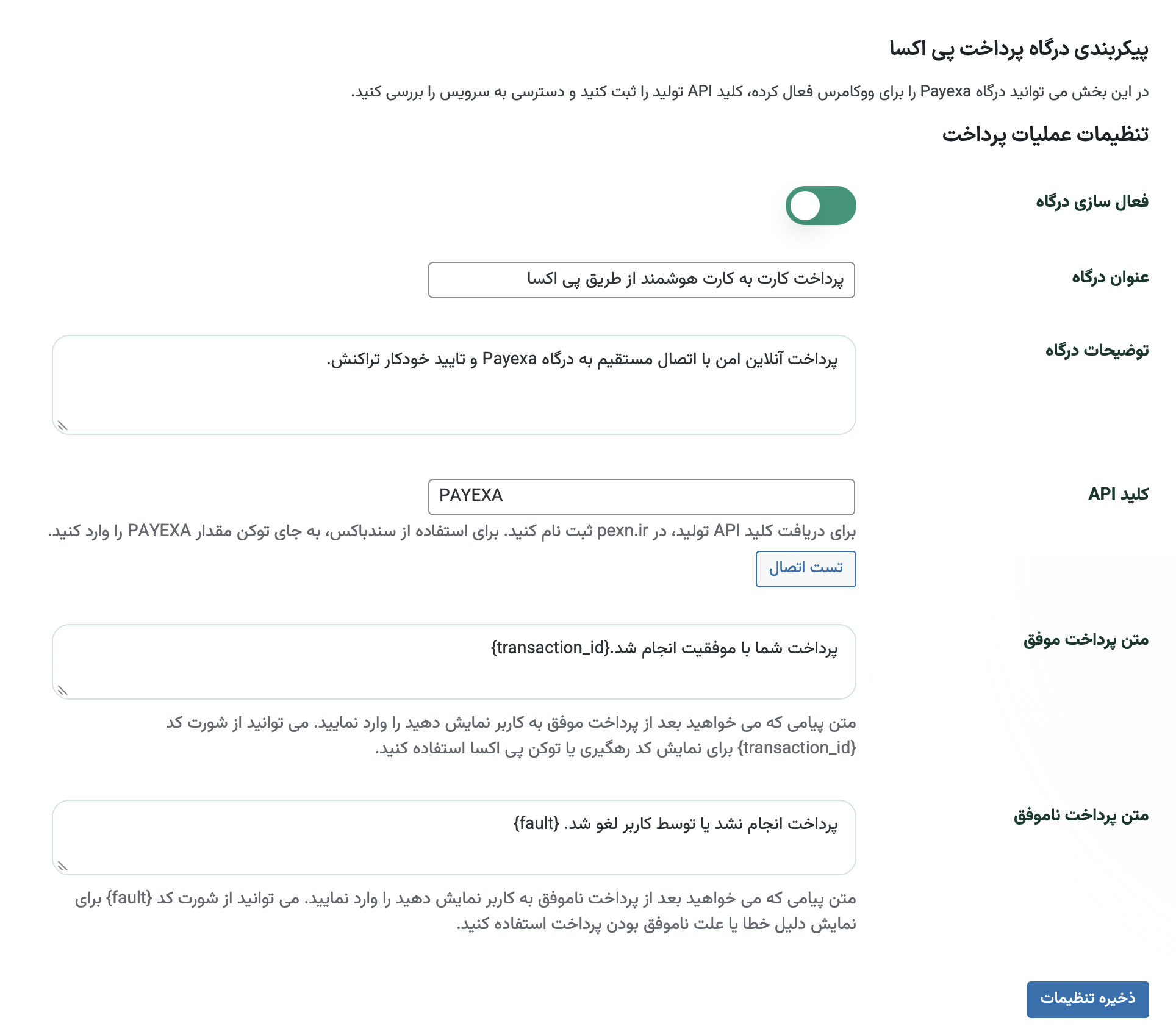
- Go to WooCommerce > درگاه پی اکسا.
- Enter your live Payexa API key in the API Key field.
- To use the sandbox, set the payment environment to Sandbox in the plugin settings.
- Enable the gateway and place a test order.
A step-by-step Persian guide is available at https://pexn.ir/tutorials/woocommerce-card-to-card-gateway-setup
FAQ
How is a card-to-card payment confirmed automatically?
The customer transfers a unique amount to the card shown on the Payexa payment page. The bank’s deposit SMS reaches Payexa through the Payexa Uploader Android app, and Payexa matches it with the pending payment. The plugin then verifies the payment with Payexa and marks the order as paid.
Do I need eNamad or a tax code?
No. A tax code is not required to start. The merchant account is activated after identity verification and a review by the Payexa support team.
Where does the money go?
With personal card-to-card, the money goes directly to the merchant’s own card. With admin card-to-card, it is paid to Payexa’s cards and settled to the merchant’s account after 12 working hours.
Does this plugin support the Payexa sandbox?
Yes. Change the payment environment to Sandbox in the plugin settings and the plugin will use the sandbox API endpoints automatically.
What do I need for live payments?
You need a Payexa merchant account and a valid live API key from https://pexn.ir.
What happens after the customer returns from Payexa?
The plugin verifies the transaction with Payexa and then updates the WooCommerce order status based on the verification result.
My store uses Toman. Will the plugin send the correct amount to Payexa?
Yes. The Payexa gateway processes amounts in Iranian Rial. The plugin includes a currency setting with three options: Auto (reads the WooCommerce currency setting and multiplies by 10 when the currency is IRT), Toman (always multiplies by 10), and Rial (no conversion). Auto is the default and works for most Persian WooCommerce stores.
Does the plugin log API activity?
Yes. It uses the WooCommerce logger for request, response, and error events.
Can I use this plugin without WooCommerce?
No. WooCommerce is a required dependency for this plugin.
When is an order marked as paid?
The order is completed only after the verification request succeeds. If Payexa reports an already verified transaction, the plugin avoids double finalization.
Screenshots



Changelog
1.0.10
- Added an editable trust message field in admin settings — the text shown below the payment method on checkout. It can be customized or left empty to hide it.
- Gateway title and description now always read from the plugin settings page, fixing inconsistency across WooCommerce versions.
1.0.9
- Fixed connection test always failing in sandbox mode because the validate endpoint does not exist on the sandbox server.
- Fixed an undefined variable in the connection test error log introduced in 1.0.8.
1.0.8
- Added automatic fallback to native PHP cURL when a third-party plugin blocks the WordPress HTTP API, ensuring payment requests reach Payexa even on restricted hosting environments.
- Fixed a potential issue where the blocks checkout payment method could be registered more than once per request.
1.0.7
- Fixed a bug where verify returning HTTP 201 (already verified) on an unpaid order left it on-hold instead of finalizing it. Orders now complete correctly when Payexa confirms the transaction was previously verified.
1.0.6
- Fixed a bug where a second callback (customer redirect) arriving after a successful payment could set the order to on-hold or failed. Orders that are already paid are now protected from any subsequent callback overwriting their status.
1.0.5
- Added a currency setting with auto-detection, Toman (IRT), and Rial (IRR) options. Toman amounts are automatically multiplied by 10 before being sent to the Payexa gateway.
1.0.4
- Added a help icon and popup guide for the API key field in the admin settings.
1.0.3
- Made the admin connection test use the current unsaved API key and environment values from the settings form.
1.0.2
- Added an explicit production or sandbox environment setting in admin.
- Made production the safe default for new installations.
- Replaced the fake connection test with API key validation through the merchant validation endpoint.
- Removed the need to enter the sandbox token in the API key field.
1.0.0
- Initial release of the Payexa gateway for WooCommerce
- Added payment request, verification, and callback handling
- Added Persian RTL settings and checkout presentation
- Added standard WooCommerce success and failure return handling