


Description
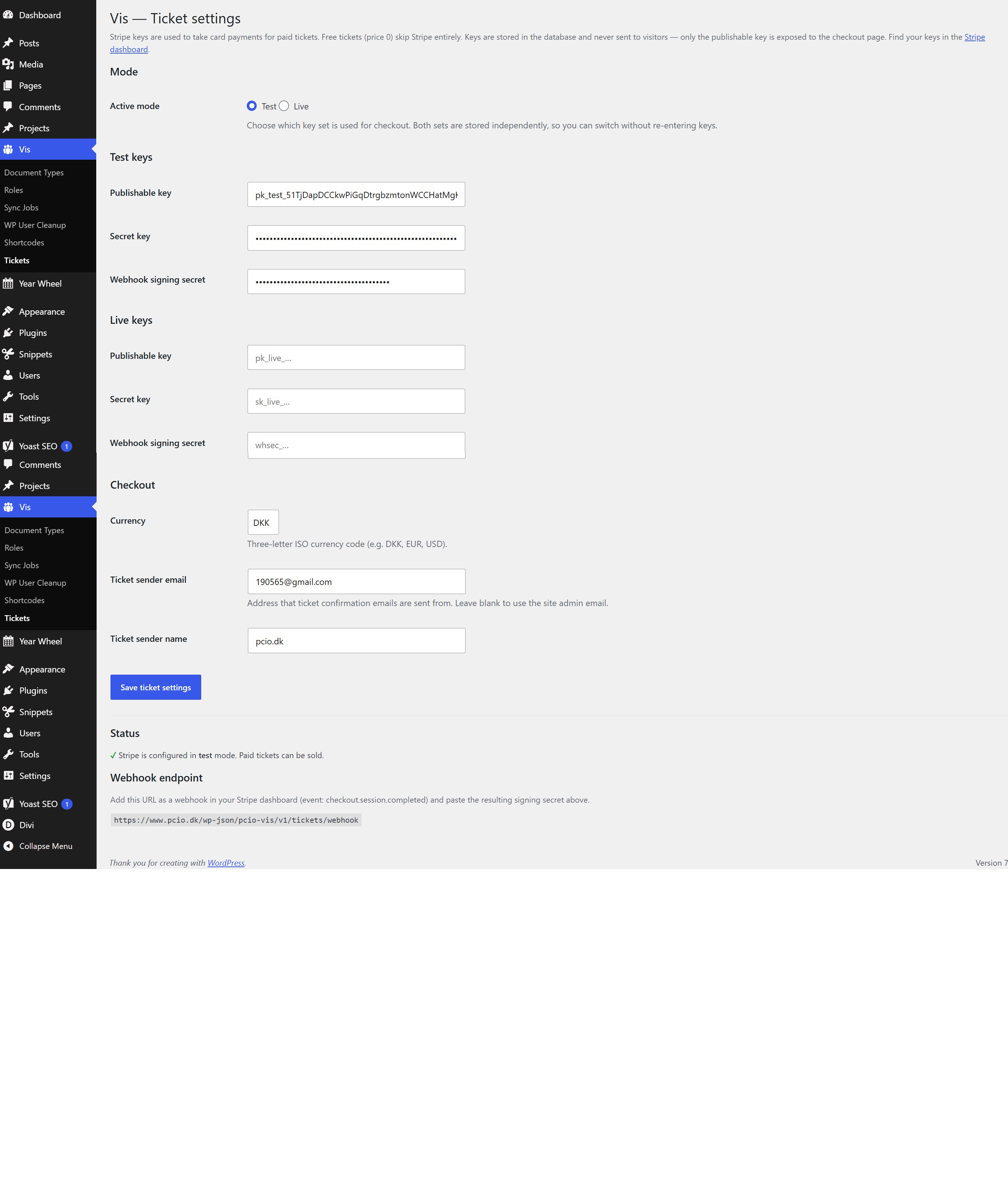
PCIO VIS Tickets is an extension for the PCIO VIS Member Event plugin. Events with a guest limit sell tickets to the public: per-event ticket types, a secure Stripe checkout, PDF tickets with QR codes, and refunds. Events without a limit keep the member join / interested / not-joining signup.
Features:
- Paid tickets via Stripe Checkout, plus free tickets.
- Per-event ticket types with prices and quantities.
- PDF tickets with QR codes for entry validation.
- Refund handling and a Ticket Orders list in Finance.
- Event reports with automatic Stripe payouts, sent as PDF to configurable receivers (new tab “Event reports” on the Finance page).
This plugin requires the PCIO VIS Member Event core plugin to be installed and active. It reuses the core plugin’s bundled Dompdf and php-qrcode libraries for PDF and QR generation.
External services
This plugin connects to the Stripe payment API (operated by Stripe, Inc.) to take card payments for paid tickets. Free tickets (price 0) never contact Stripe. Stripe is only used when you have entered your Stripe API keys under Vis admin menu.
What is sent, and when:
- When a buyer checks out a paid ticket: the plugin creates a Stripe Checkout Session by sending the order number, the ticket line items (names and amounts), the currency, the buyer’s email address, and success/cancel return URLs to
https://api.stripe.com. The buyer is then redirected to Stripe’s hosted checkout page, where they enter their card details directly with Stripe (card data never passes through this site). - When Stripe confirms payment: Stripe calls this site’s webhook endpoint; the plugin verifies the signature and records the payment reference.
- When an administrator refunds a paid order: the payment reference is sent to
https://api.stripe.comto create the refund. - When a finished event is paid out (manually or by the daily automatic check): the payout amount, currency and an internal reference are sent to
https://api.stripe.comto create a Stripe payout, and the current balance is read to make sure the event can be paid out.
Buyer name, email and phone entered at checkout are stored on this site to issue and email the tickets. Because personal data and payment data are transmitted to Stripe, please ensure your own privacy policy covers this. By using this integration you and your buyers are subject to Stripe’s terms and policies:
- Stripe Services Agreement (terms): https://stripe.com/legal/ssa
- Stripe Privacy Policy: https://stripe.com/privacy
Installation
- Install and activate the PCIO VIS Member Event core plugin first.
- Upload the
pcio-vis-ticketsdirectory to/wp-content/plugins/. - Activate the plugin in Plugins in the WordPress admin.
- Configure your Stripe keys and ticket settings under the Vis admin menu.
FAQ
Do I need Stripe?
Only for paid tickets. Free tickets work without any payment configuration.
What happens to events without a guest limit?
They keep the standard member join / interested / not-joining signup provided by the core plugin.
How do automatic event reports and payouts work?
Finished ticket events get a report (revenue, refunds, Stripe fees, net) under the “Event reports” tab on the Finance page. A daily check pays out the net amount through Stripe after the configured delay (default 3 days) when Automatic payout is enabled under Vis Tickets, and emails the PDF report to the configured receivers. When the Stripe balance is insufficient, the report is flagged “Awaiting Stripe balance” and retried the next day.
Reports, payouts and their emails are kept strictly per Stripe mode: test-mode orders only ever produce test-mode reports and test payouts (which move no real money), and report emails are only sent for live-mode reports. Switching the mode under Vis Tickets switches the whole reporting view.
Screenshots
Changelog
1.2.0
- Ticket PDF QR codes auto-select a large enough QR version for signed check-in URLs; oversized QR payloads now fall back to the short ticket code instead of aborting PDF generation.
- Accepted and rejected ticket results now render through real WordPress pages and the active theme/page builder.
- Checkout and result page improvements
- Ticket checkout now resolves through a real WordPress page and shortcode so theme headers, footers and page builders render normally.
- Ticket types now have a purchase-access setting defaulting to the event type access.
- Checkout, the event ticket box and the checkout REST endpoint enforce ticket purchase access.
- Buyers who can see the event but cannot buy any ticket see an explanation instead of a purchase button.
- The ticket box now distinguishes an access restriction from sales that have not started, ended or sold out.
- Security improvements
1.1.0
- Added PDF ticket generation with QR codes.
- Added refund handling and Ticket Orders list in Finance.
- Added Stripe payment integration for paid tickets.
- Added free ticket support alongside paid tickets.
- Added: Change history with undo — all writes to Vis tables are logged in the new
me_change_historytable, with undo data inme_change_undo. A new Vis → History admin page lists every change with filters and an Undo button, guarded by the newvis_undo_changescapability (granted to System Admin).
1.0.0
- Initial release.