


Description
Convert PNG images to JPG, free up web space and speed up your webpage
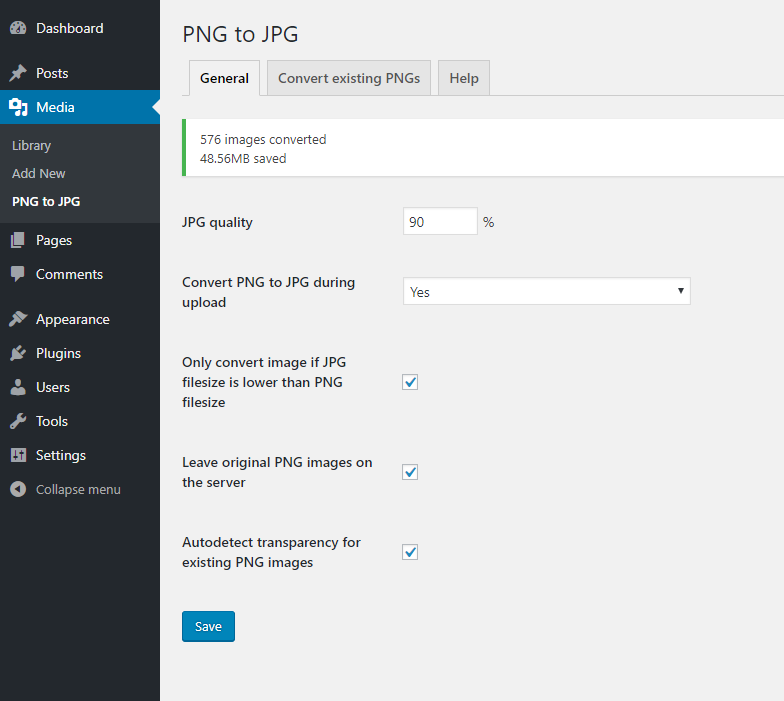
- set quality of converted JPG
- auto convert on upload
- auto convert on upload only when PNG has no transparency
- only convert image if JPG filesize is lower than PNG filesize
- leave original PNG images on the server
- convert existing PNG image to JPG
- bulk convert existing PNG images to JPG
- conversion statistics
- WP-CLI commands for bulk and single image conversion
WP-CLI
wp png-to-jpg convert <id>... [--quality=<n>] [--force] [--skip-transparent] [--keep-original|--delete-original] [--dry-run]
wp png-to-jpg bulk [--limit=<n>] [--quality=<n>] [--force] [--skip-transparent] [--keep-original|--delete-original] [--dry-run] [--yes] [--format=<table|csv|json|yaml>]
wp png-to-jpg stats
Installation
- Upload
png-to-jpgdirectory to the/wp-content/plugins/directory - Activate the plugin through the ‘Plugins’ menu in WordPress
Screenshots


Changelog
4.6
- new WP-CLI commands:
wp png-to-jpg convert,bulkandstats - security: nonce + capability checks on all conversion, transparency and Yoast reindex actions
- security: escaped output in the Convert existing screen, prepared SQL queries for URL replacement
- fix: URL replacement now includes the upload folder, so same-named images from different months are not mixed up
- fix: failed conversions in the bulk screen are reported instead of silently removed from the list
- fix: free GD memory after each image, reset conversion stats between images
- performance: one UPDATE per column instead of one per image size, transparency detection reads only PNG headers, media template buffering only where needed
4.5
- tested on WP 6.9
- performance optimization – load DB tables only when needed
- sorting by filesize in convert screen
4.4
- tested on WP 6.5
- convert individual PNG images directly in the Media library
- new column in Convert existing PNGs tab showing the filesize
4.3
- add notice for Yoast SEO users and button to reindex database after conversion
4.2
- tested on WP 6.4
- continue converting images after one of them fail
- added pagination to Convert existing screen
4.1
- added nonce and security checks
- added button to stop transparency detection or conversion process
- removed DB prefix from notice table names to make it more readable
- remove preview box flex centering to make it works with bigger images
- auto delete PNG backup when JPG deleted in admin
4.0
- replace images also in post_excerpt
- separate SQL queries
- added support for FV Player plugin
3.9.1
- tested on WP 5.9
- check if file really exists and if has .png extension
3.9
- fix transparency default state
3.8
- tested on WP 5.4
- save transparency meta and load it instantly next time
- image viewer – background switch
- image viewer – centered image
- image viewer – highlight image borders and show image size on hover
3.7
- do not run second transparency detection if first one return true
3.6
- metadata update fix
3.5
- added support for Broken Link Checker plugin ( blc_instances, blc_links )
3.4
- replace image url also in these database tables: yoast_seo_links, revslider_static_slides
3.3
- tested on WP 5.2
- handle duplicate names like WP – adding increment
- optimizing code for faster processing
3.2
- added support for Fancy Product Designer plugin
3.1
- tested on WP 5.0
- small cosmetic code changes
3.0
- new option: convert only if JPG will have lower filesize then PNG
- new feature: show converted images statistics
- fix: conflict when there is already JPEG with a same name as PNG
- fix: conflict when PNG name is part of another PNG name ( eg. ‘xyz.png’ can rename also ‘abcxyz.png’ )
- optimized for translations
2.6
- rename PNG image if JPG with the same name already exists
2.5
- BUG FIXED – disabled checkboxes when autodetect is disabled
2.4
- now you can disable autodetect PNG transparency
2.3
- WP 4.9.1 compatibility check
- new compatibility with Toolset Types
2.2
- Repair revslider database table detection
2.1
- Added option to leave original PNG image on server after conversion
- Repair SQL replacement query
2.0
- Replace image and thumbnails extension in database tables
- Moved from Settings to Tools submenu
- Some small fixes
1.2
- Fix generating background for transparent images (thanks @darkcobalt)
1.1
- Fix PNG transparency detection
1.0
- First version