

Description
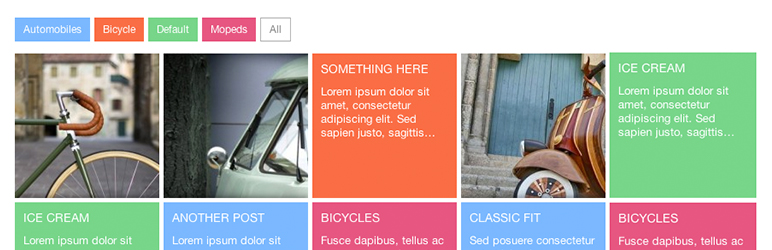
Post tiles allows you to use the shortcode [post-tiles] on any page or post and displays a grid of posts in a tile format. (Live Preview)
By default 8 posts are displayed. To change the amount of posts to display on the page, use the posts=’ ‘ attribute in the shortcode. Example: [post-tiles posts=’10’]
By default all post categories are called for the tiles. To specify the categories use the categories=’ ‘ attribute separating them by commas. Example: [post-tiles categories=’1,2,4′]
By default the tiles use the excerpt trimmed to 20. You can specify your excerpt length with the excerpt=’ ‘ attribute. Example: [post-tiles excerpt=’18’]
NOTE: The category id numbers are listed below, next to the category names. You can use both the categories and posts attributes Example: [post-tiles categories=’1,2,4′ posts=’8′ excerpt=’18’]
Version 1.4.6
Arbitrary section
Enjoy it 😀
Installation
- Upload
plugin-name.phpto the/wp-content/plugins/directory - Activate the plugin through the ‘Plugins’ menu in WordPress
- Under Settings – Post Tiles configure any custom category post tile colors.
- Place
[post-tiles]in your templates
FAQ
Why do I see an big blank space?
If in the settings jQuery is turned on then by default everything loads invisible and is revealed with a fade. You should check your version of jQuery to make sure you’re running at least 1.4 +. To test whether jQuery is the issue in the settings you can disable the jQuery and the plugin should appear.
Screenshots


Changelog
1.4.6
- Thanks to alfred_j_kwack’s PR, added text color picking and slide transparency via the admin.
1.4.5
- Removed Testing Code
1.4.4
- Fix category sorting issue
1.4.3
- Fixed jQuery Category highlighting
- Fixed errors
1.4.2
- Minor JS bug fix with responsive calculations
1.4.1
- Rounded decimals to fix scaling issue.
1.4.0
- Redesigned the responsive grid calculate based on ul width in order to maintain square tiles.
- Set background images to cover which is supported in IE 9 and up. This makes images fit better.
1.3.8
- Tested with wordpress 4.0
1.3.7
- Actually fixed the jQuery issue with featured images using fadetoggle.
1.3.6
- Fixed a jQuery Issue with features images using fadetoggle.
1.3.5
- Fixed a but with urls ending with or without forward slashes.
- Added pagination location options for top, bottom or both.
- Updated the admin panel to look a tad sexier.
1.3.4
- Added the ability to control tile featured image dimensions
- Added the ability to paginate
- Removed the category key rounded corners
- Fixed the tile dimensions. There was a 10px padding discrepancy causing tiles to be +20px wider and taller than defined in the admin settings. Not the width and height of the tiles includes the padding space.
1.3.2
- Responsive functionality added (Alternate fluid design responds to location width)
- Admin controlled animation styles (Bottom, top, right, left and fade)
- Admin controlled Tile width and Height
- Admin controlled excerpt length
- Fixed spelling errors
1.2.5
- Fix the excerpt issue regarding truncation
1.2.4
- Added featured image tiles
- Added additional warnings in the admin panel
1.2.3
- Added excerpt attribute
- Fixed jQuery Bug
1.2.2
- Fixed CSS issues
1.2.1
- Fixed the query issue
- Fixed the There is a new version… issue
1.2
- Added jQuery Animation in and Category Filtering
1.1
- Fixed multi-word categories
- Added Category Key Option
- Moved the Javascript to an external file
- Updated wp_enqueue_script and wp_enqueue_style
1.0
- Created the plugin