

Description
The plugin checks domain availability through the io-developer/php-whois library. Availability depends on the WHOIS service and response format used by each registry.
The settings page contains the result and reCAPTCHA options first, followed by the domain extension settings. Only active extensions are shown in the table. Activate another supported extension from the dropdown to add it to the table; deactivate an extension with its status checkbox. Set a priority for each active extension (higher values appear earlier) and select exactly one default extension. New installations start with .com active as the default; all other supported extensions are inactive until enabled. Save Changes stores the settings and table changes together.
The plugin uses the WHOIS servers and availability parsers provided by the library. It does not provide settings for custom WHOIS servers or custom availability strings.
Demos
Demo 1 – at our own page.
Demo 2 – live version at a hosting providers webpage.
Requires
- PHP 8.0 or newer
- PHP cURL and mbstring extensions
- Outbound network access from the WordPress server to WHOIS services on port 43
- If reCAPTCHA is enabled, outbound HTTPS access to Google
Including:
[pwhois]shortcode with an extension selector- Per-extension activation and deactivation, display priority, and one default selection
- Optional raw WHOIS response in the result
- Optional Google reCAPTCHA protection
- Custom messages for available, registered, and invalid domains; optional
www.prefix and HTML around raw WHOIS output - Result messages with
##DOMAIN##and##TLD##placeholders - German, Spanish, and Russian translations
Support
Join the community on Discord or explore the project on GitHub.
You get faster feedback if you post in our forum, rather than on wordpress.org!
Remove plugin
- Deactivate plugin through the ‘Plugins’ menu in WordPress
- Delete plugin through the ‘Plugins’ menu in WordPress
Installation
- Upload the complete plugin folder, including
vendor/, to/wp-content/plugins/. - Activate Powie’s WHOIS Domain Check from the WordPress Plugins page. The plugin creates or upgrades its TLD settings table automatically.
- Open Settings > Powie’s WHOIS.
- To add an extension, select it from the dropdown and click Activate. It then appears in the active extensions table.
- Set the display priority and choose the default extension with its radio button. Click Save Changes to store table edits and other settings.
- Add
[pwhois]to a page or post. To select a different default for one form, use[pwhois default=de](replacedewith an active extension).
To enable Google reCAPTCHA, enter both the site key and secret key in the settings. Leave both fields empty to disable it. Result messages can include ##DOMAIN## and ##TLD##; these placeholders are replaced with the checked domain and extension.
The extension settings are stored in a plugin table. Deactivating or deleting the plugin does not delete that table or the plugin options.
FAQ
Why is a domain lookup unavailable?
Check that the extension is active, that the hosting server allows outbound connections on port 43, and that the registry’s WHOIS service is responding. Availability results can vary by registry.
Can I add my own WHOIS server or availability string?
No. WHOIS server selection and response parsing are provided by io-developer/php-whois.
How do I show the raw WHOIS response?
Enable Show WHOIS output in result in the plugin settings.
How do I change the default extension?
Select the radio button in the Default column for an active extension, then click Save Changes. Only one extension can be the default at a time. A shortcode can override this choice with [pwhois default=de] if de is active.
How do I change which extensions are available?
Use the extension dropdown and Activate button to add a supported extension. Clear its Status checkbox to deactivate it. Only active extensions are listed in the table and in the public form.
How can I support you?
Post a comment on powie.de Forum
What is the plugin page?
Where do I post my feedback?
Post it at my Forum: powie.de Forum
Screenshots
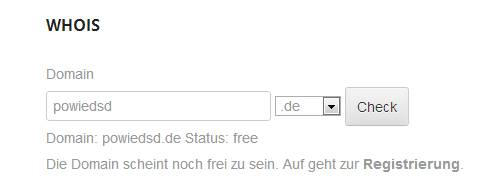
Changelog
1.0.0 (08.11.2026)
- Use io-developer/php-whois for domain checks
- Add an active-extension settings table with status, priority, and default selection
- Start with only .com active and set as default; enable other supported extensions on demand
- Refresh settings layout, reCAPTCHA handling, translations, and documentation
- Include Composer dependencies in the plugin package
0.9.33 – 0.9.34 (06.10.2024)
- tests with wp 6.6
0.9.32 – 0.9.33 (15.07.2020)
- Security Fix – https://wpvulndb.com/vulnerabilities/10300
0.9.31 (14.06.2020)
- com.br added
- 5.4.2 tests
0.9.30 (28.06.2019)
- ES translation
- translation slug changed to made tranlation more easy
0.9.26
- bugfix on handling outputs from whois servers
- whois server list update
0.9.23
- adding default outputs
0.9.22 (21.12.2015)
- 4.4 compatibility
0.9.20 (09.09.2014)
- error corrections
0.9.19 (26.11.2014)
- optimized free detection
0.9.18 (30.06.2014)
- Added co.za lookups
0.9.17 (13.05.2014)
- User can configure html code before and after whois output
0.9.16 (26.04.2014)
- Changed available status check
0.9.15 (26.04.2014)
- Added .za lookups
0.9.14 (04.03.2014)
- Optimized handling on .at whois lookups
0.9.13 (16.01.2014)
- Optimized handling on .com whois lookups
0.9.12 (14.01.2014)
- Fixed Bug on nonpriv ajax handling
0.9.11 (10.01.2014)
- Setting for showing www. in front of the input field
- Setting to enable or disable plain whois output
0.9.10 (08.01.2014)
- WHOIS server timeout handling
0.9.9 (08.01.2014)
- Initial Version