


Description
Stop Storing Raw Client PII, Credit Cards, and Medical Details in Your WordPress Database—Without Breaking Your Sales & CRM Workflow.
Every time a visitor submits a form on your WordPress site, sensitive personal data (PII), payment card numbers typed into message boxes, national IDs, and protected health information (PHI) are normally saved in plain text inside your WordPress MySQL database (wp_postmeta, Flamingo, form entry tables) and forwarded across unencrypted emails, Slack channels, and AI chatbots. If your database is ever compromised via a third-party plugin vulnerability—or if a team member pastes a client inquiry into ChatGPT—your business faces immediate regulatory and breach exposure.
PrivacyScrubber ZTDS Guard brings Airplane-Mode Form Security (powered by the Zero-Trust Data Sanitization — ZTDS™ RFC v1.0 standard) to WordPress. It intercepts form submissions inside the visitor’s own browser memory (under 0.4ms) before fetch() or XMLHttpRequest sends data over the network.
How It Works in 3 Steps (Built for Non-Technical Teams & CISOs)
- Instant Browser Shield (Before Network Send): When a visitor clicks Submit, sensitive details (Names, Emails, Phone Numbers, Credit Cards, SSNs/National IDs, Bank IBANs, Medical Record Numbers) are detected locally in the visitor’s browser (
window.crypto.subtle) and mapped into isolated tokens ([NAME_1],[EMAIL_1],[PHONE_1],[CREDIT_CARD_1],[SSN_1]). - Smart CRM & Database Split (Zero Workflow Friction):
- In Your WordPress MySQL Database (100% Zero-PII): All form entries saved in WordPress (
ztds_encrypted_inbox, Flamingo, postmeta) store only masked tokens. Even if your database backup is leaked, attackers get zero raw personal data. - In Your Email & CRM (Smart CRM Mode — Default): Your sales, support, or clinic staff still receive the client’s working Name, Email (
Reply-To), and Phone so they can reply in Gmail/Outlook or route leads into HubSpot, Pipedrive, or Salesforce immediately—while accidental high-risk secrets inside the message body (Credit Cards, SSNs, Passports, Bank Accounts, Medical IDs) remain safely masked as[CREDIT_CARD_1]or[SSN_1].
- In Your WordPress MySQL Database (100% Zero-PII): All form entries saved in WordPress (
- 1-Tap Staff Lead Card (No
wp-adminLogin Required):- Every notification email includes a secure Open 1-Tap Staff Lead Card button (
/?ztds_lead_card=1#ztds_seal=...). - Receptionists, account managers, doctors, or legal staff tap the link on their phone or desktop to view the decrypted inquiry in browser RAM—complete with 1-tap buttons for Call Client, WhatsApp Chat, Reply via Email, Save Contact (
.vcf), Copy Full Lead, and AI-Safe Copy (pre-scrubbed with tokens so staff can safely paste the inquiry into ChatGPT, Claude, or Gemini). - Zero-Server Fragment Security: The decryption key is carried inside the URL
#ztds_sealhash fragment, which browsers never send to the server over HTTP, and is automatically erased from the browser address bar (history.replaceState) the instant the card opens.
- Every notification email includes a secure Open 1-Tap Staff Lead Card button (
Why Tokens Never Collide or Mix Up Across Leads
- Per-Submission Isolated Crypto Envelopes:
[NAME_1]and[EMAIL_1]are never stored in a shared global table. Every single form submission generates its own unique cryptographic key/IV and its own self-contained encrypted dictionary (_ztds_vault_payloadand#ztds_seal). Lead #1’s[NAME_1]and Lead #2’s[NAME_1]live in completely separate encrypted envelopes and can never overwrite each other. - Smart Name Field & Product Phrase Awareness: Dedicated
Namefields deterministically capture single-word, lowercase, or multilingual names (Latin, Cyrillic, Hebrew) as[NAME_1], while built-in product/business phrase guards prevent capitalized product names (e.g., “Wooden Barrels”, “Custom Order”, “Best Regards”) from being falsely flagged as[NAME_2].
Step-by-Step Admin How-To Guide (Settings -> PrivacyScrubber ZTDS)
- Choose Your CRM & Email Routing Mode:
- Smart CRM & Email Safe Mode (Recommended): Keeps Name, Email, and Phone readable for your CRM webhooks and Gmail
Reply-Toheaders while masking high-risk secrets (Cards, SSNs, IDs, IBANs, Medical IDs) in messages and scrubbing 100% of PII into tokens inside WordPress MySQL. - Strict Zero-Egress Mode: Masks 100% of fields—including Name (
[NAME_1]), Email (email-1@ztds-redacted.org), and Phone (+10005550001)—across all outbound emails and webhooks.
- Smart CRM & Email Safe Mode (Recommended): Keeps Name, Email, and Phone readable for your CRM webhooks and Gmail
- Set an Optional 1-Tap Staff Card PIN:
- Enter a 4–8 digit team PIN in 1-Tap Staff Card PIN (Optional) if you want staff to enter a short passcode before viewing a lead card on mobile/desktop, or leave it empty for instant 1-tap access from email.
- Select Your Industry Baseline Profile:
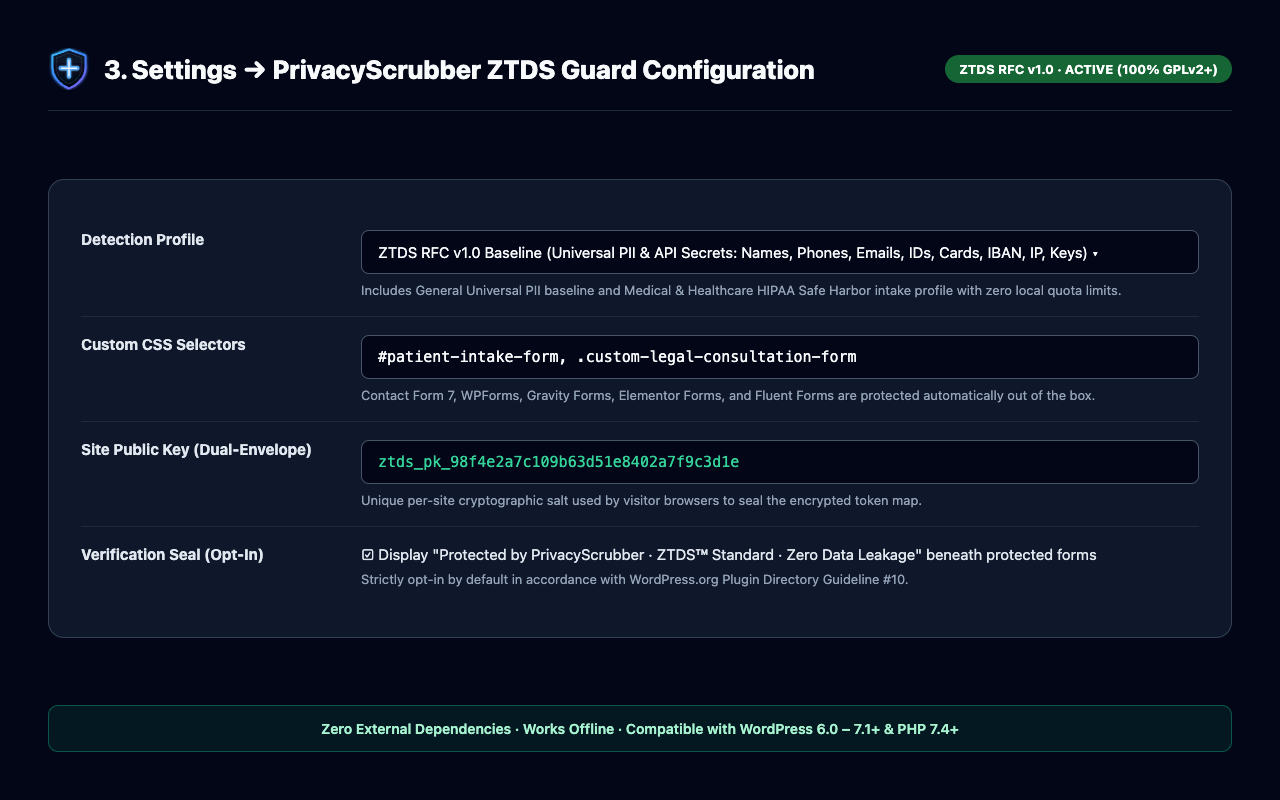
- Choose General — Universal PII & Secrets (RFC v1.0 Baseline) for standard business, agency, e-commerce, and financial forms, or Medical — Patient Intake & PHI Baseline to add Medical Record Number (
[HEALTH_MRN_1]) and clinical diagnosis ([DIAGNOSIS_1]) rules.
- Choose General — Universal PII & Secrets (RFC v1.0 Baseline) for standard business, agency, e-commerce, and financial forms, or Medical — Patient Intake & PHI Baseline to add Medical Record Number (
- Decrypt Leads in the WP-Admin Encrypted Submissions Inbox:
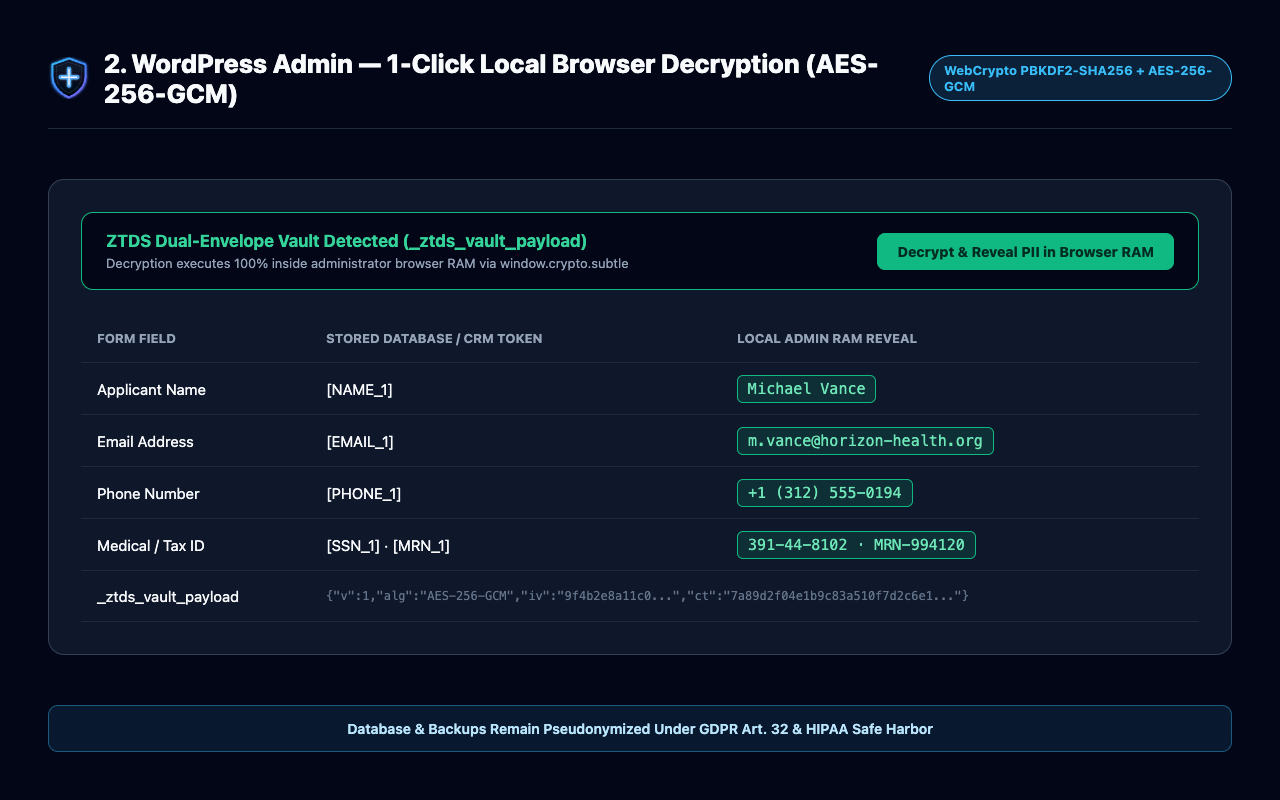
- Scroll to ZTDS Encrypted Submissions Inbox to inspect recent tokenized submissions stored in WordPress.
- Click Reveal Real Data on any row to decrypt that lead’s values locally in your browser memory (click Re-Mask Data to hide them again), or click 1-Tap Staff Card to open the standalone lead action screen.
- Back Up or Share Your Dual-Key Admin Vault Secret:
- Under Zero-Knowledge Admin Vault Secret, click Copy Key or Export Key Backup (
.txt) to save your master key or import it into another administrator’s browser via Import Key.
- Under Zero-Knowledge Admin Vault Secret, click Copy Key or Export Key Backup (
- Enable the Frontend ZTDS™ Verification Badge (Optional):
- Check Display “Protected by ZTDS™ Privacy Guard” seal below forms to show visitors a WCAG 2.1 AA accessible security badge with live links to your Verified Domain Certificate (
ztds.ai/verify/?domain=yourdomain.com) and the ZTDS™ Official Registry.
- Check Display “Protected by ZTDS™ Privacy Guard” seal below forms to show visitors a WCAG 2.1 AA accessible security badge with live links to your Verified Domain Certificate (
Supported Form Builders (Zero Configuration)
- Contact Form 7 (
form.wpcf7-form+ automatic Flamingo database scrubbing) - WPForms (
form.wpforms-form) - Elementor Forms (
form.elementor-form) - Gravity Forms (
.gform_wrapper form,form[id^="gform_"]) - Fluent Forms (
form.fluentform) - Custom HTML / AJAX Forms (via
data-ztds="true"or custom CSS selectors in Settings)
Key Architectural & Compliance Guarantees
- Zero Network & Cloud Leakage: 100% of detection, tokenization, and
AES-256-GCMencryption executes locally in the visitor’s browser. Zero bytes of form content are ever transmitted to PrivacyScrubber or external cloud servers. - Fail-Open Business Continuity: If a legacy browser lacks WebCrypto support or encounters a custom DOM exception, the interceptor gracefully bypasses tokenization so your business never loses an inbound client or patient lead.
- Statutory Risk Minimization & Technical Safe Harbor: Implements proactive Technical & Organizational Measures (TOMs) supporting GDPR Article 32 pseudonymization, HIPAA Safe Harbor (45 CFR § 164.514(b)), PCI-DSS v4.0 intake hygiene, and Israel Protection of Privacy Law Amendment 13 Section 17.
External Services & Privacy Disclosure
This plugin executes 100% locally in the visitor’s browser and does not transmit any form data, visitor PII, or telemetry to any external server. Optional verification badge links to https://privacyscrubber.com/integrations/wordpress/ and https://ztds.ai/ are disabled by default and strictly controlled by the site administrator under Settings -> PrivacyScrubber ZTDS.
Installation
- Install PrivacyScrubber ZTDS Guard directly from Plugins -> Add New in WordPress, or upload the
privacyscrubber-ztds-guardfolder to/wp-content/plugins/. - Activate the plugin through the Plugins menu in WordPress.
- Open ZTDS Guard in the left admin sidebar (or Settings -> PrivacyScrubber ZTDS):
- Keep Smart CRM & Email Safe Mode active (default) so your team can reply to emails and use CRM webhooks normally while keeping WordPress MySQL 100% zero-PII.
- Optionally set a 1-Tap Staff Card PIN and enable the ZTDS™ Privacy Guard verification seal below your forms.
- Submit a test inquiry on your contact form to verify the 1-Tap Staff Lead Card in your email and the Reveal Real Data button in your WP-Admin Encrypted Submissions Inbox.
FAQ
How do non-technical staff (sales, reception, support) see the real client data without logging into wp-admin?
In two effortless ways:
1. Directly in Email & CRM (Smart CRM Mode): By default, the client’s Name, Email (Reply-To), and Phone remain intact in outbound email notifications and CRM webhooks so staff can hit Reply in Gmail/Outlook immediately, while high-risk numbers in the message body (credit cards, SSNs, national IDs, medical IDs) are masked.
2. Via the 1-Tap Staff Lead Card: Every notification email includes an Open 1-Tap Staff Lead Card button (/?ztds_lead_card=1#ztds_seal=...). Clicking it on any phone or computer decrypts the full submission locally in browser RAM (without requiring a WordPress login) and provides 1-tap buttons to Call Client, WhatsApp Chat, Reply via Email, Save Contact (.vcf), Copy Full Lead, or copy an AI-Safe Prompt for ChatGPT/Claude.
Why don’t tokens like [NAME_1] or [EMAIL_1] get mixed up or overwrite each other across different submissions?
Tokens like [NAME_1] are not global site variables—they exist strictly inside the isolated cryptographic envelope generated for that single form submission. Each submission creates a fresh random key/IV and seals its own private dictionary inside _ztds_vault_payload (for WP-Admin) and #ztds_seal (for the 1-Tap Staff Lead Card). Lead A’s [NAME_1] and Lead B’s [NAME_1] never touch each other. Inside a single form submission, if the same person is mentioned twice, both places map to [NAME_1]; if a second person is mentioned in the message, they become [NAME_2]. Built-in product phrase filters also ensure capitalized product words (like “Wooden Barrels” or “Custom Order”) are never mistaken for a person’s name.
Will masked tokens break Contact Form 7, WPForms, or Gravity Forms email and phone validation?
No. In Smart CRM Mode, email and phone fields keep their valid format for CRM/Reply-To delivery and are tokenized into [EMAIL_1] and [PHONE_1] on the server only when saving to the WordPress MySQL database. In Strict Zero-Egress Mode, the browser automatically converts email and phone fields into RFC-compliant format-preserving surrogates (email-1@ztds-redacted.org and +10005550001) so PHP/HTML5 validators pass 100% without errors.
What is stored inside my WordPress MySQL database and Flamingo entry tables?
Zero raw personal data. Before any submission is written to the WordPress database (ztds_encrypted_inbox or Contact Form 7 Flamingo’s wp_posts / wp_postmeta tables), all personal identifiers are replaced with tokens ([NAME_1], [EMAIL_1], [PHONE_1], [CREDIT_CARD_1], [SSN_1]), alongside the AES-256-GCM / HMAC-SHA256 encrypted vault payload. If your database is ever dumped or leaked, no cleartext PII is exposed.
Does this plugin send form submissions to an external API or cloud server?
Never. All PII detection, token replacement, and AES-256-GCM vault encryption run 100% locally inside the visitor’s web browser (assets/ztds-form-guard.js). Zero bytes of form data or telemetry are ever sent to PrivacyScrubber or third-party cloud servers.
How does the frontend ZTDS™ Verification Badge and Domain Certificate work?
When enabled by the administrator in Settings -> PrivacyScrubber ZTDS (opt-in by default per WordPress.org Guideline 10), the plugin renders an accessible “Protected by ZTDS™ Privacy Guard · RFC v1.0 Verified” seal below your forms. Visitors can click Verified Certificate to inspect your domain’s Level 1 Technical Domain Certificate (ztds.ai/verify/?domain=yourdomain.com) or browse the ZTDS™ Official Verified Registry (ztds.ai/registry/).
What happens if a visitor uses an outdated browser or a JavaScript error occurs?
PrivacyScrubber ZTDS Guard enforces a strict Fail-Open Business Continuity invariant. If an older browser lacks WebCrypto support or a custom theme script throws a DOM exception, the form submits normally so your business never loses an inbound lead.
Are all features in this WordPress plugin unlocked under GPLv2+?
Yes. This plugin provides the complete ZTDS RFC v1.0 Reference Form Guard (General universal PII/secrets baseline and Medical intake profile), Smart CRM routing, 1-Tap Staff Lead Cards, and Dual-Key AES-256-GCM browser vaulting 100% free and unrestricted under GPLv2 or later.
Screenshots

Changelog
2.5.0
- Synchronized Plane 6 ZTDS RFC v1.0 Form Guard engine and cross-plane cryptographic receipt schema with the PrivacyScrubber v2.5.0 unified ecosystem release.
- Verified full compatibility with WordPress 6.7–7.1, Contact Form 7 (including Flamingo MySQL zero-PII scrubbing), WPForms, Gravity Forms, Elementor Forms, and Fluent Forms.
2.4.8
- Added Smart CRM & Email Safe Mode (default): preserves working Name, Email (
Reply-To), and Phone for outbound CRM webhooks and email replies while masking high-risk secrets (Credit Cards, SSNs, National IDs, Bank IBANs, Medical IDs) in transit and scrubbing 100% of stored PII into tokens inside WordPress MySQL and Flamingo tables. - Added 1-Tap Staff Lead Card (
/?ztds_lead_card=1#ztds_seal=...): allows non-technical sales, support, and clinic staff to open decrypted leads in browser RAM from email on mobile or desktop without awp-adminlogin, with 1-tap Call, WhatsApp, Email Reply,.vcfContact Save, and AI-Safe Copy buttons, plus optional 4–8 digit Team PIN lock. - Hardened Per-Submission Token Isolation & Name Detection: isolated per-row decryption in WP-Admin tables, dedicated
Namefield capture (including single-word and multilingual names), and false-positive guards preventing capitalized product phrases from being tokenized as[NAME_2]. - Redesigned the frontend ZTDS™ Privacy Guard verification seal and WP-Admin cockpit with official ZTDS™ SVG iconography, WCAG 2.1 AA contrast compliance, and automated Level 1 Domain Verification Certificate links (
ztds.ai/verify/?domain=...). - Added native Gravity Forms (
form[id^="gform_"]) selector support and format-preserving email/phone surrogates (email-1@ztds-redacted.org,+10005550001) for Strict Zero-Egress Mode.
2.4.2
- Initial public release of Plane 6 WordPress ZTDS Form Guard with Dual-Envelope WebCrypto (
AES-256-GCM) vaulting.