


Description
Two questions decide whether people find you today. Does Google understand your pages? And are the AI crawlers even allowed in? This plugin answers both in one report, inside your WordPress admin, without an account and without sending anything anywhere.
What it checks, on one screen
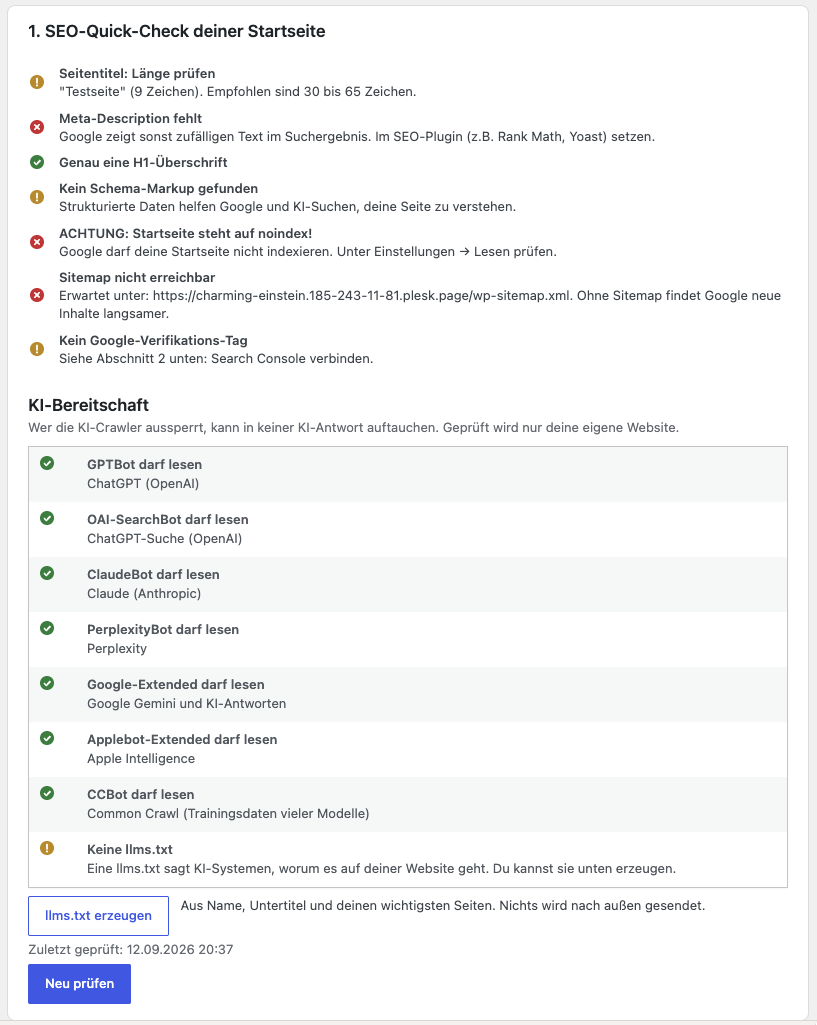
- Homepage basics. Title and its length, meta description and its length, number of H1 headings, whether any JSON-LD schema is present, and a clear warning if the page is accidentally set to noindex.
- AI crawler access. Your robots.txt decides who may read your site. The plugin reads it and tells you, one by one, whether GPTBot and OAI-SearchBot (ChatGPT), ClaudeBot (Anthropic), PerplexityBot, Google-Extended (Gemini and AI answers), Applebot-Extended and CCBot are allowed in. If a crawler is blocked, your pages cannot appear in that system’s answers, no matter how good they are.
- llms.txt. Whether your site serves one, and whether it is a real one rather than a theme error page.
- Sitemap status. Finds your sitemap on its own (Yoast, Rank Math or WordPress itself), checks that it is reachable and counts the addresses in it.
- Google Search Console verification. A guided walkthrough puts the verification tag or the HTML file in place, whichever method you pick in Search Console, and checks right away whether Google can see it. No theme editing, no FTP.
Five basics at a glance
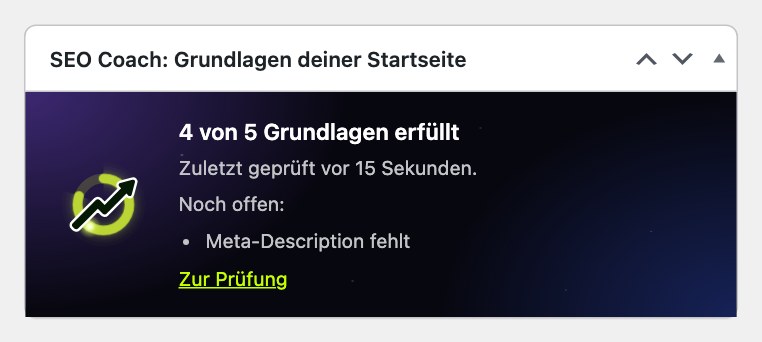
The settings page and a small box on your WordPress dashboard show how many of five homepage basics are in place: a title, a meta description, exactly one H1 heading, Google may index the page, and the sitemap is reachable. The ring in the SEO Coach logo fills up accordingly. It counts only what the plugin can actually check. If something could not be checked, for example because your server did not answer, it says so instead of counting it as fine. The check runs once a day on its own (WordPress cron) and only requests your own website. You can hide the dashboard box under “Screen Options”.
What it can create
- An llms.txt for your site, built from your site name, tagline and your most important pages. One click, nothing leaves your website. If a connected service already maintains your llms.txt, the plugin says so and refuses to overwrite it silently.
Why the standard WordPress rules do not trigger a warning
Almost every WordPress site disallows /wp-admin/ in robots.txt. That blocks no content, so the plugin does not report it. A warning that appears on every site is a warning nobody reads, and then the one that matters gets missed.
Optional: count inquiries
Off by default. Once you switch it on, the plugin counts successful form submissions (Contact Form 7, WPForms, Gravity Forms, Elementor Pro, Fluent Forms, Ninja Forms) and clicks on phone numbers and email addresses on your site. Per day it stores only the type, the address of the published page and the form name you gave the form, as a number. No field contents, no cookies, no IP addresses. Page addresses and form names are stored as they are, so if a page slug or form name contains a person’s name, so does the count. Pages that WordPress does not know as published, public pages are counted as “(other page)”; a page that a membership plugin protects on top is not recognised as such. Against abuse, a hash of the visitor’s IP address is kept for the current day only, made with a random secret that exists only for that day. Hashes and secret are deleted on the first visit after midnight, at the latest by the daily cleanup, and immediately when you switch counting off or deactivate the plugin. Clicks sent from other websites are ignored. Behind Cloudflare the visitor address sent by Cloudflare is used; for other proxies there is the filter sdcoach_besucher_adresse. The counts stay in your WordPress database and are removed after 400 days while the plugin is active. Deleting the plugin removes the counts and the hashes. A click on a phone number is not a call, and the plugin does not pretend it is.
Optional: detailed report by email
If you want more, the settings page offers the free, more detailed report of SEO Coach. It checks your homepage from the outside, including load time, HTTPS and content, explains every finding with instructions and sends the result as a PDF by email. The button opens the SEO Coach report page in a new tab, with your site address, your site title as the company name and the email address you entered already filled in. Nothing is sent until you start the check on that page yourself. You then get an email to confirm your address first, and after that the report. You only receive marketing emails if you explicitly tick a box for it.
Optional: connect to SEO Coach
If you want to go further, you can connect your site to SEO Coach (https://meinseocoach.de), an external service by a German provider. It reads your own Google Search Console data, turns it into concrete suggestions, and writes titles, meta descriptions, content and schema back into WordPress when you approve them. Rank Math and Yoast are supported.
This connection is optional and you have to establish it yourself. The plugin never sends data on its own. Only after you enter the API key shown in the plugin into your SEO Coach account can the service use the plugin’s endpoints in the WordPress REST API of this site. Details are under “External Services” below.
External Services
The plugin itself sends no data to external servers. The quick check (also when it runs once a day on its own), the AI crawler check, the llms.txt check and the sitemap check request your own website only. If you switch on inquiry counting, a small script reports clicks on phone and email links to your own website (the WordPress REST API of this site), nowhere else.
Optionally, you can request the detailed report of SEO Coach (https://app.meinseocoach.de/pruefbericht). When you click “open report”, the plugin opens that page in a new tab and passes your site address (home URL), your site title and the email address you entered in the URL fragment (the part after #, which browsers do not send to the server). The page only fills in its form with them. They are transmitted to SEO Coach only when you start the check on that page yourself, in order to run the check and to email you the report after you confirmed your address. The plugin stores only the time you last opened the report page, not the email address.
Also optionally, the site can be connected to the service SEO Coach (https://meinseocoach.de). To do that, you enter the API key generated by the plugin into your own SEO Coach account. After that, the service accesses this site through the WordPress REST API in order to
- read SEO fields (title, meta description, focus keyword) and change them on your instruction,
- create content you requested as a draft,
- update schema markup and image alternative texts on your instruction,
- read the site’s sitemap,
- read the inquiry counts, if you switched inquiry counting on.
Without that key, entered by you, the service cannot use the plugin’s endpoints and cannot change anything on your site. (The detailed report above only reads your public homepage, like any visitor.) Provider: SEO Coach, https://meinseocoach.de. Privacy policy: https://app.meinseocoach.de/datenschutz. Terms: https://app.meinseocoach.de/agb.
Installation
- Install and activate the plugin.
- Go to Settings → SEO Coach. Run the check, follow the Search Console walkthrough, and create your llms.txt if you want one.
- Optional: enter the API key in SEO Coach (meinseocoach.de) to connect the site.
FAQ
Do I need an account?
No. The homepage check, the AI crawler check, the llms.txt check and generator, the sitemap status and the Search Console walkthrough all work without an account and without any connection. An account is only needed for the optional AI optimisations.
Does the plugin send data to third parties?
Not on its own. If you request the detailed report, your site address, site title and email address are sent to SEO Coach only when you start the check on its page yourself. Only after you enter the API key into your SEO Coach account can that service use the plugin’s endpoints and make changes you approve. See “External Services”.
What does it mean when a crawler is “blocked”?
Your robots.txt tells crawlers which parts of your site they may read. If it forbids the whole site to GPTBot, for example, ChatGPT cannot read your pages and cannot mention them in an answer. The plugin only reports a block when actual content is affected, not for the usual WordPress rules such as /wp-admin/.
Does the plugin change my robots.txt?
No. It reads your robots.txt and explains what it says. Any change is yours to make.
Where is the llms.txt stored?
In your WordPress database, and it is served at /llms.txt. Deleting the plugin removes it again.
Does it work with Rank Math and Yoast?
Yes. The plugin reads and writes the SEO fields of both. For the checks and the Search Console walkthrough you need neither.
Does the Search Console walkthrough change my theme?
No. The verification tag is output through a WordPress hook. If you choose the HTML file method instead, the plugin places that one small file from Google in your site root, nothing else. No theme files are touched.
What happens if SEO Coach overwrites something I wanted to keep?
Before every write, the plugin stores a backup of the previous state. It can be restored.
Screenshots


Changelog
3.11.0
- New: the WooCommerce product short description can be sent from the SEO Coach dashboard. Many shops keep their main product text there.
- New: the short description is backed up before every change, also when it was empty, and the change can be undone. It is only written to the version you last saw.
3.10.1
- New: create a new API key with one click in the settings, for example if the old one was shared by accident. The old key stops working immediately.
- Fixed: uninstalling now also removes old values from before version 3.0.8, so an old API key cannot come back after reinstalling.
3.10.0
- New: WooCommerce product categories can be edited from the SEO Coach dashboard (category text, title, description, keyword). Works with Rank Math and Yoast.
- New: every change is backed up first and can be restored. Changes are only written to the version you last saw.
3.9.0
- New design: the settings page now tells one story in three chapters (basics, being found, getting enquiries) instead of five stacked boxes. Dark header with the score ring, light content in the SEO Coach colours.
- New: three tiles summarise the results (readable for Google, readable for AI, findable). Details open in a side panel.
- New: one “Next step” card with exactly one action, e.g. add the missing meta description, with a direct link to edit the homepage.
- New: Search Console setup as a five-step guide that remembers where you left off and shows the self-check result right in the guide. Without JavaScript the same steps appear on the page.
- New: “Later” for the Google and enquiry steps, per administrator.
- Fixed: a stored verification no longer reads as “Google connected”; the plugin only knows that the proof is stored and whether it is visible from outside.
- Fixed: the missing Google meta tag is no longer listed as an SEO problem, the file method works just as well.
- Fixed: “check completed” no longer appears when the check failed.
- Fixed: AI texts no longer promise more than the robots.txt check can tell. A missing llms.txt is shown as optional.
- Fixed: the file upload no longer submits on selection, you save explicitly.
- Fixed: “Copy” and “Copied!” are now translatable.
3.8.1
- The report page now also receives your site title as the company name, so you no longer have to type it.
3.8.0
- New: request the free, more detailed SEO Coach report by email right from the settings page. The address field is prefilled with the admin email and can be changed. Nothing is sent until you start the check on the report page yourself.
- New: the step bar now has four steps: check, detailed report, Google, SEO Coach.
- New: after the check, a short note explains what green checkmarks mean and what the homepage check cannot see (clicks and rankings).
- Improved: the SEO Coach card explains what the service shows, how the free start works, and links to sign-up and a demo with sample data.
- New: free personal help with the first Search Console setup.
3.7.0
- New: the ring in the SEO Coach logo shows how many of five homepage basics are in place (title, meta description, one H1, indexable, sitemap reachable), on the settings page and in a dashboard box.
- New: the check runs once a day on its own and keeps the last result. A failed run no longer replaces a good result.
- Fixed: an error page (maintenance mode, server error) was evaluated as if it were the homepage. It now counts as “not checked”.
- Fixed: noindex is now also found in the X-Robots-Tag header and in meta tags with any attribute order.
- Fixed: a robots.txt that answers with a server error no longer counts as “everything allowed”.
- Fixed: when the sitemap does not answer at all, the plugin says “not checked” instead of “missing”, and shows the reason.
3.6.1
- Fixed: when SEO Coach saves image alt texts and titles, the plugin now reads each value back and reports per image what was really saved. Before, an image counted as saved even if writing silently failed.
- Fixed: only media library files can be changed through this route. An ID that belongs to a page or post is ignored.
3.6.0
- New: count inquiries (optional, off by default). Successful form submissions of Contact Form 7, WPForms, Gravity Forms, Elementor Pro, Fluent Forms and Ninja Forms, and clicks on phone and email links, counted per day and page. No field contents, no cookies; only an IP hash with a secret that exists for the current day, deleted with it after midnight or when counting is switched off. Stored in your own database and removed when the plugin is deleted. SEO Coach can show which pages bring inquiries.
- Fixed: the translation endpoint used a check function that only exists in the older SEO Coach Connector and failed in this plugin.
3.5.0
- New: Google verification with the HTML file. Search Console offers this method first, and until now the plugin only accepted the HTML tag. Upload the file you downloaded from Google, or paste its name or the tag, the plugin recognises which one it is.
- New: after saving, the plugin checks whether Google can actually see the proof. If a server cache (for example nginx on Plesk) still serves the old page, it says so instead of letting the verification fail without a reason.
- New: a clear message if you paste the DNS record of a domain property, which no plugin can set.
- Clearing the field removes only the file created through this field, never one set by SEO Coach. Google checks the proof again later, so it has to stay in place.
- Fixed: the verification endpoint used by SEO Coach rejected the exact file content Google expects (“google-site-verification: google….html”). Automatic verification from SEO Coach now works.
3.4.0
- New: AI labelling in the editor. Drafts created by SEO Coach are marked as AI generated: a notice at the top of the editor, a box in the sidebar and a “KI” column in the post and page lists. Nothing of this is shown on the website.
- The “KI” column only appears once there is at least one AI generated post, and the sidebar box only on those posts. Sites that only use the checks see no change.
- Posts marked by the older SEO Coach Connector keep their label when you switch to this plugin.
3.3.0
- New: AI readiness. The plugin reads your robots.txt and reports for GPTBot, OAI-SearchBot, ClaudeBot, PerplexityBot, Google-Extended, Applebot-Extended and CCBot whether they are allowed to read your site.
- New: llms.txt check and a generator that builds one from your site name, tagline and main pages. Works without an account. An llms.txt maintained by SEO Coach is never overwritten silently.
- Improved: the usual WordPress rules in robots.txt, such as /wp-admin/, no longer produce a warning. They block no content, and a warning on every site is a warning nobody reads.
- Renamed to “SEO & AI Readiness Check”. The plugin does more than a quick check now, and the old name said nothing about the AI part. Settings, data and the connection are unaffected.
3.2.0
- New: translation interface. With Polylang or WPML installed, SEO Coach can ask the translation plugin directly which translations exist for a page instead of waiting until every page has been fetched. Sites without a translation plugin are unaffected.
- Improved: the schema check now returns the stored markup in full instead of the first 100 characters, so schema from SEO Coach can be told apart from schema by other plugins.
3.1.0
- New: backup before overwriting. When SEO Coach writes a title, a meta description or content back to WordPress, the previous state is stored first and can be restored.
3.0.8
- All internal function, option, transient, post meta and constant names now carry the unique prefix “sdcoach_” / “SDCOACH_” so they cannot clash with other plugins and themes (required by the WordPress.org review). Behaviour is unchanged.
- A one-time automatic migration keeps settings from the time of the old prefix. API key and Google verification survive the update.
3.0.7
- Renamed for a unique name. Additional output hardening (llms.txt is served with nosniff). Prepared for the initial review.
3.0.6
- Security: the JSON-LD output now escapes angle brackets so schema content cannot break out of the script block. Recommended for every site that outputs schema through SEO Coach. Backwards compatible.
3.0.4
- New: FAQ schema on request. SEO Coach can attach a generated question and answer to a page as FAQPage schema. Several questions per page are merged, existing schema is left alone. Backwards compatible.
3.0.3
- Improved: the sitemap interface lists real WordPress pages first (posts after) and includes the content type, so a generated llms.txt highlights the main pages. Backwards compatible.
3.0.2
- Improved: the sitemap interface can return real page titles so a generated llms.txt uses readable names instead of URL fragments. Backwards compatible.
3.0.1
- New: llms.txt for visibility in AI answers. If the site is connected to SEO Coach, the plugin can serve a generated, AI readable llms.txt at /llms.txt (ChatGPT, Perplexity, Gemini). Backwards compatible.
3.0.0
- New: guided three step screen with real progress (finished steps ticked off, the current one highlighted)
- New: homepage quick check (title, meta description, H1, schema, noindex) as a traffic light list
- New: sitemap status with automatic detection (Yoast, Rank Math, WordPress itself)
- New: help with Google Search Console verification (meta tag, no theme change)
- First release in the WordPress.org directory