


Description
Customer History 3.0.0 is a complete revamp — rebuilt from the ground up as a focused customer-intelligence and reporting tool for WooCommerce. We’ve moved away from scattered actions and doubled down on one thing: showing you exactly what your customers are doing on your store — who’s buying, who’s browsing without buying, and what they’re searching for — so you can plan your next move with real insight instead of guesswork. The analytics are read-only and run entirely on your own server, and the plugin never contacts your customers automatically — it sends no bulk or marketing emails.
Most WooCommerce stores fly blind on their customers. The native dashboard reports orders, revenue, and traffic — but not who is buying, who’s browsing without buying, what people are searching for, or which searches return nothing. PureDevs Customer History turns raw store activity into customer intelligence: profiles, search insight, view tracking, and segments — all inside wp-admin.
Tracking starts the moment you activate it: no wizard, no configuration, works out of the box. And it’s private by design — all data stays in your own WordPress database, with nothing sent to any third-party service or API.
SEE IT IN ACTION
Watch a full walkthrough of the dashboard, customer profiles, and search analytics — and how to use them to identify your most valuable customers:
TRY THE LIVE DEMO
Explore the full plugin — including all Pro intelligence features — on our live demo store. No installation needed:
- Demo: https://ch.puredevs.com/wp-admin
- Username: `demo` | Password: `demo1234`
The demo account is read-only — you can browse every screen, but nothing can be added or changed.
WHAT CUSTOMER HISTORY SHOWS YOU
Customer Intelligence Dashboard. Your store’s customer nerve centre: widgets for top customers by lifetime value, latest orders with customer context, top-selling products this month, top search terms, recent searches, and most-viewed products. Pro adds revenue, retention, lifetime-value, abandoned-cart, and RFM widgets, and most-viewed categories.
Customer List & Profiles. A customer-first view of your store. Sort your customers by name, orders, average order value, and lifetime spend, and filter them by order count, total spent, and purchased product. Open any customer to see their profile: financial summary, complete order history, and your private notes. Pro adds that customer’s full session history: every visit, search, and product view — data WooCommerce native simply does not provide.
Customer Notes. A private notepad on every customer profile. Jot down what the numbers cannot tell you — a phone call, a complaint, a delivery preference — and it stays with that customer. Notes are admin-only, never shown to the customer, and are included in the WordPress personal-data export and erase tools. Annotation only: no tasks, no reminders, no follow-ups.
Search & Discovery Analytics. A dedicated Search Analytics page with nothing comparable in WooCommerce. See your top search terms and most recent searches — so you know exactly what shoppers are looking for — alongside the most-viewed products with view counts.
Zero-Result Searches. The searches that came back empty — demand your catalogue failed to answer. The Search Analytics page lists every term that returned no products, how often it was searched, and when it was last searched, so you can see what shoppers wanted and you did not have. WooCommerce cannot see this, and neither can any report built from orders alone.
Zero-Result Trend. The same data, over time. A weekly chart of the share of searches that returned nothing, plus a second chart trending your top offending terms week by week — so when you add the products shoppers were asking for, you can watch the line fall. Fixing the catalogue becomes measurable instead of a guess.
Data-Freshness Indicators. Every analytics panel now says how old its numbers are. Cached panels carry an “Updated 12 min ago” chip; panels that queried on this page load carry a “Live” chip. On the Dashboard, Revenue, and Search Analytics pages, you always know whether you are looking at a live figure or a recent snapshot.
View Tracking. Passive, lightweight tracking of which products and categories your customers view. The view-to-purchase gap is invisible to WooCommerce native; Customer History surfaces it on the Dashboard and the Search Analytics page, and Pro shows it on every customer profile.
Revenue. A focused revenue dashboard: net revenue, orders, average order value, customers, and your repeat purchase rate — the share of customers in the period who bought more than once — for the selected period (within the free 90-day window), each with period-over-period comparison, plus a revenue trend chart.
Order History. A store-wide order list you can sort and filter by date range, with quick links straight into the matching WooCommerce order edit screens — a fast way to find and cross-reference orders alongside everything else you know about the customer.
Manual Customer Email. When you want to follow up with a single customer, you can compose and send them a one-off email straight from their profile. It’s entirely manual and admin-initiated — there are no automated sends, no bulk emails, and no marketing campaigns. You write each message yourself, and the plugin never contacts a customer unless you choose to.
Customer Segments. Save a customer segment configuration for quick recall. The Segments page shows your saved segment with a live customer count and one-click CSV export.
Email Digest — Weekly or Monthly. An optional, opt-in summary email sent to you, the store owner: new customers, top search terms, top customers, and most-viewed products. Choose the interval in Settings — weekly, or monthly for a slower-moving store — and the report window follows your choice. Keeps you informed about customer activity even when you don’t log in. (Admin-only — the digest goes to you, the store owner, not to your customers.)
CSV Export. Export your customer list to CSV at any time.
FREE VERSION SCOPE
The free version lists every customer in the customer list — there is no customer cap — and shows the most recent 90 days of analytics, with one saved segment. All data — for every customer and every session — is collected from day one, so upgrading to Pro opens your full history at once.
PRIVATE BY DESIGN
Customer History is built around observation and reporting. It runs no automation, sends no bulk or marketing emails, creates no coupons, and never modifies orders, product data, or any WooCommerce setting. The one outbound action it offers is fully optional and manual: you can send an individual customer a one-off email that you compose yourself from their profile — nothing is ever sent automatically. It’s HPOS-compatible, includes customer notes in the WordPress personal-data export and erase tools, and keeps all data on your own server.
Upgrade to Pro
Customer History Pro extends the free plugin with advanced customer intelligence. Upgrading doesn’t add a second plugin — the advanced features simply switch on, with all your previously captured data intact. Pro unlocks:
<
ul>
Installation
Manual installation takes less than a minute.
- Download the plugin from wordpress.org, unpack it, and upload the [PureDevs Customer History for WooCommerce] folder to your wp-content/plugins/ directory — or install it directly from the Plugins screen in WordPress.
- Activate the plugin through the Plugins menu in WordPress.
- Go to Customer History > Settings to configure tracking options (optional — defaults work out of the box).
Data collection begins the moment the plugin activates. No setup wizard or configuration is required. You are good to go.
FAQ
Q. Is this plugin only for WordPress sites?
A. Yes. The plugin works with WordPress sites that have WooCommerce installed and activated. WooCommerce is required.
Q. Where is my customer data stored?
A. All data is stored in your own WordPress database. The plugin never sends customer data to any external service, API, or third-party server. Your data stays on your own server.
Q. Is there a video walkthrough?
A. Yes. You can watch a full walkthrough of the dashboard, customer profiles, and search analytics here: https://www.youtube.com/watch?v=anFJa63GnfI
Q. Is there a live demo I can try?
A. Yes. Log in to https://ch.puredevs.com/wp-admin with username demo and password demo1234. The demo runs the Pro version, so you can explore every feature. The account is view-only — you can browse all screens but cannot add or edit anything.
Q. Is the plugin compatible with WooCommerce High-Performance Order Storage (HPOS)?
A. Yes. The plugin uses WooCommerce CRUD methods and declares HPOS compatibility. It does not query the posts table directly for orders.
Q. Will this plugin slow down my store?
A. No. Session and view tracking writes are lightweight and happen passively during normal page loads. Heavy analytics queries run on demand and cache their results. You can configure the plugin to exclude bot and admin sessions to further reduce data volume.
Q. What customer data is stored, and how do I erase it for GDPR?
A. The plugin stores activity data in your WordPress database: page views, search queries, and product views, with the visitor’s IP address and browser details, linked to the customer when they are logged in. Pro also stores abandoned carts. No data leaves your server. Customer notes, and Pro’s manual tags, are included in the WordPress tools at Tools > Export Personal Data and Tools > Erase Personal Data. Activity data and carts are not part of those tools. To limit how long they are kept, Pro has retention windows for browsing history and searches (Settings > Data Retention) and for carts (Abandoned Cart Tracking), and deleting the plugin removes its tables.
Q. Does the plugin send emails to my customers?
A. The plugin never sends automated, bulk, or marketing emails to your customers, and it runs no campaigns. The digest — weekly or monthly, your choice — is an admin-only email delivered to you, the store owner. It does include one optional manual tool: from a customer’s profile you can compose and send a single one-off email to that one customer yourself. Nothing is ever sent automatically — a customer is only ever emailed if you write and send the message.
Q. Does the plugin modify orders, products, or WooCommerce settings?
A. No. The plugin is observational where your store data is concerned. It never modifies orders, creates coupons, changes prices, stock or other product data, or alters any WooCommerce setting. The one value Pro keeps on a product is the optional “Cost (Customer History)” figure you type in yourself, in a field of its own; WooCommerce’s own cost field is never written.
Q. Is the plugin affected by the reported Freemius SDK vulnerabilities?
A. No. The plugin bundles Freemius WordPress SDK version 2.13.5. The two publicly reported Freemius SDK vulnerabilities were fixed in SDK versions 1.0.1 and 1.0.2, long before the version shipped here, so this plugin is not affected.
Q. What does the free version include?
A. The free version lists every customer in the customer list, with no cap, and shows the most recent 90 days of analytics, with the full Customer Intelligence Dashboard, customer profiles, private customer notes, Search Analytics including zero-result searches and the weekly zero-result trend charts, data-freshness chips on every analytics panel, view tracking, a Revenue dashboard with a repeat-purchase-rate card, an Order History page with a date-range filter, one saved segment, the weekly or monthly digest, a manual one-to-one customer email tool, and CSV export. All data is captured from day one; upgrading to Pro unlocks the full history, unlimited saved segments, and the advanced intelligence features.
Q. Can customers see the notes I write on their profile?
A. No. Customer notes are private to your store’s admin area and are only visible to users who can manage WooCommerce. They are never displayed on the front end and never emailed to anyone. They are stored in your own database and are included in the WordPress personal-data export and erase tools, so a GDPR request covers them.
Q. Why is the Zero-Result Searches list empty on a busy store?
A. Because it starts from the day you upgrade. Recording whether a search returned results is new, so the plugin cannot say what older searches returned. The panel tells you the date collection began, and terms appear as visitors search from that point onward.
Q. Why does the Zero-Result Trend chart say there is not enough history?
A. The trend is drawn weekly and needs at least two weeks of recorded search results before it can show a line. It uses the same data as the Zero-Result Searches list, so it starts accruing from the same date. Once two full weeks have been recorded, the chart appears automatically.
Q. What do the “Live” and “Updated X min ago” chips mean?
A. They tell you how fresh each panel’s numbers are. Heavy analytics queries are cached for up to thirty minutes so the admin stays fast; a panel served from that cache shows when it was last computed. A panel marked “Live” ran its query on this page load. No data is changed by either — it is purely a label.
Q. Is the “Buy Again” probability a guarantee that a customer will order? (Pro)
A. No. It is an estimate — the chance, from 0 to 100, that a customer places another order within the next 30, 60, or 90 days, based on how often they have bought before and how long it has been since their last order. It is recalculated nightly alongside the churn scores, and a customer with too few orders to model shows no figure. The plugin only reports the number; it takes no action on it.
Q. Where did the Zero-Result Searches stats page go? (Pro)
A. It is now part of the Search Gap report under the Customer History menu, alongside the new never-purchased list. The old menu link redirects there, so existing bookmarks keep working. The free Zero-Result Searches panel on the Search Analytics page is unchanged.
Q. Where does the Profitability report get product costs? (Pro)
A. From WooCommerce’s own Cost of Goods Sold feature when it is switched on (WooCommerce > Settings > Advanced > Features). When it is off, or on a WooCommerce version without it, each product and variation gets a “Cost (Customer History)” field next to its prices. Costs are recorded per order line when an order becomes processing or completed, in the plugin’s own table. Orders placed before a cost was known use today’s cost and are marked Estimated; products with no cost at all are marked No cost and left out of profit and margin.
Q. How does Inventory Velocity decide when to reorder? (Pro)
A. For every product or variation that tracks its stock, it divides the units sold in the last 28 days (net of refunds, from completed and processing orders) by 28 to get a daily pace, then divides the stock you have now by that pace to get the days until it runs out. The reorder-by date is the run-out date minus your supplier lead time, which you set on the page (14 days by default). “Reorder before peak” means that last year this item sold at least one and a half times as many in the coming four weeks as in the four weeks before, and you have fewer in stock than it sold then. The plugin only reports these dates; it never changes stock or orders anything.
Q. Does Subscriptions Intelligence need WooCommerce Subscriptions? (Pro)
A. Yes. The Subscriptions page, the profile card and the digest setting appear only while WooCommerce Subscriptions is active. MRR counts active and pending-cancellation subscriptions in your store currency, out of their free trial, before tax and shipping. Past months’ MRR is an estimate: WooCommerce Subscriptions keeps no price history, so each past month end uses today’s amounts, and the page says so.
Q. Why did my database grow after updating to 4.0.0?
A. 4.0.0 moves activity data into a new table built for it. Older rows are copied in the background, and the reports switch over once the copy has been compared with the old table and matches. So that the move can be undone, every new event is written to both tables until a later release removes the old one, which means activity data takes about twice the disk space for now. Progress is shown at Tools > Site Health > Info, under “PureDevs Customer History — activity data”. The copy runs on WP-Cron; if WP-Cron is off and there is no system cron, the reports simply stay on the old table.
Q. Who receives Customer Alerts, and can I change them? (Pro)
A. They go to you, never to the customer: to the Alert Email Recipient in Churn Prediction > Settings, or the site’s admin email if that is empty. There you can switch each kind on or off, set the health drop (15 points by default) and the lifetime spend a cart alert needs (500 in your store currency by default), and choose how they arrive: as they happen (at most one email an hour), daily (the default), weekly, or no email. Alerts start from the update onwards; past events do not raise any.
Q. Where does the Marketing Consent status come from? (Pro)
A. From a checkbox on your WooCommerce block checkout. WooCommerce has no marketing opt-in of its own, so a developer or a plugin has to add one using WooCommerce’s additional checkout fields; you then pick it in Settings > Marketing Consent. Until you do, consent shows as “Not set up”. The classic checkout has no such fields, so a store using it stays “Not set up”. The plugin only reads the answer.
Q. How long is browsing history kept? (Pro)
A. Forever, until you choose otherwise in Settings > Data Retention: 30, 60, 90, 180 or 365 days, set separately for browsing history and searches. Older rows are deleted in a weekly cleanup and cannot be restored; orders and customer accounts are never deleted. Reports that look further back than a window show less. Abandoned carts have their own setting (90 days by default) in the Abandoned Cart Tracking card.
Q. Do I need any technical knowledge to use the plugin?
A. No. Just install and activate — no coding required. All data is collected automatically from your WooCommerce store.
Screenshots


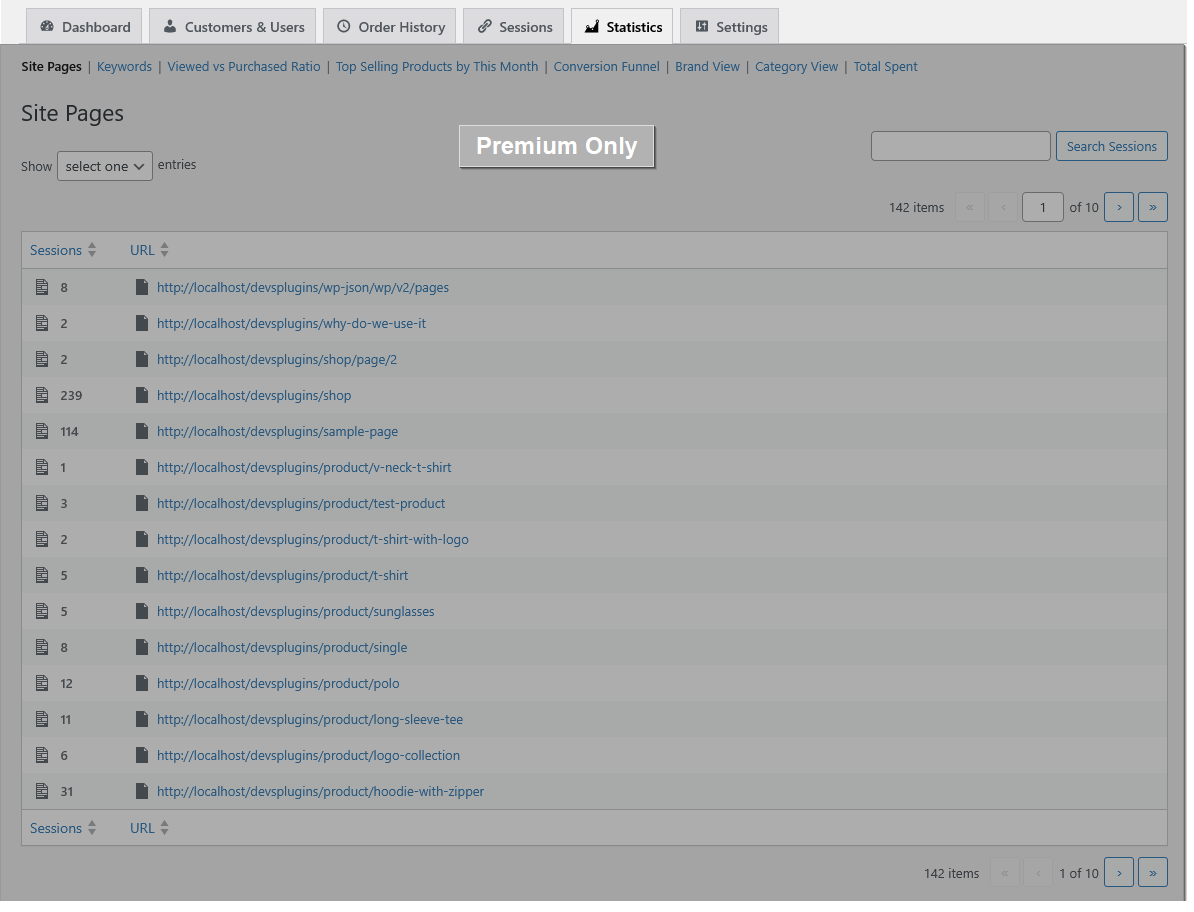


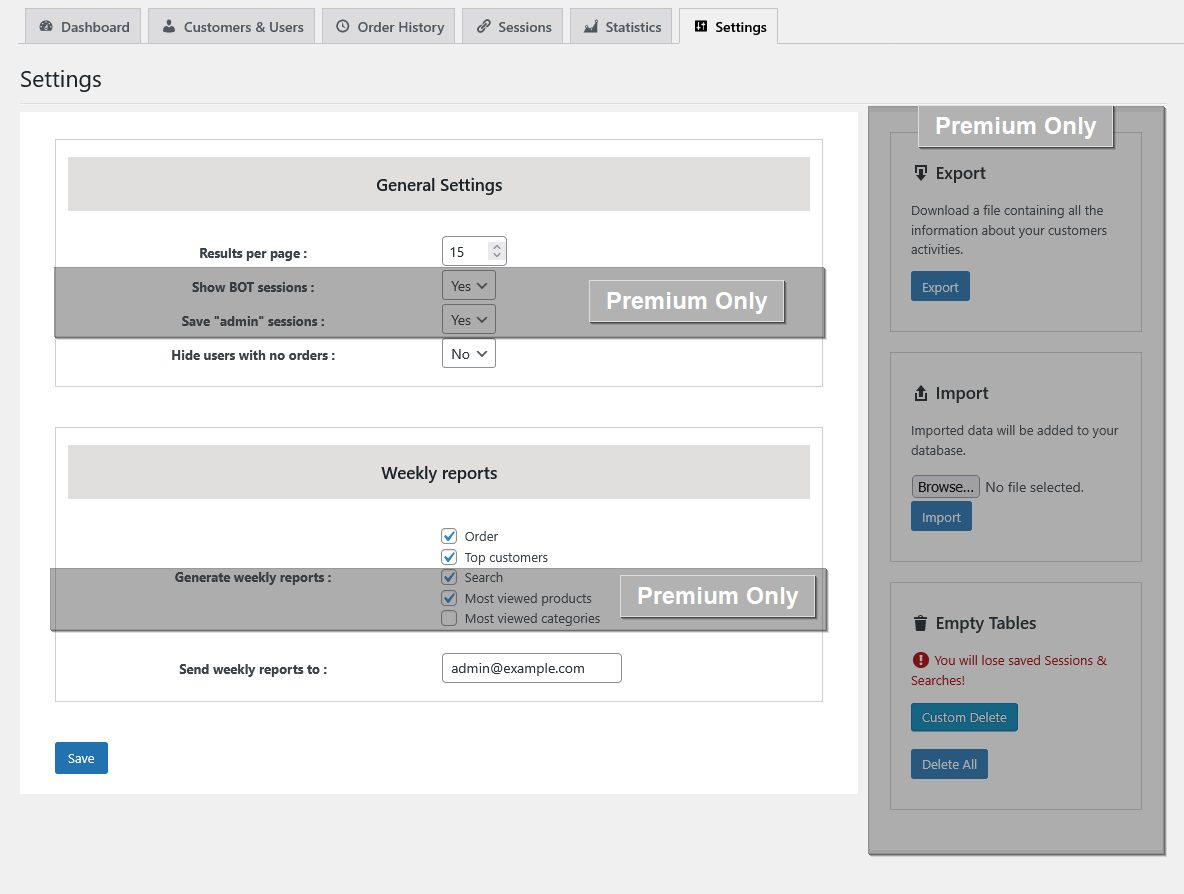
Changelog
4.1.0
A small Pro release that gets Customer History ready for companion plugins. The free version changes only its compatibility. Customer History itself still only observes and reports; nothing is sent to your customers, and no order, product or WooCommerce setting changes.
Pro additions
– NEW: A read-only interface for companion plugins (version 1). A plugin on the same site can read what Pro knows about each customer (RFM, health, lifecycle stage, churn risk, purchase probability, order counts and totals, the last abandoned cart, tags and marketing-consent status) and a few store-wide figures, without reading the plugin’s tables. It is plain PHP inside your WordPress install: nothing leaves your server, it changes nothing in your store, and it exists only while Pro is licensed.
– NEW: Each nightly calculation (RFM, health, lifecycle, churn, behaviour and the store average spend) records when it last finished, so a companion plugin knows how fresh the scores are. For developers: the pdwchs_scores_refreshed action fires as each one completes.
– CHANGED: the note on the Abandoned Cart Tracking card (Settings) and on the Abandoned Carts dashboard widget now names the plugin where recovery actions belong, instead of the old “Automation Add-on”.
Compatibility and upgrade
– COMPATIBILITY: tested with WordPress 7.1 and WooCommerce 11.3.
– UPGRADE NOTE: no new tables or columns, in either build. Pro keeps one new option, the time each nightly calculation last finished; deleting the plugin removes it.
4.0.0
Release 2.0, final part — “Scale & Trust”. The last of three Release 2.0 builds. Everything here observes and reports; nothing is sent to your customers, and no order, product or WooCommerce setting changes.
Free and Pro
– NEW: A new activity table. Page views, searches, add-to-cart and order events now go into a table of their own with purpose-built indexes. On a test store of 200,000 rows, searches, zero-result counts and dated funnel stages read 3 to 5 times faster; whole-table page views, distinct visitors and per-customer reads were about the same. Older activity is copied in the background, in small batches, and the reports switch over only once the copy has been compared with the old table and matches. Nothing changes on screen.
– NEW: A read-only “PureDevs Customer History — activity data” section at Tools > Site Health > Info: the state of the copy, row counts, and which table the reports read.
– FIXED: a page view whose referring address ran past 250 characters was lost. It is now kept, with the address cut to fit. A page view with a very long URL of its own is kept in the new table.
– FIXED: on the customer profile and email pages, the main column was cut off at phone width and the sidebar squeezed; below 782px the two columns now stack. A long email address in the sidebar wraps instead of running past it.
– CHANGED: exporting session data to CSV now needs shop-manager access (manage_woocommerce), the same as the import, because the file holds every visitor’s IP address and pages.
Pro additions
– NEW: Source on the Activity Timeline. The row that starts a visit shows where it came from: Search: Google, Social: Facebook, Referral: a site, or Direct. Each order shows WooCommerce’s own Origin wording, as on WooCommerce > Orders. Only the referring site’s name is used.
– NEW: Customer Alerts. Three triggers join the churn alert: a health score dropping by 15 points or more, a customer entering the At Risk stage, and a customer who has spent 500 or more abandoning a cart. Each can be switched off and both numbers changed in Churn Prediction > Settings. The Alerts tab labels each kind, and a completed order resolves them. Alerts start from the update onwards; past events do not raise any.
– NEW: One alert email. All alerts arrive together: as they happen (at most one email an hour), daily (the default), weekly, or no email. Alerts go to you only.
– NEW: Marketing Consent. Pick the opt-in checkbox your block checkout uses in Settings > Marketing Consent, and each customer’s answer shows on their profile with where it came from, as a Customers & Users filter, and as a segment condition. WooCommerce has no opt-in of its own, so until a checkbox is picked it says “Not set up”. Read-only.
– NEW: Data Retention. Settings > Data Retention sets how long browsing history and searches are kept: 30, 60, 90, 180 or 365 days, or forever (the default, so nothing is deleted on update). A weekly cleanup deletes older rows in small batches. The card shows the cart setting, table sizes and the last cleanup. From about 1 million activity rows, with browsing history kept forever, a dismissible notice on Customer History pages points to it.
– CHANGED: the churn alert no longer sends one email per alert (up to 50 an hour); it is part of the one alert email above. This changes what you receive after updating; set your choice in Churn Prediction > Settings.
– FIXED: the profile’s Intelligence cards (churn risk note, RFM and lifecycle “Recalculate Now” buttons) ran past a narrow sidebar on screens from about 783px to 1200px. They now wrap.
Compatibility and upgrade
– COMPATIBILITY: tested with WordPress 7.1 and WooCommerce 11.2.
– UPGRADE NOTE: one new table (activity) is added on the first page load after updating, in both builds, and the copy starts in the background; it runs on WP-Cron. The old table is still written until a later release removes it, so activity data takes about twice the disk space for now. No existing row is changed or deleted. Pro adds a weekly data-retention job, which deletes nothing until you choose a window.
3.3.0
Release 2.0, part two — “Profitability & Operations”. The second of three Release 2.0 builds. Everything here observes and reports; nothing changes an order, a product’s stock or price, or a subscription.
Pro additions
– NEW: Profitability report — a new page under Statistics, with its own Profitability menu item. For any date range it shows net revenue, cost, profit and margin by product, by customer, by RFM segment, and by cohort (the month each customer first ordered), with the ten most and ten least profitable products and customers. Net revenue is line revenue after discounts and refunds, without tax, shipping or fees, from completed and processing orders; each refund counts against the order it refunds.
– NEW: Product costs — the report reads WooCommerce’s own Cost of Goods Sold field when that feature is on. When it is off, or on a WooCommerce version without it, simple products, variable products and each variation get a “Cost (Customer History)” field next to their prices. WooCommerce’s cost field is never written.
– NEW: Order-time cost record — when an order becomes processing or completed, the cost of each of its lines is recorded in the plugin’s own table, once, so a later cost change or WooCommerce’s Recalculate button cannot rewrite past profit. Orders with no record (placed before this version, or before a cost was entered) use today’s cost and are marked Estimated. Products with no cost are marked No cost and left out of profit and margin, never counted as 100 % margin; every view shows how much of its revenue is recorded, estimated or uncosted.
– NEW: Cost, profit, margin and cost source on the Product Revenue cards, for the same range as the chart.
– NEW: Inventory Velocity — a new page under Statistics, with its own menu item. For each product or variation that tracks stock: units sold per day over the last 28 days (the last 90 for slow sellers), the trend against the 28 days before, the days until it runs out at that pace, the run-out date, and a reorder-by date from your supplier lead time (set on the page, 14 days by default). Statuses: Out of stock, Reorder now, Reorder before peak, Reorder soon and No sales in 90 days, on three tabs (Needs attention, All stock, No sales in 90 days). “Reorder before peak” compares the coming four weeks with the same weeks last year. Sales are recalculated daily; stock levels are read live.
– NEW: A Stock outlook line on the Product Revenue cards and a Stock outlook column on Top Selling Products.
– NEW: Subscriptions Intelligence, for stores running WooCommerce Subscriptions — a Subscriptions page under Statistics, with its own menu item: MRR now, active subscriptions, average per subscription, free trials, on hold and pending cancellation; the last 30 days’ new subscriptions, renewal rate, cancellations and plan switches; a 12-month MRR chart; a month-by-month table of new, cancelled and expired subscriptions, switches, renewals paid, failed and awaiting payment, renewal rate, active subscriptions and MRR at month end, and cancellation rate; MRR by plan; and every subscription by status. Past months’ MRR uses today’s amounts and is labelled as an estimate.
– NEW: A Subscriptions card on the customer profile — that customer’s subscriptions, their status, recurring amount, plans, dates and paid renewals.
– NEW: Subscriptions summary in the digest — an optional table and CSV (totals only, no customer names or emails), switched on in the new Subscriptions Digest Sheet card on the Settings page. Off by default.
– The Subscriptions page, card and Settings card appear only while WooCommerce Subscriptions is active. Nothing creates, edits, cancels or charges a subscription.
Fixes
– FIXED: the digest email’s Top Customers sheet counts only completed and processing orders, each net of its refunds, for registered customers. Before, it counted refunds, subscriptions, and failed, pending, on-hold and cancelled orders, logged three PHP warnings per digest run, and was empty on stores without HPOS. A deleted account is labelled “Customer #N (account deleted)”, and names with “&” or an apostrophe are written plainly in the CSV.
– FIXED (Pro): Product Revenue counts each refund once, against the order it refunds and in that order’s period, the rule the Revenue report and the Profitability page use. Before, a refund was subtracted on its own date and counted as an extra order, and the refund of a fully refunded order lowered revenue even though that order was no longer counted. Product Revenue figures for ranges with refunds can change after updating.
– FIXED (Pro): the Dashboard’s declining-health list was empty, with a database error in the log, once any customer’s health score had risen. It now lists the customers whose score fell, and refreshes as soon as a score is saved instead of up to 30 minutes later.
– COMPATIBILITY: tested with WordPress 7.1 and WooCommerce 11.2.
– UPGRADE NOTE: Pro adds one table (order-item costs) automatically on the first page load after updating; no existing data is rewritten. Profit for orders placed before the update uses today’s product costs and is marked Estimated. The new Inventory Velocity job runs daily at 7:30 AM; its first calculation runs a few minutes after the update.
3.2.0
Release 2.0, part one — “Search & Prediction”. The first of three Release 2.0 builds. Everything here observes and reports; nothing acts on a customer.
Free additions
– CHANGED: the customer list no longer stops at 100 customers. The free version lists, filters and exports every customer. The 90-day analytics window and the single saved segment are unchanged.
– NEW: Zero-Result Trend on the Search Analytics page — a weekly chart of the share of searches that returned nothing, plus a “top offending terms” chart trending your worst zero-result terms week by week. It draws once two weeks of search results have been recorded, and every week is plotted even when a term had no failures that week, so the axis never skips.
– NEW: Data-freshness indicators — every cached analytics panel on the Dashboard, Revenue, and Search Analytics pages carries an “Updated X min ago” chip, and every panel that queried on this page load carries a “Live” chip. Nothing about the queries changed; you can now see which figures are a snapshot.
Pro additions
– NEW: Search Gap report — a dedicated page with two ranked lists: terms that returned nothing, and terms that returned products nobody bought. Expand any term to see the products those searchers viewed instead, or that they viewed nothing at all. Each list exports to CSV. The report is built once a day, overnight; the first build runs within a few minutes of updating.
– NEW: Purchase probability (“Buy Again”) — the chance of another order in the next 30, 60, and 90 days, computed for every customer from their own order rhythm during the nightly churn pass. Shown on the churn card beside the predicted next-order date, as a “Buy Again” column on the customers list, as a filter (probability above, below, or equal to a percentage, over the 30, 60, or 90-day window), and as a saved-segment condition.
– NEW: Behaviour-based segment conditions — filter the customers list, and save segments, by “viewed product” (chosen from a search-as-you-type product picker) and by “searched term”. Both sit alongside the existing behavioral-tag filter.
– NEW: Funnel by Segment — a Segment selector on the Aggregate Conversion Funnel runs the same four stages for one RFM segment or one lifecycle stage. Segment views count only sessions attributable to a signed-in customer; the page says so, and “All customers” still includes guests.
– CHANGED: the Pro Zero-Result Searches stats page is retired. Its content lives in the Search Gap report, and the old menu slug redirects there so bookmarks keep working. The free Zero-Result Searches panel is unchanged.
Improvements, fixes, and compatibility
– IMPROVED: churn scoring now walks customers with a resumable cursor instead of an offset, so a nightly pass no longer skips the batch after the one it just scored.
– IMPROVED: a saved segment whose conditions cannot run on the current build — for example a Pro-only condition after the licence lapses — now counts zero and exports nothing, and the Segments page shows a notice naming it, instead of silently matching everyone.
– IMPROVED: deactivating the plugin now clears every scheduled event it registered, including ones carrying arguments, so nothing keeps firing while the plugin is off.
– FIXED: Search Gap CSV cells that begin with a formula character are quoted so a spreadsheet cannot execute them.
– FIXED: the “never purchased” list is a true top N — it ranks every candidate term rather than the first page only, and says so when less-searched terms were not checked.
– FIXED: the Buy Again filter’s default 30-day window no longer sneaks an empty “everyone” condition into a saved segment.
– FIXED: the Customers & Users and Order History lists sort by value: spend and order counts as numbers, dates as dates, names alphabetically. Before, money and counts sorted as text. The customer list now opens A to Z by name.
– FIXED: the Pro customer search box finds customers by username, email, first and last name, display name, and billing name, email or phone; a full name such as “Jane Smith” matches too. A saved segment that includes a search now counts and exports the same customers the list shows.
– FIXED: the Dashboard’s latest-orders panel, the customer profile, Order History and the digest email no longer log a WooCommerce “called incorrectly” notice for every order. The customer profile, the customer email page and the Pro report and statistics sub-pages now have a browser tab title, and no longer log a PHP 8.1+ deprecation notice.
– FIXED: no more PHP 8.2 “dynamic property” deprecation notices on admin pages.
– IMPROVED: the Pro session import on the Settings page accepts CSV files only and checks the user’s permission, and the session import and delete tools sanitise their input.
– FIXED: two Activity Timeline cart labels can now be translated.
– FIXED: exporting a segment on the free version no longer logs a database error about a missing Pro table.
– COMPATIBILITY: tested with WordPress 7.1 and WooCommerce 11.2.
– Updated Freemius SDK to the latest version.
– UPGRADE NOTE: Pro adds three probability columns to the churn scores table and two indexes to the sessions table (session date, and URL + user). They are created automatically on the first admin page load after updating; no existing data is rewritten. The new Search Gap cron is scheduled daily and runs its first build shortly after the update.
– UPGRADE NOTE: the Buy Again column and the churn-card probability block show “not yet scored” until the nightly churn calculation has visited each customer. On a large store the first full pass may take more than one night.
3.1.2
Release 1.5 — “See the Whole Customer”. The complete Release 1.5 feature set ships in this one version. Nothing in it acts on a customer: it is all observation and reporting.
Free additions
– NEW: Repeat Purchase Rate card on the Revenue dashboard — the share of customers in the period who ordered more than once, with period-over-period change.
– NEW: Zero-Result Searches on the Search Analytics page — the terms shoppers searched for and got nothing back, with search counts and last-searched dates. Recording starts the day you upgrade; the panel shows you that date until terms accumulate.
– NEW: Customer Notes — a private, admin-only notepad on every customer profile. Notes are never shown to the customer and are covered by the WordPress personal-data export and erase tools.
– NEW: Digest interval — the admin digest can now be sent weekly or monthly, and the report window follows your choice.
Pro additions
– NEW: Cohort Retention — monthly acquisition cohorts as a heatmap (cohort size plus the share returning at month 1 through 12), an average-retention-by-offset chart, customer and percentage views, and CSV export. The matrix is precomputed daily so the page loads instantly.
– NEW: Customer Activity Timeline — one chronological stream on the customer profile joining searches, product views, cart activity, and orders, with an event-type filter and “load older” paging.
– NEW: Guest-to-Customer Merge — when a guest’s email later registers or checks out, their earlier anonymous sessions, searches, and views attach to the unified profile automatically. A one-time background backfill repairs history already collected, in resumable batches.
– NEW: Order-Screen Intelligence Panel — health score, RFM segment, lifecycle stage, lifetime value, order count, and last-seen shown directly on the WooCommerce order edit screen.
– NEW: Retention Metrics Pack — store-level churn rate over configurable windows (15/30/60/90 days and 4/6/12/24 months) with a trend chart, plus an expected-customer-lifetime-value card, inside Revenue Analytics.
– NEW: Manual Tags — create and colour your own tags on a Manual Tags page, apply them from any customer profile, then use them as a customers-list column, a filter, and a segment condition, side by side with the automatic behavioral tags.
– NEW: Geographic Performance report — net sales, orders, items, and unique products by billing country, with side-by-side country comparison, a comparison chart, and its own date-range picker.
– NEW: LTV Distribution — a histogram of how many customers fall into each lifetime-spend bracket, with average and median LTV cards, on the Revenue dashboard.
– NEW: Refund-rate signal — each customer’s refund rate as a sortable column on the customers list, a “refund rate above X%” filter, and a matching segment condition. The quality signal that separates a genuine high-value customer from a high-refund one.
– NEW: RFM matrix heat-map — your whole customer base plotted on a recency x frequency grid, with the count in every cell.
– NEW: Average order-gap column — the typical number of days between a customer’s orders, already computed for churn prediction and now visible on the list.
– NEW: Digest segment attachment — pick a saved segment in Settings and its CSV rides along with each digest email.
– NEW: Klaviyo and Mailchimp CSV export presets, chosen from a format selector on the Segments page. These are column layouts for a file you download — the plugin still connects to no external service, no API, and no account.
– NEW: A dedicated Zero-Result Searches page under Statistics, sortable and paged, alongside the free Search Analytics widget.
Improvements, fixes, and compatibility
– IMPROVED: every Settings section now uses the same card layout, so the page reads as one screen instead of several.
– FIXED: the Delete button on the Segments page could paint outside the table when the actions column ran out of room.
– SECURITY: the search keyword is now escaped on the Pro Keywords page.
– COMPATIBILITY: tested against WooCommerce 11.0.
– UPGRADE NOTE: this release adds database tables and columns (customer notes, tags, a search results-count column, and session indexes). They are created automatically on update — no action is needed and no existing data is rewritten.
– UPGRADE NOTE: uninstall cleanup is now split per build. The free build removes only the data the free feature set creates; the Pro build removes everything. If you ran Pro and later switched to the free build, uninstall while Pro is still installed to have its tables removed too.
3.0.2
- REMOVED: the churn screen’s “Create Coupon” action and the automated win-back email. The plugin now creates no WooCommerce coupons and sends no marketing email to customers, matching its observe-and-report design. The manual, admin-composed one-to-one customer email tool is unchanged and still available from a customer’s profile.
- IMPROVED: the churn card on a customer profile now shows a predicted next-order date alongside the existing “days overdue” figure. It is derived from data already collected, so it needs no new tracking.
- FIXED: the RFM component of the churn prediction model never matched a customer’s stored RFM segment, so it always contributed a flat neutral score. Segment and recency/frequency/monetary lookups now read the correct stored values. This component is not yet wired into the scores shown on screen, so existing churn scores are unchanged and no recalculation is needed.
- FIXED: Pro feature descriptions listed behavioral badges the plugin does not produce, and overstated the customer-table filters. Both now match the actual features.
- REMOVED: unused legacy referral and points code left behind by the 2.1.8 feature removal, plus a group of unreachable helper methods in the customer-list class. No change in behaviour.
- IMPROVED: uninstall now also clears legacy referral settings left by 2.x installs.
- COMPATIBILITY: tested against WooCommerce 10.7. Added a FAQ entry confirming the bundled Freemius SDK (2.13.4) is not affected by the reported Freemius SDK vulnerabilities, which were fixed in SDK 1.0.1/1.0.2.
- Also includes the 3.0.1 changes, which shipped without a changelog entry: hardened guest, bot, and registered-user handling in the sessions list, and live demo details added to the plugin listing.
3.0.0
- NEW: Customer Intelligence Dashboard — overview cards (total, new, and active customers) plus widgets for top customers by lifetime value, latest orders, top-selling products, top searches, top categories, recent searches, and most-viewed products, with a date-range picker and period-over-period comparison.
- NEW: Search & Discovery Analytics page — top search terms, recent searches, most-viewed products with view counts, and top viewed categories.
- NEW: Per-customer profile page — financial summary, complete order history, that customer’s recent searches, and recently viewed products.
- NEW: View tracking — passive tracking of which products and categories customers view.
- NEW: Revenue dashboard — net revenue, orders, AOV, and customers with period-over-period comparison and a revenue trend chart (free 90-day window).
- NEW: Order History page — a store-wide order list filterable by date range, status, and keyword, with quick links into the matching WooCommerce order edit screens.
- NEW: Customer Segments — save a segment with a live member count and one-click CSV export.
- NEW: Weekly email digest (opt-in, admin-only) summarising new customers, top searches, top customers, and most-viewed products.
- NEW: Manual one-to-one customer email tool — compose and send a single, admin-initiated email to an individual customer from their profile. No automated sends, no bulk emails, no marketing campaigns.
- NEW: Free-tier scope — customer list shows the most recent 100 customers and a 90-day analytics window, with clear scope banners.
- IMPROVED: Reworked as a focused customer-intelligence and reporting plugin. The analytics are observation-and-reporting focused; the only outbound action is a manual, one-to-one customer email you send yourself.
- COMPATIBILITY: WordPress 6.0+, WooCommerce, HPOS-compatible. Compatibility check with the latest WordPress and WooCommerce versions.
2.1.8
- All features are now free with no premium gating.
- Removed session and behaviour tracking features (page visit recording, URL session logging, live search term tracking).
- Removed statistics section (product view vs. purchase ratio, most-viewed products/categories reports).
- Removed customer point system and Bronze/Silver/Gold/Platinum categorisation.
- Removed coupon generation for customer categories.
- Removed conversion funnel visualisation.
- Removed customer referral system.
- Weekly reports simplified to Orders and Top Customers reports.
- Security and sanitization fixes for WP.org compliance (nonce handling, wp_unslash, input sanitization, GPL-compatible chart library).
- Compatibility check with WP and WooCommerce latest version.
2.1.7
- Fix errors related to validations, sanitizations and escaping.
- Compatibility check with WP and WooCommerce latest version.