

Description
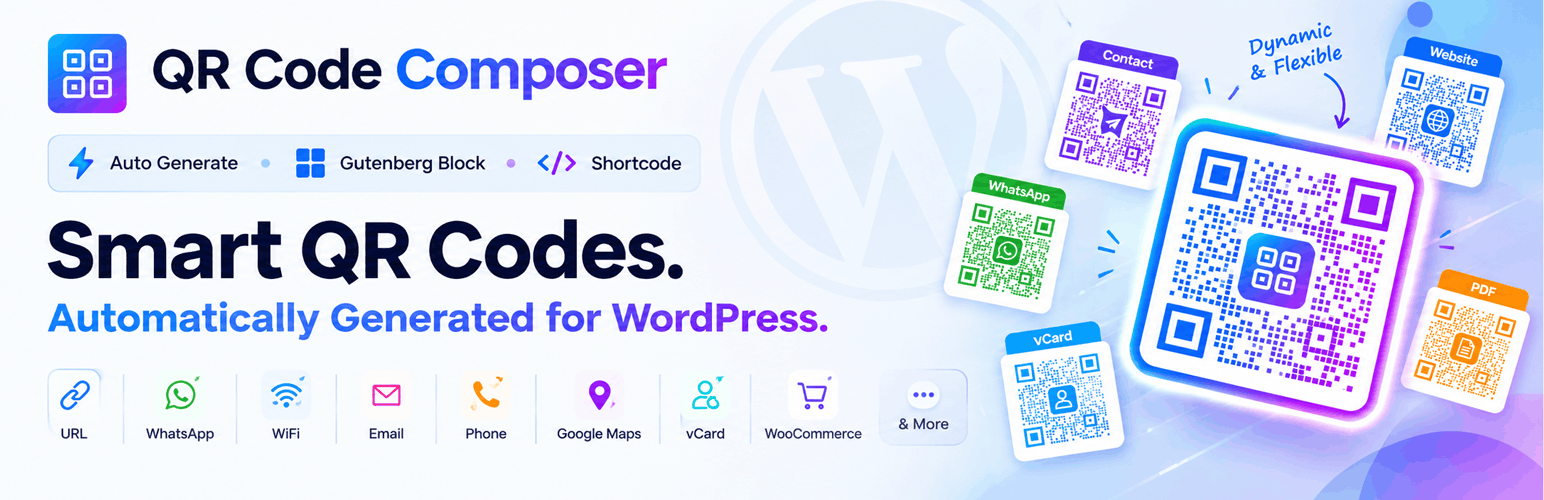
QR Code Composer automatically generates QR codes for your WordPress pages, posts, and WooCommerce products. Install it and it works right away, with no setup.
Create QR codes with the native Gutenberg block, shortcodes, or automatic generation. No external APIs or extra tools are needed.
It is a good fit for store owners, marketers, and businesses who want to save time and use QR codes without extra work.
🔥 What You Can Do with This Plugin
🟢 Automatic QR Code Generation
- Show a QR code after the content of up to 3 pages, 3 posts, and 3 products (you choose which ones)
- Need more? Pro has no limit and also supports custom post types
- The QR code updates automatically when a URL changes
- Meta field support
- Generate a QR code from each author’s user bio and show it on their dashboard
- Download the QR code image from the backend and the frontend
🧱 Gutenberg QR Code Block
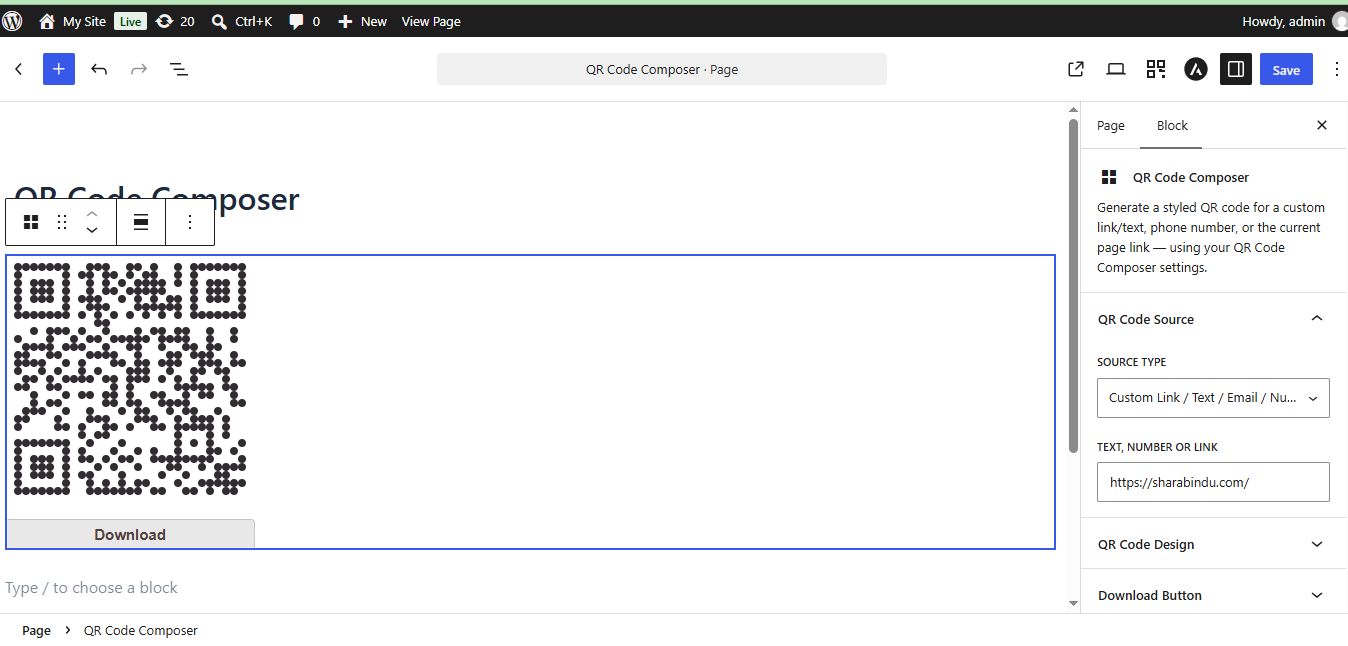
- Add a QR code to any post or page with the native QR Code block
- See a live preview inside the editor
- Change size, colors, and design in the block settings sidebar
- Create static QR codes for text, links, phone numbers, email, and WhatsApp
- More block options are available in Pro
🟡 Custom QR Code Creation
- Create QR codes for text, links, phone numbers, email, and WhatsApp
- Show them anywhere with the Gutenberg block or shortcodes
🔵 WooCommerce Integration
- Show QR codes on product pages
- Create customer QR codes on the My Account page
🚀 Upgrade to Pro:
Get more from your QR codes with QR Code Composer Pro:
Unlimited Automatic QR Codes: Show a QR code automatically after the content of all your pages, posts, and WooCommerce products, with no limit. Custom post types are supported too, so every item on your site can have its own QR code.
⚡ Dynamic QR Codes (Pro)
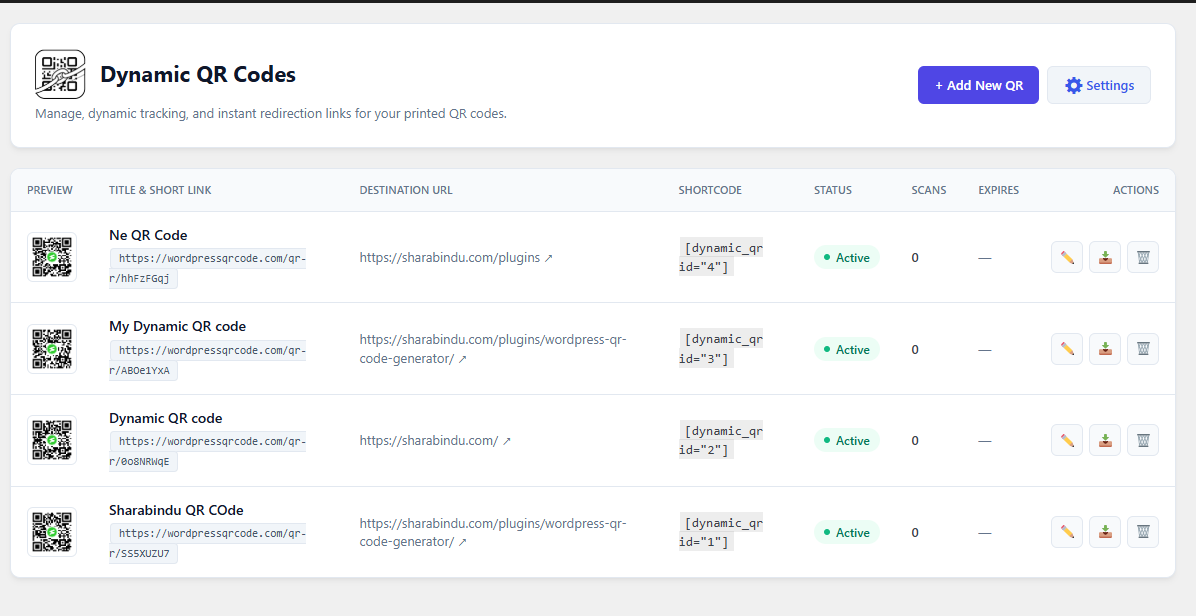
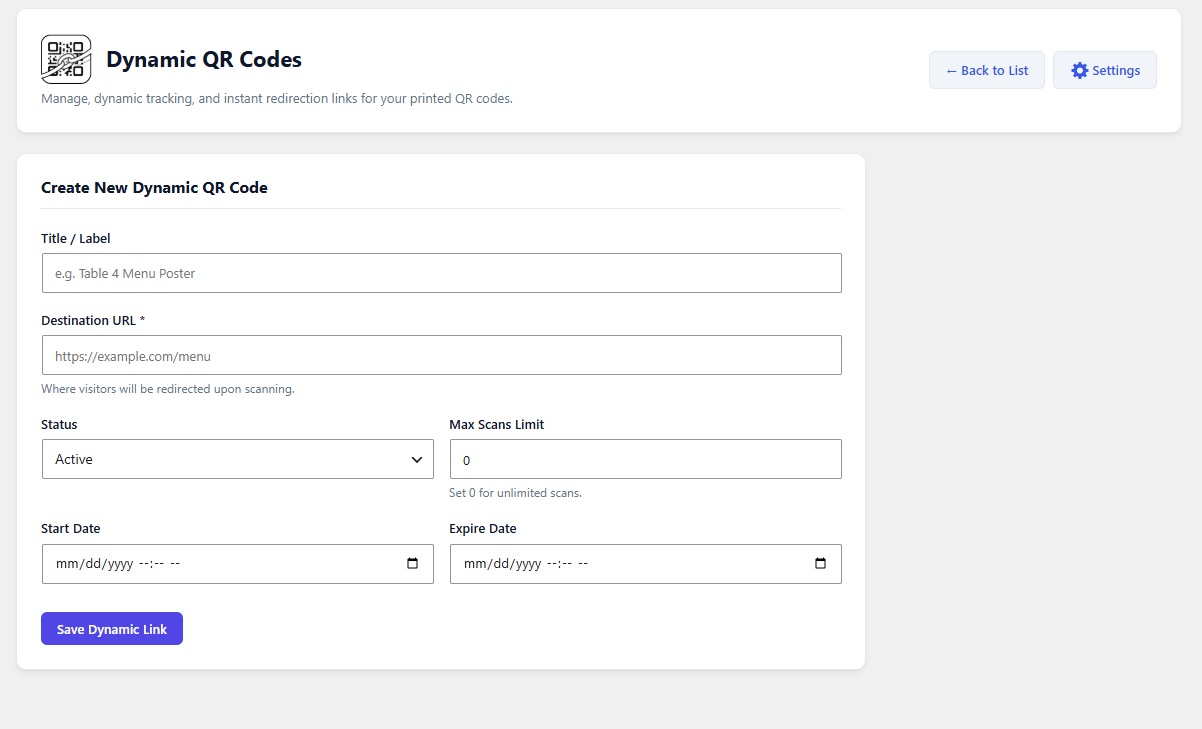
Print your QR code once and change where it points any time. A dynamic QR code uses a short link on your own site. You can update the target URL later without reprinting posters, packaging, menus, or business cards.
- Dynamic short links: Create and manage trackable QR short links from your dashboard
- Edit the destination any time: Change where a printed QR code goes
- Link scheduling: Set a start date and an expiry date for each QR code
- Scan limit: Turn off a QR code automatically after a set number of scans
- Fallback redirects: Choose a redirect URL for invalid, inactive, expired, or scan-limit QR codes
- High-resolution PNG download
- Cache-buster option for sites with strong caching
- Gutenberg block support: Insert static or dynamic QR codes with the same block
📊 QR Code Scan Analytics (Pro)
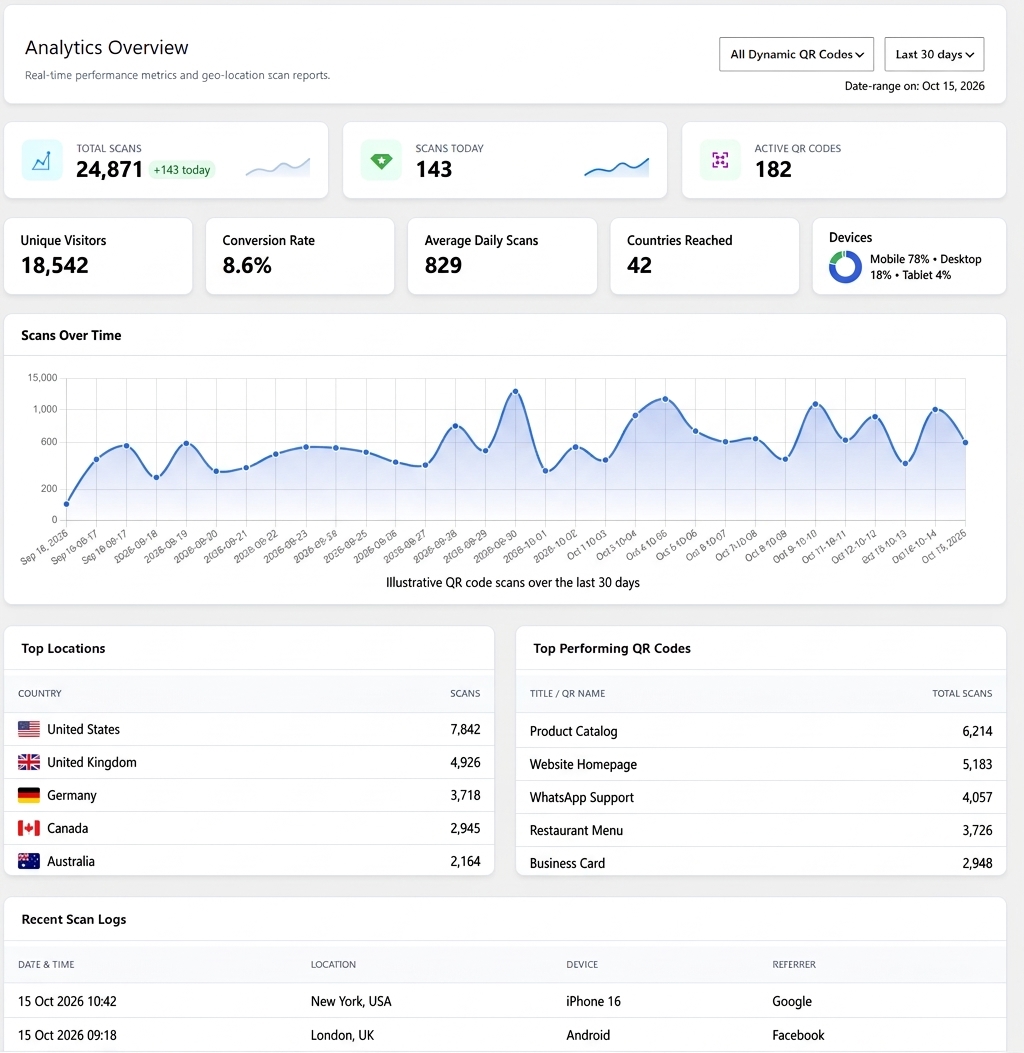
See how your QR codes perform inside your WordPress dashboard, with no third-party analytics service.
- Analytics dashboard: Daily scan charts and a top links report
- Scan tracking: Total scans for each QR code
- Device and location details: Device type, city, country, and referrer for every scan
- High-Traffic Mode: Turn off detailed logging to keep your site fast during busy campaigns
🧱 Advanced Gutenberg Block Options (Pro)
- More source types: WhatsApp, WiFi, Google Maps, Event, and vCard
- Logo in the center of the QR code
- Error correction level
- Gradient body color
- Eye frame and eye ball styles
- Custom download file name
🎨 More Pro Features
Branded QR Code: Match your brand with round, square, dotted, and rounded styles. Change colors and shapes to get a clean QR code that fits your site. Admin demo for the Pro version
Eye Frame Shape: Change the eye frame shape and add a gradient color. Shapes: Square, Circle, Classy, and Classy Rounded.
Eye Ball Shape: Change the eye ball shape and add a gradient color. Shapes: Square, Circle, and Classy.
Gradient Color QR Code: Use gradient colors on the QR body, eye frame, and eye ball for an eye-catching design.
Logo Upload: Put your logo in the center of the QR code.
WooCommerce Order QR Code: Create a QR code for every new and old order automatically. Choose what the QR code contains in the plugin settings. See it on the WooCommerce order page. Admin demo for Order QR
Order QR Code in Emails: When an order is completed, its QR code is added to the WooCommerce order email. You control which details the QR code includes. Order email demo
Bulk vCard Generator: Create vCard QR codes for any post type. For example, if you have a custom post type called “Developer”, open a developer’s edit page, fill in the vCard QR meta fields, and save. A vCard QR code is created for that developer. vCard QR codes can show automatically on the frontend and backend, and a shortcode is also available.
Event QR Code: Create an event QR code with the event details, time, and location.
WP Author QR Code: Create QR codes for WordPress authors and users, with built-in shortcodes to show them on the frontend.
WiFi QR Code: Let people join your WiFi network instantly by scanning a QR code.
Google Maps QR Code: Create a QR code for an address so people can find your location with one scan.
Elementor QR Code Generator: If Elementor is active on your site, use the built-in “QR Code Composer” addon to add QR codes. Elementor demo
Integrations (Pro)
bbPress User QR Code: Create QR codes for bbPress user profile links, or vCard QR codes from user profile details.
BuddyPress User QR Code: Create QR codes for BuddyPress user profile links, or vCard QR codes from user profile details.
Dokan Vendor QR Code: Create QR codes for Dokan vendor profile links, or vCard QR codes from vendor profile details.
Other Pro Features
Bulk Print as PDF: Print many QR codes as a PDF from the plugin dashboard or the frontend with built-in shortcodes. You can filter by category. Admin demo
Download All QR Codes from One Page: Download the QR codes of every post type from a single page. Admin demo
Download All vCard QR Codes from One Page: Download vCard QR code images for all post types from a single page. Admin demo
WordPress Widget: Create a QR code from a WordPress widget. Widget demo
Shortcode Generator: Build shortcodes on the plugin settings page for Custom Link, WhatsApp, WiFi, Google Maps, vCard, and Event QR codes. You can also change the design, color, logo, and animation. View the Shortcode Generator
Privacy
This plugin (free version):
-
Does NOT connect to any third-party services
-
Does NOT store user data
-
ONLY generates QR code images locally
The Pro version’s analytics feature stores scan data (such as device, country, city and referrer) in your own WordPress database. Nothing is sent to external services. You can turn detailed logging off at any time with High-Traffic Mode.
⭐ We Value Your Feedback
Your feedback helps us grow!
If you enjoy QR Code Composer, please share your experience and leave a rating. It means a lot.
How to add QR codes to a WordPress website
WordPress QR Code Gutenberg Block
How Create Dynamic QR Code in WordPress(Premium)
Installation
- Go to your WordPress dashboard and navigate to Plugins > Add New.
- Search for “QR Code Composer”.
- Click “Install Now” and then “Activate” the plugin.
- To add a QR code in the block editor, click the “+” button and search for “QR Code”.
FAQ
What is QR Code Composer?
QR Code Composer is a powerful WordPress QR code generator plugin that automatically creates fully customizable QR codes for posts, pages, WooCommerce products, custom URLs, contact details, and more. It supports Gutenberg, WooCommerce, Elementor, and multiple QR formats including vCard, email, phone, and WhatsApp.
How do I generate a QR code in WordPress?
After installing and activating the plugin, QR codes are automatically generated for your WordPress content. You can also create custom QR codes with the Gutenberg QR Code block, through the plugin settings, or by using shortcodes anywhere on your site.
Is there a Gutenberg block?
Yes. Both the free and Pro versions include a native QR Code block. The free version covers basic static QR codes (text, links, phone, email, WhatsApp). Pro adds more source types (WiFi, Google Maps, Event, vCard), logo, error correction level, gradient colors, eye frame and eye ball styles, and dynamic QR codes.
What is a Dynamic QR code?
A dynamic QR code points to a short link on your own website instead of the final URL. That means you can change the destination later without reprinting the QR code, set start and expiry dates, limit the number of scans, and track every scan. Dynamic QR codes are a Pro feature.
Does the plugin have QR code analytics?
Yes, in Pro. The built-in analytics dashboard shows daily scans, your top-performing QR codes, and device, city, country and referrer details for each scan. All data stays in your own WordPress database.
Can I generate QR codes for WooCommerce products?
Yes. The plugin has full WooCommerce QR code integration, allowing QR codes to appear on product pages, order details, customer dashboards, and (Pro) order emails and invoices. This helps customers quickly scan, share, or access product information.
Does the plugin support vCard QR codes?
Yes. QR Code Composer can generate vCard QR codes for WordPress users and WooCommerce customers, enabling instant sharing of contact information with a single scan.
Is the plugin compatible with Elementor?
Yes, it works seamlessly with Elementor Page Builder. You can insert QR codes using built-in shortcodes or by using the dedicated Elementor widget (Pro), allowing live design and customization inside Elementor.
Can I create custom QR codes for links, emails, or phone numbers?
Absolutely. The plugin generates QR codes for:
- URLs and custom links
- Email addresses
- Phone numbers
- WhatsApp contacts
- Plain text or numeric data
This makes it ideal for marketing, digital business cards, product sharing, and contact-based QR solutions.
Are advanced features available in the premium version?
Yes. The Pro version adds Dynamic QR codes, scan analytics, the advanced Gutenberg block, bulk QR code generation, WiFi QR codes, event QR codes, Google Maps location QR codes, vCards for custom post types, and integrations with plugins like Dokan, BBPress, BuddyPress, and WooCommerce PDF invoice plugins.
Can users download the QR codes?
Yes. QR codes can be shown in popup view or via a download-only button, allowing visitors to instantly download the QR image with one click.
Is bulk QR code generation supported?
Yes. Bulk generation is available in the premium version, allowing you to create and download QR codes for hundreds of posts, pages, products, or user profiles at once.
Does QR Code Composer support shortcodes?
Yes. The plugin includes multiple flexible QR code shortcodes so you can display QR codes anywhere — in posts, pages, widgets, templates, Elementor, or custom layouts.
How long are the QR codes valid?
Static QR codes generated by QR Code Composer are valid for the lifetime of your website. They never expire unless you change the underlying content (URL, text, contact info). Dynamic QR codes (Pro) work as long as the Pro plugin is active on your site.
How are QR codes created? Depend on Google API?
Static QR codes are generated using pure JavaScript, directly inside your website.
They do not rely on Google APIs or any third-party services.
This ensures fast, private, and lifetime-valid QR images with no external dependency.
Is there a limit in the free version?
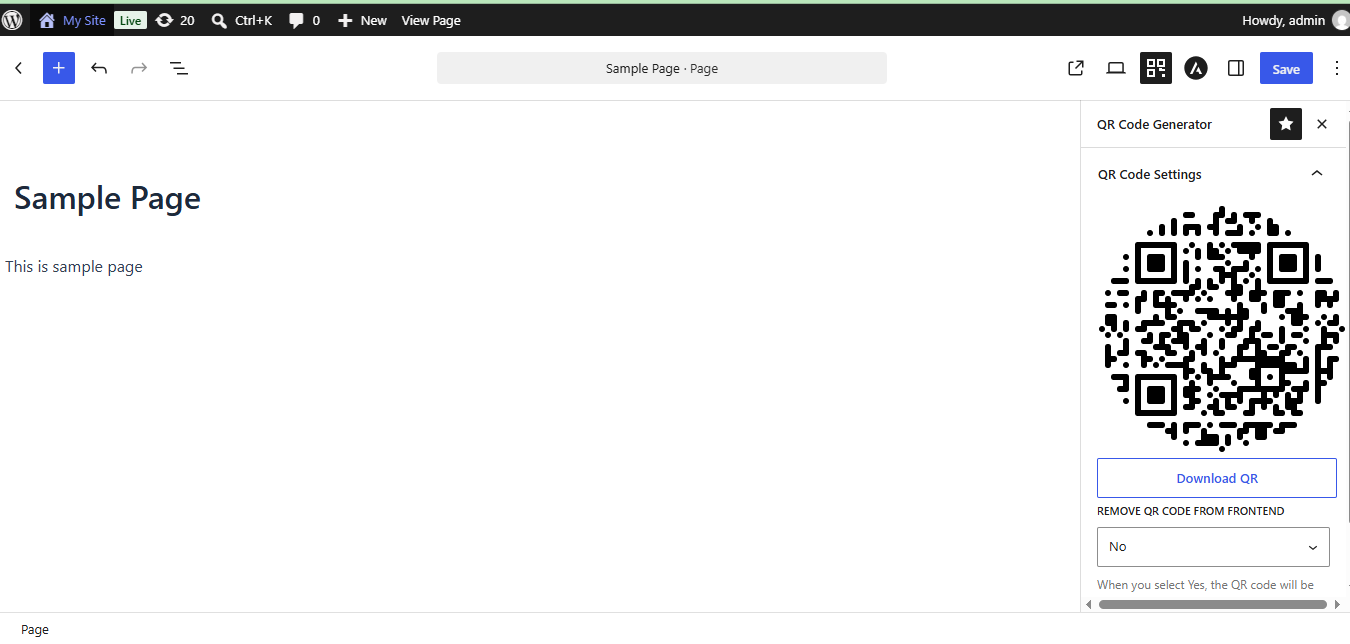
The automatic QR code (shown after your content, in the editor meta box, and in the Gutenberg sidebar) works on up to 3 pages, 3 posts and 3 products. You choose which ones in QR Plugin Settings → Auto Generate QR Code. Pro removes the limit and adds custom post types. The shortcode and the QR Code block have no limit.
How do I stop automatically displaying QR codes?
You can turn off automatic display from:
Dashboard → QR Plugin Settings → Auto Generate QR Code
There you can:
- Turn on “Disable Auto Display” to hide all automatic QR codes
- Pick which pages, posts and products show a QR code (the free version allows up to 3 of each)
You can also hide the QR code on a single page from its meta box or the Gutenberg QR sidebar.
QR codes from the shortcode and the QR Code block are not limited.
Is the QR code image stored somewhere inside WordPress?
No. Static QR codes are created instantly in the browser and not stored in the database. They are generated dynamically on each page load to ensure accuracy and speed.
Screenshots


Changelog
4.0.0
-
New: Automatic QR codes in the free version now work on up to 3 pages, 3 posts and 3 products (choose them in settings). Unlimited items and custom post types are in Pro.
-
New: Free version now limits the Profile QR Code and My Account dashboard QR code to the first 3 user accounts (Pro: unlimited)
-
Fix: Auto generate QR code content
- Update: Readme and FAQ updated with the new free version limits
3.0.7
- Fix: Auto generate QR code content
3.0.6
- New: Gutenberg QR Code block
- Update: Compatibility Update
3.0.5
- Update: Compatibility Update
3.0.4
- Update: Improved compatibility with LiteSpeed Cache and Autoptimize.
- Update: Fixed QR rendering issues caused by aggressive JS minification.
- Update: Enhanced script loading for deferred and delayed JS
- Update: Optimized QR preset initialization for cached pages
3.0.3
- Update: Improved the plugin settings page UI for better usability.
3.0.2
- Fix: Product QR code location on a single page
- Update: Compatibility Update
3.0.1
- Update: Compatibility Update
3.0.0
- New: Added Circular Shape QR Code design
- New: Can Add Error Correction Level
- New: Can Margin around the QR code
- New: Added option to disable auto-display of QR Code on the frontend via a button.
- New: Added option to disable auto-display of QR Code in the meta box via a button.
- Update: updated the Auto Generate QR Code data settings.
2.0.17
- Update: Elementor QR Code JS functionality update
2.0.16
- Fix: VCard QR code scannable problem
2.0.15
- Fix: QR Code Show/Hide on Product Page Issues Fixed
2.0.14
- Fix: QR Code Download File on Proudct page
2.0.13
- Update: Compatibility Update
2.0.12
- Fix: QR code on product page as tab
- Update: Compatibility Update
2.0.11
- Update: Compatibility Update
2.0.10
- Update: Compatibility Update
2.0.9
- Update: Added a prefix to the modal popup
2.0.8
- New: For generating QR codes for Elementor Page Builder, QR addon is included
2.0.7
- Fix: QR code removed form BudyBoss Search template
2.0.6
- New: Displaying QR code via pop-up.
- New: Added multiple options for WooCommerce’s single product page QR code display location.
- New: QR code converted from image to canvas
- New: QR code visibilityFeatires added
2.0.5
- Fix: Removed string code from QR code in meta box
- Update: The URL of the download button of the QR code is configured
2.0.4
- Update: Made Compatible with WordPress
2.0.3
- Update: Removed QR codes for shipping and billing addresses
- Update: Removed username from User vCard QR code
2.0.2
- Fix: Fixing Alignment issues for shortcode
2.0.1
- Update: Made Compatible with WordPress
1.7.3
- Fix: Fixing the issues of Download QR code image from the backend
1.7.2
- Update: Change The QR Design
1.6.1
- Fix: Troubleshooting QR code WordPress user pages
1.5.4
- Update: Hide QR code according to Page
1.5.0
- Update: Made Compatible with WordPress
1.4.0
- New: Added vCard QR code functionality
1.3.3
- New: Settings page update
1.3.2
- New: POT File Add
1.3.1
- Fix: admin page fix
1.3.0
- New: QR will run automatically by default size
1.2.9
- New: QR will run automatically by default size
1.2.8
- New: QR Download Button Added
1.2.7
- Update: Made Compatible with WordPress
1.2.6
- Update: Made Compatible with WordPress
1.2.5
- Update: Made Compatible with WordPress
1.2.4
- Update: Made Compatible with WordPress
1.2.3
- Update: Made Compatible with WordPress
1.2.2
- Update: Made Compatible with WordPress
1.2.0
- Fix: Fix CSS Issues
1.1.0
- Initial release