

Description
Copy&Paste Cleaner. If you want to quickly fill a post or a page with content that already exists, copy&paste is often used and it can destroy the layout of a website!
The basic problem is that if you copy&paste content from different sources into the visual editor, any formatting is copied over. Specifically, whether from text documents, other websites, online-shops and cms or even from social media, something comes along everywhere. This also applies to content generated in AI chats, which often contains unwanted formatting as well.
As there are often DIVs in addition to harmless HTML elements, these can cause the rendering of your own website to be faulty or interrupted. The integrated DIV-Detector automatically detects div elements in your content after pasting and shows a visual warning with a direct cleanup link.
To avoid this, this plugin checks the existing formatting and attributes and removes all those that could lead to a problem – with one click.
The cleanup includes:
- Removes layout-breaking elements such as
divandspanas well as wrapper elements (figure,article,picture,aside,pre,blockquote) – the text is kept - Removes unnecessary attributes (e.g. classes, styles, IDs as well as
aria-*anddata-*) – alt texts of images on your own website are preserved - Removes
style,scriptandiframeblocks including their content - Removes leftover CSS that comes along when you paste e-mails or Word documents
- Removes emojis and hashtag links (e.g. from Instagram)
- Removes images from foreign domains, local images are kept
- Reduces repeated empty paragraphs and line breaks
- Merges redundant nested formatting
- Converts lists (e.g. from Word) into standards-compliant lists and cleans them up
If you copy and paste into the text editor, there is usually no problem.
Tested with these page builders:
- Classic editor
- Gutenberg
- Divi 4.27
- Elementor 4.3
- WPBakery 9.1
- Beaver Builder 2.11
Accessibility
The DIV warning in the Classic Editor is announced automatically by screen readers. Alt texts of images hosted on your own website are preserved during cleanup, so the accessibility of your content is not reduced. Cleaning up also converts presentational bold and italic markup into semantic strong and em elements.
Privacy GDPR
This plugin processes the analyzed and converted HTML only within the respective website. No content is stored or transferred to other servers or services for processing. No external analytics tools or tracking services are integrated or used. Data protection in accordance with the GDPR is therefore guaranteed at all times.
Installation
Installation from within WordPress
- Visit Plugins > Add New.
- Search for Remove layout destroying HTML-Tags.
- Install and activate the Remove layout destroying HTML-Tags plugin.
Manual installation
- Upload the entire
remove-layout-destroying-html-tagsfolder to the/wp-content/plugins/directory. - Visit Plugins.
- Activate the Remove layout destroying HTML-Tags plugin.
FAQ
Why are some img elements being removed?
External images — those whose src attribute points to a foreign domain — are removed for copyright, performance and security reasons. Images that are hosted on your own domain (relative paths or same-domain absolute URLs) are kept. You should always insert image data properly and equip it with the appropriate attributes, which is better for accessibility, SEO and GEO (Generative Engine Optimization).
Is it working with Beaver, Gutenberg, Divi, Elementor or WPBakery?
At the moment it works fine with Classic Editor, Gutenberg, Divi 4, Elementor, WPBakery and Beaver Builder. Integration for Divi 5 is in process.
Why are the aria-* and title attributes removed?
These attributes are important for accessibility, but should be added and adapted individually so that the context is maintained. The alt text of images hosted on your own website is kept.
Why are emojis being removed too?
Although emojis are based on the international Unicode, they are sometimes displayed differently. This means that an emoji can look completely different on iOS, Android and Windows and have a corresponding effect. These are filtered out to avoid misunderstandings in terms of content and to avoid potential display errors.
How does it work in Gutenberg?
There are two ways to use it in Gutenberg: you can clean up the entire post or page or just the content of a block. To clean up a block, simply use the icon in the toolbar. If you want to clean up the entire content at once, go to the sidebar and use the Clean up HTML button in the HTML Cleanup section.
How does it work in Beaver Builder?
In Beaver Builder the cleanup button appears directly above the text editor toolbar inside each text module. Simply click the button to clean up the HTML content of that module. A spinner indicates that the process is running, and the button briefly turns green once the cleanup is complete.
Do I still need the plugin in Gutenberg and Elementor 4?
Current versions of Gutenberg and the Atomic elements in Elementor 4 already filter out many unwanted elements, such as div and span, when you paste content and keep only a small set of formatting. The plugin is still useful for the Classic Editor, the classic Elementor Text Editor widget, Divi, WPBakery, Beaver Builder, Custom HTML blocks and existing content. It also removes emojis and hashtag links.
Screenshots


Changelog
0.8.1 – 2026-11-16
- New: Screen readers now announce when the cleanup is finished
- New: In the Gutenberg editor, a notice confirms a successful cleanup or reports an error
- New: Empty paragraphs between bullet points are removed so the list stays in one piece
- Fix: Text such as
<div>or an e-mail address in angle brackets (Name <mail@example.com>) is no longer turned into real HTML tags during cleanup - Fix: Paragraphs and tables that follow each other are no longer nested inside each other on some servers
- Fix: A paragraph that explains a CSS example is no longer removed together with the example
- Fix: Event handler attributes (e.g. onclick) and links or images with unsafe protocols (e.g. javascript:) are removed during cleanup
- Tweak: The cleanup link in the DIV warning is now a real button and its close button is larger
- Tweak: The highlighted cleanup button in Elementor and Beaver Builder now has a text alternative for assistive technology
- Tweak: WPBakery 9.1 tested
- Tweak: Darker green for the finished state in Beaver Builder for better contrast
0.8.0 – 2026-11-03
- New: Leftover CSS that comes along when you paste e-mails or Word documents is removed
- New: Several empty paragraphs in a row are reduced to a single one (not in the Gutenberg editor, where each block is cleaned on its own)
- New: Empty paragraphs at the beginning and end of the content are removed
- New: An empty paragraph after every paragraph (typical for Word and e-mail) is removed (not in the Gutenberg editor)
- New: Two or more line breaks in a row become a paragraph break, in a Gutenberg block they are reduced to a single line break
- New: The valign and cellpadding attributes of tables are removed
- Fix: Plugin description corrected – the content is cleaned up on click, not automatically on save
- Tweak: Plugin description extended with a feature list
- Tweak: FAQ updated – Gutenberg and Elementor 4 behavior explained
0.7.0 – 2026-10-08
- New: b and i elements are converted to the semantic strong and em elements
- New: Redundant nested formatting (e.g. bold inside bold) is merged into a single element
- New: Horizontal rules (
<hr />) are now kept and normalized - New: The start, type and reversed attributes that Word adds to numbered lists are removed
- New: One-time, dismissible review reminder in the admin area about a week after the first cleanup
- Fix: The DIV warning is shown again in the WPBakery text editor, now with a direct cleanup link
- Fix: Apostrophes in translated texts are no longer shown with a stray backslash
- Fix: Cleanup no longer empties the editor when the content is too large to process
- Tweak: WPBakery 9.0.1 tested
- Tweak: Elementor 4.3 tested
- Tweak: Cleanup button in Elementor is now easier to read, also in the dark editor theme
- Tweak: Beaver Builder 2.11 tested
- Tweak: Alt texts of images hosted on your own website are now preserved during cleanup
- Tweak: The DIV warning in the Classic Editor is now announced by screen readers, and its close button label is translatable
- Tweak: Japanese translation added – thanks to @hiroshisato and @mayukojpn
- Tweak: Spanish translation added – thanks to @nilovelez
- Tweak: French translation added – thanks to @bonaldi and @clementpolito
- Tweak: Italian translation updated – thanks to @lidialab
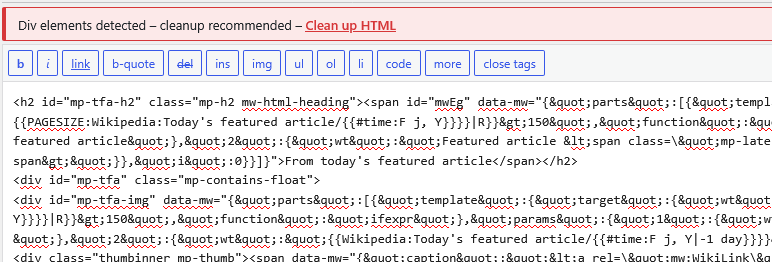
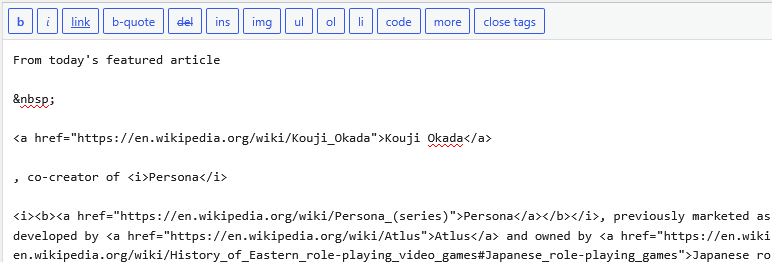
- Tweak: Screenshots added showing content before and after cleaning
- Tweak: Security policy added (SECURITY.md)
- Tweak: Code cleanup and consistency improvements
0.6.1.2 – 2026-09-15
- Fix: style and script blocks are now fully removed including their content when pasted
0.6.1.1 – 2026-09-15
- Tweak: FAQ updated – GEO (Generative Engine Optimization) added alongside SEO reference
- Tweak: Changelog format note removed from plugin page
0.6.1 – 2026-09-15
- New: Bullet point lists using the • symbol are automatically converted to proper HTML list elements on cleanup
- Tweak: Tested with WordPress 7.1
- Tweak: DIV-Detector feature name introduced in plugin description
- Tweak: Privacy information updated – added note that no external analytics tools are used
0.6.0 – 2026-09-01
- New: Hashtag links (link text starting with #) are now removed
- New: iframe elements are now removed completely including their content
- New: blockquote elements are now removed (content is preserved)
- New: pre elements are now removed (content is preserved)
- New: aside elements are now removed (content is preserved)
- New: Visual warning when div elements are detected after pasting – Classic Editor and Beaver Builder highlight the cleanup button, Divi and WPBakery show a TinyMCE notification, Gutenberg shows a notice in the sidebar panel, Elementor highlights the cleanup button
- Fix: Output escaping improved in Elementor integration
- Fix: Unnecessary context check removed from Elementor integration
- Fix: Script versioning fixed in Beaver Builder integration
- Fix: TinyMCE plugin registration restricted to post editor pages to prevent initialization errors in other admin areas
- Tweak: img handling improved – only foreign-domain images are removed; local images (relative or same-domain src) are kept
- Tweak: FAQ updated – img element handling explained
- Tweak: Gutenberg editor strings are now fully translatable via WordPress translation system
0.5.2 – 2026-08-10
- Fix: Missing capability check in AJAX handler (any logged-in user could call the endpoint)
- Fix: ABSPATH guard missing in WPBakery include file
- Fix: Unsanitized $_GET[‘action’] in Elementor integration
- Fix: Gutenberg sidebar cleanup now sends parallel requests instead of sequential (performance)
- Fix: RichText toolbar button now sends actual HTML instead of plain text
- Fix: Performance improved in Beaver Builder integration
- Tweak: Gutenberg sidebar panel updated to use current WordPress API
0.5.1 – 2026-08-10
- Tweak: FAQ updated – Beaver Builder usage explained
0.5.0 – 2026-08-10
- New: Beaver Builder support
- Tweak: Divi 4 moved to dedicated integration file
- Tweak: WPBakery 9.0 tested
- Tweak: Elementor 4.2 tested
- Tweak: Beaver 2.10 tested
- Tweak: Updating compatibility information
0.4.3 – 2026-05-21
- Fix: PHP 7.4 compatibility restored – replaced str_starts_with() with strpos()
- Fix: Deprecated mb_convert_encoding() replaced with mb_encode_numericentity()
- Fix: Added ABSPATH security check to main plugin file
- Tweak: Script versioning improved to prevent stale browser cache
- Tweak: Tested with WordPress 7.0
0.4.2 – 2025-12-03
- Tweak: WPBakery 8.7 tested
- Tweak: Elementor 3.33 tested
- Tweak: Tested with WordPress 6.9
- Tweak: Updating compatibility information
0.4.1 – 2025-09-16
- Tweak: Updating compatibility information
0.4.0 – 2025-05-02
- New: Elementor support
- Tweak: FAQ Info on Gutenberg usage
0.3.1 – 2025-04-30
- Fix: Version reference
0.3.0 – 2025-04-30
- New: Gutenberg support
0.2.4.1 – 2025-04-16
- Tweak: Tested with WordPress 6.8
- Fix: Some filters execute without explicit action on preview and save post
0.2.4 – 2025-04-11
- New: Removing emojis
- Tweak: Further Javascript optimizations
- Tweak: FAQ Info on emojis
- Tweak: Tested with WordPress 6.8-RC3
- Tweak: Javascript error is now translatable
- Tweak: Donate link updated
0.2.3.1 – 2025-04-01
- Tweak: Javascript file renamed
- Tweak: Added update date in changelog
- Tweak: GDPR privacy info added in description
0.2.3 – 2025-03-28
- New: UX – Finally tooltip in TinyMCE toolbar is now translatable
- New: UI – Finally the plugin logo in TinyMCE toolbar integrated
- Tweak: PHP for page builder swap to own folder
- Tweak: Updated screenshots
- Removed: Gutenberg integration needs more testing
- Tweak: Tested with Divi 4.27.4 & WPBakery 8.3.1
0.2.2.1 – 2025-03-27
- Fix: Content of some elements also deleted
0.2.2 – 2025-03-27
- New: align, height, bgcolor, border, cellspacing attributes will be removed
- New: Table elements added (table, tr, td, th)
- New: b, i element added to approved elements
- New: abbr element will be removed
- Fix: Some aria-* und data-* attributes wasn’t removed
0.2.1 – 2025-03-25
- New: data- attributes will be removed
- New: article, figure, picture elements will be removed
- New: aria-setsize, aria-posinset, translate, dir attributes will be removed
- Tweak: Javascript swap to own folder
- Tweak: Installation guide added
0.2.0 – 2025-03-20
- New: WPBakery 8.3 support
0.1.1 – 2025-03-19
- Tweak: Tested with Gutenberg & Divi 4 page builder
- Tweak: Linguistic adjustments
0.1.0 – 2025-03-19
- New: Copy&Paste Cleaner finally in TinyMCE toolbar integrated
0.0.20 – 2025-03-18
- New: Icon & Banner
0.0.19 – 2025-03-14
- New: Exceptions added: blockquote
0.0.18 – 2025-03-12
- New: aria-hidden, title attributes will be removed
- Tweak: some linguistic adaptation for correct translations
0.0.17 – 2025-03-12
- Tweak: Button is now translatable
0.0.16 – 2025-03-11
- New: Icon and banner for the WordPress Plugin Directory
- Tweak: after access in the WordPress Plugin Directory, small corrections of the information
- New: Plugin is now regularly available via WordPress