


Description
ReviewScribe is a powerful WooCommerce review plugin and WordPress review plugin for collecting, managing, displaying, and analyzing customer reviews. Collect more product reviews, automate review request emails, moderate submissions, and showcase customer feedback with professional review widgets—without writing code. Whether you run a small online store, manage multiple WooCommerce websites, or need a complete customer review system, ReviewScribe gives you the tools to turn customer feedback into trust and social proof.
👉 Get Pro | Live Demo | Documentation | Roadmap
🌟 Benefits of Using ReviewScribe
- Increase conversions with powerful social proof
- Build trust with verified customer reviews
- Save time using automated review requests & follow-ups (Pro)
- Gain insights with review analytics (email analytics in Pro)
- Improve SEO with fresh user-generated content
- Showcase reviews with beautiful widgets
- Manage all reviews from one dashboard
- Boost engagement with smart email automation (Pro)
⭐ Collect More Customer Reviews From Every Channel
Boost your credibility with authentic customer feedback using this advanced customer review plugin.
- WooCommerce product reviews
- Automated email review requests (Pro)
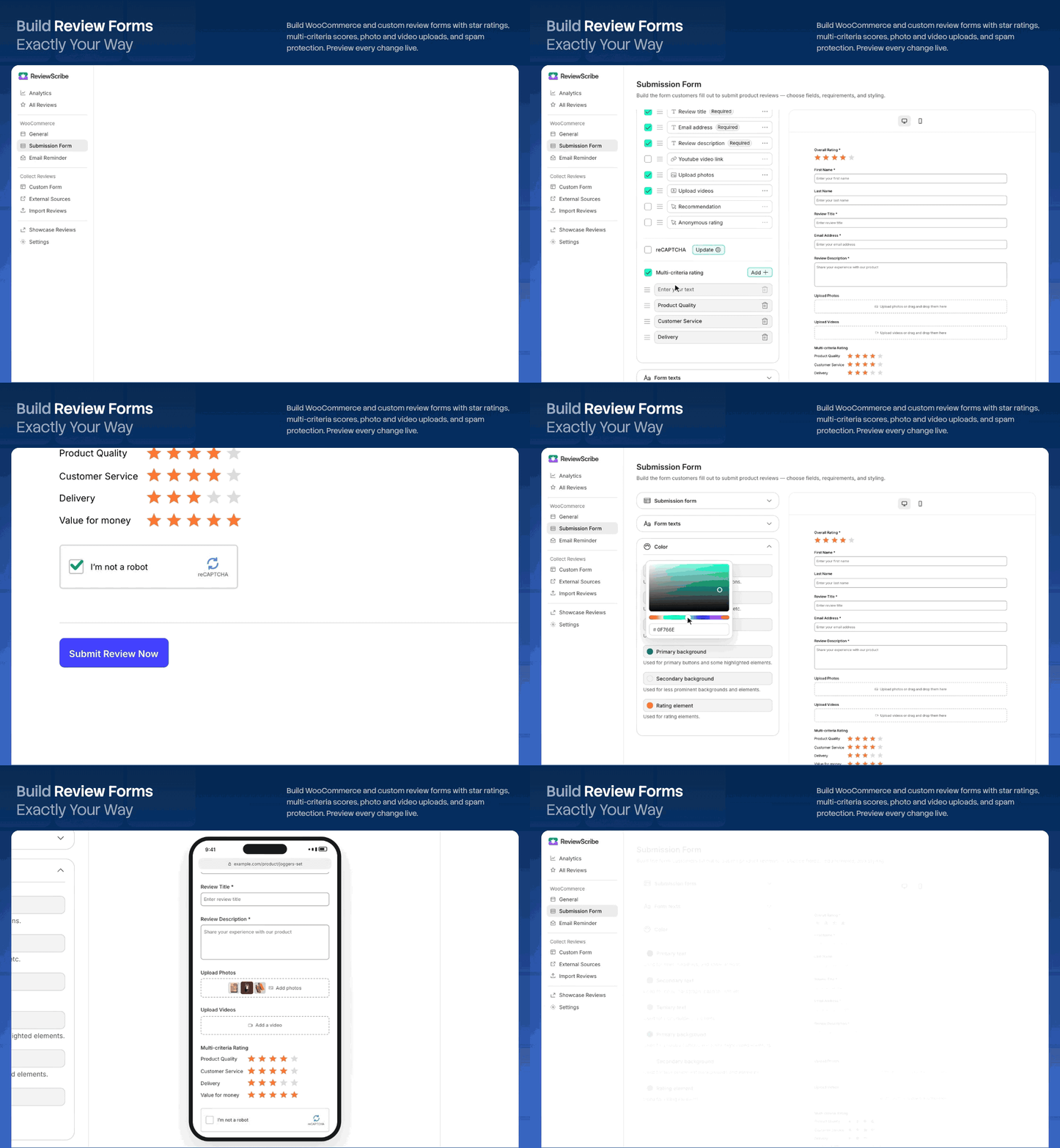
- Custom review forms
- External review sources: Google and Facebook (WordPress.org, Trustpilot, Tripadvisor and Yelp in Pro)
- Import existing reviews
- Manual review entries
- Photo, video and YouTube reviews (Pro)
- Recommendations (Pro)
- Multi-criteria ratings (Pro)
- Anonymous reviews (Pro)
- Built-in reCAPTCHA spam protection
Collect reviews from your store, your forms and the review sites you use, and manage them in one place.
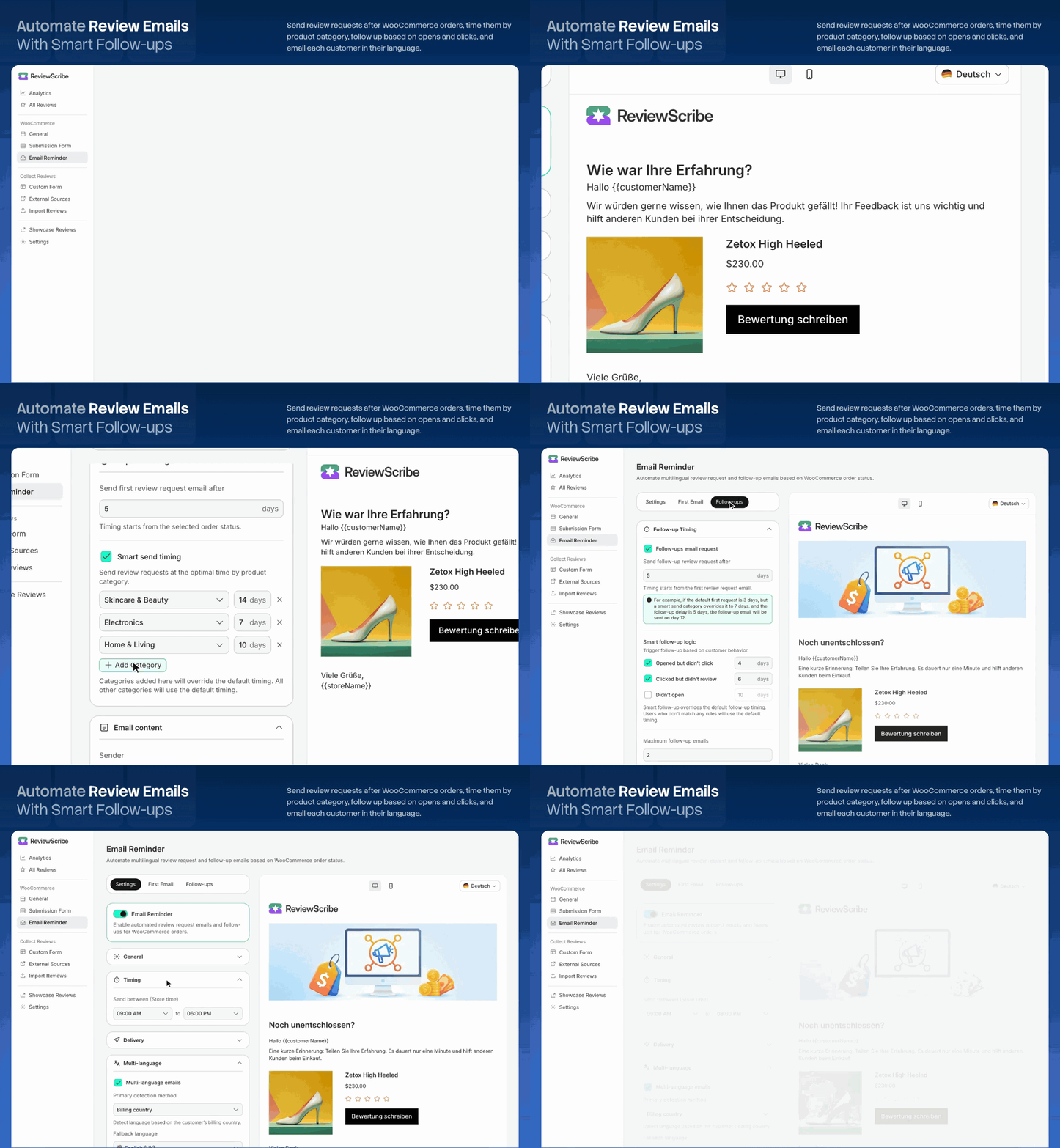
📧 Automate WooCommerce Review Requests (Pro)
Review request emails are a ReviewScribe Pro feature. Save time and reduce manual follow-ups with automated review request emails after purchase.
Create customized campaigns with:
- Custom email templates
- Configurable review request timing
- Smart follow-up emails
- In-email rating selection
- Personalized customer and order details
- SMTP and delivery settings
- Email open and click tracking
ReviewScribe helps you send review requests at the right stage of the customer journey and makes it easier for satisfied customers to leave feedback.
🧠 Smart Review Collection Automation (Pro)
Also part of ReviewScribe Pro. Reduce manual work with automation built specifically for review collection:
- Smart Send Timing — optimizes when review requests go out based on the product or category
- Smart Follow-ups — responds to customer behavior automatically:
- Opened but didn’t click → sends a gentle reminder
- Clicked but didn’t review → sends a follow-up
- Didn’t open → resends with a different subject line
🔧 Key Features at a Glance
- WooCommerce product reviews
- Automated review requests (Pro)
- AI-powered review summaries and insights (Pro)
- Smart send timing (Pro)
- Custom review forms
- Smart follow-ups (Pro)
- In-email rating selection (Pro)
- Customizable review widgets (colours and texts of the product review widget in Pro)
- External review sources (Google and Facebook; more sources in Pro)
- Review import
- Photo & video reviews (Pro)
- Review moderation
- Verified reviews
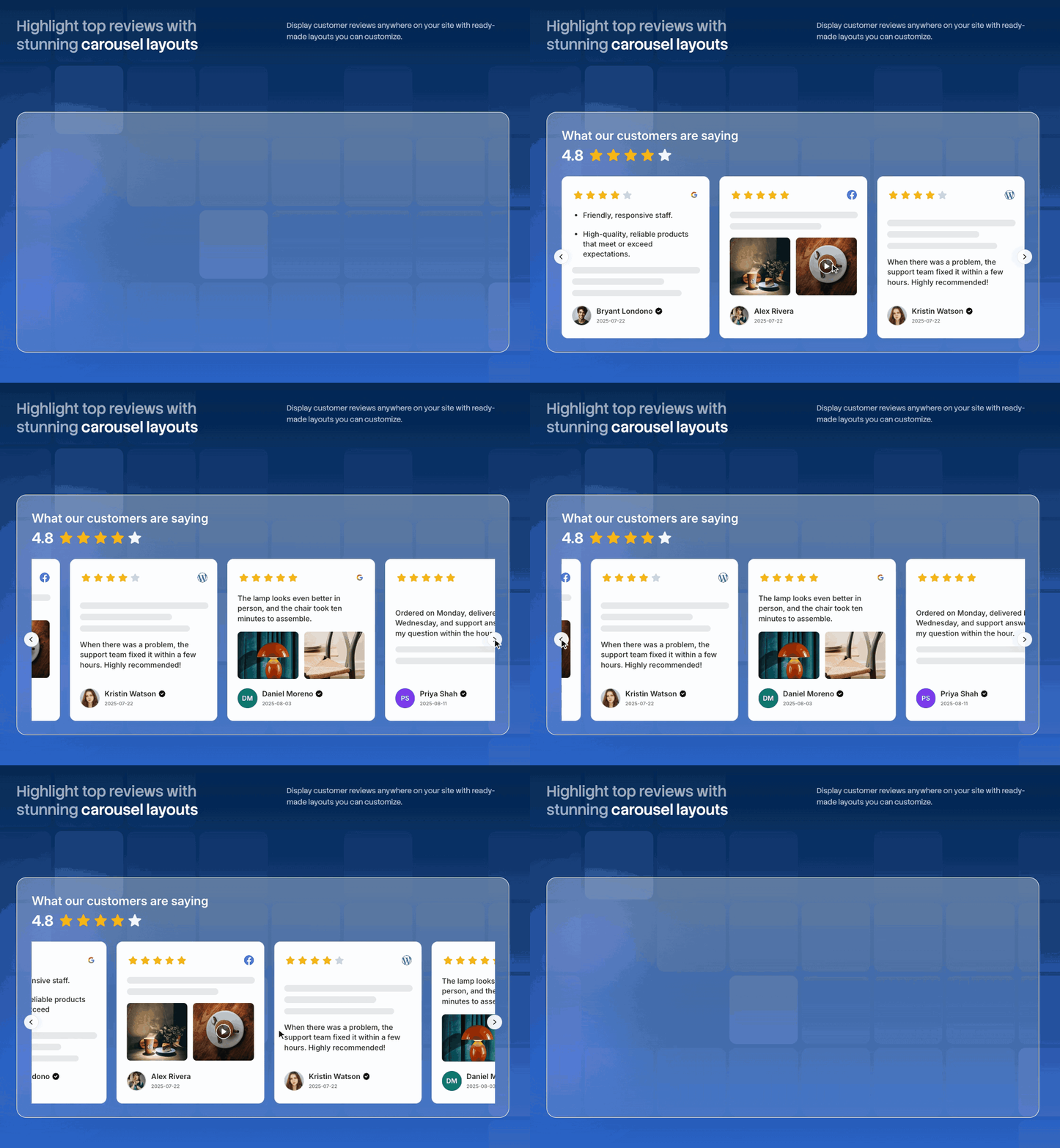
- Review carousel & grid
- Product review image gallery (Pro)
- Floating review badge
- Email analytics (Pro)
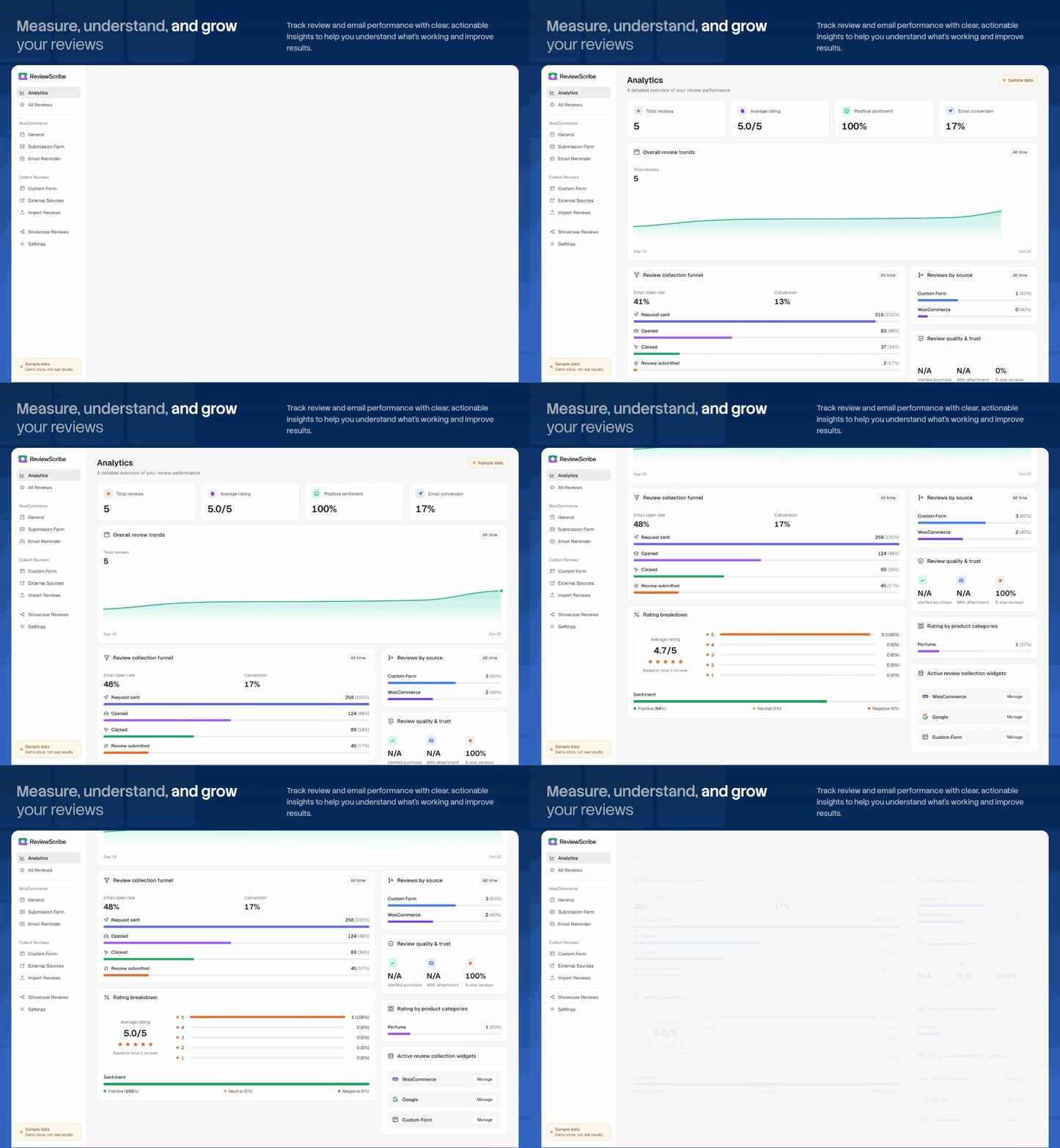
- Review analytics (advanced analytics cards in Pro)
- Google review schema (Pro)
Free and Pro
The free plugin includes:
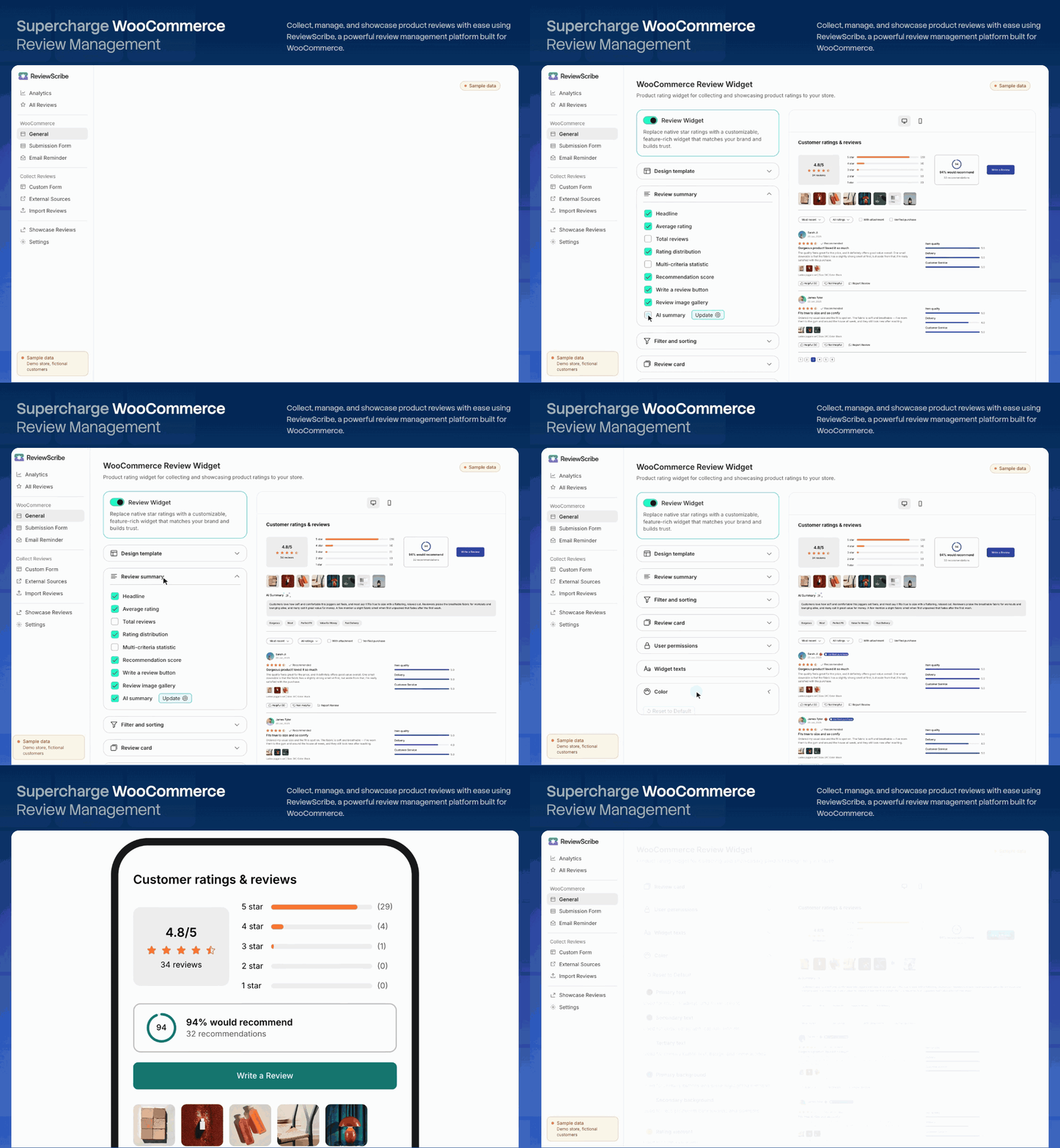
- The product review widget: rating summary, Write a review button, sorting and star filter, Helpful and Report buttons, verified purchase badge, display method and reviews per page.
- The product review form and custom review forms, with reCAPTCHA spam protection.
- Review moderation, manual reviews, import and export, and Google and Facebook review sources.
- The showcase widgets (carousel, grid, video carousel and floating badge) with all their settings: avatar, country flag, review title, verified badge, auto transition, pagination and colours.
- Core review analytics.
These features need the separate ReviewScribe Pro add-on and appear as locked in the free plugin’s settings:
- Photo, video and YouTube reviews, recommendations, anonymous reviews and multi-criteria ratings.
- Product widget extras: review image gallery, AI review summaries, recommendation score and status, media thumbnails, product variant details, country flag, Not helpful button, “with attachment” and “verified purchase” filters, and inheriting theme styles.
- Product widget colours and texts.
- Review request emails and follow-ups, with smart timing, in-email rating and email analytics.
- More review sources: WordPress.org, Trustpilot, Tripadvisor and Yelp.
- Google review schema.
- Advanced analytics cards.
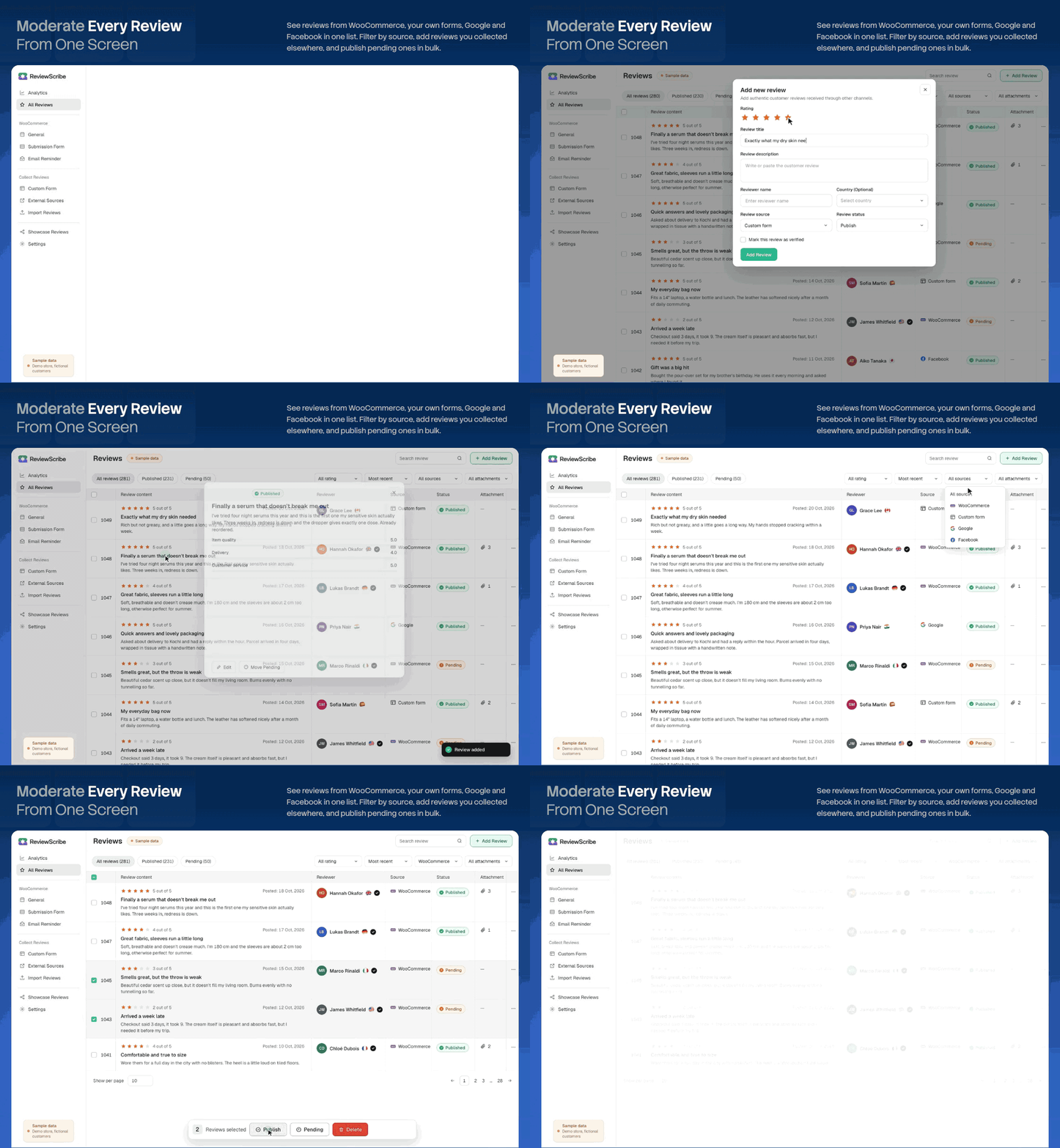
🗂️ Manage Reviews From One Dashboard
ReviewScribe is a complete review management plugin for WooCommerce and WordPress. Manage different types of reviews from a centralized dashboard:
- WooCommerce product reviews
- Imported reviews
- Reviews imported from Facebook (and from WordPress.org, Trustpilot, Tripadvisor and Yelp with Pro)
- Manually added reviews
- Photo and video submissions (Pro)
- Verified customer reviews
- Moderated and pending reviews
Organize reviews by product, rating, source, status, and other criteria so your team can manage customer feedback more efficiently. Google reviews aren’t in the dashboard: Google’s terms don’t allow saving them, so they are shown live in the showcase widgets only.
🎨 Showcase Social Proof with Modern Review Widgets
Turn reviews into visual social proof that aligns with your brand:
- Review Carousels & Sliders: Responsive sliders for product pages, homepages, and landing pages.
- Video Carousel & Review Grid: Show customer videos and photos (collected with Pro’s photo and video reviews).
- Floating Review Badges: Persistent trust badges to increase site-wide conversion rates.
- Page Builder Compatible: Native Gutenberg blocks, shortcodes, and full compatibility with WooCommerce block themes.
- Customizable Widget Layouts: Choose from flexible display styles and layouts to fit any page or design.
- Custom Colors: Match your brand with adjustable colours for the showcase widgets. Product review widget colours and texts are a Pro feature.
📊 Review and Email Analytics
Understand how your reviews and review campaigns are performing. Review analytics are free; email analytics and the advanced analytics cards (reviews by source and category, top products) are part of ReviewScribe Pro.
Track important metrics such as:
- Reviews collected
- Average ratings
- Rating distribution
- Emails sent (Pro)
- Email opens (Pro)
- Email clicks (Pro)
- Review submissions
- Campaign performance (Pro)
- Conversion-related activity (Pro)
Use these insights to identify which products, email campaigns, and follow-up strategies generate the most customer feedback.
External services
ReviewScribe connects to the third-party services below. Nothing is sent to any of them until the feature that uses it is set up or used, as described for each one.
Google reCAPTCHA
Used to block spam review submissions. It is loaded only when a site administrator turns on reCAPTCHA and enters their own site key and secret key.
- When a page with a ReviewScribe review form loads, the visitor’s browser loads the reCAPTCHA script from google.com. Google may collect data about the visitor’s browser and how they use the page.
- When a review is submitted, the site sends the reCAPTCHA response token, the site’s secret key and the visitor’s IP address to Google to check the submission.
This service is provided by Google: Terms of service, Privacy policy.
Google Places API
Used to show a business’s Google reviews in the showcase widgets, only after a site administrator connects Google as a review source with their own Google API key and Place ID. Google reviews are not saved: each time a page with a showcase widget loads, the site sends the Place ID and API key to places.googleapis.com and shows the reviews Google returns (up to 5), each with a link to the review on Google Maps. Every such page view is a Places API request billed to the administrator’s Google Cloud account; search engine crawlers and link-preview bots don’t trigger one. The page waits at most 3 seconds for Google, and if Google fails the site stops asking for 5 minutes. Each Google review is shown with its author’s name (linked to their Google profile) and the Google Maps logo (linked to the review on Google Maps). Visitors’ browsers load the reviewers’ profile photos from Google (googleusercontent.com), which sends their IP address and browser details to Google.
This service is provided by Google: Terms of service, Google Maps Platform terms, Privacy policy.
Facebook Graph API
Used to import a Facebook Page’s recommendations, only after a site administrator connects Facebook as a review source with their Page ID and Page access token. When the administrator connects or syncs, the site sends the Page ID and access token to graph.facebook.com and receives the Page’s recommendations. Site visitors’ data is not sent.
This service is provided by Meta: Terms of service, Platform terms, Privacy policy.
Gravatar
Used to show a reviewer’s profile picture in the product review list. When a product’s reviews are shown, the visitor’s browser loads each reviewer’s picture from gravatar.com, using an MD5 hash of the reviewer’s email address. The visitor’s IP address and browser details are sent to Gravatar with each request.
This service is provided by Automattic: Terms of service, Privacy policy.
Installation
- Upload the
reviewscribefolder to the/wp-content/plugins/directory, or install the plugin directly through the Plugins screen in WordPress. - Activate the plugin through the ‘Plugins’ screen in WordPress.
- Configure the plugin settings under ReviewScribe in your WordPress admin menu.
FAQ
What does ReviewScribe do?
ReviewScribe helps you collect, manage, moderate, and display customer reviews on WordPress and WooCommerce websites. It includes tools for review requests, review management, customizable widgets, and review analytics.
Does ReviewScribe work with WooCommerce?
Yes. ReviewScribe supports WooCommerce product-review workflows. Make sure WooCommerce is installed and activated before configuring the plugin.
What types of reviews can I collect?
ReviewScribe supports WooCommerce product reviews, custom review forms, imported reviews and manual entries. Photo and video reviews, anonymous reviews and multi-criteria ratings need ReviewScribe Pro.
Can ReviewScribe automatically send review request emails?
Yes, with ReviewScribe Pro. Pro sends automated review request emails with customizable templates, scheduled sending, and follow-up reminders. Additional options include behavior-based follow-ups, in-email ratings, and email analytics.
Can I customize the timing of review request emails?
Yes, with ReviewScribe Pro. Pro includes smart send timing and behavior-based follow-ups to help you schedule review requests and reminders according to customer engagement.
Can customers upload photos and videos with their reviews?
Yes, with ReviewScribe Pro. Pro adds photo, video and YouTube reviews, so customers can share visual feedback alongside their ratings and comments.
Can I import existing product reviews?
Yes. Open the ReviewScribe dashboard, go to Import Reviews and upload a CSV file. ReviewScribe reads these columns: Name, Email, Rating, Title, Review, Date, Status, Source, Product, Verified, Country, Photos and Videos. A file made with ReviewScribe’s own “Export to CSV” button (on the same page) uses the same columns, so you can move reviews between sites. You can also add reviews by hand, import reviews from Facebook (and from WordPress.org, Trustpilot, Tripadvisor and Yelp with ReviewScribe Pro), and show your Google reviews live in the showcase widgets.
Can I moderate and manage reviews before publishing them?
Yes. ReviewScribe provides review-management tools for moderating submissions, organizing reviews by source, associating reviews with products, and managing verified reviews.
How can I display reviews on my website?
ReviewScribe offers review widgets, review carousels, video carousels, galleries, and floating review badges. You can use the available display options to showcase customer feedback across your website.
Is ReviewScribe compatible with WordPress themes and page builders?
ReviewScribe is designed for WordPress and WooCommerce. Compatibility with individual themes and page builders may vary, so test your preferred theme or builder before deploying it on a production website.
Does ReviewScribe protect against spam reviews?
Yes. Add your Google reCAPTCHA keys on the Settings page of the ReviewScribe dashboard (reCAPTCHA v3, v2 checkbox or v2 invisible), and ReviewScribe checks every submission from the product review form and the custom review forms. Product reviews also follow your WordPress comment moderation settings, and reviews sent through a custom form wait for your approval before they are published.
Does ReviewScribe support multiple languages?
ReviewScribe’s screens and review widgets are in English. Review request emails (ReviewScribe Pro) are sent with the text you write, so you can write them in any language, but every customer gets the same version: sending each customer an email in their own language is not available yet.
Does ReviewScribe support Google review stars and structured data?
Google review schema (Product AggregateRating and Review JSON-LD) is a ReviewScribe Pro feature. Structured data makes your reviews eligible for star snippets in search results, but Google decides whether to show them.
Does ReviewScribe provide email and review analytics?
Yes. The free plugin includes review analytics. Email campaign analytics (emails sent, opens, clicks and review submissions) and the advanced analytics cards need ReviewScribe Pro.
My site is behind Cloudflare or another proxy. Does that affect ReviewScribe?
It can. ReviewScribe uses the visitor’s IP address to allow one helpful vote or report per visitor and to limit custom-form reviews to 3 per visitor in 10 minutes. Behind a proxy, every visitor can appear to come from the proxy’s address, so they would all share those limits. If your proxy sends the real address in a header, pass it to ReviewScribe from a small plugin or your theme’s functions.php. For Cloudflare:
add_filter( 'reviewscribe_client_ip', function ( $ip ) { return isset( $_SERVER['HTTP_CF_CONNECTING_IP'] ) ? sanitize_text_field( wp_unslash( $_SERVER['HTTP_CF_CONNECTING_IP'] ) ) : $ip; } );
Only do this when all traffic really comes through that proxy, because visitors can set these headers themselves. To change the review limit, use the reviewscribe_custom_form_rate_limit filter, for example return array( 'max' => 5, 'window' => 600 );, or 'max' => 0 to turn it off.
Where can I get support for ReviewScribe?
For assistance or to report a technical issue, visit the ReviewScribe support forum on WordPress.org or email the support team at pinemeshhq@gmail.com
Screenshots

Changelog
1.1.0
- Security: the product page review form now checks reCAPTCHA (when it is set up), follows your WordPress comment moderation settings and accepts only ratings from 1 to 5.
- Security: helpful votes and reports work only on approved product reviews, and each visitor can vote once.
- Fix: a fatal error when a review was submitted with a YouTube link.
- Security: the custom review form now checks required fields and the email address on the server, and limits how many reviews one visitor can send (3 in 10 minutes by default; filter reviewscribe_custom_form_rate_limit).
- Security: API keys and access tokens of connected review sources are masked in the admin.
- Fix: showcase widgets showed “Verified Purchase” and “Verified Buyer” on every review; they now appear only on verified reviews, and the Designation option shows the reviewer’s designation.
- Improvement: live Google reviews never slow a page down by more than 3 seconds, pause for 5 minutes after Google fails, and aren’t requested for search engine crawlers. Each one now credits its author with a link to their Google profile and shows the official Google Maps logo.
- Fix: the Analytics page no longer shows sample figures while it loads or when loading fails.
- Change: Facebook reviews use Graph API v25.0 (v21.0 stops working in January 2027).
- Readme: clearer FAQ answers about importing reviews, spam protection and languages; removed the claim that review emails are sent in several languages, which isn’t available yet.
- New: Facebook (Graph API) reviews are now imported, and Google reviews (Places API) are shown live in the showcase widgets with a link to each review on Google Maps. Google’s terms don’t allow saving its reviews, so they are never stored. Before, connecting either source saved the credentials but did nothing. A source is saved only after its first import works, and the review site’s error message is shown when it doesn’t.
- Fix: reviews imported from WordPress.org showed no rating or author in the widgets; existing imports are repaired on the next sync.
- Change: features that need ReviewScribe Pro now ship only in the Pro add-on. If you use Pro, update it to 1.0.1.
- Improvement: safer output escaping, the reCAPTCHA script is loaded the WordPress way, and dates use your site’s timezone.
- Removed unused admin files.
- Change: the Write a review button, sorting and star filter, verified purchase badge, Helpful and Report buttons, display method and reviews per page are now free settings. The showcase avatar, country flag, review title, verified badge, auto transition and pagination settings are free too.
- Change: licence activation and the connection to the reviewscribe.com licence server moved to the ReviewScribe Pro add-on. The free plugin no longer contacts reviewscribe.com. Existing licences keep working; there is nothing to reactivate.
- Change: the admin fonts (Inter and Roboto Mono) and the placeholder images are now bundled with the plugin instead of loaded from Google Fonts and placehold.co.
- Fix: on a new install the product review widget hid the headline, rating summary, Write a review button and other parts that are switched on by default.
1.0.8
- Fix some url and link issues
1.0.6
- Added Elementor addons for reviews showcase
- Added Gutenberg blocks for reviews showcase
1.0.5
- Added privacy checkbox in form
1.0.4
- Updated woocommerce review form design
- Fixed some issues
1.0.3
- Updated rating redirection
- Fixed some issues
1.0.2
- Fixed export/import issue
1.0.1
- Added settings
1.0.0
- Initial release