

Description
SanBar EXPress NF-e XML Import-BR reads the NF-e (Brazilian Electronic Invoice) XML your supplier issued for a purchase and brings the items into WooCommerce in a grid laid out like the invoice itself (Code, EAN/GTIN, NCM, CST, CFOP, ICMS/IPI values and other taxes). Nothing is saved before you review and confirm it.
New in 2.0 — now unified with Fiscal Check. The fiscal checking that used to live in the separate SanBar EXPress Fiscal Check plugin is now part of this plugin. One plugin, one screen, one flow: import the invoice, check the fiscal data, approve, and register the product. Easier to use and more complete. A Plus edition also exists, with complete product creation, manual linking, stock updates and batch tools.
Standalone plugin: works on its own, with no dependency on any other plugin from the SanBar suite.
How it works
- Entry — upload the purchase XML and review the summary (supplier, number, items, total, access key).
- Review — check each item with the fiscal checking: regime, NCM, CEST, CFOP/CSOSN and GTIN. Approve the review when it is right.
- Sync — create the product, link it to an existing one, or update cost/data — each action is independent and asks for confirmation.
Features (all editions)
- XML upload with security validation (access key check digit, protection against malicious XML, size limit)
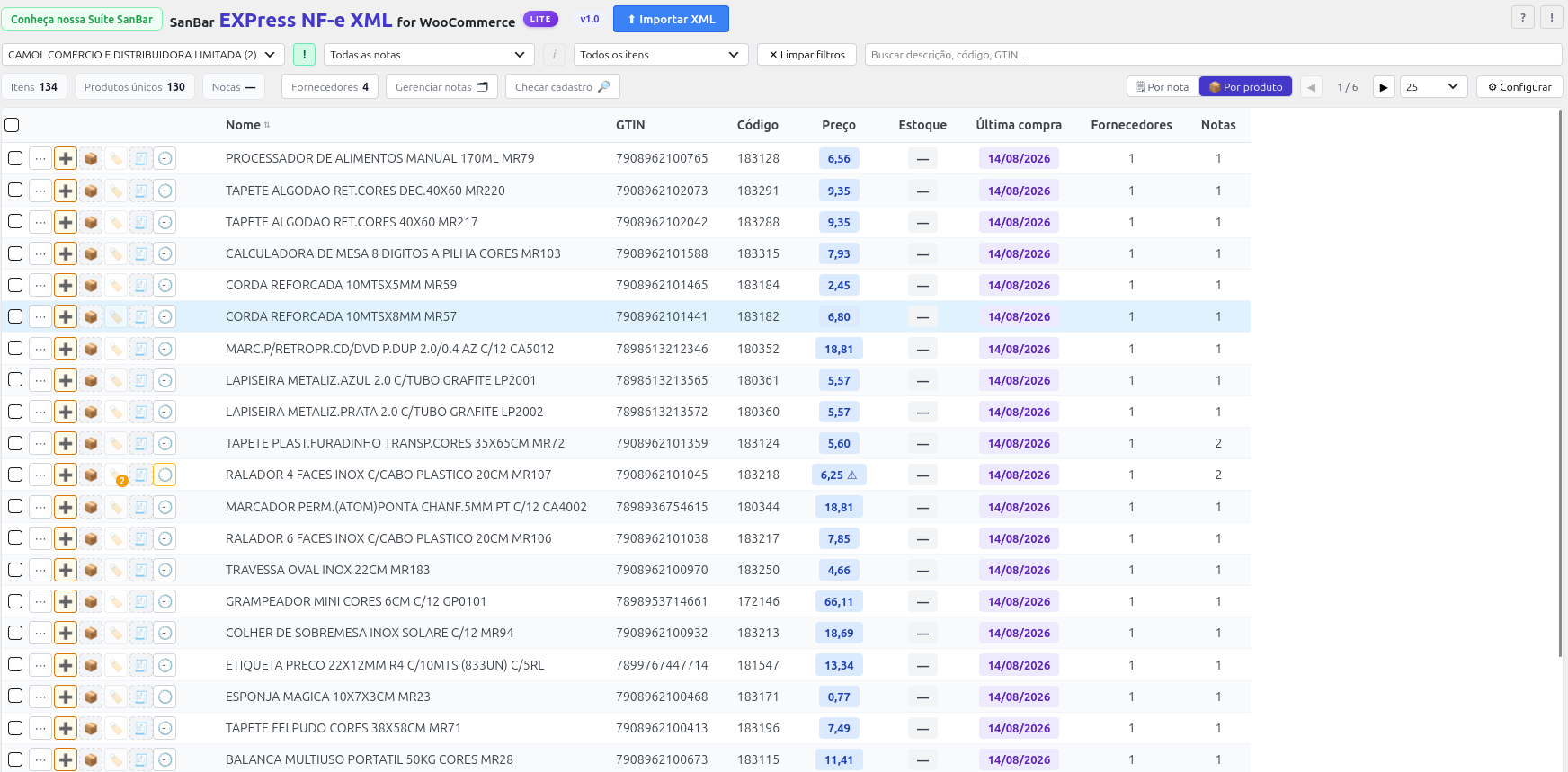
- Review grid in the invoice’s fiscal layout, with pagination, search, sorting and filters
- Three-step flow (Entry, Review, Sync) with history of each item and the option to compare XML, current and approved data
- Built-in fiscal checking: tax regime detection from the store settings, format and consistency checks, and CEST suggestions from the public NCM table (always as a suggestion — nothing is applied without your decision)
- GTIN lookup against the tax authority, using your A1 certificate (optional)
- A1 certificate stored encrypted in a shared vault (also usable by SanBar EXPress NF-e PDV)
- Product creation as a draft, individually or in bulk
- Automatic linking to a registered product by GTIN
- Cost update on a registered product, with price history per product and supplier
- “One registered product = one NF-e identity” rule, with warning and assisted resolution
- Registry cross-check against the WooCommerce catalog
- “Ignore” system for items that will never become a product
- Invoice manager and supplier library (CNPJ/CPF validation)
- Full backup and restore of the plugin’s data, in one file
- Audit log and error log with configurable verbosity; icon glossary
- Optional integration with SanBar EXPress Store Manager
Fiscal security
- Access key check digit (44 digits) validated before accepting the XML
- Protection against XXE (external entities) and an upload size limit
- An invoice already imported is rejected — never overwrites an existing link
- Transactional saving: if any item fails, the invoice is not left partially saved
- Certificate and password stored encrypted; never shown in the interface
Third-party libraries
Bundled in the lib/ folder, used only for the optional GTIN lookup with your A1 certificate:
- NFePHP sped-common 5.1.17 — LGPL v3 — https://github.com/nfephp-org/sped-common — reads the A1 certificate and prepares the signed request.
- NFePHP sped-gtin 1.1.2 — LGPL v3 — https://github.com/nfephp-org/sped-gtin — queries the tax authority’s GTIN service.
- PSR Log 3.0.2 — MIT — https://github.com/php-fig/log — logger interface required by the libraries above.
They were adapted for WordPress (requests go through the WordPress HTTP API; unused classes were removed). The changes are listed in lib/MODIFICATIONS.txt.
* Freemius SDK 2.13.5 — GPL v3 — https://github.com/Freemius/wordpress-sdk — licensing and the optional Plus trial (see “External services”).
External services
Public NCM table (Siscomex). When you use the fiscal checking and ask to download the table, the plugin requests the public NCM nomenclature from https://portalunico.siscomex.gov.br. No site or personal data is sent. Terms: https://portalunico.siscomex.gov.br
GTIN lookup (SEFAZ / SVRS). Only when you press the lookup button on an item and have an A1 certificate saved, the plugin sends the item’s GTIN, signed with your certificate, to the tax authority’s GTIN web service. Nothing is sent otherwise.
Freemius (licensing). Licensing and the optional Plus trial are handled by Freemius (https://freemius.com). Nothing is sent until you opt in on the first-run screen (or start a trial / enter a license): then the site URL, WordPress, PHP and plugin versions, your admin name and e-mail are sent to https://api.freemius.com. You can skip the opt-in and use every feature of this edition. Terms: https://freemius.com/terms/ — Privacy: https://freemius.com/privacy/
Installation
- Upload the plugin folder to
/wp-content/plugins/. - Activate the plugin from the WordPress admin.
- WooCommerce must be active.
FAQ
Do I need another SanBar plugin installed?
No. It works on its own. It integrates with SanBar EXPress Store Manager and SanBar EXPress NF-e PDV when they are installed, but this is optional.
What happened to the Fiscal Check plugin?
Version 2.0 unifies it with this plugin: the fiscal checking is built in. You do not need the separate plugin; the fiscal data already saved on your products is kept and keeps working.
Does the plugin also import sales NF-e?
No. The focus is purchase NF-e — bringing the products you bought from a supplier into WooCommerce.
Which taxes does the plugin capture from the invoice?
ICMS, ICMS-ST, IPI, FCP, PIS, COFINS, II, DIFAL, IBS, CBS, and IS — the full list of taxes that a model-55 purchase NF-e allows capturing safely.
Does the plugin change prices, costs or stock on its own?
No. Every change to cost, price or stock is a choice you confirm.
What is the difference from the Plus edition?
This edition (Lite) covers reading the invoice, the review flow with fiscal checking, draft creation and linking by GTIN. The Plus edition adds complete product creation, manual linking and linking by supplier + code, stock updates, batch tools and fiscal sync on linked products.
Screenshots



Changelog
2.0
- New: unified with Fiscal Check — fiscal checking (regime, NCM, CEST suggestions, GTIN lookup, shared certificate) now built in.
- New: three-step flow (Entry, Review, Sync) with item history and comparison of XML, current and approved data.
- New: full backup and restore of the plugin’s data.
- New: cleaner filters, search and glossary; one standard set of buttons; background no longer scrolls behind dialogs.
- Improvement: product opening goes to Store Manager when installed, otherwise the WooCommerce editor.
- Improvement: safer sync (duplicate-click protection, stock checked once) and stale items cleaned when a product is deleted.
- Free 3-day trial of the Plus edition (no credit card), via Freemius opt-in.
1.1
- New: free 3-day trial of the Plus edition, license card in Configure.
- Improvement: uninstall also removes the error log and audit log tables.
1.0
- Initial release.