


Description
Most content protection plugins disable right click in the browser. Scrapers and AI crawlers don’t click or copy: they download the raw HTML, read the REST API and the feeds, or drive a (headless) browser. ScrapeLock works on the server, where automated copying actually happens, and leaves real visitors, customers and search engines alone.
- Runs on your own server. No account and no API key needed, and no visitor data sent anywhere by default. It downloads public IP lists; only if you turn on CDN blocking does it send the IPs it blocks to your own Cloudflare or Bunny account, with your API token (see External services).
- Starts in Monitor only. For its first 7 days a new install blocks nobody: requests that would be refused are logged as “Would block”, so you can see what it would do and adjust before it enforces. You can switch Monitor only on again at any time.
What it stops, and what it cannot
Who
Result
How
AI training crawlers that say who they are (GPTBot, ClaudeBot, CCBot, Bytespider…)
Stopped
Bot list, 403
Fake Googlebot or Bingbot
Stopped
Official IP lists plus reverse and forward DNS
Fast scrapers from one IP (IPv6: one /64)
Stopped
Per-IP limits and temporary blocks
Scanners asking for .env, .git or backups
Stopped (optional)
Ban on the first probe
Scrapers spread over many IPs
Slowed
Data center limit, surge email, Emergency Mode
Headless browsers on home connections
Slowed
Human check, bot trap, limits
Copying by hand, screenshots, logged-in scraping
Cannot be stopped
Watermark, source link and TDM leave traces
Attackers who can run PHP on your server
Out of scope
No plugin can stop them
Whatever a visitor sees has already reached their device, so nothing stops a determined human. ScrapeLock closes the automated routes and leaves traces.
Who it is for
- Publishers, recipe, course and news sites: block AI training but stay in AI search, keep post text out of the REST API, GraphQL and full-text RSS, TDM opt-out.
- WooCommerce shops: limits for the product catalogue (Store API too), cart actions and coupon attempts, private feeds for price comparison sites and Google Merchant.
- Photographers: watermarks with the clean originals kept, hotlink rules for Nginx, Apache and Cloudflare.
- Directories and listing sites: page, search and “page not found” limits, a stricter limit for data centers.
- Agencies: presets, settings export and import, WP-CLI and Site Health.
Bots and crawlers
- Real search engines vs. fakes. Googlebot, Bingbot, Applebot and Yandex are verified against their official IP lists and with reverse + forward DNS. Real crawlers are never limited or blocked; fakes get a 403.
- AI training vs. AI search. Training crawlers (GPTBot, ClaudeBot, CCBot, Google-Extended, Bytespider and more) are blocked. AI search assistants (OAI-SearchBot, ChatGPT-User, PerplexityBot, Claude-SearchBot and more) can be allowed with one option and are verified with their official IP lists, so your site still appears in AI answers with a link.
- robots.txt gets the AI crawler lines, Content Signals and the Disallow line of an invisible bot trap that catches bots ignoring it. robots.txt, llms.txt and llms-full.txt are never blocked.
- Generic HTTP libraries (curl, python-requests and the like, used by apps and integrations) pass by default; a strict option blocks them too, and the Log has an “Always allow this User-Agent” button.
- Optional blocking of headless browsers and of scripts that copy a browser’s User-Agent but not its headers. A carefully disguised automated browser is not detected this way; the limits, the human check and the bot trap still apply to it.
- New in 3.5, optional (off by default): ban scanners on their first request for .env, .git, wp-config.php backups, database dumps and backup archives.
Limits and blocks
- Per-IP limits for pages, searches, REST / GraphQL, “page not found” (404) requests, sitemaps, visitors from data centers and, with WooCommerce, cart actions and coupon attempts (IPv6: per /64). Verified search engines and real shoppers are not affected.
- 3.5: an anonymous request for a long list from the REST API (posts, pages, products) counts more toward the REST limit: 2 above 20 items per page, 3 above 50. Lists of up to 20 items and logged-in users count as before, and the WooCommerce cart and checkout are not counted. JSON 429 answers (REST API, GraphQL, cart) also carry
retry_after, the seconds of their Retry-After header. - IPs that keep exceeding the limits are blocked for a while, optionally also at Cloudflare or Bunny CDN (“Test connection” checks the token, the zone and the permissions).
- Emergency Mode: stricter limits for 1 hour to 3 days, then your settings return on their own. When traffic suddenly jumps, ScrapeLock emails you a one-click button to start it.
- Optional human check without a captcha: visitors who have not scrolled, tapped or typed get a stricter page limit.
- Optional country rules, from Cloudflare’s or Bunny CDN’s country header or the free DB-IP Lite database.
- Optional pre-cache check (the bot list, the limits and the blocks also apply to pages served by WP Super Cache, W3 Total Cache, Cache Enabler, WP Rocket and the like) and early check (stops known bots and blocked IPs before the theme and the other plugins load).
- Always-blocked IPs / CIDR and referrers, usernames hidden from visitors, and trusted proxies (Cloudflare, Bunny CDN, your own), so the real IP cannot be spoofed.
Feeds, API and server rules
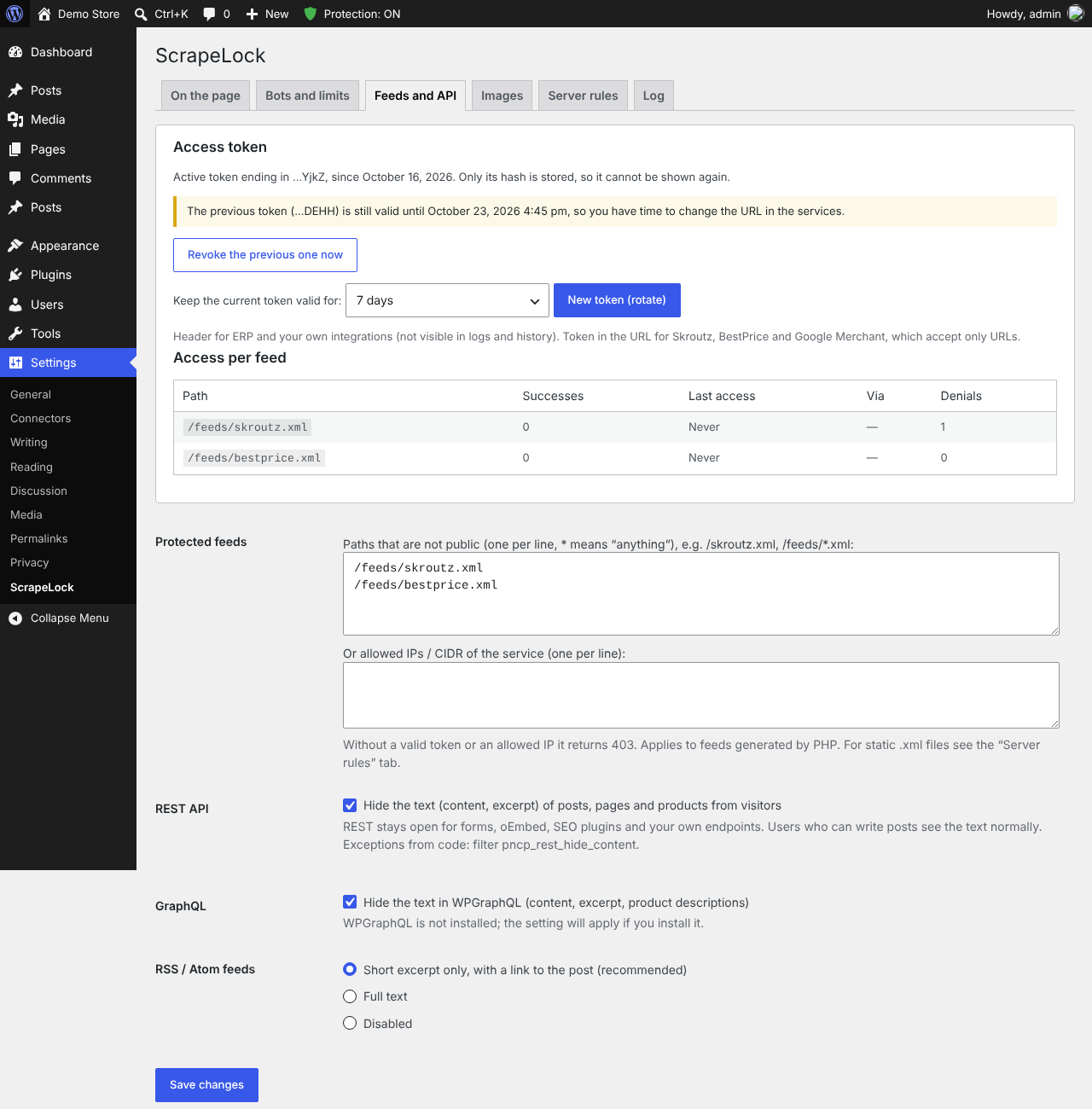
- Post, page and product text hidden from the REST API, WPGraphQL and full-text RSS for visitors: the routes scrapers use instead of the HTML.
- RSS with a short excerpt only, or disabled; with full text, an optional “The post … first appeared on …” line.
- Private XML feeds (Skroutz, BestPrice, Google Merchant, ERP) with a token in a header or the URL; only its hash is stored, it can be rotated with a grace period, and each feed has statistics.
- Optional: hide the REST API map and the versions of WordPress, PHP and the plugins, turn off XML-RPC pingbacks, list the REST routes open to anyone.
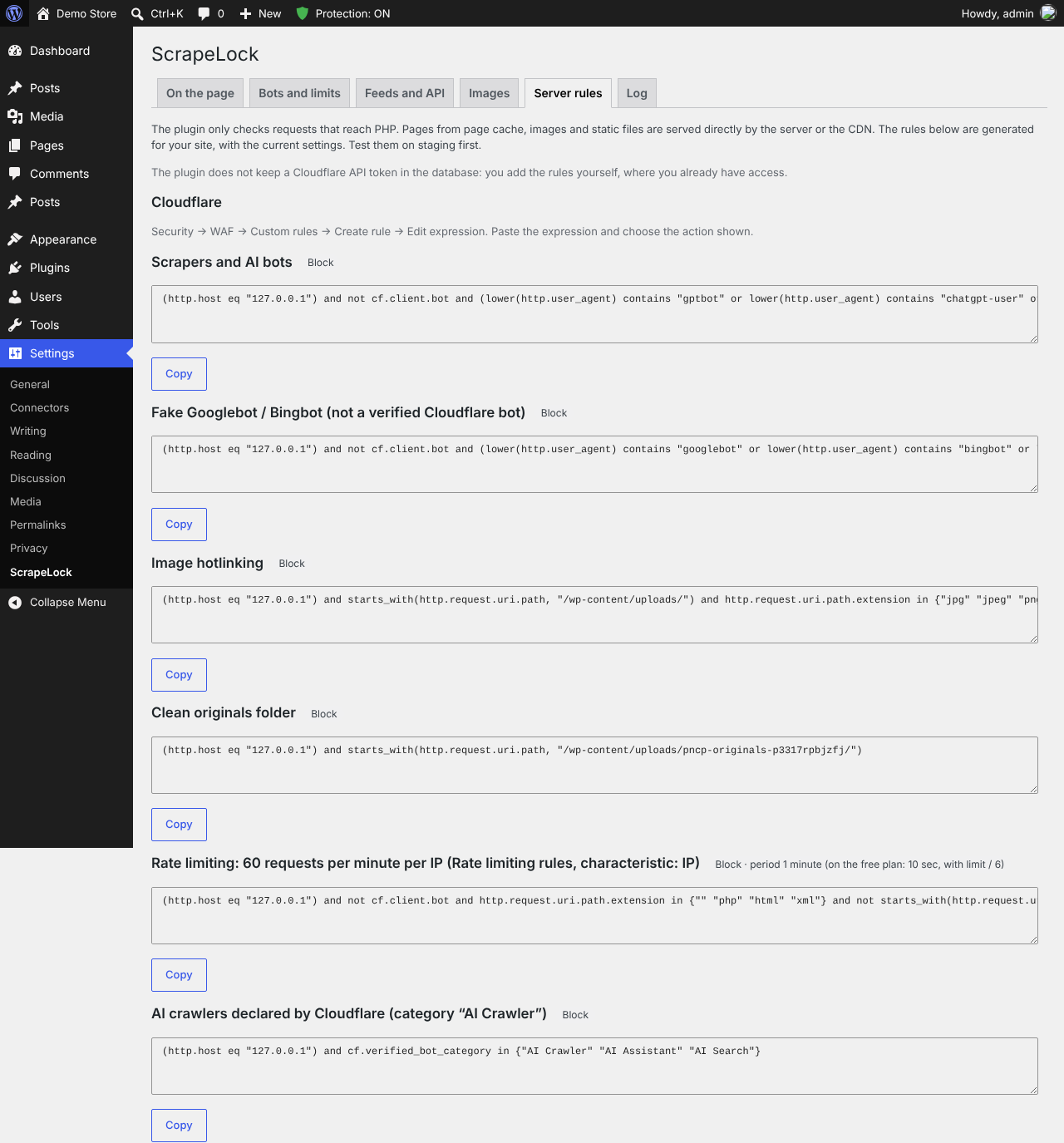
- Ready-made Nginx, Apache and Cloudflare rules for your own site, so cached pages and static files are protected too.
Check, test and tune
- Check a request (3.5, Log tab): pick GPTBot, a fake Googlebot, curl, python-requests, a browser without browser headers, a real browser or your own request, or type an IP, User-Agent and address. ScrapeLock shows whether it would allow, block or limit it, why, and where it is set. Nothing is counted, logged or blocked. Copy-ready curl lines let you test for real from another computer, and the card lists what it does not simulate (the 404 limit, the cart, the early and pre-cache checks, the bot trap).
- Staff are exempt while logged in (by default), so the admin bar reminds you: test in a private window.
- Site Health warns about settings that do not work as intended. New in 3.5: it checks that crawlers really get ScrapeLock’s robots.txt lines (a robots.txt file in the site’s root replaces the one WordPress makes) and shows the lines to paste, that ScrapeLock’s private folders cannot be read from the web, whether your text is still open through the REST API, full-text feeds or WPGraphQL while copy protection is on, and whether another plugin does the same job. These tests only fetch addresses of your own site and never write robots.txt.
- Settings that explain themselves (3.5): rejected IP lines are named after saving, unsaved changes are flagged, defaults are labelled, options that may affect visitors or SEO are tagged, and “Off” status pills link to their setting.
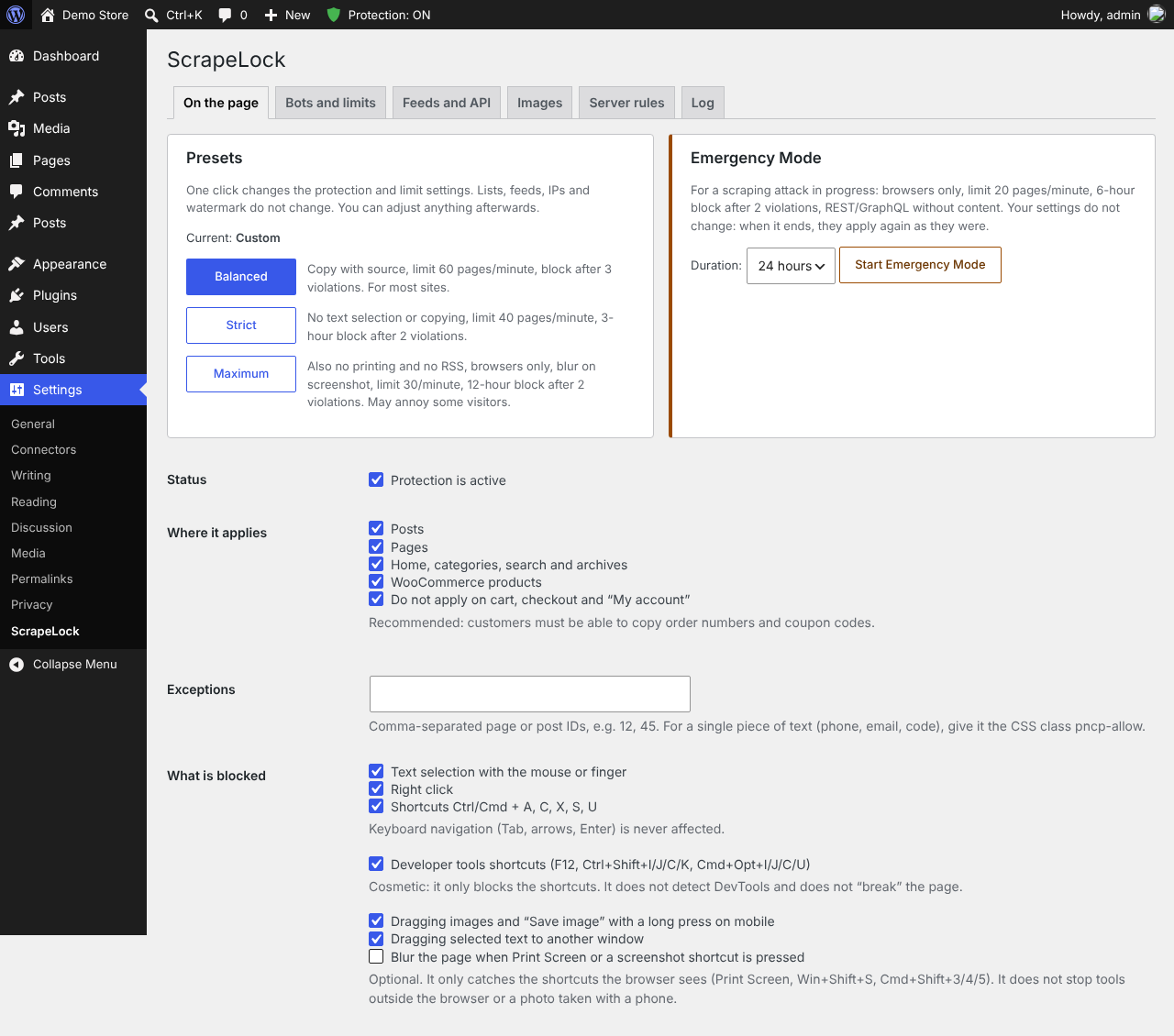
- Presets (Balanced, Strict, Maximum) with undo, settings export and import, and a block log with a 24-hour summary and automatic deletion.
- WP-CLI:
wp scrapelock status,block,unblock,blocked,emergency,log,check --ip=<ip>(what ScrapeLock would answer, without side effects),settingsandlockdown status. - Abilities API (WordPress 6.9+) for administrators: read the summary, block or unblock an IP and start Emergency Mode from an AI agent or MCP client. None of them unlocks Lockdown.
On the page and images
- Block right click, copy, drag and common shortcuts, or allow copying with the source link appended. Text selection stays allowed by default, because blocking it also stops screen readers’ “read selection” and translation tools.
- Printing with the page link at the bottom, or no printing; optional page blur on screenshot shortcuts; no framing by other sites.
- AI opt-out declaration (TDM): header, meta,
/.well-known/tdmrep.json,noai. - Watermark in a corner, the centre or repeated diagonally, optionally on the full-size image too; otherwise visitors get the largest watermarked size, also in the WooCommerce zoom, lightbox and Store API. The clean original is kept, so the watermark can always be removed. Product images are not watermarked by default, because Google Merchant Center rejects them.
Members, courses and paid content (3.6)
- Who is reading, on every screenshot: a faint line over the page with the member’s user name and the time, so a screenshot, a screen recording or a photo of the screen shows whose account it came from. No web page can block screenshots; this makes them traceable.
- An invisible trace in the text: copied text carries the account and the day, hidden in invisible characters. Paste it under Log → “Find whose copy this is”.
- Shared accounts: a page limit per account, and an email when one account is used from several addresses at once, optionally signing it out everywhere else.
- Fewer signs of WordPress for tools such as BuiltWith and for scanners.
Lockdown
- Freeze the site with a code from your authenticator app (Google Authenticator, Microsoft Authenticator, Authy and the like). While it is locked, nobody can change plugins, themes, WordPress core, users, roles or settings from wp-admin, the REST API or XML-RPC, not even an administrator or someone who stole a password.
- Administrators are frozen completely. Shop managers and other staff roles you do not tick keep their work (orders, products, coupons, posts, media), but not the rights that could take over the site. Visitors and customers browse, order, pay, register and comment as usual.
- Also enforced against code: a bug in another plugin cannot be used to activate plugins, change the site address or the admin email, add an administrator or unlock the lock. Code that can run its own PHP on your server can get around any plugin, ScrapeLock included. While the site is unlocked for a while, these rules are off for code too: unlock only for as long as you need.
- Sealed: the lock is signed with the keys in wp-config.php and kept outside the database (a guard file, a lock file, or a line in wp-config.php), so SQL injection in another plugin cannot unlock the site.
- What is put back when it is changed straight in the database: the active plugins and theme, the site address, the admin email, registration and the default role, the roles, the uploads folder, search engine visibility, the widgets, the theme’s settings, WooCommerce’s own payment methods and bank accounts, and ScrapeLock’s own settings (more with the filter
pncp_lockdown_protected_options). New administrators, new application passwords for staff and changed staff passwords are refused at sign-in and emailed. A capability given to one user alone, outside their role, does not work while the site is locked. - The Site Editor’s templates and template parts cannot be changed by code while locked; templates, template parts and global styles changed straight in the database are found every hour.
- What it does not keep: posts, pages, products, orders, comments and media, navigation menus, scheduled events, and the settings and tables of other plugins (a payment gateway of another plugin, for example; add its option to the filter). Code that other plugins keep in the database and run (snippets of Code Snippets or WPCode) is checked every hour: new or changed code is emailed to you, and the quarantine deactivates the plugin that runs it.
- File integrity: every PHP, .htaccess and .user.ini file is fingerprinted and checked every hour while locked, and WordPress and the plugins from WordPress.org are compared with their official checksums. New or changed files are emailed to you and shown in Site Health; optional quarantine. When the site is locked again after an unlock, the files that changed while it was open are emailed to you too, before they become part of the new fingerprint.
- Unlock for 15 minutes to 2 hours for yourself only, or until you lock it again; every lock and unlock is logged and emailed. Ten one-time recovery codes for a lost phone. The QR code is drawn in your browser and the secret is stored encrypted, never sent anywhere.
External services
ScrapeLock downloads public lists of IP addresses, only for the features that use them. Each download is a plain GET request for a public file, made from your server by WordPress (User-Agent “ScrapeLock/version”). No data about your site, your content or your visitors is sent, and the request does not include your site address; as with any download, the provider sees your server’s IP address. The lists are stored in your database (or, for the country database, in uploads/scrapelock-geo) and checked on your server. They are data, not code or assets: no script, style, font or image is ever loaded from these addresses.
- Google crawler IP ranges, to tell real Googlebot from fakes. Downloaded once a day while protection is enabled, from https://developers.google.com/static/search/apis/ipranges/googlebot.json, https://developers.google.com/static/search/apis/ipranges/special-crawlers.json and https://developers.google.com/static/search/apis/ipranges/user-triggered-fetchers-google.json. Provided by Google LLC: Terms of service, Privacy policy.
- Bing crawler IP ranges, to tell real Bingbot from fakes. Downloaded once a day while protection is enabled, from https://www.bing.com/toolbox/bingbot.json. Provided by Microsoft Corporation: Terms of service, Privacy policy.
- Cloudflare IP ranges, to read the real visitor IP only from Cloudflare. Downloaded once a day only when “Real visitor IP” reads the CF-Connecting-IP or X-Forwarded-For header and “Trust Cloudflare addresses” is on, from https://api.cloudflare.com/client/v4/ips. Provided by Cloudflare, Inc.: Terms of service, Privacy policy.
- Bunny CDN edge server addresses, to read the real visitor IP and country only from Bunny CDN. Downloaded once a day only when “Trust Bunny CDN addresses” is on and “Real visitor IP” reads the X-Real-IP or X-Forwarded-For header, or country rules are set, from https://bunnycdn.com/api/system/edgeserverlist and https://bunnycdn.com/api/system/edgeserverlist/IPv6. Provided by BunnyWay d.o.o. (bunny.net): Terms of service, Privacy policy.
- OpenAI bot IP ranges (OAI-SearchBot, ChatGPT-User), to tell the real bots from fakes. Downloaded once a day only when “Allow AI search engines and assistants” and “Verify AI search bots” are on, from https://openai.com/searchbot.json and https://openai.com/chatgpt-user.json. Provided …
Installation
- Upload the
scrapelockfolder to/wp-content/plugins/, or install the plugin from the Plugins screen. - Activate it. A new install runs in Monitor only for 7 days: watch the Log, then let it block.
- If your site is behind Cloudflare or another proxy, set “Real visitor IP” first (Bots and limits).
- Go to Settings → ScrapeLock and choose a preset, or adjust each tab.
Upgrading from “Content Protect” (folder content-protect), the former name of this plugin: deactivate the old plugin, activate ScrapeLock. Your settings, tokens and log are kept. If you pasted the old Apache rules, replace the “# BEGIN Content Protect” block with the new “# BEGIN ScrapeLock” block.
FAQ
My server’s CPU spikes, often at night. Can ScrapeLock help?
Often, yes: the cause is usually a crawler reading thousands of pages. Open the Log: the 24-hour summary shows the top IPs, User-Agents and reasons. The bot list, the per-IP limits and the data center limit handle most of it; during an attack, start Emergency Mode.
GPTBot or Bytespider is eating my bandwidth.
They are on the bot list, which is on by default, and are refused with a 403 (in Monitor only they are just logged). robots.txt also asks them to stay away. A 403 costs your server far less than a full page.
Bots fill carts or try coupon codes.
With WooCommerce, ScrapeLock limits cart actions and coupon attempts per IP and blocks IPs that keep going. It is not a fraud or card-testing tool: use your payment provider’s fraud protection for that.
Why don’t I see these bots in Google Analytics?
Most bots don’t run JavaScript, so analytics never counts them. ScrapeLock sees them on the server, and Monitor only logs them without blocking anyone.
Will it block real visitors, shoppers or forms?
Verified search engines are never limited or blocked, there is no captcha, and the first 7 days are Monitor only. If someone is blocked, the Log shows why: unblock the IP under “IPs blocked now”, add it to “Always allowed IPs”, or press “Always allow this User-Agent”.
Isn’t robots.txt enough?
No. robots.txt is a request that only polite bots follow. ScrapeLock writes those lines for you and also enforces them on the server, where impolite bots get a 403.
Can it stop screenshots or screen recording?
No, and no plugin can: the screenshot is taken by the phone’s or the computer’s own system, and a web page is not even told about it. (A black screen happens only with DRM-protected video, and even then a photo of the screen works.) What ScrapeLock does instead: “Show who is reading over protected pages” puts the member’s user name and the time on every screenshot, recording and photo, and “Hide an invisible trace of the account in the text” marks copied text. Both are on the “On the page” tab, under Members and readers.
Does blocking right click stop AI scrapers?
No. Scrapers download the page or read the REST API and the feeds; they never right-click. What stops them is the server side: the bot list, the limits and hiding your text from REST, GraphQL and RSS. Right-click blocking only slows down people copying by hand.
I can still right-click and copy. Is it working?
Probably: staff are exempt while logged in (“Who is excluded”, On the page tab). Test in a private window: only there do you see the copy protection as visitors see it (“Check a request” tests the server-side checks, not the browser scripts).
How do I test it?
“Check a request” (Log tab) shows what ScrapeLock would answer to GPTBot, a fake Googlebot, curl and more, without sending anything. Its “Check it yourself” lines test for real with curl from another computer. With WP-CLI: wp scrapelock check --ip=<ip> --ua=<user-agent>.
Can I use it with a security or firewall plugin?
Yes, they do different jobs. Avoid two rate limits on the same pages (keep one, or set the other’s limit higher), make both read the same real-IP header behind a CDN, and test in Monitor only first.
Will it block Google or Bing?
No. Verified search engines are never limited or blocked. Only fakes that pretend to be Googlebot or Bingbot are blocked.
Can I allow ChatGPT or Perplexity search but block training?
Yes. Turn on “Allow AI search engines and assistants” (Bots and limits). Training crawlers stay blocked. With “Verify AI search bots” on, only requests from the official addresses count as those bots; copies of the name get a 403.
Can I let one partner’s crawler in?
Yes. Add it to “Always allowed User-Agents”, pinned to its addresses so the name alone is not enough: PartnerBot@203.0.113.0/24. The page limit still applies to it.
Does it work with page cache?
ScrapeLock tells WP Rocket not to serve cached pages to the bots in its list. Other page cache plugins serve stored pages before WordPress loads: turn on the pre-cache check (Bots and limits) to apply the bot list, the page limits and the blocks to them too. Site Health tells you when a page cache answers first. A cache in the web server (Nginx FastCGI cache, LiteSpeed, Varnish) answers before PHP: there use the “Server rules” tab or blocking at the CDN.
What does the pre-cache check change on my server?
It adds two comment lines and one include line at the top of wp-config.php, which loads the check from the plugin’s folder. Its data are plain files in a protected, randomly named folder in uploads/scrapelock/ (counters in APCu if available). It runs before the page cache, without a database, and stops blocked IPs, the bot list and visitors over the page limits. Search engines, forms, wp-admin and the REST API are left to the normal check; a login cookie, which it cannot verify, gets four times the page limit. If wp-config.php is not writable, it shows the lines to add. Everything is removed when you turn it off or deactivate the plugin. Not on multisite.
What is the early check?
An optional file, wp-content/mu-plugins/scrapelock-early.php, that runs before the theme and the other plugins and stops blocked IPs and referrers, temporarily blocked IPs and the bot list with less server load. Search engines, logged-in users, forms and private feeds are left to the normal check. It is removed when you turn it off, deactivate or delete the plugin.
My site is behind Cloudflare. What should I set?
Set “Real visitor IP” to CF-Connecting-IP and keep “Trust Cloudflare addresses” on. When every visitor arrives from a Cloudflare address, ScrapeLock offers a button that does this. With Nginx, also set real_ip_header CF-Connecting-IP; and set_real_ip_from for the Cloudflare ranges, so the server rules see the real IP.
My site is behind Bunny CDN. What should I set?
If your server already replaces the IP, keep “REMOTE_ADDR”. Otherwise set “Real visitor IP” to X-Real-IP and turn on “Trust Bunny CDN addresses”. When every visitor appears with a Bunny address, a button does this for you.
Can ScrapeLock block scrapers at Cloudflare or Bunny CDN?
Yes. In “Blocking at the CDN”, choose Cloudflare (an API token with only Zone → Firewall Services → Edit, for this zone) or Bunny CDN (your API key) and the zone ID; the token can go in wp-config.php (SCRAPELOCK_EDGE_TOKEN) instead of the database. Every temporary block is then also made at the CDN and removed when it ends. Your own rules are never changed; administrators’ recent IPs, search engines and the CDN’s addresses are never blocked there. Bunny CDN blocks single addresses only. Turning it off removes ScrapeLock’s blocks.
Can someone go around my CDN?
If they find your server’s own address, yes. “Only through the CDN” (Real visitor IP) refuses every request without a secret header, X-ScrapeLock-CDN, that your CDN adds (Bunny: Edge Rule; Cloudflare: Transform Rule). It can only be turned on from a request that has the secret. If the CDN stops sending it, add define( 'SCRAPELOCK_CDN_ONLY', false ); to wp-config.php.
What does “Ban scanners on their first probe” do?
Off by default. When an IP asks for a file only attack scanners look for (.env, .git, wp-config.php backups, database dumps and backup archives at the top of the site) and the file does not exist, it is refused and blocked for 10 minutes (or your block time, if shorter; nothing is blocked when “Block after this many violations” is 0); a second probe within 24 hours gets the full block. Staff, verified search engines and the always-allowed IPs and User-Agents are never banned. On Nginx, add the updated server rules. With the rules, .env, .git, wp-config.php copies and SSH keys are never served even if they exist; a real database dump or archive of the same name is still served.
Does the human check show a captcha?
No. A small script waits for the first scroll, tap, key or mouse movement, solves a light challenge in the background and gets a cookie. Visitors without it are not blocked: they get a stricter page limit (20 per minute by default). Plain scripts never get the cookie.
Can blocked bots still read robots.txt and llms.txt?
Yes. robots.txt, llms.txt and llms-full.txt are never blocked, so every bot can read the rules it is asked to follow. If a robots.txt file in your site’s root replaces the one WordPress makes, Site Health shows the lines to add to it.
Can I customise it in code?
Yes, with filters such as pncp_client_ip, pncp_skip_guard, pncp_should_protect, pncp_known_ai_agents, pncp_ai_search_agents, pncp_rest_post_types, pncp_rest_hide_content, pncp_404_exempt, pncp_trap_exempt_agents, pncp_trap_first_ban_minutes, pncp_watermark_attachment, pncp_hotlink_allowed, pncp_use_apcu and pncp_log_rows_per_minute; 3.5 adds pncp_rest_cost, pncp_probe_trap_paths and pncp_conflicting_plugins. The early and pre-cache checks run before plugins load, so filters in plugins and themes do not apply there. There is also WP-CLI and settings export and import.
What personal data does it store?
For a blocked request: the IP, User-Agent, page and time, deleted after 1, 7 or 30 days. With the human check, visitors who interact get a 7-day cookie, pncp_hv, holding only an expiry and a signature tied to their IP network and browser; it is not used for tracking. The country database is a local file.
Does it guarantee legal protection of my content?
No. The TDM declaration is a machine-readable reservation of rights; it does not guarantee legal compliance or stop anyone who ignores it.
What does Lockdown freeze, and what keeps working?
Frozen roles can log in but change nothing. Roles that can change plugins, themes, users or settings are always frozen; editors, authors, contributors and shop managers by default. Customers, members, visitors, orders, payments, webhooks, cron and comments are not affected. Shop staff cannot process orders in wp-admin while locked: unlock for a while.
I lost my phone. How do I unlock the site?
Type a recovery code instead of an app code. With none left, add define( 'SCRAPELOCK_UNLOCK', true ); to wp-config.php, connect a new app on the Lockdown page, then remove the line. This also helps if you forget a staff password while locked.
Can someone with access to my server bypass Lockdown?
Yes. Lockdown guards against changes through WordPress; someone who can only write to the database (SQL injection in another plugin) cannot unlock it. Whoever can edit files controls the site anyway: the file integrity check finds new files within the hour, and the “No PHP in the uploads folder” server rule stops most backdoors from running.
Can I unlock Lockdown from WP-CLI or with an AI agent?
No, on purpose: only an app code, a recovery code or the SCRAPELOCK_UNLOCK line opens it. WP-CLI and the abilities can block IPs and start Emergency Mode; while locked the abilities can only read the summary.
Screenshots


Changelog
3.6.0
- New: “Show who is reading over protected pages” (On the page → Members and readers, off by default). A faint line repeated over the page with the signed-in account’s user name and the date and time, so every screenshot, screen recording or photo of the screen shows whose account it came from. No web page can stop those; this makes them traceable. It never takes clicks, taps or selections, comes back when it is removed or hidden, and the page is sent as private (not cached). Optional for visitors who are not signed in (their IP and the time, fetched by the page so cached pages still work). Filters:
pncp_mark_user_line,pncp_mark_guest_line. - New: “Hide an invisible trace of the account in the text” (off by default). For signed-in accounts, invisible characters that spell the account and the day, signed with this site’s keys, are placed in each paragraph of protected pages. Paste text found elsewhere under Log → “Find whose copy this is” to see the account and the day. Visitors and search engines get the text as it is.
- New: “Pages per minute per signed-in account” (0 = off). The other limits count per IP; one account used by a script from many addresses is now limited too (log reason “rate_account”, no IP ban).
- New: “Email me when one account is used from several addresses at once” (within 10 minutes, at most one email a day per account), optionally signing the account out everywhere else. Never for staff. Action:
pncp_shared_account. - New: “Hide that the site runs on WordPress, as far as possible” (Feeds and API tab, off by default). For visitors: everything “Hide the versions” does, plus no REST API, oEmbed, RSD and shortlink links, no emoji script, no X-Pingback and “X-Redirect-By: WordPress” headers. The addresses of themes and plugins still show it; that cannot be hidden by a plugin.
- Lockdown: the Site Editor’s templates and template parts cannot be created, changed or deleted while locked, also by code, and templates, template parts and global styles changed straight in the database are found by the hourly check.
- Bot trap and probe ban: DuckDuckBot, Baiduspider, SeznamBot and the other search engines that are never banned now have to be likely real: their reverse DNS in their own domain where they document one, otherwise an address that is not a data center’s. Before, the name in the User-Agent was enough.
- Performance: classes are loaded when they are first used. A page for a visitor loads about a fifth less of ScrapeLock’s code (no server rules, settings import and export, Site Health, “Check a request”, or the file check unless the site is locked).
- Security: a loopback or server address in the “Real visitor IP” header no longer counts as the server itself. With “Trust Bunny CDN addresses” on and no CDN secret, anyone could point a Bunny pull zone of their own at the site, send
X-Real-IP: 127.0.0.1and skip every check (blocks, bans, the bot list and the limits), also in the early and pre-cache checks. A request now counts as the server itself only when every address on its way is the server or its private network and the IP can be trusted (cron, cache preload and a local Nginx or Varnish work as before). The same holds for “Trust every proxy”. - Security: a CDN edge trusted for the “Real visitor IP” header that sends no IP in it (header missing or not an IP) is no longer treated as a shared edge exempt from the per-IP checks: this site’s own CDN always writes the header, so such a request came through someone else’s zone. It is now limited and blocked like any other address.
- Security: the DNS lookups that verify Applebot, YandexBot and the other crawlers are taken from the per-minute budget with an atomic increment. Before, many requests at the same moment read the same count and all started a lookup, each holding a PHP worker.
- Fix: a real crawler whose DNS verification could not finish (a DNS failure, or the budget used up by fake ones) is no longer refused for lacking browser headers (“Browsers only”, also turned on by Emergency Mode). The limits still apply to it.
- Lockdown: the hourly file and administrator checks are scheduled again when their event was moved more than 2 hours ahead, or to a longer interval, directly in the database (the “cron” option). This is noted in the lockdown log.
- Performance: with a persistent object cache (Redis, Memcached), Lockdown no longer rewrites the whole “alloptions” cache entry on every request, only when a value changed. This also stops it from overwriting a newer copy written by another request.
- Security: a request that claims to be Applebot or YandexBot from an address without any reverse DNS (PTR) record is now a fake crawler, as Googlebot and Bingbot already were. Apple and Yandex give every crawler address a PTR record in their own domain. Before, such a fake was never blocked as a fake crawler and never banned by the trap. A DNS failure (no answer) is still not a verdict.
- Lockdown: a capability stored for one user alone, which none of the user’s roles grants, does not work while the site is locked. Before, a subscriber given edit_posts, delete_others_posts or a plugin’s own capability straight in the database could use them.
- Lockdown: the widgets (widget_* and sidebars_widgets), the active theme’s settings, and WooCommerce’s own payment methods and bank accounts are kept while locked and put back when they are changed in the database. Filter
pncp_lockdown_protected_optionsadds options of other plugins. - Lockdown: code that plugins keep in the database and run (active snippets of Code Snippets, published snippets of WPCode; filter
pncp_lockdown_db_code) is checked every hour while locked. New or changed code is emailed and logged, and with the quarantine on, the plugin that runs it is deactivated. - Lockdown: when the site is locked again after an unlock, the code files added, changed or removed while it was open are emailed and listed on the Lockdown tab, before they become part of the new fingerprint.
- Pre-cache check without APCu: at most 2,000 new files a minute (counters, probe memory, probe bans). An attack that changes address on every request could create millions of files an hour and use up the inodes of a shared host. Filter:
pncp_precheck_new_files_per_minute. - Readme: the Lockdown section now lists what is put back when it is changed in the database, and what is not kept.
The changes of 3.5.0 and earlier versions are in changelog.txt in the plugin folder.