

Description
WordPress search is fine on a small blog. On a store with tens of thousands of products, or an archive that has been growing for years, it is not. WordPress is searching the database. Shoppers miss the product they came for, or the page sits there while MySQL grinds through post_content.
Scry Search sends that search to Meilisearch, then hands WordPress normal posts back through WP_Query. You get fast keyword search, optional AI/semantic (hybrid) search, and a big extension surface, without ripping out your theme. If you can install a plugin and paste API keys, you can run it without writing code. If you ship WordPress for a living, you can bend it without forking it.
Docs (start here): DOCS.md on GitHub — every filter/action, args, return values, when it fires, plus the window.scrySearch JS API. The same file ships in the plugin zip.
Live demo: demo.scrywp.com/search-demo — the free plugin with Scry Search Facets and Scry Search Ajax.
You get over 40 PHP hooks (scry_ms_*) covering indexing, documents, index settings, federated search, autosuggest, analytics, logs, and the front-end runtime. Call sites are marked in the source.
Built for a lot of content
A huge catalog should still be searchable. That is the case this plugin is built for.
- Search does not scan
wp_postswith a SQLLIKE. Meilisearch holds the index, so a query stays a search when the library of posts or products gets large. - Each post type gets its own index (posts, pages,
product, custom post types). A big product catalog does not have to live in the same pile of data as the blog. - Federated multi-search merges those indexes using the weights you set in Search Settings. Meilisearch does that merge, not a PHP loop that pulls every hit into memory and sorts it there.
- Bulk indexing runs in batches, so a full reindex of a large catalog does not have to load every post at once. The batch size is filterable with
scry_ms_bulk_index_batch_size. - Saves, trashing, deletes, and untrashes update the index as you go, so a big catalog does not quietly drift out of date.
- Typo tolerance, synonyms, stop words, and ranking rules are per index. When nobody can browse the catalog by hand, that is how a misspelled product code still finds the right item.
- The task pane is there for the long jobs. If a bulk index of a large site stalls, or a settings update fails without saying so, that drawer shows status, duration, and errors.
No theme changes. Not glued to a results UI.
Search gets upgraded without asking you to change the theme.
- It does not replace your search results template.
search.php(or whatever your theme or builder uses) still renders the results. - It does not require a shortcode, block, or widget. Autosuggest and highlighting are optional, and they stay off unless you turn them on.
- Existing search forms keep working. Gutenberg Search block, classic
searchform.php, Elementor/Divi/Beaver search widgets — they still POST to WordPress, and the plugin intercepts the query.
Admin-side tuning is a different story. Ranking, searchable and filterable fields, synonyms, typo tolerance, hybrid embedders, federated weights, and the rest are all in wp-admin (see below). You’re not stuck editing Meilisearch JSON by hand, and you’re not locked into a plugin-owned results page.
Under the hood the plugin hooks posts_pre_query, runs the search in Meilisearch, and hands WordPress normal WP_Post objects. Same loop, same template tags, same pagination assumptions your theme already has.
Need native WordPress search for one query? scry_ms_should_search.
Built-in semantic / hybrid search
Keyword search is the baseline. Hybrid search lives in the core plugin, not in a separate product you have to buy. Meilisearch blends full-text ranking with vector similarity, so a “fuzzy intent” query can still land on the right post or product. On a large catalog, people often don’t know the exact name of the thing they want. That is when this helps.
Per index, under Index Settings → Configure Index → Hybrid Search:
- Add embedders (OpenAI, Hugging Face, Ollama, user-provided vectors, other Meilisearch-supported sources)
- Pick which embedder to use and the semantic vs keyword ratio
- Enable hybrid per post type — products can differ from posts
Same WP_Query path as keyword search. No second endpoint, no alternate results page. Reindex after embedder changes so the vectors exist. Analytics can record hybrid usage in search_metadata.
What you configure in wp-admin
Most of Meilisearch’s knobs are in WordPress — you don’t need to curl the instance for day-to-day tuning.
Connection — URL, admin key, optional search-only key, connection test.
Index Settings (tabbed dialog per post type):
- Searchable fields — titles, content, excerpts, taxonomies, author, custom meta (ACF, Meta Box, etc.); drag to set relevancy order
- Filterable fields — post type/status/author,
post_date_unix, taxonomy IDs (taxonomies.<name>.id), and more for facets / advanced filters - Ranking rules — reorder words / typo / proximity / attribute / sort / exactness; add custom
attribute:asc/attribute:desc - Synonyms, stop words, dictionary — nicknames, brand aliases, noise terms, multi-word tokens
- Typo tolerance — enable/disable, min word sizes, disable on numbers / words / attributes
- Hybrid Search — embedders and semantic ratio (see above)
- View Raw JSON on each group when something looks off
- Bulk index / wipe, plus a live search preview before you ship ranking changes
Search Settings — federated post-type weights (e.g. products above blog posts), optional AJAX autosuggest (with optional form class targeting), optional matched-term highlighting (.scry-ms-highlight).
Ops — task pane, Logs, Search Analytics (see For developers).
You can go live from these screens alone. The hooks are there for when a project needs something the screens do not cover.
Autosuggest + highlighting (optional front-end extras)
These are the only front-end UI pieces the plugin ships, and both are off unless you turn them on. Your theme’s results page stays yours either way. On a large site, typeahead helps someone find a product without scrolling a huge catalog. Leave it off if you don’t want it.
Autosuggest — Search Settings toggle. The front-end runtime finds forms via CSS selectors (defaults: #adminbarsearch, form[role="search"], including the core Search block). Debounced AJAX, same indexes as full search. Optional form class if you only want typeahead on specific forms. Thumbnails when a featured image exists. Extend discovery selectors with scry_ms_window_localized — details in DOCS.md. Shape data with scry_ms_autosuggest_results or markup with scry_ms_autosuggest_results_rendered.
Highlighting — optional matched-term markup in results / autosuggest (class .scry-ms-highlight). Style it in your theme; the plugin doesn’t force a look.
Indexes and federation
Each registered post type can get its own Meilisearch index (posts, pages, product, custom post types). Federated multi-search merges them with your Search Settings weights — Meilisearch’s multi-search, not a home-rolled PHP merge.
WooCommerce is a good fit when the catalog is large: select product, pick product fields and meta, and set weights if you also search posts or pages. Catalog search upgrades. Theme and checkout stay as they are.
Ops: indexing
- Auto-index on save; remove on trash/delete; re-index on untrash. Bulk index / wipe from Index Settings. Bulk runs in batches so a large library does not have to be loaded all at once.
- Task pane, Logs, and Search Analytics are covered under For developers below. They’re useful for site owners too, and they’re day-to-day ops tooling — which is what you want when the index is big enough that a failed job isn’t obvious from the front of the site.
For developers
If you write code on top of this, start with the docs. The full reference lives there, not in a marketing PDF.
Full hook reference + JS API: DOCS.md on GitHub
45 PHP hooks documented there (filters + actions). Names below; args, return values, and timing are in the docs. Call sites are tagged //@HOOK: scry_ms_… in the source.
Task pane — a drawer on the plugin admin screens for Meilisearch tasks on indexes this plugin owns: status, duration, errors, and paginated history. A shared Meilisearch instance won’t dump unrelated tasks into it. Useful when a bulk index of a large site stalls, or a settings update fails without saying so.
Error / debug logs — Scry Search → Logs. Debug and Error levels, filterable viewer, DB-backed newest-first with load-more, API keys/tokens redacted before storage, retention + daily cleanup (or clean on demand). Hook scry_ms_log_message if you need to divert or annotate lines.
Search analytics — Scry Search → Search Analytics. Dashboard with summary metrics, charts, and recent searches; optional IP anonymization / omit identifying fields; retention with WP-Cron cleanup; CSV export (admin-only, nonce-protected). Extend rows with scry_ms_analytics_event_to_insert (non-column keys go into search_metadata, including hybrid usage when enabled).
Filters — indexing / documents:
scry_ms_should_index,scry_ms_should_delete,scry_ms_index_prepare_documentscry_ms_index_names,scry_ms_index_searchable_attributes,scry_ms_index_filterable_attributes,scry_ms_index_filterable_fieldsscry_ms_index_typo_tolerance,scry_ms_index_ranking_rules,scry_ms_index_fields,scry_ms_index_meta_keysscry_ms_bulk_index_query_args,scry_ms_bulk_index_batch_size
Filters — settings:
scry_ms_index_settings_ajax,scry_ms_index_settings_backupscry_ms_index_ranking_rules_before_update,scry_ms_index_searchable_attributes_before_updatescry_ms_index_synonyms_before_update,scry_ms_index_stop_words_before_updatescry_ms_index_filterable_attributes_before_update,scry_ms_index_dictionary_before_update,scry_ms_index_typo_tolerance_before_update
Filters — search / client:
scry_ms_should_search,scry_ms_meilisearch_clientscry_ms_multi_search_index_names,scry_ms_multi_search_query_params,scry_ms_multi_search_query,scry_ms_multi_search_queriesscry_ms_multi_search_federation,scry_ms_multi_search_raw_results,scry_ms_multi_search_final_results
Filters — autosuggest / admin / analytics / logs / window:
scry_ms_autosuggest_posts_per_page,scry_ms_autosuggest_query,scry_ms_autosuggest_results,scry_ms_autosuggest_results_rendered,scry_ms_autosuggest_localizedscry_ms_admin_pages,scry_ms_analytics_event_to_insert,scry_ms_should_insert_analytics_event,scry_ms_analytics_recent_searches_columns,scry_ms_analytics_recent_searches_column,scry_ms_log_message,scry_ms_window_localized
Actions:
scry_ms_after_index_document,scry_ms_after_delete_document,scry_ms_after_bulk_index,scry_ms_after_create_indexscry_ms_index_settings_restore,scry_ms_index_update_settings,scry_ms_index_settings_sections_ui
JS: window.scrySearch (handle scry_ms_window-script). Wait for scrySearchReady. Forms from windowLocalized.searchFormSelectors; filter scry_ms_window_localized to add selectors (e.g. form.my-search). Per-form pre/post submit + AJAX hooks for custom front-end behavior.
Code lives under features/<name>/. Prefer a search-only key on the front; the client factory supports admin vs search.
Premium plugins
The free plugin is the search engine. Indexing, federated search, hybrid, analytics, and the scry_ms_* hooks stay in core. Premium add-ons sit on top when you want a ready-made UI for building Meilisearch search interfaces, without replacing your theme’s results templates. Facets in particular are how a large catalog becomes browsable, not just searchable.
Browse the catalog at scrywp.com/premium-plugins, and try the live demo of the free plugin plus both upgrades at demo.scrywp.com/search-demo. Two upgrades in particular:
- Scry Search Facets – shortcode-driven facet UI (taxonomies, date ranges, and more) that turns visitor choices into Meilisearch filters on the same search path core already owns.
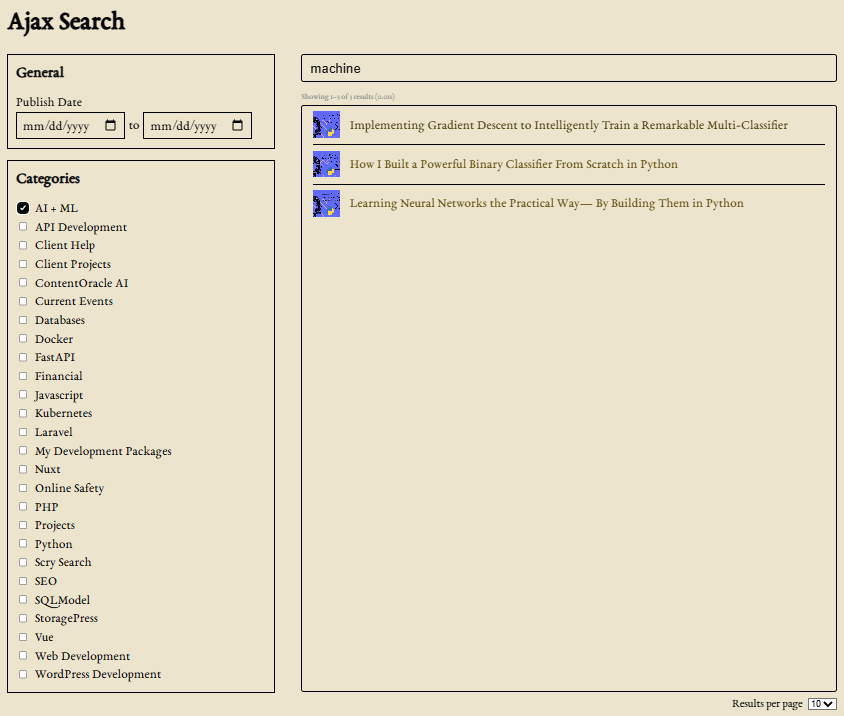
- Scry Search Ajax – ajax search UI on top of the base
window.scrySearch/submitAjax()runtime, so results can update without a full page reload.
Same connection, same indexes, same hooks. Install them from Scry Search → Premium Upgrades when you are ready. Skip them when a custom front end, or the built-in autosuggest, is enough.
Managed hosting (ScryWP)
Self-hosting is first-class. Paste any Meilisearch URL and keys into Connection Settings — Docker, bare metal, a VPS, or local dev all work the same way. Pick post types, index, ship. A large catalog doesn’t change that path. It just means the engine has more documents to hold, which is what Meilisearch is for.
When you’d rather not run the search engine itself, ScryWP is managed hosting built for WordPress. On a big site, the index is large enough that “who patches Meilisearch” stops being a theoretical question. What you get upfront:
- Engine upkeep — Meilisearch stays current; you’re not tracking release notes or patching prod yourself.
- Monitoring & ops — health and capacity on the hosting side, so search failures aren’t a surprise SSH session.
- Same plugin, same hooks — identical integration. No forked workflow; federation, hybrid, analytics, and
scry_ms_*hooks behave the same as self-host.
That is the managed value: less infrastructure for you to operate, not a different product. Choose ScryWP when ops time or handoff complexity is not where you want to spend the budget. Choose self-host or local when you need full control, a compliance boundary, or an offline sandbox.
Hosting options
- ScryWP — managed: patched engine, monitoring, ops handled for you
- Self-hosted — your infrastructure, full control
- Local (dev) — same plugin path, offline or sandbox
Paste URL + keys, pick post types, index. Done.
Fits what you already have
- Your theme’s
search.php/ results markup — unchanged searchform.php, core search block/widget, page-builder search boxes- WooCommerce products
- Custom post types + meta
- Headless / custom front via
WP_Queryor REST if you build one
Get Managed Hosting from ScryWP
Don’t want to run Meilisearch yourself? ScryWP Search runs the engine for you — kept patched, monitored, and maintained — so search isn’t another server to babysit. Self-hosting and local dev stay fully supported. Details are under Managed hosting (ScryWP) below.
Requirements
- WordPress 5.2 or higher
- PHP 8.1 or higher
- A Meilisearch instance (ScryWP or self-hosted)
Support
Hooks/docs: DOCS.md or GitHub. Issues and questions: same repo or JG Web Development.
Installation
- Have a Meilisearch instance running — self-hosted, local, or ScryWP managed (see Managed hosting (ScryWP) above).
- Install and activate the plugin (upload to
wp-content/plugins/or via Plugins → Add New). - Scry Search → Connection Settings: URL, admin key, optional search key; test connection.
- Scry Search → Index Settings: choose post types, save, Index Posts for each.
- WordPress search now uses Meilisearch. No theme changes required.
- Optional: enable autosuggest or highlighting under Search Settings.
- Optional: open DOCS.md and add your first
add_filter( 'scry_ms_…' ).
You can do that whole flow from wp-admin without custom code. On a large site, step 4 is the one that takes a while. Use the task pane while Index Posts runs. The hooks are there when you need them.
FAQ
Will this handle a site with a huge amount of content?
Yes. WordPress search queries the database, and that falls over once you have a large catalog or a long archive. Scry Search keeps the index in Meilisearch. Each post type gets its own index, federated search merges them there (not in a PHP loop), and bulk indexing runs in batches so a full reindex doesn’t have to load every post at once (scry_ms_bulk_index_batch_size). A big WooCommerce catalog and a big content library are both in scope. After you connect, run Index Posts and watch the task pane. The first index of a large site takes a while. Later saves update one document at a time.
What happens when I deactivate or uninstall?
Deactivating clears the plugin’s daily cron jobs (analytics and log cleanup) so they stop running while the plugin is inactive. Your settings, API keys, custom tables, and Meilisearch indexes are left in place — reactivating restores normal operation and re-schedules cron. On a large site, that means the Meilisearch documents stay put. You are not rebuilding tens of thousands of records just because you deactivated the plugin.
Deleting the plugin (uninstall) removes the two custom database tables (scry_ms_search_analytics, scry_ms_logs), all scry_ms_* options (connection keys, embedder secrets, index backups, etc.), and any remaining scheduled cron events. It does not delete indexes or documents on your Meilisearch server.
Will password-protected posts be indexed?
No for live saves — published posts with a password are skipped before indexing. Use scry_ms_should_index on bulk reindex (or always) if you need the same rule there. Already-indexed protected posts stay in Meilisearch until you reindex or wipe.
What makes this developer-friendly?
45 documented scry_ms_* hooks, call sites marked in the source, a shared client filter, and a real docs file — not a marketing PDF. Plus the tooling you’d actually use on a site: a task pane for Meilisearch jobs, error and debug logs, and search analytics (dashboard + CSV). Start here: DOCS.md. Optional window.scrySearch if you need front-end glue. No forced search results UI.
Can non-developers use it?
Yes, including on a large catalog. Connect Meilisearch, pick post types, index, and tune ranking, synonyms, weights, hybrid search, and autosuggest from wp-admin. Bring a developer in when you need behavior the screens do not cover.
Do I need semantic / AI search?
Optional. Keyword search works without it, and keyword search is already a large upgrade once the catalog is big. Hybrid is in core when you want vector similarity alongside full-text — configure embedders per index, reindex, same results templates.
Do I have to use a frontend UI from the plugin?
No. The plugin doesn’t take over your results page. Your theme (or builder) still displays posts from WP_Query. Ranking, fields, synonyms, typo tolerance, hybrid, weights, and the rest are configured in wp-admin. Autosuggest and highlighting are the optional front-end extras. Leave them off and you’re doing indexing and query routing only.
Do I need to change my theme?
No. Forms and search.php (or the equivalent) keep working. The plugin swaps the query engine, not the markup. Page-builder search boxes that hit WordPress search work the same way.
What is Meilisearch?
An open-source, typo-tolerant search engine: meilisearch.com. This plugin is the WordPress integration. Meilisearch handles indexing and retrieval, including libraries of content that are too big for a SQL LIKE. Use your own instance, or ScryWP.
ScryWP or self-host?
Self-host (or local dev) when you want full control, a compliance boundary, or you already run Meilisearch elsewhere. ScryWP when you would rather not operate the engine — Meilisearch kept patched and monitored on the hosting side, same plugin integration (paste a URL and keys like any other instance). Federation, hybrid, and hooks work the same either way. A large index does not push you toward one or the other. It is the same plugin.
Custom post types and meta?
Yes. Each selected post type gets its own index, which is what you want when one of those types has a huge number of records. Meta shows up in searchable fields. Tweak it in the admin, or with scry_ms_index_fields / scry_ms_index_meta_keys / scry_ms_index_prepare_document.
How does federated search work?
Meilisearch multi-search, with federation across your indexes, using the weights you set in Search Settings. The merge happens in Meilisearch, which matters when each index is large. Adjust the request with scry_ms_multi_search_*.
Will this work with WooCommerce?
Yes, including a large product catalog. Index product, choose fields and meta, and set weights if you also search other post types. Theme and checkout stay unchanged.
Synonyms, stopwords, dictionary, and typo tolerance?
Yes — per index, in the Index Settings dialog (dedicated tabs). No Meilisearch config files. Also filterable from code when you need that. On a big catalog, this is how a misspelling or a brand nickname still finds the product.
Can I configure filterable fields from WordPress?
Yes. The Filterable Fields tab lets you pick core fields, taxonomy IDs, and related attributes. Defaults and the field tree are adjustable with scry_ms_index_filterable_attributes / scry_ms_index_filterable_fields.
How do I customize with code?
The hook list is under For developers above. Common starters: scry_ms_should_index, scry_ms_index_prepare_document, scry_ms_meilisearch_client, scry_ms_autosuggest_results / scry_ms_autosuggest_results_rendered, scry_ms_admin_pages. Full signatures: DOCS.md.
JavaScript API?
Optional. Wait for scrySearchReady, then use window.scrySearch and the per-form pre/post (and AJAX) hooks. Skip it if you are not doing front-end work. Examples are in DOCS.md.
How do I debug indexing?
Use the task pane for Meilisearch tasks on the indexes this plugin manages, and Scry Search → Logs for plugin debug and error lines (secrets redacted, retention available). On a large bulk index, start with the task pane. See For developers.
Can I export analytics?
Yes — Search Analytics includes CSV export, retention and cleanup, privacy options, and scry_ms_analytics_event_to_insert for extra fields. Covered under For developers.
Is it secure?
AJAX nonces, capability checks, and sanitized/escaped I/O. Prefer a search-only API key for front-end paths. The client factory supports admin vs search keys.
Screenshots


Changelog
1.8.4
- Indexed content and excerpts keep a space where block-level HTML separated words (table cells, headings, paragraphs, lists, and line breaks), so product codes and neighboring terms stay searchable. Reindex to apply
1.8.3
- Indexed post meta keeps text as text. Numbers are stored as integers or floats, boolean strings as booleans, and serialized arrays (ACF, Meta Box groups and repeaters) are unpacked so nested values cast the same way
1.8.2
- Remove error dump and die on multisearch fail.
1.8.1
- Bug fixes.
1.8.0
- Search input discovery is configurable via
scry_ms_window_localized(searchFormElementQuerySelector; defaultinput[type="text"][name="s"], input[type="search"][name="s"]). Forms with no matching input are skipped - Autosuggest sets
searchForm.data.core.shouldRenderAutosuggestso the dropdown only renders when that flag is true (other AJAX consumers can suppress it) - Removed unused autosuggest
return_typehidden field — the REST endpoint always returns bothdataandrendered - Autosuggest script declares a soft dependency on
scry-search-facetsso the Facets add-on loads before autosuggest when both are present - Premium Upgrades lists Scry Search Ajax alongside Facets
- Internal:
_scripts/release.shbuild helper;.distignoreexcludesscripts/_scripts - DOCS.md / README updated for
searchFormElementQuerySelector
1.7.0
- Autosuggest result count is filterable with
scry_ms_autosuggest_posts_per_page(default 5; values below 1 fall back to 5) - AJAX submit debounce is configurable via
scry_ms_window_localized(debounceMs, default 250ms) - Search analytics records
is_autosuggest(schema 1.3, applied when wp-admin loads). Recent Searches shows the column, can filter autosuggest vs full searches, and CSV export includes it - New filter
scry_ms_should_insert_analytics_eventcan skip inserting an analytics row - Indexed post meta stores numeric values as integers, including arrays of numbers
- Autosuggest class selector placeholder is a class name (
scrywp-search-form) - DOCS.md / README updated for the new hooks
1.6.0
- Plugin lifecycle:
register_deactivation_hookclears daily analytics/log cron events;uninstall.phpdrops custom tables and deletes allscry_ms_*options - Password-protected posts are skipped on live indexing (built-in; still filterable via
scry_ms_should_index) - Federated search pagination keeps Meilisearch
estimatedTotalHitsforfound_posts/max_num_pages(no longer overwritten by the current page size) - Analytics CSV export sanitizes cells that start with
=,+,-,@, tab, or CR to prevent spreadsheet formula injection - Recent Searches table is extensible:
scry_ms_analytics_recent_searches_columns,scry_ms_analytics_recent_searches_column, and optionalscry_ms_analytics_recent_searches_sortable_columns; rows expose decodedsearch_metadata - Autosuggest:
scry_ms_autosuggest_localizedfilter; remove hiddenreturn_typeinput after AJAX so it does not leak into normal form submits - Semantic search onboarding notice is dismissible (cookie); overview CTA / card action dashicons alignment polish
- Readme: stronger managed-hosting (ScryWP) copy while keeping self-host first-class
- DOCS.md / README updated for new hooks and lifecycle behavior
- Fixed bug loading tasks in the task pane
1.5.2
- Fixed a bug with the updated indexing logic
- Enabled filtering of the localization of autosuggest script
1.5.1
- Front-end form discovery via CSS selectors (
#adminbarsearch,form[role="search"]by default), including Gutenberg Search block forms - Extend discovery selectors with
scry_ms_window_localized(searchFormSelectors) - Autosuggest class selector limits typeahead to discovered forms that carry a given CSS class on
<form> - Window and autosuggest use separate localized JS objects (avoids config collisions)
- DOCS.md / README updated for form discovery and autosuggest targeting
1.5.0
- Hybrid / semantic search in core — Hybrid Search tab per index with embedder add/edit/delete, semantic ratio, and federated search integration
- Embedder definitions backed up in WordPress and restored when an index is recreated; preserved when wiping/reindexing
- Search analytics records hybrid usage in
search_metadata(scry_search_hybrid) when hybrid is active - Searchable fields: drag-and-drop reorder (saved as Meilisearch
searchableAttributesorder) - Default searchable attribute order prioritizes title, excerpt, then content
- Index settings UI treats Meilisearch
["*"]searchable attributes as all fields selected - DOCS.md / README updated
1.4.0
- Tabbed Index Settings dialog covering ranking rules, searchable fields, filterable fields, synonyms, stop words, dictionary, and typo tolerance
- Filterable attributes managed in core — including post taxonomies (
taxonomies.<name>.id) andpost_date_unix - Custom ranking rules (
attribute:asc/attribute:desc) with drag-and-drop ordering alongside built-in rules - Dictionary and typo tolerance settings (enable/disable, min word sizes, disable on numbers/words/attributes)
- View Raw JSON on each settings section for debugging
- Settings backup/restore now includes filterable attributes, dictionary, and typo tolerance
- New hooks:
scry_ms_index_filterable_attributes,scry_ms_index_filterable_fields,scry_ms_index_filterable_attributes_before_update,scry_ms_index_dictionary_before_update,scry_ms_index_typo_tolerance,scry_ms_index_typo_tolerance_before_update,scry_ms_bulk_index_batch_size - Bulk indexing processes posts in batches (memory-friendly; batch size filterable)
- Setup breadcrumb navigation on admin pages
- DOCS.md / README updated for the new index settings surface
1.3.0
- New hooks:
should_index,should_delete,should_search,after_index_document,after_delete_document,after_bulk_index,index_names,index_searchable_attributes,bulk_index_query_args,meilisearch_client,autosuggest_results,autosuggest_results_rendered,admin_pages - Customize how your site displays autosuggest results with the
autosuggest_results_renderedhook - Documents now include public taxonomy terms;
index_prepare_documentgetsWP_Postas second arg - Sync on
delete_postanduntrash_post - DOCS.md / README updated
- Optional matched-term highlighting in results and autosuggest (Search Settings; CSS class
.scry-ms-highlight) - Autosuggest can show featured-image thumbnails
- Analytics: extra keys on
scry_ms_analytics_event_to_insertstored insearch_metadata(CSV too) - Premium Upgrades lists Scry Search Hybrid alongside Filters
- Index settings restored from WP only when an index is newly created (avoids re-PATCHing Meilisearch every admin load when embedders are set)
1.2.1
- Task drawer only lists tasks for indexes this plugin manages
- Premium Upgrades page layout/assets fix
1.2.0
- Logs screen (debug/error, retention, secret redaction)
- More
scry_ms_*hooks; documented in DOCS.md window.scrySearchJS API- Premium Upgrades admin page
- Federated search hit-count fix
1.1.2
- Analytics CSV export, retention/cleanup, privacy settings on Search Analytics
1.0.3
- Optional AJAX autosuggest (Search Settings toggle + optional class selector)
1.0.2
- Synonyms and stopwords from the WordPress admin
1.0.1
- ScryWP-hosted Meilisearch support
1.0.0
- Initial release: per-post-type indexes, federated search, ranking/searchable fields, auto + bulk indexing, task drawer, live preview, drop-in WP search