

Description
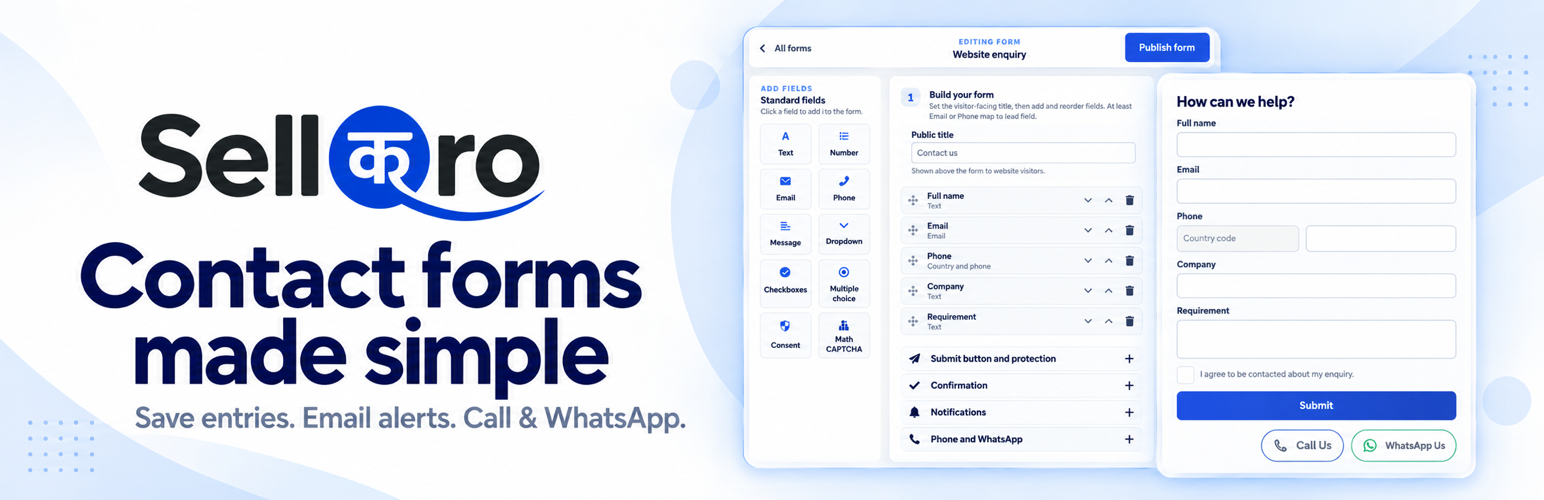
SellQro is a free WordPress contact form plugin with a visual form builder, saved entries and email notifications. Build contact and enquiry forms, keep submissions in your WordPress dashboard, and give visitors optional Call Us and WhatsApp Us buttons below the form.
Build and preview your form
- Visual form builder: Add and arrange fields, edit labels and see changes in a live preview.
- Compact settings: Expand the settings you need while the main form builder stays open.
- Flexible fields: Use text, email, phone, company, message, number, dropdown, choice, checkbox and consent fields.
- Phone country selector: Choose a default country for visitor phone fields.
- Responsive forms: Place forms on desktop and mobile pages using the SellQro Lead Form block or a shortcode.
- Confirmations: Show a thank-you message or redirect visitors to a chosen page after submission.
Call Us and WhatsApp Us buttons
Add a phone number and/or WhatsApp number with its country code in each form’s Phone and WhatsApp settings.
- Independently optional: Each button appears only when its own number is entered. Leave a number blank to hide that button.
- Compact outlined pills: Blue/green borders, dark phone and green WhatsApp icons, regular grey labels and right alignment on every screen size.
- Direct contact: Call Us opens the visitor’s calling app where supported. WhatsApp Us opens a wa.me link in a new tab or the WhatsApp app, depending on the device.
These are visitor-initiated contact links. They do not automatically send form submissions to WhatsApp, record calls or save a new entry when clicked.
Personalised email notifications
Choose the recipients for accepted SellQro form submissions. Customise the sender name, subject and message body with supported field placeholders. Preview emails with sample answers.
Notification emails display field labels above their values in a single-column layout, giving long answers more room on mobile. Use your website’s existing email setup, Gmail with an App Password, or your own SMTP provider. Submissions are saved before email delivery is attempted.
Saved entries and spam protection
- Local entry storage: View and search under SellQro CRM > Lead Entries; export selected contact details to CSV.
- Custom answers: Supported, non-sensitive answers from SellQro-built forms are retained for entry details and notification templates.
- CAPTCHA: Add an optional Math CAPTCHA alongside built-in spam checks, with no external CAPTCHA account required.
- Retention and privacy: Choose how long entries are kept and use WordPress personal-data export and erasure tools.
Already using another form plugin?
SellQro can also capture selected contact details from new WPForms, Contact Form 7, Gravity Forms and Fluent Forms submissions after you choose the fields to capture. These plugins are installed separately; Gravity Forms requires its own licence. SellQro’s contact buttons and personalised native-form notifications belong to forms built with SellQro.
Privacy and your data
Entries are stored on your WordPress website. Saved data includes selected contact details, supported non-sensitive answers from SellQro-built forms, visitor IP address and submission page URL with permitted campaign parameters. Sensitive URL information is excluded.
Entries are kept for 90 days by default. Choose 30, 90, 180 or 365 days, or keep them until removed. WordPress personal-data export and erasure tools are supported.
Passwords, payment details, identity-document information, uploaded files and security answers are excluded from enquiry data. The plugin adds no usage telemetry or remote advertising trackers. Include your form, contact-link, email and retention practices in your website’s privacy notice.
Optional services
SellQro CRM
An administrator can optionally connect the website to a paid SellQro CRM account for enquiry follow-up. This separate service is not a full CRM inside WordPress and is not required for local forms or entries.
After connection, SellQro receives website, installation, form and delivery identifiers, software versions, enquiry source and submission time, plus selected contact details, visitor IP and page URL. Anirup Technologies operates the service.
Gmail or your email provider
When notifications or a test email use Gmail or a configured SMTP provider, that provider receives authentication details where required, sender and recipient addresses, and email content. Gmail credentials are encrypted on your website and are not sent to SellQro. Your provider’s terms and privacy policy apply.
WhatsApp contact links
If you add a WhatsApp number, the plugin renders a wa.me link using that number. WhatsApp is opened only when the visitor follows the link; the plugin does not send form answers to WhatsApp or load a WhatsApp tracking script.
WhatsApp Terms | WhatsApp Privacy
The plugin does not connect to SellQro, Gmail or a custom email provider simply because it is activated.
Installation
- Go to Plugins > Add New in WordPress, search for SellQro, then install and activate it.
- Open SellQro CRM > Forms and create a form. Add fields and choose the contact details to save.
- Configure confirmations and email notifications if needed. For contact buttons, enter international numbers under Phone and WhatsApp.
- Publish the form and add its block or shortcode to a page. Test the form and any contact links.
FAQ
Is the plugin free?
Yes. Forms, local entries, email settings, CAPTCHA, CSV export and the Call Us / WhatsApp Us buttons are included without a SellQro subscription.
How do I show or hide each contact button?
Enter international numbers under Phone and WhatsApp. Leave either number blank to hide only that button. Preview your changes, then save the form.
Which information can I save?
Selected name, email, phone, company and message details are saved with enquiry source information. SellQro-built forms also retain supported, non-sensitive custom answers for entry details and notification templates. Third-party form capture and CSV export use the selected contact fields.
Why have I not received a notification email?
Check that notifications are enabled and the recipients are correct. Check spam folders and test the website’s email settings. Entries are saved before delivery is attempted; successful delivery depends on your email setup and recipient provider.
Can visitors upload files or make payments?
No. The plugin is designed for contact and enquiry forms, not file uploads or payment collection.
What happens if I remove the plugin?
Entries are retained by default. You can choose permanent removal in the plugin settings before uninstalling.
Screenshots


Changelog
1.4.23
- Use transparent contact pills with blue/green borders, grey labels, a brand-green WhatsApp icon and a darker phone icon.
- Retain compact sizing, regular-weight Call Us / WhatsApp Us labels and right alignment at every screen size.
1.4.22
- Refine contact buttons into compact pills labelled Call Us and WhatsApp Us, using regular-weight text and smaller icons.
- Align contact buttons to the right on every screen size.
1.4.21
- Make optional contact buttons compact, with white phone/chat icons, blue Phone styling and green WhatsApp styling.
- Keep the live builder preview and public/standalone forms visually consistent.
1.4.20
- Readable stacked notification emails with full-width values.
- Compact, exclusive form-settings sections; the form builder stays open.
- Optional Phone and WhatsApp buttons with international numbers and live preview.
- Additive database update preserves existing forms and defaults buttons to hidden.
1.4.19
- Clarify the optional email body, remove repeated entry details, and top-align compact lead rows.
- Rename Import other forms and SellQro CRM menus and collapse technical connection details.
- Save form defaults, email delivery and final Uninstall card independently.
1.4.18
- Personalise native-form notification sender names, subjects and message bodies with field placeholders.
- Preview emails using fictional answers without sending a message.
- Use a compact form builder with a wider full-height preview, navigation above the preview, and matching subdued placeholder selectors.
- Store permitted custom answers locally for notifications and privacy export/erasure; preserve existing email templates on upgrade.
1.4.17
- Improved phone-number handling, company fields and checkbox validation.
- Improved form submission recovery and editor compatibility.
- Improved entry search, pagination and privacy tools.
- Improved connection reliability, administrative access checks and plugin removal behaviour.