


Description
Every WooCommerce order deserves a clean invoice, and every business buyer now expects an e-invoice. SemiAuto Invoicing gives your store both. Out of the box it turns each order into a professional PDF invoice, a packing slip for your warehouse and a thermal POS receipt for your receipt printer. When your customers or your tax authority ask for e-invoices, the same orders become Peppol, XRechnung, ZUGFeRD, Factur-X, FatturaPA, Facturae, KSeF or PINT e-invoices, without changing the way you work.
Everything is created on your own WordPress site. No PDF service to subscribe to, no fee per document, no customer data sent away. Install it, add your logo and business details and your first invoice is ready as soon as your first oder comes in.
Learn More: Feature Comparison | Documentation | Guides Hub | Live Demo
Why store owners choose SemiAuto Invoicing
- One plugin instead of three – PDF invoices, packing slips and thermal receipts share one setup, one design and one secure storage. Fewer plugins, fewer conflicts, one place to look.
- Your data stays yours – invoices are generated and stored on your server. The free plugin sends nothing to an outside service.
- Prints right the first time – thermal receipts are laid out for 44, 57, 58, 76 and 80 mm paper rolls with a cut line, so your POS printer prints them as they are.
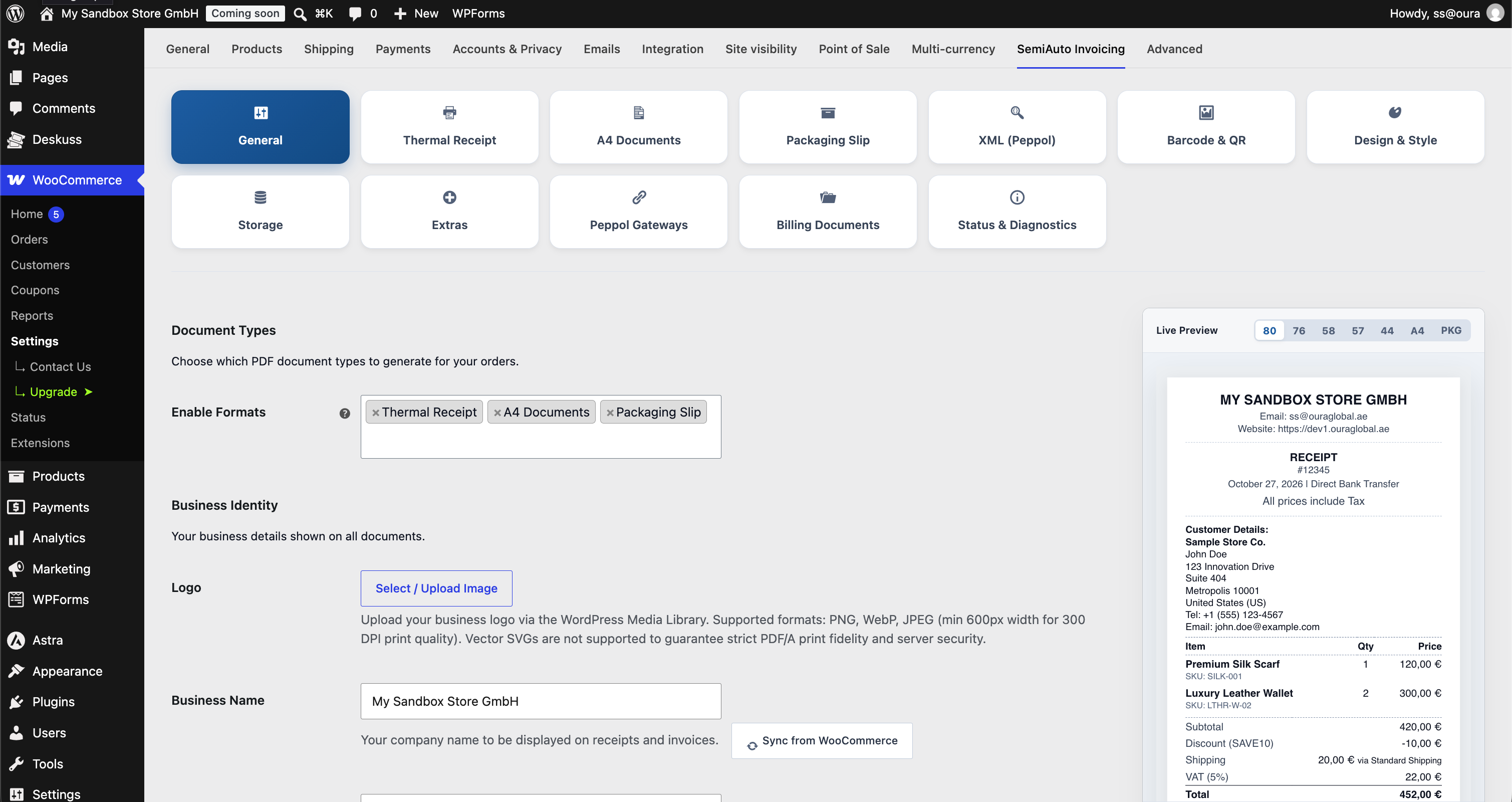
- Looks like your brand – logo, colours, fonts, footer, terms and conditions and bank details, with a live preview while you edit.
- Ready for the e-invoicing mandates – Germany, France, Italy, Spain, Poland, Belgium, Norway, Singapore, Malaysia, the UAE, Japan, Australia, New Zealand and Oman are covered in Premium, each with its official formats and checks before anything is sent.
- Test before you commit – connect your own StoreCove or A-Cube credentials(sandbox/production) accounts in the Live Demo and send test or real e-invoices over Peppol or other supported networks before going live.
- Built for today’s WooCommerce – High-Performance Order Storage (HPOS), the classic order storage, the block checkout and the classic checkout.
Compliance Disclaimer
No plugin can guarantee complete legal, tax or regulatory compliance. SemiAuto Invoicing is a software assistant: it builds invoices, receipts and e-invoices from your WooCommerce data following the published technical specifications of each format. Store owners remain responsible for their accounting records and for meeting the local, national and international rules that apply to them. This software does not provide legal or tax advice.
This plugin uses the Freemius SDK for license management and optional account services subject to the Freemius Terms and Privacy Policy. Data sharing occurs strictly upon administrative opt-in.
Key Features (Free Core):
- WooCommerce PDF Invoices: Send invoices your customers trust. Each A4 PDF invoice carries a clear two-column header, “Bill To” and shipping details, your logo, the order lines with SKU and EAN, coupons, taxes per rate, payment terms, a due date, your terms and conditions and your bank details for direct bank transfer (BACS).
- Packing Slips: Speed up picking and packing with compact packing slips (delivery notes) that show the products, quantities and shipping address, and no prices, so they can travel in the parcel.
- Thermal POS Receipts: Print till-style receipts on 44 mm, 57 mm, 58 mm, 76 mm and 80 mm thermal receipt printers, with an automatic cut line, header and footer text, tax lines and coupon codes.
- Automatic Generation: Decide once when each document is created (for example when an order is processing or completed) and which WooCommerce emails carry it as a PDF attachment. After that, every order takes care of itself.
- Customer Downloads: Fewer “can you resend my invoice?” emails: logged-in customers download their invoices and receipts from WooCommerce My Account > Orders through a secure link.
- Live Preview Studio: Change fonts, colours, line height and layout and watch the invoice or receipt update at once, on desktop, tablet and phone sizes.
- Local Rendering Engine: PDFs are rendered on your own server with the bundled Dompdf engine: no external API, no remote tracking, no per-document fees.
- Protected Storage: Documents live in their own uploads folder protected by automatic
.htaccess,web.configandindex.phpfiles, and are served only through authorised download links with a guard against directory traversal. - HPOS and Privacy Ready: Works with WooCommerce High-Performance Order Storage and the classic order storage, and with the WordPress personal data exporter and eraser.
- Activity Log: An optional local log shows which documents were created and when.
Source Code & Build Process
- Public Source Repository: SemiAuto Invoicing – GitHub
- Build Process: All JavaScript and CSS source files in the
assets/directory are unminified, human-readable Vanilla JavaScript and CSS written directly for native browser execution. No compilation or transpilation build step is required.
Premium Billing Ledger & Global E-Invoicing (Paid):
Everything above stays free, with no limits on orders or documents. SemiAuto Invoicing Premium is for stores that invoice businesses across global markets or public bodies and need structured e-invoices, a complete billing ledger and Peppol delivery:
- Complete Billing Document Suite: Credit notes (
381) for every refund, cancellation or price reduction after issue, corrected invoices (384), replacement invoices (credit and rebill), debit notes (383/380), advance and deposit invoices (386/380) deducted automatically on the final invoice, periodic B2B summary invoices, separate services documents, POS kitchen copies and alternate-profile companion PDFs and XMLs. - Document Control and Immutable Ledger: An order box shows every document as Draft, Issued, Superseded or Cancelled. Issued documents lock their amounts against silent edits or order deletion, with a store-wide billing documents ledger and CSV export for your accountant.
- Guided Post-Issue Actions: Corrections, line-level price reductions, debit notes, advance invoices, partial payments (amount, date, reference) and delivery holds, all from the order screen and without changing the WooCommerce order status.
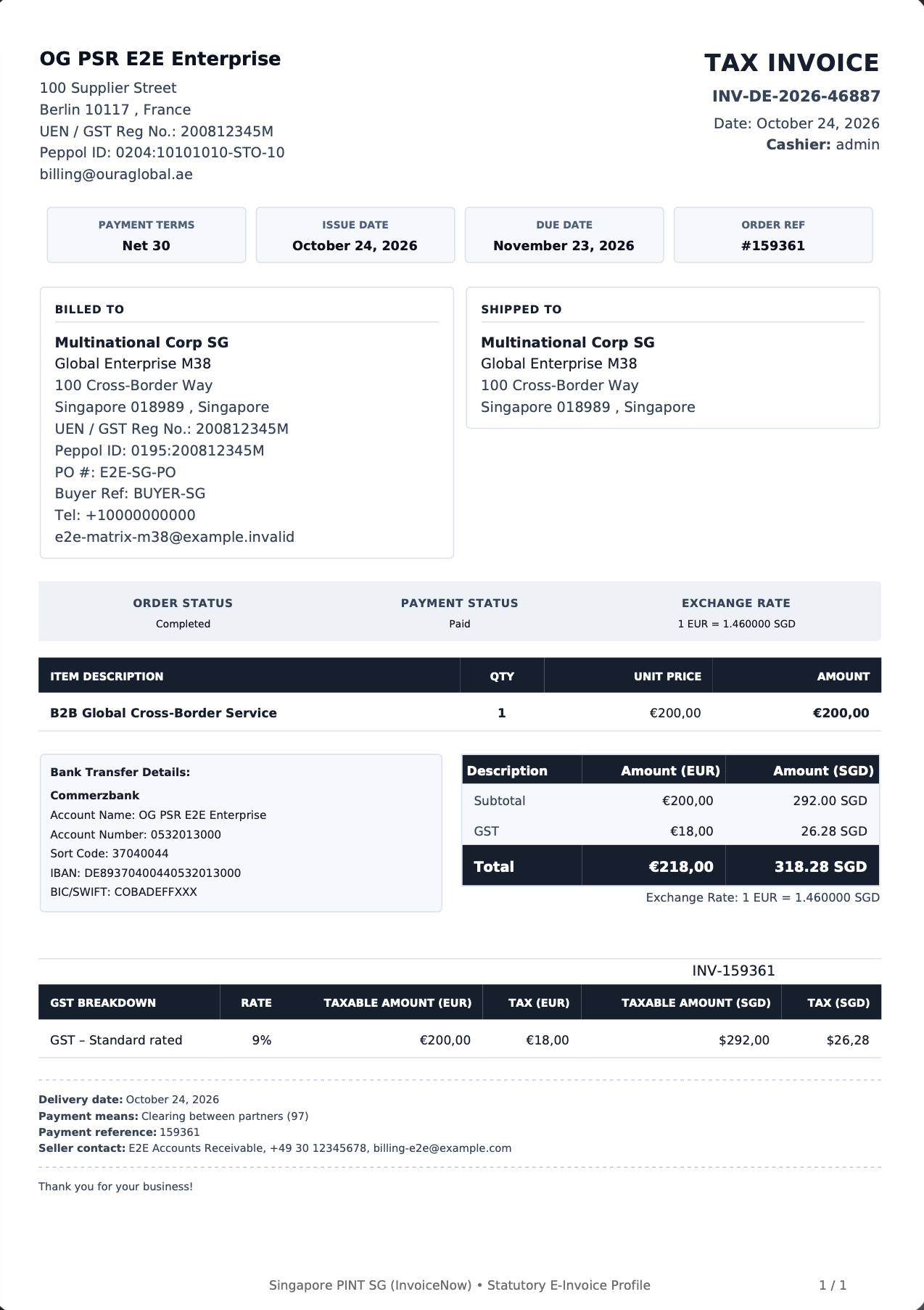
- E-Invoicing Engine for 13 Profiles: UBL 2.1 and UN/CEFACT CII e-invoice XML built to the official rules of each profile and checked before it is issued: Peppol BIS Billing 3.0 (with the Norwegian EHF rules), Peppol PINT EU, PINT SG, PINT MY, PINT AE, PINT A-NZ, PINT JP and PINT OM, German XRechnung 3.0.2, Factur-X 1.09.2 / ZUGFeRD 2.5.2 with Chorus Pro, Italian FatturaPA 1.2.3, Spanish Facturae 3.2.2 with VeriFactu, and Polish KSeF FA(3).
- ZUGFeRD and Factur-X Hybrid PDF/A-3 Invoices: The validated XML and an sRGB colour profile are embedded in a PDF/A-3 invoice that passes veraPDF checks: people read the PDF, accounting software reads the data.
- Cross-Border Routing and Diagnostics: Each buyer automatically gets the e-invoice format of its country, with pre-flight checks and an Engine Issues log that stops an invalid e-invoice and says exactly what to fix and where.
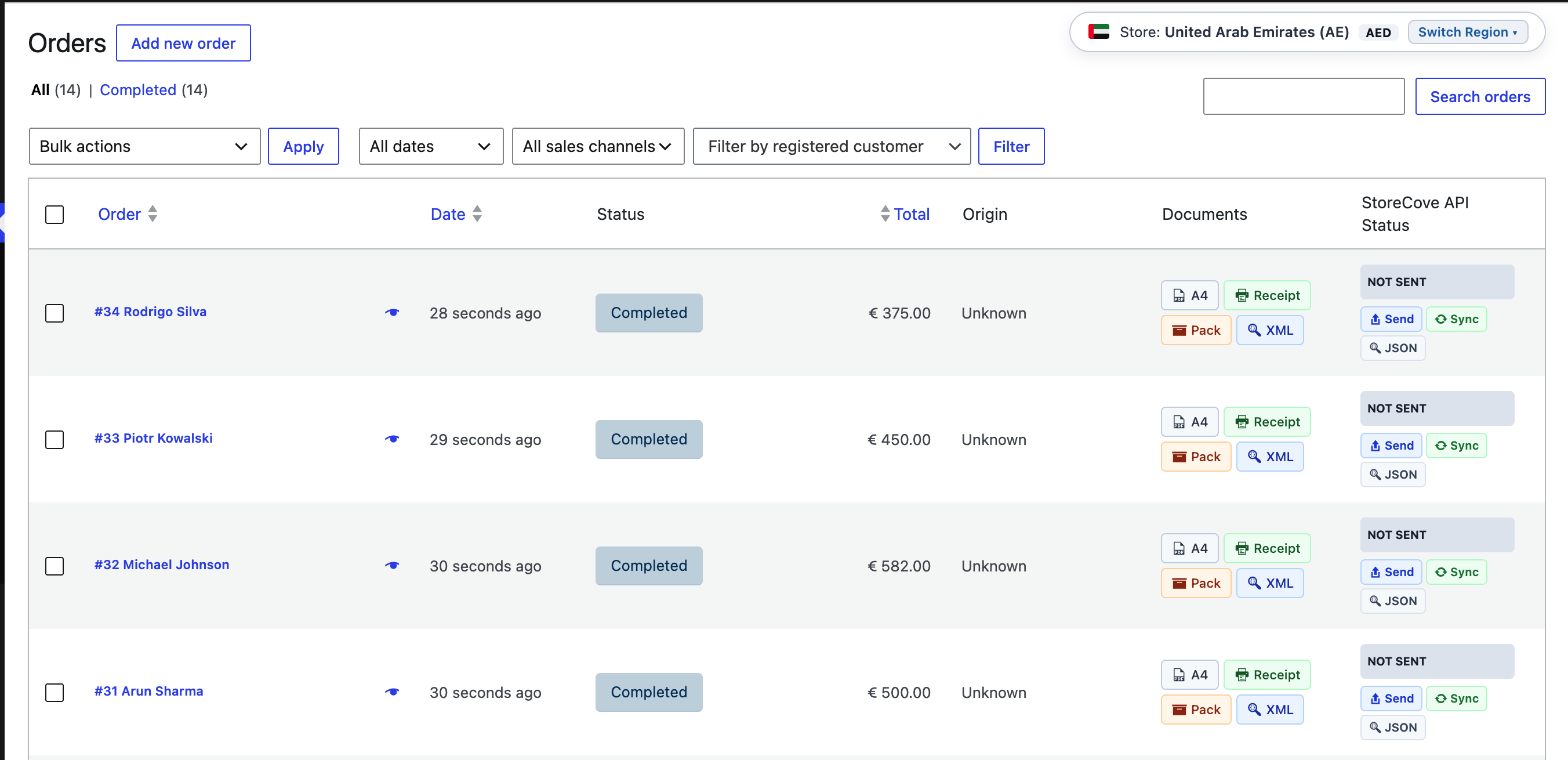
- Peppol Delivery through StoreCove and A-Cube: Send e-invoices over the Peppol network through your own StoreCove or A-Cube account (bring your own key, no markup), with SMP receiver lookup, delivery status by signed webhook, one send at a time per document and no duplicate sending after a lost connection.
- More Delivery Networks: Through StoreCove: Italy SdI, Spain FACe and FACeB2B, Poland KSeF, India IRP (GST e-invoice) and e-mail delivery for buyers without a Peppol ID. Through A-Cube: Peppol, Belgium, Norway, Slovakia, the UAE, Italy SdI, Spain VeriFactu and Poland KSeF.
- Received E-Invoices Inbox: Purchase invoices and credit notes your business receives over Peppol are kept in WordPress with no limit, in a paged inbox with download and a “not downloaded” filter.
- Adaptive B2B / B2G Checkout: VAT / TRN number, Peppol ID, SIREN, Leitweg-ID, SDI code, DIR3 codes, GSTIN, TIN / BRN and other buyer fields appear on the block and classic checkout only for buyers who need them, with check-digit validation.
- Accurate Tax Maths and Official Exchange Rates: 6-decimal EN 16931 and PINT tax reconciliation, and tax currency conversion with official rates from the ECB, Norges Bank, Bank Negara Malaysia and the Central Bank of the UAE.
- Numbering and POS Operations: Gap-free sequential numbering per document series, POS cashier roster, taxable checkout fees, Code-128 barcodes, payment QR codes, bulk ZIP downloads and statutory retention protection.
E-invoicing by country (Premium)
Germany – XRechnung and ZUGFeRD (E-Rechnung). Germany’s e-invoicing rules (E-Rechnung) expect structured invoices between businesses and for public buyers. SemiAuto Invoicing creates XRechnung 3.0.2 for public buyers with their Leitweg-ID, and ZUGFeRD 2.5.2 hybrid PDF/A-3 invoices that open as a normal PDF and import straight into accounting software. Every XRechnung and ZUGFeRD invoice is checked against the official KoSIT rules first, and can be delivered through StoreCove or A-Cube.
France – Factur-X and Chorus Pro (facture électronique). For public buyers, SemiAuto Invoicing creates Chorus Pro ready Factur-X invoices with the buyer’s SIRET, service code and engagement number. For the French e-invoicing reform it adds SIREN identifiers, the goods / services statement and the reform checks of the DGFiP, and a “French e-Invoicing Start” setting for the September 2026 or September 2027 start date. Factur-X invoices are hybrid PDF/A-3 files that any buyer can open.
Italy – FatturaPA and the SdI (fattura elettronica). Create FatturaPA 1.2.3 invoices with the codice destinatario, PEC and codice fiscale your Italian buyers give at checkout, and deliver them to the SdI through StoreCove or A-Cube.
Spain – Facturae, FACe and VeriFactu (factura electrónica). Create Facturae 3.2.2 for public buyers with their DIR3 codes and FACe delivery, report sales to VeriFactu through A-Cube, and reach Spanish businesses over FACeB2B through StoreCove.
Poland – KSeF FA(3) (e-faktura). Create KSeF FA(3) invoices for the Krajowy System e-Faktur, with NIP validation and local-government (JST) buyers, and send them through StoreCove or A-Cube.
Peppol across Europe – Peppol BIS Billing 3.0 and PINT EU. Reach businesses and public bodies in Belgium, the Netherlands, Norway (EHF), Denmark, Sweden and every other Peppol country with Peppol BIS Billing 3.0, or with the newer PINT EU. Peppol BIS 3 and PINT EU invoices go out through your StoreCove or A-Cube account.
Singapore – PINT SG for InvoiceNow. PINT SG invoices with your UEN and GST registration, ready for InvoiceNow.
Malaysia – PINT MY for MyInvois. PINT MY invoices with the buyer’s TIN, BRN and SST numbers, tax in MYR at the official Bank Negara Malaysia rate, for the MyInvois programme.
United Arab Emirates – PINT AE. PINT AE invoices with TRN numbers, the buyer’s emirate and trade licence, and VAT in AED at the Central Bank of the UAE rate. PINT AE invoices can also go through A-Cube’s UAE service.
Japan – PINT JP. PINT JP invoices for Japan’s qualified invoice system, with the registration number (T-number) and consumption tax in JPY.
Australia and New Zealand – PINT A-NZ. PINT A-NZ invoices with ABN, NZBN and GST numbers for Australian and New Zealand buyers.
Oman – PINT OM. PINT OM 1.0.1 invoices for Oman, including third-party, deemed supply, profit margin, special zone and prepayment invoices.
Upgrade to SemiAuto Invoicing Premium: Website | Pricing | Terms of Purchase | Privacy Policy
Step by Step Guides
Clear, screen-by-screen guides for PDF invoices, packing slips, thermal receipts and every electronic invoicing format (Peppol BIS 3, XRechnung, ZUGFeRD, Factur-X, FatturaPA, Facturae, KSeF) are waiting in the Guides Hub.
External services
This plugin connects to the Freemius API, provided by Freemius, Inc., for license management and optional account services. Data is only sent after an administrator opts in on the Freemius opt-in screen or account page; skipping the opt-in sends no data. When opted in, the administrator’s name and email, site URL and language, WordPress and PHP versions, and plugin version are shared (plus the list of active plugins and themes only if separately permitted). Customer and order data is never sent. Terms | Privacy Policy
The Premium edition connects to further services only when the store owner enables them:
- StoreCove (api.storecove.com), a Peppol access point: when the StoreCove gateway is active, the e-invoice of an order or refund (seller and buyer details, order lines, amounts and taxes) is sent for delivery over Peppol or the delivery networks the store owner switched on, and delivery statuses are read back.
- A-Cube (acubeapi.com), a Peppol access point: when the A-Cube gateway is active, the e-invoice of an order or refund is sent for delivery over Peppol and its status is read back.
- Norges Bank (data.norges-bank.no): when NOK exchange rates are set to Norges Bank, the currency code and date are sent to read the official exchange rate; no customer data is sent.
- European Central Bank (data-api.ecb.europa.eu): when an order needs an exchange rate the tax rules accept from the ECB (EU VAT currencies, Malaysia, Australia, New Zealand, Japan) or a converted information column, the currency codes and the supply date are sent to read the euro reference rates; no customer data is sent. Terms
- Bank Negara Malaysia (api.bnm.gov.my): for orders whose tax is stated in MYR, the currency code and month are sent to read the selling rate; no customer data is sent. Terms
- Central Bank of the UAE (centralbank.ae): for orders whose tax is stated in AED, the supply date is sent to read the published rate for VAT; no customer data is sent. Terms
- ExchangeRate-API open-source access (open.er-api.com): for information columns, and for tax currencies whose rules accept any public rate when the official source has none, the currency code is sent to read the latest rate; no customer data is sent. Terms
- Brønnøysund Register Centre (data.brreg.no): when the Norwegian company lookup is used in the settings, the organisation number entered by the store owner is sent to read the registered company details; no customer data is sent.
Each service is governed by the terms and privacy policy of its provider.
Third-Party Libraries & Copyright
This plugin bundles the following third-party software and open-source libraries:
-
Dompdf (HTML to PDF rendering engine)
License: LGPL-2.1-or-later
Source: https://github.com/dompdf/dompdf -
php-font-lib (TrueType font parsing and subsetting)
License: LGPL-2.1-or-later
Source: https://github.com/dompdf/php-font-lib -
php-svg-lib (SVG image parser for PDF generation)
License: LGPL-3.0-or-later
Source: https://github.com/dompdf/php-svg-lib -
Masterminds HTML5-PHP (Standards-compliant HTML5 parser)
License: MIT
Source: https://github.com/Masterminds/html5-php -
Sabberworm PHP CSS Parser (CSS stylesheet parser)
License: MIT
Source: https://github.com/MyIntervals/PHP-CSS-Parser -
Freemius WordPress SDK (Freemius integration and software licensing)
License: GPL-3.0-or-later
Source: https://github.com/Freemius/wordpress-sdk
Installation
- In your WordPress dashboard go to Plugins > Add New, search for SemiAuto Invoicing (or “WooCommerce PDF invoice”) and click Install Now. You can also upload the plugin files to the
/wp-content/plugins/semiauto-invoicingdirectory. - Activate the plugin on the Plugins screen. WooCommerce must be active.
- Go to WooCommerce > Settings > SemiAuto Invoicing and enter your business name, address and logo (General tab).
- Choose your invoice design, fonts and colours and check them in the live preview.
- On the A4 invoice, packing slip and thermal receipt tabs, choose when each document is created and which WooCommerce emails carry it as a PDF attachment.
- Place a test order: the PDF invoice arrives with the email and can be downloaded from the order screen and from My Account. That’s it, your store is invoicing.
FAQ
How do I create PDF invoices for WooCommerce orders automatically?
Install and activate SemiAuto Invoicing, then on the A4 invoice tab choose the order status that creates the invoice (for example processing or completed) and the WooCommerce emails that should carry it. From then on every new order gets its PDF invoice with no manual step. You can always open the invoice from the order screen too.
Can I print packing slips and delivery notes for my warehouse?
Yes. The packing slip lists the products, quantities, variations and the shipping address without prices, so it can go in the parcel. It has its own creation trigger and email choice, and you can print it from the order screen.
Which thermal receipt printers and paper widths are supported?
Thermal receipts are laid out for 44 mm, 57 mm, 58 mm, 76 mm and 80 mm paper rolls, the usual widths of POS and ESC/POS receipt printers. The receipt is a continuous PDF with a cut line, so you print it from the browser or your print app at 100 % scale. Premium adds kitchen copies for restaurants and a cashier roster.
Can invoices be attached to WooCommerce order emails?
Yes. For each document (A4 invoice, packing slip, thermal receipt) you pick the WooCommerce emails that carry it, for example “Processing order” or “Completed order”. The PDF is attached whenever WooCommerce sends that email.
How do I customize my store logo on invoices and receipts?
Navigate to WooCommerce -> Settings -> SemiAuto Invoicing -> General (Business Identity section), click Select / Upload Image, and select your store logo from the WordPress Media Library. The logo is resolved locally and embedded securely.
Where are generated PDF documents stored?
Documents are generated locally and stored inside your WordPress uploads directory (wp-content/uploads/semiauto-invoicing/). The plugin automatically generates defensive .htaccess (for Apache / LiteSpeed), web.config (for Microsoft IIS), and index.php silence files to block direct HTTP directory browsing and serves downloads through authenticated endpoints.
How do I secure stored documents on Nginx servers?
Because Nginx does not read runtime .htaccess files, add the following location block to your site’s Nginx server configuration:
location ^~ /wp-content/uploads/semiauto-invoicing/ { deny all; return 403; }
This blocks direct web access to the physical storage folder while authenticated customer and admin downloads continue to function seamlessly through the plugin’s secure PHP endpoints.
Can developers filter the document storage root path?
Yes, developers can customize the storage directory using the ogpsr_document_storage_root filter. The filter includes fail-safe sanitization and validation to ensure compatibility with your host environment.
Can customers download their invoices from My Account?
Yes, authenticated customers can download their PDF invoices directly from the WooCommerce My Account orders screen.
How are invoice numbers created?
In the free plugin the invoice carries the WooCommerce order number. Premium adds sequential, gap-free numbering per document series (invoices, credit notes) with your own prefix and suffix, and can take the number only when the invoice is issued, as many tax rules require.
Does the plugin create credit notes for refunds?
In Premium, yes: every full or partial WooCommerce refund gets its own credit note (type 381) that refers to the original invoice, as a PDF and, when e-invoicing is on, as an e-invoice. Premium also creates corrected invoices, debit notes and advance (deposit) invoices.
What is e-invoicing and does my store need it?
An e-invoice is a structured XML file (UBL or CII, following the European standard EN 16931) that your buyer’s accounting software reads without retyping. More and more countries require e-invoices for sales to public bodies (B2G) and between businesses (B2B), for example Germany, France, Italy, Poland and Belgium in Europe, and Singapore, Malaysia and the UAE elsewhere. If you only sell to consumers, PDF invoices are usually enough. E-invoicing is part of SemiAuto Invoicing Premium.
What is Peppol and how are invoices sent over it?
Peppol is an international network for exchanging electronic invoices between businesses and public bodies, used across Europe, Singapore, Australia, New Zealand, Japan, Malaysia and the UAE. SemiAuto Invoicing Premium builds the invoice in the format the receiver expects, looks up the receiver in the SMP, sends it through a Peppol access point you connect with your own account (StoreCove or A-Cube) and shows the delivery status on the order.
Do I need a StoreCove or A-Cube account?
Only to send e-invoices over Peppol or a national network. You connect your own StoreCove or A-Cube account (bring your own key), so you pay the provider directly with no markup from us. Both offer sandbox environments, so you can test real deliveries before going live. Without a gateway, Premium still creates the e-invoice files for you to download or email.
Can I create XRechnung or ZUGFeRD invoices for Germany?
Yes, with Premium. It creates XRechnung 3.0.2 (UBL) for public buyers with their Leitweg-ID and ZUGFeRD 2.5.2 hybrid PDF/A-3 invoices (also at the XRECHNUNG level), checked against the official KoSIT and ZUGFeRD rules before they are issued.
Does it support Factur-X and Chorus Pro for France?
Yes, with Premium. It creates Factur-X 1.09.2 hybrid PDF/A-3 invoices and Chorus Pro invoices for public buyers (SIRET, service code, engagement number). For the French e-invoicing reform it adds SIREN identifiers, the goods / services statement and the reform checks, with a setting for your start date (September 2026 or September 2027).
Does it support FatturaPA, Facturae, VeriFactu and KSeF?
Yes, with Premium: Italian FatturaPA 1.2.3 for the SdI (codice destinatario, PEC, codice fiscale), Spanish Facturae 3.2.2 for FACe and VeriFactu reporting, and Polish KSeF FA(3). The buyer fields each format needs appear at checkout only for buyers of that country.
Do you support PINT AE for the UAE and PINT OM for Oman?
Yes, with Premium. PINT AE invoices carry the TRN numbers, the buyer’s emirate and trade licence, with VAT in AED. PINT OM 1.0.1 covers Oman, including third-party, deemed supply, profit margin, special zone and prepayment invoices.
Do you support PINT SG, PINT MY and PINT JP?
Yes, with Premium: PINT SG for Singapore’s InvoiceNow, PINT MY for Malaysia’s MyInvois (TIN, BRN, SST, tax in MYR) and PINT JP for Japan’s qualified invoice system (T-number, consumption tax in JPY).
Can I send PINT A-NZ invoices to Australia and New Zealand?
Yes, with Premium. PINT A-NZ invoices carry the ABN, NZBN and GST numbers and go out through StoreCove or A-Cube.
What is the difference between Peppol BIS 3 and PINT EU?
Both are Peppol formats for Europe built on EN 16931. Peppol BIS Billing 3.0 is the long-established format most European receivers expect; Peppol PINT EU is the newer Peppol International model for the EU. Premium creates both, and dynamic routing allows the buyer to choose what they want to recieve.
Does the plugin work with the block checkout and the classic checkout?
Yes. The PDF documents work with orders from any checkout. The Premium buyer fields for e-invoicing (VAT number, Peppol ID, SIREN, Leitweg-ID and other country fields) are added to both the block checkout and the classic checkout, and are shown only to buyers of the countries that need them.
Does it send my customer data to an external service?
The free plugin does not: documents are created and stored on your site, and the optional Freemius opt-in never includes customer or order data. In Premium, only e-invoices are sent to StoreCove or A-Cube and exchange rates are read from central banks only when you switch those features on (see External services).
What global e-invoicing formats and gateways are supported in Pro?
Our premium engine supports server-side PEPPOL BIS Billing 3.0, PINT EU (V1.1.1), Singapore PINT (SG V1.4.1), Malaysia PINT (MY V1.3.1), UAE PINT (PINT-AE), Australia/New Zealand PINT (AUNZ-PINT V1.1.3), Japan PINT (PINT-JP), Oman PINT (PINT OM V1.0.1), Factur-X 1.09.2 / ZUGFeRD 2.5.2 (PDF/A-3), German XRechnung (3.0.2), Italian FatturaPA (1.2.3, SdI), Spanish Facturae (3.2.2, VERI*FACTU) and Polish KSeF FA(3) XML generation.
Additionally, Pro features native Peppol Access Point transmission via StoreCove API v2 and A-Cube Peppol API across international jurisdictions. It operates on a transparent Bring Your Own Key (BYOK) model—merchants connect directly using their own gateway credentials without recurring gateway markups or middleware lock-in.
Is this plugin compatible with High-Performance Order Storage (HPOS)?
Yes, SemiAuto Invoicing is declared and tested for WooCommerce High-Performance Order Storage (HPOS / Custom Order Tables).
How does the plugin handle GDPR, Erasure, and Document Retention?
SemiAuto integrates natively with the WordPress Personal Data Exporter and Eraser. Non-statutory caches and tokens are purged upon request. Invoices and receipts may be retained locally for statutory accounting requirements (customizable via the ogpsr_privacy_retain_financial_records filter).
Data Inventory:
* Customer details: Formatted inside generated documents from order data.
* Order identifiers: Stored in standard order metadata.
* Generated documents: Saved locally in protected upload directories.
* Diagnostic logs: Stored locally; sensitive credentials are never logged.
* Licensing metadata (Opt-in only): Handled by Freemius; never tracks customer transactional data.
* PremiumElectronic Invoices (XML): Stored locally in protected directories for statutory Peppol / hybrid profiles.
* PremiumExternal Gateways (BYOK): Transmitted directly to the merchant’s configured gateway (e.g., StoreCove or A-Cube API).
Which image formats are supported for store logos?
SemiAuto Invoicing supports PNG, WebP, and JPEG images. For optimal print clarity on continuous thermal rolls and high-resolution A4 prints, we recommend a PNG with a transparent background (at least 600px wide). Vector SVGs are excluded by design to prevent document rendering distortion and safeguard server security against XML and SSRF vulnerabilities.
Is SemiAuto Invoicing translation-ready?
Yes. All texts use the WordPress translation functions, so the plugin screens and the document labels can be translated with the usual WordPress translation tools.
Screenshots

Changelog
8.6.3
- Premium: French e-invoicing reform (Factur-X / CII): French sellers and buyers are identified by their SIREN, every French invoice states goods, services or both (billing framework BT-23), and invoices between French businesses are checked against the DGFiP reform rules (buyer SIREN, document types, 35-character invoice numbers, French VAT rates, BASIC level or higher), with the rule and where to fix it.
- Premium: New “French e-Invoicing Start” setting: September 2026 for large and mid-size companies, September 2027 for SMEs and micro-enterprises.
- Premium: Checkout and order box for France: “Company SIREN / SIRET” field and a “Public-sector buyer (Chorus Pro)” choice, so businesses get the reform e-invoice and public bodies the Chorus Pro invoice; goods / services choice and buyer type in the order’s French box.
- Premium: PDF invoices for French buyers show the buyer’s SIREN and the goods / services statement next to the VAT-on-debits statement.
- Premium: Adaptive checkout: the French Factur-X / Chorus Pro buyer fields now appear on the classic and block checkout whenever the invoice can be Factur-X; the Malaysian BRN / SST fields follow one rule on both checkouts; the e-invoicing settings show the Factur-X and Chorus Pro options for French sellers on the “auto” profile.
- Premium: Received Peppol documents (inbox): every purchase invoice and credit note received through StoreCove or A-Cube is kept in WordPress with no limit, one record per document, nothing autoloaded, safe when two arrive at once; the former logs are moved over.
- Premium: StoreCove: received documents are read by their official document GUID and saved before the queue entry is removed, so a received invoice can no longer be lost; new “Received Peppol Documents” panel with pages, a “Not downloaded” filter and original / JSON download.
- Premium: A-Cube: the incoming documents panel pages through every document with a “Not downloaded” filter; incoming-document webhooks are confirmed with A-Cube and an hourly sync picks up any document a webhook missed.
- Premium: Admin notice for received invoices not downloaded yet, and the WordPress privacy export and erase now cover their suppliers.
- Premium: Fix: advance (deposit) invoices no longer stop with an “Invalid tax class” error when shipping is taxed like its items.
- Free: Improvement: stability updates for PDF invoice, packing slip and receipt generation.
[See changelog.txt for full release history prior to v8.6.3]