

Description
ShortLinks Pro is the easiest way to shorten, track, manage and share any URL using your own domain name.
Transform long, unwieldy URLs into clean, branded, shareable links and manage affiliate links, track clicks in real-time, and boost your marketing campaigns without relying on third-party SaaS tools.
🔥 Features
🔗 Flexible Link Shortener
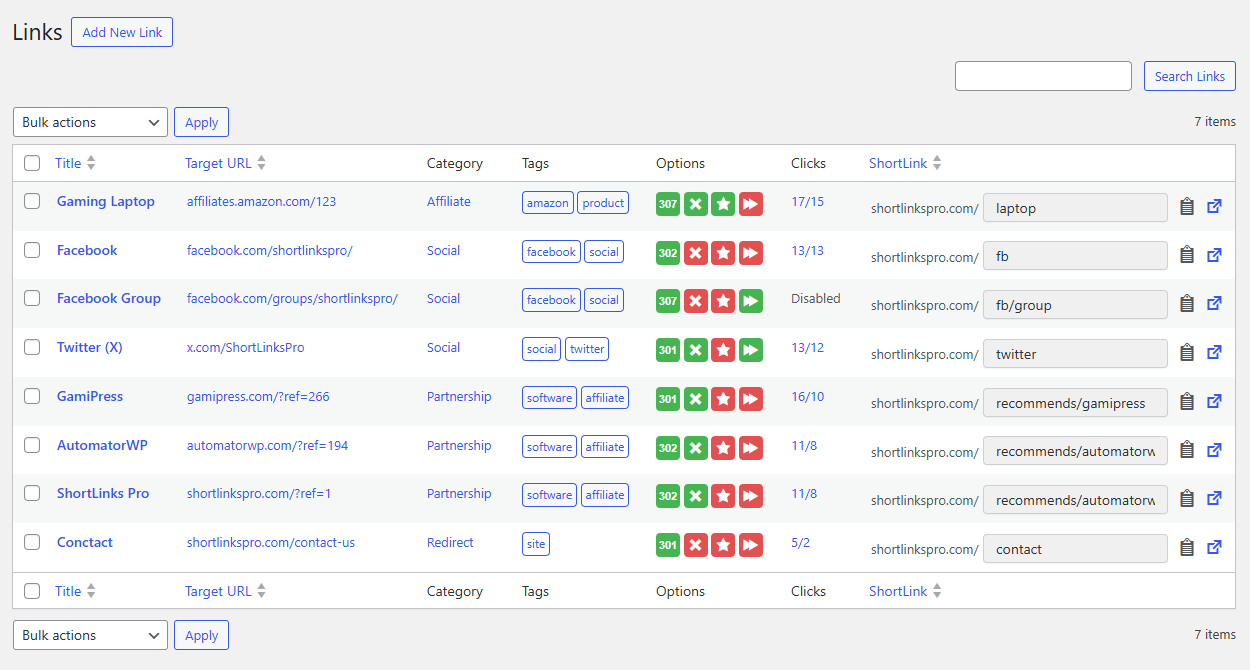
- Create short links from any URL.
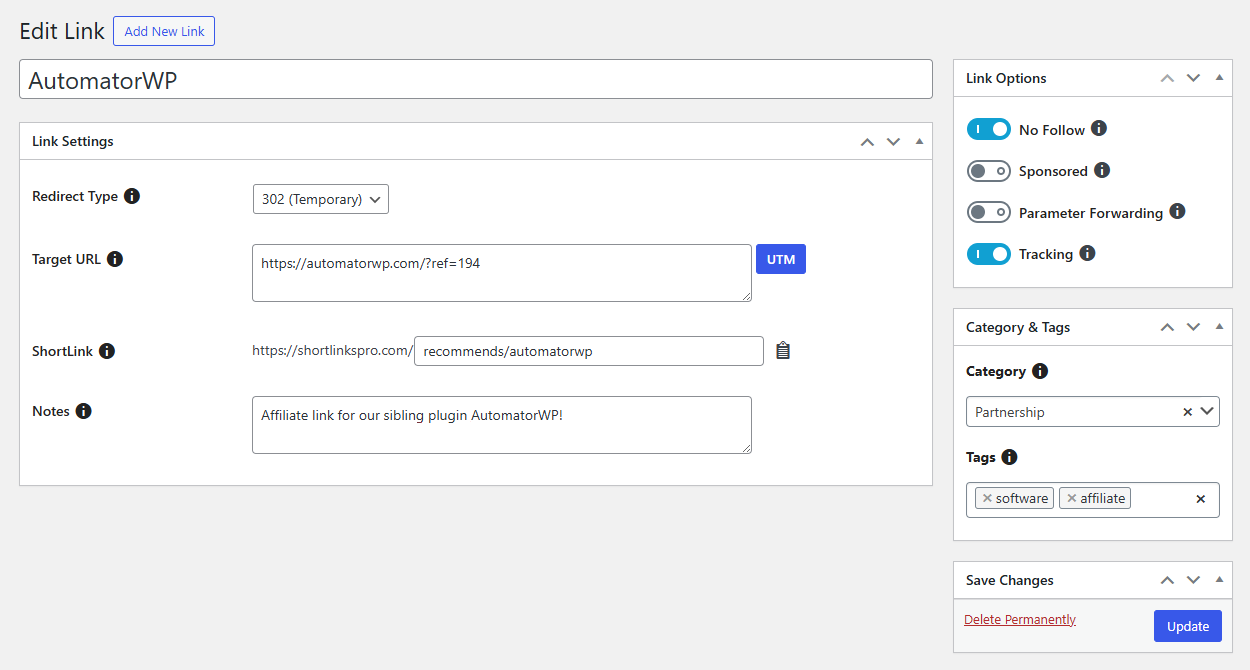
- 301, 302 & 307 redirects.
- Custom link slugs and slug prefixes.
- Auto-generated slugs.
- No follow & sponsored support.
- Parameter forwarding.
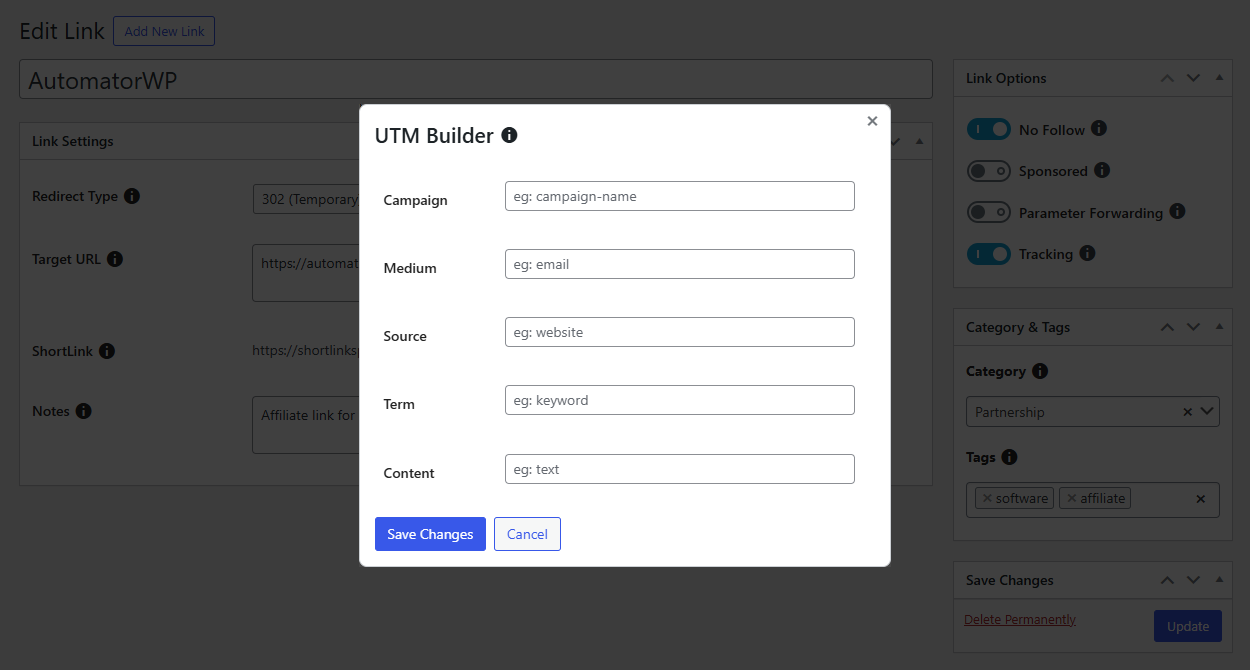
- UTM builder included.
📊 Detailed Analytics & Reporting
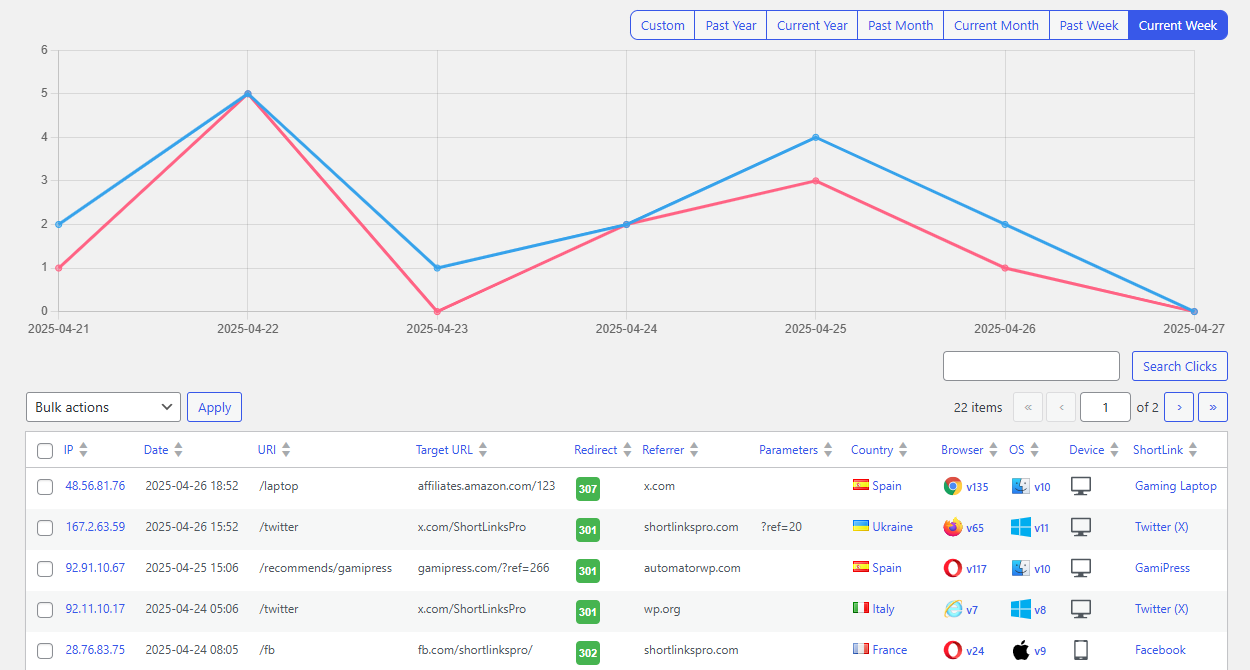
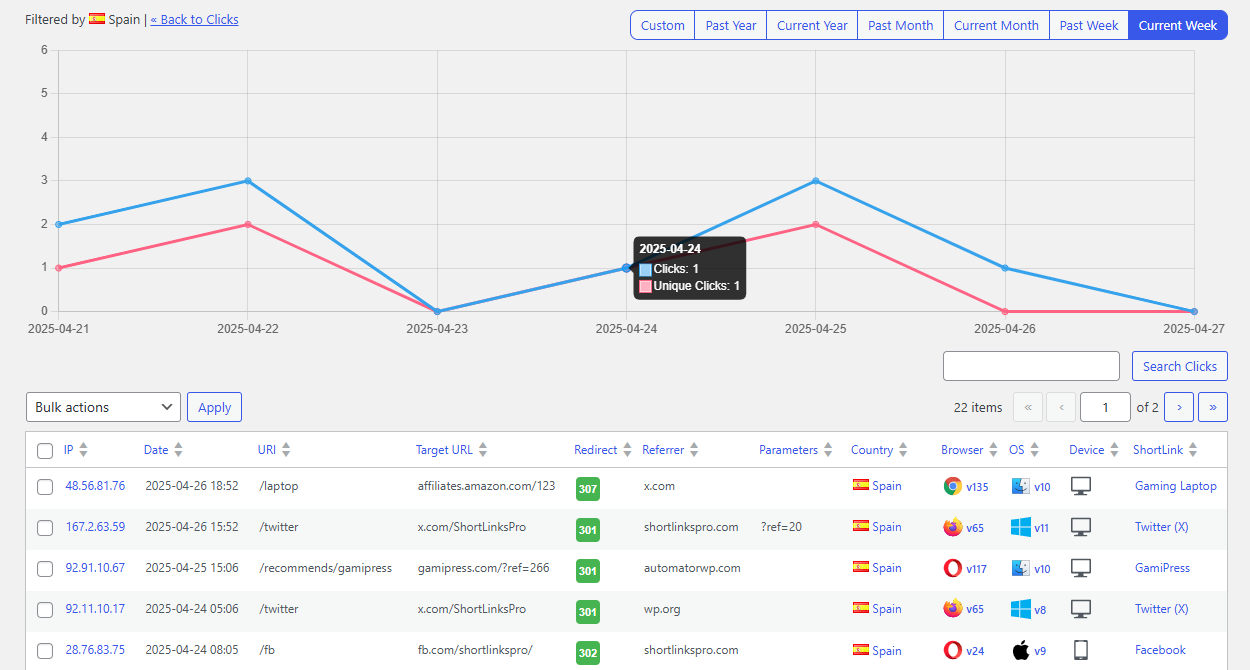
- Track clicks & unique clicks in real-time.
- Filter reports by IP, browser, OS, country, etc.
- Anti-bot features to get reliable tracking analytics.
- Block any IP of your choice.
- Option to disable tracking on any link.
💰 Affiliate Links Management
- Manage all your affiliate links in the same place.
- Turn long affiliate URLs into short ones.
- Easy-to-use UI to manage tons of links.
- Affiliate links under your own domain.
- Organize links with categories and tags.
- Internal notes on any link for your own needs.
- 1-click importer from popular plugins (Pretty Links, ThirstyAffiliates, BetterLinks, URL Shortify, and more).
⭐ Powerful add-ons to extend ShortLinks Pro
- Advanced Redirects: Mask your link redirects through cloaked, meta refresh & javascript redirects!
- Dynamic Redirects: Add multiple target URLs to your links based on the conditions of your choice!
- Email Notifications: Get informed of the growth of your link campaigns automatically.
- Link Expirations: Lets you add expiration to your links based on different conditions!
- QR Codes: Lets you to generate QR codes from your links created through ShortLinks Pro.
- Facebook Pixel: Add Facebook Pixel (Meta Pixel) tracking to your link clicks!
- Twitter Pixel: Add Twitter Pixel (X Pixel) tracking to your link clicks!
- Google Analytics: Add Google Analytics tracking to your link clicks!
♥️ More plugins from the ShortLinks Pro team
🕹️ GamiPress – Gamification plugin to boost engagement by rewarding users with points, achievements, badges & ranks.
🤖 AutomatorWP – Automator plugin that connects +300 plugins, platforms and sites together with support to webhooks.
📋 BBForms – Code form plugin designed to help you build multipurpose forms in seconds!
👤 WhatAvatar – Powerful avatar editor for creating unique avatars without uploading personal photos.
External services
ShortLinks Pro connects to ip-api to obtain geolocation information from the visitor IP, it’s needed to be able to meet, for example, from which country the visitor is.
The process requires to send the visitor’s IP to ip-api IP geolocation API on links with tracking enabled.
This service is provided by “IP-API”: Terms of service & Privacy policy.
Installation
From WordPress backend
- Navigate to Plugins -> Add new.
- Click the button “Upload Plugin” next to “Add plugins” title.
- Upload the downloaded zip file and activate it.
Direct upload
- Upload the downloaded zip file into your
wp-content/plugins/folder. - Unzip the uploaded zip file.
- Navigate to Plugins menu on your WordPress admin area.
- Activate this plugin.
FAQ
What can ShortLinks Pro do?
ShortLinks Pro is able to shorten any URL, manage thousands of affiliate links and track your link clicks for marketing campaigns.
What are the differences between redirect types?
301 (Permanent) redirects are used to tell search engines that a requested URL has been permanently moved to another URL. If you’re confident that your target URL will never change, then use this redirect type.
Meanwhile, 302 and 307 (Temporary) redirects, tell search engines that the requested URL has been moved temporarily, but will be back eventually.
With our Advanced Redirects add-on you can even to add new redirect types like cloaked, javascript or meta refresh.
Can I migrate existing links into ShortLinks Pro?
Absolutely! ShortLinks Pro offers an easy-to-use import feature that allows you to migrate your existing links from other plugins.
Actually this feature is able to import links and clicks from Pretty Links, BetterLinks, Thirsty Affiliates, URL Shortify, Easy Affiliate Links and Affiliate Links.
We are open to new requests, so feel free to contact us in case your plugin is not listed!
Where can I find documentation about ShortLinks Pro?
Check the official documentation where you can start getting familiarized with ShortLinks Pro.
Is ShortLinks Pro compatible with any theme?
Yes! ShortLinks Pro operates mainly in the admin area of your WordPress, so there is no risk of not being compatible with any theme.
Can ShortLinks Pro be easily translated?
Yes, ShortLinks Pro is stored in the official WordPress plugins repository where you (and anyone) are able to submit your own translations.
Does ShortLinks Pro work with WordPress multisite?
Yes. You can use ShortLinks Pro on a WordPress multisite network.
Screenshots
Changelog
1.3.0
- Improvements
- Improved settings for enabling the admin bar menu.
- Improved CSS file enqueuing for the admin bar.
1.2.9
- Improvements
- Updated the CMB2 library to the latest version.
1.2.8
- Improvements
Updated the CMB2 library to the latest version.
1.2.7
- Improvements
- Improved cmb2 select2 library.
1.2.6
- Improvements
- Improved CSS.
- Improved CT and CMB2 libraries.
1.2.5
- Improvements
- Improved CSS.
1.2.4
- Bug Fixes
- Fixed deprecated function notice.
1.2.3
- Bug Fixes
- Fix notice for review.
1.2.2
- Improvements
- Improved security in some ajax requests.
1.2.1
- Improvements
- Fixed PHP Deprecated: strip_tags() notice for newer versions of PHP.
1.2.0
- Improvements
- Tooltip library updated.
1.1.9
- Developer Notes
- Tested with WordPress 6.9.
1.1.8
- Improvements
- Tooltip library updated.
1.1.7
- Improvements
- Tooltip library updated.
1.1.6
- Improvements
- Improved geolocation.
- Bug Fixes
- Fixed bug related to default options when creating a new link.
1.1.5
- Improvements
- Improved how to display add-on information.
1.1.4
- Improvements
- Improved handling of URL formats with trailing slashes.
- Bug Fixes
- Fixed bug related to saving link options.
1.1.3
- Improvements
- Added check for links with UTM fields to build the URL.
1.1.2
- Improvements
- Switched from geoPlugin to ip-api.
- Improved how to display add-on information.
1.1.1
- Developer Notes
- Added add-ons information.
1.1.0
- Improvements
- Fixed typo.
1.0.9
- Improvements
- Improved CT library.
1.0.8
- Bug Fixes
- Fixed vulnerability.
1.0.7
- Improvements
- Improved check for link options.
- Bug Fixes
- Fixed bug related to import tool messages.
1.0.6
- Bug Fixes
- Fixed bug related to sanitized values.
1.0.5
- New Features
- Added “Slug Length” to Settings > General.
1.0.4
- Improvements
- Improved cookie handling.
1.0.3
- Improvements
- Added screenshots to readme.
1.0.2
- Improvements
- Clicks screen tweaks.
- Bug Fixes
- Fixed link options unchecking.
1.0.1
- Bug Fixes
- Fixed flags CSS loading.
1.0.0
- Initial Release.