


Description
Your site sends somebody a document to sign, and later wants to know whether they signed it. That is the whole job of this plugin.
Everything that makes a signature worth having happens on SignSealer: consent recorded as its own event before the signature is accepted, a trail that is append-only with a fingerprint of the exact text on every step, and the finished document sealed with an independent timestamp. A certificate can be checked afterwards by anyone holding its code, without an account.
You need a SignSealer account. This plugin is a client for it. See https://signsealer.com.
Three things this plugin refuses to do
These are limits on purpose, not features that are missing.
It never renders a signature pad. Signing happens on SignSealer’s own pages. A drawing captured in WordPress and posted to an API would make every claim on the certificate untrue — the certificate says what the signing engine observed, and it cannot observe something that arrived as a form field.
It never stores evidence. Document ids, a status and a link. If you restore a six-month-old backup of this site, nothing about any signature changes, because nothing about any signature was here.
It never holds a master credential. The connection is OAuth 2.0 with PKCE, scoped to one business, and you can end it from your own SignSealer account without touching WordPress. There is no key here that reaches two accounts.
Why a link, and a frame only where the site is proven
SignSealer’s signing pages refuse to be framed (frame-ancestors) on any site the business has not proven is its own. A signing page inside another site’s frame is a clickjacking target, and the thing being clicked is a signature. So the block, the shortcode and the forms send the signer to SignSealer’s own page, where they can see whose address bar they are signing on. The frames are where signing comes first, on this site: WooCommerce’s Before payment, a form set to be signed before it is sent, and Amelia’s and Simply Schedule Appointments’ signing before the booking. Connecting the plugin proves the site to SignSealer, which is what lets its signing page be shown here.
What it does
- Connects your site to one SignSealer business over OAuth 2.0 with PKCE.
- Registers its own webhook endpoint when you connect, so there is no secret to copy between two screens.
- Verifies every delivery: the HMAC signature, a five-minute freshness window, and a replay it has already seen. Fires a
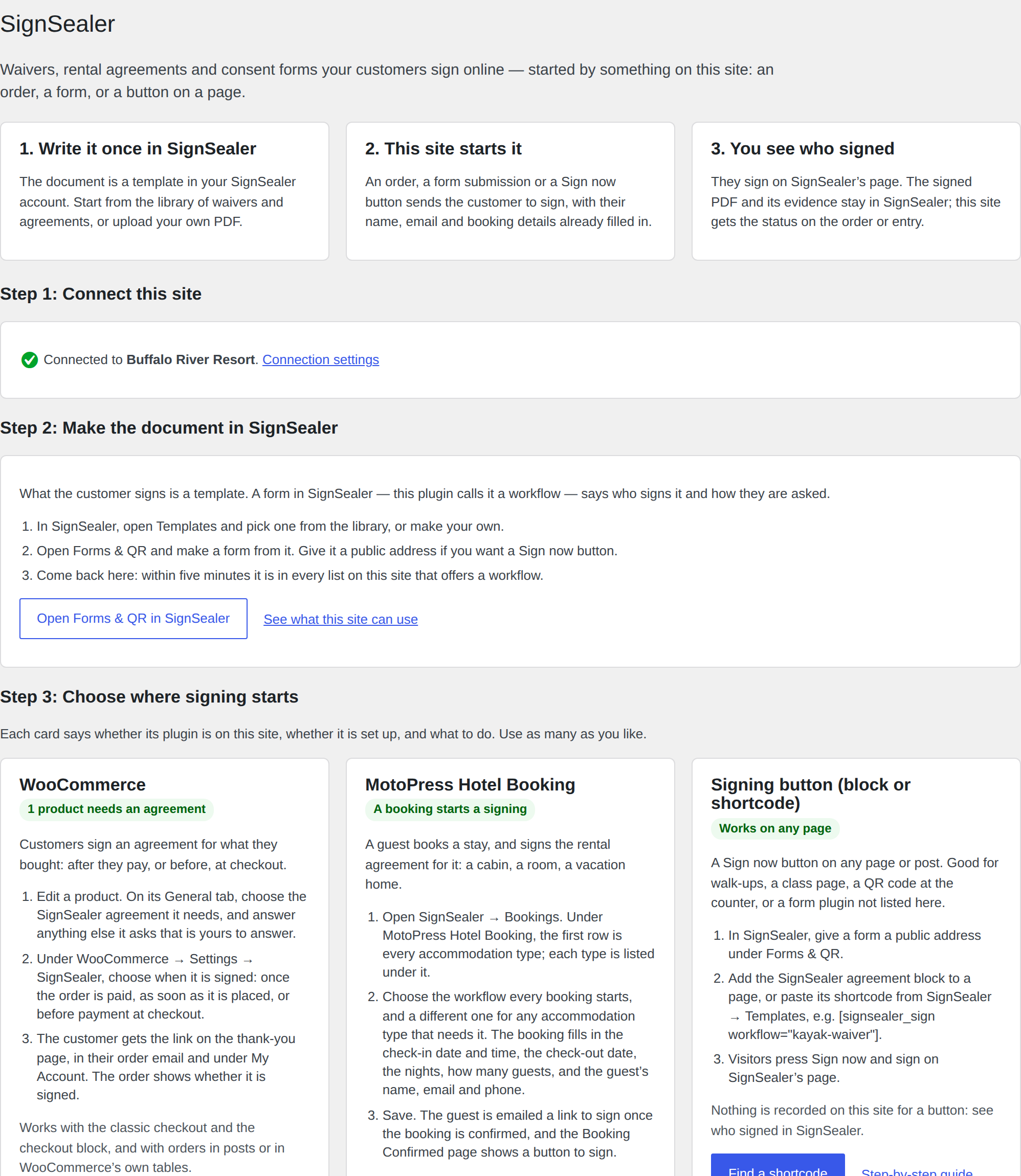
signsealer_eventaction your own code can hook. - Has its own SignSealer item in the admin menu. Start here says what the plugin does, whether the site is connected, and — for every integration — whether its plugin is on the site, whether it is set up, and the steps to set it up.
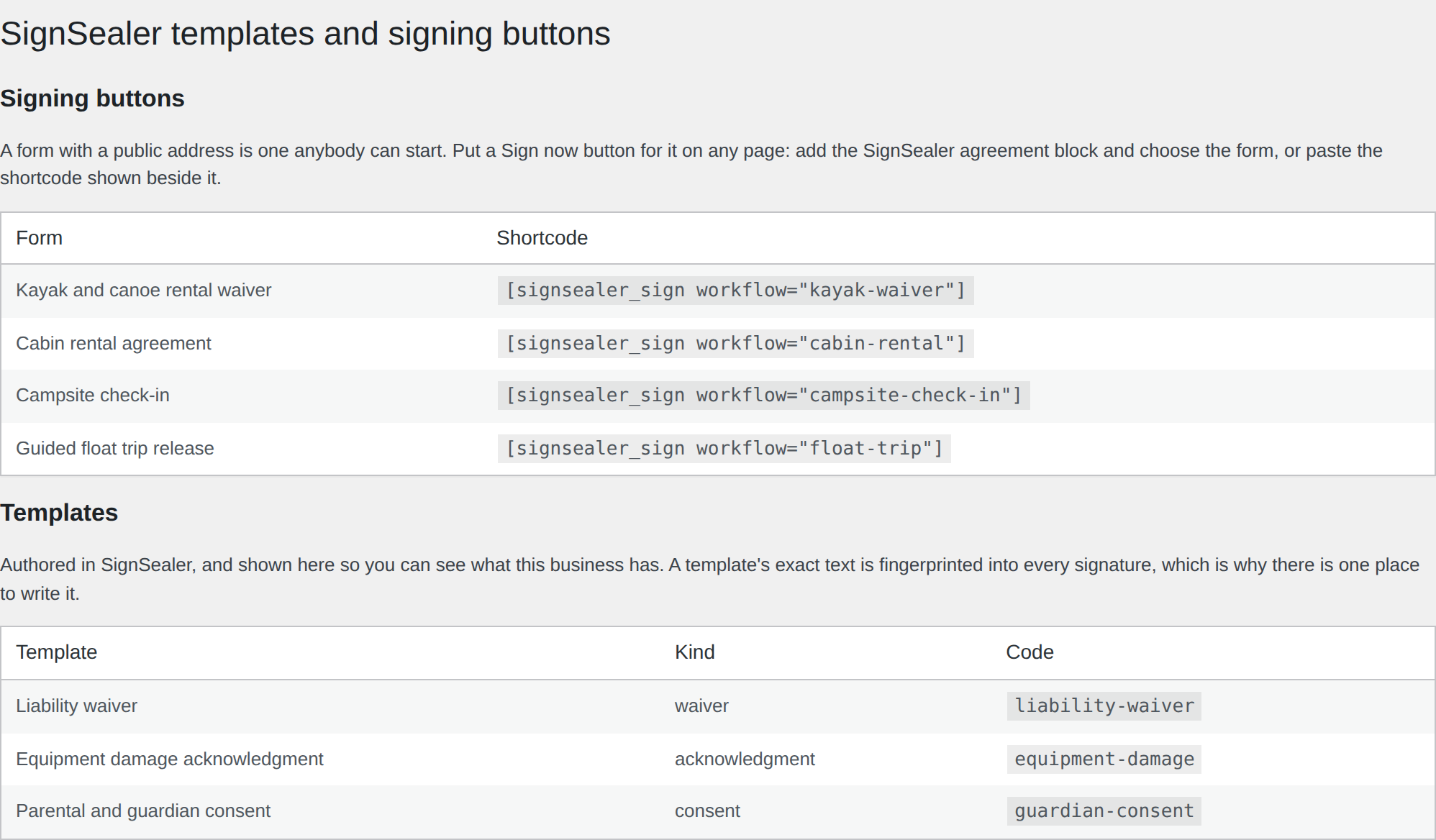
- Lists that business’s forms and templates under SignSealer → Templates, with the shortcode for each one beside it.
- Gives you a SignSealer agreement block, and
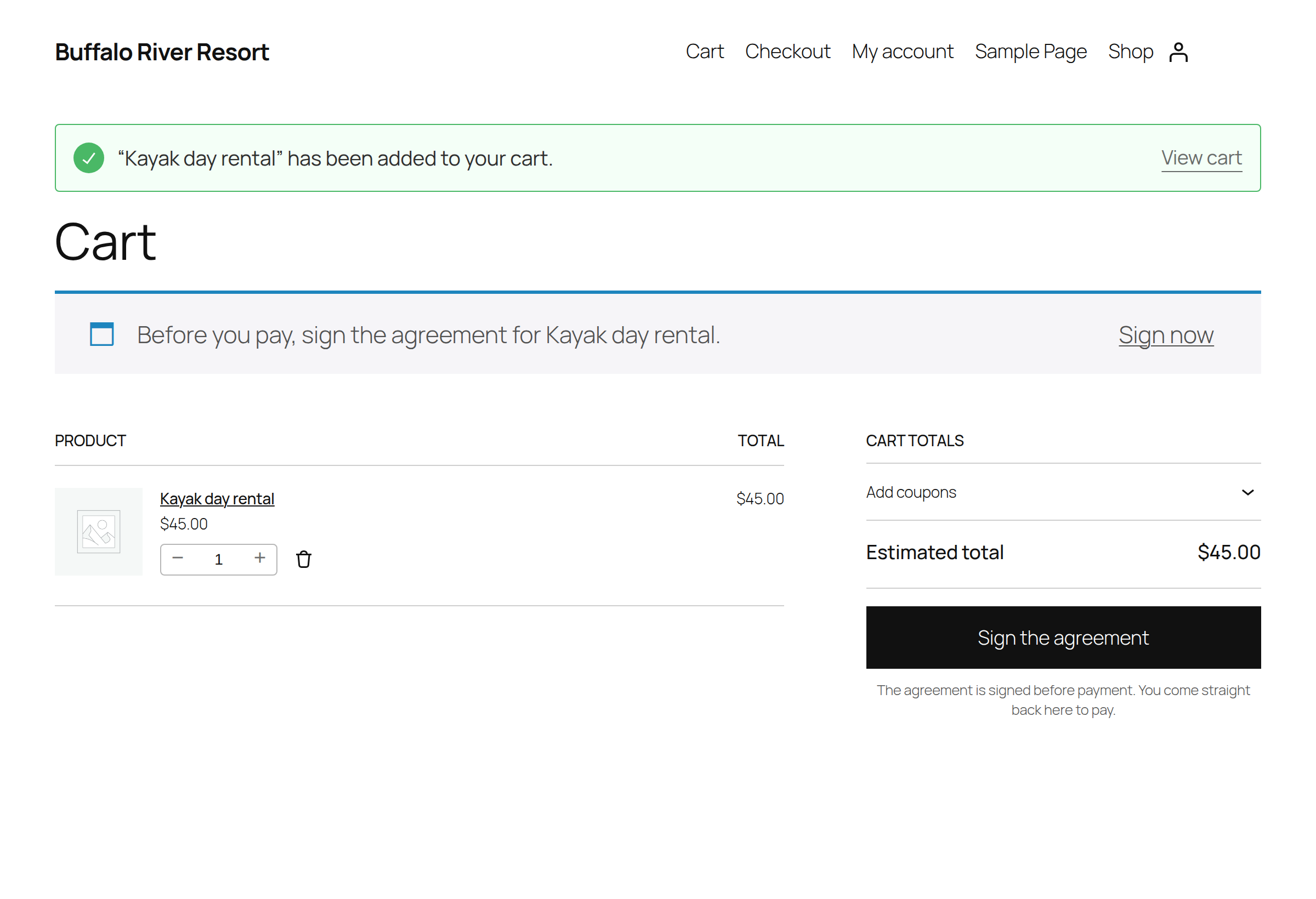
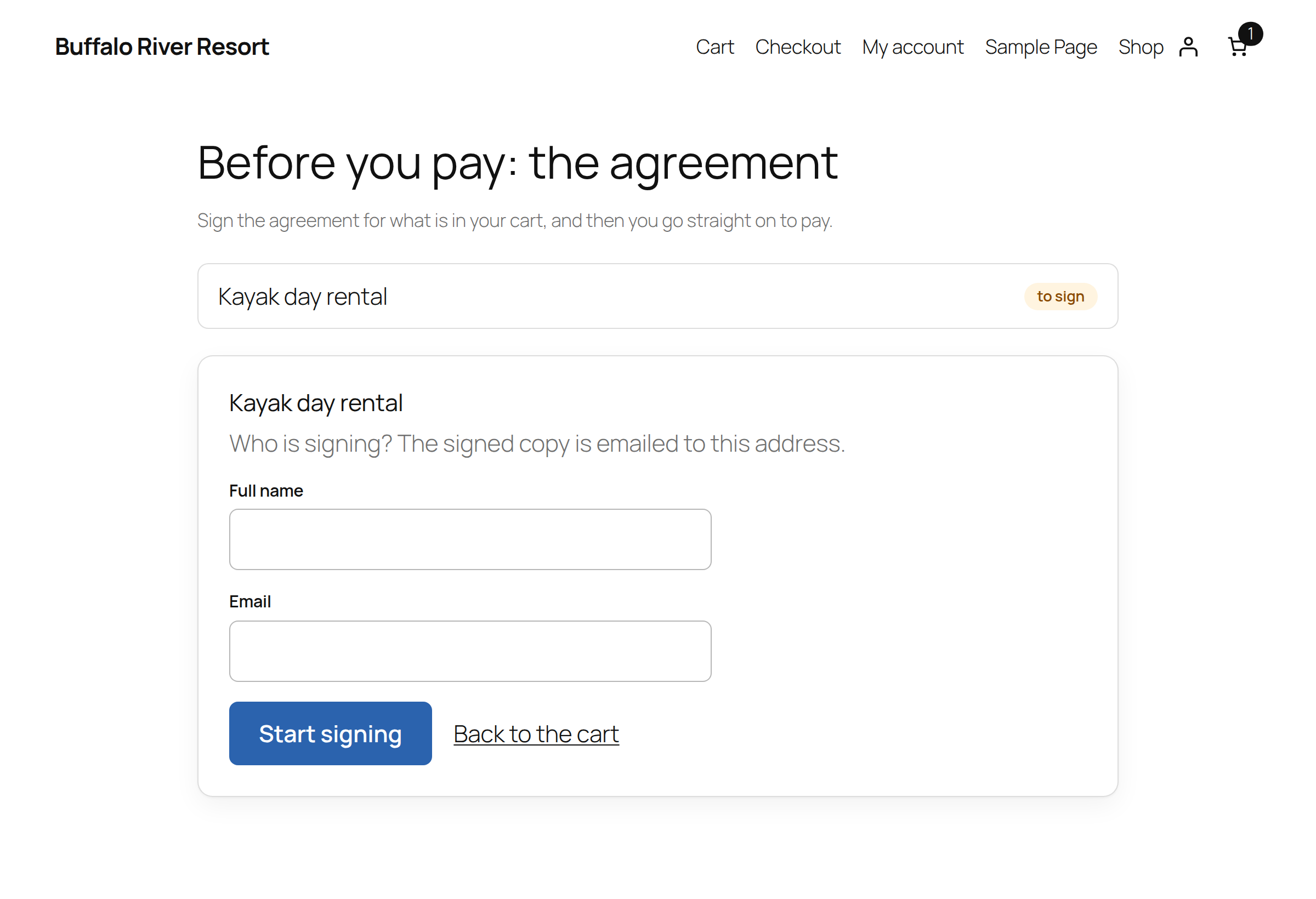
[signsealer_sign workflow="your-form"]if you prefer a shortcode. - WooCommerce: mark a product as needing an agreement, and the document is started when the order is paid (or placed, your choice), offered on the thank-you page, in the order email and under My Account, with its status on the order screen and in the order notes. Or have it signed before payment: the cart’s checkout button becomes “Sign the agreement”, the customer signs on your site, in a frame, and the checkout will not place the order until it is signed. Its settings are under WooCommerce → Settings → SignSealer.
- Details the agreement needs: a template that asks for more than an order knows — where it takes place, a vessel’s name — is answered on the product by you, or asked of the customer before they sign.
- WooCommerce Bookings: a booking you confirm starts its agreement straight away, paid or not, and the booking’s date, time, number of people and resource are filled into the template.
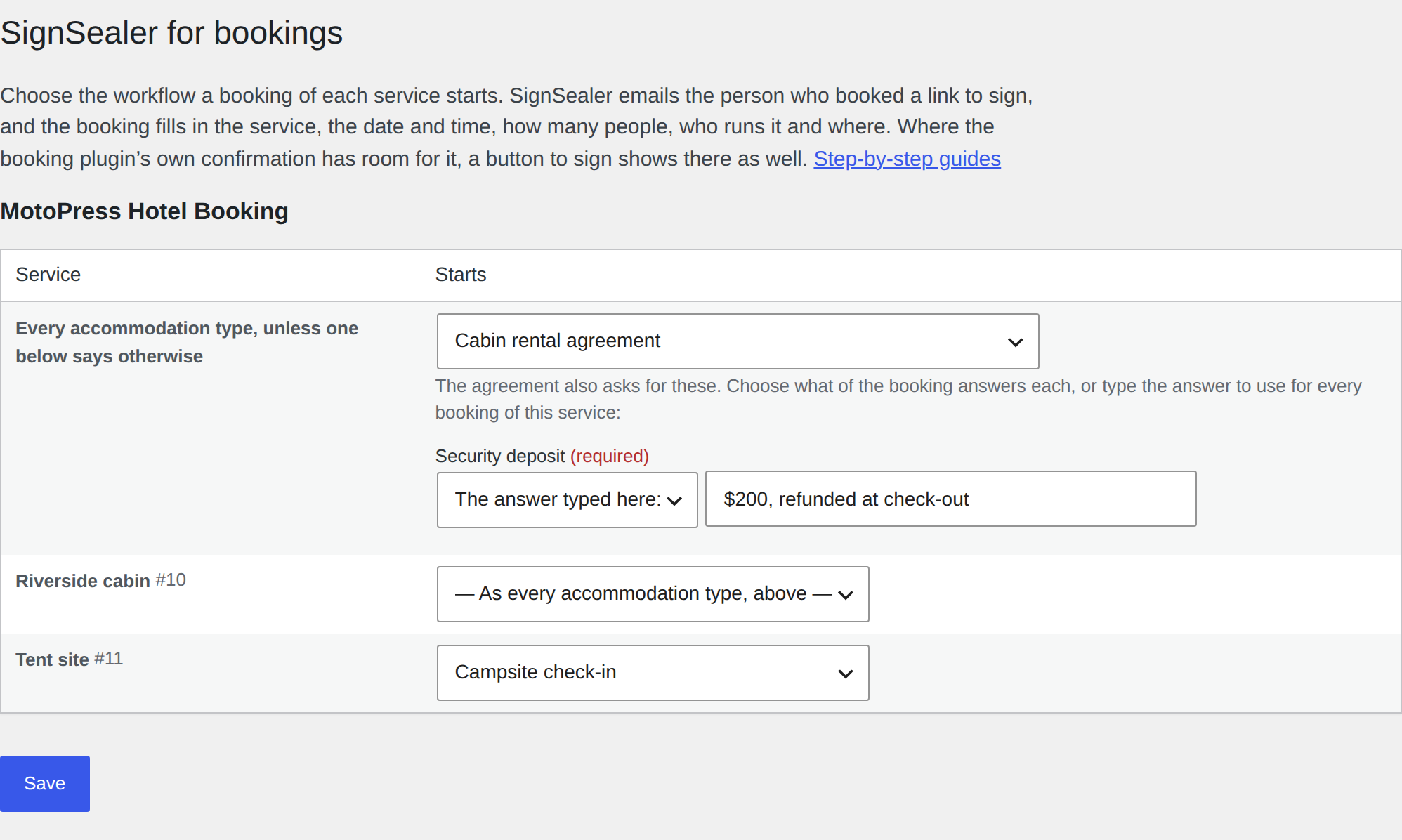
- Amelia, LatePoint and Simply Schedule Appointments: choose the workflow a booking of each service starts, under SignSealer → Bookings. The person who booked is emailed the link to sign, and the booking fills in the service, the date and time, how many people, who runs it and where. Amelia’s form opens the agreement before it books, and books once it is signed; Simply Schedule Appointments opens it over the page as soon as the booking is made; LatePoint’s confirmation step shows a button to sign.
- Event Tickets: RSVPs and tickets for your events, under SignSealer → Bookings: one workflow every ticket and RSVP starts, and a different one for any ticket that needs it. Whoever booked is emailed the link to sign, for everyone they booked, and the event fills in its name, date, time, venue and organizer, and how many people. The RSVP’s own message and the order page show a button to sign.
- Events Manager: bookings for your events, under SignSealer → Bookings: one workflow every event’s bookings start, and a different one for any event that needs it. Whoever booked is emailed the link to sign, for the spaces they booked, and the event fills in its name, date, time, location and tickets. Events Manager’s own message after booking shows a button to sign.
- Booking Calendar: choose the workflow every booking starts, under SignSealer → Bookings. Whoever booked is emailed the link to sign, and the booking fills in the date (and the time, for a time slot), how many people, and the name, email and phone from its form. Booking Calendar’s own message after booking shows a button to sign.
- FluentBooking: meetings, lessons and sessions booked on its event types, under SignSealer → Bookings: one workflow every event type starts, and a different one for any that needs it. Whoever booked is emailed the link to sign, with the event type, the date and time, the host and an in-person place filled in, and FluentBooking’s own confirmation shows a button to sign.
- MotoPress Hotel Booking: stays at your accommodation types, under SignSealer → Bookings: one workflow every booking starts, and a different one for any accommodation type that needs it. Once a booking is confirmed, the guest is emailed the link to sign, with the check-in date and time, the check-out date, the nights and everybody staying filled in, and its Booking Confirmed page shows a button to sign.
- Bookly: appointments booked with your services, under SignSealer → Bookings: one workflow every service starts, and a different one for any service that needs it. Once a booking is approved, the customer is emailed the link to sign, with the service, the date and time, how many people and the staff member filled in, and the last step of Bookly’s booking form shows a button to sign.
- Gravity Forms, WPForms, Fluent Forms, Contact Form 7, Formidable Forms, Ninja Forms, SureForms, Forminator, MetForm, Everest Forms and JetFormBuilder: map a form to a workflow in that form’s own settings (in Ninja Forms, a SignSealer action) — which field is the email, which is the name, which field answers each blank the template asks — and a submission ends on the signing page, or with a button to sign in the form’s own confirmation. Or the form signs first: pressing its button opens the agreement over the form, and the form is sent once it is signed. A blank the form does not ask is asked on your site just before signing. SignSealer → Forms lists every form, with a link to its settings.
- The button to sign is SignSealer blue, a colour of your own, or your theme’s own button, as you choose under SignSealer → Settings.
- Sends the signer back to your site afterwards: the order they came from, or the page the form was on.
For developers
Every verified delivery fires an action:
add_action( 'signsealer_event', function ( $event, $payload, $delivery ) {
    if ( 'signing.completed' === $event ) {
        // $payload['document']['id'] has signed.
    }
}, 10, 3 );
The signature is checked before this fires, so a handler can trust what it is handed. If anything fails, SignSealer sends the delivery again and every handler runs again, so do nothing twice: act on the status handed, or keep $delivery, a hash of the delivery’s body and the same on every try unless the document is redacted meanwhile, to send an email or take a charge once. A copy arriving while the handlers still run (up to ten minutes) is answered 409 and sent again later. A handler that fails every time fails every retry, and after 20 in a row SignSealer pauses this site’s endpoint, holding everything, this plugin’s own statuses included, until the business resumes it under Integrations → Webhooks.
Once a document completes, its signers’ answers to your form’s questions
are handed to signsealer_document_completed, asked for from SignSealer
just after the delivery. This plugin stores none of them; what your own code
does with them is up to it:
add_action( 'signsealer_document_completed', function ( $document ) {
    if ( 'Yes' === ( $document['answer']['married'] ?? '' ) ) {
        // "Are you married?" was answered Yes.
    }
} );

$document['answer'] has one value per question, by the question's key; a
tick box is Yes or No. A question more than one person answered (two
signers, each person in a party) holds every different answer, sorted and
joined with a comma: Yes means everyone said Yes, No, Yes that they
differed. answers_text is every answer,
one line each, for an email; answers has each one with who gave it.
Sensitive answers are masked, as your staff see them. To ask for a
document’s answers yourself: signsealer_get_answers( $document_id ).
It runs from WP-Cron, so on a site that runs WP-Cron from the server it
waits for the next run.
External services
This plugin connects to the SignSealer API at https://api.signsealer.com — the service it is a client for. It is required for the plugin to do anything.
What is sent, and when:
- When you press Connect: this site’s address and a one-time token, so SignSealer can fetch
/wp-json/signsealer/v1/siteon this site, confirm the plugin is running here, and register an application for this site. Then the PKCE challenge, once, as the browser is sent to approve, and, when you have approved, the code SignSealer hands back with the PKCE verifier and this site’s application id and secret, exchanged for an access token and a refresh token. The refresh token is exchanged again whenever the access token runs out. - Once connected: a request for your business’s name and address on SignSealer, and the registration of this site’s webhook address (
/wp-json/signsealer/v1/webhook, named “WordPress: ” and this site’s host) for SignSealer’s events. The Settings screen lists that registration, and can ask for a new webhook secret. - On every call afterwards: an access token, and this site’s address in the user-agent header so a support request can be traced.
- When you send a document: the template you chose, the values you filled in, and the signer’s name and email address.
- When a WooCommerce order starts a document: the customer’s name, email address and phone number if given, the order number, the product’s name and quantity, the answers you gave on the product to the agreement’s other blanks, any the customer typed on the page that asked them, and the address of the order-received page to send them back to.
- When a customer signs before payment: the name and email address they type, the product’s name and quantity, the answers to the agreement’s other blanks (yours from the product, and theirs from the page), and the address of the signing page on your site to send them back to. Their session keeps the document’s id and signing link until the order is placed.
- When a form submission starts a document: the values of the fields you mapped (email address, name, phone, and any template blanks), any answer you typed for a blank in the form’s settings, and the address of the page the form was on.
- When a booking starts a document (LatePoint, Amelia, Simply Schedule Appointments, Event Tickets, Events Manager, Booking Calendar, FluentBooking, MotoPress Hotel Booking or Bookly): the customer’s name, email address and phone if given; the service, event or room; the date and time; how many people; the staff member and location, and the check-out date and nights, where the booking has them; the booking’s id; and the answers you set for the agreement’s other blanks.
- While somebody signs first (before payment, before a form is sent, or before an Amelia or Simply Schedule Appointments booking): requests for whether they have signed yet. If an Amelia booking signed for in advance is never made, a request an hour later to void that document.
- When the “Signed with SignSealer” credit is on: a request for your business’s branding, for the credit’s wording, while the Settings screen shows it.
- When somebody ticks a box to be texted, at checkout or on a form, before the document starts: their phone number, the words beside the box exactly as they saw them, and which form or order it was, on which site. SignSealer keeps this as the record of their consent to be texted about that document.
- Every ten minutes at most, while an administrator screen or the checkout asks: a request for whether your SignSealer business can send texts, and the wording to show beside a box to be texted.
- When a document completes, and only if your own code or an Uncanny Automator recipe is listening for its answers (the
signsealer_document_completedaction): a request for that document, by its id, tried again up to four more times over about fifteen minutes if SignSealer cannot be reached. Its title, status, your reference and its signers’ answers come back, sensitive answers masked, and are handed to that code or recipe. This plugin stores none of it; Uncanny Automator keeps each run’s tokens in its own log, as it does for every trigger. - While you build an Uncanny Automator recipe with SignSealer’s trigger, and when that trigger runs: requests for your forms and, for the form chosen, the questions it asks. The questions are kept for an hour.
What is received: access and refresh tokens, your business’s name, address and branding, this site’s webhook registration and its secret, template and workflow lists, a form’s questions, document ids and statuses, whether a signer has signed, signing links, a completed document’s answers when asked for as above, and whether your business can send texts, with the wording for the box.
SignSealer is operated by Mashdun LLC.
Terms: https://signsealer.com/legal/terms
Privacy policy: https://signsealer.com/legal/privacy-policy
Subprocessors: https://signsealer.com/security/subprocessors
Installation
- Install and activate the plugin.
- Open SignSealer → Start here in the admin menu and press Connect to SignSealer.
-
Sign in to SignSealer (or create an account there), choose the business this site belongs to, and approve. You are brought straight back.
-
Back on Start here, pick the integrations you want. Each card has its three steps and a link to a step-by-step guide at https://signsealer.com/wordpress.
The plugin registers itself with SignSealer, registers its own webhook endpoint, and signed statuses start arriving with nothing to copy or paste. Your site must be on https: SignSealer checks the plugin is really running there before it connects, and https is also how it posts signed statuses back.
FAQ
Why does my site need to be on https?
Two reasons. Before SignSealer connects a site it fetches a small page the plugin serves, to check the plugin is really running there and that the request came from this site; it will only do that over https, so nobody can register an application in your site’s name. And once connected, SignSealer posts signed statuses back to your site, which must also be over https so those deliveries are private and verifiable.
Do I need a SignSealer account?
Yes. This plugin talks to the SignSealer API; it is not a standalone signing tool.
Where is the signed document kept?
On SignSealer, with its certificate and audit trail. This site keeps the document’s id and its status so a page can say whether it is signed.
Can I collect the signature on my own page?
No, and that is deliberate. See “Three things this plugin refuses to do” above.
Does the plugin add a link or a credit to my site?
Not unless you ask it to. Under SignSealer → Settings → The sign button there is a setting, off by default, that puts a small “Signed with SignSealer” line under the signing button block and the [signsealer_sign] shortcode, linking to signsealer.com. Only a button to your own business’s form gets it: nothing else the plugin shows, and not a shortcode pointed at another business. A business with white label is not offered it.
What happens if I deactivate the plugin?
Nothing at SignSealer. Your documents, evidence and certificates are unaffected. Deactivating does not revoke the connection — end that in SignSealer under Integrations → Connected apps.
Does it work with WooCommerce?
Yes. On a product’s edit screen, under General, choose the SignSealer agreement that product needs. When an order containing it is paid — or placed, under WooCommerce → Settings → SignSealer — the document is started for the customer, offered on the thank-you page, in their order email and under My Account, and its status appears on the order screen and in the order notes as SignSealer reports it. Works whether your orders live in posts or in WooCommerce’s own order tables.
Can the customer sign before they pay?
Yes. Under WooCommerce → Settings → SignSealer choose Before payment. While a customer’s cart holds a product whose agreement is unsigned, the cart’s checkout button reads Sign the agreement and goes to a page of your site, in your theme, that shows SignSealer’s signing page in a frame; a customer who reaches the checkout some other way is sent back to it. The classic checkout and the checkout block both refuse to place the order until SignSealer confirms it is signed, and the order then carries that signed document. SignSealer shows its signing page in a frame only on sites the business has proven, and the site you connected is one.
My agreement asks for something the order does not know
A template blank that nothing fills — {{location}} on a photo release, say — would make SignSealer refuse to start the document. So on the product’s edit screen, under its SignSealer agreement, each such blank has a box: fill it in to answer it for every order of that product, or leave it empty and the customer is asked. Before payment they are asked on the signing page, beside their name and email. After payment the order’s Sign link — on the thank-you page, in the order email and under My Account — opens a page of your site that asks, and the agreement is sent once they have answered. The order notes say when an agreement is waiting for that.
Does it work with WooCommerce Bookings?
Yes. A bookable product is a product, so mark it the same way. A booking you confirm starts its agreement at once, whether or not it has been paid, because the agreement is wanted before the day. The booking’s date, time, number of people and resource go to the template as booking_date, booking_time, persons and resource, and the booking’s own screen shows where the agreement stands.
Does it work with Amelia, LatePoint or Simply Schedule Appointments?
Yes, since 1.8.0. Open SignSealer → Bookings, which lists the services in each (in Simply Schedule Appointments, its appointment types), and choose the workflow a booking of each starts. A booking made through the plugin’s booking form, or by staff, starts that workflow for the person who booked, and SignSealer emails them the link; LatePoint’s confirmation step shows a button to sign too. Since 1.16.0 the person signs on the page in the other two as well. Amelia’s booking form opens the agreement over itself when the person presses Book, and makes the booking once it is signed (a booking Amelia takes payment for through Stripe or WooCommerce is made first, and the agreement opens just after). Simply Schedule Appointments opens it over the page as soon as the booking is made, or on the page its form sends people to afterwards. Closed without signing, a button to sign stays on the page, and the email has the link. In Simply Schedule Appointments an appointment waiting on payment starts its agreement once it is booked. The booking fills in booking_date, booking_time, service_name, persons and staff. Any other blank the agreement asks is listed under the service: choose what of the booking answers it (a location blank is given the booking’s location, when the plugin has locations set up), or type the answer to use for every booking of that service. A booking saved again — rescheduled, confirmed, paid — starts nothing a second time, and a canceled one starts nothing. If a booking could not start its agreement, SignSealer → Bookings says which and why.
Does it work with Event Tickets?
Yes, since 1.9.0: its RSVPs (the ones Event Tickets 5.30 makes, and the older kind a site has not moved over yet) and its Tickets Commerce tickets, free or paid. Open SignSealer → Bookings. Under Event Tickets, the first row is every ticket and RSVP; each ticket of the events still to come is listed under it, for any that should start a different workflow. Whoever RSVPs or buys is emailed the link to sign: one agreement for each ticket in their order, saying how many people it is for, because Event Tickets asks one name and email an order. A logged-in visitor’s RSVP is under their account’s email, as Event Tickets records it. The event fills in service_name (the event’s name), ticket_name, booking_date, booking_time, persons, location (its venue) and staff (its organizer); an RSVP on a page rather than an event fills in the page’s name, the ticket and how many. The RSVP’s “received” message and the order page show a button to sign. An RSVP of “not going” starts nothing, and a ticket starts its agreement once its order is completed. Event Tickets Plus, the paid add-on that sells tickets through WooCommerce, has not been tested.
Does it work with Events Manager?
Yes, since 1.10.0. Open SignSealer → Bookings. Under Events Manager, the first row is every event; each event still to come is listed under it, with its date, for any that should start a different workflow (each date of a recurring event is an event of its own). A booking starts its agreement for the person who booked, one agreement a booking with persons the spaces they took, and SignSealer emails them the link; Events Manager’s own message after booking shows a button to sign too. A booking waiting for your approval starts it; one waiting on a payment starts it once it is approved; a rejected or cancelled one starts nothing; approving a booking later starts nothing a second time. The event fills in service_name (the event’s name), ticket_name, booking_date and booking_time (in the event’s own time zone), persons and location. Events Manager Pro’s payments and forms have not been tested.
Does it work with Booking Calendar?
Yes, since 1.11.0, with the free Booking Calendar’s calendar. Open SignSealer → Bookings and choose the workflow every booking starts. A booking made on the calendar, or added in its admin, starts that workflow for whoever booked, and SignSealer emails them the link; Booking Calendar’s own message after booking shows a button to sign too (with its “message” setting for after booking; with its own thank-you page, the email is the way). Its form’s fields are read by name: firstname (or name) and secondname, email (or any email field), phone, and adults and children (or visitors) for persons. The booking fills in booking_date (its first day) and booking_time for a time slot. A booking waiting for your approval starts its agreement, and an edited booking does not start a second one. The paid editions’ separate resources are not listed yet: their bookings start the one workflow.
Does it work with FluentBooking?
Yes, since 1.12.0. Open SignSealer → Bookings. Under FluentBooking, the first row is every event type; each active event type is listed under it, by its calendar, for any that should start a different workflow. A booking starts its agreement once it is scheduled: booked on its page, added by the host, or, for one waiting for the host’s confirmation or a payment, once confirmed or paid. SignSealer emails the person the link, and FluentBooking’s confirmation (and its receipt page) shows a button to sign. The booking fills in service_name (the event type), booking_date and booking_time (in the calendar’s time zone), persons, staff (the host) and location for an in-person place, with the person’s name, email and phone. In a group event each person has a booking of their own and signs their own. FluentBooking Pro’s group, round-robin and multi-slot bookings have not been tested.
Does it work with MotoPress Hotel Booking?
Yes, since 1.13.0, with the free MotoPress Hotel Booking Lite (and the paid version, which has the same hooks). Open SignSealer → Bookings. Under MotoPress Hotel Booking, the first row is every accommodation type; each type is listed under it, for any that should start a different rental agreement. A booking starts its agreement once it is confirmed: by the guest’s email link (its default), by you, or by a payment. SignSealer emails the guest the link, and its Booking Confirmed page (and Reservation Received after a payment) shows a button to sign. The booking fills in booking_date and booking_time (the check-in date and the site’s check-in time), check_out_date, nights, service_name (the accommodation types booked) and persons (the adults and children in all of them), with the guest’s name, email and phone. A booking with several accommodations starts the first one’s workflow. A booking imported from another site’s calendar (Airbnb, Booking.com) has nobody to sign and starts nothing.
Does it work with Bookly?
Yes, since 1.14.0, with the free Bookly (and Bookly Pro, which adds to it). Open SignSealer → Bookings. Under Bookly, the first row is every service; each service is listed under it, for any that should start a different workflow. A booking starts its agreement once it is approved: as it is made, which is Bookly’s default, or, for one left pending, when you approve it, when its approve link is followed, or when it is paid for. A booking your staff add in Bookly’s calendar starts one too. SignSealer emails the customer the link, and the last step of Bookly’s booking form shows a button to sign. The booking fills in service_name, booking_date and booking_time, persons and staff (the staff member), with the customer’s name, email and phone. Bookly Pro’s recurring appointments start one agreement for the series. A booking whose time has already passed starts nothing. Bookly’s free version announces nothing to other plugins, so SignSealer looks for the bookings Bookly approved as each of its requests ends; a booking made some other way, such as Bookly Pro’s WooCommerce add-on, is not seen yet.
Does it work with Gravity Forms, WPForms, Fluent Forms or Contact Form 7?
Yes. Open the form’s SignSealer settings, in its own plugin: Gravity Forms’ form Settings, WPForms’ builder Settings, Fluent Forms’ Settings & Integrations, or Contact Form 7’s SignSealer tab (SignSealer → Forms lists every form with a link there). Choose a workflow and say which of its fields hold the email address and the name (and the last name, when the form asks for it in a field of its own). Every other blank the workflow’s document asks is listed, and for each you choose the field that answers it or type the answer to use; one left with neither is asked of the person on a page of your site just before they sign. After they submit, the person is sent straight to the signing page, or the form’s own confirmation gains a button to sign — your choice per form. The entry keeps the document’s id, title and status, and a note on it says what was sent and what happened. Contact Form 7 keeps no entries, so there the link is carried to its own script and shown under the form’s message.
And Formidable Forms, Ninja Forms or SureForms?
Yes, since 1.7.0. In Formidable Forms the settings are in the form’s Settings, under SignSealer; in SureForms, in the form’s Form Settings, under SignSealer, with a Save button of its own. In Ninja Forms SignSealer is an action: open the form’s Emails & Actions, add SignSealer, and fill in the person’s email and name with merge tags, the way the form’s own email is set up. Each answers the agreement’s blanks and sends the person on to sign the same way as the plugins above. These three keep the entry as they always have; see who signed in SignSealer.
Can they sign before the form is sent?
Yes, since 1.7.0. In a form’s SignSealer settings, under When they sign, choose Before the form is sent. Pressing the form’s own button then opens the agreement over the form, on your page; once it is signed, the form is sent by itself and its entry carries the signed document. Somebody who closes it without signing sends nothing, and no entry is kept. The check is made by your site asking SignSealer, not by the browser, so it cannot be skipped. SignSealer emails them the link as well, as it always does.
A visitor was told “Too many agreements have been started from your connection”
Since 1.14.4 one visitor’s address may start 20 agreements an hour, before payment or from a form: enough for anybody signing their own, and a limit on a script sending your agreements to address after address. Your staff, logged in, are not counted. A form sent past the limit keeps its entry, with a note saying nothing was sent. To change the number, return another from the signsealer_starts_per_hour filter (0 for no limit). If your site is behind a proxy that does not pass the visitor’s address on, every visitor looks like the proxy: return the address your proxy vouches for from the signsealer_visitor_ip filter.
And Forminator, MetForm, Everest Forms or JetFormBuilder?
Yes, since 1.8.0. None has a place in its own screens for another plugin’s settings, so a form’s SignSealer settings are a page of this plugin’s: open SignSealer → Forms and press Open settings beside the form. MetForm’s, Everest Forms’ and JetFormBuilder’s lists of forms also have a SignSealer link under each form. Everest Forms and JetFormBuilder work whether a form sends with AJAX or reloads the page; a JetFormBuilder form that signs first is sent with AJAX, so the signing can open over it. Both answer the agreement’s blanks, can sign before the form is sent, and send the person on to sign the same way as the others. MetForm shows its messages as plain text, so the button to sign appears under the form rather than in its message.
Can WordPress do something different depending on an answer?
Yes, with Uncanny Automator (free). Make an Everyone recipe with the trigger
SignSealer → “A document from a form is signed”, choose the form, and choose
the answer it waits for, such as “Are you married? → Yes”. Make a second
recipe for “No”. Each question on the form is also a token for the recipe’s
actions. Developers can use the signsealer_document_completed action
instead (see For developers).
What about Elementor Pro Forms?
Not yet. Start here names it if it finds it on your site, with the way round it until then: give the form you want signed a public address in SignSealer, and set your form’s confirmation to redirect to it (or to a page with the SignSealer agreement block). The person types their name and email again, and nothing is recorded on the entry.
Where did Settings → SignSealer go?
Since 1.5.0 SignSealer has its own item in the admin menu, with Start here, Forms, WooCommerce, Templates and Settings under it. Old bookmarks to the Settings pages still work: they take you to the same page in its new place. Since 1.7.0 a form’s settings are with the form, in its own plugin, and the shop’s under WooCommerce → Settings → SignSealer; SignSealer’s Forms and WooCommerce items take you there.
Does the signer come back to my site afterwards?
Yes, when your site is on https. After signing, the page offers a way back to the order they came from, or the page the form was on. SignSealer only sends people to sites a business has proven it holds, and connecting this plugin proved this one.
Screenshots
Changelog
1.17.3
- SignSealer texts US and Canadian numbers only (and UK mobiles, when that
is on for the business). The checkout box and the settings screens say
which numbers are texted, and a tick beside any other number records no
consent: the link goes by email, and the order or entry says why. - The full changelog is in
changelog.txt, in the plugin’s folder.
1.17.2
- A status SignSealer sends is no longer lost when something on your site
fails while it arrives: it is marked received once everything has run, so
SignSealer’s retry is handled, with no second order note, entry note or
automation run. A retry that arrives while the first is still running is
sent again later. - Developers:
signsealer_eventhandlers run again on a retry, and get
$delivery to act once. - A voided agreement shows as Voided on the order, and the customer is no
longer offered its link on the thank-you page, in their account or in the
order email. - Connecting again after the site’s webhook was deleted in SignSealer
registers a new one. Within a day of the first registration it brought
back the deleted one, and statuses never arrived. Finishing the
connection in two tabs at once registers one, and keeps the secret
SignSealer signs with. - Signing before payment: when your site cannot reach SignSealer to check a
signature, the customer is told so and to try again in a minute, and the
cart, the checkout and the signing page no longer each wait for SignSealer
in the same visit. The order still waits for the signature. - Customers no longer read the message meant for you about connecting again
under SignSealer → Settings. They are told signing is not available right
now and to contact you; the order’s note keeps the reason. - “Forget the connection” asks you to confirm, and says what it does:
nothing waits for a signature until you connect again, so with signing
before payment the checkout takes orders without one. - The description says what SignSealer’s evidence is: an append-only trail
with a fingerprint of the exact text on every step, and the finished
document sealed with an independent timestamp. It no longer calls the
trail a hash chain.
1.17.1
- Saving a form’s SignSealer settings keeps each line of “More blanks from
the form”. 1.17.0 joined them into one, so a form with two or more extra
blanks lost them on the next Save; save it again with the lines as they
should be. - Uncanny Automator: “Any form” means the business’s forms, and no longer
includes documents sent from the dashboard or through the API. A third
choice, “started on this site”, narrows a recipe to the documents this
site started itself (its form plugins’ submissions, orders and bookings);
left as it is, a recipe hears its form wherever it was started. - When texting waits for the business’s own verified number, or the business
is in the beta, the settings screens say so, instead of “SignSealer could
not be asked”. - The readme’s example of
signsealer_document_completedno longer warns on
a form without the question it reads.
1.17.0
- A form’s answers can drive what WordPress does next. When a document
completes, the plugin asks SignSealer for what its signers answered, just
after the delivery and without storing any of it, and fires
signsealer_document_completed with one value per question.
signsealer_get_answers() asks for them on demand. A tick box is Yes or
No; sensitive answers are masked, as your staff see them. - Uncanny Automator: a trigger, “A document from a form is signed”, for
Everyone recipes. Each question on the form you choose is a token, and the
trigger can wait for one answer (“Are you married? → Yes”), which works in
Automator’s free edition. One recipe per answer. - Every form the plugin handles checks its nonce before reading anything
posted with it, including the SureForms tab and the SignSealer → Forms
page, and posted lists are sanitized as they are read. A product’s
SignSealer settings are saved only by somebody who may edit that product. - The plugin’s scripts are written out readably, and External services now
names every request the plugin makes.
Earlier versions
- Every version since 1.0.0 is in
changelog.txt, in the plugin’s folder and at https://plugins.trac.wordpress.org/browser/signsealer/trunk/changelog.txt