


Description
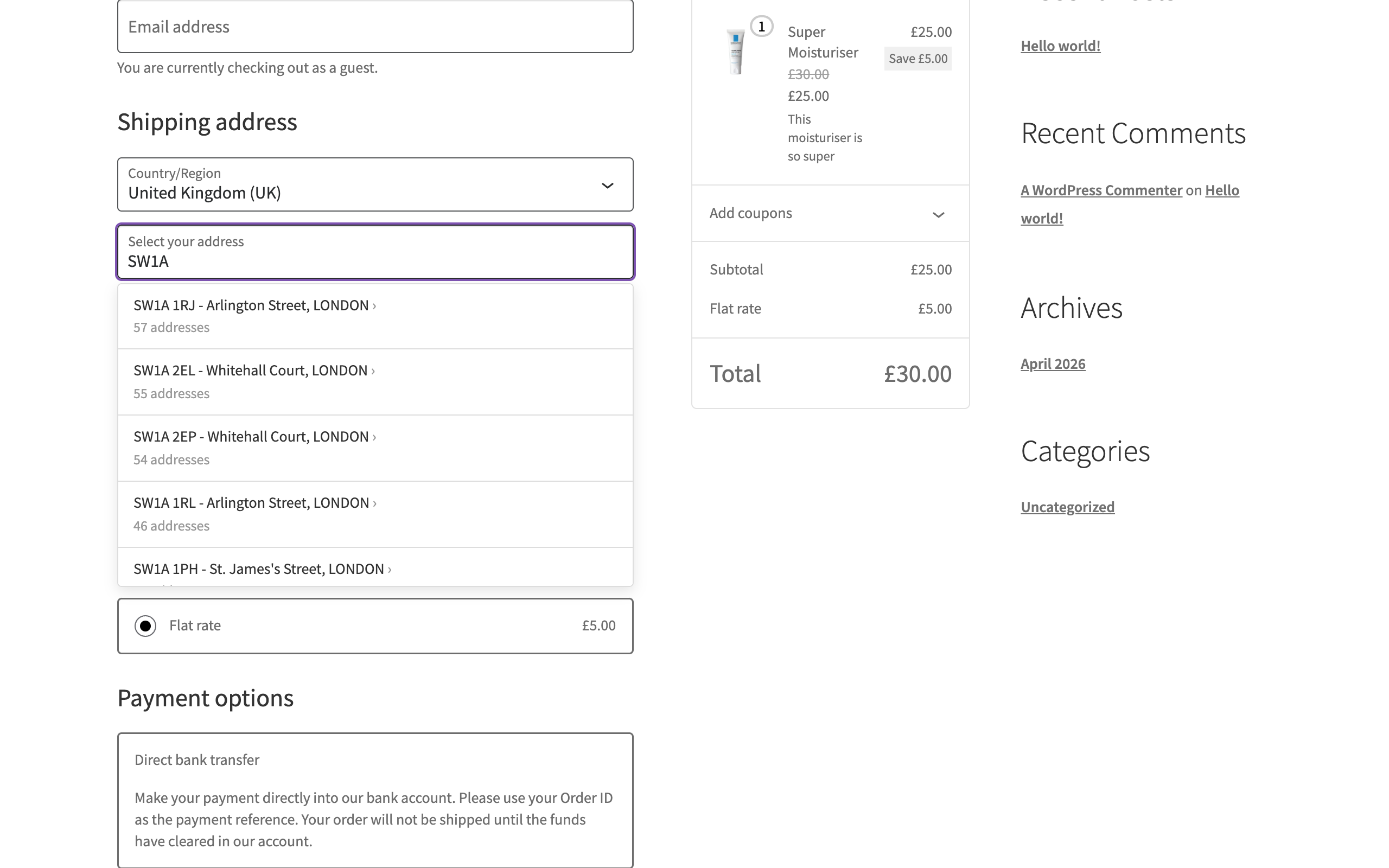
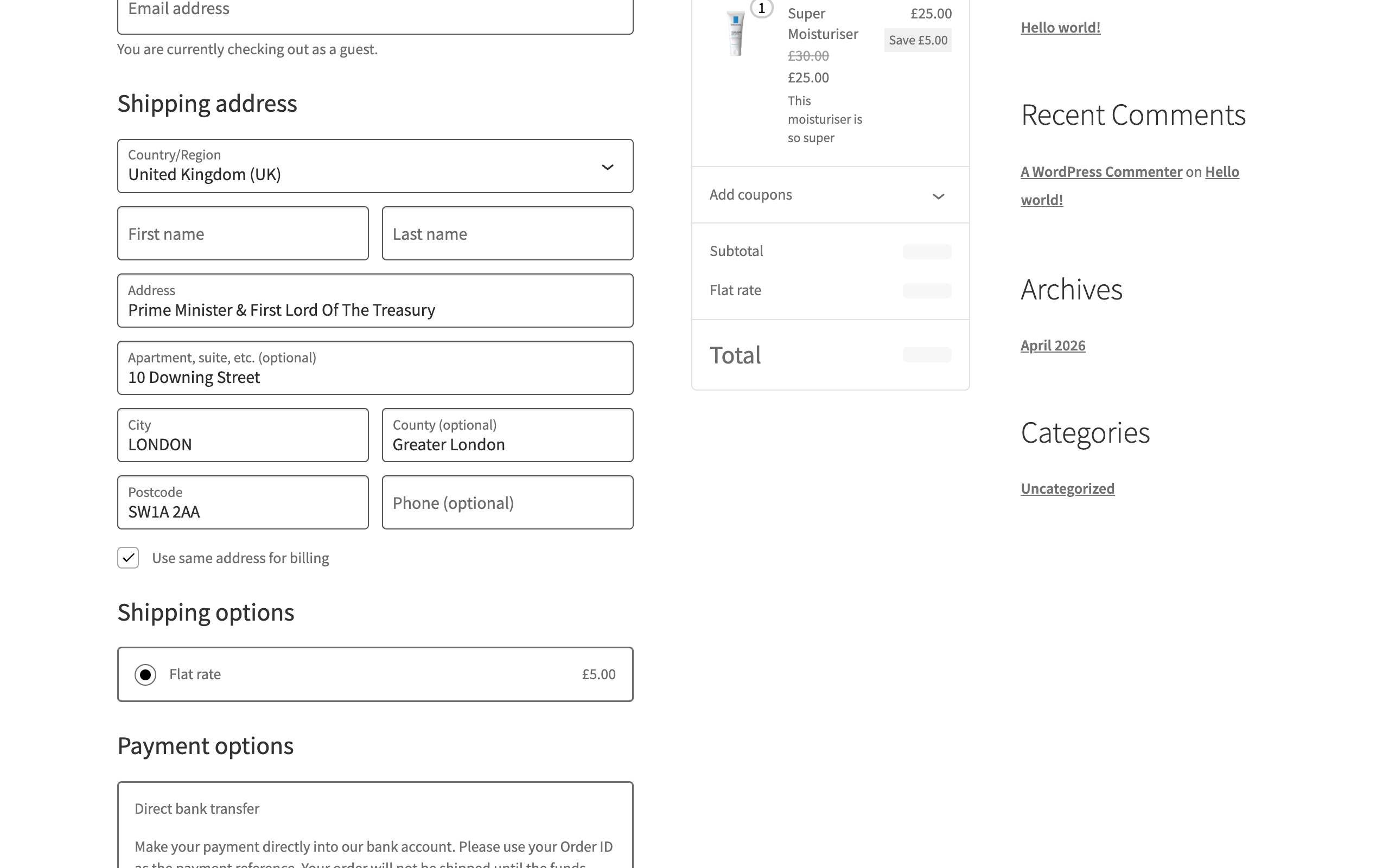
SnapAddress adds UK postcode lookup to WooCommerce. A customer types their postcode, picks their address from the list, and the address fields fill in. The addresses come from Royal Mail’s Postcode Address File (PAF), the address list Royal Mail itself delivers to.
It works wherever a full UK address gets typed:
- Checkout: block-based and classic
- My Account > Addresses: customers updating their saved billing and shipping addresses, including the WooCommerce Subscriptions “Change address” flow
- Admin order screen: staff taking phone and manual orders, on new and existing orders and on WooCommerce Subscriptions subscriptions
Checkout is on as soon as you add your API key. My Account and the admin order screen are opt-in: tick them in WooCommerce > SnapAddress.
Royal Mail PAF data, not Google. PAF covers over 32 million UK delivery points and lists flats and units in shared buildings individually, so a customer can choose their own flat rather than just the building. We refresh our copy monthly, in line with Royal Mail’s release cycle. You don’t need a Google Maps API key, and there’s no Google bill to watch.
Works with WooCommerce Checkout Blocks. SnapAddress registers as a Checkout Blocks integration and supports both the block-based checkout (the default for new stores since WooCommerce 8.3) and classic checkout. The search box sits directly above the street address field and matches your theme’s field styling. If the lookup is ever unavailable, the form falls back to normal manual entry, so checkout keeps taking orders.
Key features:
- UK postcode lookup and address autocomplete
- Checkout Blocks and classic checkout
- Address lookup on the admin order screen, for phone and manual orders
- Address lookup in My Account, for customers updating saved addresses
- Choose which screens show the lookup
- Compatible with HPOS (High-Performance Order Storage)
- No Google Maps API key
- 100 free lookups to try it, no card needed
- Published prices and one-off credit packs, with no subscription
Getting started:
- Install and activate the plugin
- Sign up for a free API key, which comes with 100 free lookups
- Enter your API key in WooCommerce > SnapAddress
- Your checkout now has UK postcode lookup
- Optionally, tick My Account and the admin order screen on the same settings page
Pricing:
You buy a one-off pack of lookup credits and top up when you choose. There’s no subscription. Prices exclude VAT: UK customers pay 20% VAT at checkout, shown on a VAT invoice.
- Free trial: 100 lookups, no card needed
- Starter: 500 lookups for £18.50
- Standard: 2,000 lookups for £64
- Business: 5,000 lookups for £150
- Pro: 15,000 lookups for £405
Each pack is valid for 12 months from the date you buy it, and trial credits for 3 months. This validity period is a requirement of our Royal Mail PAF licence. Need more than 15,000 lookups? Email us from the pricing page and we’ll reply with a price.
Third-party service disclosure:
This plugin connects to the SnapAddress API at api.snapaddress.io to provide address lookup. When a customer (at checkout or in My Account) or a member of staff (on the admin order screen) types a postcode or partial address into the lookup, the plugin sends that search text to the SnapAddress API and receives matching address suggestions.
- Service URL: https://api.snapaddress.io
- Terms of service: https://www.snapaddress.io/terms
- Privacy policy: https://www.snapaddress.io/privacy
About SnapAddress:
SnapAddress is built by Clearpath Labs Ltd, a UK software company and licensed Royal Mail PAF Solutions Provider. You can verify our licence with Royal Mail. Powered by Royal Mail PAF.
Installation
- Install the plugin from the WordPress plugin directory, or upload the
snapaddressfolder to/wp-content/plugins/ - Activate it through the Plugins menu
- Go to WooCommerce > SnapAddress
- Enter your API key (sign up for a free one)
- Click “Test connection” to check it
- Address lookup is now active on your checkout
- To add it to My Account > Addresses or the admin order screen, tick them under “Show the lookup on” and save
FAQ
Do I need a Google Maps API key?
No. SnapAddress uses Royal Mail PAF data directly and doesn’t depend on Google Maps, Google Places or any other Google service.
Does it work with WooCommerce Checkout Blocks?
Yes. SnapAddress works with both the block-based checkout and classic checkout, on both the shipping and billing address forms.
Is there a free trial?
Yes. New business accounts get 100 free lookups with no card needed, valid for 3 months. That’s enough to test the lookup on your checkout before you buy a pack.
How does pricing work?
You buy a one-off pack of lookup credits, from 500 upwards. The suggestions shown while someone types are free. A credit is used when they choose a suggestion and its list of addresses loads, so a completed address search normally costs one credit; choosing a second suggestion uses another. A search that finds no address isn’t charged. When your credits run low, you buy another pack. There’s no subscription.
What happens when my credits run out?
Checkout keeps taking orders. Wherever the lookup appears (checkout, My Account or the admin order screen), the form falls back to standard manual address entry, so customers can still complete their orders and staff can still type an address. We email you when you’re running low and again when you run out, and you top up when you’re ready.
How do I turn on lookup in My Account or the admin order screen?
Go to WooCommerce > SnapAddress and tick “My Account > Addresses” and/or “Admin order and subscription screens” under “Show the lookup on”, then save. Both are off until you turn them on. Checkout can be switched off on the same screen.
Do staff lookups in wp-admin use credits?
Yes, in the same way as a customer’s at checkout. The suggestions shown while typing are free, and a credit is used when a suggestion is chosen and its addresses load.
Do credits expire?
Yes. Each pack is valid for 12 months from the date you buy it, and free trial credits for 3 months. This validity period is a requirement of our Royal Mail PAF licence. Credits are spent soonest-to-expire first, and buying another pack doesn’t change the date on credits you already hold.
How accurate is the address data?
SnapAddress uses Royal Mail’s Postcode Address File (PAF), which covers over 32 million UK delivery points. It lists flats and units in shared buildings individually, so customers can choose their own flat rather than just the building. We refresh our copy monthly, in line with Royal Mail’s release cycle.
What customer data does the plugin process?
When a customer or member of staff uses the address lookup, the search text they type (a postcode or partial address) is sent to the SnapAddress API to return matching suggestions. No names, emails or payment details are sent. See our privacy policy at snapaddress.io/privacy for full details of what is processed and retained.
Can I use it on multiple WooCommerce stores?
Yes, if the stores belong to your business. One SnapAddress account can serve all of them, and you can create a separate API key for each store from your dashboard. If you build or run stores for other businesses, for example as an agency, each business needs its own SnapAddress account, because credits can’t be shared between businesses (a condition of the Royal Mail PAF licence).
Can I control where the search box appears?
By default the search box appears directly above the street address field. On checkout and in My Account, if your theme uses a custom layout and you want it somewhere else, add an empty element with a data-snapaddress-anchor attribute where the search box should render, for example <div data-snapaddress-anchor="billing"></div> (use "shipping" for the shipping section). The search box renders inside that element. Place the anchor outside the billing/shipping fields container (WooCommerce re-orders elements inside it), and if more than one anchor exists for a section, the first one on the page wins.
Can I restyle the search box to match my theme?
Yes. On classic checkout the search box deliberately inherits your theme’s own checkout field styling, so in most themes it already matches the fields around it without any work. To customise it further, target .snapaddress-lookup__input for the field and .snapaddress-lookup__label for its label, or override the --snapaddress-* custom properties listed at the top of the plugin’s stylesheet to restyle the suggestions dropdown. None of the search box’s own styling uses !important, so plain rules in Appearance > Customise > Additional CSS will apply. On the admin order screen the search box uses WooCommerce’s own admin field styling, so it matches the other order fields.
Screenshots


Changelog
1.2.2
- Changed: the “Get a free API key” link on the settings page now goes straight to sign-up
- Changed: plainer wording on the settings page and in the plugin’s error messages. The note shoppers see when the lookup is unavailable now reads “Address lookup isn’t available right now. Type your address below.”
- Fixed: on themes that lay out checkout rows with flexbox (Bosa Shop Dark and Designexo among them), the suggestions dropdown opened over the search box instead of under it
- Fixed: the API’s suggestion-budget and suspension responses are now reported with accurate messages and pause suggestions for the retry window, instead of saying your credits have run out or your key is invalid. Shoppers see no change: checkout still falls back to manual address entry
1.2.1
- Fixed: when your credits run out, the error the plugin returns to the browser and writes to the debug log (with WP_DEBUG on) now says your credits have run out, instead of “Rate limit exceeded”. A genuine rate limit is no longer reported as running out of credits. Shoppers see no change: checkout still falls back to manual address entry
1.2.0
- Added: address lookup in My Account > Addresses, for customers updating their saved billing and shipping addresses (also covers the WooCommerce Subscriptions “Change address” flow). Off by default – enable it in WooCommerce > SnapAddress
- Added: address lookup on the admin order screen (new and existing orders, HPOS and legacy order storage, and WooCommerce Subscriptions subscriptions), for staff taking phone and manual orders. Off by default – enable it in WooCommerce > SnapAddress. Staff lookups use credits like any other
- Added: choose which screens show the lookup. Checkout stays on as before and can now be switched off independently
- Added: a warning on the settings page when WooCommerce’s own address autocomplete is also switched on, so customers don’t see two lookups
- Fixed: on classic checkout, replacing a saved address with the lookup now clears parts the new address doesn’t have (such as a second address line or county) instead of keeping the old ones
- Fixed: on the block-based checkout, choosing a shipping address no longer overwrites a different billing address when “Use same address for billing” is unticked
- Improved: the lookup no longer loads on the order-received and order-pay pages, which have no address fields
1.1.1
- Fixed: on classic checkout, themes that set a fixed height or padding on text inputs no longer cause the “Select your address” label to overlap the search box
- Improved: the classic search box now inherits your theme’s checkout field styling, so it matches the fields around it (this may change its appearance slightly on upgrade)
1.1.0
- Improved: the lookup widget now appears directly above the street address field, fixing placement on checkouts with customised field layouts
- Fixed: logged-in customers with a saved address now see their address immediately; the lookup stays available above it to search for a different address
- Fixed: address fields entered before a checkout validation error now stay visible after the page reloads
- Added: theme developers can position the widget anywhere by adding an element with data-snapaddress-anchor=”billing” (or “shipping”) – the widget renders inside it
1.0.0
- Initial release
- UK postcode lookup and address autocomplete
- WooCommerce Checkout Blocks support
- Classic checkout support
- HPOS compatibility
- Settings page with API key configuration and connection test