

Description
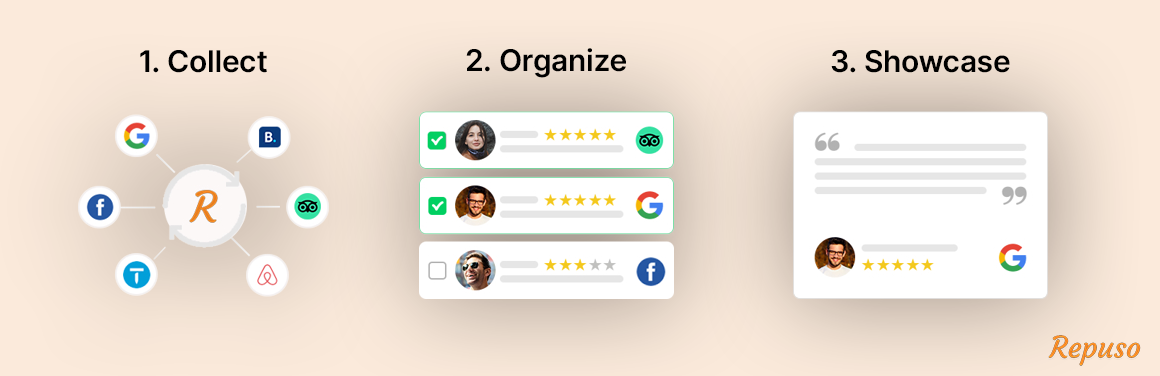
Repuso brings your reviews from Google, TripAdvisor, Facebook and 50+ other platforms into one place, shows them on your site with fast, good-looking widgets, and makes sure AI assistants can read them too.
Show your reviews on your website
Pick a widget, copy its shortcode, done. Grids, sliders, carousels, badges, a floating widget, masonry and media walls, image badges and email signatures. Choose which reviews appear, approve new ones, and match your site’s design. Social proof right where customers decide.
Does AI recommend you, or your competitors?
More customers now ask ChatGPT, Claude, Gemini, Perplexity and Google Maps “who’s the best near me?” before they search. AI Visibility shows how often these AI assistants name your business when customers ask for one like it, who they name instead, which sites they read, and what to fix first.
Run a free check right from WordPress (ChatGPT, Gemini and Google Maps), no account needed. Track it every week across all five assistants and see your score in your WordPress Dashboard.
Let AI read your reviews
Review widgets load with JavaScript, and AI crawlers like GPTBot (ChatGPT), ClaudeBot (Claude) and PerplexityBot don’t run it, so they never see your reviews. One setting adds your latest reviews to the page code for AI assistants and search engines, hidden from visitors. Your widgets look exactly the same. Structured review data (JSON-LD) follows your widget settings in Repuso.
Your public review page
A hosted page with all your reviews that AI assistants and search engines can read, always up to date. Link it from your site with one shortcode.
Ask your reviews anything in ChatGPT or Claude
Connect your Repuso account to ChatGPT or Claude with Repuso’s MCP connector and ask in plain language: “What do customers complain about this month?”, “Compare our Google and TripAdvisor ratings”, “Which reviews still need a reply?”. Developers can use the same MCP server in Claude Code, Cursor, VS Code, Windsurf, Zed, OpenAI Codex and Gemini CLI, or the Repuso API.
Reply to Google reviews from WordPress
Connect your Google Business Profile in Repuso and answer your Google reviews right from the Reviews page in your WordPress admin. Write a reply or start from an AI suggestion, edit it, and post it to Google in one click. Edit or delete replies later, and see which reviews are already answered.
Collect more reviews
Send review requests by email and SMS, share a review page or QR code, and collect text and video testimonials. Customers can record a video on any device, upload one, or share a YouTube or Vimeo link.
Dashboard and AI insights in WordPress
Average rating, total and new reviews, rating trends, platform breakdown, and AI insights on what customers love and what to improve, all inside your WordPress admin.
Supported review platforms
Google, Facebook, Instagram, TripAdvisor, Airbnb, Booking.com, Vrbo, Expedia, GetYourGuide, Viator, OpenTable, Fresha, Booksy, GlossGenius, Freetobook, Zillow, Realtor.com, Houzz, HomeAdvisor, Angi, Thumbtack, Bark, BBB, Yellow Pages, Yell, Healthgrades, Vitals, WebMD, Zocdoc, RateMDs, Justia, Avvo, The Knot, WeddingWire, Zola, Capterra, G2, GetApp, Product Hunt, AppSumo, Envato, Reviews.io, Zendesk, Delighted, App Store, Google Play, Chrome Web Store, Shopify Apps, WordPress.org plugins, Amazon, eBay, Etsy, Twitter and more.
Languages
The plugin is translated into English, French, Spanish, Portuguese, German and Italian. WordPress loads the right one from your site’s language.
More about the plugin: Repuso for WordPress
External services
This plugin connects to Repuso (https://repuso.com), the service that collects, stores and displays your reviews. It doesn’t work without a Repuso account, except for the free AI Visibility check link.
- Repuso API (api.repuso.com), from your WordPress admin: when you connect, and when you open the plugin’s pages, it sends your Repuso API key and the chosen sub-account to load and manage your account, reviews, review platforms, widgets, replies, the public review page and AI Visibility results. When you save “Let AI read your reviews”, it sends the setting and the date.
- Repuso API, from your public pages (server-side): for pages with a Repuso widget, when “Let AI read your reviews” is on, your server requests that widget’s public review data (widget ID only) at most once an hour per widget. The public review page link shortcode requests your page’s address the same way. No visitor data is sent.
- Repuso widget scripts (repuso.com/widgets/) and widget data, from your visitors’ browsers: on pages with a widget, the visitor’s browser loads the widget script and the widget’s reviews. Like any web request, this shares the visitor’s IP address, browser and the page address with Repuso.
- Image badges (w.revue.us): image badge widgets load a rating image from Repuso in the visitor’s browser.
- AI Visibility free check (repuso.com/ai-visibility/): only when you click a free check link, a new tab opens with your site’s address (and its title, when it looks like a business name) in the link.
- Crisp support chat (crisp.chat), on the plugin’s own admin pages only: loads the chat widget and shares the logged-in admin’s email, display name and the site name so Repuso support knows who is asking. Crisp terms: https://crisp.chat/en/terms/ and privacy policy: https://crisp.chat/en/privacy/
Repuso terms of use: https://repuso.com/terms-of-use/
Repuso privacy policy: https://repuso.com/privacy-policy/
Installation
- Install the plugin from the Plugins screen (search “Repuso”), or upload the plugin folder to
/wp-content/plugins/. - Activate it on the Plugins screen.
- Go to Reviews in your WordPress admin and connect a Repuso account (or create one in a click).
- Connect your review platforms, create a widget and paste its shortcode into any page.
FAQ
Is this free?
There’s a free trial. After it, choose a paid plan: Repuso plans. The AI Visibility free check (ChatGPT, Gemini and Google Maps) needs no account; weekly tracking adds Claude and Perplexity.
Which AI assistants does AI Visibility check?
ChatGPT, Claude, Gemini, Perplexity and Google Maps. It asks them the questions your customers ask and shows whether they name your business, who they name instead and which sources they cite.
Will “Let AI read your reviews” change how my widgets look?
No. The reviews are added to the page code for AI assistants and search engines and hidden from visitors. People see the same widget as before.
Will I get review stars in Google search results?
Google doesn’t show review stars for reviews a business collects from other sites on its own website. This setting is for AI assistants and other crawlers reading your reviews.
Can I use Repuso with ChatGPT or Claude?
Yes. Repuso has an MCP connector: on plans with AI connectors, add it in ChatGPT or Claude from your Repuso dashboard (Integrations) and ask questions about your reviews in plain language.
What data does the plugin send to Repuso?
See “External services” below.
Screenshots


Changelog
6.2.0
- AI Visibility page and WordPress Dashboard widget: how often ChatGPT, Claude, Gemini, Perplexity and Google Maps recommend your business, who they name instead, and what to fix. Free check for new users.
- Let AI read your reviews: your latest reviews in the page code for AI assistants and search engines, hidden from visitors; widget review data (JSON-LD) printed server-side.
- Your public review page on the Widgets page, plus a link shortcode.
6.1.0
Reply to Google reviews from the Reviews page: write a reply or post the AI suggestion, edit or delete an existing reply. Requires Google connected in Repuso and a plan with replies.
6.0.3
Connecting an existing account now offers the emailed login code first, with the password option still one click away.
6.0.2
WP v7.1
6.0.1
Reviews export
6.0.0
Major release: new dashboard with KPIs, AI insights, latest reviews and rating trend. Multi-language (EN/FR/ES/PT/DE/IT) with in-app switcher. Role-aware access, refreshed Channels and Widgets, trial countdown and a help center with video guides.
5.34
- New one-click signup (just email; password generated and emailed)
- Redesigned admin: two-card layout, Repuso branding, status pill, inline disconnect confirm
- Configurable API/dashboard URLs via REPUSO_API_URL / REPUSO_APP_URL constants
- Logo served locally; extracted inline JS into dedicated files
- Security hardening: sanitized all $_POST/$_GET access, switched AJAX handlers to wp_send_json, restricted hook proxy to a method whitelist
5.33
WP v7.0 support
5.32
Minor updates
5.31
WP version update
5.30
Security update
5.29
Connection fix
5.28
New review platform – Reviews.io
5.27
Plugin name change
5.26
Security enhancements
5.25
Collect page enhancements
5.24
4 new review platforms added: WordPress plugin, AppSumo, Product Hunt, Envato
5.23
WP v6.8.1
5.22
Minor security fix
5.21
Minor security fix
5.20
Multi language
5.12
WP 6.7.1
5.11
Admin CSS fixes
5.10
New image badge widgets
5.07
WP v6.6 support
5.06
WP v6.5 support
5.05
Notice fix & latest WP
5.04
Small fix
5.03
Login fix
5.02
Security patch
5.01
Security patch
5.00
Security patch
4.97
Floating widget display settings fix
4.96
Action link fix
4.95
GlossGenius new channel
4.94
WP v6.2
4.93
Small fix
4.92
Small fix
4.91
Small fix
4.90
14 new review platforms (channels) supported
4.83
Small fix
4.82
WP 6.1
4.81
Updates
4.80
Yell channel
Auto approve 4 star reviews
Own Live chat support for resellers / white label
4.70
Viator channel
4.61
WP 5.9
4.60
Review export to designs for social platforms
4.53
Multi account fix
4.52
Fix New Relic conflict
4.51
WP 5.8
4.50
New widgets: List, Slider, Badge
4.46
Banner
4.45
Stable tag
4.44
Removed TP
4.43
Fix add_thickbox WP bug
4.42
Minor fix
4.41
Fixed conflict with One Click SSL plugin
4.40
New Realtor.com channel
New Media wall widget
4.36
Video guides
Alternative to elfsight, brightlocal, grade.us, endorsal, birdeye, nicejob
4.35
Update dismiss notice
4.34
Admin review notice
4.33
Admin notice
4.32
Minor update
4.31
Service update
4.3
Video reviews
4.21
Minor update
4.2
Bug fix on floating widget
4.1
Minor update
4.0
Refactor entire plugin
3.2
New channels: Houzz, HomeAdvisor, Angie’s List, BBB, OpenTable
3.1
Masonry widget
3.0.4
minor update
3.0.3
minor update
3.0.2
minor update
3.0.1
minor update
3.0
Faster widgets with less footprint
Standalone tags for sub accounts
Anti review gating option
Custom rich snippet schema
More precise from date on reviews
Custom announcements in widgets
New tutorials
2.5
White label support
2.4
New widget – Flash
2.3
Added Zillow channel
2.2
Added Badge widget shortcode
2.1
Added Expedia channel
2.0
Added Floating badge widget
1.9
Added Booking.com and GetYourGuide channels
1.8
Notice fix
1.7
Added Vrbo / HomeAway channels
1.6
Added Airbnb and Healthgrades channels
1.5
Added Custom CSS for widgets feature
1.4
Added Yellow Pages channel
1.3
- Added multi website support
1.2
- Added photoset widget shortcode
1.1
- Added inline widget shortcode
1.0
- First release